• Старая версия форума работает в архивном режиме www.old.nado.in

All mitsumi'1s Applications !! (updated daily)

  • Автор темы Автор темы mitsumi1
  • Дата начала Дата начала
MediaHuman YouTube Downloader 3.9.9.50 (0912) macOS

5ee23a0aafff4421889c1c3fca32f0a9.jpg


MediaHuman YouTube Downloader 3.9.9.50 (0912) Multilingual macOS | 83.4 Mb​
MediaHuman YouTube Downloader is a handy application for those who found a favorite music video or trailer of a new movie and wants to keep it on your computer for viewing offline. Or you need to download a video lesson/tutorial. Our video downloader is an ideal solution for such kind of tasks.

- Supports Ultra High resolutions up to 4K
- Download whole playlists and channels
- YouTube, Vimeo, Dailymotion, Soundcloud
- Extract audio track and save it as MP3
- iTunes support
- VEVO support

Compatibility: OS X 10.9 or later 64-bit

Homepage -
У Вас недостаточно прав для просмотра ссылок. Войдите или зарегистрируйтесь.


Download link:​
Код:
[center][b]rapidgator_net[/b]:
https://rapidgator.net/file/0bca56de26f1746dd4a39ae37d8171e4/g5cu1.MediaHuman.YouTube.Downloader.3.9.9.50.0912.rar.html

[b]nitroflare_com[/b]:
https://nitroflare.com/view/8DFE85C44BB4A83/g5cu1.MediaHuman.YouTube.Downloader.3.9.9.50.0912.rar[/center]

Links are Interchangeable - No Password - Single Extraction​
 
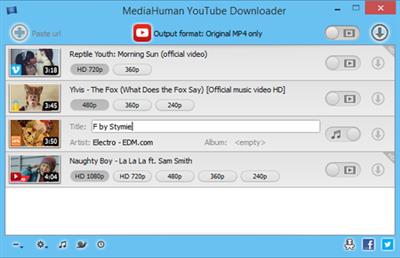
MediaHuman YouTube Downloader 3.9.9.50 (0912) Multilingual

781ca4357d53a322bde6b5dc39ca3c56.jpg


MediaHuman YouTube Downloader 3.9.9.50 (0912) Multilingual (x86/x64) | 110 Mb​
MediaHuman YouTube Downloader is a handy application for those who found a favorite music video or trailer of a new movie and wants to keep it on your computer for viewing offline. Or you need to download a video lesson/tutorial. Our video downloader is an ideal solution for such kind of tasks.

Simultaneous downloads
- Supports Ultra High resolutions up to 4K
- Download whole playlists and channels
- YouTube, Vimeo, Dailymotion, Soundcloud
- Extract audio track and save it as MP3
- iTunes support
- VEVO support

Operating System: Windows 7, 8/8.1, 10

Home Page -
У Вас недостаточно прав для просмотра ссылок. Войдите или зарегистрируйтесь.


Download link:​
Код:
[center][b]rapidgator_net[/b]:
https://rapidgator.net/file/6bc8d3a9d385220b4a834f481531f9a4/4rai4.MediaHuman.YouTube.Downloader.3.9.9.50.0912.Multilingual.rar.html

[b]nitroflare_com[/b]:
https://nitroflare.com/view/ADBAA4D54BD7024/4rai4.MediaHuman.YouTube.Downloader.3.9.9.50.0912.Multilingual.rar[/center]

Links are Interchangeable - No Password - Single Extraction​
 
MediaHuman YouTube To MP3 Converter 3.9.9.50 (0912) Multilingual

6d94698eeb8033a6584b6fb32fe6ec80.jpg


MediaHuman YouTube To MP3 Converter 3.9.9.50 (0912) (x86/x64) Multilingual | 114.2 Mb​
You like to listen to music on YouTube or SoundCloud and want to save it for offline playing. Or you want to download soundtrack of a new movie. Then we recommend you to try out this software developed specifically for this purpose.

Downloads all music from playlist or channel
Downloads highest available quality up to 320 kbps
Supports YouTube, Vimeo, SoundCloud, Dailymotion, VEVO, etc.
Downloads simultaneously several tracks
Includes simple tag editor with cover art support
Works on all modern platforms (macOS, Windows, Ubuntu)
Imports into iTunes

Playlists and channels
The software supports downloading all videos of a playlist or a channel. And there is also an option for subscribing to and downloading only newly uploaded tracks.

iTunes support
In the preferences of the application you can select an option to add downloaded tracks into iTunes automatically. You can also specify iTunes playlist, where the converted track should be added.

Saves your time & traffic
The app detects audio track in YouTube video clip and downloads it, skipping the video part. As a result download speed increases dramatically, especially on HD-quality content.

Simple tag editor
Application automatically detects artist name and track title of the video and saves it in the downloaded file. But at the same time, you can easily change tags to whatever you want. You can even change a cover art image.

Original format, no conversions
You can save audio tracks in original quality without any conversion. It means that there will be no loss of quality and it greatly reduces the downloading time.

Free music
There is a great amount of music on YouTube. You can always find the one you like there. And YouTube to MP3 Converter allows you to save it on your computer for free. Just find the track you like and download it in the quality you need.

Not only YouTube
Vevo.com, Vimeo, DailyMotion, Soundcloud, Bandcamp, HypeMachine, MixCloud, UOL and many other sites are also supported. So you can download music as easy as from YouTube.

Clipboard tracking
The program tracks the content of the system clipboard. It means that you can easily add a video clip without switching from your favorite browser. Just copy an URL into the clipboard and it will be added to the download queue.

Multilingual interface
Localized to: Arabic, Armenian, Azerbaijani, Bulgarian, Catalan, Chinese (Taiwan), Croatian, Czech, Danish, Dutch, English, Esperanto, French, German, Greek, Hebrew (Israel), Hungarian, Indonesian, Italian, Japanese, Korean, Latvian, Lithuanian, Malay, Norwegian Bokmål, Polish, Portuguese, Portuguese (Brazil), Romanian, Russian, Spanish, Swedish, Turkish, Vietnamese

Operating System: Windows 7, 8/8.1, 10

Home Page -
У Вас недостаточно прав для просмотра ссылок. Войдите или зарегистрируйтесь.


Download link:​
Код:
[center][b]rapidgator_net[/b]:
https://rapidgator.net/file/d523ceecd3b9dcb78140c66b6b5f6e67/qplnp.MediaHuman.YouTube.To.MP3.Converter.3.9.9.50.0912.Multilingual.rar.html

[b]nitroflare_com[/b]:
https://nitroflare.com/view/12FB89AFD1F73BC/qplnp.MediaHuman.YouTube.To.MP3.Converter.3.9.9.50.0912.Multilingual.rar[/center]

Links are Interchangeable - No Password - Single Extraction​
 
Perfectly Clear Complete 3.11.1.1893 macOS

ba5e2e4bef57920f401a2e53408ad410.jpg


Perfectly Clear Complete 3.11.1.1893 Multilingual | macOS | 107 mb
Standalone & Plug-in for Adobe Photoshop and Lightroom​
Built for precision. Made for beauty. Above all, you want better photos. But what if you could have better photos faster? Perfectly Clear has mastered the science of intelligent image correction - creating superior quality photos in record time, so you can get back to doing what you really love...in no time.

You have better ways to spend your day than laboring over manual edits
You became a photographer to go out and capture the beauty of the world, not sit inside at an editing desk. We invented our automatic image corrections to take away the tedium and give you back your freedom. So let Perfectly Clear handle the editing chores while you devote your day to doing what you do best-creating incredible images.

- Up to 20 auto corrections with one click
- Batch process 1000s of images in minutes
- Stay within your workflow
- Unlock the details in every image
- Tap into professionally created presets
- Save countless hours of manual editing
- Fine tune details with precise controls

Also:
Perfectly Clear is Now A Stand-Alone Application!
- Open RAW and traditional photos directly
- Crop to whatever size you need
- Print your photos
- Export in the original format or as JPEG or TIFF for sharing

- Filmstrip for Easy Navigation
- Undo/Redo
- Visual Presets
- Visual LOOKs
- Preset & LOOKs Favorites
- Graduated Filters
- Stylistic Vignette and Radial Filters
- Robust Color Restoration
- Manual Finishing Controls

Compatibility: macOS 10.10 or later 64-bit,
Homepage:
У Вас недостаточно прав для просмотра ссылок. Войдите или зарегистрируйтесь.


Download link:​
Код:
[center][b]rapidgator_net[/b]:
https://rapidgator.net/file/dc3aca321a9a456216a4730cea8cf287/wmmqg.Perfectly.Clear.Complete.3.11.1.1893.rar.html

[b]nitroflare_com[/b]:
https://nitroflare.com/view/8D86E6D78363AFE/wmmqg.Perfectly.Clear.Complete.3.11.1.1893.rar[/center]

Links are Interchangeable - No Password - Single Extraction​
 
Pixologic ZBrush 2021.5 (x64) Multilingual

819d04a6266f7307be4286acff71470d.jpg


Pixologic ZBrush 2021.5 (x64) Multilingual | 1.5 GB​
ZBrush sets the industry standard for digital sculpting and painting. Its features enable you to use customizable brushes to shape, texture and paint virtual clay in a real-time environment that provides instant feedback. When you use ZBrush you'll be empowered by the same tools employed by film studios, game developers, toy/collectible makers, jewelry designers, automotive/aviation designers, illustrators, advertisers, scientists and other artists the world over.

Base Mesh Generation
As with anything else in life, where you can go is usually determined by where you begin. Having a great finished model requires a quality base mesh. ZBrush provides an arsenal of tools to assist with this task, ensuring that no matter what you have in mind, there is a way to get the perfect base to then take to the next level. The best known of these systems are explained here.

Sculptris Pro
Ignore the constraints of polygon distribution and simply - sculpt! Sculptris Pro will dynamically add (tesselate) and remove (decimate) polygons wherever and whenever needed. It does this during your brush stroke in a real-time process called Tessimation. This frees you to focus entirely on the look you're trying to achieve.

Dynamesh
DynaMesh is a perfect solution for free-form sculpting because it removes all need for focusing on topological constraints. Change the overall shape of the model by pushing or pulling, adding various pieces of geometry to combine into one, or even remove geometry in a manner similar to what can be done with Boolean operations. Where Sculptris Pro dynamically adjusts the triangles in your mesh as you sculpt, DynaMesh redistributes the model's polygons as quads on command.

Mesh Detailing
Whether created in ZBrush or imported from elsewhere, once you have your base mesh it is time to start detailing. ZBrush features a robust suite of tools to accomplish this. Those listed below are just the tip of the iceberg.

Sculpting Brushes
The main workflow for creating with ZBrush is based on a system of brushes which can also be modulated using pen pressure from a graphics tablet. ZBrush will reproduce the natural feeling of a real paint brush or sculpting tool, using the pressure applied to the pen tip to transform your digital stroke in a variety of ways. There are brushes to pinch, move, build up the surface, chisel into it, slice through the model and much more. You can even use other 3D models as brushes, inserting their geometry into your surface.

Noisemaker
In addition to being able to add detail by hand, ZBrush provides a system for procedurally generating surface detail through noise patterns. Choose a detail type, adjust a few simple parameters, then apply that pattern to your model in its entirety or by restricting it to a certain region. You can even combine different noise types to create highly complex effects. The Noise system is ideal for both hard surface work and organic details.

PolyPaint
Because ZBrush works with tens of millions of polygons in real-time, you can paint directly on the surface of the model without first assigning a texture map or UV's. This offers significant advantages compared to a standard workflow. The resolution of the texture map does not need to be decided in advance. This is particularly valuable if you find you need more detailing on an area than you thought you would. Instead of repainting a new, larger texture map you can simply transfer the existing surface detail to that larger map without any reworking. You don't even need to do UV unwrapping before you begin this painting. In fact, thanks to the way that ZBrush can project details (both sculpted and painted) from one model to another you can have a fully painted model before you even have a finalized animation mesh. Instead, you can copy everything to the final base mesh once it has been signed off on.

UV Master
In order create or use a texture map, a model first needs UV's. These are 2D coordinates that tell all 3D applications how to apply a texture to your model. With most programs, creating those UV's has been a time consuming challenge that requires a high level of technical expertise and has little room for creativity. With UV Master you are able to create very efficient UV's for your model - in most cases with a single click. If you need more control over this automatic process there are features that refine where seams will be placed or increase the amount of pixel space given to certain regions of your model. It's both intuitive and fast, letting you get back to being creative with minimal fuss.

Rendering
Whether you are using ZBrush by itself as an illustration tool or as part of a production pipeline for animation, you will at some point want to show your work to others. ZBrush makes this possible through a powerful rendering system called BPR (Best Preview Render).

System Requirements:
Highly Recommended:
OS: 64-bit editions of Windows Vista or newer.
CPU: Intel i5/i7/Xeon technology or AMD equivalent.
RAM: 8 GB required for working with multi-million poly models. (16+ GB preferred.)
HDD: 100 GB of free hard drive space for ZBrush and its scratch disk. (SSD drive highly recommended.)
Pen Tablet: Wacom or Wacom compatible. (WinTab API.)
Monitor: 1920x1080 monitor resolution or higher with 32-bit color.
Video card: Most cards manufactured 2008 or newer. Must support OpenGL 3.3 or higher.

Home Page -
У Вас недостаточно прав для просмотра ссылок. Войдите или зарегистрируйтесь.


Download link:​
Код:
[center][b]rapidgator_net[/b]:
https://rapidgator.net/file/63b59f0d192a3ffe10a04b1578db6804/etna0.Pixologic.ZBrush.2021.5.x64.Multilingual.part1.rar.html
https://rapidgator.net/file/db3516341f9a70f3a72f9813ae4e790d/etna0.Pixologic.ZBrush.2021.5.x64.Multilingual.part2.rar.html

[b]nitroflare_com[/b]:
https://nitroflare.com/view/F131D9A5B43AA99/etna0.Pixologic.ZBrush.2021.5.x64.Multilingual.part1.rar
https://nitroflare.com/view/817B9B91C0DCB96/etna0.Pixologic.ZBrush.2021.5.x64.Multilingual.part2.rar[/center]

Links are Interchangeable - No Password - Single Extraction​
 
PTC Creo Illustrate 7.1.0.0

dfe5506f79e329f305bdb778dbf5a77a.jpg


PTC Creo Illustrate 7.1.0.0 | 443.0 mb
Languages: 中文 (Simplified), 中文 (Traditional), English, Deutsch, Français,
Español, Русский
​
The PTC Creo development team has launched Creo Illustrate 7.1. With this solution, you can create rich 3D technical illustrations, 2D drawings, and interactive animated sequences that accurately reflect current product configurations and support formats from hard copy to augmented reality.

What's new in Creo Illustrate 7.1.0.0

Add Support for Tiled Textures
Support for tiled textures to be applied to a part. This includes support for multiple decals overlayed on a texture.

What is the benefit of this enhancement?
With the new texture feature it is now possible to add detail without adding geometry, such as a thread to a bolt. It is also now possible to add the material type such as cast aluminum or braided steel lines. These added details let an end user better understand the parts they are working with.

Publish Option for Item List
The publish option for item list allows you to include a CSV file per figure to include columns set in item list display.

What is the benefit of this enhancement?
You are now able to publish the item list per figure to allow post processing of the information. This could include checking the item list against an ERP system for completeness, or processing it into HTML or XML for parts pages among other options.

Creo Illustrate enables you reuse CAD data to generate interactive, animated 3D technical illustrations that communicate complex service information easily and accurately. The 3D illustrations you create can be saved and published in a variety of 2D and 3D graphic formats. The 3D illustrations you create in Creo Illustrate can be set to update automatically when the source CAD changes-and they are easy to share across the enterprise.

PTC Creo Illustrate Demonstration

PTC was founded in 1985 and is headquartered in Needham, MA, USA. It was formerly known as Parametric Technology Corporation and changed its name to PTC . in January 2013. It is a leading software company in the domains of product lifecycle management (PLM), Internet of things (IoT) and augmented reality (AR). The company operates in two segments: software products and professional services.

PTC delivers innovative solutions that changes how products are created and serviced across the entire product lifecycle. Apart from PLM, IoT and AR, the company also provides solutions in the CAD and Service Lifecycle Management (SLM).

Product: PTC Creo Illustrate
Version: 7.1.0.0 Build 27
Supported Architectures: x64
Website Home Page :
У Вас недостаточно прав для просмотра ссылок. Войдите или зарегистрируйтесь.

Language: multilanguage
System Requirements: PC *
Size: 443.0 mb

Hardware and Operating System Requirements

You create illustrations from imported CAD files. The hardware requirements partly depend on the type and size of the CAD files you import. Hardware drivers not updated by the manufacturer in the last four year smay not meet the needs of Creo Illustrate.

The minimum requirements are sufficient for small-sized or average-sized files. For optimum performance, meet these recommended specifications:

Random access memory(RAM)
Minimum Requirement: 2 GB
Recommended Specification: 3 GB to 8 GB
Central processing unit (CPU) or Core
Minimum Requirement: Single-core, 1-GHz x86 Intel compatible
Recommended Specification: Dual-core or greater, 2-GHz x86, 64-bit Intel compatible
Disk space
Minimum Requirement: 1 GB for a 64-bit platform
Recommended Specification: 2 GB for the installation. Additional disk space for data
Operating system
Minimum Requirement: Windows 10
Recommended Specification: Windows 10 64-bit

Download link:​
Код:
[center][b]rapidgator_net[/b]:
https://rapidgator.net/file/1697fbc0c183293937242fb793bb9594/yllgr.PTC.Creo.Illustrate.7.1.0.0.rar.html

[b]nitroflare_com[/b]:
https://nitroflare.com/view/74AE92BBA92E83C/yllgr.PTC.Creo.Illustrate.7.1.0.0.rar[/center]

Links are Interchangeable - No Password - Single Extraction​
 
PTC Creo View 7.1.0.0

96c3635b572c06fc396ab9b2258904d5.jpg


PTC Creo View 7.1.0.0 | 4.5 Gb
Languages: English, Deutsch, Français, Italiano, Español,
Português, Русский.
​
PTC is pleased to announce the availability new version of Creo View 7.1.0.0. This software enables you to view and interrogate ECAD designs and 3D MCAD products and models, assemblies, drawings, images, and documents. You can collaborate on products of different information types without the native applications.

What's New in Creo View 7.1.0.0

Native PDF Viewing and Markup Released
Viewing and marking up of PDF documents without the use of the Adobe Acrobat plugin is now release and is the default viewer. As part of this release the following features where added:

* Supports polygon and multi-branch leader line markups
* Display of Creo View client-based watermarks

Markup capabilities are license enforced by the new Windchill PDF Collaboration License which is managed by Windchill.
User Interface Location: File > Options > General - Loading, then select the Use native viewer for PDF files check box.

What is the benefit of this enhancement?
The native viewer is simple to deploy with improved user experience for many aspects of PDF interaction.
------------------------
View States Comparison Improvements
Support is added for using the View State Comparison tool with JT and NX data published with Creo View 7.1 and later.
Support is also added for renamed combined states to correctly identify them as modified.
User Interface Location: Tools > View State Compare.

What is the benefit of this enhancement?
Creo View users can now utilize the View State Comparison tool to help expedite design review processes with design data from different CAD tools.
------------------------
Default Render Mode
A new preference is added to allow users to specify the default render mode to use while viewing 3D content.
User Interface Location: File > Options > Defaults. Under Model > Main, select default render mode.

What is the benefit of this enhancement?
Users who frequently wish to use render modes other than Shaded, can save time by setting a default render mode.
------------------------
Display Filters for Datum Tags
Tags for datum entities, such as coordinate systems, axes, and others, can now have their display controlled separately from the display of the datum entity itself.
User Interface Location: Home > Filters.

What is the benefit of this enhancement?
Users can now view only the datum, and not have the view obstructed by the datum tag. This can help provide a view similar to what is seen in the View States defined in the originating CAD tool.
------------------------
Support for Loading Creo Files with Multibody Data
Creo View can now directly open Creo files which contain multibody data.
------------------------
Default Help Center Now Points to PTC.com
Creo View users accessing the help center will now open the help center available on PTC.com by default. To control the preference in the user interface location: File > Options > General - Main.

What is the benefit of this enhancement?
Users will be able to access the most up-to-date help information.
------------------------
Add Parent in Search Results
In Creo View, users can now optionally add the parents of items in the search to the results.
User Interface Location: Home > Find > Search. Then select the Add Parent check box.

What is the benefit of this enhancement?
Users now have more options for identifying search results that can provide greater flexibility for creating interference input groups.

Application Support Updates

Support for the following application versions is added:
* Creo 8.0.0.0 Preview
* Autodesk Inventor 2021
* NX 1962
Support for the following application versions is removed:
* Autodesk Inventor 2018
------------------------
Office Adapter Publishing Updates
The Doc worker is now updated with several new capabilities for converting Microsoft office documents through local office publishing. These new options can help refine the resulting PDF documents to produce the desired output.
This new support includes generating PDF1/A, controlling worksheet publishing, and publishing hidden slides, along with several other new capabilities.

What is the benefit of this enhancement?
Utilizing additional recipe options PDFs can improve the resulting output to meet expectations of users viewing in Creo View.
------------------------
NX Support for Advanced Dynamic Visualization Functions
Creo View data published from NX now supports visualization of deformable parts in NX in the context of dynamic visualization.

What is the benefit of this enhancement?
Windchill users working with structure-based visualization or downstream manufacturing structures can now view more accurate representations by visualizing deformable parts correctly.
------------------------
HPGL Additional File Output for Creo Parametric
Creo View Adapter for Creo Parametric now supports HPGL format as an additional file output.

What is the benefit of this enhancement?
Windchill users can now access HPGL files directly from published content instead of needing to request designers to export it for them.
------------------------
STEP AP242 Additional File Output for NX, Inventor, and SolidWorks
Creo View Adapters for NX, Inventor, and SolidWorks now support STEP AP242 format for additional file output.

What is the benefit of this enhancement?
Windchill users can now access STEP AP242 files directly from published content instead of needing to request designers to export it for them.
ECAD Application Support Updates

Support for the following application versions is added:
* Mentor Graphics EDM VX.2.7
* Mentor Graphics PADS Layout VX.2.7
* Mentor Graphics PADS Logic VX.2.7
* Mentor Graphics PADS Professional Layout VX.2.7
* Mentor Graphics PADS Professional Schematic VX.2.7
* Mentor Graphics xDX Designer VX.2.7
* Mentor Graphics Xpedition PCB VX.2.7
* ZUKEN CR-8000 2020 Design Force and Design Gateway
* ZUKEN CR-5000 22.0 System Designer and Board Designer

Support for the following application versions is removed:
* Mentor Graphics EDM VX.2.4
* Mentor Graphics PADS Layout VX.2.4
* Mentor Graphics PADS Logic VX.2.4
* Mentor Graphics PADS Professional Layout VX.2.4
* Mentor Graphics PADS Professional Schematic VX.2.4
* Mentor Graphics xDX Designer VX.24
* Mentor Graphics Xpedition PCBVX.2.4
* ZUKEN CR-8000 2017 Design Force and Design Gateway
* ZUKEN CR-5000 19.0 System Designer and Board Designer

PTC Creo View is a simple but powerful enterprise visualization technology that enables virtually effortless collaboration across local and global design teams. Access to multiple forms of engineering data including 3D CAD models, 2D drawings, electrical schematics, and printed circuit boards both interactively at your desktop or through augmented reality (AR) allows design authors, project managers and downstream suppliers to quickly and easily access and share information between themselves and other stakeholders.

Creo View makes the comparison and validation process easy, with single-view interrogation of mechanical and electrical design, project and part data.

With Creo View, you're on the way to faster and higher quality design reviews, improved user and extended design team collaboration, and higher quality products at a lower cost.

PTC has the most robust Internet of Things technology in the world. In 1986 we revolutionized digital 3D design, and in 1998 were first to market with Internet-based PLM. Now our leading IoT and AR platform and field-proven solutions bring together the physical and digital worlds to reinvent the way you create, operate, and service products. With PTC, global manufacturers and an ecosystem of partners and developers can capitalize on the promise of the IoT today and drive the future of innovation.

Product: PTC Creo View
Version: 7.1.0.0 Build 27
Supported Architectures: x64
Website Home Page :
У Вас недостаточно прав для просмотра ссылок. Войдите или зарегистрируйтесь.

Language: multilanguage
System Requirements: PC / Linux *
Size: 4.5 Gb

Hardware and Operating System Requirements

Because you can view files with widely varying size and complexity, the hardware requirements partly depend on the type and size of files. Hardware drivers not updated by the manufacturer in the last four years may not meet the needs of Creo View .

The minimum requirements are sufficient for small-sized or average-sized files. For optimum performance, meet these recommended specifications:

Random access memory (RAM)
Minimum Requirement: 2 GB
Recommended Specification: 3 GB to 8 GB
Central processing unit (CPU) or Core
Minimum Requirement: Single-core, 1-GHz x86 Intel compatible
Recommended Specification: Dual-core or greater, 2-GHz x86_64-bit Intel compatible
Disk space
Minimum Requirement: 1.2 GB for a 64-bit platform
Recommended Specification: 2 GB for the installation. Additional disk space for data
Operating system
Minimum Requirement: Windows 10, Redhat Linux 6.2 amd64
Recommended Specification: Windows 10 64-bit, Redhat Linux 7.x amd64

Download link:​
Код:
[center][b]rapidgator_net[/b]:
https://rapidgator.net/file/60e4e67f90a63997bd94310ecd47eb8c/w0xkr.PTC.Creo.View.Adapters.JT.7.1.0.0.Win64.rar.html
https://rapidgator.net/file/97870b6a6a438d2277fd1dbc92c5c493/w0xkr.PTC.Creo.View.Adapters.MCADECAD.7.1.0.0.Linux64.rar.html
https://rapidgator.net/file/0488a490695b70e13caa5e31980701ec/w0xkr.PTC.Creo.View.Adapters.MCADECAD.7.1.0.0.Win64.part1.rar.html
https://rapidgator.net/file/c3a4a819572c9ae76875cf768c6fba11/w0xkr.PTC.Creo.View.Adapters.MCADECAD.7.1.0.0.Win64.part2.rar.html
https://rapidgator.net/file/ee891a2db51df5f28ab51ec8f6fcbf97/w0xkr.PTC.Creo.View.Adapters.MCADECAD.7.1.0.0.Win64.part3.rar.html
https://rapidgator.net/file/f961024f523a5e997db282eaa5cf78d9/w0xkr.PTC.Creo.View.Adapters.MCADECAD.7.1.0.0.Win64.part4.rar.html
https://rapidgator.net/file/bec42673e44910713bde81e68800976c/w0xkr.PTC.Creo.View.Adapters.MCADECAD.7.1.0.0.Win64.part5.rar.html
https://rapidgator.net/file/8357426419088a0e799546dc7984181d/w0xkr.PTC.Creo.View.Clients.7.1.0.0.Win.Linux.x64.part1.rar.html
https://rapidgator.net/file/98ed560898bd58f4acb70172ce5b487e/w0xkr.PTC.Creo.View.Clients.7.1.0.0.Win.Linux.x64.part2.rar.html
https://rapidgator.net/file/5888cd237c6d191c924803db086779ac/w0xkr.PTC.Creo.View.Clients.7.1.0.0.Win.Linux.x64.part3.rar.html
https://rapidgator.net/file/11247f423157accbabf01ec2656f4043/w0xkr.PTC.Creo.View.Clients.7.1.0.0.Win.Linux.x64.part4.rar.html
https://rapidgator.net/file/e8c160aaa464d7b5655d4420a326c539/w0xkr.PTC.Creo.View.Clients.7.1.0.0.Win.Linux.x64.part5.rar.html
https://rapidgator.net/file/bd14d1130ac2d48ce3061a9b80a95306/w0xkr.PTC.Creo.View.Clients.7.1.0.0.Win.Linux.x64.part6.rar.html
https://rapidgator.net/file/72a57d98758b479104be9473f57fda74/w0xkr.PTC.Creo.View.Clients.7.1.0.0.Win.Linux.x64.part7.rar.html

[b]nitroflare_com[/b]:
https://nitroflare.com/view/2EDC83843B800B7/w0xkr.PTC.Creo.View.Adapters.JT.7.1.0.0.Win64.rar
https://nitroflare.com/view/28EF1AFD98DDDB8/w0xkr.PTC.Creo.View.Adapters.MCADECAD.7.1.0.0.Linux64.rar
https://nitroflare.com/view/96C309F1D3A586F/w0xkr.PTC.Creo.View.Adapters.MCADECAD.7.1.0.0.Win64.part1.rar
https://nitroflare.com/view/B65B4265297E604/w0xkr.PTC.Creo.View.Adapters.MCADECAD.7.1.0.0.Win64.part2.rar
https://nitroflare.com/view/DDD61F5B1E378CD/w0xkr.PTC.Creo.View.Adapters.MCADECAD.7.1.0.0.Win64.part3.rar
https://nitroflare.com/view/C51036E5DB0D82F/w0xkr.PTC.Creo.View.Adapters.MCADECAD.7.1.0.0.Win64.part4.rar
https://nitroflare.com/view/8C93C136B97DF0C/w0xkr.PTC.Creo.View.Adapters.MCADECAD.7.1.0.0.Win64.part5.rar
https://nitroflare.com/view/68729C7426E043C/w0xkr.PTC.Creo.View.Clients.7.1.0.0.Win.Linux.x64.part1.rar
https://nitroflare.com/view/FBB326B4D4F2085/w0xkr.PTC.Creo.View.Clients.7.1.0.0.Win.Linux.x64.part2.rar
https://nitroflare.com/view/48FA776E80B874E/w0xkr.PTC.Creo.View.Clients.7.1.0.0.Win.Linux.x64.part3.rar
https://nitroflare.com/view/12801C8B49FB388/w0xkr.PTC.Creo.View.Clients.7.1.0.0.Win.Linux.x64.part4.rar
https://nitroflare.com/view/F1EEE672AC5A27E/w0xkr.PTC.Creo.View.Clients.7.1.0.0.Win.Linux.x64.part5.rar
https://nitroflare.com/view/29E4E4421A037E9/w0xkr.PTC.Creo.View.Clients.7.1.0.0.Win.Linux.x64.part6.rar
https://nitroflare.com/view/4C2F446CE22C4CE/w0xkr.PTC.Creo.View.Clients.7.1.0.0.Win.Linux.x64.part7.rar[/center]

Links are Interchangeable - No Password - Single Extraction​
 
Rhino 7 v7.1.20343 macOS

add209fa8953f300f68084bb0a75be9f.jpg


Rhino 7 v7.1.20343 Multilingual | macOS | 413 mb​
Rhino - Versatile 3D modeler. Rhinoceros can create, edit, analyze, document, render, animate, and translate NURBS* curves, surfaces, and solids, point clouds, and polygon meshes. There are no limits on complexity, degree, or size beyond those of your hardware.

Special features include:
- Uninhibited free-form 3-D modeling tools like those found only in products costing 20 to 50 times more. Model any shape you can imagine.
- Accuracy needed to design, prototype, engineer, analyze, and manufacture anything from an airplane to jewelry.
- Compatibility with all your other design, drafting, CAM, engineering, analysis, rendering, animation, and illustration software.
- Read and repair meshes and extremely challenging IGES files.
- Accessible. So easy to learn and use that you can focus on design and visualization without being distracted by the software.
- Fast, even on an ordinary laptop computer. No special hardware is needed.
- Affordable. Ordinary hardware. Short learning curve. Affordable purchase price. No maintenance fees.

Compatibility: macOS 10.14 or later 64-bit
Homepage:
У Вас недостаточно прав для просмотра ссылок. Войдите или зарегистрируйтесь.


Download link:​
Код:
[center][b]rapidgator_net[/b]:
https://rapidgator.net/file/8fea20114f7a86b91b0a50a2840f6a2d/qlzah.Rhino.7.v7.1.20343.part1.rar.html
https://rapidgator.net/file/fc9883e192d3894e383d59fc51170925/qlzah.Rhino.7.v7.1.20343.part2.rar.html
https://rapidgator.net/file/6dd0f2d6c692fa4a28ea60853f4d8043/qlzah.Rhino.7.v7.1.20343.part3.rar.html

[b]nitroflare_com[/b]:
https://nitroflare.com/view/37D0222B258411C/qlzah.Rhino.7.v7.1.20343.part1.rar
https://nitroflare.com/view/DE483E97B95FCF3/qlzah.Rhino.7.v7.1.20343.part2.rar
https://nitroflare.com/view/BA6A057261C2F39/qlzah.Rhino.7.v7.1.20343.part3.rar[/center]

Links are Interchangeable - No Password - Single Extraction​
 
Rhinoceros 7.1.20343.09491 (x64)

fd5b3aa016d3176aa68e3247a21fa9c4.jpg


Rhinoceros 7.1.20343.09491 (x64) | 300.8 Mb​
Rhino 7 is the most significant upgrade in our history. You can create organic shapes with our new SubD tools. Run Rhino and Grasshopper as a Revit® Add-On with Rhino.Inside.Revit. Use the robust QuadRemesh algorithm to create a beautiful quad mesh from NURBS geometry or meshes. With this release, we've unlocked completely new modeling workflows and refined many steadfast features.

New in Rhino 7:

SubD
For designers who need to explore organic shapes quickly, SubD is a new geometry type that can create editable, highly accurate shapes. Unlike other geometry types, SubD combines free-form accuracy while still allowing quick editing.

Rhino.Inside.Revit
Rhino.Inside.Revit brings the power of Rhino and Grasshopper to the Autodesk Revit® environment.

QuadRemesh
Quickly create a quad mesh from existing surfaces, solids, meshes, or SubDs-ideal for rendering, animation, CFD, FEA, and reverse-engineering.

Presentation
In Rhino 7, we've improved the presentation tools, streamlining the workflow with a major update to the Rhino Render engine, so the same look you get in your Raytraced viewport can be rendered without any changes. We've added support for PBR materials, a LayerBook command, and more...

Rhino Refined
In Rhino 7, we've fixed hundreds of bugs, but we've also added workflow improvements like Named Selections, Mold Making tools, a Single-Line font for engraving, and improved interoperation with third-party file formats...

Display
We are always refining Rhino's display pipeline to keep up with modern graphics hardware. In Rhino 7, some models will display significantly faster on both Windows and Mac. We've also made several refinements to the Display Modes to make them even more eye-popping while you work...

Documentation
Modeling is just one part of the design process; you also need to show how to build what is on the screen. We've improved many parts of the documentation workflow while also focusing on the more graphically-rich illustration tools like transparency and gradient hatches...

Grasshopper
Grasshopper seems to be everywhere lately. As usual, we're having a hard time keeping up (you might even see that familiar canvas in other applications). In Rhino 7, we've added some new components, but we've also made it easier to turn your programs into plugins...

Development Platform
Rhino 7 brings major improvements to our free SDKs, with API refinements, better documentation, and some major new features that broaden and deepen the foundations of the geometry development platform...

System Requirements:

Hardware:
- 64-bit Intel or AMD processor (Not ARM)
- No more than 63 CPU Cores.
- 8 GB memory (RAM) or more is recommended.
- 600 MB disk space.
- OpenGL 4.1 capable video card is recommended.
- 4 GB Video RAM or more recommended.
- A Multiple-button mouse with a scroll wheel is recommended.
- SpaceNavigator optional
- Apple Intel hardware with Boot Camp optional.
- (Boot Camp is not supported on Apple Silicon. M1 Macs.)

Windows Operating Systems:
- Windows 10 or 8.1.

Home Page -
У Вас недостаточно прав для просмотра ссылок. Войдите или зарегистрируйтесь.


Download link:​
Код:
[center][b]rapidgator_net[/b]:
https://rapidgator.net/file/822d58574c2f5a011b75b0158bdfdeaf/ymq8x.Rhinoceros.7.1.20343.09491.x64.rar.html

[b]nitroflare_com[/b]:
https://nitroflare.com/view/7415FF945C01B79/ymq8x.Rhinoceros.7.1.20343.09491.x64.rar[/center]

Links are Interchangeable - No Password - Single Extraction​
 
Richardson Software RazorSQL 9.2.6

26689edd2a5f9f03ce8f7e1b0013769a.jpg


Richardson Software RazorSQL 9.2.6 | 131.4 Mb​
RazorSQL is an SQL query tool, database browser, SQL editor, and database administration tool for Windows, macOS, Mac OS X, Linux, and Solaris.

Features:
A Database Navigator for browsing database objects.
An SQL Editor for creating SQL queries.
Visual tools for creating, editing, dropping, describing, altering, and viewing tables, views, indexes, and sequences
Database Management Tools
Visual Tools for creating, editing, dropping, and executing stored procedures, functions, and triggers
A robust programming editor that embeds the powerful EditRocket code editor that supports 20 programming languages including SQL, PL/SQL, TransactSQL, SQL PL, HTML, XML, and more.
Export Tool - Export data in various formats
Import Tool - Import data from delimited files, Excel files, or fixed width files into tables
Ships with a built-in relational database engine (HSQLDB) that is up and running out of the box and requires no end-user administration
A Generate DDL Tool for generating table, view, and index DDL.
Table / SQL Query Compare tool for comparing tables or queries across multiple connections
Database Data Search tool for searching single or multiple database table and view data.
Database Object Search tool for searching for database objects.
Backup tools such as the Database Backup Tool and Table Backup Tool
Database conversion tools for many popular databases such as MySQL, Oracle, DB2, PostgreSQL, SQLite, MS SQL Server, and MS Access.
Auto column and auto table lookup
SQL Formatter
SQL Query builder tool
SQL Query Scheduler tool
Command Line Interface
PHP Bridges for connecting to MySQL, PostgreSQL, and SQL Server databases remotely via PHP enabled web servers
An ASP bridge for connecting to MS SQL Server databases remotely via ASP enabled web servers
SQL GUI Tools for generating SQL for various operations
Edit, delete, and insert database data with the Database Editor
Works with all major operating systems including Windows, macOS, Mac OS X, Linux, Solaris, and any other Java enabled OS
Tested with Apache Cassandra, Apache Derby / JavaDB, Apache Hive, Daffodil DB, DB2, DBASE, Druid, DynamoDB, Firebird, FrontBase, H2, HSQLDB / HyperSQL, Informix, Ingres, Interbase, Mckoi, Microsoft Access, Microsoft SQL Server, Mimer SQL, MongoDB, MySQL, Netezza, OpenBase, Oracle, Pervasive, Pointbase, PostgreSQL, Redshift, Salesforce, SimpleDB, Solid, SQLite, Sybase Adaptive Server Enterprise, Sybase SQL Anywhere, Teradata, and VoltDB

Database Browser
Browse database objects such as schemas, tables, columns, primary and foreign keys, views, indexes, procedures, functions, and more.

SQL Editor
Edit SQL scripts. Run SQL queries. Auto column and auto table lookup. Uses the powerful EditRocket code editor that supports over 20 programming languages including SQL, PL/SQL, TransactSQL, SQL PL, HTML, Java, XML, and more.

Database Tools
Visual tools to create, alter, describe, execute, and drop database objects such as tables, views, indexes, stored procedures, functions, triggers, and more.

Database Query Tool
Includes multi-tabular display of queries with options for filtering, sorting, searching, and much more.

Installation Instructions and Requirements
Windows (Native Installer)
For best results, use of one of the following operating systems is recommended: Windows 10, Windows 8, Windows 7, Windows Vista, Windows XP, Windows Server 2008 or 2003, or Windows 2000. The 32-bit version of RazorSQL runs on both 32-bit and 64-bit versions of Windows. The 64-bit version only runs on 64-bit versions of Windows. If using ODBC drivers to connect, make sure to use the version of RazorSQL that matches up with the architecture of the ODBC driver. For example, if using 32-bit ODBC drivers, the 32-bit version of RazorSQL is required.

Home Page -
У Вас недостаточно прав для просмотра ссылок. Войдите или зарегистрируйтесь.


Download link:​
Код:
[center][b]rapidgator_net[/b]:
https://rapidgator.net/file/0d8a41d6b1d38dae3a323a9d0b1ef28a/079k4.Richardson.Software.RazorSQL.9.2.6.rar.html

[b]nitroflare_com[/b]:
https://nitroflare.com/view/321F02ADC9DD5ED/079k4.Richardson.Software.RazorSQL.9.2.6.rar[/center]

Links are Interchangeable - No Password - Single Extraction​
 
Serif Affinity Designer 1.9.0.869 (x64) Beta Multilingual

1050cb14101e7ee776336b02adddbaa0.jpg


Serif Affinity Designer 1.9.0.869 (x64) Beta Multilingual | 525.5 Mb​
Affinity Designer is the fastest, smoothest, most precise vector graphic design software available. Whether you're working on branding, concept art, print projects, icons, UI, UX, or web mock ups, Affinity Designer will revolutionise how you work, on Windows.

Design tools redefined
All the tools you need in a professional vector design app, from an incredible precise pen tool to a super smooth gradient tool. All carefully considered and meticulously developed, they just work-in precisely the way you want them to.

Built for your workflow
With core principles of performance, stability and lack of bloat, Affinity Designer has been meticulously crafted for a professional workflow.

Cross platform performance
With a professional pedigree forged on Mac, and matched step for step on Windows, common file format delivers stunning results on either platform.

Unsurpassed speed and accuracy
Pan at 60fps and zoom to an eye-popping 10,000,000%, you'll see all adjustments, effects, transformations and brushes in real time.

Work in any color space
RGB, CMYK, LAB, Grayscale. End-to-end CMYK workflow with ICC color management, and 16-bit per channel editing.

Unsurpassed file compatibility
The best PSD import engine available and full support for SVG, EPS, PDF, PDF/X and FH files means injecting Affinity Designer into your workflow is painless.

Pixel perfect control
With real-time pixel preview in standard or retina resolution available with a single click, you can always see what you're going to get. Can't achieve the perfect result purely in vector? Just edit the pixels - Affinity Designer has a full suite of raster tools too.

Non-destructive effects and adjustments
With a huge library of adjustment layers, effects and blend modes-combined with full support for masks and clipping layers-Affinity Designer offers the most advanced layer controls available in any vector based app.

Flexible workspaces... and workflows
With a focused, fully customisable workspace, including docked and floating UI modes, Affinity Designer lets you work how you want. Add regular and custom 2D and isometric grids for flexible layouts, work on multiple designs at once, and use macOS features like Split Screen and Full Screen. Plus, with savable history, unlimited undo and non-destructive filters and adjustments you can always go back and change your mind.

Natural brushwork
Use Force Touch, stylus pressure, tilt and other controls for natural-looking artwork. Edit vector brush strokes as cleanly and easily as regular curves, and add raster brushwork-on its own or with vector art-to add depth and high quality organic textures. Rotate the canvas, blend colors, edit brush parameters, create your own brushes and nozzles, and import .abr brushes for complete control over your work.

Throw some shapes
Affinity Designer delivers a comprehensive set of shape primitives with easy controls for adjusting geometry with corner settings and smart snapping indicators. A full set of Boolean geometry operations, non-destructive compound shapes, and full node editing means you can create beautiful complex geometry in no time.

Just your type
Add artistic text for headlines, text frames of any shape, or text that follows any vector path. Apply sophisticated styling and ligatures, previewing all your available fonts and style sets in on-screen panels. All the controls you need are built in, including leading, kerning, baseline shift, tab stops - and now in version 1.5 you can create text styles across your document.

New professional print controls
Affinity Designer features full professional print output. Pantone support, end-to-end CMYK and ICC color management are just part of it. You can also open, edit and output PDF/X files, set overprint controls, use spot colors, and add bleed area, trim and crop marks.

Powerful export
In export mode you get a complete workspace dedicated to image export. Select areas, layers or objects to export, controlling each item's output settings independently. For efficient web and UI design, you can automatically create new files whenever your design changes, in whatever resolution, file format and folder structure you wish.

Common Affinity file format
Affinity's shared file format makes mixed discipline design as smooth and simple as it should be. Open any native Affinity file in any Affinity app on any platform and just keep working - with shared history, unlimited undo and seamless switching. And for export, Affinity Designer takes all major file types in its stride.

Incredibly powerful artboards
In Affinity Designer you can create an unlimited number of different design variants, sizes and screens - laying them out in one document to see them all at once. When you come to export you get full control over what artboards to output and with what settings, dramatically simplifying your workflow for responsive and app design.

Operating systems (64 bit):
- Windows 10
- Windows 8.x
- Windows 7 (Service Pack 1; Aero enabled)

Home Page -
У Вас недостаточно прав для просмотра ссылок. Войдите или зарегистрируйтесь.


Download link:​
Код:
[center][b]rapidgator_net[/b]:
https://rapidgator.net/file/50595cbce8ab4908dcbb6440dd0101d1/ameve.Serif.Affinity.Designer.1.9.0.869.x64.Beta.Multilingual.rar.html

[b]nitroflare_com[/b]:
https://nitroflare.com/view/02A897389FCADA6/ameve.Serif.Affinity.Designer.1.9.0.869.x64.Beta.Multilingual.rar[/center]

Links are Interchangeable - No Password - Single Extraction​
 
Serif Affinity Photo 1.9.0.869 (x64) Beta Multilingual

bdc32260f53eb2a57a3ae96303600137.jpg


Serif Affinity Photo 1.9.0.869 (x64) Beta Multilingual | 532.2 Mb​
Five years in the making, Affinity Photo redefines the boundaries for professional photo editing software. With a meticulous focus on workflow it offers sophisticated tools for enhancing, editing and retouching your images in an incredibly intuitive interface, with all the power and performance you need.

Engineered for professionals
Built on rock solid foundations with principles of performance, stability and lack of bloat, Affinity Photo is a professional photography tool to the very core.

Comprehensive RAW editing
Develop camera RAW files in a dedicated built-in workspace with all the processing adjustments and corrections you need.

Unsurpassed file compatibility
We've got the best PSD support out there, plus all the standards you'd expect including PNG, JPG, TIFF, EPS, PDF, and SVG.

Work in any color space
RGB, CMYK, LAB, Grayscale. End-to-end CMYK workflow with ICC color management, and 32-bit per channel editing.

Dedicated RAW editing workspace
Compatible with all major camera file formats, the Develop persona offers a dedicated processing workspace offering incredibly accurate editing in an unbounded linear color space.

Complete digital darkroom
Affinity Photo includes all the tools you need from a professional photography application. Every tool has been painstakingly engineered for speed, power and accuracy - and they work in precisely the way you want them to.

Fast, customizable effects
Affinity Photo comes with a huge range of high-end filters including lighting, blurs, distortions, tilt-shift, shadows, glows and many more. Full control is given over every aspect of a filter's properties with incredibly precise controls - all the while seeing a real-time live preview of the result. Best of all, filters can be applied as live layers, enabling you to edit, erase away, or mask effects after they have been applied.

Advanced adjustment layers
Correct and enhance images with Levels, Curves, Black and White, White Balance, HSL, Shadows and Highlights and over a dozen other adjustments that are previewed instantly and can be edited any time. Adjust, readjust, and drag and drop onto any layer, group, mask, or in any place in a stack to control how they're applied.

Live blend modes
Remove trial and error from your workflow - see changes to blend modes live as you edit without having to click apply each time. Affinity Photo's 30 layer blends preview smoothly in real time while you scroll through them.

Sophisticated selection refinement
Accurate selections are critical, whether cutting out objects, creating masks or selectively applying adjustments. Our selection refinement algorithm is one of the most advanced available, making selections - even down to individual strands of hair - easier than ever before.

Precise photo stitching
Affinity Photo's stitching algorithm is one of the most advanced available. On top of accurate automatic alignment and perspective corrections, you get full control over each image and boundary in the composite to fine tune to perfection.

Extensive retouching tools
Whether you want to make quick corrections, or spend an hour on a detailed retouch, Affinity Photo has all the tools you need. That naturally includes dodge, burn, clone, patch, blemish, and red eye tools. But you'll also find an incredibly accurate inpainting brush, frequency separation capability, and a full set of liquify features built-in.

System Requirements:

Hardware
Windows-based PC with mouse or equivalent input device
DirectX 10-compatible Graphics Cards and above
2GB RAM minimum (4GB RAM recommended)
670MB of available space; more during installation
1280x768 display size or better

Operating systems (64 bit):
Windows 10 (1607 Anniversary update or higher)
Windows 8.1
Windows 7 (Service Pack 1; Aero enabled)

Home Page -
У Вас недостаточно прав для просмотра ссылок. Войдите или зарегистрируйтесь.


Download link:​
Код:
[center][b]rapidgator_net[/b]:
https://rapidgator.net/file/e273df1caaa84549c36a91323c69122b/7l478.Serif.Affinity.Photo.1.9.0.869.x64.Beta.Multilingual.rar.html

[b]nitroflare_com[/b]:
https://nitroflare.com/view/82E846E59A6B573/7l478.Serif.Affinity.Photo.1.9.0.869.x64.Beta.Multilingual.rar[/center]

Links are Interchangeable - No Password - Single Extraction​
 
Statgraphics Centurion 19.1.2

5d08fcaa8ec91e94889b5390aa5748c7.jpg


Statgraphics Centurion 19.1.2 (x86/x64) | 356 Mb​
Statgraphics Centurion is a comprehensive Windows desktop product for statistical analysis, data visualization and predictive analytics. It is designed to make the power of data science available to everyone who collects data. The latest version, Statgraphics 19, features an easy-to-use GUI that does not require learning a complicated command language. Especially helpful to practitioners is the StatAdvisor, which explains the results of statistical analyses in a manner suitable for presentation to non-statisticians.

Statgraphics 19 includes over 290 statistical procedures and special features, with many recent additions in the areas of data visualization, predictive analytics, data mining and machine learning.

Operating System: Windows 7, 8/8.1, 10

Home Page -
У Вас недостаточно прав для просмотра ссылок. Войдите или зарегистрируйтесь.


Download link:​
Код:
[center][b]rapidgator_net[/b]:
https://rapidgator.net/file/79789bafde2973c249d975826b3ee4a4/v2mmu.Statgraphics.Centurion.19.1.2.rar.html

[b]nitroflare_com[/b]:
https://nitroflare.com/view/FC764383044AD0F/v2mmu.Statgraphics.Centurion.19.1.2.rar[/center]

Links are Interchangeable - No Password - Single Extraction​
 
Topaz DeNoise AI 2.3.6 (x64)

6f5314682ea0ff0bc23642c6d8cd6687.jpg


Topaz DeNoise AI 2.3.6 (x64) | 1.1 GB​
Shoot anywhere in any light with no reservations. Eliminate noise and recover crisp detail in your images with the first AI-powered noise reduction tool. You may be surprised at the results you get.

Shoot anywhere in any light
Great noise reduction is like a lens upgrade. You'll be able to get much higher-quality results when you're shooting fast action shots, night images, or any other situation that requires a high ISO. Use DeNoise AI to help you create a pixel-perfect photo in any situation.

Groundbreaking technology
Noise reduction technology has basically been the same for a decade, with only minor incremental improvements here and there. (We would know - we made one!) DeNoise AI is different: we fed an algorithm millions of noisy/clear images until it actually learned what noise is and how best to remove it.

Recover true detail
DeNoise AI examines the whole image and holistically determines the difference between detail and noise in that photo. (Other NR tools only look at pixel-level detail.) After understanding what noise vs detail looks like for that specific image, DeNoise AI recovers a surprising amount of detail from noise.

Lightroom vs DeNoise AI
When you need pixel-level perfection in your results, DeNoise AI offers the absolute best quality currently available anywhere. Existing noise reduction tools like Lightroom give you a choice: keep some noise or remove some detail. DeNoise AI's technology allows you to get the best of both worlds: to remove noise while actually strengthening detail. The original noisy image (Luis Garena) is on the left; we compare the Lightroom vs DeNoise AI results on the right. Pay special attention to the increased definition in the image, especially in the car wheels and center signs.

- Enhance real detail
- Remove noise naturally with no smudging
- Best for moderate to ultra-high ISOs

Any noise reduction tool can remove noise - the really tricky part is to tell the difference between noise and detail. DeNoise AI helps you get the best quality at 100% by removing noise while recovering original image detail. Give it a try to see the difference for yourself!

Operating System Version:
- Windows 7 x64
- Windows 8/8.1 x64
- Windows 10 x64

Hardware Requirements:
- System RAM: 8GB / 16GB recommended
- GPU VRAM: 2GB / 4GB recommended

Graphics Card Requirements:
- NVIDIA: GeForce GTX 770 2GB / GeForce GTX 960 4GB recommended
- AMD: Radeon HD 8570 2GB / Radeon R9 270 4GB recommended
- Intel: HD Graphics 5000 / Iris Plus Graphics 640 recommended

Home Page -
У Вас недостаточно прав для просмотра ссылок. Войдите или зарегистрируйтесь.


Download link:​
Код:
[center][b]rapidgator_net[/b]:
https://rapidgator.net/file/42dc568b7a3ddf3adfd69c3b7fa0bcb1/8uhw8.Topaz.DeNoise.AI.2.3.6.x64.rar.html

[b]nitroflare_com[/b]:
https://nitroflare.com/view/8F734906A9C5A17/8uhw8.Topaz.DeNoise.AI.2.3.6.x64.rar[/center]

Links are Interchangeable - No Password - Single Extraction​
 
Topaz Gigapixel AI 5.3.2 (x64)

5515c5b5bb798a6c0553fb456ed8ee3a.jpg


Topaz Gigapixel AI 5.3.2 (x64) | 2.45 GB​
Beautiful photo enlargements using machine learning. Enlarging your image without losing detail has always been impossible... until now. Upscale your photos by up to 600% while perfectly preserving image quality.

Enlarge Images by up to 600%
Create a beautiful 80 x 60 inch print from a simple iPhone photo. Or transform your DSLR photos into sharp and ultra-detailed 100MP images.

Use truly intelligent upscaling
After being trained with millions of sample images, Gigapixel can now enlarge your images with a surprising level of quality.

Get crisp and clear results.
Gigapixel performs around 2 million operations per pixel to get you results with as much detail and sharpness as possible.

No more fuzzy enlargements.
Breathtakingly sharp prints. High-resolution cropping in post-production. iPhone photos that look like they came out of a DSLR. No matter why you're enlarging your photos, you always want the best possible quality for your results. AI Gigapixel is currently the only photo enlargement product available that can actually add detail back to your upscaled photo.

Recover real details for actual sharpness
Increasing edge contrast is the simplest way to make an image look "sharp", and how most other upscaling software works. Gigapixel is different: it increases the actual sharpness of your upscaled photo by recovering real detail in your image. This is only possible through training and exposure to millions of test images.

Crisp photos that look like they were never upscaled
It's hard to believe that the crisp output image above was enlarged 4x, but it was. Gigapixel AI successfully determines which image features are stars (detail) and what's noise. Then, it naturally accentuates and recovers detail while suppressing noise in your upscaled photo.

The highest-quality image upscaling that you can get anywhere
Because of these exceptional results, Gigapixel AI is used by everyone from leading photographers, to video game modders, to major motion studios. If you ever need to upscale your photo while preserving beautiful detail, take advantage of the most modern technology in the space and give Gigapixel AI a try.

Image enlargement: interpolation vs machine learning

Interpolation-based photo enlargement software has been around for decades. Gigapixel's new approach based on machine learning is a giant leap ahead: state-of-the-art "deep learning" methods allow it to enlarge images while actually adding new details.

Interpolation
Interpolation algorithms work by approximating new pixels from the colors of surrounding ones. This does not add any detail to the image, it just smoothes out the transition between pixels.

Neural Network (Gigapixel AI)
A neural network analyzes thousands of photo pairs to learn how details usually get lost. The algorithm learns to "fill in" information in new images based on what it has learned... effectively adding new detail to your photo.

System Requirements:

Operating System Version:
- Windows 7 x64
- Windows 8/8.1 x64
- Windows 10 x64

Hardware Requirements:
- System RAM: 8GB / 16GB recommended
- GPU VRAM: 2GB / 4GB recommended

Graphics Card Requirements:
- NVIDIA: GeForce GTX 770 2GB / GeForce GTX 960 4GB recommended
- AMD: Radeon HD 8570 2GB / Radeon R9 270 4GB recommended
- Intel: HD Graphics 5000 / Iris Plus Graphics 640 recommended

Home Page -
У Вас недостаточно прав для просмотра ссылок. Войдите или зарегистрируйтесь.


Download link:​
Код:
[center][b]rapidgator_net[/b]:
https://rapidgator.net/file/d989a73033233133d03641babef3c8a5/yw743.Topaz.Gigapixel.AI.5.3.2.x64.part1.rar.html
https://rapidgator.net/file/6e2ea3343c2752985dcd8de72be9f5a6/yw743.Topaz.Gigapixel.AI.5.3.2.x64.part2.rar.html
https://rapidgator.net/file/6adaa4e048e17ad1c1c148b746db1758/yw743.Topaz.Gigapixel.AI.5.3.2.x64.part3.rar.html

[b]nitroflare_com[/b]:
https://nitroflare.com/view/5260B75AA3630BA/yw743.Topaz.Gigapixel.AI.5.3.2.x64.part1.rar
https://nitroflare.com/view/F8C00E5D19EAE38/yw743.Topaz.Gigapixel.AI.5.3.2.x64.part2.rar
https://nitroflare.com/view/05449BB02C099C6/yw743.Topaz.Gigapixel.AI.5.3.2.x64.part3.rar[/center]

Links are Interchangeable - No Password - Single Extraction​
 
Topaz Sharpen AI 2.2.2 (x64)

d09281b7abdee180dd84c3c719abdce6.jpg


Topaz Sharpen AI 2.2.2 (x64) | 3 GB​
Create tack-sharp images with no artifacts or halos.Sharpen AI is the first sharpening and shake reduction software that can tell the difference between real detail and noise. Create tack-sharp images even when you're shooting handheld, at night, or with a shallow depth of field.

Three kinds of sharpening for a perfect photo
There's nothing worse than the feeling of taking the perfect photo, rushing home, opening it up on your computer... and realizing that it's blurry at 100%. When this happens, it's usually caused by one of three problems: camera shake, focus issues, or general softness. Sharpen AI includes a separate module to handle each one.

Stabilize: Natural shake reduction
Even the steadiest hands don't compare to a tripod when it comes to image sharpness. Unlike a tripod, though, you always have your hands with you! Sharpen AI's Stabilize module has been trained to reverse motion blur and make handheld images look like they were taken from a tripod.

Focus: Better focus correction
Focus correction is a notoriously difficult problem that's easy to get wrong, but Sharpen AI's Focus module excels at correct up to ten pixels of focus blur. This is perfect for sharpening out-of-focus eyes or correct issues caused by incorrect in-camera focus. Tip: use selective adjustments for best results!

Sharpen: General input sharpening
Even with no motion blur or focus issues, images generally come out of the camera soft. Sharpen AI includes the Sharpen module that specializes in correcting small amounts of general softness without any artifacts or halos. It's the most natural-looking sharpening tool that you will ever use.

Powered by AI
Sharpen AI was trained with millions of images so it could learn the characteristics of detail vs. noise - and then enhance just the detail. In some cases, it can even recover image detail.

Seamless integration
Works wherever you currently edit your photos. Use Sharpen AI either as a standalone software or as a plug-in for Topaz Studio / Photoshop / Lightroom Classic.

Constantly improving
Through continuous AI training, Sharpen AI's enhancement model becomes both faster and higher-quality with time. You'll get the latest and greatest when the model improves.

Fast performance
Sharpen AI is now optimized for Intel CPU and iGPUs with Intel OpenVINO support. This means you can get up to 5x faster processing speeds with an Intel graphics card (6th Gen + higher)!

The perfect time to make images tack-sharp
There's nothing worse than the feeling of taking the perfect photo, rushing home, opening it up on your computer and realizing that it's blurry at 100%. When this happens, it's usually caused by one of three problems: camera shake, focus issues, or general softness. Sharpen AI includes a separate module to handle each one.

System Requirements:

Operating System Version:
- Windows 7 x64
- Windows 8/8.1 x64
- Windows 10 x64

Hardware Requirements:
- System RAM: 8GB / 16GB recommended
- GPU VRAM: 2GB / 4GB recommended

Graphics Card Requirements:
- NVIDIA: GeForce GTX 770 2GB / GeForce GTX 960 4GB recommended
- AMD: Radeon HD 8570 2GB / Radeon R9 270 4GB recommended
- Intel: HD Graphics 5000 / Iris Plus Graphics 640 recommended

Home Page -
У Вас недостаточно прав для просмотра ссылок. Войдите или зарегистрируйтесь.


Download link:​
Код:
[center][b]rapidgator_net[/b]:
https://rapidgator.net/file/43d7efd56a951a77736781e2bbf0c604/yrpae.Topaz.Sharpen.AI.2.2.2.x64.part1.rar.html
https://rapidgator.net/file/24f9c298582e15fda163363de9ac653e/yrpae.Topaz.Sharpen.AI.2.2.2.x64.part2.rar.html
https://rapidgator.net/file/7b6dbd21cd7c49143849b1d91053eedb/yrpae.Topaz.Sharpen.AI.2.2.2.x64.part3.rar.html
https://rapidgator.net/file/00a7870eefe4eecd9365a34690b46388/yrpae.Topaz.Sharpen.AI.2.2.2.x64.part4.rar.html

[b]nitroflare_com[/b]:
https://nitroflare.com/view/78CE9E31580CED8/yrpae.Topaz.Sharpen.AI.2.2.2.x64.part1.rar
https://nitroflare.com/view/B961FB98A21C5CC/yrpae.Topaz.Sharpen.AI.2.2.2.x64.part2.rar
https://nitroflare.com/view/EB972E659ABEE98/yrpae.Topaz.Sharpen.AI.2.2.2.x64.part3.rar
https://nitroflare.com/view/A8D12F370FA5FDD/yrpae.Topaz.Sharpen.AI.2.2.2.x64.part4.rar[/center]

Links are Interchangeable - No Password - Single Extraction​
 
Valentina Studio Pro 10.5.7 macOS

b672ae823fbd9724fc08bab1c339730f.jpg


Valentina Studio Pro 10.5.7 Multilingual | macOS | 76 mb​
Valentina Studio is the ultimate data management tool for database administrators. Valentina Studio includes a wealth of database administration tools. Valentina Studio PRO to unlock advanced data modeling tools, report design and editing and more. The Best Database Management GUI for SQLite, MS SQL Server, MariaDB, mySQL, PostgreSQL and Valentina databases.

* Report Editor - visual editor of Valentina Reports that can be saved into Valentina Project file (.vsp). Reports can use as datasource MS SQL, MySQL, PostgreSQL, SQLite, Valentina DB, ODBC.
* Form Editor - visual editor of Valentina Forms that can be saved into Valentina Project file (.vsp). Forms can use all supported databases as the datasource.
* Data Editor - enables go to parent record function.
* Data Editor Layouts - save columns and their order as a named layout
* Data Editor Multiple Update - update few records at once.
* Data Transfer - copy data between different databases
* Diagram Editor - enables forward engineering - i.e. generation of SQL scripts for new/changed database objects.
* Dump Wizard - enables filter for tables to select them for a dump.
* Error Lookup - search for error description by its code.
* Keyboard Shortcuts - enables the ability to redefine the shortcuts and create own shortcut sets.
* Object Colors - enables marking objects with specific colors.
* Query Editor - enables the ability to copy the generated query.
* Schema Cache - save and reuse the schema cache.
* Schema Editor - copy one or few schema objects using drag&drop mechanism.
* Schema Editor - expanding and collapsing the tree items with subitems using OPTION + click
* Schema Snapshot - save and load schema in structured format.
* Source Control - develop database using any VCS.
* SQLDiff - find differences between two states of a databases and generate SQL script to move between these states.
* SQL Search - search of schema objects.
* SQL Editor - enables autocompletion for table aliases.
* SQL Editor - format SQL queries.
* SQL Editor - edit the result of SQL queries.

Compatibility: macOS 10.12 or later 64 bit
Homepage:
У Вас недостаточно прав для просмотра ссылок. Войдите или зарегистрируйтесь.


Download link:​
Код:
[center][b]rapidgator_net[/b]:
https://rapidgator.net/file/a4ddbdfa08dc9210fd31561152f3fe62/19fxg.Valentina.Studio.Pro.10.5.7.rar.html

[b]nitroflare_com[/b]:
https://nitroflare.com/view/7385F44471773D1/19fxg.Valentina.Studio.Pro.10.5.7.rar[/center]

Links are Interchangeable - No Password - Single Extraction​
 
WinTools.net Premium 20.12 Multilingual + Portable

c8f3782d36158aa10513a5f8bba526ef.jpg


WinTools.net Premium 20.12 Multilingual + Portable | 2.9/1.6 Mb​
WinTools.net is a suite of tools for increasing MS Windows operating system performance. WinTools.net cleanly removes unwanted software from disk drives and dead references from the MS Windows registry. WinTools.net puts you in control of the Windows startup process, memory monitoring and gives you the power to customize desktop and system settings to fit your needs. Adds more speed and stability for your connection. Ensures your privacy and keep sensitive information secure. WinTools.net Premium contains tools: Clean Uninstaller, Scan Files, Scan Shortcuts, Scan Registry, Startup Manager, Tweak UI, Net Tweaker, Your Privacy, Invisible Man, File Shredder...

WinTools.net: Clean Uninstaller
Used for both correctly removing software and for monitoring changes made to the hard drive, MS Windows registry and system files during program installations.

WinTools.net: Scan Files
Used for periodic cleaning of your hard drive from dead references, junk and obsolete files produced by different software. These files and references remain on the hard disk and increase drive access time.

WinTools.net: Scan Shortcuts
Used for periodic cleaning of your Desktop, Start-menu, Application data and hard drives from dead shortcuts, These shortcuts remain on the hard disk and increase drive access time.

WinTools.net: Scan Registry
Used for periodic cleaning of the MS Windows registry from unused applications remaining after uninstallation and from invalid references which decrease system speed and system loading time.

WinTools.net: Startup Manager
This tool allows you to monitor, add, remove, enable and/or disable individual startup items. You can also adjust applications initialized during the loading process of the operating system.

WinTools.net: Tweak UI
This is a set of additional adjustments related to safety, system capacity and user preferences and which are not included in the basic components of MS Windows.

WinTools.net: Net Tweaker
The tool is used for speed increasing of data transfer and for greater stability of connection by changing hidden network settings. Available only in "Professional" edition.

WinTools.net: Your Privacy
This is a kit of tools which ensure your privacy and keep sensitive information secure. Available only in "Professional" edition.

WinTools.net: Invisible Man
This tool is used for saving private information and its later restoration. This is useful if you don't want any information saved by the system.

WinTools.net: File Shredder
This tool is used for full secure deleting documents, programs, and any other files without possibility to restore them.

WinTools.net: IE Favorites
Little tools for quick delete, backup and restore Internet Explorer Favorites. Remove unused or damaged links.

WinTools.net: RAM Memory Booster
This tool serves for monitoring, cleaning and optimisation of RAM. It is used for increasing of operating system performance and for releasing RAM for usage by other processes. If you have a possibility, we recommend to use RAM Saver Pro instead of RAM Memory Booster.

Operating System: Windows 10/8.1/8/7/VISTA/XP/2k8/2k3/2k

Home Page -
У Вас недостаточно прав для просмотра ссылок. Войдите или зарегистрируйтесь.


Download link:​
Код:
[center][b]rapidgator_net[/b]:
https://rapidgator.net/file/4d1b1dd37524d3fce61fa887753db786/2rm0t.WinTools.net..Premium.20.12.rar.html
https://rapidgator.net/file/14b40280a3f09ec9120285f0e479cc50/2rm0t.WinTools.net.Premium.20.12.Portable.rar.html

[b]nitroflare_com[/b]:
https://nitroflare.com/view/9ACC0EF52F2E22A/2rm0t.WinTools.net..Premium.20.12.rar
https://nitroflare.com/view/428C017895190B0/2rm0t.WinTools.net.Premium.20.12.Portable.rar[/center]

Links are Interchangeable - No Password - Single Extraction​
 
WonderFox DVD Video Converter 21.3 Multilingual + Portable

0f0619c24a45c07862c7609bccbdd88b.jpg


WonderFox DVD Video Converter 21.3 Multilingual + Portable | 87.1/117.5 Mb​
WonderFox DVD Video Converter provides the easiest solution to convert DVD and video files. It enables to back up encrypted DVD and convert DVD video to any HD/SD video format at your will. You can use this powerful DVD video converter to edit or design output video by merging, clipping, cropping video or adding special effects.

Batch mode and unique encode technology makes the conversion speed 30-50X Faster than before. What's more, it supports Variable biteate (VBR) which offers better quality with smaller file size.

You can even use WonderFox DVD Video Converter to easily download online video from YouTube, Facebook, vimeo, liveleak and other popular online video websites. Furthermore, a video player is built-in which you can use to play almost all kinds of video files.

Rip DVD Content - Include Latest Encrypted Technology DVDs

WonderFox DVD Video Converter is able to remove DVD copy protections including DVD CSS, region code, RCE, Sony ArccOS, UOPs, Disney X-project DRM and the latest encrypt technology DVDs. DVDs released by Metro-Goldwyn-Mayer (MGM), Paramount Pictures, SonyPicturesEntertainment,Inc., Warner Bros Pictures, Universal Picture, UNITED ARTISTS, 20th Century Fox and TheWaltDisneyCompany are all supported. Furthermore, the DECSS technology is continuously updated to handle new protected DVDs.

Besides powerful DVD decrypted technology, WonderFox DVD Video Converter can flawlessly rip out DVD content, without any quality loss and with fast speed. All your DVD backup requirements will be realized here.

Convert DVD/Video to Popular Videos and Portable Devices (100+ Video Formats)

Convert DVD to (HD) Video: Enable to convert DVD video to all popular normal video files or HD video files including HD AVI, HD MP4, HD MOV, FLV, HD WMV, AVI, MP4, VOB, MKV, WMV, MPEG, etc.

Convert All Popular (HD) Video files between each other. Support 100+ video formats.

Convert DVD and (HD) video into portable devices including iPad mini, The New iPad, iPad 2, iPhone 5, iPhone 4s/4, iPod series, Apple TV, BlackBerry Cell Phones and PlayBook, Sumsung Galaxy series, Tab, Note, Nexus, HTC Flyer, Vivid, One, Sensation, EVO 4G, Desire, Nokia Lumia 900, N9, N8, 5800, Sony cell phone and game player, Microsoft Surface, XBox, Zune, etc.

Online Video Downloader - Download Video from YouTube, Facebook, vimeo, liveleak, metacafe, etc.

WonderFox DVD Video Converter latest version build-in a convenient online video downloader. With only a few clicks, you can easily download online video files and then transfer to any of your portable devices.
1. Download online video from YouTube, Facebook, Vimeo, Liveleak, metacafe and other popular online video sources.
2. Enable to choose high-definition source video to download from YouTube.
3. Enable to download 5 online videos at one time.

Super Fast Conversion Speed - 50X Faster than ever before

Video conversion speed should be one of the most important elements which could tell you how good the product is. WonderFox DVD Video Converter improved a lot on video conversion speed.

A 120-minute video with 1280*720 resolutions can be converted out in 3-7 minutes with 0-Quality-Loss. The conversion speed is much faster than all current mainstream (even hot popular) video converters.
1. Support Intel® Core™ Technology
2. Allow to use multiple CPU cores and set CPU utilization.
3. GPU (NVIDIA® CUDATM and AMD®) acceleration is available.
4. Unique encode technology which offers 30X-50X faster conversion speed than ever before.
5. Batch Conversion Mode enables to convert max 10 items at one time.

Operating System: Windows 10/8.1/8/7/Vista/XP

Home Page -
У Вас недостаточно прав для просмотра ссылок. Войдите или зарегистрируйтесь.


Download link:​
Код:
[center][b]rapidgator_net[/b]:
https://rapidgator.net/file/63cd2ebe337ff3889945ee6c9a83145c/a8i9a.WonderFox.DVD.Video.Converter.21.3.Portable.rar.html
https://rapidgator.net/file/4ae394c85f7ffff3cd7a6209e69b2eae/a8i9a.WonderFox.DVD.Video.Converter.21.3.rar.html

[b]nitroflare_com[/b]:
https://nitroflare.com/view/8FB7330F310AC02/a8i9a.WonderFox.DVD.Video.Converter.21.3.Portable.rar
https://nitroflare.com/view/55E9B925D46EFDD/a8i9a.WonderFox.DVD.Video.Converter.21.3.rar[/center]

Links are Interchangeable - No Password - Single Extraction​
 
WonderFox HD Video Converter Factory Pro 20.0 Multilingual + Portable

59b213e8e9297ebc4b10ce7a94cfea86.jpg


WonderFox HD Video Converter Factory Pro 20.0 Multilingual + Portable | 96/112.5 Mb​
HD Video Converter Factory Pro is equipped with advanced High-Definition (HD) video conversion technology. It can help users convert videos from Standard-Definition (SD) to High-Definition (HD) like HD MP4, HD MKV, HD AVI, HD MTS, HD TRP and also enables users to cut down the video size (convert HD videos to SD videos).

Convert HD video to 100+ video formats and mobile devices - 50X Faster conversion speed with 0-Quality-Loss
- Convert HD Video to mainstream video, audio, and mobile device
- Batch conversion - convert multiple videos at one time
- Useful video editing functions like cutting, cropping, special effects
- Support Variable bitrates (VBR) - better quality with smaller file size

This HD conversion software supports 100+ video formats. It can convert nearly all popular videos to virtually any video format including SD video to HD video, for example, converting Multi-track HD video M2TS, MKV, AVCHD, HDTV BDAV and MPEG-TS and more to a wide range of popular video and audio formats.

Enjoying movie or video at anytime anywhere on any device is also supported. It can convert all the High Definition and HD-Camcorder videos to both portable and console players, such as iPad, iPhone, Samsung Smartphone or Tab, Kindle Fire, Nexus, Android, Nokia, BlackBerry, Sony and any more. Or watch your favorite video kinds of TVs (Samsung TV, LG TV, Sony TV, Panasonic TV, Sharp TV, etc included). You can check all supported video/audio formats below.

Apart from the powerful converting functions, HD Video Converter Factory Pro also supports Multi-CPU and Hyper Threading, it offers up to 50X real time video converting speed, which will help you convert video at a blazing-fast speed.

Download Video From YouTube, Facebook, Liveleak, Vimeo, MetaCafe, etc.
A built-in online video downloader is added into WonderFox HD Video Converter Factory Pro. With only a few clicks, you can easily download hd video files and then transfer them to any of your portable devices.

- Download online video from YouTube, Facebook, Vimeo, Liveleak, Metacafe and other video sharing websites.
- Enable you to choose to download HD source video from YouTube, such as hd mp4, hd mkv, hd avi, hd ts, etc.
- Batch downloading mode - multi-task while downloading.

High Definition and Standard Definition Video
Built-in 100+ video formats, convert between all popular video formats such as convert AVI, MPEG, WMV, ASF, MOV, MKV, HD(1080P, 720P) TS, HD ASF, HD AVI, HD MP4, HD MOV, HD WMV, Apple iPod, iPad, iPhone, Most popular cell phone like BlackBerry, Samsung, HTC, Nokia, Sony, Microsoft surface, and game player XBox, PSP, PS3, etc. Without assistance of any third-party codecs.

Convert any videos to web video such as YouTube, Facebook, Myspace, Yahoo video, etc.

Convert to Popular Portable Devices
Rip videos to a wide range of portable devices with optimized presets, like, video to iPad mini 2, iPad Air, iPhone 5S/C, iPod Touch 5, iPhone 5, iPhone 4s/4, Samsung GALAXY Note 3, S4, BlackBerry Z30, Windows phones, TVs, Xperia Z1S, Surface, Xbox One, PS4, Nexus , Zune, HTC One, etc... (Over 100 mobile devices)

50X Faster Conversion Speed
Unique conversion speed - WonderFox original batch conversion function (parallel conversion) will help you convert batch of videos simultaneously. You can add up to 10 videos at once, all of the videos will be converted at the same time. Support Intel® Core TM, NVIDIA® CUDATM and AMD® to generate faster video conversion speed. And with the unique encoder technology, it can boost 50X faster conversion speed.

Video Editing - Personalize Your Media File
The HD video editing software also provides common hd video editing functions:

- Rich video effect options: Mosaic, Blur, Sharpen, Emboss, Noise, Old Film, etc.
- Crop video to remove the black bars. Cut off unwanted area to feature a highlight.
- Cut part of video clip that you want to get output, save time for the conversion process.
- Merge multi video clips to one flexibly.

System Requirements
Supported OS: Windows 10/Windows 8.1/Windows 8/Windows 7/Windows Vista / Windows XP / Windows 2000
Processor: > 1 GHz Intel or AMD CPU
Free Hard Disk Space: 50 MB or more
RAM: 512 MB or above

Home Page -
У Вас недостаточно прав для просмотра ссылок. Войдите или зарегистрируйтесь.


Download link:​
Код:
[center][b]rapidgator_net[/b]:
https://rapidgator.net/file/ded1f8017308323485437bafc5f0a725/v2yw6.WonderFox.HD.Video.Converter.Factory.Pro.20.0.Portable.rar.html
https://rapidgator.net/file/546afe1d622275e6ca6520caf0a233c6/v2yw6.WonderFox.HD.Video.Converter.Factory.Pro.20.0.rar.html

[b]nitroflare_com[/b]:
https://nitroflare.com/view/C06255B08E80701/v2yw6.WonderFox.HD.Video.Converter.Factory.Pro.20.0.Portable.rar
https://nitroflare.com/view/8590056301AF456/v2yw6.WonderFox.HD.Video.Converter.Factory.Pro.20.0.rar[/center]

Links are Interchangeable - No Password - Single Extraction​
 
Назад
Сверху