• Старая версия форума работает в архивном режиме www.old.nado.in

All mitsumi'1s Applications !! (updated daily)

  • Автор темы Автор темы mitsumi1
  • Дата начала Дата начала
Live Home 3D Pro 4.6.1 U2B macOS

dc1042d7d254fbc21bc7a589d2f96469.jpeg


Live Home 3D Pro 4.6.1 U2B macOS
File size: 472.14 MB​

Live Home 3D Pro combines all the powerful features of our home, interior and landscape design app. In addition to offering advanced home and terrain design tools, Pro edition provides superior export quality, Elevation View mode and an array of tools for light and material editing.

General
• Create detailed 2D floor plans.
• Beautiful real-time 3D rendering.
• Unlimited floor levels.
• A collection of in-depth video tutorials.
• Built-in Help Assistant and free, quick tech support service.
• Project Gallery with house projects and sample rooms.
Floor Plan Tools
• Draw complete rooms using the Room tool.
• Use Arc and Straight Wall tools for drawing walls.
• Use Terrain, Elevation Line, Elevation Spline, Pit and Pathway tools to recreate an identical copy of landscape around your house.
• Design your future garden in both 2D and 3D modes.
• Elevation view.
• "Auto outline" vector-based 2D representation for furniture.
• View real-time measurements for walls, ceilings and floors when drawing in 2D Plan view.
• Select the necessary measurement units (inches, feet, meters, etc).
• Use the smart Dimension tool to set the distance between underlying objects or walls.
• Precise positioning thanks to smart guides and object snapping.
Real-Time 3D Environment
• Adjust the lighting, add and move objects, apply materials and more, right in 3D.
• All changes, made in 3D or 2D, are rendered in 3D in real time.
• Walk through your 3D interior.
• Beautiful physically based materials guarantee a realistic look of interior renderings.
• FOV (field of view) and parallel camera projection.
• Set multiple cameras to view the house from different points of view.
• Achieve natural lighting by setting up true Geo position, daytime and overcast.
• Adjust light fixtures throughout your project to achieve a realistic lighting scene.
• Light editor helps to add a light source to imported objects.
• Create corner windows and complex openings using the advanced program technology.
• Level of details tool allows you to optimize 3D objects and speed up the project.
• Professional Shadow Map technique makes shadows look soft and natural.
3D Models and Materials
• 2,000+ furniture and other models.
• Import models seamlessly from the Trimble 3D Warehouse™ (previously Google 3D Warehouse™).
• 2,100+ supplied materials.
• Drag and drop any image from the Finder to apply it to any surface as custom material.
• Advanced material editor.
• Set the exact size of a material tile to know how much of the material is needed for your house renovation project.
• Import objects in SketchUp, COLLADA, KMZ, FBX, OBJ or 3DS formats by simply dragging and dropping them into your project.
• Polygonal-based Block tool for drawing balconies, porches and more.
Roofs and Dormers
• Roof Assistant with 12 customizable roof templates.
• Custom-shaped roofs.
• Add custom segments to fully customize your roof.
• 16 customizable dormers.
Export and Share the Result
• Export 3D views to JPEG, TIFF, PNG and BMP (up to 16,000 x 16,000).
• Render a realistic video walkthrough (up to Ultra HD).
• Create Stereo 3D Video, 360° Video and even Stereo 3D 360° Video.
• Quickly send a copy of your project via Mail, Messages or AirDrop.
• Export the entire project or selected objects to DAE, 3DS, FBX, USDZ, SCN, SCNZ, OBJ, SKP, VRML Version 2.0 or X3D format.
• iCloud support.
Release Notes
Код:
http://www.livehome3d.com/mac/release-notes

Supported Operation System
• macOS 10.14 or later
• Apple Silicon or Intel Core processor

Homepage:
Код:
http://www.livehome3d.com/mac/live-home-3d

Download link

rapidgator.net:
Код:
https://rapidgator.net/file/cecd941271f24d2f74565c4fdd143d4d/komob.Live.Home.3D.Pro.4.6.1.U2B.macOS.dmg.html

uploadgig.com:
Код:
https://uploadgig.com/file/download/c62daAa97c14Bd0B/komob.Live.Home.3D.Pro.4.6.1.U2B.macOS.dmg

nitroflare.com:
Код:
https://nitroflare.com/view/4FEAAFF98CD8321/komob.Live.Home.3D.Pro.4.6.1.U2B.macOS.dmg
1dl.net:
Код:
https://1dl.net/byz7dvleravn/komob.Live.Home.3D.Pro.4.6.1.U2B.macOS.dmg
 
OCRKit Pro 22.12 macOS


994f7abd7f07e0b7101dd1ec1885f615.jpeg


OCRKit Pro 22.12 macOS
Language: Multilingual | File size: 17 MB​

OCRKit uses OCR (optical character recognition) technology to recognize the text in the graphic, which is particularly useful for PDFs received via e-mail, created by DTP, office applications, or with a scanner or copier. Create searchable PDFs, RTF, HTML, or Unicode plain text simply by dragging a document on the OCRKit application or Dock icon.

OCR Engine
- Text recognition accuracy
- Instant content search ability
- PDF compression
- High-speed conversion
- Stability and performance
The OCR engine recognizes the following languages: Bulgarian, Croatian, Czech, Danish, Dutch, English, Estonian, Finnish, French, German, Hungarian, Italian, Latvian, Lithuanian, Polish, Portuguese, Rumanian, Russian, Serbian, Slovenian, Spanish, Swedish, Turkish, Ukrainian, and Norwegian.
Pro Features
- Automatic Language Detection - You often find yourself switching OCR settings between documents in another languages? OCRKit Pro comes with an new "Automatic" languages choice. It transparently detects the langauge and switches to the apropriate alphabet and dictionary for each page of the document independently.
- Higher Multi-Threading Performance - OCRKit Pro further optimizes the use of the many cores available today. Allowing the Pro version to archive even higher performance compared to the already blazing fast standard version of OCRKit.
- Imprinter - The Imprinter allows OCRKit Pro to print text onto the page's image. For example the scanned date, or watermarks such as "APPROVED", "VOID", "PRELIMINARY", "CONFIDENTIAL" or anything else you may need.
Supported Operation Systems
macOS 10.9 or later 64-bit

Homepage:
Код:
http://ocrkit.com

Download link

rapidgator.net:
Код:
https://rapidgator.net/file/9b6cb8cf004df145b0cf0014d11a5cc9/fhkof.OCRKit.Pro.22.12.macOS.dmg.html

uploadgig.com:
Код:
https://uploadgig.com/file/download/bE2ba34a9EEFebec/fhkof.OCRKit.Pro.22.12.macOS.dmg

nitroflare.com:
Код:
https://nitroflare.com/view/988EE4BDDF042E5/fhkof.OCRKit.Pro.22.12.macOS.dmg

1dl.net:
Код:
https://1dl.net/i6mdc4o7pw4i/fhkof.OCRKit.Pro.22.12.macOS.dmg
 
ON1 NoNoise AI 2023.1 v17.1.1.13585 macOS


475fae45c7f015f76bdb17cd5661f3cb.jpeg


ON1 NoNoise AI 2023.1 v17.1.1.13585 macOS
Languages: Multilingual | File size: 2 GB​

The New Standard in Quality and Speed for Removing Image Noise. It's the best noise reduction software for photography. Quickly remove noise and get the sharpest details in your photos with AI-powered NoNoise AI.

ON1 NoNoise AI intelligently removes all the image noise while intelligently recovering and enhancing the details. It integrates into your workflow by supporting common photo editors and file formats, including saving DNG raw files that maintain the full tonal and color range.
Release Notes
Release notes were unavailable when this listing was updated.

Supported Operation Systems
macOS 10.15 or later

Homepage:
Код:
https://www.on1.com/products/photo-raw/

Download link

rapidgator.net:
Код:
https://rapidgator.net/file/f60c0dc58b05bb4734102e70bece3c14/aoxra.ON1NoNoiseAI2023.117.1.1.13585TNT.dmg.zip.001.html
https://rapidgator.net/file/11b353308d4e67e846c2da2ed5f66bfe/aoxra.ON1NoNoiseAI2023.117.1.1.13585TNT.dmg.zip.002.html

uploadgig.com:
Код:
https://uploadgig.com/file/download/256085eE425E67a1/aoxra.ON1NoNoiseAI2023.117.1.1.13585TNT.dmg.zip.001
https://uploadgig.com/file/download/7970781dffce3A84/aoxra.ON1NoNoiseAI2023.117.1.1.13585TNT.dmg.zip.002

nitroflare.com:
Код:
https://nitroflare.com/view/F4ADCC9AF2B661E/aoxra.ON1NoNoiseAI2023.117.1.1.13585TNT.dmg.zip.001
https://nitroflare.com/view/05AC510A84BF417/aoxra.ON1NoNoiseAI2023.117.1.1.13585TNT.dmg.zip.002

1dl.net:
Код:
https://1dl.net/05gnhbqbu750/aoxra.ON1NoNoiseAI2023.117.1.1.13585TNT.dmg.zip.001
https://1dl.net/zha8cvnuabvf/aoxra.ON1NoNoiseAI2023.117.1.1.13585TNT.dmg.zip.002
 
ON1 Photo RAW 2023.1 v17.1.1.13585 U2B macOS


a94ce2c457df4ecf8c8828cc4d518b10.jpeg


ON1 Photo RAW 2023.1 v17.1.1.13585 U2B macOS
File size: 3.34 GB​

ON1 Photo RAW version 2023 is the professional-grade photo organizer, raw processor, layered editor, and effects app. It works where you do; at the center of your workflow or as a plug-in to Adobe Photoshop, Lightroom, Elements, Affinity Photo, Corel Paintshop Pro, and Capture One.

ON1 Photo RAW 2023 provides the primary photo editing needs for every photographer regardless of what they shoot - without having to bounce between multiple pieces of software. Get the professional photo editing tools you need for the professional results you need while keeping your workflow efficient, powerful, and simple.
Power & Speed
At its core, ON1 Photo RAW includes a state-of-the-art image processing engine. Optimized for today's super-megapixel cameras and high-performance computer graphics systems, Photo RAW is the world's fastest, most flexible, and easiest-to-use photo editor on the market.
Unlimited Creativity
Creators want to create and not spend all of their time learning how to use editing tools. Photo RAW is like having Lightroom & Photoshop under one roof. It comes with the tools you need for compositing, hundreds of the hottest presets and filters built-in, and world-class masking tools to make your life easy.
Control of Your Photography
ON1 Photo RAW gives you an open system for complete control over your storage, organization, editing, and method of purchase. No long importing, easy organization, unlimited ways to dial in your style, and ON1 will also never be a subscription-only model.
Plug-in to Your Workflow
ON1 Portrait AI is the perfect fit for almost any workflow. Get amazing retouching results in seconds when using ON1 Portrait AI as a plug-in for
- Adobe Photoshop
- Adobe Lightroom Classic
- Adobe Photoshop Elements
- Affinity Photo
- Capture One (coming soon)
- Apple Photos
- Corel Paintshop Pro
New Features in ON1 Photo RAW 2023
- Quickly Add Clouds to Your Dull Skies
- Retouch an Entire Portrait Shoot Automatically
- Create Stunning Sunsets in Seconds
- View Your Photos in All of Their Beauty
- Refresh Smiles in a Few Simple Clicks
- Selectively Edit Like Never Before Using Color Selection
- A Better Way to Erase Away Unwanted Distractions
- Find Your Duplicate Photos in Seconds
- Easily Change Colors of Objects in Your Photos
- Quickly Find All Photos from Your Favorite Location
- Make the Eyes Pop in Seconds
- The Best Photoshop Plugin for Editing Portraits
- Presenting Photos for Your Clients
Feature List:
New ON1 Portrait AI
Flawless retouching is just a click away with the new Portrait AI tab inside of Edit. It uses machine learning to find every face in your photo and make them look great, automatically. It analyzes each face and adds just the right amount of retouching to the skin, eyes, and mouth, giving you professional results in no time at all.
New Smart Organize
The New Smart Organize mode in Browse lets you take control over your cluttered photo archive. Not only can it find duplicates, but it can find and group photos that have similar appearance, location or time. It can help you cull your library to find just the best photos in a series.
New Spot Healing Brush
A new modern approach to removing distractions like dust spots, power-lines and unwanted people from your photos. The Spot Healing Brush is not only faster than current tools, it maintains full non-destructive adjustments for each spot you remove.
New Custom Brush Shapes
Brushing has taken a quantum-leap in control and creativity. Now you can choose from a variety of custom brush shapes or even import your own.
New Plug-in Support for Affinity Photo and Corel PaintShop Pro
Now you can extend your workflow in Affinity Photo and Corel PaintShop Pro by access Develop, Effects, and Portrait right inside the apps you use. Capture One support coming soon!
New Quick Slideshow
Need to quickly show a client their photos? With the Quick Slideshow you are only a click away from a full-screen slideshow complete with user adjustable delay and an elegant dissolve transition.
New Camera Based Presets
Now you can automatically apply a preset to any new photos from a specific camera. If you always find yourself making the same adjustments, just make a preset and apply it automatically to photos from that camera. This is super handy if you have created a custom camera profile or if you have converted a camera to infrared.
New Color-Sensitive Gradient Masks
Everyone knows how powerful the gradient mask tool is. You can quickly create straight, reflected or round radiant masks that are re-editable and blendable with brush masks. Now you can combine the color-sensitive power we created for the Perfect Brush with the gradient masks. When enabled, it detects the color under the gradient and applies the mask to only that adjustable color range. It makes it a breeze to mask areas like skies while maintaining things like buildings or trees that go into the sky.
New Batch HDR and Pano
Save time by batch processing your HDR brackets or panoramas. Simply organize your brackets into sub-folders, then let Browse build your new HDR and panos for you. This is a life-saver for real estate shooters.
New User Interface Improvements
We have taken a measured approach to updating the user interface. Based on user feedback we have improved common controls like sliders to have more precision and a longer area for labels so we can be more descriptive. We have also made sure that Layers and the Edit module tabs don't scroll out of view on a small display or when you have a large stack of filters.
New Color Fill Layers
We have brought back color fill layers to the Layers pane. They are a great way to set a background color for a composite layout. They are also handy when used with the new custom brush shapes for painting in objects like grass, trees, and clouds.
New Replace Color Filter
Easily change the color of an object to any new color. It's perfect for tweaking or totally changing the color of eyes, flowers, buildings, and apparel.
Release Notes
Код:
https://on1help.zendesk.com/hc/en-us/articles/9475457412749-ON1-PHOTO-RAW-2023-Release-Notes-and-Download

Supported Operation System
• macOS 10.15 or later
• Apple Silicon or Intel Core processor

Homepage:
Код:
http://www.on1.com/products/photo-raw

Download link

rapidgator.net:
Код:
https://rapidgator.net/file/3b7746fe3a640ed6cd252437ac532bb7/qxffc.ON1PhotoRAW2023.1v17.1.1.13585HCiSO.DMGSAnet.zip.001.html
https://rapidgator.net/file/a28f789b3531311441d2f6cdb2439dcd/qxffc.ON1PhotoRAW2023.1v17.1.1.13585HCiSO.DMGSAnet.zip.002.html
https://rapidgator.net/file/b532b154e85141520351f4482cbb6391/qxffc.ON1PhotoRAW2023.1v17.1.1.13585HCiSO.DMGSAnet.zip.003.html
https://rapidgator.net/file/1e011fb52dc88566807fcf45f1d8aed2/qxffc.ON1PhotoRAW2023.1v17.1.1.13585HCiSO.DMGSAnet.zip.004.html

uploadgig.com:
Код:
https://uploadgig.com/file/download/0d0659B5bA9a828C/qxffc.ON1PhotoRAW2023.1v17.1.1.13585HCiSO.DMGSAnet.zip.001
https://uploadgig.com/file/download/9367c03A269ce1f1/qxffc.ON1PhotoRAW2023.1v17.1.1.13585HCiSO.DMGSAnet.zip.002
https://uploadgig.com/file/download/b8912c87cbEc4A0f/qxffc.ON1PhotoRAW2023.1v17.1.1.13585HCiSO.DMGSAnet.zip.003
https://uploadgig.com/file/download/285b5Be0a74Aed15/qxffc.ON1PhotoRAW2023.1v17.1.1.13585HCiSO.DMGSAnet.zip.004

nitroflare.com:
Код:
https://nitroflare.com/view/EEB1E8DAD2C477A/qxffc.ON1PhotoRAW2023.1v17.1.1.13585HCiSO.DMGSAnet.zip.001
https://nitroflare.com/view/8A6942904F26C02/qxffc.ON1PhotoRAW2023.1v17.1.1.13585HCiSO.DMGSAnet.zip.002
https://nitroflare.com/view/C12F095F2F18EE9/qxffc.ON1PhotoRAW2023.1v17.1.1.13585HCiSO.DMGSAnet.zip.003
https://nitroflare.com/view/1829CEE61E99946/qxffc.ON1PhotoRAW2023.1v17.1.1.13585HCiSO.DMGSAnet.zip.004

1dl.net:
Код:
https://1dl.net/7kfpthbasbm1/qxffc.ON1PhotoRAW2023.1v17.1.1.13585HCiSO.DMGSAnet.zip.001
https://1dl.net/twlq19pa9jh1/qxffc.ON1PhotoRAW2023.1v17.1.1.13585HCiSO.DMGSAnet.zip.002
https://1dl.net/495pbkx4xee3/qxffc.ON1PhotoRAW2023.1v17.1.1.13585HCiSO.DMGSAnet.zip.003
https://1dl.net/fmrk9yemi5qy/qxffc.ON1PhotoRAW2023.1v17.1.1.13585HCiSO.DMGSAnet.zip.004
 
ON1 Portrait AI 2023.1 v17.1.1.13585 macOS


5e6672e4aef0507f8c20fc661a5d1cf5.jpeg


ON1 Portrait AI 2023.1 v17.1.1.13585 macOS
Languages: Multilingual | File size: 887 MB​

Flawless retouching is just a click away with ON1 Portrait AI. It uses machine learning to find every face in your photo and make them look great, automatically. It analyzes each face and adds just the right amount of retouching to the skin, eyes and mouth, giving you professional results in no time at all.

Plug-in to Your Workflow
ON1 Portrait AI is the perfect fit for almost any workflow. Get amazing retouching results in seconds when using ON1 Portrait AI as a plug-in for
• Adobe Photoshop
• Adobe Lightroom Classic
• Adobe Photoshop Elements
• Affinity Photo
• Capture One (coming soon)
• Apple Photos
• Corel Paintshop Pro
Release Notes
Release notes were unavailable when this listing was updated.

Supported Operation Systems
macOS 10.15 or later

Homepage:
Код:
https://www.on1.com/products/photo-raw/

Download link

rapidgator.net:
Код:
https://rapidgator.net/file/827db01a087d05d71f1176a849ba7d37/scjcx.ON1.Portrait.AI.2023.1.v17.1.1.13585.macOS.dmg.html

uploadgig.com:
Код:
https://uploadgig.com/file/download/f397572Ab2615326/scjcx.ON1.Portrait.AI.2023.1.v17.1.1.13585.macOS.dmg

nitroflare.com:
Код:
https://nitroflare.com/view/B060A5612C308A4/scjcx.ON1.Portrait.AI.2023.1.v17.1.1.13585.macOS.dmg

1dl.net:
Код:
https://1dl.net/9b3aam9w13xb/scjcx.ON1.Portrait.AI.2023.1.v17.1.1.13585.macOS.dmg
 
ON1 Resize AI 2023.1 v17.1.1.13585 macOS


a20526e8a347ed6a0f0cfb4ce2adb75a.jpeg


ON1 Resize AI 2023.1 v17.1.1.13585 macOS
Language: Multilingual | File size: 646 MB​

ON1 Resize AI, the next-generation photo enlargement software, gives photographers the highest quality photo enlargements. This all-new super-resolution technology will allow any photographer to enlarge photos while quickly maintaining and recovering an incredible amount of detail and sharpness.

ON1 Resize uses the Genuine Fractals technology in order to provide high quality image enlargements without the loss of details or sharpness in your pictures.
From ON1 Resize's main window, you can go through your picture collection and preview your images with ease. What is more, ON1 Resize helps you browse pictures stored in Dropbox, Google Driver, OneDrive or iCloud Photo Stream.
Release Notes
Updates: official site does not provide any info about changes in this version

Supported Operation Systems
macOS 10.15 or later

Homepage:
Код:
https://www.on1.com

Download link

rapidgator.net:
Код:
https://rapidgator.net/file/b2b2cebee57bc07e33e5754cc88a762d/vykql.ON1.Resize.AI.2023.1.v17.1.1.13585.macOS.dmg.html

uploadgig.com:
Код:
https://uploadgig.com/file/download/c508cf45500b403f/vykql.ON1.Resize.AI.2023.1.v17.1.1.13585.macOS.dmg

nitroflare.com:
Код:
https://nitroflare.com/view/144136298914C7F/vykql.ON1.Resize.AI.2023.1.v17.1.1.13585.macOS.dmg

1dl.net:
Код:
https://1dl.net/0p8p23h5conu/vykql.ON1.Resize.AI.2023.1.v17.1.1.13585.macOS.dmg
 
Patterns - The Regex App 1.3 macOS


b908ce5d3b6f5a33cc852fc348be56a2.jpeg


Patterns - The Regex App 1.3 macOS
File size: 2.84 MB​

Patterns is the ultimate tool for working with regular expressions. Build great patterns quickly and effortlessly with regex syntax highlighting, live match view, replace mode, built-in quick reference, and much more. Whether you're a seasoned regex wizard or new to regex, Patterns is the only tool you'll ever need.

FEATURES
- Regular expression syntax highlighting makes it easy to see how your pattern is interpreted by the regex engine. No more confusion about what needs to be escaped.
- The Matches view lets you inspect all matches and captured text produced by your regex, alongside your search text. Clicking on a match or group highlights both the matched search text and the specific portion of your regex that produced the match or capture.
- See matches, replacements, and filter results in real time while you edit your pattern.
- Use the Copy Code feature to quickly export your pattern for use in a number of different programming languages.
- The built-in regular expression quick reference sheet helps you learn and expand your knowledge of regex syntax.
- Customize the regex engine for different regex "flavors". Supported flavors are: Oniguruma, POSIX Basic (BRE), POSIX Extended (ERE), Perl (PCRE), emacs, Java, Ruby, bash, grep, and sed.
Release Notes
Код:
http://geo.itunes.apple.com/app/id429449079

Supported Operation System
• OS X 10.7 or later
• Apple Silicon or Intel Core processor

Homepage:
Код:
http://apps.apple.com/app/patterns-the-regex-app/id429449079

Download link

rapidgator.net:
Код:
https://rapidgator.net/file/13efe5260e0ed38e8e131dc62586d48a/ncvxt.Patterns..The.Regex.App.1.3.macOS.dmg.html

uploadgig.com:
Код:
https://uploadgig.com/file/download/c58e9bC18Ceffe19/ncvxt.Patterns..The.Regex.App.1.3.macOS.dmg

nitroflare.com:
Код:
https://nitroflare.com/view/D5CEDF7AAA51AF9/ncvxt.Patterns..The.Regex.App.1.3.macOS.dmg

1dl.net:
Код:
https://1dl.net/qa29y0c50kkz/ncvxt.Patterns..The.Regex.App.1.3.macOS.dmg
 
Recompress 22.12 macOS


a10eba44f6667782d45d750ecea5f599.jpeg


Recompress 22.12 macOS
Language: Multilingual | File size: 5 MB​

re/compress is a powerful PDF recompression utility which can decrease the size of your existing PDF files for archiving or sharing on the Web or via email. It analyzes the PDF file and determines which objects can be further compressed to save storage space.

By the various analysis and recovery steps performed by re/compress, it is often possible to recover many common types of issues, errors, or otherwise corrupted files. Saving corrected files with re/compress provides improved compatibility for more strict applications which lack such error-recovery measures.
Supported Operation Systems
macOS 10.9 or later

Homepage:
Код:
http://www.exactcode.com

Download link

rapidgator.net:
Код:
https://rapidgator.net/file/9218b68b498e45aafcf5948d51306650/tbtcj.Recompress.22.12.macOS.dmg.html

uploadgig.com:
Код:
https://uploadgig.com/file/download/4760c81cbb0Afc1a/tbtcj.Recompress.22.12.macOS.dmg

nitroflare.com:
Код:
https://nitroflare.com/view/0187B886A6D128E/tbtcj.Recompress.22.12.macOS.dmg

1dl.net:
Код:
https://1dl.net/iamtens10o0l/tbtcj.Recompress.22.12.macOS.dmg
 
SkyORB 2021 Astronomy 2021.12.10 macOS


bd3a6b62b2374880bdb15eb239ffccd1.jpeg


SkyORB 2021 Astronomy 2021.12.10 macOS
File size: 136.28 MB​

SkyORB is more than a simple star map, it's a collection of 7 tools including a 3D star map, 3D planetarium, ephemeris, search engine, sun clock, point to sky, weather, and more. SkyORB is the 3D astronomy App for Mac.
This astronomy program charts the stars, planets, and other celestial objects such as comets and asteroids and lets you navigate through space.

SkyORB features a 3D interface, a search engine, a large catalog of stars (Hyparcos), deep objects (NGC/IC 2000) planets, current satellite (including current launch missions) (MPC) and let you choose see the actual sky from any point on Earth.
Key features
• Allows you to fine tune your observation location from the database of by entering longitude and latitude or automatically with Location Services,
• Calendar of astronomy events, and astronomy news.
• Information like sunset and sunrise are computed as well as moonrise and moonset and full / new moon dates and automatically generated calendar of upcoming astronomy events.
• 3D planetarium with planets and satellites and 3 different views with 3D objects with different level of details using photo realistic textures and visuals.
• 3D animation of the solar system in real-time or fast forward, with actual facts for each planets.
• 3D sky map with real-time precession with planets, stars, constellations, deep objects, comets and satellites,
• Comets and satellites trajectories which can be updated among 6 differents databases including IAU Minor Planet Center.
• Displays the world map sun clock with rise and set.
• Multi-touch trackpad (on some devices) with pinching-to-zoom gesture is supported for zoom-in and out.
• Universal search engine.
• Weather retrieval base from location.
• macOS features like push notification with important astronomy news, today widget : Get push notifications from astronomy news found in the press, and personnalized astronomy events and observation available near you.
• Personal location can be used for improving rendering of the start chart.
Release Notes
Код:
http://apps.apple.com/app/skyorb-2021-astronomy/id402511234

Supported Operation System
• macOS 10.14 or later
• Apple Silicon or Intel Core processor

Homepage:
Код:
http://apps.apple.com/app/skyorb-2021-astronomy/id402511234

Download link

rapidgator.net:
Код:
https://rapidgator.net/file/d0c6ea08ff230a8a2c3aaee859ea39f2/pweno.SkyORB.2021.Astronomy.2021.12.10.macOS.dmg.html

uploadgig.com:
Код:
https://uploadgig.com/file/download/Fca0f814F2F7A028/pweno.SkyORB.2021.Astronomy.2021.12.10.macOS.dmg

nitroflare.com:
Код:
https://nitroflare.com/view/CC1A887C3A2F5F5/pweno.SkyORB.2021.Astronomy.2021.12.10.macOS.dmg

1dl.net:
Код:
https://1dl.net/zoetyl5n1qyz/pweno.SkyORB.2021.Astronomy.2021.12.10.macOS.dmg
 
Markdown Monster 2.8.7.4


7d6e0aebc6bafa9e8808376b41c79a47.jpeg


Markdown Monster 2.8.7.4
File size: 20.4 MB​

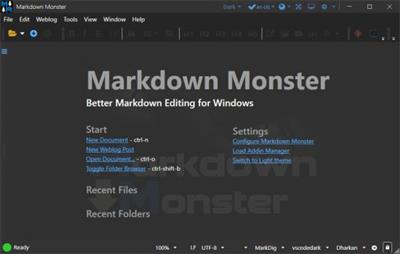
Markdown Monster is a Markdown editor and viewer that lets you edit Markdown with syntax highlighting and fast text entry. A collapsible, synced, live preview lets you see your output as you type or scroll. Easily embed images, links, emojis and code using Markdown text or use our gentle UI helpers that simplify many operations with a couple of keystrokes. Paste images from the clipboard or drag and drop from Explorer or our built-in folder browser. Inline spell-checking and word counts keep your content streamlined unobtrusively.

You can export your Markdown to HTML or PDF by saving to disk or by copying Markdown selections as HTML directly to the clipboard. The HTML preview can display syntax colored code snippets for most common coding languages, and can easily be customized with HTML and CSS template to match your own sites. You can choose from a light and dark app theme, and choose individual editor and preview themes that are fully customizable. You can even use Vim or EMacs type conventions. Other convenience features let you browse for and select files in the built-in folder browser, use the document outline to jump through sections in your Markdown, or shell out to Explorer, Terminal or your favorite Git client. It's all about convenience - everything is at your finger tips, but it's out of your way until you need it.
Markdown Editing and Weblog Publishing for Windows
Syntax colored Markdown
Live HTML preview
Inline spell checking
Embed images, links and emoji
Paste images from Clipboard
Capture & embed screen shots
Save to Html and PDF
Weblog publishing and editing
HTML to Markdown conversion
Editor and preview themes
Git Integration
Document Outline
Template text expansion
.NET scripting & addins
Код:
https://github.com/RickStrahl/MarkdownMonster/blob/main/Changelog.md

Homepage:
Код:
https://markdownmonster.west-wind.com/

Download link

rapidgator.net:
Код:
https://rapidgator.net/file/22a7e259157387120aa07675ac56f71d/lsmxs.Markdown.Monster.2.8.7.4.rar.html

uploadgig.com:
Код:
https://uploadgig.com/file/download/e1b5f25e7f0cff24/lsmxs.Markdown.Monster.2.8.7.4.rar

nitroflare.com:
Код:
https://nitroflare.com/view/B631E443FCF5B04/lsmxs.Markdown.Monster.2.8.7.4.rar

1dl.net:
Код:
https://1dl.net/g2y0myw0ffit/lsmxs.Markdown.Monster.2.8.7.4.rar
 
MEmu Android Emulator 8.1.2 Multilingual


b30626b03fd3611eb8bf7f4bda908eda.jpeg


MEmu Android Emulator 8.1.2 Multilingual
File Size : 582 Mb​

MEmu is an Android emulator that specializes in video games. With MEmu you can enjoy many exclusive titles that you can find for the Android platform, directly on your computer. You don't need to adjust any complicated settings and configure the controls, just install it and start playing. With MEmu, you can install Android games quite easily, simply click the APK button on the right side of the interface, select the APK of the game you want to install, and wait. It really is that easy.

As with most emulators, the controls are already set up, so you can play any game with either the mouse or the keyboard. With MEmu, though, if you don't like how the controls are configured, you can always modify them, or even use an Xbox 360 controller if you are more comfortable with console gaming.
There are numerous Android emulators available, but MEmu is an exceptional choice. It gives you access to a vast array of games for Android, right on your PC. The levels of compatibility, customization, and file organization is better than some of the more well known alternatives on the market.
Key features
Full Android experience with an elegant desktop
Flexible customization (CPU#, memory size, resoluton, device model, nav bar location, root mode, etc.)
Keyboard / joystick mapping to touch screen for much better game experience
Pass through sensor data (e.g. accelerometer) to Android, so you can play car-racing like games
Fast APK installation by dragging and dropping
File sharing between Windows and Android
One-click android system creation / clone / deleting, and you can run multiple Android instances
Код:
http://www.memuplay.com/blog/en/category/release-notes

Homepage:
Код:
http://www.memuplay.com/

Download link

rapidgator.net:
Код:
https://rapidgator.net/file/d7265473c0ad2e07b0aa91d4f4c6be96/jmmxa.MEmu.Android.Emulator.8.1.2.Multilingual.rar.html

uploadgig.com:
Код:
https://uploadgig.com/file/download/7eB59beCd1b898bb/jmmxa.MEmu.Android.Emulator.8.1.2.Multilingual.rar

nitroflare.com:
Код:
https://nitroflare.com/view/AE912EA45E2D850/jmmxa.MEmu.Android.Emulator.8.1.2.Multilingual.rar

1dl.net:
Код:
https://1dl.net/idpyul76t3sh/jmmxa.MEmu.Android.Emulator.8.1.2.Multilingual.rar
 
Microsoft PowerToys for Windows 10 v0.68.0


8205ce83a47884ad7a3e53f9de23b11c.jpeg


Microsoft PowerToys for Windows 10 v0.68.0
File Size : 129 Mb​

Microsoft PowerToys is a set of utilities for power users to tune and streamline their Windows experience for greater productivity. Inspired by the Windows 95 era PowerToys project, this reboot provides power users with ways to squeeze more efficiency out of the Windows 10 shell and customize it for individual workflows.

Microsoft revealed earlier this year that PowerToys were coming back to Windows 10. PowerToys used to be useful little utilities that would let you further customize Windows. Microsoft's first PowerToys for Windows 10 are now available.
Current PowerToy Utilities
• FancyZones
FancyZones is a window manager that makes it easy to create complex window layouts and quickly position windows into those layouts.
• File Explorer Add-ons (Preview Panes)
File Explorer add-ons right now are just limited to Preview Pane additions for File Explorer. Preview Pane is an existing feature in the File Explorer. To enable it, you just click the View tab in the ribbon and then click "Preview Pane".
PowerToys will now enable two types of files to be previewed: Markdown (.md) & SVG (.svg).
• Image Resizer
Image Resizer is a Windows Shell Extension for quickly resizing images. With a simple right click from File Explorer, resize one or many images instantly.
• Keyboard Manager
Keyboard Manager allows you to customize the keyboard to be more productive by remapping keys and creating your own keyboard shortcuts. This PowerToy requires Windows 10 Version 1903 (Build 18362) or newer.
• PowerRename
PowerRename is a Windows Shell Extension for advanced bulk renaming using search and replace or regular expressions. PowerRename allows simple search and replace or more advanced regular expression matching. While you type in the search and replace input fields, the preview area will show what the items will be renamed to. PowerRename then calls into the Windows Explorer file operations engine to perform the rename. This has the benefit of allowing the rename operation to be undone after PowerRename exits.
• PowerToys Run
PowerToys Run is a new toy in PowerToys that can help you search and launch your app instantly with a simple alt-space and start typing! It is open source and modular for additional plugins. Window Walker is now inside too! This PowerToy requires Windows 10 Version 1903 (Build 18362) or newer.
• Shortcut Guide
Windows key shortcut guide appears when a user holds the Windows key down for more than one second and shows the available shortcuts for the current state of the desktop.
Код:
https://github.com/microsoft/PowerToys/releases

Homepage:
Код:
https://github.com/microsoft/PowerToys

Download link

rapidgator.net:
Код:
https://rapidgator.net/file/a33a264061a52bc0637138cc074f5390/ywdnr.Microsoft.PowerToys.for.Windows.10.v0.68.0.rar.html

uploadgig.com:
Код:
https://uploadgig.com/file/download/880f79e7ae15f1e0/ywdnr.Microsoft.PowerToys.for.Windows.10.v0.68.0.rar

nitroflare.com:
Код:
https://nitroflare.com/view/E20C8A76FDE0548/ywdnr.Microsoft.PowerToys.for.Windows.10.v0.68.0.rar

1dl.net:
Код:
https://1dl.net/19y74wf37pkg/ywdnr.Microsoft.PowerToys.for.Windows.10.v0.68.0.rar
 
ON1 Effects 2023.1 17.1.1.13585 (x64) Multilingual


4e36c00979b4f93edbcfd198948039e2.jpeg


ON1 Effects 2023.1 17.1.1.13585 (x64) Multilingual
File size: 1.0 GB​

We've curated hundreds of the most popular looks and styles seen throughout the industry. With ON1 Effects, you get professional results in seconds without having to do any complex edits. Our team of experts curated the trendiest looks with amazing new one-click presets. ON1 Effects works on Mac and Windows and can be used as a standalone application or as a plug-in to Adobe Lightroom and Photoshop.

The Best Collection of Photo Effects,Filters, LUTs, and Presets.
Instantly style any photo and create any look you want in just a few clicks. The hundreds of included presets, filters, LUTs, textures and borders in ON1 Effects 2022 allow for limitless creative options. You can combine, blend, and customize any combination. Popular looks include B&W, HDR Look, Dynamic Contrast, Lens Blur (tilt-shift), Glows, Film Looks, Split Tone, Textures, Borders and more.
New Features
Stack Effects
Combine multiple effects to create any possible look. Includes 27 stackable filters and hundreds of presets, borders, and textures.
Selectively Apply
Use the easy-to-use yet powerful tools to target your effects to specific areas of your photo. Every effect can be brushed in or out in just seconds.
Responsive Sliders
We've made sure that your slider adjustments won't stick, giving you a fast and smooth editing experience. Filters and presets are easy to find and apply.
Create and Save Your Own Presets
Once you've made your adjustments, you can save your own preset for quick access later on.
Effects works as a standalone app or as a plug-in for
- Adobe® Photoshop®
- Adobe Lightroom®
- Adobe Photoshop Elements
- Apple® Photos
Create Any Look or Style.
You're in complete control of every edit you make. You can dial in every setting to your taste with instant previews!
The Perfect Tools for Applying Effects
The world's best effects for finishing your photos. The collection of tools in ON1 Effects are perfect for selectively applying effects and cleaning up your photos.
Photo Effects
Non-destructive, stackable, and re-editable photo filters and presets
Creative Assets
Includes hundreds of built-in photo effects, filters, LUTs, borders, textures, and presets
Quick View Browser
Quickly preview the effects and how the look appears on your photo
AI Quick Mask Tool
AI technology detects your subject matter and automatically creates a mask
Masking Brushes
Blend photos together for exposure or create vignettes and graduated filter looks
Adjustable Gradients
Add common adjustments to only a portion of your photo
Touch Up Tools
Crop, content-aware fill, clone, refine, chisel, and blur are perfect for touching up photos
Luminosity Masks
Create luminosity masks based on the image to automatically protect the highlights or shadows
Stack Filters
Like placing filters on the end of your camera, just easier
Skin Retouching
Easily retouch using filters specific to skin tones
Custom Presets
Easily save and organize your own looks and presets
Live Previews
Preview any look or effect instantly
Код:
https://on1help.zendesk.com/hc/en-us

Homepage:
Код:
https://www.on1.com/

Download link

rapidgator.net:
Код:
https://rapidgator.net/file/29090a49fd04e05652b07b8ba906ebfc/slhyg.ON1.Effects.2023.1.17.1.1.13585.x64.Multilingual.rar.html

uploadgig.com:
Код:
https://uploadgig.com/file/download/d950fdce5dE33fe0/slhyg.ON1.Effects.2023.1.17.1.1.13585.x64.Multilingual.rar

nitroflare.com:
Код:
https://nitroflare.com/view/9AA983C78A74514/slhyg.ON1.Effects.2023.1.17.1.1.13585.x64.Multilingual.rar

1dl.net:
Код:
https://1dl.net/5wsdrouzke97/slhyg.ON1.Effects.2023.1.17.1.1.13585.x64.Multilingual.rar
 
ON1 HDR 2023.1 17.1.1.13585 (x64) Multilingual


c80c485257293747d376475596be6a6e.jpeg


ON1 HDR 2023.1 17.1.1.13585 (x64) Multilingual
File size: 1.1 GB​

ON1 HDR creates flawless, natural HDR photos, that combine the highlight and shadow details from a bracket of exposures, in the blink of an eye. You can control the movement, such as clouds and running water with a live preview. Then, perfect your HDR photos with powerful tools and presets that showcase your creativity. ON1 HDR works as both a standalone and a plug-in for Lightroom Classic CC.

Speed
Slow previews are a thing of the past. Get results in seconds vs. minutes when compared to the competition.
Control
You control the motion with live de-ghosting controls. Everything you need to make it look great including tone & color, layers, retouching and special effects.
Re-Editable
Preview and control noise reduction, lens corrections, and chromatic aberration anytime. Re-edit any of your settings at a later date in ON1 HDR.
Create Awe-Inspiring HDR.
Tone mapping and merging exposure brackets combined with layers allows you to combine other HDR photos and even alternate exposures.
- Auto-aligns photos & removes ghosting
- Up to 7x faster than leading HDR apps
- Combine other exposures with HDR photos
- Create natural or surreal looking HDR photos
Get HDR Looks From a Single Photo!
You don't have to shoot a bracket of exposures to create an HDR look. With ON1 HDR you can open a single, well exposed raw photo and use the HDR toolset to reveal all of the shadow and highlight detail.
Batch process the creation of your HDR files, perfect for real estate photographers.
Your files work with HDR's broad file support. It can handle raw photos from over 800 cameras spanning 20 years. Plus, it supports PSD, TIF, JPG, PNG, and HEIC.
Get Creative HDR with the Best Photo Effects
Nine powerful photo effects filters work like filters you can stack on your camera lens. Mix and combine color and tone enhancers, HDR Look, Dynamic Contrast, Glow, Black and White, LUTs, and more. It even includes tons of professional-grade presets to get you started.
Plug-in & Integrate
- Plug-in to Adobe® Lightroom® Classic
- Batch process the creation of your HDR files, perfect for real estate photographers.
- Your files will work with HDR's broad file support. It can handle raw photos from over 800 cameras spanning 20 years. Plus it supports PSD, TIF, JPG, PNG, and HEIC.
Код:
https://on1help.zendesk.com/hc/en-us

Homepage:
Код:
https://www.on1.com/

Download link

rapidgator.net:
Код:
https://rapidgator.net/file/b87055f18fcb959191519f8ef6fc5876/walyy.ON1.HDR.2023.1.17.1.1.13585.x64.Multilingual.rar.html

uploadgig.com:
Код:
https://uploadgig.com/file/download/59be364c81946820/walyy.ON1.HDR.2023.1.17.1.1.13585.x64.Multilingual.rar

nitroflare.com:
Код:
https://nitroflare.com/view/869104DD659D49A/walyy.ON1.HDR.2023.1.17.1.1.13585.x64.Multilingual.rar

1dl.net:
Код:
https://1dl.net/dufj79wb5syk/walyy.ON1.HDR.2023.1.17.1.1.13585.x64.Multilingual.rar
 
ON1 NoNoise AI 2023.1 17.1.1.13585 (x64) Multilingual


c27f92e291586b8f0d2bccf9b2c83a98.jpeg


ON1 NoNoise AI 2023.1 17.1.1.13585 (x64) Multilingual
File size: 1.6 GB​

The New Standard in Quality and Speed for Removing Image Noise. It's the best noise reduction software for photography. Quickly remove noise and get the sharpest details in your photos with AI-powered NoNoise AI. ON1 NoNoise AI intelligently removes all the image noise while intelligently recovering and enhancing the details. It integrates into your workflow by supporting common photo editors and file formats, including saving DNG raw files that maintain the full tonal and color range.

Get the Absolute Best Results Way Faster!
ON1 NoNoise is up to ten times faster than the other leading image noise removal products and the results will amaze you!
AI-Based Noise Reduction
Leverages state-of-art machine learning to build an AI network to remove luminance and color noise while maintaining the details like no other application producing excellent results.
AI-Based Demosaicing
For raw photos, most image noise comes in the demosaicing process. Combining this step with the noise reduction during the AI training in ON1 NoNoise AI will achieve both better noise reduction and help increase detail and sharpness.
AI-Based Demosaicing
Includes the ON1 exclusive Progressive Sharpening algorithm to enhance the sharpness and details based on the size of the details in the photo, without the halos and artifacts that other sharpening techniques can create.
Super-Fast Live Preview of the Adjustments
Results can be viewed in only a fraction of the time it takes other apps to produce viewable results. There are also far fewer controls to adjust without the limitation of sacrificing sharpness to reduce image noise.
Plugin to Your Workflow
ON1 NoNoise AI is the perfect fit for almost any workflow.
Get amazing retouching results in seconds when using ON1 NoNoise AI as a plugin for
Adobe Photoshop, Adobe Lightroom Classic, Adobe Photoshop Elements, Affinity Photo, Capture One, Corel Paintshop Pro.
Код:
https://on1help.zendesk.com/hc/en-us

Homepage:
Код:
https://www.on1.com/

Download link

rapidgator.net:
Код:
https://rapidgator.net/file/b43cafecc6a3039c5380b44a27953994/caztl.ON1.NoNoise.AI.2023.1.17.1.1.13585.x64.Multilingual.rar.html

uploadgig.com:
Код:
https://uploadgig.com/file/download/7ec694b4ca7e5658/caztl.ON1.NoNoise.AI.2023.1.17.1.1.13585.x64.Multilingual.rar

nitroflare.com:
Код:
https://nitroflare.com/view/24539014BF618DA/caztl.ON1.NoNoise.AI.2023.1.17.1.1.13585.x64.Multilingual.rar

1dl.net:
Код:
https://1dl.net/311atui9faob/caztl.ON1.NoNoise.AI.2023.1.17.1.1.13585.x64.Multilingual.rar
 
ON1 Photo RAW 2023.1 17.1.1.13585 (x64) Multilingual


e000094b7705df880681318f62cc87d1.jpeg


ON1 Photo RAW 2023.1 17.1.1.13585 (x64) Multilingual
File size: 3.0 GB​

ON1 Photo RAW version 2023 is THE professional-grade photo organizer, raw processor, layered editor, and effects app. It works where you do; at the center of your workflow or as a plug-in to Adobe Photoshop, Lightroom, Elements, Affinity Photo, Corel Paintshop Pro, and Capture One.

What do you photograph?
ON1 Photo RAW 2023 provides the primary photo editing needs for every photographer regardless of what they shoot - without having to bounce between multiple pieces of software. Get the professional photo editing tools you need for the professional results you need while keeping your workflow efficient, powerful, and simple.
Power & Speed
At its core, ON1 Photo RAW includes a state-of-the-art image processing engine. Optimized for today's super-megapixel cameras and high-performance computer graphics systems, Photo RAW is the world's fastest, most flexible, and easiest-to-use photo editor on the market.
Unlimited Creativity
Creators want to create and not spend all of their time learning how to use editing tools. Photo RAW is like having Lightroom & Photoshop under one roof. It comes with the tools you need for compositing, hundreds of the hottest presets and filters built-in, and world-class masking tools to make your life easy.
Control of Your Photography
ON1 Photo RAW gives you an open system for complete control over your storage, organization, editing, and method of purchase. No long importing, easy organization, unlimited ways to dial in your style, and ON1 will also never be a subscription-only model.
Plug-in to Your Workflow
ON1 Portrait AI is the perfect fit for almost any workflow. Get amazing retouching results in seconds when using ON1 Portrait AI as a plug-in for
- Adobe Photoshop
- Adobe Lightroom Classic
- Adobe Photoshop Elements
- Affinity Photo
- Capture One (coming soon)
- Apple Photos
- Corel Paintshop Pro
New Features in ON1 Photo RAW 2023
- Quickly Add Clouds to Your Dull Skies
- Retouch an Entire Portrait Shoot Automatically
- Create Stunning Sunsets in Seconds
- View Your Photos in All of Their Beauty
- Refresh Smiles in a Few Simple Clicks
- Selectively Edit Like Never Before Using Color Selection
- A Better Way to Erase Away Unwanted Distractions
- Find Your Duplicate Photos in Seconds
- Easily Change Colors of Objects in Your Photos
- Quickly Find All Photos from Your Favorite Location
- Make the Eyes Pop in Seconds
- The Best Photoshop Plugin for Editing Portraits
- Presenting Photos for Your Clients
Код:
https://on1help.zendesk.com/hc/en-us

Homepage:
Код:
https://www.on1.com/

Download link

rapidgator.net:
Код:
https://rapidgator.net/file/7e803e8563ea18fd536b76c1e73566b5/dewel.ON1.Photo.RAW.2023.1.17.1.1.13585.x64.Multilingual.part1.rar.html
https://rapidgator.net/file/2f945b57a22085dbd041255a0ba4ecfa/dewel.ON1.Photo.RAW.2023.1.17.1.1.13585.x64.Multilingual.part2.rar.html
https://rapidgator.net/file/69c4f9cf02d74cb0d30c98a61dac004c/dewel.ON1.Photo.RAW.2023.1.17.1.1.13585.x64.Multilingual.part3.rar.html

uploadgig.com:
Код:
https://uploadgig.com/file/download/acb44F4a117e660e/dewel.ON1.Photo.RAW.2023.1.17.1.1.13585.x64.Multilingual.part1.rar
https://uploadgig.com/file/download/75c0cB55f32d15a4/dewel.ON1.Photo.RAW.2023.1.17.1.1.13585.x64.Multilingual.part2.rar
https://uploadgig.com/file/download/d502329f802a8272/dewel.ON1.Photo.RAW.2023.1.17.1.1.13585.x64.Multilingual.part3.rar

nitroflare.com:
Код:
https://nitroflare.com/view/11A3A2840A25985/dewel.ON1.Photo.RAW.2023.1.17.1.1.13585.x64.Multilingual.part1.rar
https://nitroflare.com/view/07B69F0CBF24555/dewel.ON1.Photo.RAW.2023.1.17.1.1.13585.x64.Multilingual.part2.rar
https://nitroflare.com/view/0B0F08866D7AAC1/dewel.ON1.Photo.RAW.2023.1.17.1.1.13585.x64.Multilingual.part3.rar

1dl.net:
Код:
https://1dl.net/yecqm8a6axwr/dewel.ON1.Photo.RAW.2023.1.17.1.1.13585.x64.Multilingual.part1.rar
https://1dl.net/u7x0asfrzjwg/dewel.ON1.Photo.RAW.2023.1.17.1.1.13585.x64.Multilingual.part2.rar
https://1dl.net/dky5ja9d0e99/dewel.ON1.Photo.RAW.2023.1.17.1.1.13585.x64.Multilingual.part3.rar
 
ON1 Portrait AI 2023.1 17.1.1.13585 (x64) Multilingual


0541d533710a9989dc2d1a90e5340c51.jpeg


ON1 Portrait AI 2023.1 17.1.1.13585 (x64) Multilingual
File size: 714 MB​

You Will Never Need Another Portrait Editing Product. Flawless retouching is just a click away with ON1 Portrait AI. It uses machine learning to find every face in your photo and make them look great, automatically. It analyzes each face and adds just the right amount of retouching to the skin, eyes and mouth, giving you professional results in no time at all.

Get Flawless, Natural Looking Skin
- AI Automatic Retouching for Every Face
- Independent Adjustments for Each Face
- Frequency Separation Based Skin Retouching
The Retouching Tools and Control You Need
The retouching options are simply amazing including skin smoothing, shine reduction, blemish removal, face sculpting and eye and teeth whitening just to get started.
Let AI Do the Hard Work for You
Automatically finds each face in your photo, analyzes them, and adds just the right amount of retouching, based on your preferences.
No More Drawn Out Editing Sessions
Put the AI to work for you by batch processing an entire folder of photos. For each photo, Portrait AI will find each face and add the right amount of retouching automatically. It's perfect for proofing your photos before delivery.
Adjust Each Person Individually
Each face in your photo has independent controls and adjustments. For example, you can use different settings for the bride and groom in a wedding photo.
Your Edits are Non-Destructive
All of your adjustments and edits are non-destructive. You can re-edit them later and the original photo is not altered.
You Control How to Edit
Everything is automatic, but you have full manual control as well. You can manually adjust the eye and mouth positions, paint to refine the skin mask, and use brushes to remove stubborn blemishes.
Improve Face Shape and Lighting
Correct common errors in lens choice and lighting by adding fill-light to lighten the face or resculpt the face to thin the jawline or balance out eye size.
The Power of Using Frequency Separation
The skin retouching uses frequency separation to maintain natural skin texture while reducing color and tonal changes across the skin. It creates flawless but natural-looking skin.
Easily Remove Blemishes
Fine blemishes can be reduced automatically, while larger blemishes can be removed with the built-in content aware eraser and clone stamp.
Whiten Teeth
Teeth and lips are detected automatically too. You can easily brighten the smile and adjust the color and saturation of the lips.
Enhance Eyes
Eyes are automatically detected and enhanced. The whites can be brightened and the iris can be sharpened.
Plug-in to Your Workflow
ON1 Portrait AI is the perfect fit for almost any workflow. Get amazing retouching results in seconds when using ON1 Portrait AI as a plug-in for
- Adobe Photoshop
- Adobe Lightroom Classic
- Adobe Photoshop Elements
- Affinity Photo
- Capture One (coming soon)
- Apple Photos
- Corel Paintshop Pro
Код:
https://on1help.zendesk.com/hc/en-us

Homepage:
Код:
https://www.on1.com/

Download link

rapidgator.net:
Код:
https://rapidgator.net/file/58069170c167b0d6762dafe6fff98e1f/bwpqm.ON1.Portrait.AI.2023.1.17.1.1.13585.x64.Multilingual.rar.html

uploadgig.com:
Код:
https://uploadgig.com/file/download/c6a5Fba97925eF55/bwpqm.ON1.Portrait.AI.2023.1.17.1.1.13585.x64.Multilingual.rar

nitroflare.com:
Код:
https://nitroflare.com/view/41B290D8C27B610/bwpqm.ON1.Portrait.AI.2023.1.17.1.1.13585.x64.Multilingual.rar

1dl.net:
Код:
https://1dl.net/m93olnum74bj/bwpqm.ON1.Portrait.AI.2023.1.17.1.1.13585.x64.Multilingual.rar
 
ON1 Resize AI 2023.1 17.1.1.13585 (x64) Multilingual


fc89e7e8bf61afe5ce684ad2a289540c.jpeg


ON1 Resize AI 2023.1 17.1.1.13585 (x64) Multilingual
File size: 350 MB​

ON1 Resize AI, the next-generation photo enlargement software, gives photographers the highest quality photo enlargements. This all-new super-resolution technology will allow any photographer to enlarge photos while quickly maintaining and recovering an incredible amount of detail and sharpness.

How It Stands Out
• ON1 Resize AI uses state-of-art neural networks to enlarge photos without losing detail
• The ultimate workflow integration - ON1 Resize AI goes beyond the average plugins when it comes to integration with the host applications
• Print directly from the app - ON1 Resize AI excels at making stunning poster-sized prints
• Powerful batch processing lets you get work done in record time
• Unique tiling and gallery wrap features
Tools for Printing Big
Photo enlargement software should deliver the highest quality photo prints. ON1 Resize AI excels at making prints using state-of-the-art technology. You can enlarge your images to any size and not lose sharpness or details in your prints.
Create Canvas Wraps
The gallery wrap feature creates extended margins for wrapping your photo around wooden stretcher bars for canvas prints.
Tiling Feature
The tiling feature divides the photo into tiles or strips to make it easier to print a mural.
Get Beautiful Prints Every Time
Print individual photos, contact sheets, a wall portrait, or tile multiple photos into package prints. Also, print multiple photos on one piece of paper to create packages.
Better Batch Processing
The Export feature in ON1 Resize AI makes it easy to process a single photo, a handful or hundreds of them. Not only can you control the size, but the file type, naming, location, etc. You can even apply gallery wrap or watermarks on the fly.
Maintain an Amazing Amount of Detail
Studying millions of examples of the everyday world allows ON1 Resize AI to upscale photos and their textures to virtually any size, leaving photographers with ultra-high resolution images.
Keep the Crisp Details
ON1 Resize AI uses deep machine learning to study different details we see in the world, whether natural textures like animal fur, tree bark, feathers, grass, leaves, rock, and skin to man-made textures like concrete, fabric, or brick.
Easier Printing
When it comes to preparing your photo to print, knowing the proper resolution for your printer and the correct amount of sharpening for your paper choice can be daunting. ON1 Resize AI's built-in presets make this a breeze. Simply pick the kind of printer, the type of paper, and the size.
Works as a Plugin
for Adobe Lightroom, Photoshop, Capture One, and Apple Photos
Resize AI goes beyond the average plugins. In CaptureOne and Lightroom you can batch process easily with powerful new resizing options. And in Adobe Photoshop it can handle layered files with masks, alpha channels, text, and adjustment layers in RGB as well as CMYK, Grayscale and LAB.
Код:
https://on1help.zendesk.com/hc/en-us

Homepage:
Код:
https://www.on1.com/

Download link

rapidgator.net:
Код:
https://rapidgator.net/file/a5b5e6b76bcaf802f13d4f4571f62f45/lijhn.ON1.Resize.AI.2023.1.17.1.1.13585.x64.Multilingual.rar.html

uploadgig.com:
Код:
https://uploadgig.com/file/download/14fc7F182D208857/lijhn.ON1.Resize.AI.2023.1.17.1.1.13585.x64.Multilingual.rar

nitroflare.com:
Код:
https://nitroflare.com/view/CB3022F301857DA/lijhn.ON1.Resize.AI.2023.1.17.1.1.13585.x64.Multilingual.rar

1dl.net:
Код:
https://1dl.net/q5d4j6w92me0/lijhn.ON1.Resize.AI.2023.1.17.1.1.13585.x64.Multilingual.rar
 
Music Developments Rapid Composer 4.6.2


30db0fd35e7b15980bbbd91345d8431a.jpeg


Music Developments Rapid Composer 4.6.2
File size: 54 MB​

RapidComposer is a unique, non-destructive, phrase-based music prototyping software designed for composers, songwriters and musicians of all musical styles (for Windows and macOS: standalone, VST, VST3, AU, AU MFX).

Music Theory Integrated
Create great sounding chord progressions, use piano-style phrases even if you've never touched a piano, auto-harmonize melodies, get chord suggestions, load MIDI files with chord detection, use the chord palette or the "circle of fifths" chart, RapidComposer will always assist you in songwriting.

Smart Phrases
Phrases always conform to the current chord and scale on the master track. Forget about tinkering with notes. Lay out the chords on the master track, or just drop a chord progression on it, with a key-press you can generate a harmony track with perfect voice leading. Start composing now!

Phrase Generators
Rhythm and phrase generators are included for various purposes. Create monophonic or polyphonic patterns. Generate melody. Use variations to change phrases non-destructively. Slice or change the rhythm of existing phrases.

Flexible Chord Selection
RapidComposer offers several ways to select chords for the master track or chord progressions including Tonnetz and Circle of Fifths. Color chord buttons by consonance, common notes, tonality or suggestions. Set up chord rules for progressions. Use chord voicings for tracks, phrases or master track chords.

Idea Tool
RapidComposer will generate a multi-track composition with chords based on your settings, using your phrases. Different types of workflows are supported. Not just when you are out of ideas.

Whats New
Updates: official site does not provide any info about changes in this version.

rapidgator.net:
Код:
https://rapidgator.net/file/17a495d5790c9cafb878a846237d0f3e/kajzh.Music.Developments.Rapid.Composer.4.6.2.rar.html

uploadgig.com:
Код:
https://uploadgig.com/file/download/857989196d498602/kajzh.Music.Developments.Rapid.Composer.4.6.2.rar

nitroflare.com:
Код:
https://nitroflare.com/view/12EE864B18A3B1F/kajzh.Music.Developments.Rapid.Composer.4.6.2.rar

1dl.net:
Код:
https://1dl.net/dqcfrvjub0mn/kajzh.Music.Developments.Rapid.Composer.4.6.2.rar
 
NetSetMan 5.2


36498db769f79b507599a2356f727df1.jpeg


NetSetMan 5.2
File Size : 7 Mb​

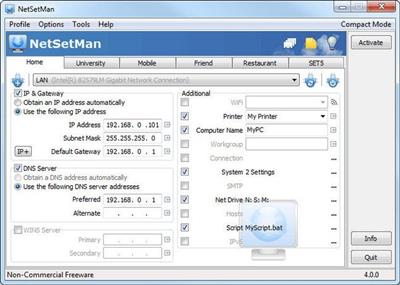
NetSetMan is a network settings manager which can easily switch between 5 different, visually structured profiles. NetSetMan is not only useful and effective but also easy and intuitive to handle. The entry fields remind of the Windows "Internet Protocol (TCP/IP) Properties" but it's much easier to fill in the adresses.

Код:
https://www.netsetman.com/de/txt/history

Homepage:
Код:
http://www.netsetman.com/

Download link

rapidgator.net:
Код:
https://rapidgator.net/file/3d3b2ea119a1fb09d13e27f989bdd001/radhv.NetSetMan.5.2.rar.html

uploadgig.com:
Код:
https://uploadgig.com/file/download/38fdff433c9428B2/radhv.NetSetMan.5.2.rar

nitroflare.com:
Код:
https://nitroflare.com/view/E795005E076359C/radhv.NetSetMan.5.2.rar

1dl.net:
Код:
https://1dl.net/p1xc9u586eam/radhv.NetSetMan.5.2.rar
 
Назад
Сверху