• Здравствуйте. Сайт заработал в архивном режиме форум www.old.nado.in

All mitsumi'1s Applications !! (updated daily)

  • Автор темы Автор темы mitsumi1
  • Дата начала Дата начала
MediaHuman YouTube To MP3 Converter 3.9.21 (1906) Multilingual (x64)
41bd6ea90b528dd3655974b1dc294575.webp

MediaHuman YouTube To MP3 Converter 3.9.21 (1906) Multilingual (x64) | 76 Mb
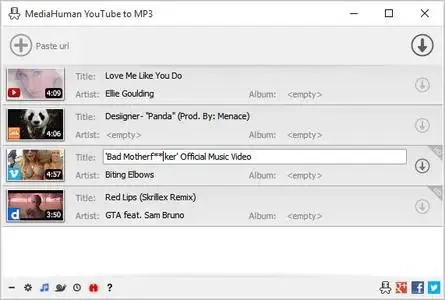
You like to listen to music on YouTube or SoundCloud and want to save it for offline playing. Or you want to download soundtrack of a new movie. Then we recommend you to try out this software developed specifically for this purpose.


Downloads all music from playlist or channel
Downloads highest available quality up to 320 kbps
Supports YouTube, Vimeo, SoundCloud, Dailymotion, VEVO, etc.
Downloads simultaneously several tracks
Includes simple tag editor with cover art support
Works on all modern platforms (macOS, Windows, Ubuntu)
Imports into iTunes
Playlists and channels
The software supports downloading all videos of a playlist or a channel. And there is also an option for subscribing to and downloading only newly uploaded tracks.
iTunes support
In the preferences of the application you can select an option to add downloaded tracks into iTunes automatically. You can also specify iTunes playlist, where the converted track should be added.
Saves your time & traffic
The app detects audio track in YouTube video clip and downloads it, skipping the video part. As a result download speed increases dramatically, especially on HD-quality content.
Simple tag editor
Application automatically detects artist name and track title of the video and saves it in the downloaded file. But at the same time, you can easily change tags to whatever you want. You can even change a cover art image.
Original format, no conversions
You can save audio tracks in original quality without any conversion. It means that there will be no loss of quality and it greatly reduces the downloading time.
Free music
There is a great amount of music on YouTube. You can always find the one you like there. And YouTube to MP3 Converter allows you to save it on your computer for free. Just find the track you like and download it in the quality you need.
Not only YouTube
Vevo.com, Vimeo, DailyMotion, Soundcloud, Bandcamp, HypeMachine, MixCloud, UOL and many other sites are also supported. So you can download music as easy as from YouTube.
Clipboard tracking
The program tracks the content of the system clipboard. It means that you can easily add a video clip without switching from your favorite browser. Just copy an URL into the clipboard and it will be added to the download queue.
System Requirements:
Windows 11, Windows 10, Windows 8, Windows 7, Windows Vista, Windows 2003, Windows XP for PC systems
About 80 Mb of free hard drive space
Home Page-
Код:
https://www.mediahuman.com/

Rapidgator
Код:
https://rapidgator.net/file/7882fc6fa804d97d96049c8a7b3f8541/t12gy.MediaHuman.YouTube.To.MP3.Converter.3.9.21.1906.Multilingual.x64.rar.html

Код:
https://nitroflare.com/view/3DC28486EA8F35A/t12gy.MediaHuman.YouTube.To.MP3.Converter.3.9.21.1906.Multilingual.x64.rar
 
Mercuriall Ampbox v1.9.0

bef493c09f8c52e296de4b4a9d880a4f.webp

Mercuriall Ampbox v1.9.0 | 123.3 Mb
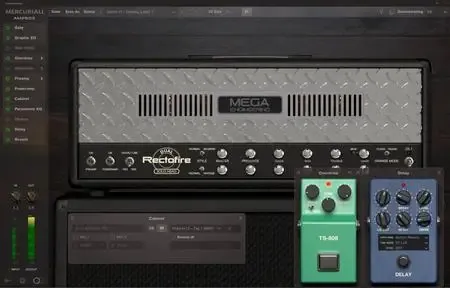
Mercuriall Ampbox is a next-gen VST/AU/AAX + standalone amp modeling plugin for PC/Mac. It's an ever-evolving platform for all* our products, current and future. You will get Ampbox for free when purchasing one of the supported plugins*. The platform has everything you need to create perfect tones with just one plugin. It's simple, elegant and versatile. Powered by Mercuriall Neural Hybrid Engine v2.0 technology.


* Ampbox supports the following products at this point: Dual Rectofire, Euphoria, ReAxis, U530. More products will be added to the platform in future.
Features:
NEW! Neural Hybrid Engine version 2.0
Used in Dual Rectofire model.
NEW! Power Link technology
Affects the power supply linkage between poweramp and preamp.
Freely movable module windows inside the plugin
Keep open only those modules that you need.
Preamp/poweramp can be switched off independently
More options, more flexibility.
Same oversampling cycle for pedals/preamp/poweramp
No latency build-up and no additional sound quality losses.
Stereo-mode
When used, right/left channels are modeled independently.
Delay and reverb can be used in parallel
No extra routing!
Plugin supports CPU multi-threading
More cores = better plugin performance.
Standalone version
No DAW? No problem, you can still use Ampbox.
Factory and user presets
Robust preset system and manual preset sharing options.
Home Page-
Код:
https://mercuriall.com/cms/details_ampbox

Rapidgator
Код:
https://rapidgator.net/file/1acd3941717cb01fe9d891d670110add/11p1q.Mercuriall.Ampbox.v1.9.0.rar.html

Код:
https://nitroflare.com/view/8B7483A08D1C6C9/11p1q.Mercuriall.Ampbox.v1.9.0.rar
 
Obsidian Ebook Reader Premium 2.0.0

29c9996f4167b2671c7529c5218da39f.avif


Obsidian Ebook Reader Premium 2.0.0 Simply your library. Designed for privacy. Obsidian is a Windows ebook reader built around library management and privacy. Point it at your folders, organize EPUBs and PDFs, and read entirely offline - with no accounts, ads, or telemetry.

Built for your library and your privacy
Organize books from your own folders, keep everything on your machine, and read without handing data to anyone else.

Languages: English
File Size: 141.59 MB


Add books your way
Import one file at a time, pull in a whole folder, include nested subfolders, or set up folder sync so your library stays up to date automatically.

- Add File - single EPUB or PDF
- Add Folder - bulk import
- Include Subfolders
- Sync Folders - auto-scanned directories

Edit book metadata
Fix titles, authors, and cover art after import so large collections stay organized. Premium lets you curate every detail of your shelf.

- Edit title and author
- Replace cover images
- Reset to defaults when needed

Browse and organize at a glance
See covers, titles, authors, and formats in a sortable list. Mark favorites, switch views, and manage growing collections without losing track of a single book.

- Sort and filter your collection
- List and grid-style browsing
- Light and dark interface themes

Typography and layout controls
Open the styling panel while you read to adjust fonts, spacing, and margins. Dial in a comfortable layout for long sessions on any screen.

- Font family and size
- Line, word, and letter spacing
- Margin presets and page layout

Release Notes
System Requirements
Windows 10 version 14316.0 or higher


HOMEPAGE


Код:
https://obsidianreader.app/


DOWNLOAD

Код:
https://rapidgator.net/file/845bb0bdedf971065c8c8443fe15436e/Obsidian.Ebook.Reader.Premium.2.0.0.rar.html

Код:
https://nitroflare.com/view/810298C19C1368C/Obsidian.Ebook.Reader.Premium.2.0.0.rar
 
Pano2VR Pro 8.0.2 Multilingual (x64)

1932220e34f350513a75f4bf2fd09578.webp

Pano2VR Pro 8.0.2 (x64) Multilingual Fast Links | 132.5 Mb
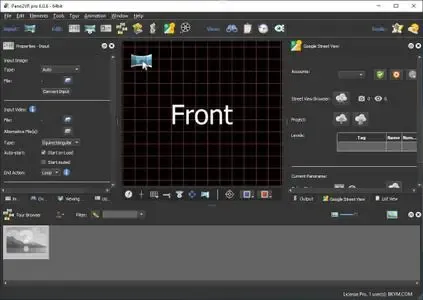
Pano2VR allows you to publish your panoramic images within minutes. No matter what type of project you're working on, whether, a gigapixel panorama or virtual tours with hundreds of nodes, Pano2VR will help you to quickly get your project up and running on the desktop as well as mobile devices.


mprove your images.
Sometimes panoramas are not level and have unwanted tripods...it happens. Straightening the horizon and removing the tripod from the panorama can be accomplished with a few simple clicks.
Build a Virtual Tour.
No matter how large the tour, Pano2VR Pro can help you quickly and easily put it together with automatic linking, filtering, master node editing and a built-in Tour Map.

Enhance the experience.
Add interactive elements like hotspots, directional sound and video to your panoramas. Use the powerful Skin Editor to design custom buttons and controllers - all of which can be made responsive so the design fits to any screen. No coding required. We promise!
Seamlessly change projections.
Easily reproject spherical panoramas during viewing or open a panorama from a little planet view to a rectilinear view on opening or create a standard format video that moves through different projections.
Reveal the highlights.
Guide viewers by creating an animation path through your panoramas or tour to show off the best areas. At any time, the viewer can interact and explore further. You can even export this walk-through as a video file.
Contribute to Google Street View.
Pano2VR offers an easy way to add and edit existing panoramas and tours to Google Street View. Once you've connected your account, you will see all tours and panoramas that you've uploaded to Google Street View. You can continue to add to your gallery or even download the existing images.
Show your work.
Export your panoramas as HTML5, Flash or QuickTime VR formats or use our handy plugins to post them directly to your Wordpress, Joomla or Drupal site. Pano2VR will also help you to transform your images into different projections for printing.
Pano2VR 6.0
Pano2VR 6.0 brings major updates to the Tour Map, Animation Editor and Viewer. You can now add floor plans to your project and correctly geolocate indoor nodes, control and animate skin elements with the Animation Editor, and view and interact with 360 video in the Viewer.
Tour Map
The Tour Map received, perhaps, the biggest update. It can now better assist in general tour building and with Google Street View tours with the addition of being able to add custom floor plans.
Floor plans, are maps of the interior of buildings where it is also likely that location data has not been recorded during a shoot. So, we added the ability to geolocate the floor plan to the tour map so that when a tour node is added to the floor plan, it will be given location data. This is especially helpful for those building tours for Google Street View and need accurate placement of nodes inside of buildings. Floor plans that have been added to the Tour Maps, can also be used in the Skin Editor using the Map element. In addition to the floor plans, map pins can now be moved in bulk.
Animation Editor
The Animation Editor is now a panel and it, too, is more powerful. You can now connect skin elements to the animation. This lets you apply, for example, subtitles or text boxes that can appear and disappear at a defined time in the animation.
Previously, the animation editor only had the ability to create a single series of clips. Now, we can create sequences, which are a group of clips, in the same project. We can then, select a specific sequence to output as an animation or as auto rotation. This makes it much easier to create multiple versions of an animation without having to create multiple projects.
Skin Editor
The Skin Editor got new features, too. The most notable feature would be the changes made to the Maps element. This is how you would add a map or floor plan overlay to your project. Previously, only a map could be added to the map element.
We've also added a way to change skins without having to open the Skin Editor - making it easier to adapt a skin to the current project using the Edit Skin Configuration button. Finally, positioning in the Skin Editor has been completely reworked to better reflect the way positioning works in HTML5. This means that when you open older skins, you may find that the positioning measurements have changed. Don't worry, it's not broken; just, the numbers have changed.
Viewer
The Viewer has been updated to be able to playback 360º video, making it much easier to work with the medium. Once the panoramic video has been added to the Viewer or Tour Browser, a transport control will appear in the Viewer.
More Features:
- Improved gigapixel support with tiled multi-resolution
- Fast loading for tours with more than 10,000 nodes
- Custom Fly-in effect
- Custom map tiles
- Filtered actions
- Flash and QuickTime outputs no longer supported
Requirements:Windows 7 and higher (64-bit).
Home Page -http://ggnome.com

Rapidgator
Код:
https://rapidgator.net/file/65792eea82af30921ef0f5d50637dd0c/q6up3.Pano2VR.Pro.8.0.2.x64.Multilingual.rar.html

Код:
https://nitroflare.com/view/D0FBD78EAEA6BE7/q6up3.Pano2VR.Pro.8.0.2.x64.Multilingual.rar
 
Pazu StreamGet 3.1.4 Multilingual

70763141d12fcb8f412006c4f216bd49.webp

Pazu StreamGet 3.1.4 Multilingual Fast Links | 244.4 Mb
Download movies and shows from various streaming platforms to MP4/MKV on your Windows device and enjoy them anywhere you want.


Download videos from the most popular streaming services including Netflix, Prime Video, Disney Plus, Max, Hulu, Apple TV Plus, and more.
Download movies and shows to MP4/MKV
High-quality downloads up to 1080p.
Freely choose to keep any or all audio and subtitles.
8x fast downloading speed
Multiple downloads at a time
Select how subtitles are saved (hardcoded, softcoded, or external files).
Multilingual interface: English, Deutsch, Espanol, Francais
Download All, Download Now
StreamGet All-In-One Video Downloader is the ultimate download solution for you. It supports downloading any movies and shows from the most popular streaming websites including Netflix, Prime Video, Disney Plus, Max, Hulu, and Apple TV Plus. The downloader is continuously updated to support more platforms in the future.
Support downloading from various streaming platforms
Download as many movies and shows as you want
Watch on any supported device
Download movies in up to 1080P
Continuously updated
User-friendly Interface and built-in browser
StreamGet All-In-One Video Downloader simplifies your download process by offering a built-in browser. This allows you to directly search for movies or TV shows within the application. Simply select your preferred streaming service from the homepage, enter a title or keywords, and let StreamGet present the search results for you.
One-stop browsing experience with the built-in browser
Simple and clear user interface
Multilingual Support
Search the movie/show title or copy&paste the link
Download videos in high quality at a fast speed
StreamGet All-In-One Video Downloader delivers the perfect combination of speed and quality. You can download high-quality videos starting from 720p(HD) and up to 1080p (FHD). Moreover, it uses multi-threading to increase download speed. Experience downloads 8x faster than standard speeds.
8x fast downloading speed
One click to download all seasons and epidodes
Choose the format, audio track, and subtitle you want
Download videos in H.265(High-Efficiency Video Coding, HEVC) or H.264(Advanced Video Coding, AVC).
Audio and subtitle customization
StreamGet All-In-One Video Downloader offers comprehensive multi-language support for downloaded videos. You can choose to download audio tracks and subtitles in any language available on the original streaming service. This flexibility ensures you can enjoy your content in your preferred language.
Freely choose to keep any audio and subtitles available.
Save subtitles as Soft subtitles, External subtitles or Hard subtitles.
Support preserving all available audio track and subtitle languages.
Keep Audio description and Audio surround sound
Ultimate offline playback experiences
With StreamGet All-In-One Video Downloader, you can download videos from Netflix, Amazon Prime Video, Disney+, Max, Hulu, and Apple TV+ even with an ad-supported subscription. These downloaded videos can be transferred to various compatible devices and applications for offline playback, offering greater flexibility in how you enjoy your favorite content.
Download videos even with an ad-supported account
Watch streaming videos offline on any devices you want
No video streaming app is required
Downloaded videos are stored locally and will never expire.
Home Page-
Код:
https://www.pazu-video.com/streamget-all-in-one-for-windows.html

Rapidgator
Код:
https://rapidgator.net/file/c98766cd5b02d500f936595aca548483/44xwc.Pazu.StreamGet.3.1.4.Multilingual.rar.html

Код:
https://nitroflare.com/view/4A1CE3F97AC88B1/44xwc.Pazu.StreamGet.3.1.4.Multilingual.rar
 
Scaler Music Carbon Electra 2 v2.0.3

570fbc73149fec4497a10c736f8d27f1.webp

Scaler Music Carbon Electra 2 v2.0.3 | 111.7MB
Synth power meets musical intelligence


Create sounds, grooves and chord progressions with Waveterrain oscillators, Scale Lock, musical filters and a scale-aware note/chord sequencer.
Dive into the Features
Scale Lock and Musical Control
Oscillators can lock to musical scale degrees instead of only traditional pitch values.
Sequencer can lock to diatonic notes and chords within the selected scale.
Musical filter can lock to scale notes, incoming chord tones or interval relationships.
Designed to keep sound design, sequencing and modulation musically connected.
Wave Terrain Oscillators
All-new waveterrain oscillator mode based on topographic terrain-style sound generation.
Upload your own terrain images in .png format to create custom oscillator behaviour.
Control how the sound interacts with terrain edges in 3D aspect.
Adjust terrain size and movement for different tonal results.
A new alternative to wavetable synthesis, with its own movement, texture and character.
Also includes classic analogue waveforms and wavetable oscillator modes.
Four-Oscillator Synth Engine
Four independent oscillators.
Classic, wavetable and waveterrain oscillator options.
Per-oscillator pitch, tune, width, cascading FM and position-style controls depending on oscillator type.
Unison support across oscillators.
Flexible oscillator blending through the central mixer.
Note and Chord Sequencer
Scale-based note and chord sequencer.
Write freely in chromatic mode or stay locked to the chosen scale.
Chord mode allows diatonic chord programming.
Supports chord extensions and inversions.
Ideal for musical riffs, basslines, arps, chord patterns and evolving harmonic sequences.
Multi-Shape Step Sequencer
Multi-shape modulation step sequencer.
Assignable to multiple parameters.
Can run independently from the note/chord sequencer.
Timing can be divided or multiplied against the main sequencer rate.
Useful for rhythmic movement, filter patterns, pitch modulation, wavetable movement and FX automation.
Musical Filter System
New musical filter modes including interval, chord and scale-based behaviour.
Filter movement can follow musical relationships rather than only static cutoff values.
Designed for harmonic filtering, resonant movement and scale-aware sound shaping.
Includes traditional filter controls such as cutoff/offset, resonance, focus/window and keytracking.
Flexible Mixer and Routing
Four-channel oscillator mixer.
Per-oscillator level and panning.
Re-routable oscillator/filter paths.
Optional gain boost mode.
Designed for complex layering and movement between oscillator sources.
Reorderable FX Stack
Powerful onboard effects section.
Includes delay, distortion, chorus, EQ and reverb.
Effects can be reordered.
FX parameters can be modulated.
Designed for creating finished sounds directly inside the instrument.
New Assignable Modulation System
Flexible modulation assignment workflow.
Assign modulation sources to multiple destinations.
Clear visual destination lists per modulation source.
Supports LFOs, envelopes, sequencer modulation and performance controls.
Multiple LFOs and Envelopes
Three dedicated LFOs.
Amp envelope and modulation envelope.
LFO sync, trigger and mono modes.
Adjustable LFO waveforms and destinations.
Velocity control for envelope behaviour.
Performance and Voice Controls
Main output section with level control.
Mono, retrigger, legato and limiter options.
Unison voice controls.
Detune, width, tune, pitch bend range and glide controls.
Mod wheel assignment support.
Advanced Preset and Sequence System
User sequence area with visual waveform/shape display.
Save and recall musical sequences and arps.
Designed for both sound design and musical phrase creation.
Stronger link between preset design, harmony and performance.
Includes 362 presets in total, with artist presets from producers including Carl Cox, Timo Garcia, Faze Action and Christian Laffitte.
Home Page-
Код:
https://scalermusic.com/products/carbon-electra-2/

Rapidgator
Код:
https://rapidgator.net/file/361ef3254a4ec60c6f053833381f6e57/3hukr.Scaler.Music.Carbon.Electra.2.v2.0.3.rar.html

Код:
https://nitroflare.com/view/3E8773D55AD26E7/3hukr.Scaler.Music.Carbon.Electra.2.v2.0.3.rar
 
Snap Video Translator 1.1.1

c786a24127be8b5d1c85c4e332b99029.webp

Snap Video Translator 1.1.1 | 395 MB
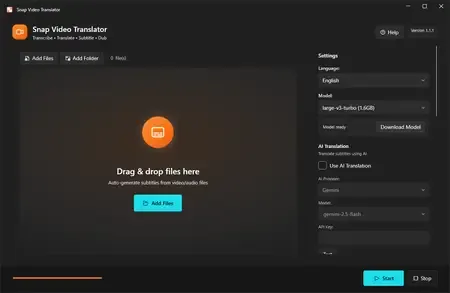
Snap Video Translator brings every step of localizing a video into a single Windows app. Load a video and it takes you straight through transcription, AI translation, and either subtitle burn-in or an AI voice-over.


Transcription (runs locally)
Runs OpenAI Whisper on your own PC. Choose from small / medium / large-v3-turbo / large-v3 to balance speed and accuracy. Your audio is never sent to an external server for transcription.
AI translation
Works with AI services such as Gemini, OpenAI, and Claude, or with an OpenAI-compatible local LLM. Produces natural translations of your video's content.
Subtitle burn-in
Adjust font size, text color, outline, and position, then burn subtitles directly into the video.
AI dubbing
Converts the translation into speech and generates a voice-over in 7 languages (Japanese, English, Chinese, Korean, French, German, Spanish). Mix it with the original audio or replace it.
Subtitle file export
Export subtitle files in SRT / VTT format.
Review & edit mode
Check the subtitle text on screen before burn-in and edit it if needed.
Batch processing
Process multiple videos at once.
Who it's for
- Video creators who want to reach viewers in other languages
- Education and training teams localizing lectures and tutorials
- Companies localizing internal videos
Before you start
- Transcription runs locally with Whisper; your audio is not sent anywhere.
- Using a cloud AI service for translation requires that service's API key. You can also use an OpenAI-compatible local LLM.
- AI translation and AI dubbing require an internet connection (no API key is needed for dubbing).
- Subtitles and dubbed audio are AI-generated. Please review the output before public or business use.
- FFmpeg is bundled as the video processing engine.
System Requirements
Windows 10 version 19041.0 or higher (64-bit)
* Japanese / English UI, selected automatically.
Home Page - https://apps.microsoft.com/detail/9n66p79hm5lb

Rapidgator
Код:
https://rapidgator.net/file/c4b26db8d4cffb730007f6cc4dc860c7/5oyn0.Snap.Video.Translator.1.1.1.rar.html

Код:
https://nitroflare.com/view/873F6A035DCB69D/5oyn0.Snap.Video.Translator.1.1.1.rar
 
VideoForge AI Pro 1.0.3

0218ea69015f1b0bb5c94950738dbbcc.webp

VideoForge AI Pro 1.0.3 | 547 MB
VideoForge AI Pro - AI video upscaling to 4K - pro features, fully offline. VideoForge AI Pro is the professional solution for AI-based video upscaling on Windows. Batch queue, multiple models, ProRes output - all directly on your GPU, no cloud, no subscription.


- Batch queue: process multiple videos in sequence
- Photo/Realistic + Anime/Illustration model selectable
- Output: 4K / 1080p / 720p / Custom - H.265, H.264, ProRes
- Denoise filter · audio preserved in full
- 100% offline · AMD, NVIDIA, Intel (Vulkan/GPU)
BATCH QUEUE
Drop multiple videos and process them all in one run. Each file shows live status: Queued → Processing → Done . Perfect for processing complete Seedance or Kling projects in one go - start it before bed, wake up to 4K.
TWO AI MODELS
- Photo / Realistic - optimized for cinematic footage, people, real-world scenes
- Anime / Illustration - optimized for animated content, stylized AI art, illustrations
FLEXIBLE OUTPUT RESOLUTION
- 4K Native - full Real-ESRGAN 4x output
- FHD 1080p - 1920x1080 (landscape) or 1080x1920 (portrait)
- HD 720p - ideal for social media drafts and previews
- Custom - enter any width x height you need
PROFESSIONAL OUTPUT FORMATS
- H.265 (HEVC) - maximum quality, smallest file
- H.264 (AVC) - broadest compatibility
- ProRes 422 (.mov) - professional quality for DaVinci Resolve, Adobe Premiere, and Final Cut Pro
DENOISE FILTER
Optional hqdn3d pre-filter reduces noise in source footage before AI upscaling - useful for lower-quality source clips.
SAVE AI CREDITS - SCALE PROFESSIONALLY
Generate at 480p, upscale to 4K for free. Why pay 3x more per clip in Seedance when VideoForge AI Pro handles the quality overnight?
System Requirements
- Windows 10 (1809) and Windows 11
- GPU-accelerated - AMD, NVIDIA, Intel all supported
Home Page - https://beckhusen-ai.com/software

Rapidgator
Код:
https://rapidgator.net/file/4aeeaae523699fbdeb5564854258b9e3/qsbvy.VideoForge.AI.Pro.1.0.3.rar.html

Код:
https://nitroflare.com/view/FB7B16DC21C0966/qsbvy.VideoForge.AI.Pro.1.0.3.rar
 
Video Repair Tool 5.0.0.7 (Win/macOS)

a70cee4c390853272c74c0a914d771eb.webp

Video Repair Tool 5.0.0.7 (Win/macOS) | 74 Mb (in total)
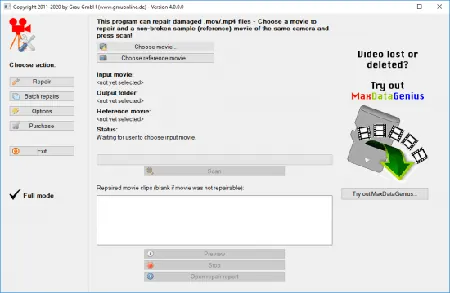
Video Repair Tool can repair and fix broken or damaged video files (MOV, MP4, 3GP, M4V) that do not play in your media player. What exactly means REPAIR? Repair means that only video and audio portions can be repaired that are not lost: On some of your corrupt files, it MAY NOT repair anything at all, on some files it MAY repair some video portions, and on some other files it MAY repair both video and audio portions (It fully depends on the grade of corruption).


Features:
- Repairs video files that are truncated, broken, corrupt or damaged
- Repairs video files that do not play in QuickTime or Windows Media player
- Repairs movies that were not finalized by the camera
- The repair does not depend on a valid/correct container format - the raw video and audio stream data is fully automatically reconstructed
- Supports non-broken reference movies for finding missing movie meta-data and parameters
Currently, our software can automatically repair damaged .mov, .mp4, m4v, or .3gp movie files (generally, all movie files based on QuickTime container format) that use one of the following codec formats:
- avc1 (H264/AVC, used by most digital cameras, HD video cameras, iPhone, etc.)
- hevc (H265, used by modern digital cameras, video cameras etc.)
- mp4v (H264/ISO, used by a few cameras)
- MPG2 / xdvc / xd5d / xd5e (MPEG-2 / XDCAM, used by Sony cameras)
- jpg (Motion JPEG,used by Panasonic cameras)
- icod (Apple Intermediate Codec, used by Final Cut)
- dvc / dvpp / dvhp (DVCPRO / DVCPRO HD, used by Panasonic cameras)
- apch / apcn / apcs / apco / ap4h (ProRes 4444/422/LT/HQ/Proxy, used by Final Cut)
Requirements:
- Mac: OS X 12.3 or higher (requires Intel-based Mac, PowerPC not supported!)
- PC: Windows Vista / 7 / 8 / 10 or higher
Home Page - https://main.grauonline.de/video-repair-beginners-experts/

Rapidgator
Код:
https://rapidgator.net/file/01571d0ec78eb730a193f72403586380/0lkpa.Video.Repair.Tool.5.0.0.7.macOS.zip.html
https://rapidgator.net/file/8e25deccf33734fd8dba5143a2eca6ff/0lkpa.Video.Repair.Tool.5.0.0.7.Win.rar.html

Код:
https://nitroflare.com/view/70E4E464B156377/0lkpa.Video.Repair.Tool.5.0.0.7.macOS.zip
https://nitroflare.com/view/FFE42E5E99B55AE/0lkpa.Video.Repair.Tool.5.0.0.7.Win.rar
 
VX Search 18.2.34

ad345bfcd8e9c4a6f75085944fd06898.webp

VX Search 18.2.34 | 39.2 Mb
VX Search is an automated, rule-based file search solution allowing one to search files by the file type, category, ✅File Name, size, location, extension, regular expressions, text and binary patterns, creation, modification and last access dates, EXIF tags, etc. Users are provided with the ability to categorize and filter results, copy, move or delete files, save reports and export results to an SQL database.


VX Search Main GUI Application
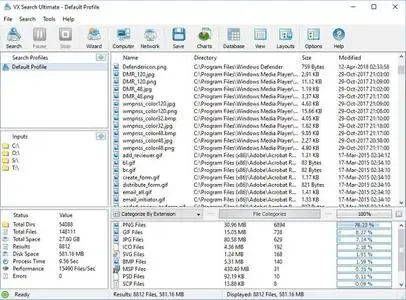
The VX Search main GUI application allows one to execute file search operations, review file search results, categorize and filter search results, perform file management operations, export reports, generate pie and bars charts, export search results to an SQL database and much more.
File Search Dialog
VX Search allows one to search files by the file type, category, ✅File Name, location, ✅File Size, creation, modification and last access dates, file attributes, JPEG EXIF tags, etc. In addition, users are provided with the ability to specify sophisticated, multi-level file search rules capable of searching files by multiple criteria combined with logical operators.
Searching Files in Network Servers and NAS Storage Devices
VX Search allows one to scan the network, discover network servers and NAS storage devices, automatically detect all accessible network shares and search files in hundreds of network servers and NAS storage devices.
File Search Results Charts
The VX Search charts dialog provides the ability to generate various types of pie and bars charts, edit the chart's title and footer and copy charts to the clipboard making it very simple to integrate VX Search charts into user's custom reports and presentations.
File Search Reports
VX Search allows one to export HTML, PDF, Excel, text, XML and CSV reports. In addition, the user is provided with the ability to save search results into the VX Search native report format and export search results to an SQL database.
Conditional File Search Actions
Power computer users and IT administrators are provided with the ability to execute custom actions when a search operation finds a user-specified number of files. VX Search allows one to specify the number of search results that should trigger an action and select the action type to perform such as save a report file, export results to an SQL database or send an E-Mail notification.
Supported Operating Systems:
Windows XP, Vista, 7, 8, 8.1, 10 Server 2003, 2008, 2008 R2, 2012, 2012 R2, 2016
Home Page -
Код:
https://www.vxsearch.com/

Rapidgator
Код:
https://rapidgator.net/file/98c89e1ea362cf46b6cf49d0568a27a1/gia0l.VX.Search.18.2.34.rar.html

Код:
https://nitroflare.com/view/3AB2328E5E02E1E/gia0l.VX.Search.18.2.34.rar
 
Windows 11 AIO 16in1 23H2 Build 22631.7219 (No TPM Required) Preactivated June 2026

887d5bee9411fee81bf5af2495e7f536.webp


Windows 11 AIO 16in1 23H2 Build 22631.7219 (No TPM Required) Preactivated June 2026 This is the latest version of Windows OS releases, with new interface and other new features like new Microsoft Store, a new personalized feed powered by AI and best-in-class browser performance from Microsoft Edge, Chat from Microsoft Teams integrated in the taskbar and many more.

Editions Includes
1. "Windows 11 Home"
2. "Windows 11 Home N"
3. "Windows 11 Pro"
4. "Windows 11 Pro N"
5. "Windows 11 Home Single Language"
6. "Windows 11 Enterprise"
7. "Windows 11 IoT Enterprise"
8. "Windows 11 IoT Enterprise Subscription"
9. "Windows 11 Enterprise multi-session"

Windows (x64) | Languages: English | File Size: 6.54 GB


10. "Windows 11 Education"
11. "Windows 11 Pro Education"
12. "Windows 11 Pro for Workstations"
13. "Windows 11 Enterprise N"
14. "Windows 11 Education N"
15. "Windows 11 Pro Education N"
16. "Windows 11 Pro N for Workstations"

What's New

System Requirements For Windows 11
Processor: 2 gigahertz (GHz) or faster.
RAM: 2 gigabyte (GB).
Free space on hard disk: 25 gigabytes (GB).
Graphics card: DirectX 9 graphics device or a newer version.
Additional requirements to use certain features.
To use touch you need a tablet or monitor that supports multitouch.
To access the Windows store to download and run apps, you need an active Internet connection and a screen resolution of at least 1024 x 768 pixels


HOMEPAGE


Код:
https://www.microsoft.com/en-pk


DOWNLOAD

Код:
https://rapidgator.net/file/364953a74c4456e91ee5220671ce9a3e/Win.11.Aio.23H2.22631.7219.Eng.part1.rar.html
https://rapidgator.net/file/e7b964ebba5c472822dab2c79b45dd18/Win.11.Aio.23H2.22631.7219.Eng.part2.rar.html
https://rapidgator.net/file/3023d5d1b0d3a1759c04d2e47cf33d6a/Win.11.Aio.23H2.22631.7219.Eng.part3.rar.html
https://rapidgator.net/file/f1e93700e96fb30054155d4c6c185968/Win.11.Aio.23H2.22631.7219.Eng.part4.rar.html
https://rapidgator.net/file/d3c889840bcdf9308b11cd1eb7a7abc6/Win.11.Aio.23H2.22631.7219.Eng.part5.rar.html
https://rapidgator.net/file/d53520e16a02182a6d822f3394cc5895/Win.11.Aio.23H2.22631.7219.Eng.part6.rar.html
https://rapidgator.net/file/e8e3a3680acfe1cb3708606c3a0c3f8b/Win.11.Aio.23H2.22631.7219.Eng.part7.rar.html

Код:
https://nitroflare.com/view/3E39E9BBF57DC5F/Win.11.Aio.23H2.22631.7219.Eng.part1.rar
https://nitroflare.com/view/C0B09F7AFC39593/Win.11.Aio.23H2.22631.7219.Eng.part2.rar
https://nitroflare.com/view/C0C51B6F4847F24/Win.11.Aio.23H2.22631.7219.Eng.part3.rar
https://nitroflare.com/view/6B1C1D1A3A9B830/Win.11.Aio.23H2.22631.7219.Eng.part4.rar
https://nitroflare.com/view/FBC35A75228E794/Win.11.Aio.23H2.22631.7219.Eng.part5.rar
https://nitroflare.com/view/07C5E03869A2D65/Win.11.Aio.23H2.22631.7219.Eng.part6.rar
https://nitroflare.com/view/144462765DF0438/Win.11.Aio.23H2.22631.7219.Eng.part7.rar
 
Wipe Professional 2026.07 Multilingual

0c5ffb8136e074dadb22e9d418e5e637.webp


Wipe Professional 2026.07 Multilingual The primary function of this utility is to put the utmost importance on the privacy and performance of your computer. Our software deletes temporary files, caches, cookies, Internet history, and more, thus freeing up valuable disk space. Deleting unnecessary files can be especially great for those running their systems on smaller SSDs. As a result of the software, you'll receive maximum confidentiality, so prying eyes won't be able to spy on you, record your activities, or do anything malicious.

File size: 6.1 MB


Over 2500 zones supported
Unlike other privacy software on the market that only remove cookies and browser history, our software can dive deeper. The program removes junk files that are created while surfing the Internet. These files don't only waste valuable space, but also allow software developers to track you and use that data to sell or promote their products and services.

Huge list of supported areas
In the latest version of our software, we have put a higher importance on cleaning. Unlike our competitors who routinely add tools to their software that are unrelated to cleaning and end up wasting your time; we do things differently. Our main focus is simple - make your computer clean and private. And we do it best.

Whats New

System Requirements: Windows 7, 8, 10, or 11 (Supports the latest OS updates)


HOMEPAGE


Код:
https://www.privacyroot.com/software/website/freeware-en-welcome.html


DOWNLOAD

Код:
https://rapidgator.net/file/56eeb6da8f5d8b20b55cca02d310bf48/Wipe_Professional_2026.07.7z.html

Код:
https://nitroflare.com/view/F18F7A5FB2F6338/Wipe_Professional_2026.07.7z
 
Zoner Photo Studio X 19.2606.2.697 (x64)

a8baabeb919104ac4344b998f643fb55.webp

Zoner Photo Studio X 19.2606.2.697 (x64) | 156.2 Mb
Make every photo better with Zoner Photo Studio X! Your Lightroom® and Photoshop® alternative. ZPS X is the most universal photo software there is. RAW processing. Layer support. Presets. Retouching tools. Video editing. Cataloging. It's all there.


RAW and JPG Editing
Need to handle a giant RAW file? Or maybe 100 photos at once? ZPS X has your back.
An Editor With Layer Support
Thanks to layers and masks, you'll handle cloning, collages, and other photo tricks with ease.
Retouching Tools
The unique retouching brush and the faces tool make portrait enhancement a snap.
Video Editor
Turn your photos into a video, a presentation, or a time-lapse without switching software. Take care of it all in ZPS X.
Presets
Change a photo's whole mood in just one click with one of the best-loved features in ZPS X.
Cataloging
Easily organize hundreds of photos-or thousands. Browse them by date, shot location, keywords, or folders.
Improving Every Day
Several times each year we add a new heap of features and improvements to ZPS X.
Take a look at everything we've already added to ZPS X:
- Faster Work with RAWs
- Transfer Edits Easily Between RAW and JPG
- Face Liquify
- New Distortion Tools
- New Video Clip Tools- Slow & Fast Motion plus Flipping
- A New Video Making Tool
- Importing and Exporting Presets
- Organizing presets into folders
- Linking Zoner Photo Cloud with the Catalog
- Zoner Photo Cloud
- Faster RAW reloading
- New presets
- New Auto-Enhancements
- Improved layer control
- Artificial intelligence
- Non-destructive Smoothing Brush
- Non-destructive Structure Cloning
- Polarizing filter
- Full support for HEIF
- Improved work with masks and layers
- Unlimited photo books layout editing
- Non-destructive retouching brush
- Adjustment Layers
- Tablet pressure support
- Major new video features
- Better contact sheet maker
- Clarity setting
- Batch edits in the Develop module
- Multi-selections
- Photo-print orders from inside of the program
- Filter Brush
- Refine Selection
- New Automatic Edits
- Radial Filter
- Smart Sharpen
- Smart Blur
- Dodge and Burn tools
- Advanced noise reduction in Develop
Automatic Import
ZPS X sees when you attach your camera, imports your photos, and sorts them into folders.
Your Photos, Organized
Sort photos by location, date, folders, or keywords in a flash.
Easy Sharing
ZPS X is the only program that lets you share photos to Instagram. And every other social network is a snap too.
Printing Straight from the Program
You don't have to go anywhere else to order prints, photo books, or calendars. You can do it all straight from ZPS X.
Requirements:Zoner Photo Studio X supports Windows 7, 8 and 10.
Home Page -
Код:
https://www.zoner.com

Rapidgator
Код:
https://rapidgator.net/file/823b214d9fa8152524faf056c30b5154/y19xc.Zoner.Photo.Studio.X.19.2606.2.697.x64.rar.html

Код:
https://nitroflare.com/view/9DB25C812887792/y19xc.Zoner.Photo.Studio.X.19.2606.2.697.x64.rar
 
Adobe Acrobat Pro 2026.001.21677 by m0nkrus [Multilanguage]

9cc847a9696984f2ffaa97fabd6ed52f.webp


Adobe Acrobat Pro 2026.001.21677 by m0nkrus (MULTi/RUS) Free Download


Adobe Acrobat Pro 2026 is the latest professional PDF solution from Adobe, offering powerful tools for creating, editing, converting, signing, organizing, and securing PDF documents. Enhanced with Adobe Document Cloud services, Acrobat Pro provides a complete document management platform accessible from desktop, mobile, and web devices.

Whether you're working in the office, at home, or on the move, Adobe Acrobat Pro 2026 allows you to manage your PDF workflow efficiently while keeping your documents synchronized across all devices.


Adobe Acrobat Pro 2026 Overview

Adobe Acrobat Pro remains the industry-leading PDF editor trusted by businesses, professionals, educators, and organizations worldwide. The software enables users to create high-quality PDF documents, edit existing files, convert paper documents into searchable PDFs, and securely share information with advanced protection features.

With integrated cloud services and AI-powered productivity tools, Acrobat Pro 2026 streamlines document workflows and enhances collaboration across teams.

Key Features of Adobe Acrobat Pro 2026

  • Create, edit, and organize PDF documents professionally.
  • Convert PDF files to Microsoft Word, Excel, and PowerPoint formats.
  • Merge multiple documents into a single PDF file.
  • Create fillable and interactive PDF forms.
  • Advanced OCR technology for scanned documents.
  • Password protection and document security controls.
  • Electronic signature and document approval workflows.
  • Cloud synchronization across desktop and mobile devices.
  • Edit scanned PDFs instantly.
  • Add multimedia content including audio and video.
  • Redact confidential information permanently.
  • Automate repetitive PDF tasks with guided actions.

Professional PDF Management Tools

Adobe Acrobat Pro 2026 simplifies document management by allowing users to:

  • Combine documents, spreadsheets, emails, and presentations into one PDF.
  • Convert paper documents into editable and searchable digital files.
  • Protect sensitive information with advanced security options.
  • Share and track documents securely.
  • Access files from any location or device.
  • Collaborate efficiently with colleagues and clients.

Electronic Signature Solution

Trusted on more than a billion devices worldwide, Adobe Acrobat Sign enables legally binding electronic signatures from virtually any device. Users can send, sign, track, and archive signed documents through a simple and secure workflow.

The integrated e-signature platform helps businesses accelerate approvals, reduce paperwork, and improve productivity.

What's New in Adobe Acrobat Pro 2026

  • PDF Workspaces - Create dedicated PDF spaces when merging files to better organize related documents and notes.
  • Expanded Language Support - Generate presentation slides with Adobe Express in German, Portuguese, Spanish, English, and French.
  • PDF-to-Podcast Technology - Convert PDF documents into audio content for convenient listening and accessibility.
  • Audio Summaries - Create and listen to short audio summaries of lengthy reports and documents.
  • Microsoft Word Integration - Create PDF Workspaces directly from Microsoft Word documents and launch them automatically in Acrobat.

Advanced PDF Editing Features

  • Edit text and images directly within PDF files.
  • Rearrange, delete, rotate, and organize pages.
  • Convert scanned images into editable content.
  • Export PDFs to Office formats while preserving formatting.
  • Optimize files for sharing and archiving.
  • Support for touch-enabled devices and tablets.

Benefits of Adobe Acrobat Pro 2026

  • Industry-leading PDF editing technology.
  • Comprehensive document management platform.
  • Cloud-based workflow synchronization.
  • Professional OCR scanning capabilities.
  • Advanced security and encryption features.
  • Integrated electronic signature solution.
  • Cross-platform compatibility.
  • Modern touch-optimized user interface.

System Requirements

  • Intel or AMD processor running at 1.5 GHz or faster.
  • Microsoft Windows 11 (64-bit).
  • Microsoft Windows 10 version 1809 or later (64-bit).
  • Windows Server 2016-2019.
  • Compatible with Windows 7 SP1, Windows 8.x, and Windows Server 2008 R2-2012 R2 in modified builds.
  • 2 GB RAM minimum.
  • 4.5 GB available disk space.
  • Display resolution of 1024 x 768 or higher.
  • Optional hardware video acceleration support.

m0nkrus Release Information

  • Updated from version 21.1.20135 to version 26.1.21677.
  • Modern Creative Cloud-style installer interface added.
  • Installation support unlocked for older Windows versions.
  • Adobe Genuine Software Integrity Service removed.
  • Automatic Acrobat update service disabled.
  • Log Transport Application and Adobe Crash Processor modules disabled.
  • Ready-to-use build after installation.

Why Choose Adobe Acrobat Pro 2026?

Adobe Acrobat Pro 2026 delivers everything needed for professional PDF creation, editing, collaboration, and document security. From advanced OCR scanning and cloud synchronization to electronic signatures and AI-enhanced productivity features, Acrobat remains the ultimate PDF solution for business and personal use.

What's New in Adobe Acrobat Pro

Код:
https://helpx.adobe.com/acrobat/using/whats-new.html

Program Information:
Year of release: 2026
Platform: Windows® 11/10
Interface language: Multilanguage / Russian / English
Medicine: not required / pre-activated
File size: 1.5/1.6 GB


Rapidgator
Код:
https://rapidgator.net/file/976705f180cd3ea68e507466cc03b10f/Adobe.Acrobat.2026.u9.x64.rar.html
https://rapidgator.net/file/5b239cc5cd4ca5f92ff6483fcd6fcd69/Adobe.Acrobat.2026.u9.x86.rar.html

Код:
https://nitroflare.com/view/C3C278FE60573C9/Adobe.Acrobat.2026.u9.x64.rar
https://nitroflare.com/view/335B8EC03616742/Adobe.Acrobat.2026.u9.x86.rar
 
Adobe Media Encoder 2026 v26.3.0.78 Portable by 7997 [Multilanguage]

c87ae9781f60b89a1bcda8ae2f9a4591.webp


Adobe Media Encoder 2026 v26.3.0.78 Portable by 7997 (MULTi/RUS) Free Download


Adobe Media Encoder 2026 v26 Portable is a powerful media processing and transcoding application designed for professional video and audio workflows. As Adobe's dedicated encoding engine, it allows users to import, convert, compress, create proxy files, and export media content into virtually any popular format.

Fully integrated with Adobe Premiere Pro, After Effects, and other Creative Cloud applications, Adobe Media Encoder streamlines content production while offering high-performance batch processing and advanced export capabilities.


Adobe Media Encoder 2026 Overview

Adobe Media Encoder is the industry-standard media encoding solution trusted by video editors, filmmakers, broadcasters, content creators, and post-production professionals worldwide.

The software supports a wide range of formats and codecs, allowing users to efficiently process media for web, broadcast, social media, streaming platforms, mobile devices, and digital cinema workflows.

This portable edition requires no installation and can be used directly from any storage device without modifying the Windows registry.

Key Features of Adobe Media Encoder 2026

  • Professional video and audio transcoding engine.
  • Batch processing for multiple media files simultaneously.
  • Create proxy media for smoother editing workflows.
  • Export content to virtually any popular media format.
  • Deep integration with Adobe Premiere Pro and After Effects.
  • Support for modern broadcast and cinema delivery formats.
  • High-performance hardware-accelerated encoding.
  • Advanced queue management system.
  • Automated workflow optimization.
  • Portable version with no installation required.

Professional Media Encoding Tools

Adobe Media Encoder provides everything needed for efficient media production:

  • Convert video and audio files between multiple formats.
  • Compress large media files without sacrificing quality.
  • Generate optimized output for YouTube, Vimeo, Facebook, and streaming platforms.
  • Create proxy files for high-resolution editing projects.
  • Process multiple projects in batch mode.
  • Manage encoding jobs through an advanced queue system.

What's New in Adobe Media Encoder 2026

  • Enhanced YouTube Publishing - Select channels, playlists, titles, and custom thumbnails directly during export.
  • Facebook & Vimeo Publishing - Improved social media publishing workflow.
  • Adaptive H.264 Bitrate Encoding - Automatically selects the optimal bitrate based on source resolution and frame rate.
  • GIF Animation Export - Native support for animated GIF creation on Windows and macOS.
  • Improved Time Tuner Effect - More accurate duration adjustments without affecting content quality.
  • Optimized H.264 Presets - Updated encoding presets for better performance and compatibility.
  • RF64 WAV Support - Support for large audio file encoding and decoding.
  • Sony X-OCN Decoding - Improved compatibility with professional Sony camera formats.
  • QuickTime DNx Smart Rendering - Faster rendering and export workflows.
  • Enhanced Timecode Management - Better support for professional broadcast production.

Broadcast & Cinema Production Features

Adobe Media Encoder includes advanced tools designed for professional studios and broadcasters:

  • AS-11 DPP broadcast package creation.
  • Dolby Digital Plus encoding support.
  • Blu-ray compatible Dolby audio formats.
  • Expanded XAVC HD, 2K, and 4K support.
  • Additional XDCAM workflow options.
  • Digital Cinema Package (DCP) export via QuVIS Wraptor.
  • Professional MXF workflow support.

Supported Workflows

  • YouTube content production.
  • Professional video editing.
  • Broadcast television delivery.
  • Cinema mastering workflows.
  • Corporate video production.
  • Social media publishing.
  • Podcast and audio production.
  • Proxy-based editing pipelines.

System Requirements

  • Windows 10 or Windows 11 (64-bit, version 22H2 or later).
  • 6th Generation Intel processor or AMD Ryzen 1000 series with AVX2 support.
  • 8 GB RAM minimum (16 GB recommended for HD workflows).
  • 32 GB RAM recommended for 4K media production.
  • 8 GB available storage space.
  • DirectX-compatible graphics card with at least 2 GB VRAM.
  • 8 GB VRAM recommended for demanding workflows.
  • 1024x768 display resolution minimum.
  • Internet connection required for online services.

Portable Edition Advantages

  • No installation required.
  • Does not modify the Windows registry.
  • Runs directly from external drives or portable storage devices.
  • Supports multiple interface languages.
  • No additional system libraries required.
  • Ideal for professional mobile workflows.

Supported Languages

English, German, French, Spanish, Italian, Japanese, Korean, Dutch, Polish, Portuguese (Brazil), Russian, Swedish, Turkish, Czech, Simplified Chinese, Traditional Chinese, and more.

Why Choose Adobe Media Encoder 2026?

Adobe Media Encoder 2026 is an essential tool for anyone working with professional video and audio content. Its advanced encoding engine, extensive format support, batch processing capabilities, and seamless integration with Adobe Creative Cloud applications make it one of the most powerful media conversion solutions available today.

Whether you're exporting content for YouTube, television, cinema, social media, or enterprise production environments, Adobe Media Encoder delivers reliable, high-quality results with maximum efficiency.

What's New in Adobe Media Encoder

Код:
https://helpx.adobe.com/tr/media-encoder/using/whats-new.html

Information about the Portable build
The program launch file "EncoderPortable.exe".
Doesn't require installing libraries on the system. Leaves no traces in the system.
and registry.
Switch language:
Edit\Settings\Appearance\Language:
Edit\Preferences\Appearance\Language:
OK
Available languages:
cs_CZ, de_DE, en_US, es_ES, fr_FR, it_IT,
ja_JP, ko_KR, nl_NL, pl_PL, pt_BR, ru_RU,
sv_SE, tr_TR, zh_CN, zh_TW.
Folders:
Documents\Adobe\Adobe Media Encoder
Documents\Adobe\Common
Documents\Adobe\Premiere Pro
located in
Media Encoder\App\Documents\Adobe
will be generated when the program is launched.
To reset language settings, delete
Media Encoder\App\Documents\Adobe\Adobe Media Encoder\26.0\AMEPrefs.xml

Program Information:
Year of release: 2026
Platform: Windows® 11/10 (64-bit only)
Interface language: Multilanguage / Russian / English
Medicine: not required / pre-activated
File size: 1.32 GB


Rapidgator
Код:
https://rapidgator.net/file/6182070d6e38f88bb5d3e965303c8546/Adobe_Media_Encoder_2026_26.3.0.78_Portable.7z.html

Код:
https://nitroflare.com/view/D3469090525AD47/Adobe_Media_Encoder_2026_26.3.0.78_Portable.7z
 
Adobe Photoshop Lightroom Classic 2026 v15.4.0.7 Portable by 7997 [Multilanguage]

f14db2f8f4bcd5b3f8519b93e43aa51f.webp

Adobe Photoshop Lightroom Classic 2026 v15.4.0.7 Portable by 7997

Adobe Photoshop Lightroom Classic 2026 is a graphics editor and cataloger for your digital photos. It's arguably the best program in its class for this functionality. Users can organize their collection of graphic files into one or more catalogs and easily navigate, process, select, and search for the content they need. This graphics application is ideal for photographers who regularly manage large numbers of photos, as well as for casual users who regularly take photos and share them on social media.

In general, Lightroom is designed exclusively for photographers interested in processing and cataloging photos, rather than integrating everything. Another unique feature of Photoshop Lightroom is its division of the photo-editing process into distinct stages. Each stage has its own dedicated module with a corresponding set of tools and adjustment palettes.


Lightroom 's functionality includes not only a RAW converter and image processing tools, but also a powerful photo cataloging system, as well as tools for creating slideshows and web pages. Like many modern RAW converters, Lightroom utilizes non-destructive editing. This means that information about all user operations and adjustments is recorded in a service file, while the original image remains unchanged. This approach not only minimizes the risk of permanently losing the original images being processed, but also allows for the creation and printing of multiple versions of the same image without the need to save a corresponding number of full-size graphic files, which quickly eat up hard drive space. After finishing work on a photo, the user can save the processed version as a separate graphic file.

The updated Lightroom Classic app with improved performance lets you import photos, create previews, and instantly switch between Library and Develop modes.
The Boundary Warp feature lets you stretch the edges of a merged panorama, eliminating the need to sacrifice important image details.
With HDR Merge, you can easily create natural or fantastical images. Combine multiple shots with different exposures to create images with dynamic range.

New and improved features in Adobe Lightroom Classic:
• New name: Lightroom Classic
Your favorite photo editor has a new name, but it remains the industry-leading desktop digital photo app.
• Significant increase in productivity
Experience improved performance when launching your app, creating previews, switching from the Develop module to the Library module, moving sliders and brushes, and more.
• Speed ��up image selection
The improved Embedded Preview process speeds up image selection during import.
• Range masking for precise adjustments to a selected area
Select colors and subtle shades for localized adjustments. Use the Local Adjustment Brush, Radial Filters, or Graduated Filters to create a rough mask, then refine the selected area with the new Range Masking feature set.

The program has five modules:
Uploading, cataloging, and searching photos (Library)
Correcting color and tonal parameters of images (Develop)
Creating a Slideshow
Print
Creating web pages to publish image collections on the Internet (Web)

Key features of Adobe Photoshop Lightroom Classic:
An intuitive environment with tools designed specifically for photographers.
Organize, rate, and copyright images.
Creating image presets.
Photoshop integration.
Adjust settings for multiple images with one click.
Cross-platform - support for 64-bit architecture, Mac OS and Windows platforms.
DSLR video file support - Interoperability with most digital SLR cameras allows you to easily manage and organize your still photos and videos.
Adding watermarks - embedding a logo (text or graphic watermark) into an image, adjusting the size, position and opacity.
Quick image import-the import interface is easy to navigate and includes clear visual indicators of where and how photos will be arranged after import.
Perspective correction is a non-destructive way to correct the perspective of an image.
Flexible print settings. Tools allow you to drag and drop one or more images onto the page, then resize and reposition them.
Lens correction is the correction of lens defects such as geometric distortion, chromatic aberration, vignetting, etc.
Upload to the Web - the ability to upload images to Facebook, SmugMug, and Flickr. When you add comments to your photos, these messages instantly appear in your Adobe Photoshop Lightroom library next to the corresponding photos.
Create slideshows with music. Finished slideshows are easy to share with others by exporting (including high-resolution versions).
Computer-assisted photography-instant import and display of photos after the camera captures them.
Film grain simulation. These tools allow you to easily control the grain parameters that can be applied to an image to simulate the look of film.

System requirements :
• 64-bit version of Microsoft Windows 10/11 (version 22H2 or later); 64-bit version of Microsoft Windows 10/11
• Intel or AMD processor with a clock speed of at least 2 GHz with support for 64-bit OS and SSE 4.2
• 8 GB RAM (16 GB recommended)
• 4 GB of available hard disk space; additional free space is required during installation
• Video card with 2 GB of video memory and DirectX 12 support (4 GB recommended for displays with 4K resolution and higher)
• Resolution 1024x768 (1920x1080 or higher recommended)

Assembly information

Run in the system language. Available languages:
en,de,fr,ja,zh_cn,zh_tw,nl,it,co,pt,es,sv,ru,th.
Change language: Edit, Settings, Language (Russian), OK.
If necessary, delete or edit CameraRaw, path:
Lightroom\App\ProgramData\Adobe\CameraRaw.
If necessary, remove Plug-Ins, path:
Lightroom\App\Program Files\Common Files\Adobe\Plug-Ins
Does not require installation of libraries in the system.
Leaves no traces in the system or registry.

Whats New in Adobe Photoshop Lightroom Classic

Код:
https://helpx.adobe.com/ru/lightroom-classic/help/whats-new.html?trackingid=P3KMQNLV&mv=in-product

Program Information:
Year of release: 2026
Platform: Windows® 11/10 (64-bit only)
Interface language: Multilanguage / Russian / English
Medicine: not required / pre-activated
File size: 2.15 GB


Rapidgator
Код:
https://rapidgator.net/file/345e4e963d87ec0eed80844168226513/Lightroom_Classic_2026_15.4.0.7_Portable.7z.html

Код:
https://nitroflare.com/view/3DDF7DB01D464B2/Lightroom_Classic_2026_15.4.0.7_Portable.7z
 
Adobe Photoshop 2026 v27.8.0.13 RePack by KpoJIuK [Multilanguage]

766373f3c53b9d457e9ee2fc1c3592a8.webp


Adobe Photoshop 2026 v27.8.0.13 RePack by KpoJIuK (MULTi/RUS)

Adobe Photoshop 2026 v27 is the world's leading professional image editing and graphic design software, built to bring any creative idea to life with powerful tools and AI-driven features.


Overview
Adobe Photoshop 2026 allows users to create, edit, and enhance photos, illustrations, and digital artwork with industry-leading precision. It is widely used for photo retouching, digital painting, web design, branding, and 3D graphics creation.


Key Features

Creative Design & Illustration
  • Create posters, banners, logos, icons, and website layouts
  • Design digital illustrations and concept artwork
  • Build 3D graphics for print and animation
  • Use advanced brushes for smooth strokes and curves

Professional Photo Editing
  • Retouch, crop, and enhance images with precision tools
  • Remove unwanted objects and restore old photos
  • Adjust colors, lighting, and apply effects
  • Transform photos into artistic compositions

Digital Art & Creativity
  • Turn images into paintings and creative artwork
  • Create textures, patterns, and visual effects
  • Work with layers for full creative control
  • Support for high-resolution projects

Improved Features in Photoshop 2026
  • Enhanced brush management with folders and presets
  • Improved performance for large documents and brushes
  • Lightroom Cloud integration for instant photo access
  • Smoother brush stroke anti-aliasing for cleaner lines
  • Variable font support with full typography control
  • Curvature Pen Tool for faster path creation
  • Improved layer copy & paste functionality
  • HEIF image format support with depth data
  • Improved Select & Mask accuracy and speed
  • Overall performance and stability improvements

AI & Next-Generation Features
  • Generative AI tools with multiple model support (Firefly, Gemini 2.5, FLUX.1 Kontext)
  • Harmonize tool for realistic object blending into backgrounds
  • Generative Upscale up to 2x-4x resolution enhancement
  • Improved AI subject selection (hair, edges, complex objects)
  • Cloud-based collaboration projects
  • Live co-editing for real-time teamwork

System Requirements
  • Windows 10 (21H2/22H2) or Windows 11 (23H2/24H2), 64-bit
  • Multi-core Intel/AMD CPU with SSE4.2 and AVX2 support
  • 8 GB RAM minimum (16 GB recommended)
  • 10 GB free disk space (SSD recommended)
  • GPU with 1.5 GB VRAM (4 GB recommended for 4K)
  • DirectX 12 support
  • 1280x800 display minimum (1920x1080 recommended)
  • Internet connection required for activation and cloud features

Why Choose Photoshop 2026
  • Industry-leading professional editing software
  • Advanced AI-powered creative tools
  • Fast and optimized performance
  • Seamless Adobe ecosystem integration
  • Suitable for beginners and professionals

Assembly information

1. Two-click installation
2. The Creative Cloud app doesn't clutter your system-it only leaves the bare minimum.
3. All localizations are included and can be selected during installation (de-DE, en-US, ru-RU, uk-UA are pre-installed)
4. The original installer is used, problems with other products are excluded

Generative fill doesn't work
Free alternative: Stable Diffusion, paid alternative: Flexy

Command line options :
-S or -S1 - hide the window with the progress of unpacking temporary files
-S2 - show a window with the progress of unpacking temporary files
-S or -S1 or -S2 is a required parameter.

/XPATH="PATH" - specify the installation location.
Default: C:\Program Files\Adobe\Adobe Photoshop 2026

/XVCR - install Visual C++ Redistributable Package (required for the program to work)

Пример: INSTALL.EXE -S /XPATH="C:\Program Files\Adobe\Adobe Photoshop 2026»

Program Information:
Year of release: 2026
Platform: Windows® 11/10 (64-bit)
Interface language: Multilanguage / Russian / English
Medicine: not required / pre-activated
File size: 4.35 GB


Rapidgator
Код:
https://rapidgator.net/file/33f484b92f5f5b5100041fb8838f5a95/Adobe.Photoshop.2026.v27.8.0.13.part1.rar.html
https://rapidgator.net/file/4b7b6f968a897bbe1d6dfaf90b3ecf5d/Adobe.Photoshop.2026.v27.8.0.13.part2.rar.html
https://rapidgator.net/file/cc3c15a215db73d4c5bee2804a8acc87/Adobe.Photoshop.2026.v27.8.0.13.part3.rar.html
https://rapidgator.net/file/9a10094c27a57f25c41862d525275a72/Adobe.Photoshop.2026.v27.8.0.13.part4.rar.html
https://rapidgator.net/file/a84034cc55739c544f9dda57f3c9c9ca/Adobe.Photoshop.2026.v27.8.0.13.part5.rar.html

Код:
https://nitroflare.com/view/235FAE7DD23FD63/Adobe.Photoshop.2026.v27.8.0.13.part1.rar
https://nitroflare.com/view/F03A67CA1DC911A/Adobe.Photoshop.2026.v27.8.0.13.part2.rar
https://nitroflare.com/view/3B23AC5838FD3DF/Adobe.Photoshop.2026.v27.8.0.13.part3.rar
https://nitroflare.com/view/3B78BCCBCD3E068/Adobe.Photoshop.2026.v27.8.0.13.part4.rar
https://nitroflare.com/view/D3754FBD7000E75/Adobe.Photoshop.2026.v27.8.0.13.part5.rar
 
Adobe Photoshop Lightroom Classic v15.4.0.7 RePack by KpoJIuK [Multilanguage]

5208ed94e4c91c776df985231219c3eb.webp

Adobe Photoshop Lightroom Classic v15.4.0.7 RePack by KpoJIuK

Adobe Photoshop Lightroom Classic is a graphics editor and cataloger for your digital photos. It's arguably the best program in its class for this functionality. Users can organize their collection of graphic files into one or more catalogs and easily navigate, process, select, and search for the content they need. This graphics application is ideal for photographers who regularly manage large numbers of photos, as well as for casual users who regularly take photos and share them on social media.

In general, Lightroom is designed exclusively for photographers interested in processing and cataloging photos, rather than integrating everything. Another unique feature of Photoshop Lightroom is its division of the photo-editing process into distinct stages. Each stage has its own dedicated module with a corresponding set of tools and adjustment palettes.


Lightroom 's functionality includes not only a RAW converter and image processing tools, but also a powerful photo cataloging system, as well as tools for creating slideshows and web pages. Like many modern RAW converters, Lightroom utilizes non-destructive editing. This means that information about all user operations and adjustments is recorded in a service file, while the original image remains unchanged. This approach not only minimizes the risk of permanently losing the original images being processed, but also allows for the creation and printing of multiple versions of the same image without the need to save a corresponding number of full-size graphic files, which quickly eat up hard drive space. After finishing work on a photo, the user can save the processed version as a separate graphic file.

The updated Lightroom Classic app with improved performance lets you import photos, create previews, and instantly switch between Library and Develop modes.
The Boundary Warp feature lets you stretch the edges of a merged panorama, eliminating the need to sacrifice important image details.
With HDR Merge, you can easily create natural or fantastical images. Combine multiple shots with different exposures to create images with dynamic range.

The program has five modules:
Uploading, cataloging, and searching photos (Library)
Correcting color and tonal parameters of images (Develop)
Creating a Slideshow
Print
Creating web pages to publish image collections on the Internet (Web)

Key features of Adobe Photoshop Lightroom Classic:
An intuitive environment with tools designed specifically for photographers.
Organize, rate, and copyright images.
Creating image presets.
Photoshop integration.
Adjust settings for multiple images with one click.
Cross-platform - support for 64-bit architecture, Mac OS and Windows platforms.
DSLR video file support - Interoperability with most digital SLR cameras allows you to easily manage and organize your still photos and videos.
Adding watermarks - embedding a logo (text or graphic watermark) into an image, adjusting the size, position and opacity.
Quick image import-the import interface is easy to navigate and includes clear visual indicators of where and how photos will be arranged after import.
Perspective correction is a non-destructive way to correct the perspective of an image.
Flexible print settings. Tools allow you to drag and drop one or more images onto the page, then resize and reposition them.
Lens correction is the correction of lens defects such as geometric distortion, chromatic aberration, vignetting, etc.
Upload to the Web - the ability to upload images to Facebook, SmugMug, and Flickr. When you add comments to your photos, these messages instantly appear in your Adobe Photoshop Lightroom library next to the corresponding photos.
Create slideshows with music. Finished slideshows are easy to share with others by exporting (including high-resolution versions).
Computer-assisted photography-instant import and display of photos after the camera captures them.
Film grain simulation. These tools allow you to easily control the grain parameters that can be applied to an image to simulate the look of film.

Benefits of the latest version of Adobe Lightroom Classic

- Rejection with the help of
Quickly select the best frames from a large set of images using the "Culler with" feature. This feature is currently in early access.

- Auto-selection
Easily group images by time and visual similarity. You can also use the "Collection" filter in the Attributes panel.

- Dust removal
Quickly find and remove spots caused by dust on your camera sensor or lens.

- Performance improvements
Achieve significant productivity gains with a smoother, faster, and more accurate user experience when performing interactive editing tasks.

- Scaling when cropping
You can now zoom in while cropping an image for the best selection.

- Support for shooting with a connected Leica camera
Lightroom Classic now supports tethered shooting for Leica cameras.

- Color deviation
Fine-tune the overall tone and color of your photo using the Variance slider in the Spot Color tool.

System requirements :
• 64-bit version of Microsoft Windows 10 (version 22H2) / Windows 11 (version 23H2 or 24H2); 64-bit version of Microsoft Windows 10 / 11
• Intel or AMD processor with a clock speed of at least 2 GHz, with support for SSE 4.2 and AVX2; without AVX2
• 8 GB RAM (16 GB recommended)
• 8 GB of available hard disk space (additional free space required during installation); SSD recommended
• Graphics card with 2GB of video memory and DirectX 12 support (4GB recommended for 4K displays or higher; 8-16GB for maximum GPU acceleration and AI support)
• Resolution 1024x768 (1920x1080 or higher recommended)
• Internet connection and registration are required to access online services.

Assembly information

1. Two-click installation
2. The Creative Cloud app doesn't clutter your system-it only leaves the bare minimum.
3. All localizations are included and can be changed in the program settings.
4. The original installer is used, problems with other products are excluded

Command line options :
-S or -S1 - hide the window with the progress of unpacking temporary files
-S2 - show a window with the progress of unpacking temporary files
-S or -S1 or -S2 is a required parameter.

/XPATH="PATH" - specify the installation location. Default: C:\Program Files\Adobe\
Please note that due to the peculiarities of the official installer, "Adobe Lightroom Classic" will be added to the selected path, so in most cases you should select C:\Program Files\Adobe

/XVCR - install Visual C++ Redistributable Package (required for the program to work)

Пример: INSTALL.EXE -S /XPATH="C:\Program Files\Adobe» /XVCR

Whats New in Adobe Photoshop Lightroom Classic

Код:
https://helpx.adobe.com/ru/lightroom-classic/help/whats-new.html?trackingid=P3KMQNLV&mv=in-product

Program Information:
Year of release: 2026
Platform: Windows® 11/10 (64-bit only)
Interface language: Multilanguage / Russian / English
Medicine: not required / pre-activated
File size: 2.38 GB


Rapidgator
Код:
https://rapidgator.net/file/76656498bc36ed7de23349c3594a769e/Adobe.Photoshop.Lightroom.Classic.v15.4.0.7.rar.html

Код:
https://nitroflare.com/view/5C54C1C5855FEE0/Adobe.Photoshop.Lightroom.Classic.v15.4.0.7.rar
 
AllMapSoft Google Maps Downloader 8.889

1a174da5768da1430ccd4f6da39bd4d7.jpg


AllMapSoft Google Maps Downloader 8.889 | Size: 25.97 MB
Language: English
​


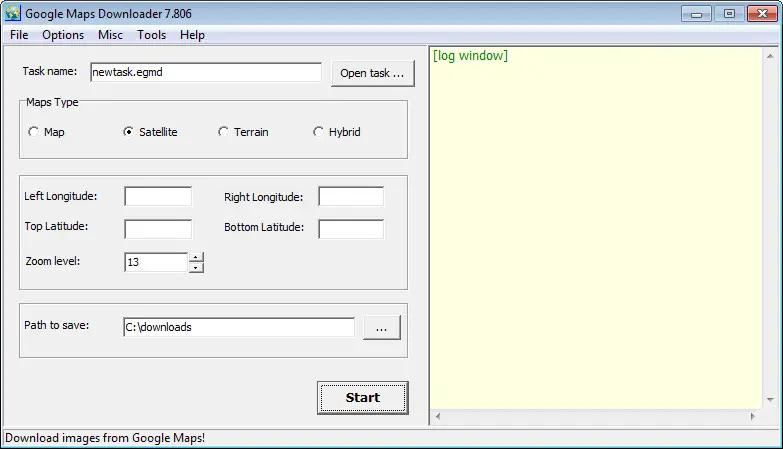
Google Maps Downloader is a tool that help you to get small tile map images from Google Maps. All downloaded small images are saved on the disk. You can view downloaded maps by Map Viewer Or you can combine them into a big BMP map.

HOMEPAGE: Code:
Код:
http://allallsoft.com/


DOWNLOAD LINKS:​


Код:
https://rapidgator.net/file/d9de94bc77c141310b04e69a90e23096/AllMapSoft_Google_Maps_Downloader_8.889.rar.html

Код:
https://nitroflare.com/view/942C5CA815FE537/AllMapSoft_Google_Maps_Downloader_8.889.rar
 
AllMapSoft Google Satellite Maps Downloader 8.418

866ca615cd7cf94c8528da5c416810a2.webp


AllMapSoft Google Satellite Maps Downloader 8.418 | Size: 25.6 MB
Language: English


Google Satellite Maps Downloader is a cute tool that helps you to get small tile satellite images from google maps. All downloaded small images are saved on the disk. You can view downloaded maps by Map Viewer Or you can combine them into a big bmp, jpg, tif, png, ecw, sgi, img, kmz map.

You can use the offline maps in GIS softwares such like Global Mapper, QGIS, TatukGIS, etc. And the exported sqlite database can be used for some APPs, such like RMaps, Locus Map, OruxMaps, MapBox, etc.

Operating System: Windows 7, 8/8.1, 10

HOMEPAGE:
Код:
http://www.allmapsoft.com/


DOWNLOAD LINKS:


Код:
https://rapidgator.net/file/47887d9372c6ce3b074d4dd6484f3474/AllMapSoft_Google_Satellite_Maps_Downloader_8.418.rar.html

Код:
https://nitroflare.com/view/EA16F7C54423EC9/AllMapSoft_Google_Satellite_Maps_Downloader_8.418.rar
 
Назад
Сверху