• Старая версия форума работает в архивном режиме www.old.nado.in

All mitsumi'1s Applications !! (updated daily)

  • Автор темы Автор темы mitsumi1
  • Дата начала Дата начала
PDF Expert 2.5.13 macOS

2b7268104ada8b5bc602309e34d4d65f.jpg


PDF Expert 2.5.13 Multilingual | macOS | 68 mb​
PDF Expert springs into action with smooth scrolling and fast search from the first document you select. PDFs open instantly, whether they are just small email attachments or 2000-page reports.

- Professional Annotation Tool
- Read - An award-winning, lightning-fast, tabbed document viewer will get you through multiple PDFs faster than ever.
- Excellent for Form Filling
- An Easy Way to Sign Documents
- Wide Sharing Options
- Works across all your devices

Compatibility: macOS 10.12 or later, 64bit

Download link:​
Код:
[center][b]rapidgator_net[/b]:
https://rapidgator.net/file/e88de405437e78c22c996400260d24b6/32bzs.PDF.Expert.2.5.13.rar.html

[b]nitroflare_com[/b]:
https://nitroflare.com/view/CD5F489BDCDC08F/32bzs.PDF.Expert.2.5.13.rar[/center]

Links are Interchangeable - No Password - Single Extraction​
 
PDF Search 10.3 macOS

8536a1aa65a7d61d19fe6d60b393e735.jpg


PDF Search 10.3 | macOS | 6 mb​
PDF Search is a utility which has a revolutionary search algorithm especially developed for PDF documents. The time to reach the information in your PDF documents will be minimum with it. It will make you able to find what you are looking for within thousands of documents instantly. It is system integrated. You can start a search directly from system menu bar like Spotlight.

Features
* Ultra-fast search
* Synchronization between iOS and macOS app.
* Page ranking system
* Word distance algorithm
* Keyword placement analyze
* Ability to understand what you mean when you mistype a keyword
* Export search results as a new PDF document which is containing all best pages from most relevant documents. So you can share results as one document.
* Wild-char search ability to search words starting or ending with other words.
* Export current page as PDF easily to share with others
* Folder based navigation
* iCloud folder support
* Tag support
* Bookmark support
* Empower search with similar keywords
* Emphasize power ranking (Header, title, paragraph detection)
* PDF Converter : Convert office documents to PDF
* Export as PDF
* Support for Word, Powerpoint, Pages, Keynote and RTF documents with the integration of PDF Converter app.
* Ability to run as a window app or menu bar app.
* Search specific files
* Higher rank for up-to-date files
* Quick navigation between pages in different documents
* Highlighting keywords in animations
* Insert annotates to pages (Highlight, Underline, Strikethrough)
* Global shortcut key to search
* Backup index database

Compatibility: macOS 10.12 or later 64-bit

Download link:​
Код:
[center][b]rapidgator_net[/b]:
https://rapidgator.net/file/51ac3cc08d048a25a06cfdfb97e17c40/ybmsz.PDF.Search.10.3.rar.html

[b]nitroflare_com[/b]:
https://nitroflare.com/view/1FA6B3DDFFF08E6/ybmsz.PDF.Search.10.3.rar[/center]

Links are Interchangeable - No Password - Single Extraction​
 
Proxifier 4.03

9e9510491effcddc4e58b506eccbe8c9.jpg


Proxifier 4.03 | 5.5 Mb​
Proxifier allows network applications that do not support working through proxy servers to operate through a SOCKS or HTTPS proxy and chains.

Proxy Everything
Redirect connections of any internet app (browser, email, database, game, etc.) through a proxy.

Master Your Corporate Network
Control access to resources. Route all your connections through a single entry point. Update multiple configurations remotely from a single place.

Improve Your Connection
Route internet traffic through faster routes.

Security and Privacy
Lightweight and flexible alternative to VPN. Tunnel your connections through encrypted channels.

Exceed Limitations
Use a proxy as a gateway for your internet activities.

Flexibility
Assign different proxies or chains to different connections using the rule-based system.

Operating System: Windows 7, 8, 10 and Server 2008, 2012, 2016, 2019

Home Page -
У Вас недостаточно прав для просмотра ссылок. Войдите или зарегистрируйтесь.


Download link:​
Код:
[center][b]rapidgator_net[/b]:
https://rapidgator.net/file/06f7c8cc01709629ed55d917129f75c8/rsi1g.Proxifier.4.03.rar.html

[b]nitroflare_com[/b]:
https://nitroflare.com/view/BA74C505A8F4926/rsi1g.Proxifier.4.03.rar[/center]

Links are Interchangeable - No Password - Single Extraction​
 
PullTube 1.5.10 macOS

eaa959445b785cc7df51fad5ed02ee47.jpg


PullTube 1.5.10 Multilingual | macOS | 64 mb​
A beautiful online video downloader for your Mac. PullTube proposes a streamlined workflow for quickly downloading videos from YouTube or Vimeo, provides control over the output quality, and enables you to extract the audio to MP3 or M4A files.

The PullTube app can handle videos of any duration or size, and you get to monitor the download progress within its main window. The utility also integrates with the Notification Center to send completion alerts.

- Supports Youtube, Vimeo, Facebook, Dailymotion, Instagram, Youku and IQY.
- More platforms to be added upon user requests.
- PullTube allows you to download video in any format available
- Convert and save videos to mand m4a
- Nice looking, dark user interface

Compatibility: OS X 10.11 or later 64-bit
Homepage:
У Вас недостаточно прав для просмотра ссылок. Войдите или зарегистрируйтесь.


Download link:​
Код:
[center][b]rapidgator_net[/b]:
https://rapidgator.net/file/7b8eb910351fb0847a9d30232ffb7eb3/pabrj.PullTube.1.5.10.rar.html

[b]nitroflare_com[/b]:
https://nitroflare.com/view/451794DFBD2E487/pabrj.PullTube.1.5.10.rar[/center]

Links are Interchangeable - No Password - Single Extraction​
 
RecoveryTools Gmail Backup Wizard 6.0

495abd820cd3ca2808b9d7910eec5027.jpg


RecoveryTools Gmail Backup Wizard 6.0 | 23.5 Mb​
Gmail Backup Tool is an all-in-one software that gives capability to backup Gmail account in a hassle free manner. With this wizard, the users can backup Gmail data into multiple file saving formats such as PST, MSG, EML, EMLX, MBOX, PDF, HTML, MHT, XPS, RTF, DOC, CSV, etc.

By these conversions, you can easily backup Gmail emails to computer. It also permits to take backup of all emails from Gmail account along with associated attachments. The user can check a free preview of selected Gmail folders before starting Gmail backup processing. It offers multiple file naming conventions to arrange the resultant Gmail backup data. Along with various beneficial features of this software, it also facilitates to backup Gmail emails to external hard drive.

BACKUP EMAILS TO CLOUD
With this tool, one can backup Gmail messages to several cloud based email services directly. This can be done by filling the credentials in the specific fields i.e. Gmail, Outlook.com, Office 365, G Suite, IBM Verse, Amazon WorkMail, etc.

GMAIL EMAILS TO SERVER
Gmail Backup Software for Mac OS & Windows OS provides multiple Saving options. With this tool, one can make a backup of Gmail emails to various Servers by filling account login details, for example, Microsoft Exchange Server, Hosted Exchange Server, IMAP Server, etc.

BACKUP GMAIL TO PC
Gmail Backup Tool permits to backup Gmail emails to Computer in popular file formats such as PST, MSG, EML, EMLX, PDF, MBOX, HTML, MHT, XPS, RTF, DOC, CSV, ZIP, etc formats. You can select a desired saving format to take Gmail backup on PC.

PRESERVES ALL DETAILS
During the process to get backup of emails from Gmail, this tool maintains all the email components such as Embedded Attachments, Sender Email Address, Receiver Email Address, Subject, Signature, Inline Images, Hyperlinks, Header, etc.

System Requirements:
Operating System: Windows 10, 8.1, 8, 7, Windows Server 2019, 2016, 2013, etc
Pentium IV Processor, 256 MB RAM, Minimum 100 MB Space

Home Page -
У Вас недостаточно прав для просмотра ссылок. Войдите или зарегистрируйтесь.


Download link:​
Код:
[center][b]rapidgator_net[/b]:
https://rapidgator.net/file/42fb27ff863c9fd95de4fbf7d35721fd/t67rc.RecoveryTools.Gmail.Backup.Wizard.6.0.rar.html

[b]nitroflare_com[/b]:
https://nitroflare.com/view/AB08803F59711AE/t67rc.RecoveryTools.Gmail.Backup.Wizard.6.0.rar[/center]

Links are Interchangeable - No Password - Single Extraction​
 
RecoveryTools Kerio Migrator 10.3

dceb0839cd17fc275780a1998bf263d7.jpg


RecoveryTools Kerio Migrator 10.3 | 22 Mb​
RecoveryTools Kerio Migrator help you to easily migrate or backup all your mailboxes to various platforms. The program costs lesser and performs better compared to other solutions available in the market. The program is well built to handle large amount of data and meets enterprise migration needs.

TRANSFER KERIO CONNECT TO ANOTHER MAIL CLIENT
The Kerio Converter Toolkit does not require any special technical skill to run the program. The program is built with simple and user-friendly user interface which any one can run. User can start the migration process in 3 simple steps. The program gives 25+ Kerio mailboxes migration/backup options with no restriction with the appropriate program license means you can migrate mailboxes to any of the options available with the program. The program keeps the emails, attachments, email metadata, contacts, calendars, folder hierarchy intact while migrating or backing up to all the available options.

KERIO CONTACTS TO CSV & VCARD
The Kerio Migration tool let you export Kerio contacts to standard contacts format like CSV and vCard. This will help you to import Kerio contacts to smartphones, tablets, Gmail, iCloud and many other platforms. CSV format can be opened and managed using Microsoft Excel spreadsheet or notepad. vCard or VCF file format is electronic contact format supported by many platforms and user can share or backup contacts in VCF format.

EXPORT KERIO CALENDARS TO ICS OR ICALENDAR
This market leading Kerio Converter Tool help users to export Kerio Calendars to ICS format. ICS or iCalendar files are supported in all email clients and various applications supporting email formats. ICS is a standard calendar format and with the converted Kerio calendars can be imported to many email platforms.

CONVERT ALL KERIO TASKS, NOTES ETC. TO PST FILE
The Kerio Cloud Mail Migration utility will easily convert all the Emails, Contacts, Calendars, Tasks, Notes, Journals etc. It becomes easier for the users to manage the Kerio accounts. All the items from Kerio Mailbox are transferred easily into various file format.

System Requirements:
Pentium IV Processor, 256 MB RAM, Minimum 100 MB Space
Operating System: Windows 10, 8.1, 8, 7, Windows Server 2016, 2013, 2000 etc

Home Page -
У Вас недостаточно прав для просмотра ссылок. Войдите или зарегистрируйтесь.


Download link:​
Код:
[center][b]rapidgator_net[/b]:
https://rapidgator.net/file/bf69edd252ae68544b1c21d120b23945/tcg7t.RecoveryTools.Kerio.Migrator.10.3.rar.html

[b]nitroflare_com[/b]:
https://nitroflare.com/view/207424BCCEC64DB/tcg7t.RecoveryTools.Kerio.Migrator.10.3.rar[/center]

Links are Interchangeable - No Password - Single Extraction​
 
RecoveryTools MDaemon Migrator 9.8

e14b235b5d701c41a27d172f04cbc5c7.jpg


RecoveryTools MDaemon Migrator 9.8 | 22 Mb​
MDaemon Converter for Large Scale Email Migration Projects to Export MDaemon Emails, Contacts & Calendars to Outlook, Office 365, G Suite, Zimbra, MBOX or PDF File etc.

Convert MDaemon Emails, Contacts, Calendars, Tasks etc
Batch Convert multiple MDaemon Server mailboxes
Migrate MDaemon to popular email services like Office 365, Gmail etc
Maintains proper meta-data UNREAD & Calendar recurrence
MDaemon Converter tool will Run on Windows 10, 8.1, 8, 7, XP, Vista
No requirement for installation of MDaemon Server to do migration

Best & Useful MDaemon to PST Converter
MDaemon to PST Converter software allows the users to import MDaemon into Outlook. This software allows the users to export MDaemon to Outlook by creating UNICODE PST file. When a user select the option to convert MDaemon to Outlook PST, it will ask the users to create single PST file or separate PST file for each MDaemon mailbox.

Export Multiple MDaemon Mailbox in Batch
The MDaemon Converter software allows the users to export multiple MDaemon mailbox at a single instance. It will ask the users option to convert multiple MDaemon users instantly. It will select the whole folder containing all Maildir files and then select only the required MDaemon documents and convert it into your desired format.

Import MDaemon to 20+ Email Clients for Ease
This MDaemon to PST Converter tool is capable to perform transfer of emails from MDaemon to various email clients and Webmail services directly. One can easily migrate MDaemon to Windows Live Mail, Thunderbird, Office 365, Outlook.com, Maildir, Zimbra, Lotus Notes, Gmail, G Suite as well other IMAP services. For MDaemon to IMAP Migration, it will ask the users IMAP Host, Email and Password as it can automatically detect IMAP Port No.

System Requirements:
1 Ghz Processor, 512 MB RAM, Minimum 100 MB Space
Operating System: Windows 10, 8.1, 8, 7, Windows Server 2016, 2013, 2000, etc.

Home Page -
У Вас недостаточно прав для просмотра ссылок. Войдите или зарегистрируйтесь.


Download link:​
Код:
[center][b]rapidgator_net[/b]:
https://rapidgator.net/file/7d6424f846fa42edebbd47fbdfd9e2a9/ggzf1.RecoveryTools.MDaemon.Migrator.9.8.rar.html

[b]nitroflare_com[/b]:
https://nitroflare.com/view/A6808377B3D5FD3/ggzf1.RecoveryTools.MDaemon.Migrator.9.8.rar[/center]

Links are Interchangeable - No Password - Single Extraction​
 
RecoveryTools nMigrator 6.5

c825f52c8ad91e131d7b0b8fe6d0b2c1.jpg


RecoveryTools nMigrator 6.5 | 35 Mb​
RecoveryTools Lotus Notes NSF Converter can convert everything from all IBM Notes NSF files like Names.NSF or other mailbox (*.nsf) file components including Emails, Contacts, Calendars, Groups & Attachments.

CONVERT LOTUS NOTES MAILBOX ITEMS INSTANTLY
This nMigrator utility is best for all type of users including technical & non-technical users due to its simplified GUI. The Lotus Notes NSF File Converter offers a wide range of features that makes it unique to use over the time. One can also directly import Lotus Notes NSF files to various email clients directly. This Lotus Notes Migration utility is best for all type of users including technical & non-technical users due to its simplified GUI. The NSF Migration tool offers a wide range of features that makes it unique to use over the time. One can also directly import Lotus Notes NSF files to various email clients directly.

CONVERT NSF ITEMS LIKE TASKS & NOTES
This All-in-One NSF File Converter freeware proves to be the best choice for the users to migrate their Lotus Notes mail client solutions. The Open Source Lotus Notes Export utility will convert all the mailbox items of IBM Notes including Trash and Spam folders. All the emails, contacts, calendars, tasks, notes, journals & Address Book details to user desired file format. One can also directly import Lotus Notes NSF Mailbox items to popular email clients.

EXPORT LOTUS NOTES CALENDARS TO ICS
In Business or Enterprise environment, there are large number of users who wants to share or migrate their contacts details to their event managers or seniors. It becomes much easier to perform Lotus Notes Calendar Migration just by using this application. One can easily transfer Lotus Notes Contacts to ICS or iCalendar formats

CONVERT NSF CONTACTS TO CSV & VCARD
There is no doubt that it proves to be the best Lotus Notes Contacts Converter software in terms of its conversion speed and accuracy. Lotus Notes is one of the favorite choice of users to manage their contacts and address book details due to its high security patches. You can perform NSF to CSV & vCard Conversion just in 3 simple steps.

System Requirements:
Pentium IV Processor, 256 MB RAM, Minimum 100 MB Space
Operating System: Windows 10, 8.1, 8, 7, Windows Server 2016, 2013, 2000 etc

Home Page -
У Вас недостаточно прав для просмотра ссылок. Войдите или зарегистрируйтесь.


Download link:​
Код:
[center][b]rapidgator_net[/b]:
https://rapidgator.net/file/2674e25d78d8258b88b09cfeb565bbc7/x1gid.RecoveryTools.nMigrator.6.5.rar.html

[b]nitroflare_com[/b]:
https://nitroflare.com/view/74F72EA6D60FCD1/x1gid.RecoveryTools.nMigrator.6.5.rar[/center]

Links are Interchangeable - No Password - Single Extraction​
 
RecoveryTools Yahoo Backup Wizard 6.0

7752a8e7395e6ae740b314962a6eb80e.jpg


RecoveryTools Yahoo Backup Wizard 6.0 | 23.5 Mb​
RecoveryTools Yahoo Mail Backup Tool is a single all-in-one Yahoo Backup utility that creates the complete backup copy of Yahoo Emails to 25+ email formats, email clients, email webmail accounts, & email servers, etc. So, after backup Yahoo Emails to Hard Drive, you can read Yahoo email with different services like Cloud Based, Web-Based, Desktop Based, etc. The application features advanced set of options to render an increased success ratio in performing the data backups.

Export Yahoo Emails to Another Email Account
The Yahoo Mail Backup Tool doesn't require any extra technical knowledge to use this utility. The software provides a simple and consistent interface to understand by any user. A user can start the Yahoo Backup process within 3 simple steps. However, the Yahoo Backup Tool provides 25+ Yahoo Mail migration/backup options such as Backup Yahoo Emails to PST, EML, MBOX, EMLX, MSG, DOC, RTF, Gmail, Rediffmail, Outlook.com, Thunderbird, Office 365, PDF, HTML, MHT, XPS, CSV, ZIP, Windows Live Mail, Zimbra, Lotus Notes, Yahoo Mail, Exchange Server, Hosted Exchange Server, G Suite, IBM Verse, Amazon WorkMail, IceWarp, IMAP Server.

Save Yahoo Emails as PDF Documents
One of the major queries that a user faces in the present time is to save emails from Yahoo Mail or yahoo Small Business Mail account to local storage. Most of the users prefer to save Yahoo emails as PDF files so that they become portable on the number of devices and can be easily sharable over the platforms. Yahoo Email backup software best fits for all types of users and completely export emails from Yahoo mailbox to PDF documents. When a user chooses the option to save Yahoo Emails to PDF format, the software will provide 10+ file Naming options to easily sort, arrange Yahoo emails.

Download Multiple Yahoo Email Accounts
This market-leading Yahoo Backup Tool helps users to download emails from multiple Yahoo Mail accounts to local computer at a single process. Now, it becomes easier to export batch Yahoo Mail accounts to your selected file format. One can easily choose the "Use Batch Mode" option to download multiple Yahoo Accounts at once. After that, the user needs to create a CSV file contains all the email account details and thereafter upload this file to Yahoo Backup Wizard to download multiple Yahoo Mail Accounts.

Complete Yahoo Backup with All Items
The Yahoo Mailbox Backup Tool proves to be the best software in terms of its speed and accuracy. One can save Yahoo emails to hard drive by saving them as Text, PDF, or Word document files. One of the best parts of this application does not only download emails from Yahoo Inbox folders but also download emails from the whole Yahoo Inbox, Yahoo Sent, Yahoo Drafts, Yahoo Trash, Yahoo Spam, and other Yahoo mailbox items to your local storage.

System Requirements:
Pentium IV Processor, 256 MB RAM, Minimum 100 MB Space
Operating System: Windows 10, 8.1, 8, 7, Windows Server 2019, 2016, 2013, etc

Home Page -
У Вас недостаточно прав для просмотра ссылок. Войдите или зарегистрируйтесь.


Download link:​
Код:
[center][b]rapidgator_net[/b]:
https://rapidgator.net/file/c2ef2465b5a41b0bc2f2769aa6f66e43/fi5g5.RecoveryTools.Yahoo.Backup.Wizard.6.0.rar.html

[b]nitroflare_com[/b]:
https://nitroflare.com/view/16AC6F8FEB8900B/fi5g5.RecoveryTools.Yahoo.Backup.Wizard.6.0.rar[/center]

Links are Interchangeable - No Password - Single Extraction​
 
RecoveryTools Yandex Mail Backup Wizard 6.0

9f976d98ed70d6188012d1fcc38e7d34.jpg


RecoveryTools Yandex Mail Backup Wizard 6.0 | 24 Mb​
Yandex Mail Backup Tool by RecoveryTools is a world-class software that will help Yandex Mail users to download Yandex emails to your local storage and online email accounts with all the attachments files included in various formats to complete backup Yandex Mail emails. The software offers many features to its users to download emails from Yandex Mail to several options.

Best Yandex Mail Backup Solution
Yandex Mail Backup Tool is one of the best application software that provides a solution to backup multiple Yandex Mail accounts. The software supports a wide range of file saving options including email file formats, document formats, email client formats, webmail formats, email server formats, etc. The program also offers a direct way to transfer and forward emails from Yandex Mail to multiple webmail accounts.

Backup Multiple Yandex Mail Accounts
RecoveryTools Yandex Mail Backup Wizard is a professionally tested application to download emails from Yandex Mail to local storage and online accounts. The software provides an advanced option to download multiple Yandex Mail accounts at a single process. To backup batch Yandex Mail accounts, create a CSV file contains all email credentials. And then upload it to the software interface for downloading multiple Yandex mail account data at once.

Save Yandex Mail to Document Formats
RecoveryTools Yandex Backup Software developed with the best software algorithm flow techniques to migrate Yandex emails to multiple document formats such as XPS, PDF, RTF, DOC, HTML, MHT. The software allows its users to export Yandex emails with attachments to Adobe PDF format to read and view emails offline without facing any problem. The software is also able to convert Yandex Mail to Word document formats to easily share email data without any issues.

Backup Complete Yandex Mail Account Items
Yandex Backup tool provides the local file format backup options to download Yandex account emails. The software takes complete account backup of the Yandex mail account including email with attachments. The program not only downloads the emails but also maintain the properties of Yandex emails such as email with attachments, email addresses (to, cc, bcc, from), email subject, email images, email meta properties, email text formatting, email hyperlinks, etc.

System Requirements:
Pentium IV Processor, 256 MB RAM, Minimum 100 MB Space
Operating System: Windows 10, 8.1, 8, 7, Windows Server 2019, 2016, 2013, etc

Home Page -
У Вас недостаточно прав для просмотра ссылок. Войдите или зарегистрируйтесь.


Download link:​
Код:
[center][b]rapidgator_net[/b]:
https://rapidgator.net/file/14af31f7a850a7077a6081b24a62fb8e/4pn4w.RecoveryTools.Yandex.Mail.Backup.Wizard.6.0.rar.html

[b]nitroflare_com[/b]:
https://nitroflare.com/view/62C665AC4181E26/4pn4w.RecoveryTools.Yandex.Mail.Backup.Wizard.6.0.rar[/center]

Links are Interchangeable - No Password - Single Extraction​
 
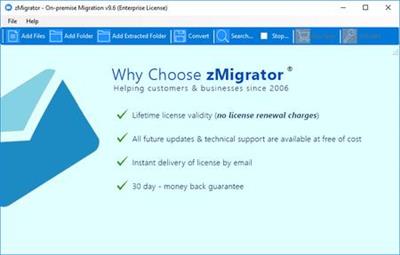
RecoveryTools zMigrator 9.6

de23285e254b2d388add344c73982965.jpg


RecoveryTools zMigrator 9.6 | 42 Mb​
With help of Zimbra to Mac mail Converter software, it is now possible to easily transfer data of Zimbra email client in Apple Mail program. Email folders like inbox, sent, junk, outbox, etc., all Zimbra items are moved to Mac mail application without any extra efforts. Moreover, the software migrates emails having attachment with it to Apple mail program.

Save Attachments Embedded with Emails
After browsing and loading the Zimbra exported TGZ files, software automatically scans complete mailboxes present within it. The software will display all the attachments embedded with Zimbra emails. User can easily save the attachments in hard drive before performing conversion of ZImbra to Apple Mail EMLX files.

Export Selective TGZ Folders to Apple Mail
Zimbra to EMLX converter provides feature to perform selective Zimbra migration of data. Users can check/uncheck the folders, which they want or do not want to import in Mac mail. The tool itself will generate those respective folders on defined location of local machine. For each mailbox, there is going to be a separate folder where items are saved.

System Requirements:
Pentium IV Processor, 256 MB RAM, Minimum 100 MB Space
Operating System: Windows 10, 8.1, 8, 7, Windows Server 2019, 2016, 2013, etc

Home Page -
У Вас недостаточно прав для просмотра ссылок. Войдите или зарегистрируйтесь.


Download link:​
Код:
[center][b]rapidgator_net[/b]:
https://rapidgator.net/file/460b2d4613dfd8aa5ccce5395118b030/35oqr.RecoveryTools.zMigrator.9.6.rar.html

[b]nitroflare_com[/b]:
https://nitroflare.com/view/EBE0F96E8D45687/35oqr.RecoveryTools.zMigrator.9.6.rar[/center]

Links are Interchangeable - No Password - Single Extraction​
 
Scrutiny 9.13.2 macOS

0d8f32c7b663e2b789445eb8e9a9fa82.jpg


Scrutiny 9.13.2 | macOS | 11 mb​
Optimizing your website for search engines can improve your ranking in the search results pages and naturally bring more users to your site. Scrutiny is a website analysis tool that can help you check if there are any broken links on your website, create a sitemap, check for spelling errors, run SEO checks, and so on.

Scrutiny comes with a sites manager where you can easily input the source URL for the website you want to start evaluating. The app automatically generates a thumbnail for the page and then enables you to configure the scanning rules.

Features
- Link checker
- SEO analysis
- XML sitemap generation, optionally include images / PDF pages
- Insecure / mixed content reporting
- Page-load speed test
- Spelling and grammar checking
- Scans sites requiring authentication
- Search your site (source or visible text) obtain a list of pages containing a search term or not containing a search term
- Website monitoring of as many URL's as you like with a choice of alerts and logging
- Scheduling made easy with a few easy clicks
- On finish, send an email, save a report, open a file or AppleScript, FTP the sitemap XML, and other actions
- Opens and scans a list of links in HTML, CSV, plain text format, or XML sitemap

Homepage:
У Вас недостаточно прав для просмотра ссылок. Войдите или зарегистрируйтесь.


Compatibility: OS X 10.8 or later 64-bit
Download link:​
Код:
[center][b]rapidgator_net[/b]:
https://rapidgator.net/file/9266ec9e49992ede47236081b00ed527/jl9u1.Scrutiny.9.13.2.rar.html

[b]nitroflare_com[/b]:
https://nitroflare.com/view/201BDB232BEED0C/jl9u1.Scrutiny.9.13.2.rar[/center]

Links are Interchangeable - No Password - Single Extraction​
 
Sun Moon Calendar 9.8.0.1 Multilingual

d7f6ad26699c37e36aaf15d278750508.jpg


Sun Moon Calendar 9.8.0.1 Multilingual | 4.8 Mb​
The Program calculates the sets, rises and phases of the sun and moon. It covers over 2000 locations in 110 countries. The program includes signs of the Zodiac, Saint's days, and days of Eclastical year, the moon in the Ecliptic, a graphical overview of the moons brightness, and time zone information and comparison.

Other features include absolute local accuracy by management of own locations, pretty daily graphic, easy navigation and additional search functions, scientific calculation methods that involve even the influence of the moons distance, and the ability to print your own professional reports - monthly list, yearly overview etc.

Aside from astronomers and astrologists, this program is very useful for people who need to know rises and sets like fishermen, hunters and other outdoor activists. Note that Rises and Sets may differ appreciably yet at distances of 100miles.

Operating System: Windows 7, 8/8.1, 10

Home Page -
У Вас недостаточно прав для просмотра ссылок. Войдите или зарегистрируйтесь.


Download link:​
Код:
[center][b]rapidgator_net[/b]:
https://rapidgator.net/file/e84ddadb2013fc87fcc8cf68386029cd/e9upb.Sun.Moon.Calendar.9.8.0.1.Multilingual.rar.html

[b]nitroflare_com[/b]:
https://nitroflare.com/view/5503FE38D7D84FA/e9upb.Sun.Moon.Calendar.9.8.0.1.Multilingual.rar[/center]

Links are Interchangeable - No Password - Single Extraction​
 
Tenorshare 4uKey - Password Manager 1.4.1.1 macOS

af3b8607996c8d42fe34e8cdc5253b93.jpg


Tenorshare 4uKey - Password Manager 1.4.1.1 Multilingual | macOS | 18 mb​
No.1 iOS Password Finder. Focus on All iOS Password Solutions. 4MeKey makes it easy for you to find, recover, view, export and manage all your passwords on iPhone and iPad.

- Find saved Wi-Fi password on iPhone/iPad from PC/Mac
- Recover stored websites & app login passwords
- Scan and view mail accounts, credit card information
- Show Apple ID & passwords kept on your device
- Transfer passwords to iOS password manager app like 1Password

Compatibility: OS X 10.10 or later 64-bit
Homepage:
У Вас недостаточно прав для просмотра ссылок. Войдите или зарегистрируйтесь.


Download link:​
Код:
[center][b]rapidgator_net[/b]:
https://rapidgator.net/file/c07ec4e3aa5ecdb6dc5a49059ebe2a8a/n8re3.Tenorshare.4uKey..Password.Manager.1.4.1.1.rar.html

[b]nitroflare_com[/b]:
https://nitroflare.com/view/10E76CA7C854F20/n8re3.Tenorshare.4uKey..Password.Manager.1.4.1.1.rar[/center]

Links are Interchangeable - No Password - Single Extraction​
 
Tenorshare 4uKey Password Manager 1.4.1.2 Multilingual

cd712a0410658b8955162309e095466d.jpg


Tenorshare 4uKey Password Manager 1.4.1.2 Multilingual | 42.3 Mb​
4uKey - Password Manager makes it easy for you to recover Wi-Fi password on iOS device. Connect your iPhone as you normally would via a cable, 4uKey - Password Manager will then recognise your device and do the job.

No.1 iOS Password Finder
- Find saved Wi-Fi password on iPhone/iPad from PC/Mac
- Recover stored websites & app login passwords
- Scan and view mail accounts, credit card information
- Show Apple ID & passwords kept on your device
- Transfer passwords to iOS password manager app like 1Password

Find Wi-Fi Password on iPhone - No Need to Jailbreak
- Forgot Wi-Fi password that saved on the iPhone
- Cannot find stored Wi-Fi passwords on iPhone
- My remembered Wi-Fi password cannot connect
- Try to show the Wi-Fi password my iPad currently-connected

Recover Stored Website & App Login Passwords
- Can't remember saved Amazon login password on iPhone
- Visit Twitter website but forgot the logins
- My remembered Google account cannot access
- Recently reset Facebook password on iPhone but forgot it

View and Manage iOS Devices' Passwords
4uKey - Password Manager is the easiest and safest iOS password manager for iPhone XS/XS Max/XR/X/8/7/6s/6 and iPad. Support the Latest iOS 12.

Export iOS Passwords to 1Password/LastPass/Chrome/Dashlane/Keeper
Transfer accounts and passwords stored on iOS (iCloud Keychain) to 1Passsword, Chrome, Dashlane, LastPass, Keeper or .csv files for better managing passwords on iPhone and iPad.

System Requirements:
- Windows 10/8.1/8/XP/7/Vista (32 bit / 64 bit)
- > 750MHz Intel or AMD CPU
- 256MB or above RAM
- 50 MB or more space
- iTunes pre-installed in your computer

Home Page -
У Вас недостаточно прав для просмотра ссылок. Войдите или зарегистрируйтесь.


Download link:​
Код:
[center][b]rapidgator_net[/b]:
https://rapidgator.net/file/310cc7e9df78455193ad656799ad34b1/nuy7i.Tenorshare.4uKey.Password.Manager.1.4.1.2.Multilingual.rar.html

[b]nitroflare_com[/b]:
https://nitroflare.com/view/51E4687E716561B/nuy7i.Tenorshare.4uKey.Password.Manager.1.4.1.2.Multilingual.rar[/center]

Links are Interchangeable - No Password - Single Extraction​
 
Tenorshare ReiBoot Pro 7.6.1.0 Multilingual

9c5d9b736d35f852c23486f80cd50b16.jpg


Tenorshare ReiBoot Pro 7.6.1.0 Multilingual | 14.2 Mb​
ReiBoot is an extremely handy utility that can put your iOS device into recovery mode, as well as to pull it off this state with a single click. Usually, such an operation involves a tedious procedure which requires you to hold down the Home button of the device while disconnecting and connecting it to your computer, during which you also need to operate iTunes. Not to mention that sometimes the scenario gets even more complicated if boot issues occur.

ReiBoot is a wonderful resolution to all of these problems, making it possible to induce the Recovery mode, as well as exit it in an effortless manner, in a one-click operation.

Whether your device's Home button is broken, you've encounter a DFU black screen or even worse, the phone has entered an endless reboot loop, ReiBoot can help you nonetheless.

It's compatible with most modern iOS devices, including iPhones, iPods and iPads and is way less demanding than iTunes, which is the traditional way to accomplish such operations. Moreover, ReiBoot won't cause data loss, being able to preserve the files on the device untouched.

Manipulating ReiBoot is a child's play. Provided that you've connected the device to the computer, simply launch it, at which point the application detects your device model and lists it inside the main GUI.

If your device is already in Recovery mode, it will identify this accordingly, allowing you to pull it off the state by pressing the dedicated button.

Overall, it's incredibly easy and pleasant to work with ReiBoot. It is an effortless process - all you need to do in order to turn the Recovery mode on or off is to press one of two buttons.

Operating System: Windows 10/Windows 8.1/Windows 8/Windows 7/Vista/Windows XP (32-bit/64-bit)

Home Page -
У Вас недостаточно прав для просмотра ссылок. Войдите или зарегистрируйтесь.


Download link:​
Код:
[center][b]rapidgator_net[/b]:
https://rapidgator.net/file/3edc8772f041d15aaffc018757574658/7rolx.Tenorshare.ReiBoot.Pro.7.6.1.0.Multilingual.rar.html

[b]nitroflare_com[/b]:
https://nitroflare.com/view/0F85B658F982FEF/7rolx.Tenorshare.ReiBoot.Pro.7.6.1.0.Multilingual.rar[/center]

Links are Interchangeable - No Password - Single Extraction​
 
ToothFairy 2.7 macOS

5aaff53dffce1b488af7588807b28344.jpg


ToothFairy 2.7 Multilingual | macOS | 11 mb​
Connect AirPods (or other Bluetooth headphones) to your Mac with a single click or keypress. AirPods are great, but they don't work quite as smoothly with Macs as they do iPhones. You can't tell at a glance whether audio will play from the AirPods or your Mac's built-in speaker, you have to dig into a Bluetooth submenu to connect, and then you have to go back to the menu to see when the AirPods are ready for use.

ToothFairy streamlines this: just click an icon in the menu bar (or press a hotkey) to switch to the AirPods, and the icon always shows whether they're connected.

- Works with AirPods, as well as any Bluetooth headphones, speakers, or headset that you can connect to your Mac.

- Click the hollow AirPods icon in the menu bar to switch to AirPods. It fills in to show they are connected and also displays a battery indicator.

- Supports multiple Bluetooth audio devices; you can choose a different icon and hotkey for each.

- Get the best audio quality. macOS will normally use the SCO codec if it thinks you're going to use the microphone. ToothFairy can ensure that it uses the higher quality AAC codec when you only care about audio output: listening to music or video or playing a game.

- Disconnect a Bluetooth device by clicking the icon (or pressing the hotkey) again, so that you can switch back to your phone. AirPods and Beats devices with an Apple W1 chip do not need to be manually disconnected, and you can set them to "Connection only mode" to avoid accidental disconnetions when pressing the hotkey multiple times.

- ToothFairy automatically launches at login, so it's always there when you need it.

- Optionally hide the Dock icon so it only appears in the menu bar. With the Dock icon hidden, you can right-click (or Control-click) the menu bar icon to access the settings.

- Run a shell script when the AirPods are connected or disconnected.

Note: ToothFairy works with devices that can be connected via the macOS Bluetooth menu. Please make sure the devices you want to connect have been paired to the system correctly before using them with ToothFairy.

Compatibility: OS X 10.11 or later 64-bit

Download link:​
Код:
[center][b]rapidgator_net[/b]:
https://rapidgator.net/file/e8e4fc4b2757c259051c1058647c9118/v5qh0.ToothFairy.2.7.rar.html

[b]nitroflare_com[/b]:
https://nitroflare.com/view/7A05A16B3304A61/v5qh0.ToothFairy.2.7.rar[/center]

Links are Interchangeable - No Password - Single Extraction​
 
Video Shaper Pro 3.0 Portable

279846a3cc18b63f119fff0d2a5f8284.jpg


Video Shaper Pro 3.0 Portable | 37.6 Mb​
Video Shaper is a lightweight and easy to use video conversion software, which allows you to convert and burn video files, extract audio tracks from video files, preview video and apply visual effects.

Convert video to AVI, MOV, MKV, WMV, VCD, DVD, MP4
Extract audio and save to MP3, WAV, OGG, FLAC, WMA
Burn video files to CD, DVD or Blu-ray Disc
Preview video files and save snapshots
Command line support
Supports batch conversion and extraction

Operating System: Windows Vista, 7, 8, 8.1, 10 (32 and 64 bit)

Home Page -
У Вас недостаточно прав для просмотра ссылок. Войдите или зарегистрируйтесь.


Download link:​
Код:
[center][b]rapidgator_net[/b]:
https://rapidgator.net/file/bfea6ea1d87a318f980c70d7cef47c99/f10bv.Video.Shaper.Pro.3.0.Portable.rar.html

[b]nitroflare_com[/b]:
https://nitroflare.com/view/B5011CD8B6D171C/f10bv.Video.Shaper.Pro.3.0.Portable.rar[/center]

Links are Interchangeable - No Password - Single Extraction​
 
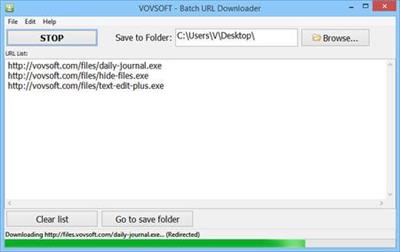
VovSoft Batch URL Downloader 2.8 + Portable

f0dc371e407b55eb2b0798bf9fab6542.jpg


VovSoft Batch URL Downloader 2.8 + Portable | 3.3/2.4 Mb​
Some of download managers may be more complex than some users would like. Batch URL Downloader is one of the simplest applications of its kind, so it can prove to be a good alternative to overly-complex download managers. It enables you to save multiple files as part of the same job.

Essentially, all you have to do is paste a list of URLs in the text field and then click the Download All button. The files will be saved in quick succession, and the jobs progress is displayed in the status bar.

If you need to download a large number of files and wish to avoid saving them individually, this application can certainly prove helpful. It can speed up the process of downloading a large number of files from a URL list.

Operating System: Windows 10/8.1/8/7/Vista/XP

Home Page -
У Вас недостаточно прав для просмотра ссылок. Войдите или зарегистрируйтесь.


Download link:​
Код:
[center][b]rapidgator_net[/b]:
https://rapidgator.net/file/f837c51d60ed362b71448ee633c9d28d/3czub.Batch.URL.Downloader.2.8.Portable.rar.html
https://rapidgator.net/file/f3e1367355167f1d82c20cd3594076aa/3czub.VovSoft.Batch.URL.Downloader.2.8.rar.html

[b]nitroflare_com[/b]:
https://nitroflare.com/view/3719851DD56E130/3czub.Batch.URL.Downloader.2.8.Portable.rar
https://nitroflare.com/view/98E79B96D550963/3czub.VovSoft.Batch.URL.Downloader.2.8.rar[/center]

Links are Interchangeable - No Password - Single Extraction​
 
VolumeLock 2.4 Multilingual

0db358b0359bfd2e9a739036c9633c40.jpg


VolumeLock 2.4 Multilingual | 0.5 Mb​
VolumeLock is an easy-to-use audio control utility that gives you the freedom in loudness control. With this program you can guarantee that the volume settings of your PC will never be changed unexpectedly. By creating your own fully customized rules for any volume control, including recording controls, you can prevent other applications from changing your volume settings.

VolumeLock includes a powerful lock function, a scheduler, command line support, an ability to store and retrieve a lot of rule configurations via one mouse click or system-wide hot keys. It works with all modern sound cards and can be useful for home and power users alike.

Operating System: Windows 9X/Me/NT4/2000/XP/2003/Vista/7/8/10

Home Page -
У Вас недостаточно прав для просмотра ссылок. Войдите или зарегистрируйтесь.


Download link:​
Код:
[center][b]rapidgator_net[/b]:
https://rapidgator.net/file/e024eea39e357e8692ca842adf457eb7/0z4r7.VolumeLock.2.4.Multilingual.rar.html

[b]nitroflare_com[/b]:
https://nitroflare.com/view/13F243F9E53BA3B/0z4r7.VolumeLock.2.4.Multilingual.rar[/center]

Links are Interchangeable - No Password - Single Extraction​
 
Назад
Сверху