• Старая версия форума работает в архивном режиме www.old.nado.in

All mitsumi'1s Applications !! (updated daily)

  • Автор темы Автор темы mitsumi1
  • Дата начала Дата начала
Maxon CINEMA 4D Studio R23.110 (x64) Multilingual

469d3503fca3f2870e379f5d983c473b.jpg


Maxon CINEMA 4D Studio R23.110 (x64) Multilingual | 469.8 Mb​
Easy to learn and extremely powerful: Cinema 4D is the perfect package for all 3D artists who want to achieve breathtaking results fast and hassle-free. Beginners and seasoned professionals alike can take advantage of Cinema 4D's wide range of tools and features to quickly achieve stunning results. Cinema 4D's legendary reliability also makes it the perfect application for demanding, fast-paced 3D production.

EASE OF USE
Getting started in the world of 3D is a blast when you can quickly create great-looking results! Cinema 4D's intuitive and easy to understand operation and logically arranged interface makes it easy for beginners to jump right in and take control. And it never ceases to amaze professional users just how easy Cinema 4D is to use. Countless tutorials and a global, highly-skilled community play an important role in bringing beginners to a professional level of use.

INTUITIVE INTERFACE
Cinema 4D is a pillar in our users' everyday workflow. This is why we make sure from the start that new functions work intuitively and are exactly where users will expect to find them. The Cinema 4D layout can also be easily customized to precisely fit a user's needs and saved for later use.

STABILITY
Cinema 4D's stability is renowned throughout the 3D community and beyond. All new features and functions are thoroughly put through their paces by our QA and beta testers before being released. Our free service packs, which are released on a regular basis, further optimize Cinema 4D and let us rapidly respond to changes in operating systems and drivers!

POWERFUL HELP SYSTEM
Any questions about a specific function can be quickly answered by right-clicking on it and jumping straight to the integrated software documentation.

Unpack This!
If you've struggled with UVs in the past, you're going to love the new workflow advancements. With unified component modes and improved selection tools, you'll enjoy the Cinema 4D artist-centric workflow you've come to expect. If you'd rather not mess with UVs, you'll really appreciate the easy new Automatic Unwrap option.

IMPROVED UV UNWRAPPING
Progressively unwrap your 3D objects by pinning points, selecting edges to use as seams in either the 3D or UV window, and clicking the new UV Unwrap Command.

AUTOMATIC UVs
Generate automatic UVs that make the most of your texture resolution - great for baking maps for export or simply getting a jump start on the 3D painting process. Thanks to the Ministry of Flat Technology developed by Eskil Steenberg of Quel Solaar, you can generate great UVs with a single click.

VISUALIZATION
See your seams in the 3D view while unwrapping, easily spot distorted or overlapping elements, and visualize your UV map with the help of multi-color islands or a UV checkerboard.

EFFICIENT PACKING
Arrange UV islands efficiently thanks to new packing options that take full advantage of texture space.

What a View!
Your window to the 3D world just got better, and is ready to take advantage of tomorrow's technology. Get the best picture and clear the clutter with improved filter options. Enjoy more accurate display of shaders and improved performance with multi-instances. Full support for Apple Metal means the viewport is more than ready for modern Mac systems, and a new core architecture sets the foundation for more great things to come!

GLTF EXPORT
Export geometry, materials, cameras, PSR animation, PoseMorphs and Joint-based animation via GLTF for use in modern Web and Augmented Reality applications.

GOZ BRIDGE
Seamlessly exchange models, UVs and painted maps between Pixologic ZBrush and C4D. The workflow is a breeze - send a model to ZBrush, modify it and send it back with just one click. This new bridge supports millions of polygons, and even imports polypaint and polygroup information.

NODAL MATERIALS
Export a baked representation of nodal materials via Cineware or FBX, and create nodal materials when importing FBX. Additionally, your favorite third-party render engines also have the option to export a simplified version of their materials for Cineware or FBX.

MODELING
Modeling tools are faster and more robust thanks to a new core, but most importantly they're much better at preserving UV and Vertex Maps.

ANIMATION
Copy and Paste animation tracks, select splines more easily, and enjoy a number of usability enhancements to character animation tools including Spline IK and Constraints.

Minimum System Requirements Cinema 4D:
- Windows 10 64-bit on Intel or AMD 64-bit CPU with SSE3 support
- 4 GB RAM (8 GB or more recommended), OpenGL graphics card supporting OpenGL 4.1 (dedicated GPU recommended)
- The GPU renderer requires an NVIDIA or AMD graphics card on Windows or AMD on MacOS that supports OpenCL 1.2 or newer. Metal support requires MacOS 10.14.6 or newer. We recommend at least 4 GB VRAM for GPU rendering.

Home Page -
У Вас недостаточно прав для просмотра ссылок. Войдите или зарегистрируйтесь.


Download link:​
Код:
[center][b]rapidgator_net[/b]:
https://rapidgator.net/file/bc34af86eb69ec79cce79b4224bb331f/ll8pa.Maxon.CINEMA.4D.Studio.R23.110.x64.Multilingual.rar.html

[b]nitroflare_com[/b]:
https://nitroflare.com/view/89E9F2DD0CA7BC6/ll8pa.Maxon.CINEMA.4D.Studio.R23.110.x64.Multilingual.rar[/center]

Links are Interchangeable - No Password - Single Extraction​
 
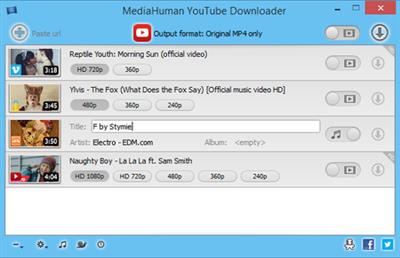
MediaHuman YouTube Downloader 3.9.9.49 (1011) Multilingual Portable

f38d18eda0f7f50b7b1500025eee76b1.jpg


MediaHuman YouTube Downloader 3.9.9.49 (1011) Multilingual Portable | 120 Mb​
MediaHuman YouTube Downloader is a handy application for those who found a favorite music video or trailer of a new movie and wants to keep it on your computer for viewing offline. Or you need to download a video lesson/tutorial. Our video downloader is an ideal solution for such kind of tasks.

Simultaneous downloads
- Supports Ultra High resolutions up to 4K
- Download whole playlists and channels
- YouTube, Vimeo, Dailymotion, Soundcloud
- Extract audio track and save it as MP3
- iTunes support
- VEVO support

Operating System: Windows 7, 8/8.1, 10

Home Page -
У Вас недостаточно прав для просмотра ссылок. Войдите или зарегистрируйтесь.


Download link:​
Код:
[center][b]rapidgator_net[/b]:
https://rapidgator.net/file/16a100a267b3dfa074f9716826f57366/u7a12.MediaHuman.YouTube.Downloader.3.9.9.49.1011.Multilingual.Portable.rar.html

[b]nitroflare_com[/b]:
https://nitroflare.com/view/7B8A5479F7A6F20/u7a12.MediaHuman.YouTube.Downloader.3.9.9.49.1011.Multilingual.Portable.rar[/center]

Links are Interchangeable - No Password - Single Extraction​
 
Movavi PDFChef 21.0.0 Multilingual

baa7422d7f76e9a3b8c7eb99813d0525.jpg


Movavi PDFChef 21.0.0 (x86/x64) Multilingual | 75.3 Mb​
The PDF Editor for Windows You've Always Wanted. What's the best program to edit PDFs? This kind of software is really hard to find. Online tools can't be trusted with sensitive information; a free PDF editor for download is often too basic in functionality and buggy; good paid apps from top industry leaders will cost you an arm and a leg to buy.

That's why we're developing our own alternative, an all-in-one PDF file editor that will let you open any PDF and enjoy easy and trouble-free editing. Want to make quick changes to a contract, convert images to PDFs, or collect multiple scans in one PDF file? Movavi PDF Editor for Windows has the functionality you need!

View PDFs and Images
Read industry-standard PDF files on Windows PCs: brochures, scanned documents, forms, articles, and other content
Open and display images in JPG and PNG
Work with multiple documents in separate tabs

Edit Documents
Add and rearrange pages in existing booklet layouts, brochures, and articles in PDF
Update catalogues when product ranges change
Extract only the pages you need from large PDF files
Remove unwanted pages from your PDF documents

Combine Files
Save Word, Excel, AutoCAD, and Photoshop files as PDFs, then import and merge them
Store scans of monthly reports or receipts in one convenient PDF file
Combine scans in the PDF Editor if your scanner doesn't store multiple pages in a single PDF file
If you have scanning problems, replace just the pages that weren't scanned properly - you don't have to re-scan the whole document

Export Pages
Save single pages as PDFs
Extract desired pages as image files
Extract PNG and JPG images and turn them into standalone PDF pages

System Requirements
Microsoft® Windows® Vista/7/8/10 with up-to-date patches and service packs installed
Intel®, AMD®, or compatible processor, 1 GHz
1280 x 768 screen resolution, 32-bit color
2 GB RAM
75 MB available hard disk space for installation, 250 MB for ongoing operations
Administrator permissions are required for installation

Home Page -
У Вас недостаточно прав для просмотра ссылок. Войдите или зарегистрируйтесь.


Download link:​
Код:
[center][b]rapidgator_net[/b]:
https://rapidgator.net/file/eb68aac305d3fa0f2a4e4be3eab7f91f/geamw.Movavi.PDFChef.21.0.0.Multilingual.rar.html

[b]nitroflare_com[/b]:
https://nitroflare.com/view/42EB40EC83624E9/geamw.Movavi.PDFChef.21.0.0.Multilingual.rar[/center]

Links are Interchangeable - No Password - Single Extraction​
 
Nitro Pro 13.30.2.587 Enterprise / Retail

fcbb1b5c06d44e4a5a16b8fdd9ba8e57.jpg


Nitro Pro 13.30.2.587 Enterprise / Retail | 397.4/402.4 Mb​
Nitro Pro gives you everything you need to create, convert, edit, sign, and share standard PDF files. It's simple, straightforward, and intuitive to use - so you can work more productively, your way. With Nitro Pro you can share your files with others, no matter what platform or device they are on, and Nitro Pro makes conversion easy. Convert one or more files to PDF with just a click or two.

Reuse and repurpose PDF-based content with greater accuracy. With Nitro Pros industry-leading conversion technology and array of extraction tools you can easily repurpose text and images from reports, presentations, and more for reuse in any other application. Share files with the peace of mind, knowing almost anyone on almost any machine can open, view, and review - every time.

Directly edit your PDF files more easily. Just click, and edit. Nitro Pro enables you to edit entire paragraphs with ease, automatically reflowing text as you type - like you would in a word processor.

Nitro Pro gives you a powerful set of easy-to-use tools that make working with digital documents simple, straightforward, and more cost-effective. Nitro Pro, the complete Adobe Acrobat alternative, enables you to do more with PDF through powerful tools to create, convert, edit, combine, secure, annotate, form-fill, and save 100% industry-standard PDF files. Recipient of multiple best product awards, Nitro Pro is specifically designed for the business user and makes working with PDF faster and easier than ever before!

System requirements
OS Desktop: Windows Vista, 7, 8, 8.1, 10
OS Server: Windows Server 2008 SP1, 2008 R2, 2012, 2012 R2 (Terminal Server and
Citrix XenApp / Access Essentials configurations supported)
RAM: 512MB,1GB system memory recommended
Storage: 300MB of available hard drive space
CPU: Intel Pentium® 4 and above.
Display: 1024x768 screen resolution
Additional requirements:
Microsoft .NET Framework 2.0 (or above)
Microsoft Office 2007 or newer (for Office integrated features)
Web Browser integration supported in IE 7 and above
Preview and Thumbnail handlers supported only in Windows Vista and above

Home Page -
У Вас недостаточно прав для просмотра ссылок. Войдите или зарегистрируйтесь.


Download link:​
Код:
[center][b]rapidgator_net[/b]:
https://rapidgator.net/file/3c5102a869e6d35d44417de9605ac9ee/9xaej.Nitro.Pro.13.30.2.587.Ent.rar.html
https://rapidgator.net/file/5c02a0a16d84aad520740ca2646ce46d/9xaej.Nitro.Pro.13.30.2.587.Retail.rar.html

[b]nitroflare_com[/b]:
https://nitroflare.com/view/1C12AA04E383E83/9xaej.Nitro.Pro.13.30.2.587.Ent.rar
https://nitroflare.com/view/093508534F75ED1/9xaej.Nitro.Pro.13.30.2.587.Retail.rar[/center]

Links are Interchangeable - No Password - Single Extraction​
 
Nitro Pro Enterprise 13.30.2.587 (x64) Portable

59038e1572c0eed1e29e8557ac6140ec.jpg


Nitro Pro Enterprise 13.30.2.587 (x64) Portable | 168.7 Mb​
Nitro Pro gives you everything you need to create, convert, edit, sign, and share standard PDF files. It's simple, straightforward, and intuitive to use - so you can work more productively, your way. With Nitro Pro you can share your files with others, no matter what platform or device they are on, and Nitro Pro makes conversion easy. Convert one or more files to PDF with just a click or two.

Reuse and repurpose PDF-based content with greater accuracy. With Nitro Pros industry-leading conversion technology and array of extraction tools you can easily repurpose text and images from reports, presentations, and more for reuse in any other application. Share files with the peace of mind, knowing almost anyone on almost any machine can open, view, and review - every time.

Directly edit your PDF files more easily. Just click, and edit. Nitro Pro enables you to edit entire paragraphs with ease, automatically reflowing text as you type - like you would in a word processor.

Nitro Pro gives you a powerful set of easy-to-use tools that make working with digital documents simple, straightforward, and more cost-effective. Nitro Pro, the complete Adobe Acrobat alternative, enables you to do more with PDF through powerful tools to create, convert, edit, combine, secure, annotate, form-fill, and save 100% industry-standard PDF files. Recipient of multiple best product awards, Nitro Pro is specifically designed for the business user and makes working with PDF faster and easier than ever before!

System requirements
OS Desktop: Windows 7, 8, 8.1, 10 (64-bit only)
OS Server: Windows Server 2008 SP1, 2008 R2, 2012, 2012 R2 (Terminal Server and
Citrix XenApp / Access Essentials configurations supported)
RAM: 512MB,1GB system memory recommended
Storage: 300MB of available hard drive space
CPU: Intel Pentium® 4 and above.
Display: 1024x768 screen resolution
Additional requirements:
Microsoft .NET Framework 2.0 (or above)
Microsoft Office 2007 or newer (for Office integrated features)
Web Browser integration supported in IE 7 and above
Preview and Thumbnail handlers supported only in Windows Vista and above

Home Page -
У Вас недостаточно прав для просмотра ссылок. Войдите или зарегистрируйтесь.


Download link:​
Код:
[center][b]rapidgator_net[/b]:
https://rapidgator.net/file/5d1337323ede70cd443239cd0500ed98/7t6vx.Nitro.Pro.Enterprise.13.30.2.587.x64.Portable.rar.html

[b]nitroflare_com[/b]:
https://nitroflare.com/view/1A3E513AB7C74CD/7t6vx.Nitro.Pro.Enterprise.13.30.2.587.x64.Portable.rar[/center]

Links are Interchangeable - No Password - Single Extraction​
 
Outline 3.2011.0 macOS

c72f76cc882ca2c6ed11f822e62802aa.jpg


Outline 3.2011.0 Multilingual | macOS | 50 mb​
Outline - one note app for offline, cloud & WebDAV. OneNote compatible & Office 365 powered. Capture notes at any spot on a page and draggable around. Organize notes in the world's most natural hierarchy. Store notes in your local file system, and synced across devices with your favorite cloud. Powered with import from Evernote and Circus Ponies.

ONENOTE'S BEST FRIEND
- Give your OneNote notes a new start beyond OneDrive or SharePoint
- Export to OneNote, just in case
- Go beyond import/export and do a real time collaboration on notes with colleagues who use OneNote (your Mac and their PCs)

STORAGE
- Choose where you want to store your notes: Dropbox, iCloud, WebDAV, Box, or OneDrive
- Consider a no-cloud option too: some notes need offline and cloud-free privacy
- Mind the coming-soon: SharePoint, OneDrive for Business / Office 365

UI
- Find everything a note needs by the hand: text, lists, tables, images, checkboxes, hyperlinks, and more
- Put that stuff anywhere in a note and then move around / re-size / edit it all, the way you like
- Keep notes structured in a natural hierarchy of pages, sections, and notebooks
- Access a note fast via recents, search, and note links
- Manage font size and color, apply styles and highlighting
- Attach files and insert printouts, to collect documents in one place

IMPORT
- From OneNote
- From Circus Ponies
- From Evernote

Compatibility: OS X 10.10 or later 64-bit

Download link:​
Код:
[center][b]rapidgator_net[/b]:
https://rapidgator.net/file/08aedc2056dd748448dd08a479383a79/ngocz.Outline.3.2011.0.rar.html

[b]nitroflare_com[/b]:
https://nitroflare.com/view/B0FE41252FBA1DB/ngocz.Outline.3.2011.0.rar[/center]

Links are Interchangeable - No Password - Single Extraction​
 
PDF-XChange Pro 8.0.342.0 (x64) Multilingual Portable

d71ff11d98cd5e1c20bbfbbe9301175c.jpg


PDF-XChange Pro 8.0.342.0 (x64) Multilingual Portable | 219 Mb​
PDF-XChange PRO is the ultimate PDF solution. It's a bundle package that combines the three best-selling applications that Tracker Software produces.

PDF-XChange Editor Plus is a hugely dynamic and fully-customizable PDF application. Create, view, edit, annotate, OCR* and sign PDF files - and that's just the beginning. If you work with PDF then this fully-customizable product will optimize your work process to levels that no other product can achieve. Create PDF files from scanned documents, images, text files, Markdown files and much more. Open, edit and convert Microsoft Office documents.* Avail of over thirty tools to assist in the creation of document comments, annotations, links and fillable forms. These tools make editing PDFs a finely-tuned, precise process that produces documentation and image files of the highest quality. Our user-friendly functionality is diverse enough to meet the needs of all practitioners from novices to professionals.**

PDF-Tools is a worldwide leader in the creation and manipulation of PDF and image files. Highly user-friendly, it can be used to convert files of almost any format to/from PDF. Avail of seventy built-in standard tools, as well as functionality to clone and edit these tools and their variables as you desire. Use the Actions Library to fully customize your tools and the Tool Actions Sequence to determine the order in which they perform operations. Combine seventy-seven available actions to create your own tools - out of billions of possibilities. PDF-Tools is compatible with large PDF files and can also handle a huge number of files simultaneously - batch conversion is its strength.

PDF-XChange Standard Printer is Tracker Software's best-selling virtual printer - the ultimate application for the creation and virtual printing of industry-standard PDF files. It's compatible with files from almost all Windows applications, such as Word, Excel and AutoCAD, and features an optimized engine for superb conversion of images and image-based text characters. The files it creates are surprisingly small, given their quality - allowing for faster uploads/downloads, a reduction in storage space and increased data retention - even at high levels of compression. PDF-XChange Standard also features MS Office integration, which provides extra functionality such as adding clickable tables of contents and embedded URL support that facilitates the creation of external links.

Operating System: Windows 7 and later

Home Page -
У Вас недостаточно прав для просмотра ссылок. Войдите или зарегистрируйтесь.


Download link:​
Код:
[center][b]rapidgator_net[/b]:
https://rapidgator.net/file/49cba385f693b2bb9e817437bc1fd94a/ak579.PDFXChange.Pro.8.0.342.0.x64.Multilingual.Portable.rar.html

[b]nitroflare_com[/b]:
https://nitroflare.com/view/A2A7CAFB2193713/ak579.PDFXChange.Pro.8.0.342.0.x64.Multilingual.Portable.rar[/center]

Links are Interchangeable - No Password - Single Extraction​
 
Perfectly Clear Complete 3.11.0.1887 (x64) Multilingual

881452f684e7129ae6f5cf96f5c0d9e4.jpg


Perfectly Clear Complete 3.11.0.1887 (x64) Multilingual | 123.4 Mb​
Built for precision. Made for beauty. Above all, you want better photos. But what if you could have better photos faster? Perfectly Clear has mastered the science of intelligent image correction - creating superior quality photos in record time, so you can get back to doing what you really love...in no time.

Spend less time in front of your computer.
With Perfectly Clear, you'll get results faster so you can spend more time behind the camera and less time in front of the computer. Take advantage of intelligent image analysis to find and fix numerous camera flaws automatically. Plus, you can quickly add your favorite finishing touch with our stylized LOOKs.

Take complete control.
Our presets are just the starting point. Easily apply only the adjustments you need for the perfect image. Use our powerful sharpening and noise reduction, which goes beyond what other tools can do, to unlock a whole new image. Keep an eye on your color and exposure with a dynamic histogram that tracks exposure and color clipping.

A custom experience.
Every photographer is different, and so is Perfectly Clear. Our adaptive interface lets you hide tools you don't need while you work, allowing you to focus on your image. Plus, you can make and manage your own presets, which intelligently adapt to each photo.

Why change your workflow?
Rather than move your entire image library or change your workflow, we'll make your existing workflow better. We support several platforms and have more coming soon. With powerful batch processing and up to 30 corrections in one click, we'll make everything better.

We've got image correction down to a science.
Creating our award-winning technology took more than a decade of R&D, multiple patented processes, and over a dozen unique algorithms. We cracked the code on correcting every pixel independently. The proof is in your pictures.

System Requirements:
- Windows 7, 8 or 10 (64-bit only)
- Photoshop CS6 or Creative Cloud
- Photoshop Elements 13,14,15
- Corel PaintShop Pro X6, X7, X8, X9, 2020
- Lightroom 4 or newer, including v6 and CC
- 4 GB RAM or more
- OpenGL v2.0 or newer

Home Page -
У Вас недостаточно прав для просмотра ссылок. Войдите или зарегистрируйтесь.


Download link:​
Код:
[center][b]rapidgator_net[/b]:
https://rapidgator.net/file/ebcccbb68a8fbe9fa37d2ad34e846a7e/nc2ph.Perfectly.Clear.Complete.3.11.0.1887.x64.Multilingual.rar.html

[b]nitroflare_com[/b]:
https://nitroflare.com/view/82B58ADA222C7EC/nc2ph.Perfectly.Clear.Complete.3.11.0.1887.x64.Multilingual.rar[/center]

Links are Interchangeable - No Password - Single Extraction​
 
PilotEdit 14.6.0 Multilingual

f0553c56ab61515c70ca9906799bfb77.jpg


PilotEdit 14.6.0 Multilingual | 82 Mb​
PilotEdit is a handy and reliable file editor designed to help users to execute scripts, extract strings and edit large files. PilotEdit is a file editor that will help you search and replace multi line text, edit FTP files or even download and upload FTP files and directories. With PilotEdit file editing just became easier.

PilotEdit is an advanced text and hex editor that supports opening of files larger than 4GB. It offers customizable syntax and keyword highlighting, advanced search and replace operations, automatic text encoding, 256-bit AES encryption/decryption, and a built-in FTP client lets you open, edit and upload files directly to/from an FTP server.

In addition to standard text editing features, PilotEdit can compare and merge two files larger than 100MB. In addition, you can sort, find/remove duplicated lines and collect strings over a file larger than 1GB.

Here are some key features of "PilotEdit":
-The file size supported by PilotEdit is unlimited.
-PilotEdit only uses a little memory even you open a big file.
-ANSI, UTF-8, UTF-16 and UTF-16 big endian files are fully supported by PilotEdit. You may also change a file's encoding with PilotEdit easily.
-DOS, UNIX file support. When you copy/paste text, PilotEdit will adjust text encoding automatically.
-Self-defined file types and key words high-lightening.
-The user interface of HEX mode is as friendly as text mode.
-Column mode.
-Endless undo/redo. You may undo/redo your operations even after you switch between text mode and HEX mode.
-Word wrap enable you to view long lines within one page.
-PilotEdit provides a friendly interface for editing FTP files. You can also download/upload FTP files and directories with PilotEdit.
-Searching and replacing multi-line text has become so easy with PilotEdit.
-You may compare two files or two directories with PilotEdit.
-Self-defined string table enable you to add a pre-defined text by just one click.
-Regular expression has made search and replacement much more powerful.
-You may define some operations in a script file and execute this script file so that you don't need to repeat your work day after day.
-Find/remove duplicated lines
-String collection
-Find/replace in multiple directories
-Sort

Operating System: Windows 7, 8/8.1, 10

Home Page -
У Вас недостаточно прав для просмотра ссылок. Войдите или зарегистрируйтесь.


Download link:​
Код:
[center][b]rapidgator_net[/b]:
https://rapidgator.net/file/0b8a787f6209a352b3680cba71313462/pzuqo.PilotEdit.14.6.0.Multilingual.rar.html

[b]nitroflare_com[/b]:
https://nitroflare.com/view/ACF423DAB7C8EFF/pzuqo.PilotEdit.14.6.0.Multilingual.rar[/center]

Links are Interchangeable - No Password - Single Extraction​
 
Rhinoceros 6.31.20315.17001 (x64)

e4c05b272641be0ed975d40552d66a74.jpg


Rhinoceros 6.31.20315.17001 (x64) | 267 Mb​
In Rhino 6 for Windows, we've fully embraced Grasshopper - the wildly popular visual programming language - by "baking it in." Grasshopper is no longer beta; it's a stable development environment. We've also rewritten some features and renovated workflows that needed fundamental overhauls to make them truly productive.

Grasshopper
The long beta period is over: Grasshopper, the world's most beautiful programming language, is now a full-fledged part of Rhino. Used in some of the most ambitious design projects of the past decade, Grasshopper, like Rhino, has become a robust development platform. Grasshopper provides the solid foundation for many incredible third-party components ranging from environmental analysis to robotic control.

Presentation
Presentation is key: during nearly every phase of design, you need to communicate, getting "buy-in" from clients, customers, collaborators, or the public at large. We've improved Rhino with the aim of helping you present your work: be it "quick and dirty" or "high-res glossy." With major changes to Rendering, Materials, or just plain capturing the viewport, it's now easier and faster to present, discuss, make decisions, and iterate.

Display
Rhino's new display pipeline is faster, more stable, and uses features found on modern graphics hardware, like GPU sensitive shaders and memory optimizations. This results in fewer GPU-specific display glitches and more consistent, beautiful, and frequent frames, even with large models. In some conditions, display speed can be up to 300% faster.

Documentation
Modeling is just one part of the design process; you also need to show how to build what is on the screen. We've refined many parts of the documentation workflow, from a completely reworked annotation-style interface, to better DWG support, and RichText throughout. It's now easier to convey accurately and clearly the what and the how of your design.

Licensing & Administration
We have worked hard to make Rhino easier to install, license, and configure. There's a great new option to license Rhino using the Cloud Zoo.

Make2D
Make2D has been completely rewritten to provide faster, better, cleaner, more customizable results.

Rhino Refinements
Small quirks add up to painful paper cuts over the course of a prolonged modeling session. In Rhino 6, we've fixed hundreds of minor bugs and consolidated disparate - but similar - features into single commands, making Rhino much more refined.

Development Platform
Rhino is more than just a modeler. With a rich ecosystem of plugins and an open set of development tools, Rhino is quickly becoming the development platform for those seeking to push the envelope of design. Rhino 6 brings major improvements to our free SDKs, with API refinements, better documentation, and more access to Rhino commands from Grasshopper.

Serengeti
We're constantly improving Rhino. Rhino 6 users have access to the Serengeti community and our Work-In-Progress (WIP) builds. The WIP builds are where we are developing future features like SubD support, Grasshopper 2, a new real-time rendering engine, and much more.

System Requirements:
- Windows 10, 8.1, or 7
- 8 GB memory (RAM) or more is recommended.
- 600 MB disk space.
- OpenGL 4.1 capable video card is recommended.
- No more than 63 CPU Cores.
- Multiple-button mouse with scroll wheel is recommended.
- The SpaceNavigator is supported.
- Apple hardware is supported with Bootcamp.

Not supported:
Windows 8
Windows XP 64-bit
Windows Vista, NT, 95, 98, ME, or 2000
Windows 32-bit all versions

Home Page -
У Вас недостаточно прав для просмотра ссылок. Войдите или зарегистрируйтесь.


Download link:​
Код:
[center][b]rapidgator_net[/b]:
https://rapidgator.net/file/0f3ddd255d10b0d0d452c741fda3789e/m13d6.Rhinoceros.6.31.20315.17001.x64.rar.html

[b]nitroflare_com[/b]:
https://nitroflare.com/view/01312431ABE998B/m13d6.Rhinoceros.6.31.20315.17001.x64.rar[/center]

Links are Interchangeable - No Password - Single Extraction​
 
Rhinoceros 6.31.20315 macOS

0dca38d9c673f57ed32bb6413a33c277.jpg


Rhinoceros 6.31.20315 Multilingual | macOS | 388 mb​
Rhinoceros - Versatile 3D modeler. Rhinoceros can create, edit, analyze, document, render, animate, and translate NURBS* curves, surfaces, and solids, point clouds, and polygon meshes. There are no limits on complexity, degree, or size beyond those of your hardware.

Special features include:
- Uninhibited free-form 3-D modeling tools like those found only in products costing 20 to 50 times more. Model any shape you can imagine.
- Accuracy needed to design, prototype, engineer, analyze, and manufacture anything from an airplane to jewelry.
- Compatibility with all your other design, drafting, CAM, engineering, analysis, rendering, animation, and illustration software.
- Read and repair meshes and extremely challenging IGES files.
- Accessible. So easy to learn and use that you can focus on design and visualization without being distracted by the software.
- Fast, even on an ordinary laptop computer. No special hardware is needed.
- Affordable. Ordinary hardware. Short learning curve. Affordable purchase price. No maintenance fees.

Compatibility: macOS 10.13 or later 64-bit
Homepage:
У Вас недостаточно прав для просмотра ссылок. Войдите или зарегистрируйтесь.


Download link:​
Код:
[center][b]rapidgator_net[/b]:
https://rapidgator.net/file/bf05460a58640041ed8cd1c5363cd6b7/hk080.Rhinoceros.6.31.20315.part1.rar.html
https://rapidgator.net/file/4f9c2ad180df1f49be97f886c6bbd21b/hk080.Rhinoceros.6.31.20315.part2.rar.html
https://rapidgator.net/file/aca17a3049e99d7bac94456c3fc306af/hk080.Rhinoceros.6.31.20315.part3.rar.html
https://rapidgator.net/file/02ef9618987e4db5c3bf72599d72707b/hk080.Rhinoceros.6.31.20315.part4.rar.html

[b]nitroflare_com[/b]:
https://nitroflare.com/view/BF5878F3098929C/hk080.Rhinoceros.6.31.20315.part1.rar
https://nitroflare.com/view/3CE2EE574F976E5/hk080.Rhinoceros.6.31.20315.part2.rar
https://nitroflare.com/view/566F8EAFD56411C/hk080.Rhinoceros.6.31.20315.part3.rar
https://nitroflare.com/view/CEDED77DC9929D9/hk080.Rhinoceros.6.31.20315.part4.rar[/center]

Links are Interchangeable - No Password - Single Extraction​
 
R-Tools R-Drive Image 6.3 Build 6308 Multilingual BootCD

cb75566c645e91ffb9a020da64be8ad6.jpg


R-Tools R-Drive Image 6.3 Build 6308 Multilingual BootCD | 63.4 Mb​
R-Drive Image is a potent utility providing disk image files creation for backup or duplication purposes. A disk image file contains the exact, byte-by-byte copy of a hard drive, partition or logical disk and can be created with various compression levels on the fly without stopping Windows OS and therefore without interrupting your business. These drive image files can then be stored in a variety of places, including various removable media such as CD-R(W)/DVD, Iomega Zip or Jazz disks, etc.

R-Drive Image restores the images on the original disks, on any other partitions or even on a hard drive's free space on the fly. To restore system and other locked partitions R-Drive Image is switched to the pseudo-graphic mode directly from Windows or bootable version created by the utility is launched from CD disc or diskettes.

Using R-Drive Image, you can completely and rapidly restore your system after heavy data loss caused by an operating system crash, virus attack or hardware failure. You can also use R-Drive Image for mass system deployment when you need to setup many identical computers. In other words, you can manually setup one system only, create an image of the system, and then deploy it on all other computers, saving your time and costs. If you need to restore only certain files from a disk image, you can connect that image as a virtual disk and copy those files directly from the disk image using Windows Explorer or any other file utility.

R-Drive Image is one of the best backup and disaster recovery solutions to prevent losing your data after a fatal system failure.

R-Drive Image Features
- A simple wizard interface - no in-depth computer management skills are required.
- On-the-fly actions: Image files are created on-the-fly, no need to stop and restart Windows. All other disk writes are stored in a cache until the image is created. - Data from image files are restored on-the-fly as well, except on a system partition. Data to the system partition can be restored either by restarting R-Drive Image in its pseudo-graphic mode directly from Windows, or by using specially created startup disks.
- Image files compression. Image files can be compressed to save free storage space.
- Removable media support. Image files can be stored on removable media.
- Startup version. A startup version can be used to image / restore / copy partitions locked by the OS. The computer can be re-started into the startup version either directly from Windows, or from an external USB device, a CD/DVD disk, or 6 floppies. The startup version can use either a graphic user interface, or a pseudo-graphic mode, if the graphic card isn't supported. Support for UEFI boot for modern computers.
- USB 2.0 and 3.0 support in the startup version. With hard drives prices constantly going down, an external IDE-USB 2.0 or 3.0 HDD case with an appropriate hard drive is an ideal (fast and reliable) solution for storing backup files for system and other partitions that can be restored only in the startup version. Do not use numerous unreliable CD discs and slow CD/DVD recorders any more. Remember: with the incremental backup, this hard drive is not to be too large.
- Network support in the startup version. R-Drive Image startup version supports disk image file creation and restoration over the Microsoft network (CIFS protocol).
- Extended List of the supported devices in the startup version. The list of hardware supported by R-Drive Image startup versions has been extended.
- An image file can be connected as a read-only virtual disk. Such disk can be browsed through and files/folders can be found and copied.
- Individual files and folders restoration. Individual files and floders rather than entire disk can be restored either during the restoring action or from a image file connected as a virtual disk.
- Image files splitting. Drive images can be split into several files to fit a storage medium.
- Image Protection. Disk image files can be password-protected and contain comments.
- New partition creation. Data from a disk image can be restored on a free (unpartitioned) space on any place on a hard drive. The size of the restored partition can be changed.
- Partition replacement. Data from a disk image can be restored on other existing partitions. R-Drive Image deletes such partitions and restores data on that free space.
- Disk to Disk copy. An entire disk can be directly copied on another one.
- Image files verification. You may check if your image files are good before you store them or restore data from them.
- Scheduler. A time for disk image creation may be scheduled and the process can be run in unattended mode.
- Script creation for frequent or unattended actions. Such scripts for creating an image file and appending data to an existing image file are created from the R-Drive Image interface the same way the actual action is performed. Scripts are executed from a command line and such command can be included to any command file.
- Action Report. When disk image is successfully created or the action fails the report can be automatically sent over e-mail or an external application can be launched.
- Support for the ReFS file system (Resilient File System), a new local file system Microsoft has introduced in its Windows 2012 Server. All disk actions are supported, except partition resizing.
- Full support for the GPT partitioning layout. R-Drive Image can create GPT disks, resize them, and change their partition layout during copy/restore operations.
- Support for Windows Storage Spaces (Windows 8/8.1 and 10), Linux Logical Volume Manager volumes, and MacRAIDs.

System Requirements
An Intel-compatible platform running Windows 2000/XP/ 2003/Vista/2008/Windows 7/8/8.1/10 / Windows Server 2012 (including 64 bits editions).
The administrative privileges are required to install and run R-Drive Image under Win2000/XP/ 2003/Vista/2008/Windows 7/8/8.1/10 / Windows Server 2012.

Home Page -
У Вас недостаточно прав для просмотра ссылок. Войдите или зарегистрируйтесь.


Download link:​
Код:
[center][b]rapidgator_net[/b]:
https://rapidgator.net/file/f0bc1b42d2cfb12a473df08a710d073e/nrwzi.RTools.RDrive.Image.6.3.Build.6308.Multilingual.BootCD.iso.html

[b]nitroflare_com[/b]:
https://nitroflare.com/view/06C51240430B9A4/nrwzi.RTools.RDrive.Image.6.3.Build.6308.Multilingual.BootCD.iso[/center]

Links are Interchangeable - No Password - Single Extraction​
 
ScreenHunter Pro 7.0.1131

18846cad76c829109837e75045560bac.jpg


ScreenHunter Pro 7.0.1131 | 133.1 Mb​
ScreenHunter Pro is the most advanced version of ScreenHunter with all the necessary tools included for your screen capture needs. It's the total screen capture solution to save you time and boost productivity. With ScreenHunter Pro, you can immediately see the benefits of numerous time-saving features and deliver the highest quality screenshots. As well, it offers easy-to-use user interface and maximum flexibility for a more interactive capture experience. Powerful and intelligent, ScreenHunter Pro has proven to be an incomparable helper of your business.

Capturing Features
* Rectangular area
* Adjustable rectangle
* Object / Window
* Auto-scroll
* Multi-object
* Text
* Active Window
* Fixed area (user defined)
* Specific window (lock-in window)
* Full screen
* DOS program
* DirectX / Screen saver
* Movie / video
* Freehand
* Round area (Ellipse)
* Round Rectangular area
* Polygon
* Web capture
* Scanning images

Addition Features
* Mouse pointer
* Multiple monitors
* Transparent window
* AutoText (date/time stamps, note)
* Watermark
* Border

Timing Features
* Delayed capture
* Timed auto-capture
* Scheduled auto-capture
* Recurring capture

Viewing and Editing Features
* Image editing, adding text & annotation
* Advanced image processing
* High-quality zooming, resizing & cropping
* Viewing 100 images & conversion
* Drag & drop images from desktop

Saving Features
* Automatic naming and saving to files
* Clipboard
* Auto-email
* Auto-scale
* Saving in the smallest file size
* Optimized JPEG, GIF and PNG
* High quality and transparent GIF
* Saving to TIFF

Other Features
* Screen Color Picker
* System tray
* Zoombox
* Flexible hotkey
* Multiple hotkey
* Direct printing
* Wysiwyg printing
* Developer support

Operating System: Windows 7, 8/8.1, 10

Home Page -
У Вас недостаточно прав для просмотра ссылок. Войдите или зарегистрируйтесь.


Download link:​
Код:
[center][b]rapidgator_net[/b]:
https://rapidgator.net/file/d2095f9d6c71bd316541a135270bc7f5/vblwe.ScreenHunter.Pro.7.0.1131.rar.html

[b]nitroflare_com[/b]:
https://nitroflare.com/view/35E338DC56D6DFE/vblwe.ScreenHunter.Pro.7.0.1131.rar[/center]

Links are Interchangeable - No Password - Single Extraction​
 
Simlab Composer 10.15 (x64) Multilingual

8f128475fcdeb0674916c8a6094f19aa.jpg


Simlab Composer 10.15 (x64) Multilingual | 219.6 Mb​
Simlab Composer is a complete, easy, affordable and feature rich solution enabling you to communicate your 3D ideas with ease. Start with any 3D model, and bring it to life with SimLab Composer to utilize it in marketing, manuals, training, user feedback, education and much more.

Features in SimLab Composer 9:
A brief summary with regards to the new updates that have been made in SimLab Composer 9 :

Scene Building:
-Search by name

Animation
- Animation Auto Ease options (Auto Ease Out, Auto Ease In, and Auto Ease).
- New Animation Time-line tools: Capture keyframe for object, Go to previous/next keyframe, and Select all keyframes on Animation Time-line.
- (Enhancement) Better layout for Animation Time-line tools.

HTML/WebGL
- Added support for SimLab 360s Grid Technology.
- Added support for Light Baking (Light Baking is similar to Texture Baking but it gives the user the ability to change material of objects).
- Added support for sun light
-Added support for shadow from sun, which can be enabled or disabled by the user.
- Added support for Visualized Scene Options (lists)
- (Enhancement) Better appearance for materials
- (Enhancement) Better navigation: Smoother camera navigation with mouse movement in spin mode.
- (Enhancement) Better looking message boxes.
- (Enhancement) Camera transition among Scene States

3D PDF
- Added support for Visualized Scene Options (lists).

VR
- SimLab 360s Grid Technology for SimLab FREE VR Viewer, SimLab FREE AR/VR Mobile Viewer, and HTML/WebGL: load and move among 360 degree images.
- Make Video: View video clips in SimLab FREE VR Viewer and SimLab FREE AR/VR Mobile Viewer.
- Event-Response System: SimLabs Event-Response System used for endless possibilities in your VR experiences, which also includes location-based triggers.
- VR Training: A state-machine-based system used for endless possibilities in your VR experiences, which also includes location-based triggers.

Render
- Render Animation using SimLab FREE VR Viewer: New rendering mode using the VR Viewer.

Simlab Free VR Viewer
- Added support for SimLab 360s Grid Technology.
- Scene Building Mode: Dedicated mode where you can move, rotate, scale, copy, delete, and hide/show objects.
- (Enhancement) Improved two hands interaction with VR scene elements in VR mode.
- (Enhancement) Improved grabbing (grabbing with two hands) in VR mode.
- (Enhancement) Improved VR navigation (fixed old issues and added rotation) in VR mode.
- (Enhancement) Improved Scene Modes activation for Large Navigation, Lists, and Scene Building.
- Circular menu for switching among modes.
- Activation of List mode shows all list pins existing in scene.
- Users can now have two FREE private catalogs (up to 60 package)
- Users have the ability to edit or delete their own packages.

System Requirements:
Intel or AMD processor
Windows 64-bit (7, 8, or 10)
Any graphics card with 256 MB or more (either dedicated or shared)
2 GB of RAM or more
2 GB of free hard disk space
Monitor resolution of 1440 X 900 or greater

Home Page -
У Вас недостаточно прав для просмотра ссылок. Войдите или зарегистрируйтесь.


Download link:​
Код:
[center][b]rapidgator_net[/b]:
https://rapidgator.net/file/311c8932c3a64aa5edc02625343a330d/nz348.Simlab.Composer.10.15.x64.Multilingual.rar.html

[b]nitroflare_com[/b]:
https://nitroflare.com/view/56EDA3722217BEA/nz348.Simlab.Composer.10.15.x64.Multilingual.rar[/center]

Links are Interchangeable - No Password - Single Extraction​
 
Solid Angle Houdini to Arnold 5.5.0

10961e64f275ee5ed22b8e12f8f6493a.jpg


Solid Angle Houdini to Arnold 5.5.0 | 805.1 mb​
The Arnoldrenderer development team is pleased to announce the availability of Arnold (or HtoA) 5.5.0 for Houdini. This update introduces Arnold 6.1.0.0 and is a feature release bringing a brand new post-processing framework (imagers), support for nested dielectrics, much improved progressive and adaptive sampling, on-demand texture loading on GPU, integration improvements for Solaris, and Arnold-USD (4e5710fa).

Enhancements

Imagers: We're introducing a brand new framework to apply post-processing effects such as color correction, vignetting, or tone mapping. A new type of post-processing nodes called imagers operate on pixels before the output driver. Imagers can be chained. The initial set of imagers consists of:

. imager_exposure
. imager_color_correct
. imager_lens_effects
. imager_white_balance
. imager_tonemap

Imagers work both in batch and interactive contexts. While imager parameters can change interactively during rendering, adding a new imager currently requires the render to be restarted, so it's a good idea to add the ones you will need to adjust at the beginning of an interactive session. We are looking at removing this limitation in a subsequent release. (core#8368, core#9716, core#9723, core#9724, core#9867, core#9868, core#9869, core#9938).

bfaba306ed86c2677ff1faaf2f01174f.jpg

Nested dielectrics: Physically-correct reflection and refraction of rays in scenes with adjacent dielectrics, such as liquids in glass vessels, has been implemented by resolving overlapping, i.e. "nested", dielectrics via a priority system. This allows for more realistic renders of scenes such as glass containers with liquid contents and bubbles, correctly accounting for the change in the index of refraction as rays refract through the transparent media. The new dielectric_priority parameter on the standard_surface shader assigns a priority to the internal dielectric medium of the closed transparent object the shader is assigned to. These priorities specify that in an area of overlap of two transparent objects, only the highest priority dielectric medium exists (see the schematic glass of water below). The priority is simply a signed integer (default 0), which can be increased or decreased as needed to define the dielectric medium in the overlap areas. If priorities are made equal, then media are effectively blended in the overlap. The effect can be disabled globally with options.dielectric_priorities (Nested Dielectrics in the Advanced tab of the render settings) in case you need to revert to the legacy mode, which does not correctly compute the refractions. (core#6023)

3e45b33ff5c69525dad4b697c3001e29.jpg

Improved progressive and adaptive sampling: Better sampling now results in much faster noise convergence, especially with adaptive sampling enabled. (core#9941)

Improved performance on Windows: Arnold now runs on average 7-8% faster overall on Windows. (core#5481, core#9876, core#9975)
Improved IPR interactivity: IPR interactivity on both CPU and GPU, especially when moving the camera in a scene with many nodes (thousands to millions of meshes, ginstances, lights, shaders, etc.), is improved. For instance, a scene with 24,433 ginstances and simple shading went from 8 fps to 14 fps on the CPU and about 3 fps to 20 fps on the GPU. (core#8662, core#9918, core#10027, core#10029)
Improved performance in Toon on Windows: The contour_filter used for toon rendering should now be faster and scale better especially on Windows, with up to 3x speedups on AMD Threadripper 2 and up to 4x speedups on AMD Threadripper 3 CPUs. (core#7844)
Toon AOV prefix : The toon shader has a new optional aov_prefix that will be prepended to the toon AOVs' names. For instance, if aov_prefix is "toon_", the toon diffuse AOV will be written out to "toon_diffuse". This can be used when you need to access both the toon AOVs and the core's LPE AOVs. (core#9823)
Improved soft creases in adaptive subdivision: Normals for soft creases follow the geometry closer for low iterations. (core#9971)
AA seed now included in EXR metadata: The AA seed of a render is now also included in EXR metadata. (core#9895)
Improved support for MaterialX: Material nodes are now supported, shader nodes and node graph outputs can be connected to material node inputs. Node definitions implemented as node graphs can contain both Arnold native shaders and MaterialX standard library shaders. This is useful to build reusable and portable material groups and definitions, for example by using standard_surface with MaterialX patterns. The environment variable ARNOLD_MATERIALX_NODE_DEFINITIONS can now point to directories and load multiple node definitions (see here) (core#9204, core#9618, core#9926)
Solaris:
- Add AOV light groups and menu to Solaris lights (htoa#1502)
- Support Solaris shader translation for H18.5 (htoa#1537, htoa#1573)
- Add portal mode for dome light LOP (#1536)
- Add enable_adapative_sampling option to the Solaris render settings LOP (htoa#1528)
- Add AA_sample_clamp properties to Solaris render settings (htoa#1553)
- Update the default values of transmission weight and camera weight on the solaris Light LOPs (htoa#1557)
- Support the Arnold OSL inline shader VOP in Solaris (htoa#1560)
- Fix camera pivot when orbitting the camera in Houdini 18.5 (htoa#1566)
- Per face material assignments for the render delegate (usd#520)

GPU Enhancements

Improved on-demand loading of textures: The GPU renderer can now partially load textures which results in important GPU memory savings when using tiled and mipmapped textures, such as from .tx textures. In a typical scene, the amount of memory needed for textures could be reduced to be up to 5x smaller. A recent driver is needed for this feature (core#9984).

Initial support for light linking: Initial support has been added for light linking. Currently, there is a limitation that light linking is not supported on volumes. (core#9890)
Support light AOV groups: Adding light AOV groups in LPEs is now supported on the GPU. (core#9882)
Improved OSL JIT compilation performance: OSL JIT compilation performance has been improved, meaning faster time to first pixel and improved interactivity when using OSL shaders. The improvement averaged 6.3x faster during testing. (core#10004)
Improved support for min pixel width and thin-walled sampling: We have improved compatibility with the CPU renderer for min pixel width on the GPU and thin-walled sampling on zero roughness surfaces. (core#9291)
Partial GPU IPR output: Like on the CPU, when the FPS goes below a certain threshold (5fps by default), instead of not displaying anything, the GPU will at least display the pixels that have finished rendering. Since GPU currently renders pixels in a top to bottom ordering, this will result in the top part of the image being updated while the lower part becomes stale. (core#10027)
OptiX cache location change: The Optix cache directory used to be of the form: arnold-_driver-. Now it is simply arnold. This means the same cache will be used across driver and Arnold versions. Upgrading to a new version will still likely cause a lengthy JIT/cache pre-population, but it will reduce disk usage as old versions will not stay around-consuming disk space. (core#9239).

USD Enhancements

Light Shaping: The procedural now supports the UsdLuxShapingAPI, allowing the use of spot and IES lights (usd#344).
UsdTransform2d: The render delegate now supports the UsdTransform2d preview shader (usd#516).
Per-face material assignments: The render delegate now supports per-face material assignments (usd#29).
Render Stats: The Render Delegate now returns render stats via GetRenderStats. For now, this is used to show render progress in Solaris (usd#537).
Schema for custom procedurals: The schemas now include ArnoldCustomProcedural for describing custom procedurals (usd#487).
Schema updates: Schemas now support cameras, render settings, and new output types (usd#500).
Parent Scope: There is a new flag to specify a custom root for all exported prims (usd#292).
ST for Texture Coordinates: Texture coordinates are now written as primvars:st to match the USD convention (usd#542).

Incompatible Changes

Correct refractions with nested dielectrics: Refraction through adjacent transparent media now looks more physically correct thanks to nested dielectrics resulting in a look change. If you need to revert to the legacy unphysical behavior for compatibility reasons, you can disable nested dielectrics globally by setting options.dielectric_priorities to False.
mix_shader add for transparency: Previously, the add mode of the mix_shader also added the transparency closures, which means that effects such as min pixel width would be double-counted, leading to objects disappearing. Now, we will add only non-transparency closures, while we pass through the max of the transparency closures. The old behavior can still be obtained by setting add_transparency to true (core#9952).
Skipped node updates: In order to improve IPR interactivity, we skip the per-frame node update if we believe that node has not changed. If our internal heuristics for detecting node changes is wrong and node_update was supposed to be called, you can set the force_update metadata on your node:

node_parameters
{
AiMetaDataSetBool(nentry, nullptr, "force_update", true); // depends on camera node

so that Arnold will always run node_update on every render pass. At the moment, this should only be needed for nodes that access options.camera in their node_update. If you do not have access to your shader's source code, you can globally disable this optimization by setting the options.enable_fast_ipr to false (core#8662).

Arnold for Houdini (HtoA) provides a bridge to the Arnold renderer from within the standard Houdini interface. Having been in beta for several months, the plugin has already been used in production by many studios, including Prime Focus World for Hercules and Vampire Academy, Milk VFX for the Sherlock and Doctor Who TV series, and Framestore NY for the Captain Morgan commercials.

Solid Angle SL is the technology company behind the Arnold rendering software, with offices in Madrid and London and customers throughout the world including Framestore, DreamWorks, ILM, Sony Pictures Imageworks, MPC, The Mill, Mikros Image and Rising Sun Pictures. Arnold was designed from the ground up to efficiently raytrace the complex geometric datasets required for feature*-length CGI animation and big* budget visual effects, while at the same time simplifying the pipeline, reducing the number of passes, minimizing storage requirements and greatly enhancing interactivity for lighting artists.

Product: Solid Angle Houdini To Arnold
Version: 5.5.0
Supported Architectures: x64
Website Home Page :
У Вас недостаточно прав для просмотра ссылок. Войдите или зарегистрируйтесь.

Language: english
System Requirements: PC *
Size: 805.1 mb

New Windows system requirement
If you use the Extract contents only option to install HtoA, you must manually install the Microsoft Visual C++ 2015-2019 Redistributable. The VCRedist install is in the HtoA redist folder. For example:

\\SERVER\htoa\htoa-5.5.0.0_r5b05c8c_houdini-18.5.351\htoa-5.5.0.0_r5b05c8c_houdini-18.5.351\redist\VC_redist.x64.exe

Requirements & Platforms

Binaries available for the following Houdini, Houdini FX, Houdini Indie and Houdini Education production builds:
- 17.5.460
- 18.0.597
- 18.5.351

and for the following platforms:
- Windows 7 or later, with the Visual Studio 2015 redistributable
- CPUs need to support the SSE4.1 instruction set
- GPU rendering works on Windows and Linux only and requires an NVIDIA GPU of the Turing, Volta, Pascal, or Maxwell architecture. We recommend using the 450.57 or higher drivers on Linux and 451.77 or higher on Windows.
- Optix denoiser requires an NVidia GPU with CUDA Compute Capability 5.0 and above

Download link:​
Код:
[center][b]rapidgator_net[/b]:
https://rapidgator.net/file/1f798384e599e4708f213588ce5a60bf/v3sus.htoa.5.5.0.0.houdini.17.5.460.windows.rar.html
https://rapidgator.net/file/2e1a4753343d714bdb7558f79c41da0a/v3sus.htoa.5.5.0.0.houdini.18.0.597.windows.rar.html
https://rapidgator.net/file/c080f2a6b2a2f2b54da5b0e85a2ddf18/v3sus.htoa.5.5.0.0.houdini.18.5.351.windows.rar.html

[b]nitroflare_com[/b]:
https://nitroflare.com/view/34F375291B4CEA1/v3sus.htoa.5.5.0.0.houdini.17.5.460.windows.rar
https://nitroflare.com/view/980213FAA5415A1/v3sus.htoa.5.5.0.0.houdini.18.0.597.windows.rar
https://nitroflare.com/view/C9E878D934FDF01/v3sus.htoa.5.5.0.0.houdini.18.5.351.windows.rar[/center]

Links are Interchangeable - No Password - Single Extraction​
 
Stigmatized Productions Stigmatized Drummer v1.2 KONTAKT

32b990a42b7503bd6c41dd222dc3238e.jpg


Stigmatized Productions Stigmatized Drummer v1.2 KONTAKT | 2.17 Gb​
Stigmatized Drummer is a high-end metal oriented Drumming Library. Recorded under an exhaustive detail it provides the real deal. After trying and testing every possible setup, mic placement, and tuning the results are phenomenal. Real organic, full cracking and "just in your face" sound.

Every Drum piece is recorded both left and right hand and with up to 60 velocity layers the quality is unparalleled. Using the industry standard of the Highest Sampling technology the powerful Kontakt 5 engine, and it's build in quality effects you have access to a whole Studio. Advanced Scripting gives you the right tools to control everything in a top notch designed interface.

Selecting some of the 1500+ of "focused" grooves, drag'n'drop in your DAW, using all these tools, effects, our top sophisticated Split technology, the 16 track flexible Mixer and the Matrix Router, the ultimate weapon in terms of full control on every internal buss of Stigmatized Drummer, creating the perfect Drumtrack has never been so easy.

Download link:​
Код:
[center][b]rapidgator_net[/b]:
https://rapidgator.net/file/dd4ee38b74e166082d3175fb2b9d35b1/ytoqp.Stigmatized.Productions.Stigmatized.Drummer.v1.2.KONTAKT.rar.html

[b]nitroflare_com[/b]:
https://nitroflare.com/view/65F975076F71752/ytoqp.Stigmatized.Productions.Stigmatized.Drummer.v1.2.KONTAKT.rar[/center]

Links are Interchangeable - No Password - Single Extraction​
 
Tenorshare iCareFone 7.2.0.6 Multilingual

b91856658ad77d89df1ea3fcb924c046.jpg


Tenorshare iCareFone 7.2.0.6 Multilingual | 108.4 Mb​
Tenorshare iCareFone (iPhone Care Pro) is a PC-based tool to tweak your iOS Devices to its top performance. This tool is further divided into 6 small tools specializing in fixing certain issues. You can fix all kinds of iPhone problems just on your Windows computer after downloading iCareFone (iPhone Care Pro).

Great Utility to Clean Up and Speed Up iPhone, iPad and iPod
iCareFone (iPhone Care Pro) is an iOS cleanup/speedup tool that promises to clean up all sensitive and overloaded data. It enables you to get rid of unneeded files so that your device could have more free space and the apps runs more smoothly.
It provides 2 ways to clean iPhone, iPad and iPod: Quick Clean (FREE) and Deep Clean. Scan for and clean up app cookies, app crash logs, photo caches, call history, iTunes Radio caches and other junk files. You can decide and set certain types of files to clean by your own and clear all junk files in one click.

Fix Various iOS Stuck Related to iOS Upgrade, Overheat and More
iPhone, iPad or iPod gets stuck and can't boot properly? iCareFone (iPhone Care Pro) can help you fix all of iOS stuck issues only with one click.
Fix iPhone/iPad/iPod stuck on Recovery mode, DFU mode, Apple logo, iOS freeze, reboot loop, etc. And reboot your device when you need a firmware restore, but Home or Power button doesn't work.

Ultimate Solution to Repair iOS System
"Repair Operating System" function of Tenorshare iCareFone (iPhone Care Pro) provides an easy way to download firmware to fix iOS crash, upgrade failure and any iOS stuck issues. No Data loss. No jailbreak.
iOS can't boot properly due to system files loss.
Can't receive upgrade notification and fail to upgrade iOS.
iOS operating system is damaged severely.
Enter and exit recovery mode or DFU mode but iOS stuck issues still can't be resolved.

Block Ads on iPhone, iPad and iPod
iCareFone (iPhone Care Pro) is a great iOS ads blocker which easily blocks or removes ads and banners in apps on iPhone, iPad and iPod Touch. It creates a totally ad-free environment for your iOS devices.
Block ads from all popular apps: Pandora, YouTube, Airborne, etc.
Remove only ads. No damage to your apps and no leaking of personal information.
Improve system performance of iOS devices to a large extent.

Backup and Restore iOS Data
iTunes can't recognize your iPhone? Even without iTunes, you can still backup and restore iPhone, iPad and iPod from iTunes backup.
Faster than iTunes as there's no need to load all iTunes library when backup and restore.
Automatically list all iTunes backups for you to restore from.
Delete unneeded backups and save more space on your hard drive.

Operating System: Windows 10/Windows 8.1/Windows 8/7/Vista/XP (32-bit/64-bit)

Home Page -
У Вас недостаточно прав для просмотра ссылок. Войдите или зарегистрируйтесь.


Download link:​
Код:
[center][b]rapidgator_net[/b]:
https://rapidgator.net/file/aba9d3bb1d310ed663fff8640a1e954c/qoxu4.Tenorshare.iCareFone.7.2.0.6.Multilingual.rar.html

[b]nitroflare_com[/b]:
https://nitroflare.com/view/E9351E8817FE15F/qoxu4.Tenorshare.iCareFone.7.2.0.6.Multilingual.rar[/center]

Links are Interchangeable - No Password - Single Extraction​
 
Tenorshare UltData for Android 6.3.1.9 Multilingual

59da17736118d7dcc29ceabc12161074.jpg


Tenorshare UltData for Android 6.3.1.9 Multilingual | 85.8 Mb​
Accidently deleted some important messages on your Samsung Galaxy? Carelessly formatted the precious photos you take on your Note 5? Now Android Data Recovery makes it a snap to bring them back! It is fully capable of recovering contacts, photos, videos, text messages (containing name, phone number and the detailed content), incoming and outgoing calls from your Android device and SD card.

Restore Files from Internal Phone Storage
With the advanced data recovery technologies, this powerful Android Data Recovery can acquire your device's highest authority and scan your phone internal memory to restore lost files.

Recover Files from External SD Card
Detect photos, videos, and music from external SD card and recover lost/deleted files from the external storage. No backup file required.

Free to Preview
Worry about wasting money to buy a program can't recover your lost data? Now Android Data Recovery releases you from this worry! It lets you check and preview your lost data for free before you purchase it to recovery.

Flexible Recovery
Android Data Recovery flexibly allows you to either recover all files or only recover what you want by selecting them from the scanning result. It is totally up to you! Moreover, it supports exporting recovered files in multiple formats.

Safe Recovery
Never worry about further data loss or personal data leaking on your Android device. Android Data Recovery is totally risk free and read-only, no personal info leaking, no data damage, deletion or data modification at all.

Complete Android Compatibility
It perfectly works with almost all mobile models from Samsung, HTC, LG, Sony, Google Nexus, Huawei, Motorola, ZTE, etc. and is fully compatible with Android OS 6.0 and older versions. No need to worry about the device and OS compatibility.

System requirements:
Operating System: Windows 10/Windows 8.1/Windows 8 /Windows 7/Vista/XP (32-bit/64-bit)
CPU: 1 GHz (32 bit or 64 bit) and above
RAM: 256 MB (1028 MB Recommended)
Hard Disk: 200MB free space and more

Home Page -
У Вас недостаточно прав для просмотра ссылок. Войдите или зарегистрируйтесь.


Download link:​
Код:
[center][b]rapidgator_net[/b]:
https://rapidgator.net/file/f9b613c62d935a82113e75ff0ad2cdd3/lgpnp.Tenorshare.UltData.for.Android.6.3.1.9.Multilingual.rar.html

[b]nitroflare_com[/b]:
https://nitroflare.com/view/1B1246D00BC118D/lgpnp.Tenorshare.UltData.for.Android.6.3.1.9.Multilingual.rar[/center]

Links are Interchangeable - No Password - Single Extraction​
 
Tipard Blu-ray Converter 10.0.22 Multilingual

1f593736755ab3a974c5726b8700de32.jpg


Tipard Blu-ray Converter 10.0.22 Multilingual | 128 Mb​
Tipard Blu-ray Converter, labeld as the best Blu-ray Ripper, features ripping Blu-ray Movies (disc, folder and iso files) and converting DVD and videos to various formats, like MP4, MKV, WMV, FLV, AVI, etc. It also possesses a wide range of output profile, including portable devices (iPhone 5S/C, iPad 4, iPad Air, iPad mini 2, Smasung Galaxy Series, HTC One Series and Kindle Fire, etc) and editing software (Avid Media Composer, Sony Vegas, After Effect and more).

Rip Blu-ray Movie to Popular Video/Audio Formats
Tipard Blu-ray Converter is casted as amazing blu-ray solution software to convert Blu-ray movie at blazing fast speed. It can convert any Blu-ray movie in Blu-ray disc, folder as well as iso files (virtual blu-ray drive is needed). Capable of ripping Blu-ray to mainstream video formats, this Blu-ray Ripper provides best solution to convert Blu-ray disc or Blu-ray m2ts files to MP4, MKV, WMV, MOV, AVI, FLV, DivX, etc or HD videos. Additional function to convert Blu-ray to videos of this Bku-reay Ripper is its extract capability to take out audios from Blu-ray and save them into desired audio formats, like FLAC, WAV, WMA, MP3, AMR, AIFF, OGG and more.

Comprehensive troubleshootor for DVD/video zealots
Blu-ray conversion is not the single merit of Tipard Blu-ray Converter. Held up as the best choice, it also features wonderful implementation to convert DVD and videos to desired formats you yearn for. This versatile Blu-ray Ripper is endowed with a exremely wide range of output profile, whose formats cover from prevailing devices to excellent editing software. That is, you can convert DVD/video to popular devices, like iPhone 5S, iPad 4, Samsung Galaxy Series, HTC One X, Kindle Fire HD, etc as well as current editing software, including Sony Vegas, Avid Media Composer, After Effect, Windows Movie Maker, Powerpoint and more. More importantly, huge quantity but no chaos is its another merit for the so much favourable causation.

Awesome Retouch Capability
No matter what source files you use, BD, DVD or video, this Blu-ray Converter enables users to make adjustment for video effect as needed. No matter what kind of edit you need to make, combing chapters or cutting video segments, this Blu-ray ripper will make it at a stroke with a small "merge" or "trim" button magically. As for users who needs to adjust video effect, several parameters like contrast, hue, brightness and Saturation are settable. The "Crop" feature padded with aspect ratio is mainly suit for users whose source videos have different aspect ratio with devices. If you need to label the output video with your logo, you can use the watermark function to paste picture/text, and the picture/text position, color as well transparency are alterable.

Welfare for Professional & Amateurish Users
Tipard Blu-ray Converter is one specially designed software around the concept of easy to use and user friendly. It adopts the best accelerating technology - NVIDIA® CUDA™ technology and AMD APP acceleration, which will make less time-consuming and faster file conversion on computers confired with multiple CPUs. As for Amateurish newbies, this Blu-ray ripper provides simple illustrated image guide on the main interface, easy but useful. Only several simple steps can complete the whole Blu-ray/DVD/video conversion process. Moreover, its coherent layout of profile list and category, to some extent, makes the profile-selection more smoothly, esp. with the quick user-friendly search frame.

System Requirements
OS Supported: Windows XP (SP2 or later), Windows Vista, Windows 7, Windows 8, Windows 10
CPU: 1.2GHz Intel or AMD CPU, or above;
RAM: 1G RAM or higher recommended
Drive: An internal or external Blu-ray drive

Home Page -
У Вас недостаточно прав для просмотра ссылок. Войдите или зарегистрируйтесь.


Download link:​
Код:
[center][b]rapidgator_net[/b]:
https://rapidgator.net/file/5e69bfa0a8d5ae31939d46cc0cc6f21f/0gtyg.Tipard.Bluray.Converter.10.0.22.Multilingual.rar.html

[b]nitroflare_com[/b]:
https://nitroflare.com/view/B7143FC6084510D/0gtyg.Tipard.Bluray.Converter.10.0.22.Multilingual.rar[/center]

Links are Interchangeable - No Password - Single Extraction​
 
Tipard DVD Ripper 10.0.18 (x64) Multilingual

6b41c8e3395a85dac8337b9d01011be7.jpg


Tipard DVD Ripper 10.0.18 (x64) Multilingual | 65.6 Mb​
Tipard DVD Ripper enables you to rip any DVD with 12x faster ripping speed than others. You can convert any DVD to almost all video and audio formats like MP4, AVI, MOV, WMV, MKV, MP3 and more for playing and sharing on YouTube with excellent video/image quality. You can also feel free for backup any DVD movie on your computer local disc.

Rip any DVD to Video like MP4, AVI, MKV, MOV, FLV, WMV, and audio like MP3 and more than 300 formats.
Backup DVD disc/movie and even protected DVD to computer on Windows 10 with fastest speed.
Put DVD movies on iTunes, iPhone, iPad, iPod, Apple TV, Android, Samsung, HTC, and PSP, etc.
Edit video like clip/crop/add watermark/adjust video effect before ripping DVD movies.

Freely rip DVD to MP4, AVI, MOV, FLV, WMV, MKV, and more with fastest speed
The best DVD Ripper enables you to rip DVD to AVI, DVD to MP4, DVD to AVI, DVD to MOV, DVD to MKV, DVD to FLV, DVD to WMV, and other videos like M4V, TS, VOB, MPEG and more with super fast speed and fantastic video quality. Also, it's possible to extract audio files from and convert them to popular audio files like MP3, WAV, M4A, AAC, and AC3, etc.

You can convert DVD movies to all popular digital devices like iPhone X, iPhone 8/8 Plus, iPhone 7/7 Plus, iPhone 6s/6s Plus, iPhone 6/6 Plus, iPhone SE, iPhone 5s, iPhone 5c, iPhone 5, iPad Pro/mini 4, iPod, and Apple TV, Samsung, Sony Xperia, HTC, LG, Nokia Lumia and more multimedia players. With this all-in-one DVD Rip Software, you do not need to rely on VLC, but can play favorite DVD movies on your portable player easily.

Rip almost all DVDs latest released on Windows 10/8/7/Vista/XP
Tipard DVD Ripper allows you to rip any DVD disc like DVD-5/9, DVD folder and ISO files to any popular video. It is capable of ripping homemade DVDs to video and audio easily on Window PC with 1:1 clone. Moreover, for protected or commercial DVDs, it moves common protected DVD CSS, UOP, RCE, Sony ARccOS, region code, UOPs, APS, RCE, etc. For the new encryption method adopted by Disney X-project DRM, Paramount and Warner, it also works great to remove the protected elements and rip to the video as you like.

It is the super fast and high video/audio quality DVD Ripper with Hyper-threading and Super Encode Engine built on this DVD ripper.

System requirements:
OS Supported: Windows XP (SP2 or later), Windows Vista, Windows 7, Windows 8, Windows 10
CPU: 1.2GHz Intel or AMD CPU, or above
RAM: 1G RAM or higher recommended

Home Page -
У Вас недостаточно прав для просмотра ссылок. Войдите или зарегистрируйтесь.


Download link:​
Код:
[center][b]rapidgator_net[/b]:
https://rapidgator.net/file/64763e684fe9908f98caddee271f4d91/k18ja.Tipard.DVD.Ripper.10.0.18.x64.Multilingual.rar.html

[b]nitroflare_com[/b]:
https://nitroflare.com/view/63E759CA2C7CAFB/k18ja.Tipard.DVD.Ripper.10.0.18.x64.Multilingual.rar[/center]

Links are Interchangeable - No Password - Single Extraction​
 
Назад
Сверху