• Старая версия форума работает в архивном режиме www.old.nado.in

All mitsumi'1s Applications !! (updated daily)

  • Автор темы Автор темы mitsumi1
  • Дата начала Дата начала
ScreenHunter Pro 7.0.1135
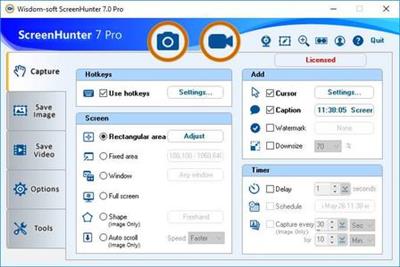
576f04663cd8126ec6a9353e6ac96e88.jpg


ScreenHunter Pro 7.0.1135 | 136.8 Mb​
ScreenHunter Pro is the most advanced version of ScreenHunter with all the necessary tools included for your screen capture needs. It's the total screen capture solution to save you time and boost productivity. With ScreenHunter Pro, you can immediately see the benefits of numerous time-saving features and deliver the highest quality screenshots. As well, it offers easy-to-use user interface and maximum flexibility for a more interactive capture experience. Powerful and intelligent, ScreenHunter Pro has proven to be an incomparable helper of your business.

Capturing Features
* Rectangular area
* Adjustable rectangle
* Object / Window
* Auto-scroll
* Multi-object
* Text
* Active Window
* Fixed area (user defined)
* Specific window (lock-in window)
* Full screen
* DOS program
* DirectX / Screen saver
* Movie / video
* Freehand
* Round area (Ellipse)
* Round Rectangular area
* Polygon
* Web capture
* Scanning images

Addition Features
* Mouse pointer
* Multiple monitors
* Transparent window
* AutoText (date/time stamps, note)
* Watermark
* Border

Timing Features
* Delayed capture
* Timed auto-capture
* Scheduled auto-capture
* Recurring capture

Viewing and Editing Features
* Image editing, adding text & annotation
* Advanced image processing
* High-quality zooming, resizing & cropping
* Viewing 100 images & conversion
* Drag & drop images from desktop

Saving Features
* Automatic naming and saving to files
* Clipboard
* Auto-email
* Auto-scale
* Saving in the smallest file size
* Optimized JPEG, GIF and PNG
* High quality and transparent GIF
* Saving to TIFF

Other Features
* Screen Color Picker
* System tray
* Zoombox
* Flexible hotkey
* Multiple hotkey
* Direct printing
* Wysiwyg printing
* Developer support

Operating System: Windows 7, 8/8.1, 10

Home Page -
У Вас недостаточно прав для просмотра ссылок. Войдите или зарегистрируйтесь.


Download link:​
Код:
[center][b]rapidgator_net[/b]:
https://rapidgator.net/file/26729dbd81ad7eb9d4f367a8cc6fd36f/rypl0.ScreenHunter.Pro.7.0.1135.rar.html

[b]nitroflare_com[/b]:
https://nitroflare.com/view/AFE9554995D4BF2/rypl0.ScreenHunter.Pro.7.0.1135.rar

[b]uploadgig_com[/b]:
https://uploadgig.com/file/download/2A316Aca22927C52/rypl0.ScreenHunter.Pro.7.0.1135.rar[/center]

Links are Interchangeable - No Password - Single Extraction​
 
Tower 6.1 macOS

7767b2e661e7868c3f9577805fec2f53.jpg


Tower 6.1 | macOS | 44 mb​
Tower is a Git client for OS X that makes using Git easy and more efficient. Users benefit from its elegant and comprehensive interface and a feature set that lets them enjoy the full power of Git.

Tower abstracts Git's complexity in an easy-to-use interface. For example, lots of actions can be performed simply via drag-and-drop, and mistakes can be undone easily. Advanced users can increase their productivity with features like single line staging, submodule support, or the file history.

Compatibility: macOS 10.11 or later 64-bit
Homepage:
У Вас недостаточно прав для просмотра ссылок. Войдите или зарегистрируйтесь.


Download link:​
Код:
[center][b]rapidgator_net[/b]:
https://rapidgator.net/file/f4c46fa57878fee4548f7bc7a8b0deeb/g8kei.Tower.6.1.rar.html

[b]nitroflare_com[/b]:
https://nitroflare.com/view/32191DAE5FDAD51/g8kei.Tower.6.1.rar

[b]uploadgig_com[/b]:
https://uploadgig.com/file/download/956e52693c4283cb/g8kei.Tower.6.1.rar[/center]

Links are Interchangeable - No Password - Single Extraction​
 
Transmit 5.7.0 macOS

5bf60beb11dca13108885b66353cf828.jpg


Transmit 5.7.0 | macOS | 43 mb​
Transmit is an excellent FTP (file transfer protocol), SFTP, S3 (Amazon.com file hosting) and iDisk/WebDAV client that allows you to upload, download, and delete files over the internet. With the most Mac-like interface available, Transmit makes FTP as simple, fun, and easy as it can possibly be.

Compatibility: macOS 10.13 or later 64-bit
Homepage:
У Вас недостаточно прав для просмотра ссылок. Войдите или зарегистрируйтесь.


Download link:​
Код:
[center][b]rapidgator_net[/b]:
https://rapidgator.net/file/604e6dbc72e89de76a283ae6049f8254/j5so5.Transmit.5.7.0.rar.html

[b]nitroflare_com[/b]:
https://nitroflare.com/view/FD1452C704D6AAA/j5so5.Transmit.5.7.0.rar

[b]uploadgig_com[/b]:
https://uploadgig.com/file/download/cc593230AE3e6014/j5so5.Transmit.5.7.0.rar[/center]

Links are Interchangeable - No Password - Single Extraction​
 
Wondershare UniConverter 12.0.6.7 macOS

530e2395e3b62464566144006bd03952.jpg


Wondershare UniConverter 12.0.6.7 Multilingual | macOS | 113 mb​
Wondershare UniConverter is a complete video toolbox that lets you convert, edit, enhance, download, burn, organize, capture and watch video files. Convert videos to and from virtually any video format out there, with 30X faster conversion speed.

Wondershare Video Converter Ultimate will make your movies versatile by instantly converting them to AVI, WMV, MP4, MKV, FLV, 3GP, MPG - even convert video to 3D and 4K Ultra HD video format at ultrafast speeds. 159 formats supported and counting! Burn video files to Blu-Ray/ DVD disc, DVD folder, or ISO files, download or record videos from YouTube, Google, Yahoo and other video-sharing sites, convert home movies to any video/audio, for playback on any devices.

Compatibility: OS X 10.10 or later 64bit
Homepage:
У Вас недостаточно прав для просмотра ссылок. Войдите или зарегистрируйтесь.


Download link:​
Код:
[center][b]rapidgator_net[/b]:
https://rapidgator.net/file/b9eaab2f2f7bbe408a422926226e396a/f3l7e.Wondershare.UniConverter.12.0.6.7.rar.html

[b]nitroflare_com[/b]:
https://nitroflare.com/view/E338EBB73788B77/f3l7e.Wondershare.UniConverter.12.0.6.7.rar

[b]uploadgig_com[/b]:
https://uploadgig.com/file/download/ff3db4F722575d70/f3l7e.Wondershare.UniConverter.12.0.6.7.rar[/center]

Links are Interchangeable - No Password - Single Extraction​
 
ZillaTube 8.2

28a578dbffac04b88a9dba132cfb591f.jpg


ZillaTube 8.2 | 60.9 Mb​
Download your favorite YouTube videos easily, and keep them permanently.

Now you can watch your YouTube videos conveniently and instantly. Never lose it again.
Easily convert YouTube to high-quality formats such as Movies, Musics, Phone, Tablet, TV & Car Stereos, Projectors, PowerPoint media and much more.

Playback those converted videos on your iPhone, iPad, Androids, Tablets, Electronic devices, and watch those videos with friends and family.

OS: Win XP, Vista, Win 7, Win 8, Windows 10

Home Page -
У Вас недостаточно прав для просмотра ссылок. Войдите или зарегистрируйтесь.


Download link:​
Код:
[center][b]rapidgator_net[/b]:
https://rapidgator.net/file/3415e646f3ded94374f31a8be452c583/qroa9.ZillaTube.8.2.rar.html

[b]nitroflare_com[/b]:
https://nitroflare.com/view/0629D0AFE401EB0/qroa9.ZillaTube.8.2.rar

[b]uploadgig_com[/b]:
https://uploadgig.com/file/download/4a3061820d716355/qroa9.ZillaTube.8.2.rar[/center]

Links are Interchangeable - No Password - Single Extraction​
 
Adobe Zii 2021 6.0.3 universal Patcher macOS

5db77c93a142097be60cd86093122c4d.jpg


Adobe Zii 2021 6.0.3 universal Patcher | macOS | 14 mb​
Adobe Zii is a small and great utility which helps you forget about all issues with the registration of all Adobe existing products

What's New:

Added:
Adobe Acrobat DC v20.013.20064
Adobe After Effects 2020 v17.5.1
Adobe Audition 2020 v13.0.12
Adobe Media Encoder 2020 v14.6
Adobe Photoshop 2021 v22.0.1
Adobe Prelude 2020 v9.0.2
Adobe Premiere Pro 2020 v14.6
Adobe Premiere Rush v1.5.38
Adobe XD v35.0.12

Supported Products:
Adobe Acrobat DC v20.012.20048 - 20.013.20064
Adobe After Effects 2020 v17.5 - 17.5.1
Adobe Animate 2021 v21.0.0
Adobe Audition 2020 v13.0.11 - 13.0.12
Adobe Bridge 2021 v11.0.0
Adobe Character Animator 2020 v3.4
Adobe Dimension v3.4
Adobe Dreamweaver 2021 v21.0.0
Adobe Illustrator 2021 v25.0.0
Adobe InCopy 2021 v16.0.0
Adobe InDesign 2021 v16.0.0
Adobe Lightroom Classic v10.0
Adobe Media Encoder 2020 v14.5 - 14.6
Adobe Photoshop 2021 v22.0.0 - 22.0.1
Adobe Prelude 2020 v9.0.1 - 9.0.2
Adobe Premiere Pro 2020 v14.5 - 14.6
Adobe Premiere Rush v1.5.34 - 1.5.38
Adobe XD v34.0.12 - 35.0.12

Adobe Photoshop Elements 2021
Adobe Premiere Elements 2021

Compatibility: OS X 10.13 or later 64-bit
Homepage:
У Вас недостаточно прав для просмотра ссылок. Войдите или зарегистрируйтесь.


Download link:​
Код:
[center][b]rapidgator_net[/b]:
https://rapidgator.net/file/663c5c582338d57dbecfed2580f4515b/5ma9m.Adobe.Zii.2021.6.0.3.universal.Patcher.rar.html

[b]nitroflare_com[/b]:
https://nitroflare.com/view/525211088F6149F/5ma9m.Adobe.Zii.2021.6.0.3.universal.Patcher.rar

[b]uploadgig_com[/b]:
https://uploadgig.com/file/download/95aC1bc779a3D385/5ma9m.Adobe.Zii.2021.6.0.3.universal.Patcher.rar[/center]

Links are Interchangeable - No Password - Single Extraction​
 
Alfred 4 Powerpack 4.2.2 (1189) macOS

0193f24b8ee191dde5be66468dec300a.jpg


Alfred 4 Powerpack 4.2.2 (1189) | macOS | 6 mb​
Alfred is an award-winning app for Mac OS X which boosts your efficiency with hotkeys, keywords, text expansion and more. Search your Mac and the web, and be more productive with custom actions to control your Mac.

Search and Browse
Launch applications and find files on your Mac or on the web. Alfred learns how you use your Mac and prioritises results.
Save countless hours by using hotkeys, keywords and customising how you want to search your Mac and activity history.
Jump in and browse, preview files and take action on them without lifting your fingers off the keyboard.

Type Less, Say More
With Alfred's Clipboard History and Snippets features, there's no need to type the same URLs or responses over and over.
Use the Clipboard History to locate any text, image or file you copied earlier and paste it again.
Create your own snippets and type a short abbreviation to auto-expand them into a full text snippet, saving yourself hours of typing in the long run!

Extend and Automate
With Alfred's Powerpack, use immensely powerful workflows to perform tasks more efficiently and cut down on repetitive manual tasks.
Link hotkeys, keywords and actions together to create your own workflows; There's no need to write a single line of code to create a workflow. Import workflows from the thousands our community of creators have shared.

Control Your Music
You're the boss. Boost your productivity by controlling your Mac using Alfred's deep integration with OS X. Swiftly take action on files and contacts, control your music player and dispatch System commands.
Add some fun to your day; Turn your iPhone or iPad into a command centre for your Mac with Alfred Remote for iOS.
Alternatively, take a look at the many workflows for other music services like Spotify.

Alfred Powerpack
Control your Mac with the Powerpack's incredible features, and enjoy workflows and themes.

Compatibility: OS X 10.9 or later 64-bit
Homepage:
У Вас недостаточно прав для просмотра ссылок. Войдите или зарегистрируйтесь.


Download link:​
Код:
[center][b]rapidgator_net[/b]:
https://rapidgator.net/file/6d640aba17bf05c52b3fbeb9568fff7b/dmqu4.Alfred.4.Powerpack.4.2.2.1189.rar.html

[b]nitroflare_com[/b]:
https://nitroflare.com/view/EBF909450309C86/dmqu4.Alfred.4.Powerpack.4.2.2.1189.rar

[b]uploadgig_com[/b]:
https://uploadgig.com/file/download/64cC4c1986b138D9/dmqu4.Alfred.4.Powerpack.4.2.2.1189.rar[/center]

Links are Interchangeable - No Password - Single Extraction​
 
File Cabinet Pro 8.0 macOS

2bf5ac8b3cefd0a9ed8e2f2fe6dc21ad.jpg


File Cabinet Pro 8.0 | macOS | 19 mb​
File Cabinet Pro is the file manager for the macOS menu bar. Quickly navigate to files without cluttering your desktop. Open, move, rename, compress, tag, trash, copy and paste files, all from the menu bar. You can open many file types natively in File Cabinet Pro or open files by launching other applications. It's easy to click into directories in icon view, drill through directories in list view, or navigate the file tree in column view.

File Cabinet Pro is also a document-based application that ships with a built-in text editor, image viewer, pdf viewer, and media player. Some of the file types File Cabinet Pro can open for editing/viewing include:

TEXT DOCUMENTS:
* Plain text files (txt)
* Rich Text Format (rtf)
* Rich Text Format Directory (rtfd)
* Markdown (md)
* Portable Document Format (pdf)

IMAGE DOCUMENTS:
* Portable Network Graphics (png)
* Joint Photographic Experts Group (jpeg)
* Tagged Image File Format (tiff, tif)
* Bitmap image file (bmp)
* Photoshop File Format (psd) Import only
* Scalable Vector Graphics (svg) Import only

VIDEO/AUDIO:
-mov , -mp4 , -m4a , -m4v , -avi , -mp3 , -wav , -caf , -aif

Compatibility: OS X 10.10 or later 64-bit

Download link:​
Код:
[center][b]rapidgator_net[/b]:
https://rapidgator.net/file/6352e68d273bca5950fde4474599b6e8/hfsn8.File.Cabinet.Pro.8.0.rar.html

[b]nitroflare_com[/b]:
https://nitroflare.com/view/E3C0CD84E1DB4A9/hfsn8.File.Cabinet.Pro.8.0.rar

[b]uploadgig_com[/b]:
https://uploadgig.com/file/download/9e4285Bbf4dDa0d2/hfsn8.File.Cabinet.Pro.8.0.rar[/center]

Links are Interchangeable - No Password - Single Extraction​
 
Folder-Factory 5.7.12 macOS

c747d5be19b4741aa1f9079cc644208e.jpg


Folder-Factory 5.7.12 | macOS | 12 mb​
Folder-Factory is a basic icon tool for OS X which help you to customize, design and enhance your folder icons. With it you can combine folder icon with images, text, sketch, and shape. This will improve your system's appearance, keep your Mac organized and improve your working productivity. You'll no longer need to read folder names as you can now easily identify them. And at last, it has a friendly and clean UI and it's really easy to use.

Key features:
- Support retina display.
- Customize, design and enhance your folder icons.
- Support all kinds of tools. For example eyedropper, fill, line, rectangle, ellipse, pen, eraser, text, image, round rectangle and so on.
- Config line width, pen color and fill color and so on.
- Full support for transparency.
- Add text on image.
- Full support for undo/redo, cut/copy/paste.
- Support drag and drop any files and folders.

Compatibility: macOS 10.9 or later 64 bit

Download link:​
Код:
[center][b]rapidgator_net[/b]:
https://rapidgator.net/file/5055800d93b71d84b37c8b7ffa6fa63c/ais3c.FolderFactory.5.7.12.rar.html

[b]nitroflare_com[/b]:
https://nitroflare.com/view/7C8ED3AFDA4C6F2/ais3c.FolderFactory.5.7.12.rar

[b]uploadgig_com[/b]:
https://uploadgig.com/file/download/9427d7dcc33149d1/ais3c.FolderFactory.5.7.12.rar[/center]

Links are Interchangeable - No Password - Single Extraction​
 
Folder Tidy 2.8.3 macOS

be8f0ba22862da3d465345339f738d45.jpg


Folder Tidy 2.8.3 | macOS | 10 mb​
Take a look at your Desktop, or the Downloads folder - is it a little disorganized? Or maybe really disorganized? Don't worry, it's really easy to clean up. Download Folder Tidy right now and choose the folder to organize and with one click you'll see the files get sorted into the appropriate sub folders (Pictures, Word Documents, Numbers, Archives, etc).

Compatibility: OS X 10.10 or later 64-bit

Download link:​
Код:
[center][b]rapidgator_net[/b]:
https://rapidgator.net/file/dd30afc7106c5a1cd0651f80a0f2aa3e/f60yu.Folder.Tidy.2.8.3.rar.html

[b]nitroflare_com[/b]:
https://nitroflare.com/view/F5EDA62E2F79915/f60yu.Folder.Tidy.2.8.3.rar

[b]uploadgig_com[/b]:
https://uploadgig.com/file/download/bc26d33da90AeEE8/f60yu.Folder.Tidy.2.8.3.rar[/center]

Links are Interchangeable - No Password - Single Extraction​
 
Lyn 2.0.1 macOS

2217de43c991cefdc801406958724fb5.jpg


Lyn 2.0.1 Multilingual | macOS | 23 mb​
Lyn is a fast, lightweight image browser and viewer designed for photographers, graphic artists, and Web designers. Featuring an extremely versatile and aesthetically pleasing interface, it delivers an easy-to-use geotagging technology and a complete solution for sharing your photographs. The new editing inspector gives you everything to turn your shots into great photos.

Adjust exposure, color temperature, brightness, and contrast, or reveal image details with highlight and shadow adjustments. You can experiment and convert your color photos to black and white, try a classic sepia tone, or add a vignette.

Lyn natively supports all popular image formats like JPEG, TIFF, JPEG 2000, PNG, PPM, TGA, RAW, HDR, OpenEXR, animated GIF, and any other image format supported by OS X. It also integrates a movie player to watch camera recordings.

Compatibility: OS X 10.11 or later 64-bit
Homepage:
У Вас недостаточно прав для просмотра ссылок. Войдите или зарегистрируйтесь.


Download link:​
Код:
[center][b]rapidgator_net[/b]:
https://rapidgator.net/file/4e519fbb2d3fd40aa5d892d75c50e24d/hfcqr.Lyn.2.0.1.rar.html

[b]nitroflare_com[/b]:
https://nitroflare.com/view/CF2F0E3F8B4C213/hfcqr.Lyn.2.0.1.rar

[b]uploadgig_com[/b]:
https://uploadgig.com/file/download/e9b309d653a19879/hfcqr.Lyn.2.0.1.rar[/center]

Links are Interchangeable - No Password - Single Extraction​
 
Moom 3.2.19 macOS

bb69e8a382e919eb3e206217c79da7b6.jpg


Moom 3.2.19 | macOS | 9 mb​
Moom allows you to move and zoom windows - using either the mouse or the keyboard - to predefined locations and sizes, or to full screen mode.

When used via the mouse, all you need to do is hover over a green resize button, and Moom's interface appears. When used via the keyboard, press your defined shortcut, and the Moom keyboard bezel appears; you can then move windows using the arrow keys and modifier keys.

Moom can be run as a traditional application, a menu bar application, or a completely faceless background application.

Compatibility: OS X 10.9 or later 64-bit
Homepage:
У Вас недостаточно прав для просмотра ссылок. Войдите или зарегистрируйтесь.


Download link:​
Код:
[center][b]rapidgator_net[/b]:
https://rapidgator.net/file/608d0487cbbb93259b02ff884b018f99/5i3jm.Moom.3.2.19.rar.html

[b]nitroflare_com[/b]:
https://nitroflare.com/view/DAEE7F04DE0FAB9/5i3jm.Moom.3.2.19.rar

[b]uploadgig_com[/b]:
https://uploadgig.com/file/download/3e20D62004F599e8/5i3jm.Moom.3.2.19.rar[/center]

Links are Interchangeable - No Password - Single Extraction​
 
SiteSucker Pro 3.2.6 macOS

1c7aecd2cb0c1ac7f006bf4f20d187b7.jpg


SiteSucker Pro 3.2.6 Multilingual | macOS | 5 mb​
SiteSucker is an Macintosh application that automatically downloads Web sites from the Internet. It does this by asynchronously copying the site's webpages, images, PDFs, style sheets, and other files to your local hard drive, duplicating the site's directory structure. SiteSucker Pro is an enhanced version of SiteSucker that can download embedded videos, including embedded YouTube and Vimeo videos.

SiteSucker can be used to make local copies of Web sites. By default, SiteSucker "localizes" the files it downloads, allowing you to browse a site offline, but it can also download sites without modification

Compatibility: macOS 10.14 or later 64-bit
Homepage:
У Вас недостаточно прав для просмотра ссылок. Войдите или зарегистрируйтесь.

Download link:​
Код:
[center][b]rapidgator_net[/b]:
https://rapidgator.net/file/a3654ba4317341629444be515839ed12/67jtz.SiteSucker.Pro.3.2.6.rar.html

[b]nitroflare_com[/b]:
https://nitroflare.com/view/B41CAC4216DB6EC/67jtz.SiteSucker.Pro.3.2.6.rar

[b]uploadgig_com[/b]:
https://uploadgig.com/file/download/1049997037f36aE4/67jtz.SiteSucker.Pro.3.2.6.rar[/center]

Links are Interchangeable - No Password - Single Extraction​
 
Smooze 1.9.7 macOS

a40f86099f764a9e5721054af4fc08d6.jpg


Smooze 1.9.7 | macOS | 9 mb​
Smooth scrolling and mouse enhancements. Unobtrusive tool created to help you smooth out your scrolling, as well as to add custom mouse buttons actions and mouse gestures to any app

Even though macOS comes with a mouse preference pane, it is quite limited as it offers insufficient options for customizing the scroll feature, the mouse's buttons, and absolutely no mouse gesture support.

Smooze is an application designed to fill in the gap left by Apple in macOS' mouse customization department.

Once launched, Smooze will add a status bar item with a menu which enables you to set the app to start automatically on login, as well to disable its custom scroll engine and button actions, and access its options.

- Disable scroll acceleration in macOS 10.12 Sierra (the app is not free but that specific feature is free and will always be free)
- Every app you own will have buttery smooth scrolling
- Save time by attaching mouse buttons to actions
- Disable animated scroll for specific apps

Compatibility: macOS 10.12 or later 64-bit
Homepage:
У Вас недостаточно прав для просмотра ссылок. Войдите или зарегистрируйтесь.


Download link:​
Код:
[center][b]rapidgator_net[/b]:
https://rapidgator.net/file/4e65db0a24406d7f65307e6d49f6b7c3/palgi.Smooze.1.9.7.rar.html

[b]nitroflare_com[/b]:
https://nitroflare.com/view/B25B1A3145336DF/palgi.Smooze.1.9.7.rar

[b]uploadgig_com[/b]:
https://uploadgig.com/file/download/69B3c53c2c8c04b0/palgi.Smooze.1.9.7.rar[/center]

Links are Interchangeable - No Password - Single Extraction​
 
Stacks (RapidWeaver plugin) 4.1.1 macOS

7c272decb2b7a2bbc86f027a144cc5d9.jpg


Stacks (RapidWeaver plugin) 4.1.1 | macOS | 13 mb​
Stacks is a new way to create pages in RapidWeaver. It's a plugin designed to combine drag-and-drop simplicity with the power of fluid layout.

Features:

* Fluid Layout: Stacks lets you build pages that flow text to the dimensions of a theme even if the theme has a variable width. You can build flowing columns, flexible rows, and tiles of images.
* Nesting Objects: Build columns within columns within rows within columns. Or group a stack of objects inside a box. Almost anything is possible with Stacks.
* Download More Stacks:There are hundreds of professionally designed free and low cost stacks ready for download. Easily add amazing content to your site.
* Live Image Editing: Resize, rotate, and style your images with an easy to use HUD and see the changes happen right in the layout.
* Pros Welcome: Because Stacks builds layout with relative positioning from a simple two-div structure, the HTML is clean and valid. Pros can use Stacks to prototype difficult layout and add their own HTML to the mix.
* Stacks API: You can build your own components for Stacks or even publish them for others to use. The Stacks API reference covers how to build and configure a stack and even build a custom UI for the Stacks HUD.

Requirements: RapidWeaver 7 or later
Compatibility: OS X 10.11 or later 64-bit
Homepage:
У Вас недостаточно прав для просмотра ссылок. Войдите или зарегистрируйтесь.


Download link:​
Код:
[center][b]rapidgator_net[/b]:
https://rapidgator.net/file/b71d54e433bcc6ea9b3ae0a0ad175a80/0sye3.Stacks.RapidWeaver.plugin.4.1.1.rar.html

[b]nitroflare_com[/b]:
https://nitroflare.com/view/B72F995BD12B561/0sye3.Stacks.RapidWeaver.plugin.4.1.1.rar

[b]uploadgig_com[/b]:
https://uploadgig.com/file/download/367fa824c238717b/0sye3.Stacks.RapidWeaver.plugin.4.1.1.rar[/center]

Links are Interchangeable - No Password - Single Extraction​
 
TinkerTool System 7.01 macOS

2a6ae52f32b8fa9cb0fa98664af07baf.jpg


TinkerTool System 7.01 | macOS | 25 mb​
TinkerTool System is a collection of system utility features helping you in performing advanced administration tasks on Apple Macintosh computers. The application makes use of a self-adapting user interface which automatically adjusts to the computer model and to the version of macOS you are running. All options available in the current situation are accessible via "panes", very similar to the techniques you already know from the System Preferences application.

The features are controlled via a single window which allows you to use the application as a general toolbox and First Aid assistant. This includes:

*built-in maintenance features of macOS, usually not visible on the graphical user interface,
*extended file operations, not available in the macOS Finder,
*the possibility to access advanced system settings which are not visible in System Preferences,
*genuine and unique features of TinkerTool System, designed to resolve typical real-world problems of administrators and to fix the effects of certain defects ("bugs") in the operating system,
*an emergency tool to troubleshoot and repair macOS in cases where the graphical user interface is no longer starting correctly or the user account of the system administrator has been damaged,
*functions to collect advanced information about the hardware, operating system, and applications.

Together with its sister program TinkerTool which is available at no charge, TinkerTool System is a perfect substitute for the following types of system utilities:

*Finder enhancers,
*Cache and font cache cleaners,
*Scripts to create bootable system installer and recovery disks,
*Tools to access hidden preference settings,
*Applications to make objects invisible in the Finder,
*Log file browsers,
*Application uninstallers,
*Single User Mode troubleshooting tools,
*Spell-checker dictionary editors,
*and many others.

Compatibility: OS X 11.0 or later 64-bit
Homepage:
У Вас недостаточно прав для просмотра ссылок. Войдите или зарегистрируйтесь.


Download link:​
Код:
[center][b]rapidgator_net[/b]:
https://rapidgator.net/file/9f27bce917ec84ef5b050b7e05266558/ghtbn.TinkerTool.System.7.01.rar.html

[b]nitroflare_com[/b]:
https://nitroflare.com/view/9420C6EFC64EDDF/ghtbn.TinkerTool.System.7.01.rar

[b]uploadgig_com[/b]:
https://uploadgig.com/file/download/0d0aB96d9E1d2bC5/ghtbn.TinkerTool.System.7.01.rar[/center]

Links are Interchangeable - No Password - Single Extraction​
 
Tri-BACKUP Pro 9.1.7 macOS

5e812bf145bc747629557827760f308e.jpg


Tri-BACKUP Pro 9.1.7 macOS | 13.4 MB
Languages: English, Français​
Tri-BACKUP Pro is a customizable back-up solution for your disks and folders, Tri-Backup Pro adds advanced functions such as web server back-ups, control for actions from remote machines, copying process double-checking, and e-mail alerts (for example, to send email to an administrator when errors were detected, or to monitor the proper implementation of backups).

Copy your disk: Create a bootable copy of your disk updated regularly and automatically. You can restart from the copy at any time and retrieve all your data and applications in your usual environment. This function is also useful to change your startup disk or to duplicate an environment on multiple machines.

Clean Mac: Put your Mac in good condition by using a clean copy of your startup disk.You can directly restart from the clean copy or restore your internal disk.

Save your data: Tri-BACKUP automatically and regularly copies your files to one or more internal or external drives, on another machine, network, FTP server, etc. You can multiply your backups to increase the security of your data.

Data recovery: If you lose your data, backups will be much more effective than any data recovery software. Think backup with Tri-BACKUP.

Transfers your data: Synchronize multiple machines, share files and group documents from multiple users, across a local network or through external drives, and you can even use systems like Dropbox updated by Tri-BACKUP.

Automate your backups: Let your backups run automatically in the background without disturbing you or slow down the use of your machine. Programmed actions can be triggered at the time and frequency of your choice, or automatically executed when a disk is connected, or when you quit an application.

Compare and control: With the immediate actions of Tri-BACKUP, you compare the contents of two folders and you can control exactly what needs to be copied, synchronized or deleted.

Survey: Survey the contents of a folder or disk to detect any modification and warn or execute an action.

Copy and organize: Copy the contents of a folder by sorting the files in subfolders following their date, their kind (images, video...), their extension, etc

Version 9.1.7:

Enhancements:

Enlarge the size of list of folders in the actions editor.Various minor enhancements and interface changes.
Corrections:
Various minor corrections.

Download link:​
Код:
[center][b]rapidgator_net[/b]:
https://rapidgator.net/file/aea889a809f317a7f46e093f807edacf/icx2x.TriBACKUP.Pro.9.1.7.macOS.rar.html

[b]nitroflare_com[/b]:
https://nitroflare.com/view/A3DDA65FD6D5C0C/icx2x.TriBACKUP.Pro.9.1.7.macOS.rar

[b]uploadgig_com[/b]:
https://uploadgig.com/file/download/936005515a6a589e/icx2x.TriBACKUP.Pro.9.1.7.macOS.rar[/center]

Links are Interchangeable - No Password - Single Extraction​
 
WiFi Explorer Pro 3.0.1 macOS

54651599a786d440ffd985dfb7b39f7f.jpg


WiFi Explorer Pro 3.0.1 | macOS | 13 mb​
WiFi Explorer Pro takes the code base of WiFi Explorer, and adds a set of features that makes it the right tool for WLAN and IT professionals. You can use WiFi Explorer Pro for preliminary assessments, to help design and validate wireless networks installations, as well as to identify channel conflicts, overlapping, poor signal quality and other issues that may be affecting the connectivity or performance of your home, office or enterprise wireless network.

Features
- Passive and directed scan modes
- Spectrum analysis integration
- Custom filters
- Support for remote sensors
- Support for networks with hidden SSIDs
- Additional columns with advanced information
- Additional organization options for scan results
- Dark and light themes

Compatibility: macOS 10.13 or later 64-bit
Homepage:
У Вас недостаточно прав для просмотра ссылок. Войдите или зарегистрируйтесь.


Download link:​
Код:
[center][b]rapidgator_net[/b]:
https://rapidgator.net/file/1afd2edb883f6aac5231de2359f6ac0a/ktp8p.WiFi.Explorer.Pro.3.0.1.rar.html

[b]nitroflare_com[/b]:
https://nitroflare.com/view/DB81A81C7275E4F/ktp8p.WiFi.Explorer.Pro.3.0.1.rar

[b]uploadgig_com[/b]:
https://uploadgig.com/file/download/89659c28168b10aB/ktp8p.WiFi.Explorer.Pro.3.0.1.rar[/center]

Links are Interchangeable - No Password - Single Extraction​
 
BackupTrans Android iPhone WhatsApp Transfer Plus 3.2.147 (x64)

b8b9e6a3afbb5ae00e8d7dc6e7ca4956.jpg


Backuptrans Android iPhone WhatsApp Transfer Plus 3.2.147 (x64) | 20.1 Mb​
Copy Android/iPhone WhatsApp Messages to PC or another Android/iPhone. If you have two Android/iPhone devices or one Android and one iPhone, it's always wise to find a tool to help you manage WhatsApp Chat History for your Android/iPhone devices or to transfer WhatsApp Messages between Android and iPhone. Backuptrans Android iPhone WhatsApp Transfer + is the best all-in-one WhatsApp Messages manager package which lets you copy & share WhatsApp Chat Mesages for Android/iPhone on computer directly. No Root/Jailbreak required.

Backup WhatsApp Chat History from Android/iPhone to PC
Restore WhatsApp Chat History from Computer to Android/iPhone
Transfer WhatsApp Messages between Android and iPhone
Recover WhatsApp Messages from iTunes Backup to Android/iPhone
Export WhatsApp Messages to document file(Txt, Csv, Doc, Html, PDF)
Print out WhatsApp Messages in conversations on PC
Extract WhatsApp pictures videos audios etc attachments on PC
Support iPhone, Samsung, HTC, Motorola, Sony Ericsson, LG, Huawei and More

Operating System: Windows NT/2000/XP/2003/Vista/7/8/10 (64-bit only)

Home Page -
У Вас недостаточно прав для просмотра ссылок. Войдите или зарегистрируйтесь.


Download link:​
Код:
[center][b]rapidgator_net[/b]:
https://rapidgator.net/file/d0589fe7880519652450e28af1562d60/1zga8.BackupTrans.Android.iPhone.WhatsApp.Transfer.Plus.3.2.147.x64.rar.html

[b]nitroflare_com[/b]:
https://nitroflare.com/view/2518D66407E9D8D/1zga8.BackupTrans.Android.iPhone.WhatsApp.Transfer.Plus.3.2.147.x64.rar

[b]uploadgig_com[/b]:
https://uploadgig.com/file/download/65edb0fD28924391/1zga8.BackupTrans.Android.iPhone.WhatsApp.Transfer.Plus.3.2.147.x64.rar[/center]

Links are Interchangeable - No Password - Single Extraction​
 
Chris-PC RAM Booster 5.11.21

66a5234e3e487a5d0325842d7dc9e62d.jpg


Chris-PC RAM Booster 5.11.21 | 9.6 Mb​
Chris-PC RAM Booster will definitely improve things! Your computer will get a boost, since RAM Booster will monitor the RAM (Random Access Memory) usage and when that gets to a certain low memory threshold, it will trigger the process of freeing up memory for newly opened programs while at the same time move the old programs from the RAM memory to the virtual memory on the disk.

Lets see what actually happens under the hood: when your PC's physical RAM gets full of opened applications, typically Windows starts opening any new applications using the hidden buffer file on the disk called pagefile.

Certainly this is a slower process since accessing the info bits on the hard drive is a more time-consuming mechanical process (the heads of the hard-drive move towards the right platter, cylinder and section of the disk surface where the bits are stored) than accessing the memory RAM chips. This means that your newly opened application is now stored in the virtual memory on the hard-drive. Therefore your computer will act very poor in terms of performance.

What to do? Install Chris-PC RAM Booster to manage RAM memory and pagefile usage more wisely than before. RAM Booster will change the behavior of Windows and your newly opened applications and games will run better and faster.

Most important features of Chris-PC RAM Booster:
-Faster running applications and games by smartly optimizing the usage of the physical RAM memory of your computer against the virtual memory from the page file of your Windows operating system.
-Wide set of options and settings for personal customization of RAM memory usage: including low memory threshold to start the freeing up process, setting for full-screen applications, CPU usage for which memory should be freed etc.
-Background running: once installed, started and configured, RAM Booster will run quietly without user interaction and will free-up RAM memory.
-Is useful also on server machines (idle or in use), with no user logged in, giving access to more RAM to server programs.
-Includes a memory benchmark test to get an evaluation on the stability of your computer and RAM memory.
-Provides statistics for a complete overview on your computer performance with RAM Booster active.
-Provides dynamic systray icon which displays computer realtime memory usage.
-Simple and intuitive interface.

System Requirements:

Hardware:
1000 MHz processor or higher, such as an Intel Pentium III or AMD Athlon
Memory : more than 128 MB RAM
HDD Space : 10 MB

Software:
Microsoft Windows 10, 8, 7, Vista, XP & Windows Server 2012, 2008, 2003. 32-BIT/64-BIT
Internet Explorer 7 or higher

Home Page -
У Вас недостаточно прав для просмотра ссылок. Войдите или зарегистрируйтесь.


Download link:​
Код:
[center][b]rapidgator_net[/b]:
https://rapidgator.net/file/102e368567b7dc5b89718856f0f43b3c/ei0ae.ChrisPC.RAM.Booster.5.11.21.rar.html

[b]nitroflare_com[/b]:
https://nitroflare.com/view/97B34221F631349/ei0ae.ChrisPC.RAM.Booster.5.11.21.rar

[b]uploadgig_com[/b]:
https://uploadgig.com/file/download/0f252A5dAf324af7/ei0ae.ChrisPC.RAM.Booster.5.11.21.rar[/center]

Links are Interchangeable - No Password - Single Extraction​
 
Назад
Сверху