• Старая версия форума работает в архивном режиме www.old.nado.in

All mitsumi'1s Applications !! (updated daily)

  • Автор темы Автор темы mitsumi1
  • Дата начала Дата начала
YT Downloader 7.2.9 Portable
6da3c1314a8d4e30619351b1dad9960b.jpg


YT Downloader 7.2.9 Portable | 21.4 Mb​
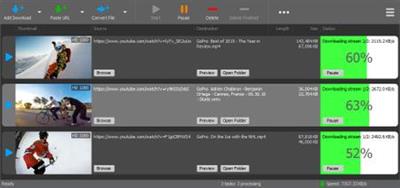
YT Downloader (ex YTD Youtube Downloader) is a simple and easy-to-use video download application. It helps you to download and convert videos from YouTube and hundreds of other video sites. YT Downloader increases your download speeds by up to 500%.

Features
YT Downloader is the easiest and the fastest way to download and convert videos from YouTube and other video sites.

Download videos from YouTube and hundreds of video sites
YT Downloader can download videos from YouTube, Facebook, Dailymotion, Vimeo, Metacafe, and hundreds of other video sites. After downloading your video files, you'll be able to watch them smoothly using any media player, even if you don't have internet access.

Accelerate your downloads
YT Downloader features an advanced download acceleration engine that lets you download videos 500% faster than normal speed.

Download 4K, 2K, HD 1080p and 720p videos from YouTube
You can also download 3D videos from YouTube if they are available.

YouTube to MP3
YT Downloader allows you to download only audio stream from YouTube, and save it as MP3. You don't need to download the entire video file. The audio stream is small, you can download it within seconds.

Download whole playlist from YouTube
Just enter a YouTube playlist ID, YT Downloader will download all or selected videos in the playlist from YouTube for you.

Support drag-and-drop
You can directly drag and drop video link from your browser to the drop box or program window to start a download. You don't even need to copy and paste video URL.

Download multiple videos at a time
YT Downloader supports simultaneous downloads. It allows you to download more than one video at same time and safe time.

Pause and resume downloads
You can pause, resume, or cancel your downloads if you need more connection to perform other important tasks.

Preview videos while downloading
While downloading, you can click the Preview button to play incomplete video and make sure the content you are downloading is really the content of your choice.

Video and audio converter
YT Downloader is also a powerful video/audio converter. It can convert local video/audio files to any format you wish so that they are playable everywhere.

Video to MP3
YT Downloader allows you to extract audio streams from videos and save them as mp3, wav, wma, ac3, ringtone, or other audio format.

Support all popular video and audio formats
YT Downloader allows you to save downloaded videos in any format for any device, so you can watch them smoothly on your PC, iPhone, iPad, Android phone, and other device.

Ready-made presets
YT Downloader provides ready-made presets for all video and audio formats. You can also custom output video/audio format settings.

iTunes compatible
Optionally, YT Downloader can add downloaded video/music to your iTunes library automatically, so you can easily synchronize your videos and music to your iPhone, iPad, iPod.

Media Player
YT Downloader includes a simple and easy-to-use media player. If your Windows Media Player cannot play your video/audio files, you may try our Media Player.

Operating System: Windows 10/8/7/Vista/XP/2000

Home Page -
У Вас недостаточно прав для просмотра ссылок. Войдите или зарегистрируйтесь.


Download link:​
Код:
[center][b]rapidgator_net[/b]:
https://rapidgator.net/file/83127c7cf5e09a9dbe19317ae7b01b41/giu3g.YT.Downloader.7.2.9.Portable.rar.html

[b]nitroflare_com[/b]:
https://nitroflare.com/view/F4385A9C4647605/giu3g.YT.Downloader.7.2.9.Portable.rar

[b]uploadgig_com[/b]:
https://uploadgig.com/file/download/dc1479dc0FD7eb55/giu3g.YT.Downloader.7.2.9.Portable.rar[/center]

Links are Interchangeable - No Password - Single Extraction​
 
ZOC Terminal 8.01.5 macOS

1dffc90f352bfcef77af15d1a5ce5b4e.jpg


ZOC Terminal 8.01.5 macOS | 10.2 MB​
ZOC Terminal is a Telnet/SSH/SSH2 client and terminal emulator. Featuring tabbed sessions, typed command history, scrollback, and multi-window support, ZOC Terminal's implemented emulations have made it the preferred tool for anyone who needs to access Unix shell accounts from a Windows or OS X platform.

User Interface
Tabbed sessions with overview screen to show thumbnails of all open sessions
Session tabs can be moved between windows
"Colorful tabs" feature to tint user interface elements with different colors depending on which host is connected
Full keyboard remapping (e.g. to send text, perform functions, execute programs, etc.)
Host directory with folders and full option set for each entry and automatic login sequences
User button bar to map texts, scripts, phone book entries, external protocols and shell commands to buttons (incl. sub-folders in the button bar)
F-Macro keys for texts, scripts, phone book entries, external shell commands, etc.
Local typing (entry field with history e.g. to type commands)
Various logging and scroll back functions
Keyboard mode for bbs door programs (doorway mode)
Compatible with current Windows 10 and macOS Sierra operating systems (more details below)

Emulation
Full Xterm emulation with 256 colors and mouse support (e.g. for use with Midnight Commander)
Linux console-like (including UTF8, colors, full keyboard)
VT52, VT100, VT102, VT220 (complete implementation incl. print through, keyboard and ANSI colors)
TN3270 (models 3278 and 3279/E with line graphics, colors and full keyboard mapping)
TN5250 for IBM iSeries access
ANSI-BBS, ANSI-SCO, Avatar
Sun-CDE
Wyse WY-30, WY-50, WY-60
TVI 9xx (TVI 920, TVI 925, TVI 950)
QNX V4
ATT4410
TTY
All emulations support line graphics with any font

Communication
Modern Secure Shell (currently based on OpenSSH 7.0) with public/private key authentication, smart-card support (pkcs#11) and port forwarding (tunneling)
Telnet (RFC-Telnet, pure TCP sockets), SSL-Telnet (with TLS 1.2 support)
IPv6 support for SSH and Telnet
Modem via serial port and TAPI (Windows modem)
Direct serial console connections via local serial port or USB/serial adaptors with FTDI chipset or Keyspan or PL2303
Supports Break-Signal for serial Connections (e.g. for CISCO devices)

Rlogin
ISDN via CAPI V2.0 (including X.25 and X.31 support)
File transfer via Ascii, Xmodem, Ymodem, Zmodem, Kermit, SCP, IND$FILE
Translation of inbound/outbound characters

SSH (Secure Shell) Features
Based on industry reference implementation OpenSSH
Client supports latest encryptions like ED25519 SHA256, SHA2 or AES-256ctr
SSH public/private key, key certificate, keyboard interactive or password authentication
Dynamic port forwarding (client as a SOCKS proxy)
X11 forwarding (lets you run X-Windows applications in the remote session)
Static port forwarding (tunneling of connections to predefined destinations)
Proxy support (client connects to server through proxy or jumpserver/jumpdrive)
SSH Agent forwarding between client and server
support for Putty-Agent (Windows) and ssh-agent (macOS)
Client side SSH key generator
SCP file transfer through terminal emulation session
SSH client protocol versions 1 and 2
SSH Keep-Alive

Logging
Scroll back in three variantes (in window, in separate Window and data view in separate window)
Auto Highlight (text on screen can be monitored and special phrases can be highlighted automatically)
Raw data trace to file (text and binary mode)
Hex debug mode on screen
File-log of all incoming data including optional time stamps
Printer log of all incoming data
Auto-Highlight (automatic color highlighting of predefined words or phrases)
Print screen and screen to clipboard functions

Automation
AutoLogin (recorded login procedures from the host directory)
REXX language for scripting (fully featured programming language with over 75 extensions to control the terminal emulator)
DDE support allows ZOC to act as a communication server (Windows)
AppleScript support with access to all internal script commands (macOS)
Auto Macros (text/functions invoked by typing certain text)
Auto Replies (text/functions invoked by receiving certain text)
Functions and special escape sequences to automatically exeute local applications (NetTerm compatible)

Requirements: Intel OS X 10.6 or later

Home Page -
У Вас недостаточно прав для просмотра ссылок. Войдите или зарегистрируйтесь.


Download link:​
Код:
[center][b]rapidgator_net[/b]:
https://rapidgator.net/file/be88a4cb715de2edff868e23a04d5da7/g6318.ZOC.Terminal.8.01.5.macOS.zip.html

[b]nitroflare_com[/b]:
https://nitroflare.com/view/F25F958197115C6/g6318.ZOC.Terminal.8.01.5.macOS.zip

[b]uploadgig_com[/b]:
https://uploadgig.com/file/download/eEA898e9E75d1379/g6318.ZOC.Terminal.8.01.5.macOS.zip[/center]

Links are Interchangeable - No Password - Single Extraction​
 
+40 Golden Tips for designer

153373c708d304105b8b2ed35273a8ae.jpg


+40 Golden Tips for designer
Duration: 54m | .MP4 1280x720, 30 fps(r) | AAC, 44100 Hz, 2ch | 522 MB
Genre: eLearning | Language: English
Some of these important points are artistic, technical, recommendations, and activities.​

What you'll learn
+40 tips and advice's for designers and animators
Clarity and simplicity
Consistency and harmony
Imitate printed and visual designs
Establish your own library
Volunteer to work in a small printing press for a few days
Design in black and white and gray-scale
Do not sanctify your deeds
Buy a computer with excellent specifications, and renew every four years
Practice well in the art of layout
Accept criticism and ask for it, but from people with knowledge and experience in the specialty.
Understand what domination in design means
Study time and learn to manage it intelligently, and do not give work more than its time
Working a lot does not mean better quality or more knowledge
Software does not make you creative ... it's you

Requirements
One of the following or more : Photoshop or illustrator or coreldraw, affinity designer, aftereffects, final cut pro, Davinci resolve, InDesign...
Description
we will talk about a series of wonderful tips and activities, to develop your level and skills, and advance them as a distinguished designer, I have written and abstracted more than forty important tips, from my experience and long years, which I spent in the fields of this industry.

I will also present many skills and basics that I rarely found an explanation talking about, deficiencies in their presentation and clarification.

By understanding and applying these tips, it will raise your level, skills, and awareness as a designer to a higher level, you will understand many things that were not clear to you. analyze many ambiguities.

These tips will be presented in a slightly different way, with conveniently and easiness.

Who this course is for:
Graphic design Students
Personal trained graphic designers
Junior Graphic designers
Senior graphic designers
web designers
Animators

Download link:​
Код:
[center][b]rapidgator_net[/b]:
https://rapidgator.net/file/9d08b265823037c139f8541cbfae3d11/ir91b.40.Golden.Tips.for.designer.rar.html

[b]nitroflare_com[/b]:
https://nitroflare.com/view/55ED94B16211DDD/ir91b.40.Golden.Tips.for.designer.rar[/center]

Links are Interchangeable - No Password - Single Extraction​
 
Animate Explainer Videos From Storyboard to Animation

ebaea44afb4d01403211716ddbd9c91a.jpg


Animate Explainer Videos From Storyboard to Animation
Duration: 2h38m | .MP4 1280x720, 30 fps(r) | AAC, 44100 Hz, 2ch | 1.4 GB
Genre: eLearning | Language: English
Learn how to animate explainer videos with motion graphics techniques from scratch.​

What you'll learn
Animate stunning motion graphics videos on your own
Improve your animation with animation principles and curves
Understand the basics of After Effects
Use hottest professional techniques to improve workflow and be more efficient

Requirements
No previous knowledge is required. Basic knowledge of adobe suite software will make this course easier to follow.
Download any version of Adobe After Effects. In the course, we're using the latest Adobe Suites.

Description
Explainer videos are animated video contents that explain a business and also convey the value of a business. There are so many awesome explainer videos created for all kinds of businesses to drive traffic and sales as well as generating awareness for their products and services.

Explainer videos are in high demand. Once you know how to animate explainer videos, it will make you a more marketable animator towards other competitors and be able to take on different kinds of fun projects

In this course, I will take you step by step from receiving a storyboard to rendering out our final explainer video animation. Here are the topics that we will cover in this course:

Complete professional explainer workflow from AI to AE

How to customize or come up with your storyboards

How to setup your illustration for animation

How to setup After Effects project for explainer video

How to animate each scene in After Effects

How to easily animate transitions between scenes

A variety of tools inside After Effects

Tons of keyboard shortcuts and tips and tricks in After Effects that will speed up your workflow

How to work with animation principles-Overshoot and Anticipation

How to edit speed graph to bring life to your animation

Apply simple wiggle expression in After Effects

The concepts and techniques covered in this course are fundamentals and essential workflows that you will be able to apply to any explainer video that you work on. Some of the basic tools, tips and tricks of After Effects can also be translated into any type of projects.

This is an introductory course and it's for anyone who wants to learn the professional workflow of animating an explainer video, getting into motion design, adding animation to your graphic design and illustration.

Although it's an introductory course, there are a lot of things that we need to cover in this course, so a basic understanding of design tools from Adobe suites will make this course easier to follow.

If you would like to learn more about motion graphics, you can also check out my other courses.

Project Description

For the class project, you will be animating your first explainer video.

Here are the steps you can take to complete your project for reference. These are only guidelines to help you complete the project, you can also find the best process that works for you.

Take my storyboard or customize it to fit your need / create your own storyboard

Follow the steps in the course to think about the transition of each boards

Plan out animation before going into After Effects

Prepare your illustrator files

Setup After Effects project

Work through each storyboard following things taught in the course.

Work on transition of between each storyboard

Finalize your video

Export as a mp4 video

Upload to project page and share with us

Keep me posted with your work in progress video even if you only have a few sec. I will be happy to provide feedback and answer any questions you may have to guide you through the process.

After completing the project, you will have a 15s awesome explainer video to share with your friends on the internet. It can also be a great piece that you can put into your demo reel as a portfolio piece for potential employers or clients. Don't forget to share with me in the project page, I can't wait to see what you come up with.

Who this course is for:
Motion graphics designers or video editors
Graphic designers or Illustrators
Anyone who wants to create animated video for their business and products

Download link:​
Код:
[center][b]rapidgator_net[/b]:
https://rapidgator.net/file/f876675df7b2229ac38c1259f68167ce/5sqwq.Animate.Explainer.Videos.From.Storyboard.to.Animation.part1.rar.html
https://rapidgator.net/file/7aee7fef5a788788a004f25a0c70f978/5sqwq.Animate.Explainer.Videos.From.Storyboard.to.Animation.part2.rar.html

[b]nitroflare_com[/b]:
https://nitroflare.com/view/FA347ED74055360/5sqwq.Animate.Explainer.Videos.From.Storyboard.to.Animation.part1.rar
https://nitroflare.com/view/B82B2DB5523C974/5sqwq.Animate.Explainer.Videos.From.Storyboard.to.Animation.part2.rar[/center]

Links are Interchangeable - No Password - Single Extraction​
 
Apple Motion - Essentials Training Course

973e989a502c96933089176496baf79a.jpg


Apple Motion - Essentials Training Course
Duration: 3h11m | .MP4 1280x720, 30 fps(r) | AAC, 48000 Hz, 2ch | 2.6 GB
Genre: eLearning | Language: English
An easy to follow Motion 5 course for beginners , master all the fundamentals of Apple motion in this training course​

What you'll learn
Understand How Apple Motion works
Create amazing visual motion graphics
Publish project into Final Cut pro and edit them there
How to animate objects using keyframes and behaviors and difference between them
How to use and animate replicators
How to add particle emitters

Requirements
Having Apple Motion 5 installed
Mac

Description
Hello and welcome to Apple Motion - Essentials Training Course, Together, we will go for a simple and straightforward course that will give you the skills to understand apple motion very properly.

And since I believe in learning by doing, so expect to discover concepts from the very beginning and apply them right away.

This program will provide you with all the tools to understand motion 5 fast and efficiently.

I guarantee, by the end of this course, you will be able to work with Apple motion very easily & fast.

First, we will learn the basics of Apple Motion and the function of each window separately.

Step by step you will start learning the basics, how to import media files, and how to publish motion projects and edit them in Final Cut Pro, and the relationship between Motion 5 and Final Cut pro

We will learn how to animate objects, using keyframes and behaviors and the difference between them.

You will learn about replicators, particle emitters, effects, and generators.

By the end of the course, you will be able to use motion 5 smoothly.

And I am very committed to student's success. I will be there to help you if you have any questions.

Who this course is for:
This course is for people new to Apple Motion and Motion Graphics
It's for you if you want to understand how Motion 5 works

Download link:​
Код:
[center][b]rapidgator_net[/b]:
https://rapidgator.net/file/db7627499b5c1232c1869a57efb20314/6uyk4.Apple.Motion..Essentials.Training.Course.part1.rar.html
https://rapidgator.net/file/f5eae8774292a84fdf89d7debf49683a/6uyk4.Apple.Motion..Essentials.Training.Course.part2.rar.html
https://rapidgator.net/file/74aec1bad411500a247ec6ee6adab241/6uyk4.Apple.Motion..Essentials.Training.Course.part3.rar.html

[b]nitroflare_com[/b]:
https://nitroflare.com/view/2B9ADD148802164/6uyk4.Apple.Motion..Essentials.Training.Course.part1.rar
https://nitroflare.com/view/AA454973F862FDD/6uyk4.Apple.Motion..Essentials.Training.Course.part2.rar
https://nitroflare.com/view/32C492497011617/6uyk4.Apple.Motion..Essentials.Training.Course.part3.rar[/center]

Links are Interchangeable - No Password - Single Extraction​
 
Beginner's Guide to Adobe After Effects

68e5b54f69a787c79bba46916d3e7696.jpg


Beginner's Guide to Adobe After Effects
Duration: 4h21m | .MP4 1280x720, 30 fps(r) | AAC, 44100 Hz, 2ch | 1.93 GB
Genre: eLearning | Language: English
Explore the steps to become a great Motion Graphic Designer​

What you'll learn
By the end of this course you will be able and feel very confident to use Adobe After Effects

Requirements
No prior knowledge of After Effects.
To follow along with the course you should have Adobe After Effects Installed.
Description

· How to create Text Animations

· How to create Masks using a Pen Tool

· How to properly render your video in After Effects

· How to create Animation using an Illustrator file

· How to Morph shapes in After Effects

· Extract a foreground objects from the background in your video

· Stabilize your shaky shots

· Animate with Puppet Tools

· 3D features

· How to create your Lower Third Animation

· You will have a full support from an instructor

Who this course is for:
Begginers to Intermediate

Download link:​
Код:
[center][b]rapidgator_net[/b]:
https://rapidgator.net/file/4920c1ad227dc5e52761ef2f39f21bd8/bbq7u.Beginners.Guide.to.Adobe.After.Effects.part1.rar.html
https://rapidgator.net/file/889444fe63a88a4991355df19b666927/bbq7u.Beginners.Guide.to.Adobe.After.Effects.part2.rar.html

[b]nitroflare_com[/b]:
https://nitroflare.com/view/2555A89187B9293/bbq7u.Beginners.Guide.to.Adobe.After.Effects.part1.rar
https://nitroflare.com/view/15F26386C417CF1/bbq7u.Beginners.Guide.to.Adobe.After.Effects.part2.rar[/center]

Links are Interchangeable - No Password - Single Extraction​
 
Canva 2020 Master Course for Anyone | 15+ PRO Designs

0aec8a6903f662afc42af26c8b923181.jpg


Canva 2020 Master Course for Anyone | 15+ PRO Designs
Duration: 5h38m | .MP4 1280x720, 30 fps(r) | AAC, 44100 Hz, 2ch | 3.15 GB
Genre: eLearning | Language: English
Canva 3.0 Pro made super easy. Graphic designing and webpage designing have never been sweeter!​

What you'll learn
Becoming a master graphics and website designer with Canva 3.0 (Latest version)
Walk with me in designing different fun and engaging projects, each in a very hands-on and practical way.
Experience advanced knowledge of Graphics Design theory with no fluff. Straight to the point methods to produce beautiful designs.
Design great animated stories for Instagram and Facebook.
Build amazing web and landing pages easily
Create and develop the front end architecture of a web page with Canva.
Create animated social media posts
Design irresistible thumbnails for your YouTube videos.
Design amazing channel art banners and logos
Remove background from your pictures like a pro.
Learn how to get stock photos, videos, icons, royalty free audio and sound effects to use to create professional designs and videos.
The art of designing presentations adapted for mobile and PC in Canva.
How to create professional CVs and resumes with Canva.
You will learn how to create Professional Quality Social Media videos in minutes.

Requirements
Creative head and eyes
Internet-enabled PC
Motivation

Description
Canva is free. Knowledge isn't. Professional graphics designing is hard and expensive. But guess what? If you have a tinge of creativity, working internet connection, and a PC, you can create stunning graphic designs on your own!

Canva is the most advanced yet simple and sophisticated graphics designing software there is. I would be teaching how to become the best professional graphics designer.

Canva is a perfect way to grow any business or career.

Here's the deal: This advanced course shares extraordinary projects which will improve your designing skills. You will be able to create a professional brand visual identity with web, social media, videos, corporate presentations, business presentations, etc.

You'll get to learn the key elements of design theory, hands-on practical examples, as well as tips, tricks, and workarounds that arose from my own experience.

HERE'S WHAT YOU'LL LEARN IN THIS COURSE:

How to Build Easy Web Pages with Canva

In this course, you will follow as I build a website which has already been done by a professional website developer with Canva! You'll see how easy it is to design a complete website page or landing page that helps you promote your business or that new project you are working on.

Create Videos with Canva

We will design several kinds of videos in this course, from Animated Stories for Facebook & Instagram to YouTube Intros. I will create presentations, for mobile and PC, Advert videos, logo animation, and so on. I will use moving elements from Canva to add some movement to designs.

How to Design Irresistible YouTube Thumbnails and Art with Canva

In this course, I will show you how to create irresistible thumbnails with Canva. Thumbnails that will push people to click on your videos!

How to Create a CV with Canva

In this course, I will teach you how to create a Killer CV with Canva. A resume that will stand out from the crowd and get you noticed!

We will be looking at how you can turn templates around and create your very own resume.

Create Beautiful eBook Covers with Canva

In this course, we'll take you on a journey where you will learn how to create covers for your ebook.

These are only a text-taste of what you will enjoy in this action-packed course.

The goal is to make you a better designer. When you finish this course, you will have no cause to pay any dime for graphics designing or even web page designing!

Still not convinced? Why not watch my promo video!?

Who this course is for:
Graphics Designing Students
Want to perfect using Canva
Canva Pro

Download link:​
Код:
[center][b]rapidgator_net[/b]:
https://rapidgator.net/file/e5ed11229bb400c3d2d40ea9a5522b00/pz1br.Canva.2020.Master.Course.for.Anyone..15.PRO.Designs.part1.rar.html
https://rapidgator.net/file/f75744ffbc68ebb82b7a67962941d4bc/pz1br.Canva.2020.Master.Course.for.Anyone..15.PRO.Designs.part2.rar.html
https://rapidgator.net/file/6a92b3aee085094b439af7b8f7586e4b/pz1br.Canva.2020.Master.Course.for.Anyone..15.PRO.Designs.part3.rar.html
https://rapidgator.net/file/16222c5b003ef45f6707d50087762082/pz1br.Canva.2020.Master.Course.for.Anyone..15.PRO.Designs.part4.rar.html

[b]nitroflare_com[/b]:
https://nitroflare.com/view/1DC1F1D59D110D1/pz1br.Canva.2020.Master.Course.for.Anyone..15.PRO.Designs.part1.rar
https://nitroflare.com/view/999D8CC05869837/pz1br.Canva.2020.Master.Course.for.Anyone..15.PRO.Designs.part2.rar
https://nitroflare.com/view/E941F04C17517CD/pz1br.Canva.2020.Master.Course.for.Anyone..15.PRO.Designs.part3.rar
https://nitroflare.com/view/1FCDEB0AAB168C6/pz1br.Canva.2020.Master.Course.for.Anyone..15.PRO.Designs.part4.rar[/center]

Links are Interchangeable - No Password - Single Extraction​
 
Cisco DevNet Associate Exam Preparation 4: Application Deployment and Security

62ad64139f7d1d6e3cd8f67e90156bc6.jpg


Cisco DevNet Associate Exam Preparation 4: Application Deployment and Security
Duration: 1h 47m | .MP4 1280x720, 30 fps(r) | AAC, 48000 Hz, 2ch | 271 MB
Genre: eLearning | Language: English
Are you preparing for the Cisco DevNet Associate exam?​

In this course, instructor Eric Chou covers what you need to know about application deployment and security. The public cloud is the most common place for public-facing application deployment. The private cloud is when we build the cloud in our own data centers. The hybrid cloud offers a way to leverage both the public and private cloud. Eric explains edge cloud computing and the edge cloud approach. He goes over types of application deployment, including virtual machines and containers. He steps through how to manage files, directories, and environmental variables in a Linux shell, then shares common principles and practices for DevOps. Continuous integration and deployment are important components in software deployment, and Eric teaches you about the basics of Jenkins, a popular CI/CD framework. Plus, the course covers containers, working with Dockerfiles, and several components of application security.

Download link:​
Код:
[center][b]rapidgator_net[/b]:
https://rapidgator.net/file/be8e4bae815c8cdda9adabae7727e090/izday.Cisco.DevNet.Associate.Exam.Preparation.4.Application.Deployment.and.Security.rar.html

[b]nitroflare_com[/b]:
https://nitroflare.com/view/25CAF883D34FD52/izday.Cisco.DevNet.Associate.Exam.Preparation.4.Application.Deployment.and.Security.rar[/center]

Links are Interchangeable - No Password - Single Extraction​
 
Complete Course of After Effects: Learn From an Expert

5c59105442c3d544d4d883733759208f.jpg


Complete Course of After Effects: Learn From an Expert
Duration: 10h41m | .MP4 1280x720, 30 fps(r) | AAC, 44100 Hz, 2ch | 5.14 GB
Genre: eLearning | Language: English
Learn After Effects and receive the experience of 10 years of making +50 motion graphics and visual effects projects​

What you'll learn
After effects software
Motion Graphics Techniques
Visual Effects Techniques

Requirements
No Background Knowledge of After Effects, Visual Effects or Motion Graphics Required
After Effects CC 2020 or CC 2019 Software
Backward compatibility up to After Effects CC 2013 for all projects

Description
Hi. This is Mohammad Fazel, motion designer and i have 10 years of experience in this field.

I'll be glad to share my exprience in After Effects with you.

in this course, I'll explore all capabilities that After Effects has in making Motion graphics and visual Effects.

after watching this course, you'll absolutely be ready to enter the world of motion graphics and visual effects.

you don't need any prior knowledge for this course and I'll teach you from introducing you to after effects to the point that you learn everything about the software.

Who this course is for:
Beginners in After Effects who want to start Learning Compositing ,Visual Effects, and Motion Graphics
Intermediate After Effects Users who want to polish their skills and learn more techniques to create better videos
YouTube Publisher looking to add Motion Graphics, Titles, Lower Thirds and VFX to their Videos
Video Editors looking to implement Visual Effects and Motion Graphics in their videos
Motion graphics artists and graphic designers

Download link:​
Код:
[center][b]rapidgator_net[/b]:
https://rapidgator.net/file/4158d47488d5a2a951452b979919eb74/0oxu9.Complete.Course.of.After.Effects.Learn.From.an.Expert.part1.rar.html
https://rapidgator.net/file/c77b67718d5bd23fb75541ef9fc8a51c/0oxu9.Complete.Course.of.After.Effects.Learn.From.an.Expert.part2.rar.html
https://rapidgator.net/file/f7f8936e1e2cad2d07739c928db9edb1/0oxu9.Complete.Course.of.After.Effects.Learn.From.an.Expert.part3.rar.html
https://rapidgator.net/file/ece9f24fdd9c2d85b5eba5d692485570/0oxu9.Complete.Course.of.After.Effects.Learn.From.an.Expert.part4.rar.html
https://rapidgator.net/file/79a8ca35562c34f18c79cb37a57e2a8d/0oxu9.Complete.Course.of.After.Effects.Learn.From.an.Expert.part5.rar.html
https://rapidgator.net/file/0980f57db5f24b5b41a8bc802cd4e5d5/0oxu9.Complete.Course.of.After.Effects.Learn.From.an.Expert.part6.rar.html

[b]nitroflare_com[/b]:
https://nitroflare.com/view/AC27D0B26568A2D/0oxu9.Complete.Course.of.After.Effects.Learn.From.an.Expert.part1.rar
https://nitroflare.com/view/71CFF83AEB2097E/0oxu9.Complete.Course.of.After.Effects.Learn.From.an.Expert.part2.rar
https://nitroflare.com/view/2A26FB1C834C071/0oxu9.Complete.Course.of.After.Effects.Learn.From.an.Expert.part3.rar
https://nitroflare.com/view/7D27982DB476892/0oxu9.Complete.Course.of.After.Effects.Learn.From.an.Expert.part4.rar
https://nitroflare.com/view/8199A1FE7AFB5BB/0oxu9.Complete.Course.of.After.Effects.Learn.From.an.Expert.part5.rar
https://nitroflare.com/view/5E6368FD7A9AAE6/0oxu9.Complete.Course.of.After.Effects.Learn.From.an.Expert.part6.rar[/center]

Links are Interchangeable - No Password - Single Extraction​
 
Creating 3D Artworks with Adobe Dimension

44a56c0bf633f2fe0b5c65f2f988d42e.jpg


Creating 3D Artworks with Adobe Dimension
Duration: 1h 40m | .MP4 1280x720, 25 fps(r) | AAC, 48000 Hz, 2ch | 872 MB
Genre: eLearning | Language: English​

Welcome, Y'all CreativeRockstars!
3D graphics is taking the world of entertainment and visual design. From AR/VR, 3D mock-ups, motion graphics, UX design,visual communication, animation to game design - creatives now have a huge arsenal of software and apps to create 3D visual arts and experiences.
From my years of teaching in renowneduniversities, I have the opportunity to work with students with astounding talents in the fine arts, illustration, fashion, photography, film, and graphic design. I recognized a challenge many creatives face:3D design can be overwhelming formany creatives- the complex workflow from 3D navigation and modeling, texturing, lighting, rendering, and post-image editing can take awayour initial fuse of inspiration and creativity:This iswhat inspired me to create this fun andpractical project-based course - toinspire and work withcreatives newin 3D design to create3D graphics easily.
Course Overview:

This course is designed for creatives who:
Are new to the world of 3D graphicsand design, and want a less technical approach to learning about 3Ddesign.
Are seasoned graphic designers who want to incorporate3D graphics into their projects and portfolio.
Want to quickly and easily incorporate 3D artwork and design for clients' presentation.
Want to use 3D graphics in their school assignments.
Want to harness the creative possibilities inworking between 2D and 3D graphics insideAdobe Creative Cloud ecosystem.

Adobe Dimension:
We will be using Adobe Dimension to kickstart our journey into the world of 3D design. Adobe Dimension offers many advantages for creatives:
Native 3D design appinAdobe Creative Cloud ecosystem: Ability to create content for UX/AR, design 3D graphicswith Photoshop,product and brand visualization, and virtual photography.

Import 3D models from other applications such as Adobe Medium (VR sculpting tool), and seamless integration with Adobe Aero to create Augmented Reality contentin a fun and engaging creative environment.

Create realistic 3D renders with a suite of lighting tools, including HDRI: image-based lighting.
Create 3D materials very easily with Adobe Captureusingtablets and smartphones.

Presentand render 3D art with photographs: Matching photographicperspective and lighting.
What you will learn in this course:
Working with 3D models in Adobe Dimension.

Download link:​
Код:
[center][b]rapidgator_net[/b]:
https://rapidgator.net/file/7664d15639f4afdea049e8b100134a22/va4we.Creating.3D.Artworks.with.Adobe.Dimension.rar.html

[b]nitroflare_com[/b]:
https://nitroflare.com/view/00FDFFC7F0CD5CB/va4we.Creating.3D.Artworks.with.Adobe.Dimension.rar[/center]

Links are Interchangeable - No Password - Single Extraction​
 
Creating A Cartoon Character Using Blender

5ef3387e7c98534a89e5af2ea64d8959.jpg


Creating A Cartoon Character Using Blender
Duration: 1h 42m | .MP4 1280x720, 30 fps(r) | AAC, 44100 Hz, 2ch | 0.99 GB
Genre: eLearning | Language: English​

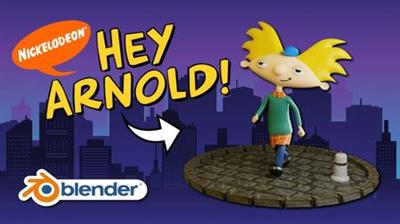
Hello guys, my name is Dino, and welcome back to another course. In this course, we are going to model out the popular cartoon character Arnold from the famous 90's sitcom "Hey Arnold!".

The show centers on a fourth grader named Arnold, who lives with his grandparents in an inner-city tenement. Episodes center on his experiences navigating urban life while dealing with the problems he and his friends encounter.
Arnold is a calm, nice, kind, optimistic, upbeat, and smart idealist who always sees the best in people despite how unkind or sneaky some of them maybe. Although he's usually a pacific kid, he has his limits and can be a bit irritable when he's pushed too far.

For this character creation, we are going to be using basic mashes and modifiers. We will model the character in the T pose from which will be easier for us to animate and set the pose later on.
First of all, we will start with the modeling of our character. Once we finish modeling the character we will export it as an fbx file so that we will be able to import it in Mixamo Adobe's online rigging and animating tool.
Once we find our favorite animation or pose we will then download it and import it back into Blender.
Later we will add HDRI image for the lightning and apply the materials.
For the shirt that he wears as a skirt, we are going to play with nodes in shader editor to replicate the famous checkered shirt.
For the rest of the body, we will use basic materials.
In the end, I will show you how to set your scene and the final render settings.
This curse is beginner-friendly and if you are an advanced 3d artist you can use this course as a practice.
So what are we waiting for let's hop on to the videos?

Download link:​
Код:
[center][b]rapidgator_net[/b]:
https://rapidgator.net/file/342bed838b0530506173eb427947f52b/8rw7d.Creating.A.Cartoon.Character.Using.Blender.rar.html

[b]nitroflare_com[/b]:
https://nitroflare.com/view/87365BAAF960C60/8rw7d.Creating.A.Cartoon.Character.Using.Blender.rar[/center]

Links are Interchangeable - No Password - Single Extraction​
 
Creating character using 3ds max and Substance Painter

a06e073895a342be78e513d9c94ce19f.jpg


Creating character using 3ds max and Substance Painter
Duration: 5h35m | .MP4 1280x720, 30 fps(r) | AAC, 44100 Hz, 2ch | 2.31 GB
Genre: eLearning | Language: English
Series of lectures how to create an awesome robot character in 3d max and texture it using Substance Painter​

What you'll learn
Create character fast and easy
Get best knowledge of Substance painter texturing your character
Visualise your characters in the best way using 3ds max

Requirements
Basic 3ds max knowlegde of interface and modelling
You have to have installed 3ds Max and Substance Painter
Additionally you have to have installed V-ray. But you can use any preferred render engine

Description
You will learn how to create and visualise character using 3ds Max and Substance Painter easily less than in 6 hours!

26 videos will show you whole of the process of creating beautiful result

If you are beginner and mid-user of 3ds Max this course is perfect for you!

Whole course less than 6 hour-long and it will give you a lot of useful information about Substance Painter and also 3ds Max.

You will be able to build your character from scratch and in the end of a course you'll be surprised how fast you can get the best results!

If you really into creating great-looking characters this course is definetely for you!

Who this course is for:
This course is for students who already have basic knowdlege about 3ds max interface and are familiar with modelling
It is also for students who doesn't know anything about Substance Painter
Also basic knowledge of any render engine will be an advantage

Download link:​
Код:
[center][b]rapidgator_net[/b]:
https://rapidgator.net/file/45ac451e4452ee86b7a5dd7a0ecdb6c8/ptivx.Creating.character.using.3ds.max.and.Substance.Painter.rar.html

[b]nitroflare_com[/b]:
https://nitroflare.com/view/FDB9702A4C56D2A/ptivx.Creating.character.using.3ds.max.and.Substance.Painter.rar[/center]

Links are Interchangeable - No Password - Single Extraction​
 
Design a Printing Pro Restaurant Menu with Indesign and Photoshop

6ab31d906dc69b30125f681642db9062.jpg


Design a Printing Pro Restaurant Menu with Indesign and Photoshop
Duration: 1h 53m | .MP4 1280x720, 25fps(r) | AAC, 48000 Hz, 2ch | 1.04 GB
Genre: eLearning | Language: English​
This class is about Graphic Design for Print.If you are a beginner graphic designer, or you have always worked only on web design projects, you will learn detailed aspects of a complete print design product through the simple design of aRestaurant Menu!

Sara will walk you through her workflow, from the concept to the final file, highlighting proper choices for printing, but also design tips. She cares mainly abouteditingandformatting textandlayout. But, because of her personal experience, she gives you also many hints about printing materials, good habits, handling of printing shops, and clients. She really doesn't cut anything out around the topic.
She has worked on more complex design projects like catalogs and booklets and believes all you will learn will come in handy with every other project you will face in the future.
She also added aBONUS:easydigitizedhand painting,a fun way to add style to your design.
You'll face the class step by step, but the minimum knowledge ofAdobe IndesignandPhotoshopwould be helpful.

Download link:​
Код:
[center][b]rapidgator_net[/b]:
https://rapidgator.net/file/900b1392423d85ddf162539e78e96f91/6f097.Design.a.Printing.Pro.Restaurant.Menu.with.Indesign.and.Photoshop.rar.html

[b]nitroflare_com[/b]:
https://nitroflare.com/view/E616F818D2C2042/6f097.Design.a.Printing.Pro.Restaurant.Menu.with.Indesign.and.Photoshop.rar[/center]

Links are Interchangeable - No Password - Single Extraction​
 
Drawing Faces: A Beginner's Guide

8cede3b903e5a4c73d9c801458adf16a.jpg


Drawing Faces: A Beginner's Guide
Duration: 2h 35m | .MP4 1280x720, 30 fps(r) | AAC, 48000 Hz, 2ch | 1.32 GB
Genre: eLearning | Language: English
A step by step guide to makingamazing faces.​

Join graphic novelist, Ira Marcks as he shares everything you need to know to get started drawing faces! Totally new to drawing? No worries, just follow along with Ira's bite-sized lessons, and by the time youcomplete the course, you'll be ready to dive right into aclass project.

Download link:​
Код:
[center][b]rapidgator_net[/b]:
https://rapidgator.net/file/3dc754fb9b8e1c7c61cf85ef807f11cb/vq7fm.Drawing.Faces.A.Beginners.Guide.rar.html

[b]nitroflare_com[/b]:
https://nitroflare.com/view/1D47CCC4948D886/vq7fm.Drawing.Faces.A.Beginners.Guide.rar[/center]

Links are Interchangeable - No Password - Single Extraction​
 
FlippedNormals - Creating a Realistic Ocean in UE4

38eda5e68b6b660aa20db84f60274d69.jpg


FlippedNormals - Creating a Realistic Ocean in UE4
Duration: 7h 4m | .MP4 1920x1080, 30 fps(r) | AAC, 48000Hz, 2ch | 5.98 GB
Genre: eLearning | Language: English

Let's open the floodgates for Game Art Effects!​

In this series, you'll be introduced to the fundamentals of using dynamic materials and particles to bring your environments to life, in this case with water and ocean effects. The first half of this series features a full walkthrough of building elements of an ocean shader both in a stylized and realistic fashion. The second half consists of building the elements of particle material systems and showing how to use dynamic features of particles in Unreal Engine to create an artistic performance with your effects.

Software Maya, Photoshop, UE4, ZBrush

Download link:​
Код:
[center][b]rapidgator_net[/b]:
https://rapidgator.net/file/c6380d32781b413f4a36f649af5f398e/d9ucr.FlippedNormals..Creating.a.Realistic.Ocean.in.UE4.part1.rar.html
https://rapidgator.net/file/24acded892c49166354a34dda34d641e/d9ucr.FlippedNormals..Creating.a.Realistic.Ocean.in.UE4.part2.rar.html

[b]nitroflare_com[/b]:
https://nitroflare.com/view/80EC699999365D8/d9ucr.FlippedNormals..Creating.a.Realistic.Ocean.in.UE4.part1.rar
https://nitroflare.com/view/36ABEE6BAA72D22/d9ucr.FlippedNormals..Creating.a.Realistic.Ocean.in.UE4.part2.rar[/center]

Links are Interchangeable - No Password - Single Extraction​
 
FlippedNormals - Fundamentals of Environment Design for Games

2aa1db035720c114b18bea270b505dd2.jpg


FlippedNormals - Fundamentals of Environment Design for Games
Duration: 4h 18m | .MP4 3840x2160, 30 fps(r) | AAC, 44100 Hz, 2ch | 4.53 GB
Genre: eLearning | Language: English​
The best way to set your portfolio apart from the competition is to have strong fundamentals - timeless concepts. What you're learning in Fundamentals of Environment Design for Games will stay with you for the rest of your career.

COMPOSITION AND SHAPES
We'll start by going over the fundamentals of landscape composition. Starting with looking at the history of landscapes and how the different fundamentals came to be represented. Looking into what tools 3D game art can provide to accelerate these fundamentals. Then practicing with basic shape design and arrangement to understand how to best set a space with both a strong visual aesthetic and a strong narrative.

LIGHT AND COLOR
Learn how to apply color and light to the shape composition made in the previously. Starting with a basic understanding of how light behaves both in the real world and in UE4. Followed by creating a basic local color master material and applying different versions to objects to see how it works with light. Concluding with bringing all the elements together to create a strong final environment that holds both visual appeal and a strong sense of depth and narrative.

YOUR TEACHER
My name is Tyler Smith and I'm a Senior Environment Artist currently working at Sony Sucker Punch in Seattle. I have been in the industry for seven years and have loved seeing the evolution of game art technology and how it has grown into a new amazing medium for artistic expression. I spend alot of my time in UE4 experimenting with environment creation, seeing what kind of new elements can be pushed and pursued to bring game environment art into the same realm as traditional 2D art and illustration.

SKILL LEVEL
Fundamentals of Environment Design for Games is perfect for students who have a decent understanding of Unreal Engine 4 and wants to take their art to the next level by going back to the fundamentals.

Software UE4, ZBrush

Download link:​
Код:
[center][b]rapidgator_net[/b]:
https://rapidgator.net/file/d8906cedac1d8e890713526ef67d8d93/v7v5m.FlippedNormals..Fundamentals.of.Environment.Design.for.Games.part1.rar.html
https://rapidgator.net/file/7844f7d5a0e709b5c71dd1252cc7bad3/v7v5m.FlippedNormals..Fundamentals.of.Environment.Design.for.Games.part2.rar.html
https://rapidgator.net/file/4bd11be51521eaa400f756ec29247424/v7v5m.FlippedNormals..Fundamentals.of.Environment.Design.for.Games.part3.rar.html
https://rapidgator.net/file/35d5d388481a9d3cad76131bd12e139a/v7v5m.FlippedNormals..Fundamentals.of.Environment.Design.for.Games.part4.rar.html
https://rapidgator.net/file/4a7f52b12c2eccb4bb44ebfdc7a6fc8d/v7v5m.FlippedNormals..Fundamentals.of.Environment.Design.for.Games.part5.rar.html

[b]nitroflare_com[/b]:
https://nitroflare.com/view/60C6028264CCE1E/v7v5m.FlippedNormals..Fundamentals.of.Environment.Design.for.Games.part1.rar
https://nitroflare.com/view/4EFBDBEAAD76316/v7v5m.FlippedNormals..Fundamentals.of.Environment.Design.for.Games.part2.rar
https://nitroflare.com/view/839933AE4931E34/v7v5m.FlippedNormals..Fundamentals.of.Environment.Design.for.Games.part3.rar
https://nitroflare.com/view/542511E504522B4/v7v5m.FlippedNormals..Fundamentals.of.Environment.Design.for.Games.part4.rar
https://nitroflare.com/view/E9D987CFB6D1065/v7v5m.FlippedNormals..Fundamentals.of.Environment.Design.for.Games.part5.rar[/center]

Links are Interchangeable - No Password - Single Extraction​
 
hacking/Website Hacking/ Penetration Testing &Bounty Hunting

ca285026ab6e7bed6ff709c8650b02fa.jpg


hacking/Website Hacking/ Penetration Testing &Bounty Hunting
Duration: 10h20m | .MP4 1280x720, 30 fps(r) | AAC, 44100 Hz, 2ch | 4.17 GB
Genre: eLearning | Language: English
Website Hacking / Penetration Testing & Bug Bounty Hunting​

What you'll learn
90+ Videos to take you from a beginner to advanced in website hacking.
Become a bug bounty hunters & discover bug bounty bugs!
Exploit these vulnerabilities to hack into web servers.
Advanced post exploitation - hack other websites on the same server, dump the database, privilege escalation....etc
Create a hacking lab & needed software (on Windows, OS X and Linux).
Discover, exploit and mitigate a number of dangerous web vulnerabilities.
Bypass security & advanced exploitation of these vulnerabilities.
Bypass security & filters.
Gain full control over target server using SQL injections.
Intercept requests using a proxy.
Adopt SQL queries to discover and exploit SQL injections in secure pages.
Learn linux commands and how to interact with the terminal.
Understand how websites & web applications work.
Gather sensitive information about websites.
Discover emails & sensitive data associated with a specific website.
Discover unpublished directories & files associated with a target website.
Find all subdomains associated with a website.
Find all websites hosted on the same server as the target website.
Exploit advanced file upload vulnerabilities & gain full control over the target website.
Exploit advanced code execution vulnerabilities & gain full control over the target website.
Exploit local file inclusion vulnerabilities to to get a shell.
Exploit advanced remote file inclusion vulnerabilities & gain full control over the target website.
Exploit advanced local file inclusion vulnerabilities & gain full control over the target website.
Discover, fix, and exploit SQL injection vulnerabilities.

Requirements
No Linux, programming or hacking knowledge required.
Computer with a minimum of 4GB ram/memory.
Operating System: Windows / OS X / Linux.

Description
Discovery, Exploitation & Mitigation - In this section you will learn how to discover, exploit and mitigate a large number of vulnerabilities, this section is divided into a number of sub-sections, each covering a specific vulnerability, firstly you will learn what is that vulnerability and what does it allow us to do, then you will learn how to exploit this vulnerability and bypass security, and finally we will analyse the code causing this vulnerability and see how to fix it, the following vulnerabilities are covered in the course:

File upload - This vulnerability allow attackers to upload executable files on the target web server, exploiting these vulnerabilities properly gives you full control over the target website.

Code Execution - This vulnerability allow users to execute system code on the target web server, this can be used to execute malicious code and get a reverse shell access which gives the attacker full control over the target web server.

Local File Inclusion - This vulnerability can be used to read any file on the target server, so it can be exploited to read sensitive files, we will not stop at that though, you will learn two methods to exploit this vulnerability to get a reverse shell connection which gives you full control over the target web server.

Remote File Inclusion - This vulnerability can be used to load remote files, exploiting this vulnerability properly gives you full control over the target web server.

SQL Injection - This is one of the most dangerous vulnerabilities, it is everywhere and can be exploited to do all of the things the above vulnerabilities allow us to do and more, so it allows you to login as admin without knowing the password, access the database and get all data stored there such as usernames, passwords, credit cards ....etc, read/write files and even get a reverse shell access which gives you full control over the target server!

Cross Site Scripting (XSS) - This vulnerability can be used to inject javascript code in vulnerable pages, we won't stop at that, you will learn how to steal credentials from users (such as facebook or youtube passwords) and even gain full access to their computer.

Insecure Session Management - In this section you will learn how to exploit insecure session management in web applications and login to other user accounts without knowing their password, you'll also learn how to discover and exploit CSRF (Cross Site Request Forgery) vulnerabilities to force users to change their password, or submit any request you want.

Who this course is for:
all

Download link:​
Код:
[center][b]rapidgator_net[/b]:
https://rapidgator.net/file/f8cab840a24e6a17d1f55a647ece6336/cwzis.hackingWebsite.Hacking.Penetration.Testing.Bounty.Hunting.part1.rar.html
https://rapidgator.net/file/7474a4f1da9fa6521b9e6b457538ba56/cwzis.hackingWebsite.Hacking.Penetration.Testing.Bounty.Hunting.part2.rar.html
https://rapidgator.net/file/d4e48e5d26b5b01ffd1fabdec79673a5/cwzis.hackingWebsite.Hacking.Penetration.Testing.Bounty.Hunting.part3.rar.html
https://rapidgator.net/file/b70833d137b029461013e60d609757e6/cwzis.hackingWebsite.Hacking.Penetration.Testing.Bounty.Hunting.part4.rar.html
https://rapidgator.net/file/bb2907278b6f92818bb4b5cff78f1dab/cwzis.hackingWebsite.Hacking.Penetration.Testing.Bounty.Hunting.part5.rar.html

[b]nitroflare_com[/b]:
https://nitroflare.com/view/4C102BA3F3F78C4/cwzis.hackingWebsite.Hacking.Penetration.Testing.Bounty.Hunting.part1.rar
https://nitroflare.com/view/B9B6313A5E409AD/cwzis.hackingWebsite.Hacking.Penetration.Testing.Bounty.Hunting.part2.rar
https://nitroflare.com/view/6EBA339D50E494F/cwzis.hackingWebsite.Hacking.Penetration.Testing.Bounty.Hunting.part3.rar
https://nitroflare.com/view/DBAAE0D82C65BB3/cwzis.hackingWebsite.Hacking.Penetration.Testing.Bounty.Hunting.part4.rar
https://nitroflare.com/view/A6E058ADF869F6F/cwzis.hackingWebsite.Hacking.Penetration.Testing.Bounty.Hunting.part5.rar[/center]

Links are Interchangeable - No Password - Single Extraction​
 
Hands-On with the Canon EOS R5 Everything You Need to Know to Get Great Shots

3e0ffb62f49f51ec23e68e08042b0a0c.jpg


Hands-On with the Canon EOS R5 Everything You Need to Know to Get Great Shots
Duration: 2h 16m | .MP4 1920x1080, 30 fps(r) | AAC, 44100 Hz, 2ch | 2.22 GB
Genre: eLearning | Language: English
Get up to speed on the Canon EOS R5 with Erik Kuna!​

If you've purchased the R5 or are just curious about what it has to offer, then this is the class for you. Join Erik as he shares his experience with using the R5, discusses what type of photographer will benefit the most from this new model. From there, Erik takes you on a deep dive exploration of the buttons, dials, menus, and video functions to help you get the most out of this amazing mirrorless camera.

Download link:​
Код:
[center][b]rapidgator_net[/b]:
https://rapidgator.net/file/02fea50cfa91216ae5564370ce4d4a06/k4ohh.HandsOn.with.the.Canon.EOS.R5.Everything.You.Need.to.Know.to.Get.Great.Shots.rar.html

[b]nitroflare_com[/b]:
https://nitroflare.com/view/E05672ACD7209F8/k4ohh.HandsOn.with.the.Canon.EOS.R5.Everything.You.Need.to.Know.to.Get.Great.Shots.rar[/center]

Links are Interchangeable - No Password - Single Extraction​
 
Meditations to Change Your Brain (Video Audio)

e3d61720e40b0bd6f5406760a76a4eb4.jpg


Meditations to Change Your Brain
Duration: 2h 29m | .MP4 1280x720, 30 fps(r) | AAC, 48000 Hz, 2ch | 397 MB
Genre: eLearning | Language: English​

Science has proven what contemplative traditions have taught for centuries: Meditation holds a key to a life of balance, peace, and joy. Join neuropsychologist Rick Hanson, PhD, and neurologist Richard Mendius, MD, as they present several different meditation techniques to promote concentration, reduce stress, and cultivate a more positive outlook. Explore a collection of guided meditations picked for the kinds of challenges modern workers face: stress, focus, gratitude, and more. Reshape your brain with exercises including "Steadying your mind" to tap the full creative power of your attention, "Taking in the good" to maintain a positive emotional landscape, "Antidote to stress," a conscious way to activate your body's relaxation response, and more.

Download link:​
Код:
[center][b]rapidgator_net[/b]:
https://rapidgator.net/file/e776b315ee54a9df1a3b190d9a1e4172/uzp9a.Meditations.to.Change.Your.Brain.Video.Audio.rar.html

[b]nitroflare_com[/b]:
https://nitroflare.com/view/A93389AC0758335/uzp9a.Meditations.to.Change.Your.Brain.Video.Audio.rar[/center]

Links are Interchangeable - No Password - Single Extraction​
 
Microsoft Teams: Automating with Bots, Connectors, and Flow

f2173b5c1efeefba955392252ddc5fc2.jpg


Microsoft Teams: Automating with Bots, Connectors, and Flow
Duration: 52m 37s | .MP4 1280x720, 30 fps(r) | AAC, 48000 Hz, 2ch | 141 MB
Genre: eLearning | Language: English​

Did you know you can automate many tasks in Teams? Microsoft Office Apps and Services MVP and Microsoft Certified Trainer Heather Severino teaches how to do more in less time with bots, connectors, and flows. Heather starts by showing how to speed things up with bots, including how to quickly find colleagues and projects, automate meeting scheduling, create polls and surveys, and track team progress. Next, she shows how to pull in relevant content with connectors, including pulling pertinent news stories and RSS feeds. She demonstrates creating flows with Power Automate, which allow you to post messages to a Teams channel or conversation automatically whenever a new Planner task is created, a new Forms response is received, an Outlook email arrives, or a new tweet matches a particular hashtag. Finally, Heather shares where to go for more help in automating Microsoft Teams.

Download link:​
Код:
[center][b]rapidgator_net[/b]:
https://rapidgator.net/file/3c8ced5eb2eb26188b683c83137c2749/l4dp9.Microsoft.Teams.Automating.with.Bots.Connectors.and.Flow.rar.html

[b]nitroflare_com[/b]:
https://nitroflare.com/view/A72AF1D7CB585AA/l4dp9.Microsoft.Teams.Automating.with.Bots.Connectors.and.Flow.rar[/center]

Links are Interchangeable - No Password - Single Extraction​
 
Назад
Сверху