• Форум работает в архивном режиме www.old.nado.in

All mitsumi'1s Applications !! (updated daily)

  • Автор темы Автор темы mitsumi1
  • Дата начала Дата начала
ISO Workshop Professional 10.2 Multilingual

57a208ec483a422f33d263fba59bbd1f.jpeg

File size: 10 MB​
ISO Workshop is a application specifically designed to facilitate disc image management, conversion and burning operations. The program has a very simple user interface and enables you to make ISO images, extract specific files and folders from disc images, create disc backups by copying disc contents to an ISO or BIN image file, convert different disc image files into the ISO or BIN format and, of course, burn ISO and CUE images to blank discs.

Create
ISO Workshop allows you to create ISO images from your local files and folders. You can make standard ISO images with various file systems or bootable ISO images, to prepare boot disc.

Copy
With ISO Workshop you can make an exact copy of your CD, DVD or Blu-ray Disc on your hard drive, to backup important data or Audio CD. Also, you can copy CD, DVD or Blu-ray Discs on-the-fly.

Burn
Using ISO Workshop you can easily burn disc image to CD, DVD or Blu-ray Disc. It could be any disc image, not only standard ISO image. Additionally, you can erase rewritable CD, DVD or Blu-ray Disc.

Make standard or bootable ISO, with various file systems
Burn ISO image or any other disc image to CD, DVD or BD
Browse and extract files from various disc image formats
Copy any CD, DVD or Blu-ray Disc to ISO or BIN image
Convert various disc images to ISO or BIN format
Make exact CD, DVD or Blu-ray Disc copies on-the-fly
Support Windows XP, Vista, 7, 8, 8.1, 10 (32 and 64 bit)

Download link:​
Код:
[center][b]rapidgator_net[/b]:
https://rapidgator.net/file/2d28c434c4f5be700a9d8b2760227edb/jinfq.ISO.Workshop.Professional.10.2.Multilingual.rar.html

[b]nitroflare_com[/b]:
https://nitroflare.com/view/E346CA0FC7FBEE2/jinfq.ISO.Workshop.Professional.10.2.Multilingual.rar

[b]uploadgig_com[/b]:
https://uploadgig.com/file/download/C7269206e88a806D/jinfq.ISO.Workshop.Professional.10.2.Multilingual.rar[/center]

Links are Interchangeable - No Password - Single Extraction​
 
JSONBuddy 5.4

2fa02bbd912643e7f66f0d6c91031811.jpeg

File Size: 23.1 MB
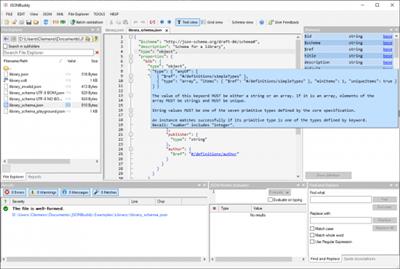
JSONBuddy - A better way to edit and create JSON and JSON schema. The only editor with full support for Draft 4, 6 and Draft 7.​

Context sensitive entry-helper
Intelligent auto-completion using JSON schema information. Create JSON content in less time.

Brace highlighting and pretty-print
Brace highlighting, JSON pretty-print and remove whitespace features.

JSON Text editor
Whenver you need to edit any JSON input which is not well-formed.

JSON syntax checking
Avoid JSON parsing problems with the built-in JSON syntax checking.

Best JSON schema editor available
Schema editor for Windows® with $ref keywords as active links. Unique JSON schema analyzer

Code folding
Use code folding to collapse and expand sections of JSON text.

Syntax-coloring
Complete JSON text editor for Windows®. JSON specific syntax-coloring for increased readability.

Complete JSON editor environment
Standard editor functionalities undo-redo, copy-paste and find-replace.

Download link:​
Код:
[center][b]rapidgator_net[/b]:
https://rapidgator.net/file/c004e31c7f0487774cf94f32f997b0bf/k5531.JSONBuddy.5.4.rar.html

[b]nitroflare_com[/b]:
https://nitroflare.com/view/4E51917DDBB23F1/k5531.JSONBuddy.5.4.rar

[b]uploadgig_com[/b]:
https://uploadgig.com/file/download/0e81149a83bCebb1/k5531.JSONBuddy.5.4.rar[/center]

Links are Interchangeable - No Password - Single Extraction​
 
KMS2038 & Digital & Online Activation Suite 8.8

ed41fa6790617710f66afa87ac207713.jpeg

File Size: 0.7 MB​
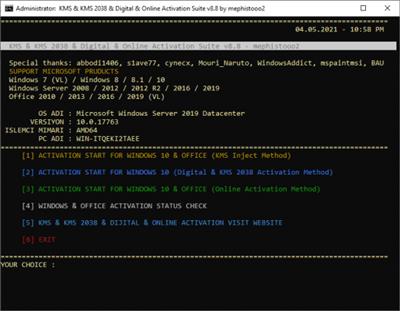
This tool includes 4 different activation methods. KMS Inject, Digital, KMS 2038 and Online activations. While this script is being created, abbodi1406's script is referenced. Thank him so much. Some security programs will report infected files, that is false-positive due KMS emulating.

NOTE: Windivert and Digital Activation methods are virus free
If use this tools remove any other KMS solutions and temporary turn off AV security protection.

$OEM$ Activation About:
3 methods are also $OEM$ activation support.
To preactivate the system during installation, copy $OEM$ folder to "sources" folder in the installation media (iso/usb)
$OEM$ activation method also enable the KMS task scheduling system during installation. (digital and KMS2038 activation method except)

SUPPORTED MICROSOFT PRODUCTS:
* Windows 7 (VL) / 8 / 8.1 / 10
* Windows Server 2008 R2 / 2012 / 2012 R2 / 2016 / 2019
* Office 2010 / 2013 / 2016 / 2019 (VL)

UNSUPPORTED MICROSOFT PRODUCTS:
* Office Retail (Volume License certificates supported if installed)
* Windows 7 (Starter, HomeBasic, HomePremium, Ultimate)
* Windows 10 (Cloud S, Professional Single Language)
* Windows Server (Server Foundation, Storage Server, Home Server 2011)

Whats New:
- The ability to run KMS Suite script with "Trustedinstaller" rights has been removed.
- Office 2021 preview version support added.
- Some improvements have been made to cmd script files in all methods.

Download link:​
Код:
[center][b]rapidgator_net[/b]:
https://rapidgator.net/file/8b885dbc3b72f2f822b07bdc95b71961/rks27.KMS2038..Digital..Online.Activation.Suite.8.8.rar.html

[b]nitroflare_com[/b]:
https://nitroflare.com/view/2A4751C082CA4DF/rks27.KMS2038..Digital..Online.Activation.Suite.8.8.rar

[b]uploadgig_com[/b]:
https://uploadgig.com/file/download/1b9e553A47Ab96a4/rks27.KMS2038..Digital..Online.Activation.Suite.8.8.rar[/center]

Links are Interchangeable - No Password - Single Extraction​
 
Kodak Preps 9.0.1 Build 136 Multilingual

959f552461ef9b05d7c6ec1455d50a5e.jpeg

Windows x64 | Languages: Multilingual | File Size: 255.37 MB​
KODAK PREPS Imposition Software - the leading solution for error-free impositions and one of the most widely used tools in the printing industry. PREPS Imposition Software produces faster, more accurate impositions that maximize press sheet usage. Its automated imposition process cuts turnaround time and reduces costs.

Primary Benefits
- Makes it fast and easy to create, save and manage step-and-repeat reducing turnaround time and costs so you can get to more jobs, faster
- Handles complex jobs for digital and conventional print with ease
- Produce similar or repetitive jobs easily, saving time and reducing cost with templates and libraries
- Efficiently and effectively manage any print project using specific interfaces for commercial and packaging
- Industry standard software well known by print operators minimizes training and maximizes productivity

Software Capabilities
- Flexible, easy-to-use templates make it easy to produce similar or repetitive jobs efficiently
- Template Search tool enables you find an existing Preps template quickly for re-use
- Define how a mark should be placed based on job or production needs with SmartMarks
- Define rules that utilize the SmartMarks automatically in a JDF or auto generated workflow with SmartMarks Editor
- Improved production reporting on colors, dimensions and equipment specified for the job
- Enhanced step-and-repeat for packaging applications and packaging specific interface
- AutoGang feature optimizes the placement of several jobs on a single press sheet
- Supports industry-standard PDF input and JDF output files

Save a layout with Independent Page as a Custom Fold Pattern
You can now save a Custom Fold Pattern with a section that includes independent pages. When adding these fold patterns to a Press Run, you will be prompted to set the independent page properties.

Preps can now define subsections (or ribbons) in Custom Fold Patterns. This means that you can use Preps to create a multi-web layout, save it as a custom fold pattern, and then generate a web press run with the custom fold pattern.

New Print menu and Preferences for Job Layout Report
You can now set output defaults for layout reports.

Remove marks through JDF import process
If you are working with Preps templates that have marks already defined on templates/signatures, you now have the ability to remove all existing marks through the JDF import process. You can then use SmartMarks based on marks rules to replace them.

New shortcut keys for inserting a new web and duplicating an existing web
You can now use shortcut keys to insert new webs and duplicate webs. See Menu shortcuts - Windows OS-based computers and Menu shortcuts

Disconnect Shingling/Bottling rules from Stock (Substrate) resource property
The Auto Shingling and Bottling rules are now defined in Resources > Shingling and Bottling Rules Editor, rather than being defined as a Stock (Substrate) resource property. This means that you no longer need to define multiple Stock (Substrate) resource properties for this purpose. In the new Shingling and Bottling Rules Editor, you will have all the same abilities defined in the Stock (Substrate) resource, plus additional fields to define a range of the Stock (Substrate) paper weight and caliper. An Auto Shingling and Bottling rule will be triggered when a Stock (Substrate) resource that fits the range is specified.

New Profile switch to allow users to enable AutoShingling
You have two ways to apply the Auto Shingling and Bottling rules: manually (in a Job Layout Details dialog box) or automatically.

To apply the rule automatically, in your Preps profile, set -AUTOSHINGLING and -AUTOBOTTLING to YES. When new jobs are created, the Auto Shingling and Auto Bottling will be automatically set in the Job Layout Details dialog box. The default is NO, so that you can control the use of Auto Shingling at a job level, as needed.

New mark capability to allow for marks only on the Preps Job Layout Report
You can now edit a SmartMark setting for placing marks on press runs that allows you to restrict the mark to printing only on the Job layout report. The mark will not print on the production layout.

New collation marks for Mixed Binding styles
When your production includes signatures made up from different binding styles-for example, you have two perfect bound signatures that are made up from three saddle stitched signatures each-you can now use Mixed Binding collation marks. In the example, the perfect bound signatures are the top level and each will get a signature number for the collation mark. The saddle stitched signatures get the same signature number as the parent and a tic line below indicating its number within the parent signature.
Release Notes
Fixed Bugs:
- Too many anchor points for Page Head, Foot, Spine, Face
- Mark Anchored to PageBleedHead is incorrectly positioned on output.
- Preps no longer uses colorf_profiler to get Mac computer id so drop in fix no longer works.
- File>>Close or Cmd + W causes Preps application to Quit - Mac Only
- Assembly View, Press Runs View and Textmarks are blurry on MACs with specific graphics card
- Can't select more than one section in Preps 9.0 build 466 (MAC only)
Preps Print Job Layout Report Fails (Win only) - Regression from Preps 9.0.0 Build 444 integrated
- Preps 9 UI - Layouts pane displays new saved templates at root of Templates folder instead of defined folder (KMS ONLY)
- Preps Marks pane Display Issue - Marks lists are duplicated each time the group folder is expanded (Win Only) (KMS Only)
- [Win]Rectangle Mark_The graphic points of the anchor to page foot and the graphic points of the mark anchor are reversed

System Requirements:

Supported operating systems:
- Microsoft Windows 10 Pro
- Windows 2016
- Windows 2019

Memory:
4 GB of RAM (available minimum)

Hard disk space:
4 GB of available space

Screen resolution:
1280 x 960 (minimum)
Homepage
У Вас недостаточно прав для просмотра ссылок. Войдите или зарегистрируйтесь.


Download link:​
Код:
[center][b]rapidgator_net[/b]:
https://rapidgator.net/file/8342f28daee3b43477d631677ac3a2d9/nwlth.Kodak.Preps.9.0.1.Build.136.Multilingual.rar.html

[b]nitroflare_com[/b]:
https://nitroflare.com/view/A7F82765A706BE0/nwlth.Kodak.Preps.9.0.1.Build.136.Multilingual.rar

[b]uploadgig_com[/b]:
https://uploadgig.com/file/download/891794169f268056/nwlth.Kodak.Preps.9.0.1.Build.136.Multilingual.rar[/center]

Links are Interchangeable - No Password - Single Extraction​
 
Laughingbird Software The Graphics Creator 8 v1.4.0

4703ea72281909e0003ebdf631980135.jpeg


Languages: English | Incl. Extra Add-ons | File Size: 920.47 MB | 2.17 GB​
The Graphics Creator 8 - Create your own graphics in minutes without ANY design skills or a big budget! Grab attention with stunning graphics... fast! Search from hundreds of thousands of high-quality stock photos and videos. And much more!

PROFESSIONAL DESIGN FEATURES
- Search from hundreds of thousands of high-quality stock photos and videos
- Select from over 1000 stunning fonts from Google
- Remove an image's background to make it transparent
- Increase the Graphic Creator's Canvas to 10,000 x 10,000 pixels (great for creating your own t-shirt designs or desktop wallpapers)
- Captivating, ready-made design templates

IN 10 MINUTES OR LESS YOU CAN:
Make a graphic, download it in multiple formats, and post it to get more traffic, clicks, and sales. And you can create graphics for your social media posts, blog, website, marketing materials, emails, YouTube videos... and more!

Here's What You Get with The Graphics Creator:
- Easy Drag and Drop Design
- Unlimited Saves
- Unlimited Downloads
- Unlimited Revisions
- 1000+ Google Fonts
- Over 1 Million Royalty-Free Stock Images
- 10,000 X 10,000 Canvas Size
- Save as JPG, PNG, Transparent PNG
- Save and Record Video
- Save Your Designs
- Color-Picker Tool
- Background Removal Tool
- Add Shapes feature
- Duplication of Objects and Text
- Easy Layering of Objects and Text
- Complete Control of Every Element

Included Add-ons:
- Facebook Graphics Pak
- Mascots2Go Mega Colllection
- Social Media Pak
- The Alphabet Logo Pak
- The Business Card Creator
- The Character Creator
- The Design Set
- The eCover Creator
- The Graphics Creator 8 - Extra Templates
- The Mockup set - The Mockup Creator
- The Promobot 365
- The YouTube Graphics Creator
- Video Backgrounds
Release Notes
- New feature: Text Circle.

- FabricJS 4.3.1 update. (this is the "engine" that helps us to code the features of the software)
- Fix scale/stretch controls on multi-selections.
- Modified and renamed the 'Edit' and 'Options' menus. They are now "Edit" and "Insert" to allow for insertion of circular text and other elements to insert onto the canvas

Requirements:Windows® 10, Windows® 8/8.1, and Windows® 7
Homepage
У Вас недостаточно прав для просмотра ссылок. Войдите или зарегистрируйтесь.


Download link:​
Код:
[center][b]rapidgator_net[/b]:
https://rapidgator.net/file/d778a00efe4c0cc697e459dcec54caf2/sbt62.TGC.8.v1.4.0.rar.html
https://rapidgator.net/file/240a056c98aecfa164e43d9d50b1789d/sbt62.TGC8.Addons.part1.rar.html
https://rapidgator.net/file/1acf86358826409c62036f57c6f04653/sbt62.TGC8.Addons.part2.rar.html
https://rapidgator.net/file/5583c637a02f994a4d21443191794cf5/sbt62.TGC8.Addons.part3.rar.html

[b]nitroflare_com[/b]:
https://nitroflare.com/view/BDEC2FCE379A37B/sbt62.TGC.8.v1.4.0.rar
https://nitroflare.com/view/986EB938C5A0A6E/sbt62.TGC8.Addons.part1.rar
https://nitroflare.com/view/8981665D19BF280/sbt62.TGC8.Addons.part2.rar
https://nitroflare.com/view/46BB14ECD79315B/sbt62.TGC8.Addons.part3.rar

[b]uploadgig_com[/b]:
https://uploadgig.com/file/download/D403157265d27b68/sbt62.TGC.8.v1.4.0.rar
https://uploadgig.com/file/download/bac47fd03091E473/sbt62.TGC8.Addons.part1.rar
https://uploadgig.com/file/download/c178618ca25fBe05/sbt62.TGC8.Addons.part2.rar
https://uploadgig.com/file/download/20a7932E54f09566/sbt62.TGC8.Addons.part3.rar[/center]

Links are Interchangeable - No Password - Single Extraction​
 
Mac DVDRipper Pro 9.1 macOS

6e75603dcf4980d9a7b43a1150e65949.jpeg

File size: 194.30 MB​
Mac DVDRipper Pro allows you to copy DVDs to your Mac so you can easily view them without wasting your laptop's battery-life, spinning a disc in your optical drive. By ripping the DVD to your harddrive you are also keeping an exact copy of your DVD, and you can compress each movie on the fly - making them viewable on video iPod, iPod Touch, iPhone, iPad, Apple TV and many more.

Mac DVDRipper Pro analyzes your DVD and uses advanced and efficient algorithms to ensure proper rips. It is the best DVD ripper at an unbeatable price! You can also use it to burn a backup directly from the application. Finally: an easy, inexpensive, fast and reliable DVD ripper to rip your DVDs!

Supported Operation System:
* 64-bit processor
* OS X 10.9 or later

Download link:​
Код:
[center][b]rapidgator_net[/b]:
https://rapidgator.net/file/08b620b406e2c038d96458ec57cd0c12/3je6g.Mac.DVDRipper.Pro.9.1.macOS.rar.html

[b]nitroflare_com[/b]:
https://nitroflare.com/view/95232E9B9B94110/3je6g.Mac.DVDRipper.Pro.9.1.macOS.rar

[b]uploadgig_com[/b]:
https://uploadgig.com/file/download/53e352481afff5Cb/3je6g.Mac.DVDRipper.Pro.9.1.macOS.rar[/center]

Links are Interchangeable - No Password - Single Extraction​
 
Magic Sort List 3.3.3 MAS

a85d33e75a3fe241fd1548e41af71338.jpeg

File size: 11.95 MB​
Do You have lists which are unsorted and do not have a spreadsheet ready to sort it ? Don't despair, Magic Sort List is here to the rescue.
Magic Sort List comes with our revolutionary sorting engine which we have perfected and further refined over the years.

Other sorting application is good at sorting alphabetical list but failed when encountering non-zero padded numbers. Have you ever sorted a list of say, 5 1 10 and ended up with a list like 1 10 5 ? Magic Sort List treats numbers as numbers and will give you a proper sorted list of 1 5 10. It does not matter if the numbers are at the beginning of the text or somewhere in the middle, Magic Sort List is up to the challenge.

Key Strengths of Magic Sort List
* Sort List in either the Ascending or Descending Order
* Smart Sort option which will treat numbers as numbers no matter if they are zero padded or not
* Has the ability to Group and Add Alphabetic Headers in a sorted list
* Can help remove duplicates entry within the list and remove blank lines
* Provides the option to ignore certain prefixes to the list such as A, An and The. Not just those but you can set your own prefix ignore list
* Add Running Index Number in front of each line which is zero padded so the list would look neat
* Change Text Case - All Lowercase, All Uppercase, Capitalize 1st Letter of Each Word, Capitalize 1st Letter of 1st Word and No Change.
* The No Sort option allows you to Remove Duplicates and Add Index Number to your list
* Saving the Sorted Lists in the built-in database for future retrieval and re-sorting
* As the lists (both unsorted and sorted) are text based files, you can export them to anywhere which requires the sorted list.
* Can Share the Sorted List with a variety of applications through the Mac's Share Menu
* Support for Accented Characters
Release Notes

* Improved Performance

Supported Operation System:
* 64-bit processor
* OS X 10.10 or later

Download link:​
Код:
[center][b]rapidgator_net[/b]:
https://rapidgator.net/file/03fcfc7a37ca9a89889c5ce28823bdc4/jv4me.Magic.Sort.List.3.3.3.MAS.rar.html

[b]nitroflare_com[/b]:
https://nitroflare.com/view/9EDAF506A772FC2/jv4me.Magic.Sort.List.3.3.3.MAS.rar

[b]uploadgig_com[/b]:
https://uploadgig.com/file/download/78Bb291Fa0c0CBca/jv4me.Magic.Sort.List.3.3.3.MAS.rar[/center]

Links are Interchangeable - No Password - Single Extraction​
 
Millumin 3 v3.18.h macOS

2f918e1a968811cff65a3b8866043f89.jpeg

File size: 81 MB​
Millumin - create audiovisual and interactive shows, Theater, Dance, Videomapping, Interactive installation. Millumin is a creative solution to bring your ideas to life. It is tailored to play your live show and tell your story.

Release Notes
Release notes were unavailable when this listing was updated

Supported Operation Systems:
macOS 10.11 or later

Download link:​
Код:
[center][b]rapidgator_net[/b]:
https://rapidgator.net/file/d0cd30300596317b96d635b436ce164f/lwd7u.Millumin.3.v3.18.h.macOS.rar.html

[b]nitroflare_com[/b]:
https://nitroflare.com/view/44C1B1638806EAA/lwd7u.Millumin.3.v3.18.h.macOS.rar

[b]uploadgig_com[/b]:
https://uploadgig.com/file/download/5996B6FEfa58c02A/lwd7u.Millumin.3.v3.18.h.macOS.rar[/center]

Links are Interchangeable - No Password - Single Extraction​
 
myTracks 4.0.1 macOS

ea221f1382f2094d25f7c24a0f1878aa.jpeg

Language: Multilingual | File size: 40 MB​
myTracks is the swiss-army knife for organizing your GPS tracks. They can be loaded from a broad range of devices and organized in a library comfortably.

Once imported you can drag & drop photo files to myTracks and they will be assigned to the GPS tracks automatically. The GPS information can be written to the EXIF and IPTC tags of the photo files (Geotagging). You can use any photo organizing software such as Photos, iPhoto, Aperture, Lightroom, GraphicConverter or even the Finder. myTracks can handle both JPEG and RAW file formats.

GPS tracks can be exported as GPX, KML or KMZ files. You can use the exported files, e.g. with Google Earth.

Besides the dedicated GPS loggers a free iPhone App called "myTracks - The GPS logger" is available on the App Store. You can use this App to record GPS tracks.
Release Notes
Release notes were unavailable when this listing was updated

Supported Operation Systems:
macOS 10.13.6 or later

Download link:​
Код:
[center][b]rapidgator_net[/b]:
https://rapidgator.net/file/1709fa6b5688858bcbcc290fc13b44ac/db8xo.myTracks.4.0.1.macOS.rar.html

[b]nitroflare_com[/b]:
https://nitroflare.com/view/54CF38F7797C646/db8xo.myTracks.4.0.1.macOS.rar

[b]uploadgig_com[/b]:
https://uploadgig.com/file/download/be053bA313Ba7572/db8xo.myTracks.4.0.1.macOS.rar[/center]

Links are Interchangeable - No Password - Single Extraction​
 
NeoOffice 2017.26 macOS

0a85275eb8c984b517e3d2617ea30832.jpeg

Language: Multilingual | File size: 253 MB​
NeoOffice is an office suite for Mac that is based on OpenOffice and LibreOffice. With NeoOffice, you can view, edit, and save OpenOffice documents, LibreOffice documents, and simple Microsoft Word, Excel, and PowerPoint documents.

Two engineers created NeoOffice in 2003 when they made OpenOffice run natively on OS X for the first time. Since then, the NeoOffice engineers have continually added improvements to NeoOffice that you will not find in OpenOffice or LibreOffice such as:

* NeoOffice > Open at Launch menu to open Calc or Impress instead of Writer at launch
* File > Browse All Versions menu to restore previous versions of your documents
* Native file locking to safely edit files in iCloud Drive, Dropbox, or network drives
* Native Mac grammar checking
* Native Mac text highlighting
* Support for Mac Services
* Native floating tool windows
Release Notes
Release notes were unavailable when this listing was updated

Supported Operation Systems:
macOS 10.12 or later

Download link:​
Код:
[center][b]rapidgator_net[/b]:
https://rapidgator.net/file/f81e30542ed6b43d148a3175939142dd/b8h65.NeoOffice.2017.26.macOS.part1.rar.html
https://rapidgator.net/file/e7e5b64e7575203fbdf37a0e6c4ef806/b8h65.NeoOffice.2017.26.macOS.part2.rar.html
https://rapidgator.net/file/dfe02944fe3978168aafbe2592148bca/b8h65.NeoOffice.2017.26.macOS.part3.rar.html

[b]nitroflare_com[/b]:
https://nitroflare.com/view/61ADE8516506BFB/b8h65.NeoOffice.2017.26.macOS.part1.rar
https://nitroflare.com/view/23D90CE421E821D/b8h65.NeoOffice.2017.26.macOS.part2.rar
https://nitroflare.com/view/EE013E89FACE6A3/b8h65.NeoOffice.2017.26.macOS.part3.rar

[b]uploadgig_com[/b]:
https://uploadgig.com/file/download/eCd7cbea11fbc067/b8h65.NeoOffice.2017.26.macOS.part1.rar
https://uploadgig.com/file/download/F3c19e3bD517812e/b8h65.NeoOffice.2017.26.macOS.part2.rar
https://uploadgig.com/file/download/E045d0ea9d2b9524/b8h65.NeoOffice.2017.26.macOS.part3.rar[/center]

Links are Interchangeable - No Password - Single Extraction​
 
NetSpot PRO - Wi-Fi Reporter 2.13.1015 macOS

a8a2c630b52da4a5ae724c6f35fc1a11.jpeg

File size: 15 MB​
Collect data about WiFi networks, create WiFi site surveys, map out realistic WiFi coverage, analyze your WiFi with 12+ interactive visualizations, and fix WiFi issues! nstalling a WiFi network isn't always easy. Interference from neighboring wireless networks and radio noise from electronic devices can cause serious connection problems. While you can overcome those by trial and error, there's a much better solution: NetSpot PRO WiFi scanner is here for you!

NetSpot PRO is a WiFi analyzer app allowing you to get all the necessary details about WiFi networks around, measure WiFi signal strength, locate WiFi interference issues, analyze and troubleshoot your wireless coverage. NetSpot PRO WiFi analyzer offers advanced visualizations and powerful reporting features. WiFi heatmap visualizations include:

* Signal-to-noise ratio
* Signal level
* Signal-to-interference ratio
* Quantity of access points
* Noise level
* Frequency Band Coverage
* PHY Mode Coverage
* Wireless Transmit Rate
* Iperf TCP/UDP
* Download Speed
* Upload Speed
* Troubleshooting

NetSpot PRO features:

* Support of 802.11 a/b/g/n/ac WiFi standards and 2.4GHz + 5GHz channel bands
* Advanced customizable export of your survey projects
* Unlimited number of APs can be visualized simultaneously
* 50 zones per project, 50 snapshots per zone, 500 data points per heatmap
* Super-flexible grouping of APs by SSID, channel, etc., plus custom group creation
* Better AP management with custom aliases
* Easy detection of problem areas in your wireless network and improvement recommendations
* No special knowledge required: simple and fast wireless data analysis

NetSpot PRO is the perfect WiFi analyzing and troubleshooting tool for IT and network administrators, wireless service providers, engineers, hardware vendors, consultants, WiFi deployment agents, SMB, homeowners and IT professionals looking to optimize their WiFi network.

Additional NetSpot PRO features:

* Active wireless site survey with download and upload speeds of the WiFi network you are connected to
* Hidden networks detection and scanning
* Configurable survey autosaving
* Predictive location of access points on heatmaps
* Detailed parameters collected about every network

To make full use of NetSpot PRO, you will need the following:
A Mac laptop or a mobile Mac desktop computer with macOS 10.13 and up on board
Release Notes
Release notes were unavailable when this listing was updated.

Supported Operation Systems:
macOS 10.13 or later

Download link:​
Код:
[center][b]rapidgator_net[/b]:
https://rapidgator.net/file/32b0624e8f6b74e1e6fd48baae8ca022/wqj0k.NetSpot.PRO..WiFi.Reporter.2.13.1015.macOS.rar.html

[b]nitroflare_com[/b]:
https://nitroflare.com/view/D79DD1FA5F23BBC/wqj0k.NetSpot.PRO..WiFi.Reporter.2.13.1015.macOS.rar

[b]uploadgig_com[/b]:
https://uploadgig.com/file/download/1Fc3744eFF9756b8/wqj0k.NetSpot.PRO..WiFi.Reporter.2.13.1015.macOS.rar[/center]

Links are Interchangeable - No Password - Single Extraction​
 
PictureCode Photo Ninja 1.4.0c Pre-release macOS

b32d1ea4307c7e35a0705a3e98ed8e8e.jpeg

File size: 38 MB​
Distinctive image quality: Photo Ninja is a professional-grade RAW converter that delivers exceptional detail, outstanding image quality, and a distinctive, natural look. If you think this is "just another RAW converter", you're in for a surprise. Photo Ninja is truly special, with unique capabilities for improving and optimizing your digital images.

Click on the items below to learn more about this powerful tool, and read why serious photographers are adopting it into their workflows.
Release Notes

* Show app version number in MacOS system menu bar
* Fix a nuisance warning on startup after a fresh install
* Fix incorrect icons for pane synchronization button

Supported Operation Systems:
macOS 10.14 or later

Download link:​
Код:
[center][b]rapidgator_net[/b]:
https://rapidgator.net/file/a7dd374c0753bc12babe8e71930e7267/mo6vn.PictureCode.Photo.Ninja.1.4.0c.Prerelease.macOS.rar.html

[b]nitroflare_com[/b]:
https://nitroflare.com/view/9BB413D91087FB9/mo6vn.PictureCode.Photo.Ninja.1.4.0c.Prerelease.macOS.rar

[b]uploadgig_com[/b]:
https://uploadgig.com/file/download/10b2261A1269aa70/mo6vn.PictureCode.Photo.Ninja.1.4.0c.Prerelease.macOS.rar[/center]

Links are Interchangeable - No Password - Single Extraction​
 
MKVToolNix 56.0.0 Multilingual

ee84235caa5590d94754d26ab1e4e62a.jpeg

File Size: 40.9 MB​
MKVToolnix is an advanced application that enables you to open, examine, edit and mux Matroska files (.mkv). It offers support for other popular video file types too, along with audio tracks and subtitles. The full package includes separate command-line utilities for merging and extracting streams, viewing information, as well as for editing headers and chapters They are all wrapped up in a graphical interface in the Windows edition.

The tool enables you to view, append and take apart tracks, chapters and tags, as well as to edit a wide range of data. For example, when it comes to general track options, you can set the track name, language, default and forced track flags, tags, and timecodes.
What's more, you can set the aspect ratio, FPS, delay, stereoscopy mode, cropping, cues, compression mode, and custom command-line parameters for enhanced functionality. External files can be embedded in the movie as attachments.

Create and edit movie chapters
It's also possible to create chapters and define properties, such as start and end time, flags, segment and segment edition UID, together with chapter name, language and country. Configurable global settings focus on the tag file, whether to create a WebM compliant file or not, split mode, file linking, and so on.
An important aspect worth taking into account is that MKVToolnix offers support for batch jobs, which means that you can leave the workstation unattended while the tool executes time-consuming tasks.
You can examine the current command line and copy it to the Clipboard or save it to file to use in future projects, manage the queue jobs, add command-line options, load chapters from external files, edit the header, as well as save the project as an .mka, .mkv or .mk3d-formatted file.

Evaluation and conclusion
The tool didn't put a strain on computer performance in our tests, using low CPU and RAM. It carried out tasks in a decent amount of time and didn't trigger the operating system to hang, crash or prompt error messages.
Taking into account its wide range of configuration parameters, MKVToolnix should meet the requirements of most expert users looking to study, create, edit and generate MKV files.

Download link:​
Код:
[center][b]rapidgator_net[/b]:
https://rapidgator.net/file/de767bbd8fa032f51863a604427e0c34/g923e.MKVToolNix.56.0.0.Multilingual.rar.html

[b]nitroflare_com[/b]:
https://nitroflare.com/view/5646AE2D3E960CE/g923e.MKVToolNix.56.0.0.Multilingual.rar

[b]uploadgig_com[/b]:
https://uploadgig.com/file/download/91eE3025C373c4C7/g923e.MKVToolNix.56.0.0.Multilingual.rar[/center]

Links are Interchangeable - No Password - Single Extraction​
 
NirLauncher Package 1.23.43

79f202371893112e43345aae9b2b0972.jpeg

File Size : 31 Mb​
NirLauncher is a package of more than 180 portable freeware utilities for Windows, all of them developed for NirSoft Web site during the last few years.

NirLauncher Features
NirLauncher can be used from USB flash drive without need of any installation.
NirLauncher and all the utilities in the package are completely freeware, without any Spyware/Adware/Malware. This package doesn't contain any 3-party software, toolbars, Web browser plugins, or other unwanted surprises. It will not install any software on your system and it will not change your Web browser homepage or other settings on your system.
NirLauncher package includes variety of tools that you may need for your daily computer use, including utilities to recover lost passwords, to monitor your network, to view and extract cookies, cache, and other information stored by your Web browser, to search files in your system, and more...
For every utility in the package, you can easily run it, view the help file, or jump to the Web page of the utility.
When using it from USB flash drive, the configuration of every utility is saved into .cfg file on the flash drive.
On x64 systems, NirLauncher automatically run the x64 version of the utility, when there is a separated x64 version.
NirLauncher also allows to add more software packages in additional to the main NirSoft package.
NirLauncher allows you generate plugin files for BartPE (Launcher -> Generate BartPE Plugin Files), so you can easily use the utilities of NirSoft from a bootable live windows CD.

System Requirements
NirLauncher works on any version of Windows, starting from Windows 2000 and up to Windows 8. NirLauncher also works on x64 systems. Some the NirSoft utilities have a separated version for x64, and NirLauncher automatically run them when you're in x64 system.

The passwordfor extracting the files is nirsoft9876$

Whats New:
Updates: official site does not provide any info about changes in this version

Download link:​
Код:
[center][b]rapidgator_net[/b]:
https://rapidgator.net/file/e3250616953cea719415cad10f53ea27/f1lfa.NirLauncher.Package.1.23.43.zip.html

[b]nitroflare_com[/b]:
https://nitroflare.com/view/24AA4EDB6117BA7/f1lfa.NirLauncher.Package.1.23.43.zip

[b]uploadgig_com[/b]:
https://uploadgig.com/file/download/9B3F7f8b28a896ba/f1lfa.NirLauncher.Package.1.23.43.zip[/center]

Links are Interchangeable - No Password - Single Extraction​
 
Nitro Pro 13.38.1.739 Enterprise / Retail

feb3438dc3ceee4745f092990f46c619.jpeg

File size: 402/407 MB​
Create, edit and convert PDF files effortlessly with the help of this intuitive program that also allows users to accurately extracting text from PDFs thanks to its OCR function. Nitro Pro is one of the most advanced PDF creating and editing software solutions, providing basically all the tools you would ever need to help you in this regard. Although it's called 'Professional,' the application has been developed to be aimed at beginners and advanced users alike, so you won't find it too difficult to use.

Features:
Create PDFs and Combine Files
Create PDFs from virtually any document, image, or file type
Drag and drop to create and combine PDFs
Insert, delete, and organize pages in a PDF
Combine multiple files and file types into one PDF
Deep integration with Office 365, SharePoint 365, OneDrive for Business, Dropbox, Box, Google Drive
Copy and paste selected parts of a PDF file with formatting intact
Batch-create PDF files

Convert Files to and from PDF
Convert Word, PowerPoint, and Excel files to editable PDFs
Convert PDFs into editable Word, PowerPoint, and Excel files
Convert scanned documents into editable, searchable PDFs
Convert PDFs to JPEG, TIFF, or PNG image formats
Convert web pages to interactive PDFs, complete with links
Convert CAD files to PDFs
Convert any PDF file to PDF/A 1 and 2
Extract text and images
Postscript-based document conversion

Apply and Request Electronic Signatures
Request secure, legally binding electronic signatures
Lightweight eSignature workflows, designed for speed and ease of use
Apply your own electronic signature
Digitally sign and certify documents
Send, track, and confirm electronic signatures with real-time notifications and analytics
Easy mobile signing optimized for smartphones and tablets
eSignature templates for frequently used forms
Easily add documents and templates that your whole team can access

Edit PDF files
Insert and edit text and images
Insert and edit fonts, layouts, and pages
Optimize, shrink, and repair PDF files
Visual rotation of images and pages
Insert and edit bookmarks, links, headers, numbering, and watermarks
Insert and edit Bates Numbering
Create searchable and editable PDFs from scans with OCR (Optical Character Recognition)
Smart Alignment tool
Copy and paste between applications
Automatic text reflow and resize
Scanned image detection with automatic deskew

Keep PDFs Secure
Add password protection and permissions to PDFs
Redact to permanently remove sensitive information from PDFs
Create protected PDF files that restrict copying and editing
Secure PDFs with Microsoft Rights Management Services (RMS) 2.0
Encryption support for 64-, 128-, and 256-bit (with R6 support)
Work with digital signatures, including Chain of Trust support
Manage digital signature profiles and certificates
Create and manage digital IDs
Batch security
Document version tracking

Build and Fill PDF Forms
Static XFA form support
PDF form creation and editing
Easily create, fill, sign, send, and store forms

Review, Mark up, and Annotate PDFs
Highlight, cross out, and underline text with annotations
Create annotations using sticky notes, text boxes, call-outs, pencil, and shapes
Attach entire files as annotations
Sort, manage, filter, and summarize comments
Apply dynamic stamp annotations, which auto-populate specific information
Spell check
Compare PDF files
Advanced search allows for increased precision and contextual results
Smart guidelines for Object Tool aligns shapes to ensure content is arranged properly

User-Friendly Interface
Familiar Microsoft Office-style interface for easy adoption
Access your documents from your desktop, browser, or mobile device
Functional on touch-enabled devices
Integrated Microsoft Office toolbar and shortcuts
Outlook plugin to create PDFs from email
Print reduction suggestions
Smart Tips and onboarding product tour
Customizable Home tab
View Optional Content Group (OCG) layers
Floating toolbar for easier access to editing tools
Drag and drop documents into multiple windows
Preview PDF files in Windows Explorer, Outlook, and web browsers

Easy IT Deployment and Management
(Available in Business and Enterprise plans only)
Lightweight deployment with thin, server, and desktop options
Support for App-V and managed servers
Nitro Analytics for insights into printing activity and document workflows
Manage licenses, users, and services via Nitro Admin
NIST 800-53, HIPAA, SOC2 Type 2 certified

Download link:​
Код:
[center][b]rapidgator_net[/b]:
https://rapidgator.net/file/e8ed137a4b860bda24816d1998ba8e6a/mkjbx.NitroProEnt13.rar.html
https://rapidgator.net/file/7df377d1e3abb6d9da9614c6d92d8b60/mkjbx.NitroProR13.rar.html

[b]nitroflare_com[/b]:
https://nitroflare.com/view/6075E1DCD523807/mkjbx.NitroProEnt13.rar
https://nitroflare.com/view/C7CA41E8567E90B/mkjbx.NitroProR13.rar

[b]uploadgig_com[/b]:
https://uploadgig.com/file/download/3f7fDd37ce6C3cf3/mkjbx.NitroProEnt13.rar
https://uploadgig.com/file/download/6aab291aFab8c33F/mkjbx.NitroProR13.rar[/center]

Links are Interchangeable - No Password - Single Extraction​
 
Pichon (Icons8) 9.3.1

ad6ec1d84dcfa5f8d601c4c73e5fac43.jpeg

File Size: 174.4 MB​
Picchon - All our Icons Offline on Your Computer that works with Photoshop, Adobe XD, Visual Studio, or anything. The app stores all the Icons8 icons on your hard drive and these are available in any format, size, or color. ? No doubt, we have social media icons like Facebook, Twitter, Youtube, and all kinds of arrows. Surely, we have basic ones like phone, home, and settings. However, if you are up for something more unorthodox, simply request it. No charge. Guaranteed. ? We tweet, message, and conduct structured interviews to determine which features the community needs, not to mention that the community invented many of them We have been creating 3-20 new line and filled icons every working day since 2012.

Single Style
All icons are done by a single designer, so your user interface will look consistent.

Editable Vectors
Vector icons are not merged and have preserved shapes. Check it out

Fonts Generator
Goodbye monster fonts of 500 icons. Pick only the icons you need and build your own, small font. How-to

Icon Recoloring
Pick a color and we will generate recolored versions of your PNG or SVG.

Mac&Win Apps
Allows you to search icons quickly, and works well with Photoshop. Download

HTML Embedding
Get a code to paste an icon right into your HTML. Choose one of the 5 ways to insert an icon.

Pick your color, size, and format. Drag it to Photoshop. You're done.
- All icons have ~20 tags for effective search.
- Browse around 50 categories, with 50-200 icons each.
- Recolor PNG and SVG icons on the fly.
- Drag icon to Illustrator, Photoshop, Visual Studio, or anything else.

What's new:
official site does not provide any info about changes in this version.

Download link:​
Код:
[center][b]rapidgator_net[/b]:
https://rapidgator.net/file/ee59b63c85fba029c8b7eba1789fba2a/1smgc.Pichon.Icons8.9.3.1.rar.html

[b]nitroflare_com[/b]:
https://nitroflare.com/view/440F4ED6A6344F0/1smgc.Pichon.Icons8.9.3.1.rar

[b]uploadgig_com[/b]:
https://uploadgig.com/file/download/8cc76F5e7535a91e/1smgc.Pichon.Icons8.9.3.1.rar[/center]

Links are Interchangeable - No Password - Single Extraction​
 
PowerPhotos 1.9.6 macOS

5c4bae6108c8a3322b1e25e002e4d226.jpeg

File size: 27 MB​
PowerPhotos allows you to break up your Photos.app images among multiple Photos libraries, rather than having to store all of them in one giant library. You can easily switch between libraries, or just browse the photos in your libraries directly from PowerPhotos, without having to open each library in Photos.

PowerPhotos also supports searching across all your libraries at once to help track down a particular photo. If you use iCloud Photo Library to sync photos with your other devices, splitting up your library can help save on iCloud storage costs. Use a single library to hold a smaller collection that you sync with iCloud, while keeping the bulk of your photos in separate libraries so they don't take up space on iCloud. PowerPhotos can analyze your libraries for duplicate photos, showing them to you side-by-side and letting you get rid of extra copies of photos that you no longer need
Release Notes
Release notes were unavailable when this listing was updated.

Supported Operation Systems:
macOS 10.12 or later

Download link:​
Код:
[center][b]rapidgator_net[/b]:
https://rapidgator.net/file/ed127234ee4310a087fee4f406d36f99/lpar0.PowerPhotos.1.9.6.macOS.rar.html

[b]nitroflare_com[/b]:
https://nitroflare.com/view/CF65B8ABBD9171D/lpar0.PowerPhotos.1.9.6.macOS.rar

[b]uploadgig_com[/b]:
https://uploadgig.com/file/download/626ecc87BD0E8a8d/lpar0.PowerPhotos.1.9.6.macOS.rar[/center]

Links are Interchangeable - No Password - Single Extraction​
 
Principle 6.4 macOS

1bd94da06f29a72583b7042d07552ee1.jpeg

File size: 6.02 MB​
Principle makes it easy to create animated and interactive user interface designs. Whether you're designing the flow of a multi-screen app, or new interactions and animations, Principle lets you create designs that look and feel amazing.

Built for the Biggest Imaginations
There are a lot of things you might want to design: a short animation, a slick interaction, or an extensive multiple screen app. No matter what you're doing, you can do it with Principle.

Animation
Principle's timeline makes it quick work to illustrate the perfect bounce, ease, and pop.

Interaction
Want to design a totally new interaction? Principle gives you the freedom to experiment without limiting you to pre-defined transitions.

Multiple Screens
It's a breeze to design the flow of a multi-screen app; and when you're done you'll have a bird's-eye view of all your screens.

Totally New, Yet Immediately Familiar
With artboards, magic animations and a timeline, using Principle will give you Déjà vu.

Touch Your Designs
Principle Mirror lets you interact with your design instantly on device or view designs that others have sent you.

Lights. Camera. Interaction.
Showing your designs has never been simpler with the record feature: Export a video or an animated gif that can be shared on Dribbble, Twitter, and wherever else you'd like!

Built for macOS
Principle is powered by Core Animation, the hardware-accelerated animation engine that iOS and OS X are built on. It also includes the Mac features you love: Full-screen mode, a Retina interface, and Auto Save - so you'll feel right at home.

Design For Any Size
Choose a device preset or enter a custom Artboard size. Whether it's web, desktop, mobile, or watch - you're set!
Release Notes

Supported Operation System:
* 64-bit processor
* macOS 10.13 or later

Download link:​
Код:
[center][b]rapidgator_net[/b]:
https://rapidgator.net/file/ae8a83663ae1ac769dbddd4dfc00cf7e/0z2ej.Principle.6.4.macOS.rar.html

[b]nitroflare_com[/b]:
https://nitroflare.com/view/0B051E7FFF58DC5/0z2ej.Principle.6.4.macOS.rar

[b]uploadgig_com[/b]:
https://uploadgig.com/file/download/Fc768448a6A7c6c8/0z2ej.Principle.6.4.macOS.rar[/center]

Links are Interchangeable - No Password - Single Extraction​
 
Private Contact 3.5.2 macOS

c981b60f37293a8d4fae041155fb645c.jpeg

File size: 9 MB​
Private Contact is an application to manage an always-encrypted address book to protect your privacy and keep your contacts really private.

Data are organised using a master-and-details interface, which is very easy to use. Custom colour categories can be associated with contacts to categorise them. Everything can be sorted by name, company, or category. Search can be performed via a combination of keyword and category. Colour labels inside the view can be totally customised by the user. Custom colour categories can be created, modified, and assigned by the user at any time.

Features:

* Import from the Address Book
* Import from any text in CSV and TSV format
* Export to TSV, CSV, Html table, web pages, custom format with custom tags.
* Easy to use interface
* No learning period required
* Very secure AES-256 encryption algorithm. No one can decrypt your own data.
* Very fast. Encryption saving and decryption opening is almost instantaneous
* Instant lock with a click
* Rock solid native macOS algorithm to encrypt and decrypt. This is a native Mac only app.
* Contact can be sorted and filtered
* Powerful category concept
* Uses a standard macOS toolbar to manage frequent task
* Customisable colored categories
* Search and sort by category and name or company and all the content inside
* Includes an embedded PDF user guide
* macOS full featured complaint with Resume, Auto Save, Versions, Full screen
Release Notes
Updates: official site does not provide any info about changes in this version

Supported Operation Systems:
macOS 10.10 or later

Download link:​
Код:
[center][b]rapidgator_net[/b]:
https://rapidgator.net/file/85542d17e24eb4a6b49095c79cd26cc8/npyma.Private.Contact.3.5.2.macOS.rar.html

[b]nitroflare_com[/b]:
https://nitroflare.com/view/BBCBBACD5BBC41E/npyma.Private.Contact.3.5.2.macOS.rar

[b]uploadgig_com[/b]:
https://uploadgig.com/file/download/8293ECC6a68ccb9a/npyma.Private.Contact.3.5.2.macOS.rar[/center]

Links are Interchangeable - No Password - Single Extraction​
 
Quux Sincpac C3D 2021 3.30.7672.23349 (x64)

73e86dcbef95b4901bd0d3e6d9c5da11.jpeg

File size: 20 MB​
The Sincpac C3D for AutoCAD Civil 3D was designed and created by actual users of Civil 3D - people attempting to use Civil 3D "in the trenches". As such, it addresses many of the real-world weaknesses of Civil 3D, and adds more than 150 new commands and features to Civil 3D 2008 and above. All utilities are entirely designed inside of Civil 3D, extending and enhancing the built-in Civil 3D functionality, and using default Civil 3D entities.

The Sincpac C3D creates no custom entities in your drawings, and your drawings may be shared freely with those who do not have the Sincpac C3D. Since Civil 3D itself is stronger for Engineers than for Surveyors, the Sincpac C3D features many commands that are geared specifically toward Surveyors. But it also contains many features that any user of Civil 3D will find welcome. If you already thought Civil 3D was powerful, just wait until you turbo-charge it with the Sincpac C3D!

While the Sincpac C3D does include the handy PtConnect command for connecting Cogo Points, it is not intended to be a field-to-finish solution. There are enough offerings for that, including the new linework features introduced in Civil 3D 2010, and we assume you have that part of your task covered. Likewise, it is not another file format converter, or piece of traverse adjustment software. Again, those areas are well-covered by other sources. Instead, the Sincpac C3D contains a large number of tools that come in handy for any user of Civil 3D. Many people have said that they have grown to think of the Sincpac C3D as the "Express Tools for Civil 3D", because of the way it enhances so many basic tasks. However, there are many other tools, such as the Dynamic Reporting tools, which can be found nowhere else. The Sincpac C3D features dialog boxes with pop-up help that explain most of what you need to know, so you can start using most Sincpac C3D features without even reading the help file. However, complete help is also included, and most commands also feature context-sensitive help that can be activated by hitting the F1 key on your keyboard. You can review the complete help file on-line to see in detail what commands are available in the Sincpac C3D. Additionally, the revision history of the Sincpac C3D may be found in the change log.

Here's a brief synopsis of just a few of the tools available:
Create alignments and profiles in a variety of ways, such as from 3D-Polylines, from Feature Lines, or by selecting Points, among others.
Create Dynamic Links between various Civil 3D elements.
Create Dynamic Station/Offset and Cut/Fill tables.
The so-called Dynamic Reporting tools, which are actually incredibly powerful, multi-function, interactive interfaces that must be experienced to be believed.
Extract linework and points from Civil 3D elements and XREFs.
Style Management: Import or Export Civil 3D Styles between drawings, Search and Replace on Civil 3D Style names, or Compare two drawings to see what Styles exist in each drawing.
A Curve Solver - type in any two parameters for a curve, and solve for the remaining parameters.
The incredibly-handy Entity Tracker, which reports a lot of useful information about items under the cursor.
Stretch and Move Profiles.
Check parcels for gaps and mark perpendicular and radial intersections.
Create parcel offsets with different front, back, and side offset distances, for lot setbacks and easements.
Export Cogo Points to a KML file, which can be loaded into Google Earth.
Select Points by Point Group, ID which Point Groups a Point belongs to, and add and remove Points to and from Point Groups by right-clicking.
Enable automatic update of Civil 3D Point Groups.
A Point Group Browser allows for fast adjustments to styles and override settings, and displays an editable list of points that are currently in the selected Point Group.
A point-creation command that can add points to point groups by number as they are created, using elevations from 3D linework, and more.
Numerous routines for datum-adjusting Points.
Move and Scale Cogo Points without changing their elevations, regardless of your OSNAPZ settings.
Find and Replace text in Parcels and Points, with an option to use regular expressions.
A Drawing Log feature, which logs drawing open and close times, along with total edit time for each drawing.

for Autodesk Civil 3D 2018-2021 (x64)

Download link:​
Код:
[center][b]rapidgator_net[/b]:
https://rapidgator.net/file/0fc0b2b8c7e6541c8e63484ccd2cd4fd/g7cp3.Quux.Sincpac.C3D.2021.3.30.7672.23349.x64.rar.html

[b]nitroflare_com[/b]:
https://nitroflare.com/view/2104D9B5BD6AB03/g7cp3.Quux.Sincpac.C3D.2021.3.30.7672.23349.x64.rar

[b]uploadgig_com[/b]:
https://uploadgig.com/file/download/e05fe7Fbbcd706A6/g7cp3.Quux.Sincpac.C3D.2021.3.30.7672.23349.x64.rar[/center]

Links are Interchangeable - No Password - Single Extraction​
 
Назад
Сверху