• Форум работает в архивном режиме www.old.nado.in

All mitsumi'1s Applications !! (updated daily)

  • Автор темы Автор темы mitsumi1
  • Дата начала Дата начала
HDApplications HD Downloader 5.9.9

ae398196a87d440971ef6a577b78ab84.jpeg

File size: 21 MB​
HD Downloader is a powerful but easy-to-use Windows app for downloading and converting HD videos from YouTube and other video sites.

In the eventuality that you have spent some time and effort documenting and acquiring highly performant multimedia playback equipment, then it is only natural that you want to be able to play videos and tracks in the best format available.
HD Downloader is a small tool designed to lend you a hand with grabbing video clips from YouTube, Dailymotion and numerous other similar websites in high quality that can be easily run on the latest smartphones, tablets or Xbox gadgets.

Clean, airy and easy to navigate interface
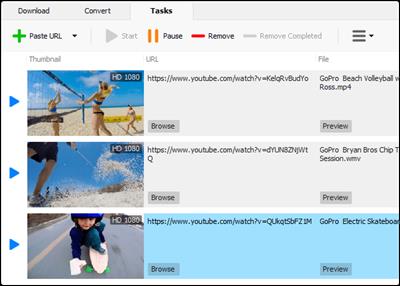
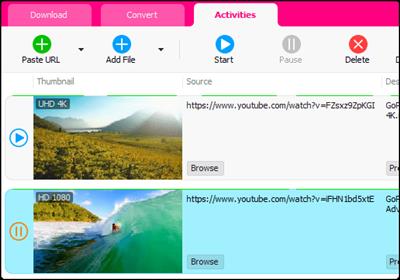
Following a swift and straightforward installation, you are welcomed by a user-friendly interface that is unlikely to give you any troubles. As you can hint from the functions available in the toolbar, you can either paste the desired URL directly or add multiple links at the same time.
While you can set the application to commence the download right away, you can also create a playlist download that can be processed later on, perhaps maybe when you do not need to use your Internet connection. As a side note, the too enables you to grab audio formats only, in case this is more convenient for your purposes.

Works with several HD file formats
The idea behind the program is to provide you with a quick method to download videos and clips in a high-definition format. Among the supported audio formats, you can count AC3, M4A, FLAC, MP2, AAC or OGG, whereas the video formats include MKV, M4V, OGV, SWF, TS, VCD, SVCD, MOV, FLV or ASF, just to name a few.
To make things simpler, the app comes with ready-made presets that you can employ for all popular videos you are about to download. Then again, you are able to modify the settings if you prefer and, of course, if the video supports the parameters you are interested in.

A useful app for grabbing apps in HD quality
All in all, HD Downloader is a simple-to-use utility that allows you to download videos and tracks in a file format that is compatible with iTunes, smartphones, PSP, Xbox or Windows Phones.

Whats New:
Updates: official site does not provide any info about changes in this version.

Download link:​
Код:
[center][b]rapidgator_net[/b]:
https://rapidgator.net/file/366ea58fd03208b52ec2daad299a97bc/if5gx.HDApplications.HD.Downloader.5.9.9.rar.html

[b]nitroflare_com[/b]:
https://nitroflare.com/view/03E9D996B6A0617/if5gx.HDApplications.HD.Downloader.5.9.9.rar

[b]uploadgig_com[/b]:
https://uploadgig.com/file/download/6ef1fad27d223669/if5gx.HDApplications.HD.Downloader.5.9.9.rar[/center]

Links are Interchangeable - No Password - Single Extraction​
 
HWiNFO 7.02 Build 4430

e82a4bf41daf3555ecdd33ce769c1313.jpeg

File size: 9.0 MB​
HWiNFO64 are professional hardware information and diagnostic tools supporting latest components, industry technologies and standards. These tools are designed to collect and present the maximum amount of information possible about computer's hardware which makes them suitable for users searching for driver updates, computer manufacturers, system integrators and technical experts as well. Retrieved information is presented in a logical and easily understandable form and can be exported into various types of reports.

Features
- comprehensive hardware information of your computer
- system health monitoring (Thermal, Voltage, Fan, Power)
- table, Logfile, Graph, Tray, Gadget, LG LCD reporting
- text, CSV, XML, HTML, MHTML report formats
- frequent updates
- available as SDK (custom client)
- 3rd party add-ons (Rainmeter plug-in, Samurize plug-in, Sidebar Gadget to display any sensor value, LCDHost plug-in, Mini WebServer, RivaTuner/MSI Afterburner/EVGA Precision On-Screen Display, HWiNFOMonitor Sidebar Gadget including graphs, bars, etc.)

Download link:​
Код:
[center][b]rapidgator_net[/b]:
https://rapidgator.net/file/500fc3e5be662b632b018c70fa5f6689/nyods.HWiNFO.7.02.Build.4430.rar.html

[b]nitroflare_com[/b]:
https://nitroflare.com/view/1CFE4BA7836E40D/nyods.HWiNFO.7.02.Build.4430.rar

[b]uploadgig_com[/b]:
https://uploadgig.com/file/download/8633F11225625541/nyods.HWiNFO.7.02.Build.4430.rar[/center]

Links are Interchangeable - No Password - Single Extraction​
 
Jerry YouTube Downloader Pro 7.9.12

4bbc07c25374af825f67476244c3c0e1.jpeg

File size: 20.6 MB​
YouTube Downloader Pro is a powerful but easy-to-use Windows app for downloading and converting videos from YouTube and hundreds of other video sites.

Download videos from YouTube and Facebook Increase download speeds by up to 500%
YouTube Downloader Pro can download videos from YouTube, Facebook, TikTok, and hundreds of other video sites. YouTube Downloader Pro downloads videos with our exclusive multithreading accelerator that can boost download speeds by up to 500% faster.

Download multiple videos at a time Pause and resume downloads
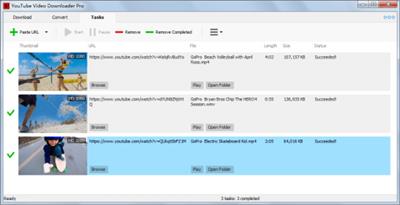
YouTube Downloader Pro supports simultaneous downloads that allows you to download more than one video at the same time. You can pause downloads tonight, and resume downloading tomorrow morning.

Download only audio if possible Download whole playlist from YouTube
YouTube Downloader Pro allows you to download only audio stream from YouTube, without downloading the entire video file. Just enter a YouTube playlist ID, YouTube Downloader Pro will automatically download all videos in the playlist for you.

Whats New:
Updates: official site does not provide any info about changes in this version

Download link:​
Код:
[center][b]rapidgator_net[/b]:
https://rapidgator.net/file/da4b5e01dc641488ff79ffbf68f3c6fe/6tp3p.Jerry.YouTube.Downloader.Pro.7.9.12.rar.html

[b]nitroflare_com[/b]:
https://nitroflare.com/view/4167F57B2B8D6AE/6tp3p.Jerry.YouTube.Downloader.Pro.7.9.12.rar

[b]uploadgig_com[/b]:
https://uploadgig.com/file/download/0d93e89Af8523235/6tp3p.Jerry.YouTube.Downloader.Pro.7.9.12.rar[/center]

Links are Interchangeable - No Password - Single Extraction​
 
LizardSystems Remote Process Explorer 21.04

bf32c32572a348250f6c07fcfdd0e645.jpeg

File size: 4.0 MB​
Remote Process Explorer - manage processes on a remote computer in real time. With Remote Process Explorer, you will be able to get the list of processes and will also be in a position to manage them. On a local or remote computer, users can kill a process, run a new one or change the priority of a process.

In order to do this, you are not required to install additional software on a remote computer since the program uses the in-built functions of the operating system. With Remote Process Explorer, you will be able to see complete information about each running process. It will also indicate the time the process began, the user who started the process the path to its executable file as well as the amount of memory and CPU it uses.
This information is available in the Task Manager and can be obtained for a local as well as a remote computer. For managing a remote computer, Remote Process Explorer has in-built tools built that it uses.

Key features:
Monitoring all running processes on a local and remote computer.
Showing the parameters of running processes (Process ID, Parent PID, CPU, Memory Usage, Priority, Handles, Threads and much more).
Showing all parameters in real time.
Displaying the process tree.
Killing the selected process at any moment.
Changing the priority of a process on a remote computer.
Running new processes on a remote computer.
Searching the Internet for information about the selected process.
Add Computers Wizard.
Groups in the computer list.
Showing the state of a computer in the list (on/off).
Automatically refreshing the list of computers.
Two methods for determining the state of a computer.
Using different accounts for each computer.
Switching off and restarting a remote computer.
Additional administrative tools

Download link:​
Код:
[center][b]rapidgator_net[/b]:
https://rapidgator.net/file/7ac1bf696ddd6626215d5d535037e4b9/y6f3v.LizardSystems.Remote.Process.Explorer.21.04.rar.html

[b]nitroflare_com[/b]:
https://nitroflare.com/view/ADB1BFF0BA2118F/y6f3v.LizardSystems.Remote.Process.Explorer.21.04.rar

[b]uploadgig_com[/b]:
https://uploadgig.com/file/download/9f59A5f7cB67b725/y6f3v.LizardSystems.Remote.Process.Explorer.21.04.rar[/center]

Links are Interchangeable - No Password - Single Extraction​
 
NCH VideoPad Video Editor Professional 10.26 Beta

ab75d7a6165a3fc02fe389da9d28c982.jpeg

File size: 8.15 MB​
Working with video files, especially editing them, is a task that requires a specialized application that can provide all the tools one needs. Among the software applications of this kind you can find VideoPad Video Editor. The interface of this utility is divided into several parts (e.g. Media List, Effects, Transitions, Files, Clips, Video Track, Audio Track, Overlay Track), which may make everything seem a little hard to operate. You can capture video from a camcorder or another device like a webcam or a TV capture card, and once you have added files and sequence clips to the queue, you can start editing them.

So, you can select position for the new clip (at slider's position, to the timeline's start or end point), add blank slides and overlays, modify media in an external editor, change playback speed and stabilize video with the Deshaker filter.
You can also create bookmarks and subtitles, import and export subtitles, select Chrome Key color, save video in the "Stereoscopic 3D" output format, apply audio effects (e.g. amplify, chorus, compressor, distortion, flanger, reverb), as well as record a narration.

Furthermore, you can apply various video effects (e.g. brightness, crop, edge detection, sepia, temperature, posterize, hue) and transitions (e.g. cross fade, reveal, split, fan, circle, diamond).
The program comes with a well-drawn help file and video tutorials while the system resource usage is moderate. It may lag sometimes between commands, but overall, VideoPad Video Editor manages to put up a good performance.

Key Features:

Stunning Transition Effects:
* Choose from a range of fade transitions to give your movie that professional touch.
* Preview the effects in real time.
* Customize the duration of the effect.

Amazing Audio Tools:
* Import and mix music tracks like a pro.
* Make your own custom movie soundtrack.
* Record your own narrations with the click of a button.
* Import pre-recorded narrations, sound effects or music.

Complete Video Optimization:
* Fine tune brightness, saturation and color for your video.
* Add photos and digital images with a click of a button.
* Apply effects like black & white, sepia tone and negative.
* Add text captions to your movie.

Share With Your Family and Friends:
* Burn to DVD and watch in your living room on your TV.
* Save for Youtube and share online with friends.
* Save to PSP, iPod, iPhone or 3GP mobile phone.
* Save to your PC as a high-quality digital movie.

Input Formats:
* Video: avi, mpeg, wmv, divX, Xvid, mpeg1, mpeg2, mpeg4, mp4, mov, asf, vob, ogm, .3gp, H.264, RM and many more.
* Image: bmp, gif, jpg, jif, jiff, jpeg, exif, png, tif

Output Formats:
* Disc export: DVD, CD, Blu-ray Discs, HD-DVD
* Video export: avi, wmv, asf, mpg, 3gp, mp4, mov, iPod, iPhone, PSP, Mobile Phone, Pocket PC

Download link:​
Код:
[center][b]rapidgator_net[/b]:
https://rapidgator.net/file/015910a7da2e57f55a7419c2cd111969/il4ed.NCH.VideoPad.Video.Editor.Professional.10.26.Beta.rar.html

[b]nitroflare_com[/b]:
https://nitroflare.com/view/19A510F7697C299/il4ed.NCH.VideoPad.Video.Editor.Professional.10.26.Beta.rar

[b]uploadgig_com[/b]:
https://uploadgig.com/file/download/ff70aB283b933529/il4ed.NCH.VideoPad.Video.Editor.Professional.10.26.Beta.rar[/center]

Links are Interchangeable - No Password - Single Extraction​
 
S.O.S Security Suite 1.2.4.0

1c19731f0d518b352a40bcd477bdff81.jpeg

File Size : 12.4 Mb​
S.O.S. Security Suite is a free, user friendly application that helps you to get rid of Malware, Adware and Spyware, and also prevent from being infected. There is also a hardware and security flaws detection element and a system optimization module. All these features together bring you what the application's initials stand for: A Safer and Optimal System.

S.O.S Security Suite is the successor to UVK and is designed to help you eliminate Malware, Adware, and Spyware and help prevent you from being infected.

It also includes a hardware and security flaw detection element and a system optimization module that, when combined with its other features, enables you to have a Safer and Optimal System - thus S.O.S.

S.O.S Security Suite should be used alongside your full-service antivirus app of choice like Malwarebytes and should be considered another layer of protection for your machine. As mentioned above, it includes a system flaw detection module that will notify you about any software or hardware-related issues and then help fix them.

The included System Optimization module will help keep you safe by ensuring that you have the best privacy, performance, and reliability for your system. S.O.S. Security Suite can either be installed as a portable tool or an installer; the option is given during install.

It also provides you with a threat scan. It has a System Immunization and Execute section that will prevent work by preventing threats from being executed instead of just blocking them when they are being executed. You can also whitelist apps easily.

SOS's interface is easy-to-navigate but packed with useful features and includes a link to an online help section if you get stuck. S.O.S Security Suite appears to be by all accounts a decent tool in the ongoing fight against malware, etc.
Whats New:
Bug fixes and definition updates.

Download link:​
Код:
[center][b]rapidgator_net[/b]:
https://rapidgator.net/file/a771916c9a61eb703dd6bb7e0999996a/ps6tk.S.O.S.Security.Suite.1.2.4.0.rar.html

[b]nitroflare_com[/b]:
https://nitroflare.com/view/FA759D157D36DA0/ps6tk.S.O.S.Security.Suite.1.2.4.0.rar

[b]uploadgig_com[/b]:
https://uploadgig.com/file/download/903c0676698481e8/ps6tk.S.O.S.Security.Suite.1.2.4.0.rar[/center]

Links are Interchangeable - No Password - Single Extraction​
 
Supremo 4.4.0.2636

595651be753165eb47bbe49aabe12510.jpeg

File Size : 8.1 Mb​
Supremo Remote Desktop is an easy-to-use software that will enable users to easily connect to other computers. It is a complete and powerful utility for remote access and support over the internet. With Supremo you can remotely control any computer, without the need to change any firewall/router settings, combining an extremely easy setup with one of the highest security level available.

It is a complete and powerful utility for remote access and support over the internet. With Supremo you can remotely control any computer, without the need to change any firewall/router settings, combining an extremely easy setup with one of the highest security level available.

Thanks to its integrated encryption and SSL support, Supremo guarantees the highest security combined with optimal performance.

Supremo is a lightweight and non-intrusive software, constituted by only one executable file that includes all program's features. Finally, Supremo is optimized to use minimum system resources and is continually updated and improved.

Here are some key features of "Supremo Remote Desktop":

Small and easy to use:
· Supremo is a remote desktop software created to be a fast, portable and easy to use solution to provide remote assistance to customers. Supremo is constituted by only one executable file, that is very small and doesn't need any installation. The customer must simply download the file Supremo.exe from this website, activate the connection and accept the support request.

No router / firewall configuration:
· Supremo uses a fast and versatile data transfer protocol, to easily allow you to connect to remote computers even behind routers and firewalls, without change any network configuration. Supremo doesn't need any installation or setup, and its connection is extremely secure thanks to its integrated encryption and HTTPS protocol (SSL).

Multi connection:
· Supremo allows multiple users to connect to the same computer. This can be very useful when you need to do complex assistance sessions or when you need to do an internet presentation. For example, you customers can connect at the same time to a computer in your company and see a presentation of your products and services.

File transfer with FTP client style and Drag & Drop:
· Supremo provides an integrated file transfer application, that allows you to explore the disks of the remote computer and transfer files and folders in both directions. You can send a folder from your PC to the customer's PC with a simple click, or you can download a file/folder from the customer's PC to your local PC.

Security and protection:
· Supremo is a secure and reliable application. All the data transferred by Supremo over the internet are encrypted with a strong encryption algorithm. In addition Supremo uses the secure HTTPS (SSL) protocol, ensuring in this way one of the highest security level for data transfer.

· Regarding the security measures for remote desktop connections, Supremo allows to configure some important parameters to avoid unauthorized accesses. You can set and IP filter to block or allow multiple IPs or specify a password that can be specified by remote users in order to connect.

A lot of useful features:
· Supremo provides a lot of useful features in order to simplify the remote assistance work. You can install Supremo as a Windows service, to make the connection always available in background. You can set connection filters for certains IPs or IDs, in order to limit the possibility of connection only to some users. You can create a detailed address book where you can register all your contacts and customers.

· With Supremo you can transfer files and folders in both directions, and you have several advanced features to adjust bandwidth usage and visual aspect, to send remote commands and to automatically transfer clipboard. Finally, Supremo provides an integrated chat application, that allows you to chat with multiple users while you are connected for remote asissatance.

Download link:​
Код:
[center][b]rapidgator_net[/b]:
https://rapidgator.net/file/d1680d9778ffaa06efbe0b16ad3e73c6/o32bh.Supremo.4.4.0.2636.rar.html

[b]nitroflare_com[/b]:
https://nitroflare.com/view/64D6924BA7D80F4/o32bh.Supremo.4.4.0.2636.rar

[b]uploadgig_com[/b]:
https://uploadgig.com/file/download/83d4fCFb23cd0462/o32bh.Supremo.4.4.0.2636.rar[/center]

Links are Interchangeable - No Password - Single Extraction​
 
WinExt Registry Fixer 1.0 Build 001

372581f97083559b5e0b8201b4eab85b.jpeg

File Size : 0.5 Mb​
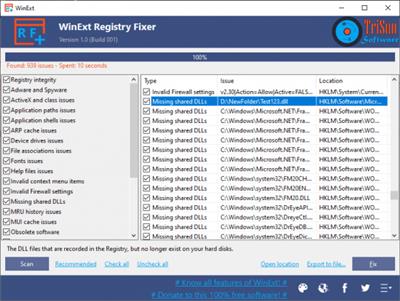
A user-friendly application for maintaining high performance of your computer by repairing registry issues and cleaning its junk.

There are many reasons why you might sometime notice a decline in your computer's performance - and if you suspect registry issues might be the culprit, a dedicated tool can come in handy. Such a solution is WinExt Registry Fixer.

Basic registry repair solution
The GUI of this application is highly intuitive, and you get complete control over the registry categories that should be analyzed.

In fact, it is best that you take some time to read the description of each section, especially if you are a beginner, otherwise you might end up making things even worse than before.

Once you finish reviewing these categories, you can quickly select or un-select all, due to the dedicated buttons.

Supports multiple registry categories
You can set WinExt Registry Fixer to look for problems in various registry sections, such as adware and spyware, ActiveX and class, application paths or shell, device drives, file associations or fonts.

You can also detect issues with help files, invalid context menu items, invalid firewall settings, missing shared DLLs, MRU history or MUI cache, as well as obsolete software and redundant installers.

Moreover, you can identify if there is any trouble with apps running at startup, or with the start menu ordering.

Export results to file
When all the topics have been scanned, you have two options: you can either fix them all automatically, as suggested by WinExt Registry Fixer, or you can export the data to a file.

This way, after you save the info to a TXT tab-separated file, Excel workbook, or a CSV file, you can analyze them and find the best course of action.

To wrap it up
All in all, WinExt Registry Fixer might seem like a hassle-free tool to repair any snags you might come across in your registry, yet once you export the data it generates, it can help you get an in-depth look under your PC's hood.

Whats New:
New release.

Download link:​
Код:
[center][b]rapidgator_net[/b]:
https://rapidgator.net/file/3bbfa3b6dd3af0b0d0f6c8e331b2e87f/67y5r.WinExt.Registry.Fixer.1.0.Build.001.zip.html

[b]nitroflare_com[/b]:
https://nitroflare.com/view/3573DF70E2FB066/67y5r.WinExt.Registry.Fixer.1.0.Build.001.zip

[b]uploadgig_com[/b]:
https://uploadgig.com/file/download/dE7Ec5658A4eeFd6/67y5r.WinExt.Registry.Fixer.1.0.Build.001.zip[/center]

Links are Interchangeable - No Password - Single Extraction​
 
WinUpdatesView 1.15

7c31542e9e1e5a406480d5bd7d60f567.jpeg

File Size : 0.1 Mb​
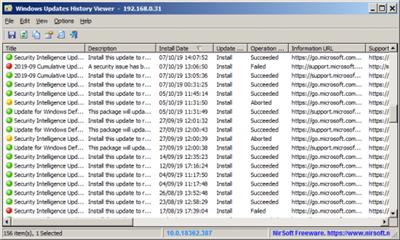
WinUpdatesView is a simple tool that displays the history of Windows updates on your system. WinUpdatesView can load the Windows updates history from your local system, using API, and it can also read and parse the Windows updates database file (DataStore.edb) from external drive or from remote computer on your network.For every Windows update history record, WinUpdatesView displays the following fields: Title, Description, Install Date, Update Operation (Install, Uninstall, Not Started, In Progress), Operation Result (Succeeded, Succeeded With Errors, Failed, Aborted), Category, Information URL, Support URL, Uninstall Notes, Client Application ID, Service ID, Update ID, Revision Number, Unmapped Result Code, Server Selection, hResult

Whats New:
Fixed some display issues in high DPI mode.

Download link:​
Код:
[center][b]rapidgator_net[/b]:
https://rapidgator.net/file/b02b6ed6c92b3b848ce62e944e56a60f/y06x1.WinUpdatesView.1.15.rar.html

[b]nitroflare_com[/b]:
https://nitroflare.com/view/E7071C7A01CB931/y06x1.WinUpdatesView.1.15.rar

[b]uploadgig_com[/b]:
https://uploadgig.com/file/download/a5542112B26954De/y06x1.WinUpdatesView.1.15.rar[/center]

Links are Interchangeable - No Password - Single Extraction​
 
Youtomato YT Downloader Plus 4.16.10

e4a46a9f68866655ff9667a57054000a.jpeg

File size: 19 MB​
YT Downloader is a software utility designed to provide you with a simple and reliable way to save YouTube clips to your hard drive, as well as choose the desired quality and modify their output format. Moreover, the videos can also be re-encoded using one of the available codecs and exported to your iTunes library.

Features:
YT Downloader Plus is simple and light but features many attractive and useful functions.
Download your favorite videos from YouTube and hundreds of other video sites.
Download HD 720p, 1080p, 2K, 4K, 8K videos from YouTube.
Download all videos in a playlist with just one-click.
Support drag-and-drop. Just drag and drop video link from your web browser to the program window to start download.
Convert downloaded videos to MP4, WMV, AVI, 3GP, MPEG, or any other video format, so you can store and play them on your iPhone, iPad, iPod, PSP, smart phone or any other mobile device.
Extract audio tracks and save them as mp3, wav, wma, ac3, ringtone, or any other popular audio format.
Ready-made presets for all output video and audio formats.
Ability to custom output video and audio format settings

Whats New:
Updates: official site does not provide any info about changes in this version.

Download link:​
Код:
[center][b]rapidgator_net[/b]:
https://rapidgator.net/file/6af0221000635473d9e3040bcd5fe8fa/i465t.Youtomato.YT.Downloader.Plus.4.16.10.rar.html

[b]nitroflare_com[/b]:
https://nitroflare.com/view/48E645723850474/i465t.Youtomato.YT.Downloader.Plus.4.16.10.rar

[b]uploadgig_com[/b]:
https://uploadgig.com/file/download/A5575478dfCf691b/i465t.Youtomato.YT.Downloader.Plus.4.16.10.rar[/center]

Links are Interchangeable - No Password - Single Extraction​
 
YT Downloader 7.3.25

19b02026a8f68525b1f25923a98f9de3.jpeg

File size: 20 MB​
YT Downloader is a simple and easy-to-use video download application. It helps you to download and convert videos from YouTube and hundreds of other video sites. YT Downloader increases your download speeds by up to 500%.

Download videos from YouTube and hundreds of other video sites
YT Downloader downloads videos from YouTube, Facebook, TikTok, and hundreds of other video sites. After downloading your video files, you'll be able to watch them smoothly using any media player, even if you don't have internet access.

Accelerate your downloads
YT Downloader features an advanced download acceleration engine that lets you download videos 500% faster than normal speed.

Download multiple videos at a time
YT Downloader supports simultaneous downloads. It allows you to download more than one video at a time.

Pause and resume downloads
YT Downloader allows you to pause, resume, or cancel your downloads at anytime if you need more connection to perform other important tasks.

YouTube to MP3
YT Downloader allows you to download only audio stream from YouTube, and save it as MP3. You don't need to download the entire video file. The audio stream is small, you can download it within seconds.

Video and audio converter
YT Downloader is also a powerful video/audio converter. It can convert local video/audio files to any format you wish so that they are playable everywhere.

Whats New:
Updates: official site does not provide any info about changes in this version.

Download link:​
Код:
[center][b]rapidgator_net[/b]:
https://rapidgator.net/file/e9655f1cf07c76a00578752a7e59a022/afv08.YT.Downloader.7.3.25.rar.html

[b]nitroflare_com[/b]:
https://nitroflare.com/view/2637C9D3E9A03F8/afv08.YT.Downloader.7.3.25.rar

[b]uploadgig_com[/b]:
https://uploadgig.com/file/download/bf950e8248Fc90a1/afv08.YT.Downloader.7.3.25.rar[/center]

Links are Interchangeable - No Password - Single Extraction​
 
Zemana AntiMalware Premium 3.2.28 Multilingual

9fb66186594bf2897668c28415d1084f.jpeg

File Size: 15.2 MB​
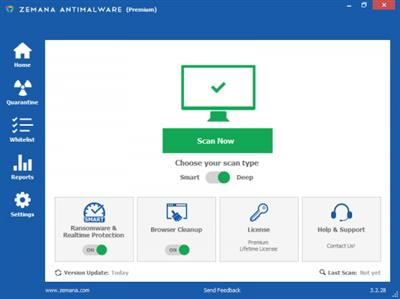
Zemana AntiMalware is an all-in-one anti-malware solution for your machine, boasting an easy to use UI that will effortlessly clean a badly infected computer fast.It comes equipped with a one-click rescue that removes unwanted apps, toolbars, browser add-ons as well as quickly neutralizing viruses, trojans, rootkits, worms, spyware and adware. It will also work seamlessly with other security software installed on your PC without any conflicts. Zemana AntiMalware has been configured so that anyone can use it without needing to tinker around with confusing settings - it is ready to go right after you download it.

Features:
* Detects and removes even deep embeded rootkits and bootkits and keeps your PC clean.
* Faster, better detection rate and malware removal.
* Protects your PC before the infections take place.
* With its unique technology it increases zero day malware detection of suspicious files.
* Detects and removes what Anti Viruses don't.
* Pandora Real Time Sandbox Technology.
* Proactively defeats viruses, trojans, browser add ons and other types of malware.
* File Reputation Service.

Download link:​
Код:
[center][b]rapidgator_net[/b]:
https://rapidgator.net/file/0999b1521065d245acbba7c296ef3352/xtdz1.Zemana.AntiMalware.Premium.3.2.28.Multilingual.rar.html

[b]nitroflare_com[/b]:
https://nitroflare.com/view/A428411CA130B9F/xtdz1.Zemana.AntiMalware.Premium.3.2.28.Multilingual.rar

[b]uploadgig_com[/b]:
https://uploadgig.com/file/download/64aA8ea0268dA9ea/xtdz1.Zemana.AntiMalware.Premium.3.2.28.Multilingual.rar[/center]

Links are Interchangeable - No Password - Single Extraction​
 
PictureCode Photo Ninja 1.4.0c macOS

b060df9ca50f3832c82e79b386ae927a.jpeg

File size: 38 MB​
Distinctive image quality: Photo Ninja is a professional-grade RAW converter that delivers exceptional detail, outstanding image quality, and a distinctive, natural look. If you think this is "just another RAW converter", you're in for a surprise. Photo Ninja is truly special, with unique capabilities for improving and optimizing your digital images.

Click on the items below to learn more about this powerful tool, and read why serious photographers are adopting it into their workflows.
Release Notes

This release includes support for Big Sur and an assortment of improvements.

* Updated to run on Apple MacOS 11 "Big Sur". Installers are notarized.
* Scrolling/panning significantly more fluid on both Windows and MacOS
* Updated UI look and feel, with refinements of both light and dark themes
* Streamlined main toolbar to use less vertical space and to reduce visual clutter
* Reworked interface of the "Change Appearance" dialog
* Added option for automatic light/dark mode switching on MacOS
* Improved UI scaling on HighDPI displays
* Tweaked algorithm formulation for sharpening, reduced minimum radius, and made step sizes more consistent
* Some modest performance optimizations
* Added support for FujiFilm GFX 100, X-S10
* Improved metadata parsing of high ISO values above 65535 for some FujiFilm and possibly other cameras
* Photoshop plug-ins have been removed for the time being

Supported Operation Systems:
macOS 10.14 or later

Download link:​
Код:
[center][b]rapidgator_net[/b]:
https://rapidgator.net/file/8c569a712bb43a4703a744cc5e9d6ef2/zhete.PictureCode.Photo.Ninja.1.4.0c.macOS.rar.html

[b]nitroflare_com[/b]:
https://nitroflare.com/view/FC2685B2E30807A/zhete.PictureCode.Photo.Ninja.1.4.0c.macOS.rar

[b]uploadgig_com[/b]:
https://uploadgig.com/file/download/889d154549E94c4b/zhete.PictureCode.Photo.Ninja.1.4.0c.macOS.rar[/center]

Links are Interchangeable - No Password - Single Extraction​
 
Master PDF Editor 5.7.53 Multilingual

d2815628c3a99e1f068852cf76ce4d6f.jpeg

File Size: 43.4 MB​
Master PDF Editor is straightforward, easy to use application for working with PDF documents equipped with powerful multi-purpose functionality. With Master PDF Editor you can easily view, create and modify PDF documents. The application enables you to merge several files into one, split a source document into multiple documents, and also to comment, sign and encrypt PDF files.

View, create, modify, sign, scan, OCR and print PDF documents
Modify text and objects
With Master PDF Editor you can add text with any formatting to a PDF document or edit existing text. You can also insert images to the document, select and move objects, change the size of objects, save images to a file and copy objects them to the clipboard.

Annotate PDF documents
Powerful annotation tools such as Sticky Note, Measuring tools and Shapes, as well as the enhanced editing capabilities provided by the Strikethrough, Underline, and Highlight functions will make your work easier than ever. Create unique Stamps and use them when reviewing the document or making a note of its status.

Create and fill in PDF forms
With Master PDF Editor it is very simple to edit the various elements of interactive PDF forms such as buttons, text fields, checkboxes and more, as well as implement event handlers for predefined user actions. Automatic calculation and data validation with JavaScript is supported.

Optical character recognition
Optical character recognition allows the ability to search for text fast and efficiently, as well as to edit scanned documents and documents containing images.

Operations on pages
Master PDF Editor supports both the merging and spiting of PDF files. It enables you to easily move, remove, insert and rotate pages in PDF documents as well as change their size.

Bookmarks
Create, edit and remove bookmarks. Add bookmarks for specified pages or paragraphs to allow fast document navigation and efficiently look up information.

Virtual PDF printer
Master PDF Editor is installed as a virtual PDF printer, allowing you to easily print any documents from different applications supporting printing (e.d. Microsoft Word / Excel, OpenOffice).

Digital signatures
Check digital signatures, create new ones and sign documents with digital certificate. For PDF documents, a digital signature is the equivalent of the handwritten signature on paper documents, so the recipient of the signed document may be confident about its authenticity.
*In order to use this function it is required to have a digital signing certificate.

Create PDF documents
PDFs can be created straight from paper documents using a scanner. Master PDF Editor allows you to create documents from existing files, create empty documents or insert empty pages into an existing document .

Download link:​
Код:
[center][b]rapidgator_net[/b]:
https://rapidgator.net/file/91a12c00d0856a071d7c0d2769028a9e/ki92r.Master.PDF.Editor.5.7.53.Multilingual.rar.html

[b]nitroflare_com[/b]:
https://nitroflare.com/view/AD213E07831A33D/ki92r.Master.PDF.Editor.5.7.53.Multilingual.rar

[b]uploadgig_com[/b]:
https://uploadgig.com/file/download/f363832de0c9FD80/ki92r.Master.PDF.Editor.5.7.53.Multilingual.rar[/center]

Links are Interchangeable - No Password - Single Extraction​
 
Microsoft Visual C++ 2015-2019 Redistributable 14.29.30031.0

b496f0956bb4003164a14e6d480f6bc6.jpeg

File Size : 37.8 Mb​
Microsoft Visual C++ Redistributable Package contains the run-time components of Visual C++ Libraries needed for running applications on a PC without Visual C++ installed.

Most people will have this installed at some point being that it is pretty common in many applications and games explaining why it eventually shows up in most people's programs or apps. In other words, if you don't have a program that needs it, then there is no reason to download this.

Microsoft Visual C++ Redistributable Package comes as a self-installing executable. Download the 32-Bit or 64-Bit version, double click and follow the prompts.

Download link:​
Код:
[center][b]rapidgator_net[/b]:
https://rapidgator.net/file/f50a80d36f6c15bc0727609c2d61e50f/8qlxc.Microsoft.Visual.C.20152019.Redistributable.14.29.30031.0.rar.html

[b]nitroflare_com[/b]:
https://nitroflare.com/view/811E45AC9191484/8qlxc.Microsoft.Visual.C.20152019.Redistributable.14.29.30031.0.rar

[b]uploadgig_com[/b]:
https://uploadgig.com/file/download/92fb5220a3B55f28/8qlxc.Microsoft.Visual.C.20152019.Redistributable.14.29.30031.0.rar[/center]

Links are Interchangeable - No Password - Single Extraction​
 
Muziza YouTube Downloader Converter 7.16.10

ebf8a0567e872af98ba1c0de901d6c33.jpeg

File size: 21 MB​
YouTube Downloader Converter is a tool that facilitates an attractive interface and plenty of features to help you download video clips from YouTube, Facebook, Dailymotion, Instagram and other websites.

Download videos from thousands of video sites.
Increase download speeds.
YouTube to MP3 converter.
Pause and resume downloads at anytime.
Video and audio converter

Whats New:
Updates: official site does not provide any info about changes in this version.

Download link:​
Код:
[center][b]rapidgator_net[/b]:
https://rapidgator.net/file/dd09ae2b648e2ee1c43ce03dba9f6a88/mlqm7.Muziza.YouTube.Downloader.Converter.7.16.10.rar.html

[b]nitroflare_com[/b]:
https://nitroflare.com/view/CB248A3E7969A51/mlqm7.Muziza.YouTube.Downloader.Converter.7.16.10.rar

[b]uploadgig_com[/b]:
https://uploadgig.com/file/download/fD875baae76c7c15/mlqm7.Muziza.YouTube.Downloader.Converter.7.16.10.rar[/center]

Links are Interchangeable - No Password - Single Extraction​
 
Personal Backup 6.1.16.1

22867036940819cdd814413e47b881b1.jpeg

File Size : 33.4 Mb​
Personal Backup is a useful application designed to help you save your important data. You can use this program to perform backup jobs for your files and folders.The backup folder can be on a local or removable drive, as well as on a network or a FTP server. The application allows you to perform multiple backups at the same time.Also, you will be able to schedule backup jobs. For example, you can set the program to perform a backup job at every system startup, logout or shutdown or at any given time.

key Features

· Restore of single files or zip files
· Selection dialog for files on restore or cleanup with folder tree and find function
· File preview on selecting or deselecting subfolders
· Wizard for the creation of new backup tasks
· Unlimited number of configurable backup tasks
· Backup of complete directory structures
· Start backup on demand or run automatically
· Backup via FTP
· Backup into single or ZIP files
· Internal backup scheduler
· Create and configure alternate backups using Windows Task Scheduler
· Verification of backed up files

Download link:​
Код:
[center][b]rapidgator_net[/b]:
https://rapidgator.net/file/700b659c04008671dc5ca1d9bc160363/cs4jy.Personal.Backup.6.1.16.1.rar.html

[b]nitroflare_com[/b]:
https://nitroflare.com/view/0E608740F4D5656/cs4jy.Personal.Backup.6.1.16.1.rar

[b]uploadgig_com[/b]:
https://uploadgig.com/file/download/99f5574da520b345/cs4jy.Personal.Backup.6.1.16.1.rar[/center]

Links are Interchangeable - No Password - Single Extraction​
 
PictureCode Photo Ninja 1.4.0c (x64)

6b6b88e76150c496bb62c956ba53a7fc.jpeg

File size: 51 MB​
Photo Ninja is a professional-grade RAW converter that delivers exceptional detail, outstanding image quality, and a distinctive, natural look. If you think this is "just another RAW converter", you're in for a surprise. Photo Ninja is truly special, with unique capabilities for improving and optimizing your digital images. Click on the items below to learn more about this powerful tool, and read why serious photographers are adopting it into their workflows.

Adaptive lighting
Photo Ninja's intelligent illumination control can lighten shadows, overcome backlighting, and tame excessive contrast, with a natural, artifact-free result.

Detail enhancement
Our one-of-a-kind local contrast adjustment makes detail "pop" without halo artifacts. It also works in reverse for a nice smoothing effect.

Highlight recovery
World-class technology can salvage many overexposed images, with convincing recovery of blown-out highlight regions.

Noise Ninja®
Noise reduction in Photo Ninja is powered by the latest generation of our highly regarded Noise Ninja technology.

Color enhancement
Improve skin tones, enhance foliage, deepen the sky, and create your own color "looks" with hue-selective color enhancements.

Black and white processing
Create monochrome and split-tone images quickly and easily, with flexible control over tonal interpretation.

Chromatic aberration correction
Automatically analyze and remove complex lateral chromatic aberration prior to demosaicing, with outstanding results.

Color correction
Balance neutrals in a single click. Achieve consistent color with on-location lighting profiles.

Distortion correction
Fix keystoning and correct complex lens distortion.

Advanced demosaicing
For cameras with weak antialiasing filters, Photo Ninja can reduce maze artifacts and moire patterns.

Point-and-go browser
Navigate through your image collection quickly and easily with Photo Ninja's streamlined, integrated browser.

Download link:​
Код:
[center][b]rapidgator_net[/b]:
https://rapidgator.net/file/8c1fc8d5ec497a2a49ec0810ad05ec1e/b0xnx.PictureCode.Photo.Ninja.1.4.0c.x64.rar.html

[b]nitroflare_com[/b]:
https://nitroflare.com/view/7E2DC64F64FF309/b0xnx.PictureCode.Photo.Ninja.1.4.0c.x64.rar

[b]uploadgig_com[/b]:
https://uploadgig.com/file/download/0469661ac9F80fA5/b0xnx.PictureCode.Photo.Ninja.1.4.0c.x64.rar[/center]

Links are Interchangeable - No Password - Single Extraction​
 
proDAD ReSpeedr 1.0.44.2 Multilingual

470360cf976992d9a361a356cdff6f78.jpeg

Windows x64 | Languages: Multilingual | File Size: 77.59 MB​
proDAD ReSpeedr V1: The Ultimate Super Slow-motion & Time-lapse Video Producer Create stunning time-lapse and super slow-motion sequences. Professional grade results without the professional price tag.

ReSpeedr converts your original camera recordings into stunning slow-motion-scenes. And just as easy you can turn your footage into fascinating time-lapse videos. You determine the degree of speeding your scenes up or slowing them down. Then ReSpeedr exports the desired scenes as video files in best quality.

Professional high-speed-cameras are not only expensive and lack flexibility. Due to the fast shutter speed they also require huge amounts of light. Although some camcorders as well as smartphones do offer some limited high speed mode, this may not be activated during a "regular" recording. And most of those recordings are restricted to capturing just a few seconds only. ReSpeedr does not restrict you in any way and allows you to change the speed of any shot of your original recordings to your heart's content

Instead of only 120 frames per second slow motion sequences with 1000 fps or even more are possible! Instead of only slowing down your recordings you can set keyframes to dynamically vary the speed from timelapse to slow-motion. With the power of the highly efficient motion detection engine and the advantage of dynamic frame-blending technology you will achieve perfect results with a beautiful flow of motion.

ReSpeedr works on action scenes as well as on nature and is also ideally suited to show and analyze technical processes. ReSpeedr is an ideal companion product for proDAD's other specialized tools like DeFishr and Mercalli to further enhance, dewarp, stabilize and optimize videos.

Features:
- Creation of high-quality slow-motion video
- Creation of time-lapse sequences
- Slow motion and time-lapse also work in combination controllable by keyframes
- Frame-based motion-flow analysis uses a combination of dynamic frame-blending and optical flow technologies to deliver incredible detail and smoothnes
- Real time preview and super-fast rendering with CPU & GPU support (if GPU is present)
- Intuitive timeline interface
- Super-easy keyframing
Release Notes
- Release notes were unavailable when this listing was updated.

System Requirements:
- Windows 64-Bit Vista, Win7, Win8, Win8.1, Win10
- 2GB-memory
- Recommended: i7-cpu
- Recommended: 6 GB memory

Download link:​
Код:
[center][b]rapidgator_net[/b]:
https://rapidgator.net/file/1d3b3a8cc153ff2c72afcb356d69b144/2o35j.proDAD.ReSpeedr.1.0.44.2.Multilingual.rar.html

[b]nitroflare_com[/b]:
https://nitroflare.com/view/75599D10ABF04BB/2o35j.proDAD.ReSpeedr.1.0.44.2.Multilingual.rar

[b]uploadgig_com[/b]:
https://uploadgig.com/file/download/caa472134d343FaA/2o35j.proDAD.ReSpeedr.1.0.44.2.Multilingual.rar[/center]

Links are Interchangeable - No Password - Single Extraction​
 
Robin YouTube Video Downloader Pro 5.26.10

63301370a08ebb22d59ee1830bae3528.jpeg

File size: 23.5 MB​
YouTube Video Downloader Pro is a professional Windows app for downloading and converting videos from YouTube, Facebook, Dailymotion, and thousands of other video sharing sites. It accelerates your downloads by up to 5 times. YouTube Video Downloader Pro allows you to download multiple videos at a time. It also allows you to pause, resume, and cancel downloads at anytime.

Features

Download videos from YouTube and thousands of other video sites
YouTube Video Downloader Pro can download videos from YouTube, Facebook, Dailymotion, Vimeo, Vine, Metacafe, and thousands of other video sites.

Accelerate downloads by up to 5 times
YouTube Video Downloader Pro features an advanced download acceleration engine that lets you download videos up to 500% faster than normal speed.

Download 4K, 2K, FHD 1080p, HD 720p, and 3D videos from YouTube
YouTube Video Downloader Pro can download UHD 4K, QHD 2K, FHD 1080p, HD 720p, and 3D videos from YouTube if they are available.

Download only audio stream from YouTube
YouTube Video Downloader Pro allows you to download only audio stream from YouTube, without downloading the entire video file.

Download whole playlist from YouTube
Just enter a YouTube playlist ID, YouTube Video Downloader Pro will download all or selected videos in the playlist from YouTube for you.

Download more than one video at a time
YouTube Video Downloader Pro supports simultaneous downloads that allows you to download multiple videos at the same time.

Pause and resume downloads
YouTube Video Downloader Pro allows you to pause, resume, and cancel downloads at anytime.

Preview incomplete video while downloading
While downloading, you can click "Preview" button to play incomplete video and make sure the file you are downloading is really the video of your choice.

Convert downloaded videos to any format
YouTube Video Downloader Pro can automatically convert downloaded videos to the format that you specify. It supports MP4, FLV, WMV, MOV, ASF, AVI, DV, M4V, MKV, MPG, OGV, SWF, TS, VOB, WEBM, DVD, VCD, SVCD, and many other formats.

Optimize downloaded videos for any device
YouTube Video Downloader Pro automatically converts and optimizes downloaded videos for your mobile/desktop device, so you can watch them smoothly on your iPhone, iPad, iPod, Android phone, Android tablet, Xbox, PSP, PS4, PS3, Samsung Galaxy, or other device.

Extract audio stream from video
YouTube Video Downloader Pro allows you to extract audio stream from video, and save it as MP3, WAV, WMA, AC3, AAC, OGG, M4A, FLAC, MP2, or any other audio format.

Convert local video/audio files
YouTube Video Downloader Pro is also a powerful video/audio converter. It helps you to convert your disk video/audio files to any format you wish so that they are playable on your media player.

Ready-made presets
YouTube Video Downloader Pro provides ready-made presets for all popular video and audio formats. You can also custom output video/audio format settings.

iTunes compatible
Optionally, YouTube Video Downloader Pro can automatically add downloaded video/music to your iTunes library, so you can easily synchronize your videos and music to your iPhone, iPad, iPod, etc.

Integrate with Internet Explorer and Firefox
YouTube Video Downloader Pro adds download button and menu commands to the toolbar and the context menu of your browser, so you can download and convert any video with just one click.

Support drag-and-drop
You may directly drag and drop video link/URL from your browser to the main window of YouTube Video Downloader Pro to start download, you don't even need to copy and paste video URL manually.

What's new
* official site does not provide any info about changes in this version

OS: Windows 10/8/7/Vista/XP/2000

Download link:​
Код:
[center][b]rapidgator_net[/b]:
https://rapidgator.net/file/19e869d2c7057f51bc11ce81d271dd49/u97ku.Robin.YouTube.Video.Downloader.Pro.5.26.10.rar.html

[b]nitroflare_com[/b]:
https://nitroflare.com/view/FFE680B45EEA444/u97ku.Robin.YouTube.Video.Downloader.Pro.5.26.10.rar

[b]uploadgig_com[/b]:
https://uploadgig.com/file/download/37ad423786dd6ec5/u97ku.Robin.YouTube.Video.Downloader.Pro.5.26.10.rar[/center]

Links are Interchangeable - No Password - Single Extraction​
 
Назад
Сверху