• Форум работает в архивном режиме www.old.nado.in

All mitsumi'1s Applications !! (updated daily)

  • Автор темы Автор темы mitsumi1
  • Дата начала Дата начала
Sublime Text 4.0 Build 4100 Dev macOS

a3ec45eda5fa9caafa9a95fe6e89db0a.jpeg

File size: 28 MB​
Sublime Text is a sophisticated text editor for code, markup and prose. You'll love the slick user interface, extraordinary features and amazing performance.Sublime Text is a super fast and feature packed text and development editor. If you are going to be coding regularly you want to try this amazing editor (IDE).

Following some of the great features that make Sublime Text stand out from other code editors:
- Multiple cursors: Once you have discovered multiple cursors you won't want to work without them anymore. As the name suggests they let you write or edit in multiple places in a document at the same time.
- Vintage mode: Vim keyboard shortcuts will work just like in the original Vim editor. To use them, all you need to do is to enable vintage mode.
- Lightning fast: This is the fastest code editor you will find right now.
- Command pallet: A great feature that allows you to reach about all functions of the editor via the keyboard. You will hardly use your mouse and thus code more efficiently.
- Plugin collection: A hugely active community creates plugins for almost any task in Sublime Text. This includes syntax highlighting and code snippets for a large number of languages, for example Javascript, PHP, CSS, HTML, Python, LESS, XML and C++ to name just a few.
- Package control: This add-on let's you install plugins within seconds directly from the editor.
Release Notes

Changelog
Dev Channel Changelog
Build 4100

Switching files correctly updates the window title and status bar
Goto Anything: pasting a file name and line number no longer changes the line in the previous file
Goto Anything: correct flickering of first tab when filtering files
Auto Complete: fixed a regression with the Definition
Sidebar: fixed keyboard navigation when the Open Files section is displayed
Code Folding: fixed some edge-case incorrect behaviors
Various syntax definition updates
API: added Sheet.group()
API: fixed ViewEventListener.on_load_async() sometimes not being called
API: added missing Window.select_sheets() method to Python 3.3 plugin host
API: Syntax.name is now derived from the path if not present

Supported Operation Systems:
macOS 10.9 or later

Download link:​
Код:
[center][b]rapidgator_net[/b]:
https://rapidgator.net/file/c32f0442f287ac16a1dfe9a71d2d0bcd/x44en.Sublime.Text.4.0.Build.4100.Dev.macOS.rar.html

[b]nitroflare_com[/b]:
https://nitroflare.com/view/83D4F4FE11735CD/x44en.Sublime.Text.4.0.Build.4100.Dev.macOS.rar

[b]uploadgig_com[/b]:
https://uploadgig.com/file/download/51B779a44360b0D6/x44en.Sublime.Text.4.0.Build.4100.Dev.macOS.rar[/center]

Links are Interchangeable - No Password - Single Extraction​
 
Tomabo MP4 Downloader Pro 4.2.15

c1cc5616ea8b0c7d1ea7c68cc40f1389.jpeg

File size: 24 MB
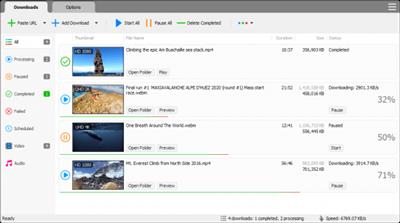
MP4 Downloader Pro is a professional Windows application for downloading your favorite videos from hundreds of video sites.​

Features:
Download your favorite videos from hundreds of video sharing sites.
Download HD 720p, 1080p, 2K, 4K, 8K videos.
Download only audio. You can choose to download only audio stream without downloading the entire video file.
Support playlist download.
Support subtitle download.
Download more than one video at the same time.
Pause and resume downloads.
Support scheduled downloads.
Preview video while downloading. You can click "Preview" button to play incomplete video and make sure it is really the video that you want.
Support drag-and-drop. To start a download, just drag and drop a video link/URL from your web browser into the Drop Box or program window.
Convert video/audio to different formats: MP4, WebM, FLV, MKV, AVI, MP3, AAC, and other formats and devices.
Convert video/audio for different devices: iPhone, iPad, iPod, Galaxy, Android, etc.
Extract audio from video and save in MP3, AAC, or other audio format.
Ready-made presets for all popular video and audio formats and devices.
Fully customizable video and audio format settings.

Whats New:
Updates: official site does not provide any info about changes in this version.

Download link:​
Код:
[center][b]rapidgator_net[/b]:
https://rapidgator.net/file/f08689d1105da6d7bb5fdbd1131c96f0/df95i.Tomabo.MP4.Downloader.Pro.4.2.15.rar.html

[b]nitroflare_com[/b]:
https://nitroflare.com/view/954F087997E8B28/df95i.Tomabo.MP4.Downloader.Pro.4.2.15.rar

[b]uploadgig_com[/b]:
https://uploadgig.com/file/download/947500b8987E8eE7/df95i.Tomabo.MP4.Downloader.Pro.4.2.15.rar[/center]

Links are Interchangeable - No Password - Single Extraction​
 
TubeMate Downloader 3.19.16

7245c7b75620a42411edac7b4cd5182d.jpeg

Languages: English | File size: 29 MB​
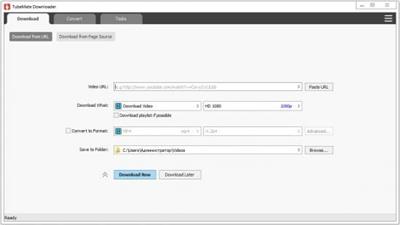
Windows TubeMate is a smart application that lets you snag any clip you want from the main video hosting sites and convert them while downloading or after that. If you need a simple and efficient video downloading tool, you can give it a try.

Features:

Online video downloader
TubeMate can download videos from YouTube, Facebook, Instagram, Dailymotion, and thousands of other video sites.

HD video downloader
TubeMate can download UHD 8K, 5K, 4K, QHD 2K, HD 1080p and 720p videos from YouTube.

YouTube to MP3 converter
TubeMate allows you to download only audio stream from YouTube, and save it as MP3. You don't need to download the entire video file.

Playlist downloader
TubeMate enables you to download entire or part of a playlist with just a few clicks.

Download accelerator
TubeMate features a multi-thread download acceleration engine that increases your download speeds by up to 500% or even more.

Download multiple videos at a time
TubeMate supports simultaneous downloads. It allows you to download more than one video at the same time.

Pause and resume downloads
You can pause and resume your downloads at any time.

Support drag-and-drop
You may directly drag and drop video link from your browser to the drop box or app window to start a download. You don't even need to copy and paste video URL.

Preview video/audio while downloading
While downloading, you can click the 'Preview' button to view incomplete file and make sure the content is you want.

Video and audio converter
TubeMate can convert your disk video/audio files between MP4, FLV, AVI, WMV, MOV, MP3, AAC, and any other formats for any device.

Video optimizer
TubeMate automatically optimizes downloaded videos for popular mobile devices, so you can watch downloaded videos smoothly on your iPhone, iPad, Android phone, and other devices.

Video to MP3 converter
TubeMate allows you to extract audio stream from video and save it as MP3, WAV, AC3, or other audio format.

Ready-made presets
TubeMate provides ready-made presets for all video and audio formats. You can also customize your own video/audio formats.

iTunes compatible
Optionally, TubeMate can add downloaded video/music to your iTunes library automatically, so you can easily synchronize your videos and music to your iPhone, iPad, iPod.

Media player
TubeMate contains an easy-to-use media player for playing files that Windows Media Player cannot play.

Whats New:
Updates: official site does not provide any info about changes in this version

Download link:​
Код:
[center][b]rapidgator_net[/b]:
https://rapidgator.net/file/ca1e6f1c0749367338e2b1befe7b2621/a92m0.TubeMate.Downloader.3.19.16.rar.html

[b]nitroflare_com[/b]:
https://nitroflare.com/view/A50749708EFB8FD/a92m0.TubeMate.Downloader.3.19.16.rar

[b]uploadgig_com[/b]:
https://uploadgig.com/file/download/44d1e04c789468Df/a92m0.TubeMate.Downloader.3.19.16.rar[/center]

Links are Interchangeable - No Password - Single Extraction​
 
Waterfox Classic 2021.03 (x64) Multilingual

21ba9730bf6ce177b3d7721eb0842202.jpeg

File Size : 72.8 Mb​
Waterfox is a 64-bit version of Firefox. Waterfox is modified version of the Firefox source code specifically for machines running 64-bit versions of Windows. Software designed for 64-bit Windows editions can take advantage of faster RAM and processing speeds and greater stability in 64-bit systems. Just converting Mozilla's source code for 64-bit Windows isn't enough, Waterfox takes it to another level with unique tweaks which help it exploit the speed of 64-bit systems. Waterfox is made with one thing in mind: speed. Waterfox offers 100% Firefox Add-on Compatibility and 64-bit Plugin Support.

Features:
Compiled in Intel's C++ Compiler
Intel's Math Library
Streaming SIMD Extensions 3
Advanced Vector Extensions
Jemalloc
Profile-Guided Optimisation
/O3 Switch
100% Extension Compatibility
64-bit Plugin Support
Future Proof!

Download link:​
Код:
[center][b]rapidgator_net[/b]:
https://rapidgator.net/file/74c2fc723fec482beffcffb2a5a3175e/kg1kq.Waterfox.Classic.2021.03.x64.Multilingual.rar.html

[b]nitroflare_com[/b]:
https://nitroflare.com/view/7B29441E5751272/kg1kq.Waterfox.Classic.2021.03.x64.Multilingual.rar

[b]uploadgig_com[/b]:
https://uploadgig.com/file/download/B97ddf0613f163BD/kg1kq.Waterfox.Classic.2021.03.x64.Multilingual.rar[/center]

Links are Interchangeable - No Password - Single Extraction​
 
Windows Password Solutions 1.3

87f1f24e826d309cffebf71e07f35d41.jpeg

File Size: 54.1 MB​
Useful collection to solve passwords problems, Reset Windows XP-10 Local or Admin Account Passwords, Temporary Bypass Local or Microsoft (online) account Passwords, Reset Active Directory Account or Domain Cached Passwords., Create New Users and Many more (Explore your self).

Notes:
- This is a portable Collection but You need a Windows x86 or x64 Based WinPE to USE This collection, Like (Sergei Strelec, Hiren's Boot CD, Windows_10_XPE, or any Windows PE with wow64 support)
- Before you use any tools, Make sure you know about Hybrid sleep of Win 8-10.
- These tools are meant to be used from WinPE environment.
- You can refer the Documentation written by authors.

What's New:
- PCUnlocker 5.6
- O&O BlueCon UserManager 1.0.1.5715
- SQL Server Password Changer 1.9

Download link:​
Код:
[center][b]rapidgator_net[/b]:
https://rapidgator.net/file/b8df973936dd17c230388f7674b06496/n142h.Windows.Password.Solutions.1.3.rar.html

[b]nitroflare_com[/b]:
https://nitroflare.com/view/C49A2B0839DF5DE/n142h.Windows.Password.Solutions.1.3.rar

[b]uploadgig_com[/b]:
https://uploadgig.com/file/download/Af0a929fd1960676/n142h.Windows.Password.Solutions.1.3.rar[/center]

Links are Interchangeable - No Password - Single Extraction​
 
WonderFox DVD Ripper Pro 16.2

9734b235c35f168a2bcd752ac2ace04d.jpeg

File size: 57 MB​
WonderFox DVD Ripper provides the best solution to convert DVD to a wide range of mainstream video and audio formats such as DVD to AVI, DVD to MP4, DVD to MKV, DVD to MPG for quick back up DVD to iPad, DVD to iPhone 5S, DVD to Android, etc. And new media formats are keeping added and supported.

In supports of all regular DVDs including DVD Movie, TV Show, Tutorial, etc. With the powerful dvd decryption technology, it can remove/bypass DVD CSS, Region Code, Multi-angle, RCE, Sony ARccOS, UOP and even Disney X-Project. It takes about 20 minutes to rip a 120 minutes' DVD to AVI video with 0-Quality-Loss and much less time to MPG(only 5~10 minutes). Moreover, it adds optimized presets for all pop portable devices such as DVD to iPhone 5S, DVD to iPad Air, DVD to Samsung Galaxy S5, Sony, Nokia, BlackBerry, HTC, Xbox, Android device, etc.

It's easy-to-use (within three simple steps - Load DVD > Output Format > Get Start) software, which provides blazing fast ripping speed but preserves high original quality.

Rip DVD to AVI, MP4, MPG, WMV, iPad, iPhone, Android with 0-Quality-Loss.
- Rip your extensive DVD collection to virtually any video/audio/device
- Support almost all encrypted DVDs (Latest & Classic DVDs)
- Useful video editing functions like cutting, cropping, special effects
- Useful DIY editing (cut, crop and effects included)

Everything You Need to Make and Watch DVD Movies
Enjoying your DVD just got simpler. Now you can watch it anytime, anywhere. Alter, enhance, convert - whatever you do - the final result will be in perfect quality (even in high-definition) no missing key frames, quality, redraw issues, or crashes.

Rip DVD to All Popular Videos and Audios
Base WonderFox leading DVD decoding technology, WonderFox DVD Ripper enables you to easily rip any DVDs to AVI, MP4, MPG, MKV, WMV, MOV, MTS, M4V, ASF, DVC, MTS, M2TS, WEBM, FLV, SWF, VOB, F4V, 3GP and 3GP2. It also supports rip DVD to MP3, AC3, AAC, WMA, WAV, MKA, OGG, AU, AIFF, FLAC and M4A audio file.

Rip DVD to Portable Device for Playback
One step to rip your DVD movie to iPad, iPhone, Apple TV, Android Tablet, Samsung Galaxy and Note, HTC cell phone, Nokia Lumia, Blackberry cell phone, Sony cell phone and PS, TVs, XBox,Wii, Kindle Fire, Surface, etc. Total 150+ latest devices supported.

Backup A DVD Only 5 Minutes
As we know, there are many so called No. 1 fast DVD ripping tools on the market. But, have you seen any tools able to backup a DVD less than 5 minutes. Now, let the dream into reality. WonderFox DVD Ripper lets you backup a DVD to MPG video within 5 minutes. DVD to AVI XviD will take about 20~25 minutes, DVD to MP4 H264 will take about 40~50 minutes.

Decrypt CSS and Region Code Protections
Commonly purchased DVD (Movie, TV Show, Tutorial, etc.) has one or more copyright protection to avoid copying DVD content from DVD disk. Some popular DVD encryption technology includes CSS, Region Code, Sony ARccOS Protection, Disney X-project DRM, etc. WonderFox DVD Ripper will help you decrypt any DVD protections, make your DVD to digital video.

Edit, Enhance, and Personalize DVD Movie
A simple DVD editor is enbeded. There are some common editing features and 12 effects, and just few clicks you can personalize your DVD movie.

One Interface, All Operations
What's the real easy-to-use? We have no enough time to learn how to use a software, WonderFox DVD Ripper provides one interface concept, everything becomes simple. (provides one interface concept to make everything simple)

Flexible Settings
It offers flexible choices to fine-tune and adjust parameters to tailor the output videos, in terms of video audio encoding, bitrate, frame rate, aspect ratio, resolution, audio codec, audio channel number, sample rate, etc. You can customize and apply your own settings to all, you can also save all of the settings as a single profile.

Whats New:
Updates: official site does not provide any info about changes in this version.

Download link:​
Код:
[center][b]rapidgator_net[/b]:
https://rapidgator.net/file/04cc1b0ae068ad4f85fb05d9dfabd811/bg13t.WonderFox.DVD.Ripper.Pro.16.2.rar.html

[b]nitroflare_com[/b]:
https://nitroflare.com/view/34880169B4197D5/bg13t.WonderFox.DVD.Ripper.Pro.16.2.rar

[b]uploadgig_com[/b]:
https://uploadgig.com/file/download/8b9e8f0Ffb197fe6/bg13t.WonderFox.DVD.Ripper.Pro.16.2.rar[/center]

Links are Interchangeable - No Password - Single Extraction​
 
WonderFox DVD Video Converter 24.0 Multilingual

75c0777e356cc1e0eef3ed98c887c5c2.jpeg

File size: 87 MB​
Want to enjoy a complete movie night with your family instead of waiting long time for conversion? WonderFox DVD Video Converter is the best choice, which provides one-stop total solution to Rip DVDs (Disney, Paramount, Sony Included), Convert videos, Download online videos, Edit and Play movies/video with excellent performance.

In celebration of the birth of Apple & Samsung new generation devices, we launched an exclusive special event to support iPhone 6& Note 4 owners. For the special offer, we gave our flagship product away as gift - WonderFox DVD Video Converter - the advanced all-in-one DVD converter which perfectly matches iPhone 6& Note 4.

New Features:
Perfectly Match the Resolution of iPhone 6
Now iPhone 6, iPhone 6 Plus give us 1334*750 and 1920*1080 resolutions with a 4.7 inch screen and 5.5 inch screen. Bigger screen, better visual effect. There's nothing better than watching DVD blockbusters on large-screen mobile phone!

While if the DVD resolution and the new machine resolution are not just right for a match, there will be black bars on the top and bottom of images normally, or sometimes on the left and right sides of the screen either. WonderFox DVD Video Converter exclusively provides every user a perfect resolution-matching when you convert DVD to iPhone 6, or Galaxy Note 4, to totally avoid the problem of black strips inserting.

Better High-definition Movie Viewing Experience
The pixel density per inch of iPhone 6 has reached 326ppi and the entire screen contains more than one million pixels. The values of iPhone 6 Plus touched 401ppi per inch, and over 200 million pixels in the screen, more than 185% of iPhone 5S's. It has no precedent in history. Apple called the new screen resolutions "Retina HD", under which users can have a near perfect watching experience with iPhone 6.

WonderFox DVD Video Converter supports converting SD to HD video to suit the unprecedented high-clearness of iPhone 6. So does Samsung Galaxy Note 4. The large-screen mobile phones will better your movie-viewing experience while its 1080 x 1920 pixels make everything vivid and lifelike on the screen. It is quite pleasant to enjoy visual feast brought by the latest fantastic phones.

Overview of WonderFox DVD Video Converter
WonderFox DVD Video Converter is a powerful all-in-one program. It provides one-stop total solution to rip DVDs (released by Disney, Paramount, Sony, etc), convert video, download online video, edit and play movies/video with excellent performance.

A handy tool to rip and convert DVD to your portable device! 150+ video formats are supported & perfectly match your iPhone 6 and Samsung Note 4. SD to HD conversion brings better movie-viewing experience on your high-definition large screen. Unique encode technology makes the conversion speed 30-50X faster than ever.

Download link:​
Код:
[center][b]rapidgator_net[/b]:
https://rapidgator.net/file/1035613a71e43f369dfc5b5fd5a32276/3fs3l.WonderFox.DVD.Video.Converter.24.0.Multilingual.rar.html

[b]nitroflare_com[/b]:
https://nitroflare.com/view/86225171FDD024C/3fs3l.WonderFox.DVD.Video.Converter.24.0.Multilingual.rar

[b]uploadgig_com[/b]:
https://uploadgig.com/file/download/e0e17a4b01aA6a7a/3fs3l.WonderFox.DVD.Video.Converter.24.0.Multilingual.rar[/center]

Links are Interchangeable - No Password - Single Extraction​
 
WonderFox HD Video Converter Factory Pro 22.0 Multilingual

5bc977fe074a14ea54e4841ed5a22853.jpeg

File size: 97 MB​
Let HD Video Converter Factory Pro Power UP Your Videos And Save Space on Your Devices Convert HD video to 300+ formats and devices - Simple yet Faster, when helping you deal with higher definition source. There are currently many HD video converters in this field, which claim to be the best HD videos converter. But if you got the idea of HD conversion for a long time, you must know WonderFox HD Video Converter Factory Pro is a program of the first batch supporting HD video conversion. We are continuing to update and comfort our users with mature technology.

HD Video to General Video
This HD conversion software supports the newest encoder H265(HEVC), VP9 and other h-video formats. It converts Multi-track HD video M2TS, MKV, AVCHD, HDTV BDAV and MPEG-TS, HD-camcorder video and more to 300+ video and audio codecs.

SD Video to HD Video
HD Video Converter Factory Pro is equipped with advanced High-Definition (HD) video conversion technology. It works the best on converting videos from Standard-Definition (SD) to High-Definition (HD) like HD MP4, HD MKV, HD AVI, HD MTS, HD TRP, even 4k standard.

Outstanding 5X Compression Rate
Watch Video on Hand-Held Devices Anytime, Anywhere
Integrated with an advanced video compressor, it will downsize video (convert HD videos to SD videos) with Minimum Quality Loss! And the converted videos are nearly indistinguishable from the originals. Thus you are able to free up some storage space on your devices, let alone, it presets optimal parameters for the widest selection of gadgets, HDTV.

A Real Time Saver- 50X Faster Video Conversion Speed
HD Video Converter Factory Pro is designed to take advantage of your computer hardware. It supports Multi-CPU and Hyper Threading, increasing CPU utilization on video conversion processing with mature technology.

What If You Want to Download
An Online Video
While it's a high definition video converter, you can regard it as a YouTube to MP3, MP4, AVI downloader.
With only a few clicks, you can easily download HD video files (download 4K video, new VR video, 360 degree video, HD MP4, HD MKV, HD AVI, HD TS, HD ASF, HD MOV, HD WMV) and then transfer them to any of your portable devices.

Apart from that, with the unique encoder technology and batch conversion mode, it can boost 50X faster conversion speed.
Tip: Wanna experience the maximum point in conversion speed of the HD movie converter? Convert between:
1.AVI, MP4, MKV, MOV, M4V, F4V, FLV, MTS, M2TS
Supports Intel Core, NVIDIA CUDA and AMD.

Download link:​
Код:
[center][b]rapidgator_net[/b]:
https://rapidgator.net/file/abed38635bf72de79faa4cc134df0df5/d37fx.WonderFox.HD.Video.Converter.Factory.Pro.22.0.Multilingual.rar.html

[b]nitroflare_com[/b]:
https://nitroflare.com/view/115F074F49BC92B/d37fx.WonderFox.HD.Video.Converter.Factory.Pro.22.0.Multilingual.rar

[b]uploadgig_com[/b]:
https://uploadgig.com/file/download/51ed0cC5290e9a3A/d37fx.WonderFox.HD.Video.Converter.Factory.Pro.22.0.Multilingual.rar[/center]

Links are Interchangeable - No Password - Single Extraction​
 
Abelssoft Doku Downloader Plus 2021 v3.6 Portable

1c43a7cf53e2ba44baa6f02885477e9e.jpeg


Abelssoft Doku Downloader Plus 2021 v3.6 Portable | 99.4 Mb​
Get with the documentary Downloader access to thousands of exciting documentaries from popular media centers such as ARD, ZDF and more. Even YouTube is on board!

Every day hundreds of new documentaries
Who wants to always look the same? The documentary Downloader provides you every day hundreds of new documentaries from over 10 different categories.

See documentaries or download
No matter where you look at you the next document - the documentary Downloader does it all. Take a look at a document directly in the program or to invite them to you as the video down.

Operating System:Windows 7, 8/8.1, 10

Home Page -
У Вас недостаточно прав для просмотра ссылок. Войдите или зарегистрируйтесь.


Download link:​
Код:
[center][b]rapidgator_net[/b]:
https://rapidgator.net/file/dc60ad1a0019562c35d847239d13796c/x3b5h.Abelssoft.Doku.Downloader.Plus.2021.v3.6.Portable.rar.html

[b]nitroflare_com[/b]:
https://nitroflare.com/view/E14F3D5EA8FF995/x3b5h.Abelssoft.Doku.Downloader.Plus.2021.v3.6.Portable.rar

[b]uploadgig_com[/b]:
https://uploadgig.com/file/download/ba5acaaeD93aa9dC/x3b5h.Abelssoft.Doku.Downloader.Plus.2021.v3.6.Portable.rar[/center]

Links are Interchangeable - No Password - Single Extraction​
 
Fast Video Downloader 4.0.0.6 Multilingual Portable

f8431ac2c970f9a79f3b818369742c85.jpeg


Fast Video Downloader 4.0.0.6 Multilingual Portable | 50 Mb​
Fast Video Downloader is software, which allows you to download videos from youtube, dailymotion, vimeo, metacafe, facebook, bing and many more video sites and convert them to iPhone, iPad, iPod, Android, psp device compatible format. You may schedule your download list.

Featured :

Download from
Download videos from Youtube, Dailymotion, Vimeo, Metacafe, Facebook, Bing & more video sites.

Multiple download
Download one or more video simultaneously on same time.

Download HD Video
Download high resolution, Full HD (1080p), HD(720p) videos from YouTube and other videos sites (if video site supports High Definition Videos).

Download schedule
Schedule your download video.

Video Search
This is very smart feature. You may search videos & add to download list in a single click.

Paste Video URL
Automatically paste video URL which you copied.

Convert Videos
Convert downloaded videos to Iphone, Ipad, Ipod, Android, psp device compatible format. You can also convert videos to 3gp, AVI format.

Convert Video Resolution
Change resolution of the video without changing format.

Convert Video Format
Automatic convert videos when download complete. Convert for iPhone, iPad, iPod, Android, PSP device compatible format. You can also convert videos to 3GP, AVI format.

Fast Speed
Application does not apply any restriction on download speed of the videos. So video download will complete in less time.

Proxy Setting
If you use proxy for connecting to internet then you can specify that proxy to download videos.

Submit Feedback
Send and share your using experience for improvement also report video URL, if have any error.

Home Page:
У Вас недостаточно прав для просмотра ссылок. Войдите или зарегистрируйтесь.


Language:Multilingual

Download link:​
Код:
[center][b]rapidgator_net[/b]:
https://rapidgator.net/file/a1ab395ccacfc423f64580bb0db6a1cb/0p2u3.Fast.Video.Downloader.4.0.0.6.Multilingual.Portable.rar.html

[b]nitroflare_com[/b]:
https://nitroflare.com/view/804083C1E5D83E7/0p2u3.Fast.Video.Downloader.4.0.0.6.Multilingual.Portable.rar

[b]uploadgig_com[/b]:
https://uploadgig.com/file/download/4f50247970759a7b/0p2u3.Fast.Video.Downloader.4.0.0.6.Multilingual.Portable.rar[/center]

Links are Interchangeable - No Password - Single Extraction​
 
Kodak Preps v9.0.1 Build 136 (x64) Multilingual Portable

22ffe9f79257d1902d14b248943c35b9.jpeg


Kodak Preps v9.0.1 Build 136 (x64) Multilingual Portable | 91 Mb
Languages: English, Русский, 中文, 日本語, Français, Deutsch, Italiano, Español, Português​
KODAK PREPS Imposition Software - the leading solution for error-free impositions and one of the most widely used tools in the printing industry. PREPS Imposition Software produces faster, more accurate impositions that maximize press sheet usage. Its automated imposition process cuts turnaround time and reduces costs.

Primary Benefits
- Makes it fast and easy to create, save and manage step-and-repeat reducing turnaround time and costs so you can get to more jobs, faster
- Handles complex jobs for digital and conventional print with ease
- Produce similar or repetitive jobs easily, saving time and reducing cost with templates and libraries
- Efficiently and effectively manage any print project using specific interfaces for commercial and packaging
- Industry standard software well known by print operators minimizes training and maximizes productivity

Software Capabilities
- Flexible, easy-to-use templates make it easy to produce similar or repetitive jobs efficiently
- Template Search tool enables you find an existing Preps template quickly for re-use
- Define how a mark should be placed based on job or production needs with SmartMarks
- Define rules that utilize the SmartMarks automatically in a JDF or auto generated workflow with SmartMarks Editor
- Improved production reporting on colors, dimensions and equipment specified for the job
- Enhanced step-and-repeat for packaging applications and packaging specific interface
- AutoGang feature optimizes the placement of several jobs on a single press sheet
- Supports industry-standard PDF input and JDF output files

Save a layout with Independent Page as a Custom Fold Pattern
You can now save a Custom Fold Pattern with a section that includes independent pages. When adding these fold patterns to a Press Run, you will be prompted to set the independent page properties.

Preps can now define subsections (or ribbons) in Custom Fold Patterns. This means that you can use Preps to create a multi-web layout, save it as a custom fold pattern, and then generate a web press run with the custom fold pattern.

New Print menu and Preferences for Job Layout Report
You can now set output defaults for layout reports.

Remove marks through JDF import process
If you are working with Preps templates that have marks already defined on templates/signatures, you now have the ability to remove all existing marks through the JDF import process. You can then use SmartMarks based on marks rules to replace them.

New shortcut keys for inserting a new web and duplicating an existing web
You can now use shortcut keys to insert new webs and duplicate webs. See Menu shortcuts - Windows OS-based computers and Menu shortcuts

Disconnect Shingling/Bottling rules from Stock (Substrate) resource property
The Auto Shingling and Bottling rules are now defined in Resources > Shingling and Bottling Rules Editor, rather than being defined as a Stock (Substrate) resource property. This means that you no longer need to define multiple Stock (Substrate) resource properties for this purpose. In the new Shingling and Bottling Rules Editor, you will have all the same abilities defined in the Stock (Substrate) resource, plus additional fields to define a range of the Stock (Substrate) paper weight and caliper. An Auto Shingling and Bottling rule will be triggered when a Stock (Substrate) resource that fits the range is specified.

New Profile switch to allow users to enable AutoShingling
You have two ways to apply the Auto Shingling and Bottling rules: manually (in a Job Layout Details dialog box) or automatically.

To apply the rule automatically, in your Preps profile, set -AUTOSHINGLING and -AUTOBOTTLING to YES. When new jobs are created, the Auto Shingling and Auto Bottling will be automatically set in the Job Layout Details dialog box. The default is NO, so that you can control the use of Auto Shingling at a job level, as needed.

New mark capability to allow for marks only on the Preps Job Layout Report
You can now edit a SmartMark setting for placing marks on press runs that allows you to restrict the mark to printing only on the Job layout report. The mark will not print on the production layout.

New collation marks for Mixed Binding styles
When your production includes signatures made up from different binding styles-for example, you have two perfect bound signatures that are made up from three saddle stitched signatures each-you can now use Mixed Binding collation marks. In the example, the perfect bound signatures are the top level and each will get a signature number for the collation mark. The saddle stitched signatures get the same signature number as the parent and a tic line below indicating its number within the parent signature.

NOTE:
- Made in Turbo Studio
- This portable release supported Win10 (64-bit ONLY)


Home Page-
У Вас недостаточно прав для просмотра ссылок. Войдите или зарегистрируйтесь.


Download link:​
Код:
[center][b]rapidgator_net[/b]:
https://rapidgator.net/file/7262668fc0676f04a8f676a773c14d10/esk07.Kodak.Preps.v9.0.1.Build.136.x64.Multilingual.Portable.rar.html

[b]nitroflare_com[/b]:
https://nitroflare.com/view/E62C37C5A57F573/esk07.Kodak.Preps.v9.0.1.Build.136.x64.Multilingual.Portable.rar

[b]uploadgig_com[/b]:
https://uploadgig.com/file/download/Ec35b883ae8d7d36/esk07.Kodak.Preps.v9.0.1.Build.136.x64.Multilingual.Portable.rar[/center]

Links are Interchangeable - No Password - Single Extraction​
 
Mediafour MacDrive Pro 10.5.7.6 (x64) Portable

6dbfa088ebef768a35e748537394f648.jpeg


Mediafour MacDrive Pro 10.5.7.6 (x64) Portable | 13.08​
We went back to the whiteboard and have made MacDrive even easier to use. From seeing the Mac disks mounted to your computer to activating and deactivating, everything from top-to-bottom is easier. MacDrive 10 features an all-new Disk Management Window that displays any Mac disk mounted to your PC and gives you quick access to all of MacDrive's features. Open and edit your Mac files from the new window or access them direct from Windows Explorer or your favorite software.

MacDrive has built a reputation on blazing quick read/write speeds and unparalleled data security. MacDrive 10 extends the lead with even faster access and more protection for your Mac disks and files. We think you're going to love the all-new MacDrive 10.

System Requirements:
Runs on Windows 10/8.1/8/7 and Server 2012.
MacDrive does not support Apple Fusion drives.

Home Page-
У Вас недостаточно прав для просмотра ссылок. Войдите или зарегистрируйтесь.


Language:English

Download link:​
Код:
[center][b]rapidgator_net[/b]:
https://rapidgator.net/file/9929106029497caf5b065c0f7b03a966/v70yg.Mediafour.MacDrive.Pro.10.5.7.6.x64.Portable.rar.html

[b]nitroflare_com[/b]:
https://nitroflare.com/view/50685FC55E051BD/v70yg.Mediafour.MacDrive.Pro.10.5.7.6.x64.Portable.rar

[b]uploadgig_com[/b]:
https://uploadgig.com/file/download/01c4d04f86Fb3952/v70yg.Mediafour.MacDrive.Pro.10.5.7.6.x64.Portable.rar[/center]

Links are Interchangeable - No Password - Single Extraction​
 
proDAD Hide 1.5.80.2 Multilingual + Portable

a85436758512617a0a27692f3bee7c75.jpeg


proDAD Hide 1.5.80.2 (x64) Multilingual + Portable | 102/56 Mb​
Hide can do magic - all done automatically within the shortest time without any manual effort! Hide is an ideal tool equally suited for professional and holiday shooters, for YouTubers as well as sophisticated cinematographers. Hide is a true problem remover whenever something gets into your frame that might either distract the viewer or simply does not belong there. Most of the time those glitches become evident during editing - when there is no chance anymore for a second take.

How often in the past have you been upset about ruined recordings because a person has been walking through your picture or other disturbing objects have gotten in the view. With Hide you render the disturbing object invisible which helps you saving unrepeatable moments and precious memories.

Hide is an ideal tool equally suited for professional and holiday shooters, for YouTubers as well as sophisticated cinematographers. Hide is a true problem remover whenever something gets into your frame that might either distract the viewer or simply does not belong there. Most of the time those glitches become evident during editing - when there is no chance anymore for a second take.

Hide can truly do magic.
First you mark the unwanted object by applying the intelligent automatic tracking mode. After an analyzing process Hide will substitute the object by its original background - all done automatically within the shortest time without any manual effort. For this process Hide will need some seconds of footage before and after the object to be removed has gotten out of view.

Features:
- Compared to a conventional and rather imperfect clone stamp and other time and work intensive substitution methods as featured in an NLE program, Hide's innovative technology offers the far better quality within a fraction of the time.

- By attaching optional USB input devices, the workflow can even be further enhanced. While controlling the tracking direction and speed with your optional pedals you simultaneously follow the process with your mouse and keyboard for an optimal tracking result even with complex objects.

- The unparalleled high-quality result driven by the newest Hide technology will amaze you and your viewers.

Highlighted Features:
- Clear timeline for a fast workflow
- Easy trimming of clips
- Comfortable marking of objects
- Manual & automatic object tracking
- Comprehensive keyframe support
- Supporting optional input devices (like USB pedals)
- Effects preview window prior to file export
- Direct YouTube upload if desired
- Compatible with every framerate (24p/25p/30p/50p/60p and more)
- Supports resolutions up to (and including) 8K

System Requirements:
- Windows 64-Bit Vista, Win7, Win8, Win8.1, Win10:
- 6GB main memory, 1GB graphics memory
- Recommended i7-cpu, 16 GB main memory, 3GB graphics memory

Home Page-
У Вас недостаточно прав для просмотра ссылок. Войдите или зарегистрируйтесь.


Download link:​
Код:
[center][b]rapidgator_net[/b]:
https://rapidgator.net/file/9947410756b1abe6033a901dada7da60/els7v.proDAD.Hide.1.5.80.2.rar.html
https://rapidgator.net/file/99fa6bdea5c3cc5ce4383686d962297a/els7v.proDAD.Hide.v1.5.80.2.64.Bit.Portable.rar.html

[b]nitroflare_com[/b]:
https://nitroflare.com/view/ED22ACEED3F913D/els7v.proDAD.Hide.1.5.80.2.rar
https://nitroflare.com/view/3BC64935FDF8617/els7v.proDAD.Hide.v1.5.80.2.64.Bit.Portable.rar

[b]uploadgig_com[/b]:
https://uploadgig.com/file/download/5772050a819c7b42/els7v.proDAD.Hide.1.5.80.2.rar
https://uploadgig.com/file/download/8439B4de0F84c9C7/els7v.proDAD.Hide.v1.5.80.2.64.Bit.Portable.rar[/center]

Links are Interchangeable - No Password - Single Extraction​
 
proDAD Mercalli V5 SAL+ 5.0.461.2 Multilingual + Portable

923ba6742de9b33a9bf88a7f61bfbe1c.jpeg


proDAD Mercalli V5 SAL+ 5.0.461.2 (x64) Multilingual + Portable | 88.1/42 Mb​
Mercalli V5 SAL+ Video Stabilizer + CMOS Correction in one single package. No matter what sport, no matter what type of shooting, no matter what kind of camera you're using - You hope and expect your videos to look like your actual experiences! And what do you get instead? Shaky and distorted images...

But that was yesterday, this is today: You take care of the shooting, then Mercalli V5+ optimizes the footage for you! Video stabilizer, rolling shutter and CMOS correction for any action-cam, camera phone, or camcorder.

And no matter whether it's the vehicle's engine vibration, or a bumpy surface, that's causing the faulty image: Mercalli handles jello, vibration, and distortion - individually and in combination! Compared to a camera's internal stabilizer, Mercalli V5+ clearly produces the superior result and allows for a wider viewing angle. With its additional features - comprehensive CMOS correction and further optimization in 3-axis-stablization - with Version 5+, you can expect the most powerful Mercalli yet.

Forget worrying about vibration, shakes, or complicated mounting devices. Don't get frustrated with expensive or heavy gyros or gimbals, which are not able to remove CMOS distortions and shorten battery life (if you're shooting from an aerial plane/copter) due to added weight. Don't bother with incam stabilization, which only decreases the video resolution, often does a sub-optimal job of stabilizing, and can't correct CMOS distortions. Simply mount the camera wherever you want on whatever you want and focus on getting that fantastic shot - leave the stabilizing and distortion corrections to Mercalli V5 SAL+.

Treat yourself to the best stabilization available.
Mercalli is an ideal companion product for proDAD's other specialized tools like ReSpeedr for slomo and timelapse sequences and DeFishr for an automatic fisheye correction to further optimize and enhance videos.

Features:
- Greatly improved video stabilization, faster and more efficient than ever!
- Unique and completely automatic CMOS correction for skew, wobble and jello
- Most refined and effective 3D stabilization (X, Y, and Z-axis stabilization)
- Optical-Warp-Image-Stabilize-Function (Fisheye-distortions do not disturb the stabilization process)
- No need to remove wideangle-distortions: therefore faster rendering and less zoom-in
- Numerous cameras are supported. Universal profiles included as well
- Dynamic Zoom Reduction (significantly reduces the need to zoom-in)
- Improved border-boundary adjustments, which also reduces the need to zoom-in
- Degree of sharpening can be selected easily during editing
- Enhanced options determining camera movement
- Straight forward storyboard function for combined clip export
- Super fast full screen preview with new comparison modes original/optimized
- Forensic View for evaluation and further optimization of the corrected video
- In addition to Mercalli V5's comprehensive set of individual settings Mercalli offers a full auto mode for stabilization as well as CMOS correction.
- Advanced customization settings are an option for those who want full control to be able to finetune and tweak every detail.

System Requirements:
- Windows 64-Bit Vista, Win7, Win8, Win8.1, Win10
- 2GB Memory
- Recommended: i7 CPU, 6GB Memory

Homepage
У Вас недостаточно прав для просмотра ссылок. Войдите или зарегистрируйтесь.


Download link:​
Код:
[center][b]rapidgator_net[/b]:
https://rapidgator.net/file/aaab468a0d69b9ac21700585a829d2d5/6mxoq.proDAD.Mercalli.V5.SAL.5.0.461.2.rar.html
https://rapidgator.net/file/a8d8ab9c9b70f3d268defd159bc89a5d/6mxoq.proDAD.Mercalli.V5.SAL.v5.0.461.2.64.Bit.Portable.rar.html

[b]nitroflare_com[/b]:
https://nitroflare.com/view/01BC9607DA6FD9E/6mxoq.proDAD.Mercalli.V5.SAL.5.0.461.2.rar
https://nitroflare.com/view/8719A121276FDB3/6mxoq.proDAD.Mercalli.V5.SAL.v5.0.461.2.64.Bit.Portable.rar

[b]uploadgig_com[/b]:
https://uploadgig.com/file/download/43173156BD661A8b/6mxoq.proDAD.Mercalli.V5.SAL.5.0.461.2.rar
https://uploadgig.com/file/download/8afDB9b94fe04c96/6mxoq.proDAD.Mercalli.V5.SAL.v5.0.461.2.64.Bit.Portable.rar[/center]

Links are Interchangeable - No Password - Single Extraction​
 
proDAD ReSpeedr 1.0.44.2 + Portable

2d10b59508503d80f612725883cae578.jpeg


proDAD ReSpeedr 1.0.44.2 (x64) Multilingual + Portable | 77.6/133 Mb​
proDAD ReSpeedr V1: The Ultimate Super Slow-motion & Time-lapse Video Producer Create stunning time-lapse and super slow-motion sequences. Professional grade results without the professional price tag.

ReSpeedr converts your original camera recordings into stunning slow-motion-scenes. And just as easy you can turn your footage into fascinating time-lapse videos. You determine the degree of speeding your scenes up or slowing them down. Then ReSpeedr exports the desired scenes as video files in best quality.

Professional high-speed-cameras are not only expensive and lack flexibility. Due to the fast shutter speed they also require huge amounts of light. Although some camcorders as well as smartphones do offer some limited high speed mode, this may not be activated during a "regular" recording. And most of those recordings are restricted to capturing just a few seconds only. ReSpeedr does not restrict you in any way and allows you to change the speed of any shot of your original recordings to your heart's content

Instead of only 120 frames per second slow motion sequences with 1000 fps or even more are possible! Instead of only slowing down your recordings you can set keyframes to dynamically vary the speed from timelapse to slow-motion. With the power of the highly efficient motion detection engine and the advantage of dynamic frame-blending technology you will achieve perfect results with a beautiful flow of motion.

ReSpeedr works on action scenes as well as on nature and is also ideally suited to show and analyze technical processes. ReSpeedr is an ideal companion product for proDAD's other specialized tools like DeFishr and Mercalli to further enhance, dewarp, stabilize and optimize videos.

Features:
- Creation of high-quality slow-motion video
- Creation of time-lapse sequences
- Slow motion and time-lapse also work in combination controllable by keyframes
- Frame-based motion-flow analysis uses a combination of dynamic frame-blending and optical flow technologies to deliver incredible detail and smoothnes
- Real time preview and super-fast rendering with CPU & GPU support (if GPU is present)
- Intuitive timeline interface
- Super-easy keyframing

System Requirements:

- Windows 64-Bit Vista, Win7, Win8, Win8.1, Win10
- 2GB-memory
- Recommended: i7-cpu
- Recommended: 6 GB memory

Home Page-
У Вас недостаточно прав для просмотра ссылок. Войдите или зарегистрируйтесь.


Download link:​
Код:
[center][b]rapidgator_net[/b]:
https://rapidgator.net/file/cc05a31951bbb41ff19f7c7012e3a2ec/uao4w.proDAD.ReSpeedr.1.0.44.2.rar.html
https://rapidgator.net/file/6da1e52b27bc596acf126200727bd007/uao4w.proDAD.ReSpeedr.v1.0.44.2.64.Bit.Portable.rar.html

[b]nitroflare_com[/b]:
https://nitroflare.com/view/2F6B9A9DB2919CA/uao4w.proDAD.ReSpeedr.1.0.44.2.rar
https://nitroflare.com/view/A94294E7622C6B7/uao4w.proDAD.ReSpeedr.v1.0.44.2.64.Bit.Portable.rar

[b]uploadgig_com[/b]:
https://uploadgig.com/file/download/EeB54611Cd501468/uao4w.proDAD.ReSpeedr.1.0.44.2.rar
https://uploadgig.com/file/download/B73C743e1A5C544e/uao4w.proDAD.ReSpeedr.v1.0.44.2.64.Bit.Portable.rar[/center]

Links are Interchangeable - No Password - Single Extraction​
 
TextPad 8.6.0 Portable

d3923c92d3d51bba1d359e3262757b0e.jpeg


TextPad 8.6.0 (x64) Portable | 7.5 Mb​
When just getting the job done is work enough, the last thing you need is to waste time having to learn yet another computer application. Your experience with other tools should be relevant to each new application, making it possible to sit down and use that new application right away. That's why TextPad® is so popular. Whether you simply need a powerful replacement for Notepad, a tool for editing your web pages, or a programming IDE, TextPad does what you want, the way you would expect.

Features:
Huge files can be edited, up to the limits of 32-bit virtual memory. See Specifications for the actual limits.
Supports Universal Naming Convention (UNC) style names, and long file names with spaces.
CUA compliant keyboard commands.
English, French, German, Italian, Polish, Portuguese and Spanish user interfaces.
A spelling checker with dictionaries in 10 languages.
Multiple files can be simultaneously edited, with up to 2 views per file.
Warm Start feature lets you restart exactly where you left off.
In addition to the usual cut, copy and paste capabilities, selected text can be case shifted and block indented, and characters, words and lines can be transposed. Cut and copied text can be appended to the clipboard, as well as replacing its contents.
Text can be automatically word-wrapped at the margin, or at a specified column, if it does not fit on a line. In this mode, text can be split into separate lines where wrapping occurs, or lines can be intelligently joined, preserving paragraphs.
OLE2 drag and drop editing for copying and moving text between documents.
Unlimited undo/redo capability. The undo buffer can be optionally cleared when a file is saved, or by using the Mark Clean command.
Block (column) selection mode, and visible display of tabs and spaces.
A keystroke macro recorder, with up to 16 active macros.
Sorting, using up to 3 keys.
Text can be automatically aligned and indented, relative to the previous line, to aid block indentation.
The right mouse button pops up an in-context menu.
The cursor can be constrained to the text, or can be positioned freely in the document view.
Toolbar with fly-by usage hints, and an active status bar.
A powerful search/replace engine using UNIX-style regular expressions, with the power of editor macros. Sets of files in a directory tree can be searched, and text can be replaced in all open documents at once.
Incremental search toolbar for literal text.
Visible bookmarks can be placed on individual lines, and on all occurrences of a search pattern. Bookmarked lines can be cut, copied or deleted.
A built in file manager for fast file copying, renaming, deleting etc.
Print previewing, and printing with customizable headers/footers and page breaks.
Viewer for binary files using a hexadecimal display format.
Built in file comparison utility, and up to 16 user-defined tools with argument macros.
Hypertext links from file search and user tool output to the relevant source line.
DDE interface to other tools, such as MS Visual C++. The editor detects when an open file has been modified by another tool, and prompts you to reopen it.

Minimum Requirements:
Windows compatible PC with a Pentium 4 processor supporting SSE2 instructions (first introduced in 2001).
TextPad 8 runs on the 32-bit and 64-bit editions of Vista, Windows 7, 8.1 and 10, and on Server 2008 and 2012.

Home Page-
У Вас недостаточно прав для просмотра ссылок. Войдите или зарегистрируйтесь.


Download link:​
Код:
[center][b]rapidgator_net[/b]:
https://rapidgator.net/file/6c238f6704343fa4d006377aa08c6d1f/u6zbb.TextPad.8.6.0.Portable.rar.html

[b]nitroflare_com[/b]:
https://nitroflare.com/view/B417529DDB24211/u6zbb.TextPad.8.6.0.Portable.rar

[b]uploadgig_com[/b]:
https://uploadgig.com/file/download/f4e9Eea00f028A11/u6zbb.TextPad.8.6.0.Portable.rar[/center]

Links are Interchangeable - No Password - Single Extraction​
 
Tipard Video Converter Ultimate 10.2.6 (x64) Multilingual Portable

96efcd7b5e68c447ef0dfd60ef31865b.jpeg


Tipard Video Converter Ultimate 10.2.6 (x64) Multilingual Portable | 104 Mb​
Tipard Video Converter Ultimate is capable of converting over 500 video and audio formats for playback on any mainstream device like iPhone 11/XS/ XR, iPad, iPod, Samsung, Huawei, Xiaomi, HTC, Motorola, Sharp, etc. Moreover, it can convert video to 4K UHD and 1080p HD video, so that you can get a superb clear image, even if you are using the 4K TV.

This powerful Media Converter supports full-quality conversion. It can convert recorded or downloaded video to the video of 4K H.265/HEVC (*.mp4), 4K H.264 FLV (*.flv), VP8 4K, VP9 4K, 2K HD, 1080p HD, 720p HD, 480p, etc., so that you can play Ultra HD video on any 4K TV like Samsung, Sony, Vizio and others, and play HD video on mainstream digital devices like iPhone, Samsung phone, etc.

The Excellent Video Converter supports over 500 media formats' conversion. It can convert video/video to MP4, MOV, WMV, AVI, FLV, MKV, VOB, WebM, TS, TRP, ASF, 3GP, MP3, WMA, WAV, FLAC, AAC, AIFF, OGG, MKA, AU, M4A, M4B, M4R, AMR, etc. You can extract the background audio from the video for ear pleasure. Meanwhile, the batch conversion can save your time greatly.

Rip and Copy DVD to Computer Losslessly
Not only working as the media converter, it can be the DVD Ripper and Copy. It can rip DVD into the digital formats for smooth playback on any device without DVD Player. Moreover, it can let you free up more room to copy the DVD disc into the DVD folder and ISO file.

Rip and convert DVD to a wide range of video formats of MP4, MKV, AVI, WMV, AVI, MOV, MP4, WMV, MKV, FLV, etc., and extract MP3, AAC, OGG, WAV, DTS, M4A, and more formats' music or songs from DVDs.

Convert DVD to MPG Lossless. Tipard Video Converter Ultimate can store the full original subtitle and audio track options of the DVD and keep the best output quality of the original DVDs.

Copy DVD to full DVD folder and ISO file. Tipard Video Converter can copy the DVD disc into the full-mode DVD folder and ISO file on the computer, so that you can experience the same playback as DVD player.

Convert Files at 60x Faster Speed with Full Quality
Tipard Video Converter Ultimate supports the GPU acceleration from Intel, AMD, NVENC, etc., which lets you experience the 60x faster speed than other common media converter in the market. Moreover, it converts the video files in full quality. Whether you rip a HD DVD to MPG Lossless, or convert 4K MP4 to 4K AVI, WebM, FLV, MKV, etc., it can lets you keep the original settings to keep the full quality.

Edit Video Effects to Refine Video Creations
This Media Conversion tool has a built-in video editor that allows you to edit the video effects easily. All the editing tools like watermark, clip, merge, crop, rotate, filter, etc., can be applied without any skills.

Clip & Merge
If you want to cut down a long video into parts for uploading, then this software is exactly what you need. It can split one file into 2 parts, and also keep the wanted part from a video file. It also lets you copy and paste the video segment to create what you want. When you want to make the collections, it can also combine more than one video and audio files into one file in simple clicks.

Crop Video
Feel annoyed by the black edges of the video? Just crop the video to remove the letterbox now. This video cropper lets you drag the frame to adjust the border directly to remove unwanted parts. Moreover, you can use the crop mode from Letter Box, Pan & Scan or Full. You can also change the aspect ratio as 16:9, 9:16, 4:3, 1:1 or freely.

Adjust Effects
How to get a darken recording video into a bright one? How to make the overexposed video normal. Tipard Video Converter Ultimate can solve it. It lets you adjust the contrast, hue, saturation and brightness manually by dragging the threshold slider. The deinterlacing feature can get a high-quality 1080i video and DVD titles.

Apply Filters
Filter is not only the magic for a photo. A video can also apply the filters to get a totally different video creation. You can apply the various filters like pixelate, gray, warm, coordinates, sketch, plain, whirlpool, purple, stars, modern, Hong Kong movie, and more, into your video file and get a fantastic movie vision with this video editor.

Add Watermark
Watermark is the specific of your video. When you share a video on YouTube, Facebook, etc., you can add your personal logo into the video to get recognition. This software lets you add the image as the watermark. It also lets you create a text watermark with your own font size, style, color, position, even the writing system.

Rotate & Flip Video
No body wants to get a sideways video playback on computer from the phone camera. So does you. Take Tipard Video Converter Ultimate to rotate your video in 90 counterclockwise or clockwise. Moreover, you can flip your video vertically and horizontally to create a mirroring video file to get more likes from others.

Add Subtitle & Audio Track
It will never be happy if you found your video downloaded is not synchronize in subtitle or voices. The software can help you fix it. It lets you remove the original substile and add the matching one. Moreover, for the background audio, you can silence it and add one or more audio tracks to replace the old one.

System Requirements
OS Supported: Windows XP (SP2 or later), Windows Vista, Windows 7, Windows 8, Windows 10
CPU: 1.2GHz Intel or AMD CPU, or above
RAM: 1G RAM or more

Home Page-
У Вас недостаточно прав для просмотра ссылок. Войдите или зарегистрируйтесь.


Language:Multilingual

Download link:​
Код:
[center][b]rapidgator_net[/b]:
https://rapidgator.net/file/54b91e709e077b1170eb4762afe657f9/mb963.Tipard.Video.Converter.Ultimate.10.2.6.x64.Multilingual.Portable.rar.html

[b]nitroflare_com[/b]:
https://nitroflare.com/view/F1DD687409E75F2/mb963.Tipard.Video.Converter.Ultimate.10.2.6.x64.Multilingual.Portable.rar

[b]uploadgig_com[/b]:
https://uploadgig.com/file/download/891a0c82a2d92134/mb963.Tipard.Video.Converter.Ultimate.10.2.6.x64.Multilingual.Portable.rar[/center]

Links are Interchangeable - No Password - Single Extraction​
 
VovSoft Text Edit Plus 8.7 Multilingual + Portable

5d3da8641bd956967e23f03a9438144d.jpeg


VovSoft Text Edit Plus 8.7 Multilingual + Portable | 9.6/8.6 Mb​
Text Edit Plus is a lightweight tool that enables users to easily create new text documents or to modify existing ones. The application is designed as an alternative to Notepad, by offering a wider set of features.

Some of the features: Adding date and time. Changeability of background color and font properties. Encode and decode text. Combine lines. Command system for extracting the desired text. Delete empty lines. Delete same lines. Filter lines. Find and Replace. Full screen view. Generate e-mail list. Generate quick stats. Generate word list. Import picture as text (ASCII art). Insert numbers. Insert text into beginning or end of lines. Lowercase and uppercase conversion. Randomize lines. Reverse lines. Sort lines. Trim lines.

Operating System:Windows XP, Vista, 7, 8/8.1, 10

Home Page-
У Вас недостаточно прав для просмотра ссылок. Войдите или зарегистрируйтесь.


Download link:​
Код:
[center][b]rapidgator_net[/b]:
https://rapidgator.net/file/6e6ab629f6af1aa227a4e9cbc67c07e3/tq2e1.VovSoft.Text.Edit.Plus.8.7.Portable.rar.html
https://rapidgator.net/file/3b43ca468e71d776fd3694ae181d2039/tq2e1.VovSoft.Text.Edit.Plus.8.7.rar.html

[b]nitroflare_com[/b]:
https://nitroflare.com/view/2F13BCC544A835E/tq2e1.VovSoft.Text.Edit.Plus.8.7.Portable.rar
https://nitroflare.com/view/D602C44F762523F/tq2e1.VovSoft.Text.Edit.Plus.8.7.rar

[b]uploadgig_com[/b]:
https://uploadgig.com/file/download/8428612d814D7b30/tq2e1.VovSoft.Text.Edit.Plus.8.7.Portable.rar
https://uploadgig.com/file/download/1d3311b3bc71B8cD/tq2e1.VovSoft.Text.Edit.Plus.8.7.rar[/center]

Links are Interchangeable - No Password - Single Extraction​
 
VueScan Pro 9.7.52 (x64) Multilingual Portable

dd82d74b5b1e17cd48d54ef26e9da13a.jpeg


VueScan Pro 9.7.52 (x64) Multilingual Portable | 15.3 Mb​
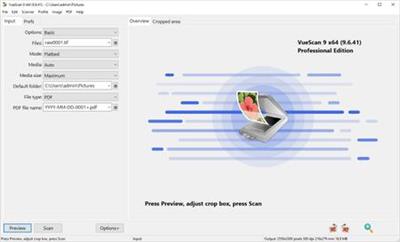
VueScan, the world's most popular scanner software, is used extensively by photographers, home users, scanning services and corporations. VueScan is a scanning program that works with most high-quality flatbed and film scanners to produce scans that have excellent color fidelity and color balance. It is very easy to use, and also has advanced features for restoring faded colors, batch scanning and other features used by professional photographers.

VueScan changes nothing on your system, installs nothing in your operating system and all other scanner software will continue to function. VueScan increases your productivity and saves you money. VueScan has advanced scanning options, powerful features, and greatly improves your scans with superior color accuracy and better color balance. VueScan supports more than 700 scanners and 209 digital camera raw files and takes about 5 minutes to download and install.

Features:
Works with 1200 flatbed and film scanners
Runs on Mac OS X, Windows and Linux
Improves your productivity and quality of scans
Has been downloaded more than 5 million times
Create raw scan files
ICC profiles and color spaces
IT8 color calibration

Operating System:Windows 10, 8, 7, Vista, XP

Home Page -
У Вас недостаточно прав для просмотра ссылок. Войдите или зарегистрируйтесь.


Download link:​
Код:
[center][b]rapidgator_net[/b]:
https://rapidgator.net/file/10da85e7013be4c6148b06d212612ef1/6739l.VueScan.Pro.9.7.52.x64.Multilingual.Portable.rar.html

[b]nitroflare_com[/b]:
https://nitroflare.com/view/6AD10A41EBD3F80/6739l.VueScan.Pro.9.7.52.x64.Multilingual.Portable.rar

[b]uploadgig_com[/b]:
https://uploadgig.com/file/download/cBd469FdfF593A68/6739l.VueScan.Pro.9.7.52.x64.Multilingual.Portable.rar[/center]

Links are Interchangeable - No Password - Single Extraction​
 
WonderFox DVD Ripper Pro 16.2 + Portable

830fb4f726ba7837cce918034e5680b3.jpeg


WonderFox DVD Ripper Pro 16.2 + Portable | 56.6/49.2 Mb​
WonderFox DVD Ripper provides the best solution to convert DVD to a wide range of mainstream video and audio formats such as DVD to AVI, DVD to MP4, DVD to MKV, DVD to MPG for quick back up DVD to iPad, DVD to iPhone 5S, DVD to Android, etc. And new media formats are keeping added and supported.

In supports of all regular DVDs including DVD Movie, TV Show, Tutorial, etc. With the powerful dvd decryption technology, it can remove/bypass DVD CSS, Region Code, Multi-angle, RCE, Sony ARccOS, UOP and even Disney X-Project. It takes about 20 minutes to rip a 120 minutes' DVD to AVI video with 0-Quality-Loss and much less time to MPG(only 5-10 minutes). Moreover, it adds optimized presets for all pop portable devices such as DVD to iPhone 5S, DVD to iPad Air, DVD to Samsung Galaxy S5, Sony, Nokia, BlackBerry, HTC, Xbox, Android device, etc.

It's easy-to-use (within three simple steps - Load DVD > Output Format > Get Start) software, which provides blazing fast ripping speed but preserves high original quality.

Rip DVD to AVI, MP4, MPG, WMV, iPad, iPhone, Android with 0-Quality-Loss.
- Rip your extensive DVD collection to virtually any video/audio/device
- Support almost all encrypted DVDs (Latest & Classic DVDs)
- Useful video editing functions like cutting, cropping, special effects
- Useful DIY editing (cut, crop and effects included)

Everything You Need to Make and Watch DVD Movies
Enjoying your DVD just got simpler. Now you can watch it anytime, anywhere. Alter, enhance, convert - whatever you do - the final result will be in perfect quality (even in high-definition) no missing key frames, quality, redraw issues, or crashes.

Rip DVD to All Popular Videos and Audios
Base WonderFox leading DVD decoding technology, WonderFox DVD Ripper enables you to easily rip any DVDs to AVI, MP4, MPG, MKV, WMV, MOV, MTS, M4V, ASF, DVC, MTS, M2TS, WEBM, FLV, SWF, VOB, F4V, 3GP and 3GP2. It also supports rip DVD to MP3, AC3, AAC, WMA, WAV, MKA, OGG, AU, AIFF, FLAC and M4A audio file.

Rip DVD to Portable Device for Playback
One step to rip your DVD movie to iPad, iPhone, Apple TV, Android Tablet, Samsung Galaxy and Note, HTC cell phone, Nokia Lumia, Blackberry cell phone, Sony cell phone and PS, TVs, XBox,Wii, Kindle Fire, Surface, etc. Total 150+ latest devices supported.

Backup A DVD Only 5 Minutes
As we know, there are many so called No. 1 fast DVD ripping tools on the market. But, have you seen any tools able to backup a DVD less than 5 minutes. Now, let the dream into reality. WonderFox DVD Ripper lets you backup a DVD to MPG video within 5 minutes. DVD to AVI XviD will take about 20-25 minutes, DVD to MP4 H264 will take about 40-50 minutes.

Decrypt CSS and Region Code Protections
Commonly purchased DVD (Movie, TV Show, Tutorial, etc.) has one or more copyright protection to avoid copying DVD content from DVD disk. Some popular DVD encryption technology includes CSS, Region Code, Sony ARccOS Protection, Disney X-project DRM, etc. WonderFox DVD Ripper will help you decrypt any DVD protections, make your DVD to digital video.

Edit, Enhance, and Personalize DVD Movie
A simple DVD editor is enbeded. There are some common editing features and 12 effects, and just few clicks you can personalize your DVD movie.

One Interface, All Operations
What's the real easy-to-use? We have no enough time to learn how to use a software, WonderFox DVD Ripper provides one interface concept, everything becomes simple. (provides one interface concept to make everything simple)

Flexible Settings
It offers flexible choices to fine-tune and adjust parameters to tailor the output videos, in terms of video audio encoding, bitrate, frame rate, aspect ratio, resolution, audio codec, audio channel number, sample rate, etc. You can customize and apply your own settings to all, you can also save all of the settings as a single profile.

Operating System:Windows 10/8.1/8/7Vista/XP

Home Page-
У Вас недостаточно прав для просмотра ссылок. Войдите или зарегистрируйтесь.


Download link:​
Код:
[center][b]rapidgator_net[/b]:
https://rapidgator.net/file/9326c9148ec22b7e41be232dbdc70155/8kbzy.WonderFox.DVD.Ripper.Pro.16.2.Portable.rar.html
https://rapidgator.net/file/7b64f98ab5e607d322d8d2c408f20c1e/8kbzy.WonderFoxDVDRipperPro16.rar.html

[b]nitroflare_com[/b]:
https://nitroflare.com/view/7A7AF336A80BFF9/8kbzy.WonderFox.DVD.Ripper.Pro.16.2.Portable.rar
https://nitroflare.com/view/609716810E06AB5/8kbzy.WonderFoxDVDRipperPro16.rar

[b]uploadgig_com[/b]:
https://uploadgig.com/file/download/d7C1C0a4c02c8324/8kbzy.WonderFox.DVD.Ripper.Pro.16.2.Portable.rar
https://uploadgig.com/file/download/6a3609f55409b371/8kbzy.WonderFoxDVDRipperPro16.rar[/center]

Links are Interchangeable - No Password - Single Extraction​
 
Назад
Сверху