• Форум работает в архивном режиме www.old.nado.in

All mitsumi'1s Applications !! (updated daily)

  • Автор темы Автор темы mitsumi1
  • Дата начала Дата начала
RadioBOSS Advanced 6.0.5.4 Multilingual + Portable

33c491318e6b7d65f353f19643aabff1.jpeg


RadioBOSS Advanced 6.0.5.4 Multilingual + Portable | 42.4/115 Mb​
RadioBOSS radio automation software provides professional radio programming engineering and automation at a fraction of what other applications cost. If you're creating programming for a terrestrial or Internet radio station, RadioBOSS lets you build sophisticated playlists with the professional features you need. RadioBOSS is also a simple to use solution to create background music for a wide range of venues: clubs, bars, restaurants, gyms and health clubs. With RadioBOSS, you can quickly create the right background music for your business and RadioBOSS will run unattended and trouble-free for months at a time.

RadioBOSS is used at radio stations, clubs, hotels, shops and casinos all over the world. You're in good company when you choose DJSoft.Net products!

RadioBOSS includes:
An extremely stable Player application that controls when and how playlists are played.
Support for all popular audio formats, use the audio assets you already have on disk or hard drive.
A simple-to-use music library to locate, track, annotate and manage your audio assets.
A robust playlist generator with professional functionality including playlist templates and more.
An advertisement scheduler to easily create and schedule commercial breaks.
A report generator to create detailed reports of what songs were played.

The components of RadioBOSS:

The Playeris the central component of RadioBOSS. With it you can:
Launch and edit playlists.
Schedule various events. Events can be launched at a set time or by a DTMF signal.
For advertising, specify volume increase.
Automatically create teasers from songs
Automatic volume leveling, crossfading and silence trimming.
Use the automatic playlist generation to create sophisticated multi-hour audio programming.
Easily create random playlists.
Include Internet streams (HTTP, MMS and FTP) and podcasts in your playlists.
Automatically insert jingles before music tracks
Use the microphone and linear input
Improve the quality of any given audio asset with RadioBOSS' 12-band equalizer and sound compressor.
Use your WinAMP and VST plugins for even more sophisticated audio engineering.
Use the cart wall for instant audio playback
Take advantage of the multichannel card installed in your PC (4.0, 5.1, 7.1, etc.) output multiple channels.
Export metadata: upload to FTP, send HTTP request, save to text or XML file.
Broadcast using integrated Internet streaming support: Shoutcast, Icecast, Windows Media servers, and an integrated streaming server.
Create playlists with prerecorded voice tracks.
Use individual user profiles.
Configure User Access Control.
RadioBOSS supports ASIO and WASAPI low-latency input and output
RadioBOSS offers remote control API for advanced usage scenarios

The Playlist Generatorcreates playlists.
Automatically generate playlists for a given duration.
Generates playlists quickly using and reusing playlist templates.
Supports multiple generation options.
Create playlists with rotations.
Create playlists with jingles.
Create playlists with hour markers and commercials.

The Music Libraryorganizes your audio assets.
Batch process audio tracks: normalize, detect BPM, trim silence.
Use Track Tags for filtering and search purposes.
Automatic indexing supports quick searches.
Filter and sort to work with just records you want.
Automatically tracks usage statistics.
Tag any audio asset, regardless of format.
Tag mutiple audio assets.
Add comments to any audio asset.

The Advertisement Scheduler
Create and schedule commercial breaks
Automatic playlist and event generation to schedule commercial breaks in RadioBOSS
Remote ads management over a network
Use custom intros and outros
Specify the Start and End dates for commercials

The Report Generator
View and print reports for the custom date range
Customizable report fields
Filters to exclude unneeded items
Export reports in various formats: XLS, PDF and others

System Requirements:
Hardware (minimal): CPU 2 Ghz 2 cores; 1 GB RAM; 1 GB hard disk space
Operating System: Windows 10, Windows 8.1, Windows 7 (SP1+), Windows Server 2019, Windows Server 2016, Windows Server 2012 R2; 32- or 64-bits.

Home Page -
У Вас недостаточно прав для просмотра ссылок. Войдите или зарегистрируйтесь.


Download link:​
Код:
[center][b]rapidgator_net[/b]:
https://rapidgator.net/file/0993a66aa5cc94650aa451d499fff981/tq4tz.RadioBOSS.6.0.5.4.rar.html
https://rapidgator.net/file/efefbe6be4609f102587a10e321e0064/tq4tz.RadioBOSS.Advanced.6.0.5.3.rar.html

[b]nitroflare_com[/b]:
https://nitroflare.com/view/789D4563672C369/tq4tz.RadioBOSS.6.0.5.4.rar
https://nitroflare.com/view/8AD47F9F71AF820/tq4tz.RadioBOSS.Advanced.6.0.5.3.rar

[b]uploadgig_com[/b]:
https://uploadgig.com/file/download/D3a2852e0Ce4d88c/tq4tz.RadioBOSS.6.0.5.4.rar
https://uploadgig.com/file/download/64eD054143e53128/tq4tz.RadioBOSS.Advanced.6.0.5.3.rar[/center]

Links are Interchangeable - No Password - Single Extraction​
 
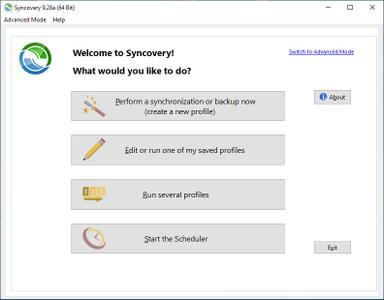
Syncovery Premium v9.35a Build 204 (x86/x64) Portable

ae4c8e4301010ea1ed4c111a04774eea.jpeg


Syncovery Premium v9.35a Build 204 (x86/x64) Portable | 53 Mb

Syncovery will copy your files your way. The super versatile sync, copy, move and backup tool.​

MULTIPLE PLATFORMS
Syncovery copies your data the way you need it, on Windows, macOS, Linux, FreeBSD, and NAS systems. Copy between local drives, network shares, mobile devices via MTP, or using FTP, SFTP, or WebDAV and many others.

CLOUD SUPPORT
Includes support for many different cloud storages, such as Google Drive, Box, Amazon S3, Azure, DropBox, OneDrive, Rackspace, Sharepoint, Backblaze B2, and many others.

CREATE MULTIPLE JOBS
Create as many different jobs as you need. Run them manually (with Sync Preview), or let the scheduler run them automatically.

HANDLE COMPLEX TASKS
Syncovery is rich in features, including real-time sync, compression, encryption, email notifications, and much more. It can be extended via PascalScript.

NOTE:
- Made in NSIS
- This portable release supported Win7, Win8/8.1, Win10 (both 32-bit and 64-bit)


Home Page-
У Вас недостаточно прав для просмотра ссылок. Войдите или зарегистрируйтесь.


Download link:​
Код:
[center][b]rapidgator_net[/b]:
https://rapidgator.net/file/909476d322f8cfc98e8907e5fb246d2a/foof9.Syncovery.Premium.v9.35a.Build.204.x86x64.Portable.rar.html

[b]nitroflare_com[/b]:
https://nitroflare.com/view/9DB7E163AAAE710/foof9.Syncovery.Premium.v9.35a.Build.204.x86x64.Portable.rar

[b]uploadgig_com[/b]:
https://uploadgig.com/file/download/a8eb3d09eFcB5228/foof9.Syncovery.Premium.v9.35a.Build.204.x86x64.Portable.rar[/center]

Links are Interchangeable - No Password - Single Extraction​
 
Tetraface Inc Metasequoia 4.7.7a macOS

3e7931454ee516c9ea356e0c322fa17b.jpeg


Tetraface Inc Metasequoia 4.7.7a macOS | 93 Mb​
Three-dimensional model design, especially the creation of human or animal-like characters, requires some knowledge in this area and, most importantly, a set of suitable tools for the job. For those who made some 3D creations using various specialized software solutions and need to work on them without having to install each program again, a utility like Metasequoia can be the right choice.

This application manages to provide a strong set of features and make them available from a really friendly interface. There are several modes to operate Metasequoia, namely Beginner, Modeling (string), Modeling (icon) and Mapping.

Each of these styles comes with its commands for editing the loaded model, setting the appropriate lighting and more. There is a wide variety of objects that you can select and insert in the design, as well as some tools that are meant for modifying the model you are working on.

The editing function that Metasequoia is equipped with are rather basic, but, nonetheless, cover all the necessary actions for handling objects, material faces and vertices. Each selected portion of the design can be fixed, stored or restored when needed, as well as fit to view or set as center of rotation.

There are many customizations that can be made to the application from the 'Configuration' area, so you can assign, for instance, various actions to mouse buttons and key combinations. Texture rendering imperfections and some glitches that may occur can be avoided by adjusting the Direct3D and OpenGL preview options.

All things considered, Metasequoia seems to be a worthy alternative to more complex utilities of its kind, especially thanks to the ease of use coupled with a good support for a variety of formats this software is able to work with.

system requirements

macOS High Sierra (10.13)
macOS Mojave (10.14)
macOS Catalina (10.15)

Home Page-
У Вас недостаточно прав для просмотра ссылок. Войдите или зарегистрируйтесь.


Download link:​
Код:
[center][b]rapidgator_net[/b]:
https://rapidgator.net/file/9d37ff0fa416a12894807997123a1524/htl4v.Tetraface.Inc.Metasequoia.4.7.7a.macOS.zip.html

[b]nitroflare_com[/b]:
https://nitroflare.com/view/8A53953FD205F45/htl4v.Tetraface.Inc.Metasequoia.4.7.7a.macOS.zip

[b]uploadgig_com[/b]:
https://uploadgig.com/file/download/7d9b5213903e1ee4/htl4v.Tetraface.Inc.Metasequoia.4.7.7a.macOS.zip[/center]

Links are Interchangeable - No Password - Single Extraction​
 
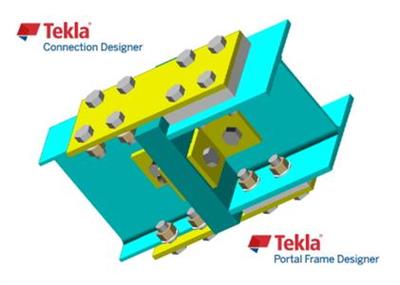
Trimble Tekla Portal Frame & Connection Designer (Fastrak) 2021 SP1

63d3f4ee8739192ce94c98421d807968.jpeg


Trimble Tekla Portal Frame & Connection Designer (Fastrak) 2021 SP1 | 508.4 mb​
Trimble launched Tekla Portal Frame & Connection Designer (Fastrak) 2021 SP1 (version 21.1.0.0). This release includes a number of enhancements and issue resolutions.

Tekla Portal Frame Designer & Connection Designer 21 Service Pack 1 Release notes

Fixes & Enhancements
A number of minor updates and enhancements have been included in this release, including:
[TSD-4665] - When adding wind loading for portal frames to BS 6399, editing values in the dialog such as qs would trigger recalculation of Cpe. However, reduction factors applicable to multi-span portal frames were not being applied correctly. This is corrected in this release.
[TSD-9256] - In Portal Frame Designer, when a combination had Strength load factors for loadcases set to zero, this could cause a crash in the portal frame analysis. With this fix, Strength load factors of zero in any ULS or SLS combinations are no longer allowed.

9c1e7e5ce9a547cb4bbeb1e9ea9c874d.jpeg

The automated design of steel portal frames and steel connectionsjust got a whole lot easier as Tekla Portal Frame Designer and Tekla Connection Designer now integrate with Tekla Structural Designer. Packed with really clever features and functions to make your life easier these specialist tools will help you increase efficiency and design with confidence.

Tekla Portal Frame Designeris now an integrated part of the Tekla software family. Integrating seamlessly with Tekla Structural Designer or acting as a stand alone application, Tekla Portal Designer is packed full of features and functionality that enable efficient and rigorous design to create cost effective design solutions for steel portal frame buildings.

Automated checks for sway, member stability and snap through are included along with automated loading for wind, snow, cranes, ties and parapets. Final designs can be communicated through clear and concise documentation that includes drawing and calculations.

Tekla Connection Designeris the new name for Fastrak Connections. Using the stand alone product you can design moment or simple connections, column base and hollow section connections. If you are using Tekla Structural Designer or Tekla Portal Frame Designer moment and base plate connections integrate seamlessly improving design efficiency.

Tekla software solutions for advanced BIM,structural engineering and steel fabrication management are produced by Trimble. Tekla software is at the heart of the design and construction workflow, building on the free flow of information, constructible models and collaboration.

Product:Trimble Tekla Portal Frame & Connection Designer (Fastrak)
Version:2021 SP1 (version 21.1.0.0)
Supported Architectures:x64
Website Home Page :
У Вас недостаточно прав для просмотра ссылок. Войдите или зарегистрируйтесь.

Language:english
System Requirements:PC *
Size:508.4 mb

Tekla Portal Frame Designer 19 & Tekla Connection Designer 19 system requirements

System requirements for effective operation

CPU:Multi core Intel i3 Series or above, Xeon or AMD equivalent
Highest affordable performance recommended.
Memory:8GB (16GB or more recommended)
Memory requirements are highly dependant on model content.
OS:Microsoft Windows 7 SP1 / 8.1 / 10 (64-bit recommended)
Operating systems must be running the latest service packs / updates.
Graphics:1280 x 1024 resolution (1920 x 1080 or higher recommended)
512MB or higher of dedicated RAM.
Disk space:1GB or more of free space for installation
Operational disk space requirements are highly dependant on model content.

Download link:​
Код:
[center][b]rapidgator_net[/b]:
https://rapidgator.net/file/45708c8a559329b5c4b7356318a93dd8/wi2aj.Trimble.Tekla.Portal.Frame..Connection.Designer.Fastrak.2021.SP1.rar.html

[b]nitroflare_com[/b]:
https://nitroflare.com/view/F6BC5493D55351F/wi2aj.Trimble.Tekla.Portal.Frame..Connection.Designer.Fastrak.2021.SP1.rar

[b]uploadgig_com[/b]:
https://uploadgig.com/file/download/D50a4b18b8b7bA42/wi2aj.Trimble.Tekla.Portal.Frame..Connection.Designer.Fastrak.2021.SP1.rar[/center]

Links are Interchangeable - No Password - Single Extraction​
 
Trimble Tekla Structural Design Suite 2021 SP1

030547a4d134585e1704275437482d28.jpeg


Trimble Tekla Structural Design Suite 2021 SP1 | 1.1 Gb​
Trimble launched Tekla Structural Designer 2021 SP1 (version 21.1.0.33). This release includes a number of enhancements and issue resolutions.

Tekla Structural Designer 2021 SP1 release notes

Highlights
- Imposed/ Live Load Reductions - Review View Enhancements - All Head Codes
- Steel Beam Design - Enhanced Camber Settings & New Review View Attribute
- Steel Column Base Plate Design - Enhanced Scope for USA Head Code
- New Overall Wind Drift Check - All Head Codes

- A number of additional fixes which are not detailed explicitly here are also made to improve general performance and stability.
- Embodied Carbon: - a number of further enhancements are made to the Embodied Carbon calculation features as detailed below.
. New Embodied Carbon eLearning course - to learn more about this novel and powerful feature we highly recommend you view the new eLearning for it here; Embodied carbon assessment in Tekla Structural Designer (eLearning).
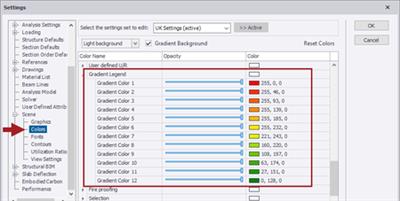
. [TSD-9226 and 9227] - Review View - the legend colors for the Embodied Carbon Review View > Show/Alter state > "Utilization and embodied carbon" attribute have been adjusted and enhanced to more clearly display the distribution of embodied carbon in the model. As shown in the picture below, the colors now graduate from red (highest embodied carbon) to green (lowest), and include more gradations.
.. In addition, the information text at top left of the Review View window now includes the Overall Embodied Carbon value (for both Carbon Factors and Utilization and embodied carbon options), the number of selected entities in the current view, their amount of Embodied carbon and the % of the total.

.. Note the following:
... The legend colors are controlled by new settings in Home > Settings > Scene > Colors > "Gradient Legend" as shown in the picture below.
... When the displayed content requires fewer values the red and green extremes remain.

54fe7ab57a57758e9b31fc6c7ae3822d.jpeg

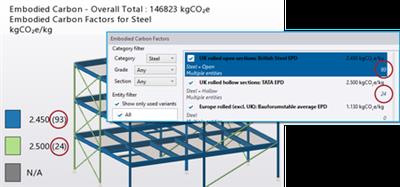
[TSD-9213] - Embodied Carbon Factors Dialog - the count of entities to which a particular carbon factor is assigned given in the Embodied Carbon factors dialog is corrected to be consistent with that given in the Review View Legend for the Carbon Factors attribute, as shown in the picture below. Previously, the value in the Embodied Carbon factors dialog also counted the steel member connection allowance and so was commonly considerably larger.

03395037d5986e63ec43ea0a5cfbc221.jpeg

[TSD-4951] - User Defined Attributes (UDA's) - UDA's have multiple uses - see for example the Help Topic Create and manage user-defined attributes. In this release, UDA's assigned to members can be automatically copied to duplicate floors, facilitating their application especially in larger models.
- This feature is enabled via a new checkbox for each UDA titled "Linked" in the User Defined Attributes Settings (both Global and Model) as shown in the picture below (default setting is disabled). Simply check it on to enable the automatic copying to duplicate levels of specific UDA's.

Grid Lines:

[TSD-9328] - Grid Lines in 3D Views - Architectural grids have been made visible in all 3D Review Views, and are now excluded from selection and ghosting by default, which helps navigate the model when using the Review views. Please note the following:
- This change means that if you wish to select and/ or edit the grid lines using the 3D structure view, you must now enable Scene Content > "Grid & Construction Lines" and "Show grids in 3D view" for a Level in the Structure Tree to make the grid lines selectable.
- The functionality in 2D views is unchanged.

[TSD-4926] - Renumbering - the automated renumbering of Gridlines has been enhanced with additional controls. To use Renumber, select 'Renumber' from the right-click context menu for the "Architectural Grid" group of the Structure tree. At this point a new configuration dialog "Renumber Grid" opens, allowing you to specify how the renumbering will work. This has options of:
- Detect Name type from direction (default ON) - when enabled there are two naming options for Vertical and Horizontal direction lines. When off there is only one
- Direction - allows you to select the direction you want the renumbering to work in.
- Line name type - Alphanumeric or Numeric - and Start value

[TSD-4944] - Grid Line Creation - when adding grid lines, two new options "Next Vertical Grid Name" and "Next Horizontal Grid Name" have been added to the Properties in the 'Grid Line Naming' group. These allow you to specify grid line name and type prior to its creation.

Member Properties:

[TSD-9129] - Columns & Walls - the options 'Assume extra floors supported' and 'Count floor as being supported' present in the property grid and/or member properties dialog box of column/wall are no longer listed for the USA and Australia Head Codes as they are not relevant to these. These options do not play any role in the calculations of Live/ imposed load reduction where this is based on the tributary area method.

[TSD-8326] - Braces - in previous releases it was possible to enter invalid values for the properties Tension > Net area > Percentage value and Tension > Net area > Effective net area. This is now prevented in this release - a validation message giving the acceptable range of input is now displayed when an invalid value is entered.
- Existing files - when opened in this release these values are checked and when invalid input exists a Validation Error is issued in the Status tree listing affected braces.

[TSD-9235] - BIM Integration - Embodied Carbon - the Embodied carbon results can now be exported to external BIM applications as follows:
- Tekla Structures or Revit - the Embodied carbon results are now automatically included in the Structural BIM Export CXL file which is produced by the Tekla Structures/ Revit Export options on the BIM Integration tab of the ribbon - they can then be displayed in Tekla Structures/ Revit as attributes as illustrated below.

- IFC - the values are also included in the IFC export.
- Trimble Connect - uploading an IFC of the model to Trimble Connect will allow these values to be seen in the Properties when viewing the IFC model in Trimble Connect as illustrated below.

- In all cases, the values are exported for members, walls, slabs and foundations. One value per object is exported - the total resulting embodied carbon of all constituent materials of the object.

[TSD-9219] - Grasshopper Live Link - Embodied Carbon - Embodied Carbon results and Rebar Mass per Volume can now be returned to Grasshopper using the Concrete Material Quantities and Steel Material Quantities components. These components operate with filters as previously, and new output parameters give the total Embodied Carbon Mass of objects included in the filter, or the overall Rebar Mass per Volume.
- As well as reporting these values, this allows the user to optimize the Structural Designer model for these parameters using the optimization tools in Grasshopper.

Highlights
- Imposed/ Live Load Reductions - Review View Enhancements - All Head Codes

Other Loading Enhancements and Fixes
[TSD-9144] - Equivalent Horizontal Forces (EHF) - Eurocode - it is now possible to override the calculated value of ɸ in the Model Settings > EHF dialog by selecting the new "Override" option as shown in the picture below. This enhancement is applicable to the Eurocode Head Code (all countries and NAs).
- When the option is enabled you can enter you own values for ɸx and/ or ɸy and these are used in place of calculated values in the calculation of EHFs
- In addition, In Model Settings the formerly titled "EHF" heading has been renamed to "EHF (Global Imperfections)" for clarity.

[TSD-9284] - Notional Loads/ Horizontal Forces (NL/ NHF) - for Head Codes other than the Eurocode, a new "NL/NHF(Global Imperfections)'' Setting is now included in Model Settings, as shown in the picture below (illustrates this for the USA Head Code). This includes override options for NL/ NHF parameters for each building direction - typically the proportion of gravity loads used to calculate the NL/ NHF's.

[TSD-6477] - Diaphragm Loads - Creation - application of Diaphragm loads is now enabled in a 3D View. To facilitate this and their general application, the following new option and enhancements are added:
- When in a 3D View, a new option "Select Diaphragm Level" is listed in the Properties window. Load application then operates as follows:
. When enabled - application points will be displayed in all the diaphragm levels as you move the cursor over available points in the model. You then specify the load location in two steps: 1) first click an application point at any level - this 'locks' the application point and displays the available points at each diaphragm level intersected by a vertical line at the point - then 2) click the point on the level you wish the load to be applied - it is then created.
. When disabled - the load is applied with a single click on the desired application point.
.. When clicking on a point that is not in a diaphragm level - for example a point along a grid line in the base level - the load is created at a position projected vertically to the nearest diaphragm level.
- Snapping to members, grid and construction lines:
. The application point can now also snap to points along a member when you move the cursor over one, in a similar manner to the application of member loads. Just as with applying member loads, the available snap points are; end, mid, 1/3 and 1/4 points. You can also apply the load at any point along the member - either by simply clicking as you move the cursor along it, or press F2 on your keyboard to enter the exact distance along the member. This behavior applies to both 3D and 2D views.
. The application point can also snap to points along grid and construction lines in just the same manner as for members - again in both 3D and 2D views.

[TSD-9160] - Model Settings - Live Load Reductions - USA Head Code - an issue is fixed in this release in which edits to the Live Load Reduction % limit values in Model Settings > Live Load Reductions were potentially not stored correctly when the model was saved. This specifically affected the following % limit values; "Roof live Beams", "Live walls supporting 1 floor", "Roof live Columns" and "Live walls supporting 2 or more floors" limits.
- For existing models it is recommended that these limit values are reviewed and corrected if necessary then, when saved in this release, they will be stored correctly.

[TSD-9239] - Ancillaries & Equipment - Operating & Testing Content Load Case type - for both Pipework Ancillaries (Line & Area) & Equipment load entities, the load case Type (either Dead or Live/ Imposed) for the automatically created Operating & Testing Content Load cases is specified in Model Settings > General (default Dead). This setting dictates the combination factor assigned to these loadcases so, if it is changed, existing combinations must be updated. To cater for this circumstance, a warning is added in this release to this effect when such a change is made as shown in the picture below.

Highlights
- Imposed/ Live Load Reductions - Review View Enhancements - All Head Codes
- Steel Beam Design - Enhanced Camber Settings & New Review View Attribute
- Steel Column Base Plate Design - Enhanced Scope for USA Head Code
- New Overall Wind Drift Check - All Head Codes

General Design Enhancements and Fixes
[TSD-9039] - Steel Column Base Plates - Review Data - a Design Summary table has been added for Steel Column Base Plates. To view this summary, activate the Review View > Tabular Data Window, select the "Design Summary" option then enable the new "Base Plates'' Characteristic button as shown in the picture below. This enhancement applies to both the USA and Eurocode Head Codes. In common with other design summaries you can do all of the following:
- Export the Table directly to Excel via the Excel Export button,
- Click the "Results..." button at the end of a row to open the design details dialog.
- Double-click a row to locate that particular base plate in the 3D Structure view.

[TSD-8591] - Seismic Story Drift - it is now possible to override the previously hardcoded Allowable Story Drift Factor for the Seismic Drift check. New settings for this are added to the Seismic Wizard on the Localization page, as illustrated in the pictures below for the USA and Eurocode Head Codes. This enhancement applies to all Head Codes which feature Seismic Analysis.
- To enter your own override value, select the Structure Type option, enable the override checkbox then enter your desired factor value - this will then be used to calculate the allowable story drift. As shown below, the Structure type options where listed depend on the model Head Code.

[TSD-8799] - Steel Design - Auto-design Constraints - it is now possible to set the Size constraints "Min depth" and "Min width" as low as zero. Previously the lowest limit allowed was 50mm / 2inch which could cause problems with assigning acceptable sections during design in some circumstances.
- The default Min depth and Min width values remain unchanged.

Eurocode Design Enhancements and Fixes
[TSD-8542] - Steel Beam Design - Web Openings - for two circumstances when closely spaced web openings are such that the Web Posts check is beyond scope, the following explanatory messages are now issued where previously there was none (other than the Beyond Scope status):
- Circular openings too closely spaced - "Closely spaced circular openings - spacing, s_{o} is less than 0.4 \times sum of the radii"
- Adjacent circular and rectangular openings too closely spaced - "Closely spaced openings - One opening is rectangular, one is circular and the spacing, s_{o} is less than 0.5 \times (rectangular opening depth + circular opening diameter)"

Report Styles

[TSD-7879] - Ancillary and Equipment Loads - a new report style 'Industrial Structure Loading' has been added to report the details of the following loading elements (which are typically - though not exclusively - used for Industrial structures); Line Ancillaries, Area Ancillaries & Equipment.
- The new report consists of tables for each of these load entities, listing their principal properties and values; Name, Type, Location, Area, Loadcase Title and Applied load.
- Note that existing models will not include the new default style, however you can easily create it as shown in the picture below by 1) Adding a new style (naming it as you like) then 2) dragging the new "Industrial Structure Loading" Chapter into this.

[TSD-4951] - the default "Building Analysis checks" report style is renamed to"Building Analysis & Drift Checks". In addition the "Wind drift" option is added to this style, together with the "Loadcase summary" and "Sway / Drift" options as appropriate to the Head Code.
- Note that existing models will not include these amendments, however you can easily adjust the existing "Building Analysis checks" style to make these same changes should you wish to.

Tekla Structural Designerdelivers powerful features for optimizing concrete and steel design, including the ability to quickly compare alternative design schemes, efficiently manage changes and collaborate seamlessly. Regardless of project size or complexity, Tekla Structural Designer's fully automated, productivity-enhancing capabilities enable engineering firms to improve operations, successfully bid more projects and enhance client service.

Tekla Structural Designer 2021 structural analysis and design software introduces the 'design-to-detail workflow' for more efficient modeling of reinforced cast-in-place concrete and transferring reinforcing bars, including slabs, foundations, beams, columns and walls, to Tekla Structures. A new carbon calculator provides the ability to understand a structure's embodied carbon impact during design and compare alternative schemes to identify the most effective, sustainable and affordable option.

Tekla Structural Designer in 5 Minutes

Tekla Teddsis powerful software developed to meet the needs of the structural engineering workflow and designed to help you automate your repetitive structural calculations. Choose from one or more of our regularly updated calculation libraries or write your own, and create professional documentation every time. Combine your structural calculations with 2D frame analysis.

Tekla Tedds 2021 structural analysis and design calculation software offers new and improved calculations, including base plate, precast hollow core slab, concrete foundation and timber racking loads, to satisfy multiple design codes.

Tekla Structural Designer - Design using Tekla Tedds - Wood member design (NDS)

Tekla software solutionsfor advanced BIM and structural engineering are produced by Trimble. Trimble's construction offering ranges from total stations to advanced software, giving the industry tools to transform planning, design, construction and operation of buildings. Tekla software is at the heart of the design and construction workflow, building on the free flow of information, constructible models and collaboration.

Product:Tekla Structural Design
Version:2021 SP1 Suite *
Supported Architectures:x64
Website Home Page :
У Вас недостаточно прав для просмотра ссылок. Войдите или зарегистрируйтесь.

Language:english
System Requirements:PC **
Size:1.1 Gb

Tekla Structural Design Suite 2021 SP1 Includes:

- Tekla Structural Designer 2021 version 21.1.0.33
- Tekla Tedds 2021 version 23.0.0000
- Engineering Library version 23.1.0000

We suggest that you complete any unfinished models using your current version of Tekla Structural Designer.

This version is not backwards compatible. When you create or save a model in Tekla Structural Designer 2021, you cannot open it in older versions due to database differences.

Tekla Structural Designer 2021 hardware recommendations.

System requirements for effective operation

CPU:Multi core Intel i5 Series or above, Xeon or AMD equivalent
- Highest affordable performance recommended.

Memory:16GB (32GB or more recommended)
- Memory requirements are highly dependent on model content.

OS:64-bit Microsoft Windows 8.1 / 10
- Operating systems must be running the latest service packs / updates.

Graphics:1600 x 900 resolution (1920 x 1080 or higher recommended)
- 1GB or higher of dedicated RAM.
- Utilizes HOOPS Visualize, a third party graphics engine available from Tech Soft 3D. To check your adapter's compatibility visit the HOOPS developer website for HOOPS 20.x, DirectX and OpenGL requirements.

Disk space:1GB or more of free space for installation
- Operational disk space requirements are highly dependent on model content.

Internet connection: Required for access to Online Services and some documentation.

License Service:
- Tekla Structural License Service 3.00 including Sentinel RMS 9.5

License Server: The latest version of the Tekla Structural Licence Service, at time of release, is shipped and installed with the software. If you have chosen to have a separate licence server, it is always our recommendation that you also run the latest version of the Tekla Structural License Service on it to ensure compatibility. Please see System Requirements for specific version details.

Test environments

The application is tested and supported on the following business versions of Microsoft Windows with the latest updates applied:

- Windows 10 64-bit
- Windows 8.1 64-bit

Tekla Tedds 2021 hardware recommendations:

CPU:Multi core Intel i3 Series or above, Xeon or AMD equivalent
- Highest affordable performance recommended.

Memory:2GB
- Memory requirements are dependant on document content.

OS:32-bit or 64bit Microsoft Windows 8.1 / 10
- Operating systems must be running the latest service packs / updates.
- See Test Environments (below) for full details of supported operating systems.

Graphics:1920 x 1080 resolution
- 1GB or higher of dedicated RAM.

Disk space:1GB or more of free space for installation.
- Operational disk space requirements are highly dependant on model content.

Internet connection:Required for access to Online Services and some documentation.

Microsoft Word:32-bit or 64-bit of Microsoft Word 2013, 2016 or 2019.
- Microsoft Word needs to be fully service packed.

License Service:
- Tekla Structural License Service 3.00 including Sentinel RMS 9.5

License Server: The latest version of the Tekla Structural Licence Service, at time of release, is shipped and installed with the software. If you have chosen to have a separate licence server, it is always our recommendation that you also run the latest version of the Tekla Structural License Service on it to ensure compatibility. Please see System Requirements for specific version details.

The application is tested and supported on the following business versions of Microsoft Windows with the latest updates applied:

- Windows 10 32-bit & 64-bit
- Windows 8.1 32-bit & 64-bit

Added by 3% of the overall size of the archive of information for the restoration

Download link:​
Код:
[center][b]rapidgator_net[/b]:
https://rapidgator.net/file/7b1a2dd7975072329a94a9f2011cfbeb/fy6js.Trimble.Tekla.Structural.Design.Suite.2021.SP1.part1.rar.html
https://rapidgator.net/file/cb7397163f54b758cc00e0425b198b93/fy6js.Trimble.Tekla.Structural.Design.Suite.2021.SP1.part2.rar.html
https://rapidgator.net/file/96871f35a9972106395c04296124ab4a/fy6js.Trimble.Tekla.Structural.Design.Suite.2021.SP1.part3.rar.html
https://rapidgator.net/file/1f601b6b577bd5714f33a60b4d6a1163/fy6js.Trimble.Tekla.Structural.Design.Suite.2021.SP1.part4.rar.html

[b]nitroflare_com[/b]:
https://nitroflare.com/view/07DDF47712F6745/fy6js.Trimble.Tekla.Structural.Design.Suite.2021.SP1.part1.rar
https://nitroflare.com/view/2B59B0A39931D2B/fy6js.Trimble.Tekla.Structural.Design.Suite.2021.SP1.part2.rar
https://nitroflare.com/view/CF3B73F11828417/fy6js.Trimble.Tekla.Structural.Design.Suite.2021.SP1.part3.rar
https://nitroflare.com/view/80404D65F935338/fy6js.Trimble.Tekla.Structural.Design.Suite.2021.SP1.part4.rar

[b]uploadgig_com[/b]:
https://uploadgig.com/file/download/3eb382082d8a8d95/fy6js.Trimble.Tekla.Structural.Design.Suite.2021.SP1.part1.rar
https://uploadgig.com/file/download/918e307dc2e12d54/fy6js.Trimble.Tekla.Structural.Design.Suite.2021.SP1.part2.rar
https://uploadgig.com/file/download/d84D18c97d70328c/fy6js.Trimble.Tekla.Structural.Design.Suite.2021.SP1.part3.rar
https://uploadgig.com/file/download/A3947516ee3F5285/fy6js.Trimble.Tekla.Structural.Design.Suite.2021.SP1.part4.rar[/center]

Links are Interchangeable - No Password - Single Extraction​
 
XMind 2020 v10.3.1 Build 202101070032 Multilingual Portable

f92b5e5f20f221898b0b8d66795503e9.jpeg


XMind 2020 v10.3.1 Build 202101070032 (x64) Multilingual Portable | 136 Mb
XMind 2020, A full-featured Swiss Army Knife for your brain. A modern replacement for pencil and paper.​

Outliner is ideal for managing lists, organizing facts and ideas, and for goal and task management. Freely switch between outliner and mind mapping, you are superior to your former self. You can tailor the style of themes to your preference, customize shapes, lines, colors, etc. which allows you to use it directly every instead of repeat editing. We make more possibilities for image exporting. Such as allowing all sheets to be exported at the same , more size to select, and export the transparent background that can be easily inserted to Keynote and PPT. It's surprising that just use one mind map, you can manage all the files on your computer. When you need to search for a file later, a simple click to the topic and you will be taken to the right file you want. Outliner

Outliner is ideal for managing lists, organizing facts and ideas, and for goal and task management. Freely switch between outliner and mind mapping, you are superior to your former self.

Theme Editor
You can tailor the style of themes to your preference, customize shapes, lines, colors, etc. which allows you to use it directly every instead of repeat editing.

All New UI
We call our all new UI - CREAM, like the energy in the early morning, a sweet feeling to liberate exhausted, the power to move your thought forward.

Enhance Image Export
We make more possibilities for image exporting. Such as allowing all sheets to be exported at the same , more size to select, and export the transparent background that can be easily inserted to Keynote and PPT.

File Link
It's surprising that just use one mind map, you can manage all the files on your computer. When you need to search for a file later, a simple click to the topic and you will be taken to the right file you want.

ZEN Mode
It's not easy to focus for a long , ZEN mode helps you only concentrate on one mind map. This way all your energy will go into it and you will accomplish it perfectly.

Equation
Equation, a feature with the highest voice. LaTeX command allows you to present mathematical and chal formulas. Wish you keep straight-A.

Style & Structure
We offer the fishbone chart, matrix, line, the org chart to enrich your mind maps. Various branch shape like the hexagon, capsule, circle etc. to emphasize your thoughts.

New From Library
Only good-looking works will be selected into the Library. You can choose your favorite mind map from it and open it directly as a template.

Set Password
Security is always the first priority. Set a password for your XMind file. Without a password, no one can open the file.

Print
Printing is no longer a dry thing. You can choose to tick/untick background color and decide to print on the actual size or fit page.

Fold/Unfold All Sub-branches
When you need to present your mind map to others, you can freely fold or unfold all the sub-branches by one click. Say goodbye to duplicate work.

Find/Replace
It is a small tip, if your mind map is particularly large, in addition to find and replace, you can also use it to locate a certain word.

Map Overview
Map Overview shows a general situation of your entire mind map, which can help you to check the approximate location of a topic quickly.

Topic Count
Topic Count is useful. In the process of creating a mind map, it will automatically show you how many topics have been completed.

Quick Entry (Mac Only)
It is a small window that can be opened from the menu. It will generate a new mind map after you type what you are thinking. (Mac Only)

CJK Font
After setting Chinese, Japanese and Korean fonts, mixed layout with western typeface displays better.

Shortcuts
Shortcuts can be found in Preference. You can set Shortcuts for up to 47 operations, which make you to create a mind map faster than others.

Multi-branch Color
We provide several choices for branches, you can use them to make your mind map look more beautiful and clearly.

Topic Free-positioning
We believe this is a very useful feature. If you tick it in the format panel, you will find you can use floating topic more freely.

Topic Free-positioning
We believe this is a very useful feature. If you tick it in the format panel, you will find you can use floating topic more freely.

Quick Style
You can set the priority of a topic quickly, such as Very Important, Important, Cross Out and Default.

Relationship
A relationship is a customized line connect with any two topics to show a special relationship between them. You can change the line into different shapes, colors, width and add description directly.

Boundary
A boundary can group topics with a closed area. You can use it to emphasize some content or tell readers some special concepts. We provide many style for your boundary.

Summary
A conclusion is always essential in every part. Like other types of topic, a summary topic can change the style, color, shape, and extend to subtopics.

Note
To make all topics are very concise, you can put your complementary ideas into the notes and view them when you need.

Label
A label appears with a topic, and typically used for simple notation and categorization.

Callout
Callout is a nifty way to insert additional text. In XMind, Callout is not only a shape, but also a real attachment to a topic.

Hyperlink
You can insert relevant hyperlinks into your topics, which allow you to access documents and web pages directly.

Attachment
You can attach a file or another mind map which is related to your current map. The attachment will become a new topic and will be previewed when you open it.

Audio Note
Helps to capture spoken information during meetings, brainstog sessions, or other activities. It enables you to annotate topics without typing.

Marker
Marker is widely used in mind maps and plays an important role. It's used to express specific meaning, like priority, progress, risk, feeling.

Local Image
Insert a local image to the mind map to make your work clearer. When you want to explain a problem, it is best to match the text with a picture.

Sticker
Images are always telling some concepts and ideas intuitively. There are 89 built-in stickers in XMind, and all of them are designer's original works.

System Requirements: Windows 7 and later (64 Bit)

Home Page-
У Вас недостаточно прав для просмотра ссылок. Войдите или зарегистрируйтесь.


Download link:​
Код:
[center][b]rapidgator_net[/b]:
https://rapidgator.net/file/989d9c4b7681e4df00a2cc81cbe48f6e/nbmn1.XMind.2020.v10.3.1.Build.202101070032.Multilingual.Portable.rar.html

[b]nitroflare_com[/b]:
https://nitroflare.com/view/2FAA71993F3CDE8/nbmn1.XMind.2020.v10.3.1.Build.202101070032.Multilingual.Portable.rar

[b]uploadgig_com[/b]:
https://uploadgig.com/file/download/aa4aCb26D9a25a94/nbmn1.XMind.2020.v10.3.1.Build.202101070032.Multilingual.Portable.rar[/center]

Links are Interchangeable - No Password - Single Extraction​
 
Windows Video Editor 2021 v8.0.8.8 + Portable

6158de67571e7b9f1edc0794eacd8bbf.jpeg


Windows Video Editor 2021 8.0.8.8 (x64) Multilingual + Portable | 283/271 Mb​
Windows Video Editor (Editing Tools Collection) 2021 has everything you need to edit your video files. You can easily Cut, Crop, Rotate, Split, Trim or Join your videos. You can add Effects, Text, Animations, Watermarks, Subtitles, Music to your videos. You can adjust video speed, brightness, contrast, saturation or anything else of your videos. You can do almost everything to edit your videos! And You can edit videos in batch!

Windows Video Editor 2021:
- Everything You Need to Edit Your Videos.
- Cut, Join, Crop, Rotate, Split, Trim, etc...
- Add Effects, Text,Animations, Watermarks, Subtitles, Music, etc...
- Adjust Speed, Brightness, Contrast, Saturation,etc
- Tested For Windows 10 and Windows 7, 8, XP.

What you can do with Windows Video Editor 2021:
- With Windows Video Editor, it's easy to Cut/Crop/Rotate/Split/Trim/Join your videos. And you can edit the videos in batch.
- With Windows Video Editor, you can add Effects, Text, Animations, Watermarks, Subtitles, Music to your videos. And you can make Picture-in-Picture videos.
- With Windows Video Editor, you can adjust video speed, brightness, contrast, saturation or anything else of your video. You can adjust any settings or properties or your videos.

Windows Video Editor & Windows Movie Maker
Integrated Window Video Editor and Windows Movie Maker. Edit Video and Make Movie with one software.

System Requirements:
- OS: Microsoft Windows XP (SP2 or later), Windows 7, Windows 8, Windows 8.1, Windows 10
- Processor: 1GHz Intel/AMD processor or above
- RAM: 256MB RAM (512MB or above recommended)
- Free Hard Disk: 300MB space for installation
- Graphic Card: Super VGA (800x600) resolution, 16-bit graphics card or higher

Home Page-
У Вас недостаточно прав для просмотра ссылок. Войдите или зарегистрируйтесь.


Download link:​
Код:
[center][b]rapidgator_net[/b]:
https://rapidgator.net/file/f14677f89598a486af07cd149b3a30a3/gxjtq.Windows.Video.Editor.2021.v8.0.8.8.Port.rar.html
https://rapidgator.net/file/6a52a1a4d6762b436fa23045efbc0033/gxjtq.Windows.Video.Editor.2021.v8.0.8.8.rar.html

[b]nitroflare_com[/b]:
https://nitroflare.com/view/4F6C5EB13AB0E48/gxjtq.Windows.Video.Editor.2021.v8.0.8.8.Port.rar
https://nitroflare.com/view/B9C3CC30DD49FA4/gxjtq.Windows.Video.Editor.2021.v8.0.8.8.rar

[b]uploadgig_com[/b]:
https://uploadgig.com/file/download/d914A108c2dee29a/gxjtq.Windows.Video.Editor.2021.v8.0.8.8.Port.rar
https://uploadgig.com/file/download/D61f1f5d044c8e48/gxjtq.Windows.Video.Editor.2021.v8.0.8.8.rar[/center]

Links are Interchangeable - No Password - Single Extraction​
 
VovSoft Link Analyzer 1.4 + Portable

5803f8465437c9d80d1377dac03fa225.jpeg


VovSoft Link Analyzer 1.4 + Portable | 3.3/2.6 Mb​
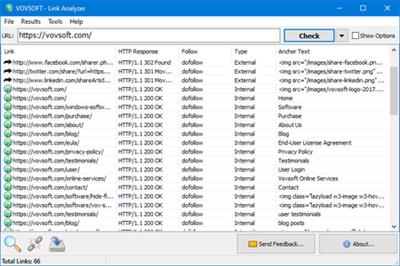
Link Analyzer is an easy to use hyperlink checker, able to crawl both small and very large websites efficiently, while allowing you to find broken links, analyze the results in real-time, gather onsite data, distinguish internal and external links, check dofollow and nofollow links, analyze META descriptions and various tags.

Supports:Windows Windows 10/8.1/8/7/Vista/XP (32-bit and 64-bit)

Home Page -
У Вас недостаточно прав для просмотра ссылок. Войдите или зарегистрируйтесь.


Download link:​
Код:
[center][b]rapidgator_net[/b]:
https://rapidgator.net/file/8c2112e4477de0c04b73892430aea8da/14uou.Link.Analyzer.1.4.rar.html
https://rapidgator.net/file/363a3c3bb8613a6222dbdc058f34dea5/14uou.Vovsoft.Link.Analyzer.1.4.Portable.rar.html

[b]nitroflare_com[/b]:
https://nitroflare.com/view/C8428C45189EF8B/14uou.Link.Analyzer.1.4.rar
https://nitroflare.com/view/7ED8DB7766E5E2F/14uou.Vovsoft.Link.Analyzer.1.4.Portable.rar

[b]uploadgig_com[/b]:
https://uploadgig.com/file/download/c4aF4d95b93e8240/14uou.Link.Analyzer.1.4.rar
https://uploadgig.com/file/download/beb9B9d73e18eE89/14uou.Vovsoft.Link.Analyzer.1.4.Portable.rar[/center]

Links are Interchangeable - No Password - Single Extraction​
 
AllMapSoft Offline Map Maker 8.160

a4f9aed3864fdf1d646257e64646caa9.jpeg

File size: 11 MB​
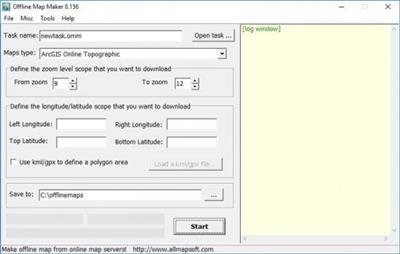
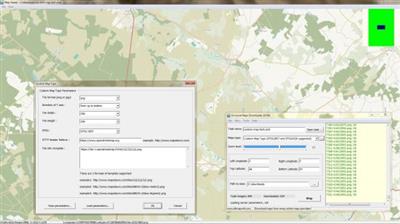
Offline Map Maker is a tool that help you to get offline tile images from many online maps providers, including 500+ maps types.

It supports multi-zoom level images download, supports kml and gpx as input parameters, can output html files for leaflet, openlayers and googleapi, can output bmp, jpg, tif, png, ecw, sgi, img, kmz as a big map, can output mbtiles for mobile apps to use.

Download link:​
Код:
[center][b]rapidgator_net[/b]:
https://rapidgator.net/file/d870e7387dff5f20c720f6f4f4c75ea3/i7a2h.AllMapSoft.Offline.Map.Maker.8.160.rar.html

[b]uploadgig_com[/b]:
https://uploadgig.com/file/download/03eeBd240d41F168/i7a2h.AllMapSoft.Offline.Map.Maker.8.160.rar

[b]nitroflare_com[/b]:
https://nitroflare.com/view/DC770C3D2D3C88A/i7a2h.AllMapSoft.Offline.Map.Maker.8.160.rar[/center]

Links are Interchangeable - No Password - Single Extraction​
 
AllMapSoft Universal Maps Downloader 10.040

b5e9298e5a451792e96d82740a231708.jpeg

File size: 10.2 MB​
Universal Maps Downloader is also a tool like Offline Map Maker, that helps you to get offline tile images from many online maps providers, including 500+ maps types.

It is different with Offline Map Maker, it can only download single zoom level images, does not support kml and gpx, does not output html files.

Download link:​
Код:
[center][b]rapidgator_net[/b]:
https://rapidgator.net/file/816d25a7960184cb0b0747a2ce7e0d00/b5mit.AllMapSoft.Universal.Maps.Downloader.10.040.rar.html

[b]uploadgig_com[/b]:
https://uploadgig.com/file/download/93Cfa690738e4024/b5mit.AllMapSoft.Universal.Maps.Downloader.10.040.rar

[b]nitroflare_com[/b]:
https://nitroflare.com/view/6B1F1AB04F34CC7/b5mit.AllMapSoft.Universal.Maps.Downloader.10.040.rar[/center]

Links are Interchangeable - No Password - Single Extraction​
 
ALTDVB 2.4

5d4fb28b385ee8523218f3ccd047c084.jpeg

File Size : 10.7 Mb​

ALTDVB application allows you to experience Digital TV on your PC.With a DVB-S satellite card you can enter the world of digital entertainment and experience high quality, incredibly sharp TV pictures and near CD quality radio! More then that.

Features
Fast startup
Parallel transponder scanning
Native DiseqC 1.2 & USALS + RAW
Integrated Program Guide (EPG)
Teletext + TTX Subtitles
Extensible with Multidec compatible plugins
Complete channel information, including ES & CA
Channel list filter & grouping
Independent channel volume control
Fast channel switch
Picture-in-Picture (PIP)

Download link:​
Код:
[center][b]rapidgator_net[/b]:
https://rapidgator.net/file/c694c778437529935361a1facff74dd9/vrvwh.ALTDVB.2.4.zip.html

[b]uploadgig_com[/b]:
https://uploadgig.com/file/download/f50D924772DE405c/vrvwh.ALTDVB.2.4.zip

[b]nitroflare_com[/b]:
https://nitroflare.com/view/189A31A138F389F/vrvwh.ALTDVB.2.4.zip[/center]

Links are Interchangeable - No Password - Single Extraction​
 
DeskCover Pro 1.8 macOS

7109e4c0757f1eaa49085f907f0e5ef1.jpeg

File size: 3.80 MB​
DeskCover is a simple Mac application that allows you to hide the mess on your desktop with a single mouse click or by pressing a global hotkey. DeskCover also allows you to focus on your current task by highlighting the window of the currently active applicationand automatically dimming those of inactive ones. Beautiful alternative to Isolator, Hazeover and other.

Does the mess on your desktop constantly distract you?
Does this medley of files, icons, folders and other things hamper your work and you just don't have time to clean it all up?
Need to write an important email or finish a report? Do you want to make a screenshot, record a screencast or make a presentation, but need to hide your documents and icons from the prying eyes?

DeskCover is just the right tool for the job! Your desktop chaos will be reliably hidden under a special cover and will remain invisible to everyone.

=COVER YOUR MESSY DESKTOP=
Hide items on your desktop behind a beautiful picture cover, system wallpaper or solid color

=ISOLATE FRONTMOST WINDOW=
... and help you focus on the current task
DeskCover automatically highlights the current working window and darkens all the others in the background.

=CUSTOMIZE=
Use the color, system wallpaper (desktop image) or your own picture as a cover that will hide the desktop or isolate the active window.You can also adjust background transparency settings.

=WORKS WITH MULTIPLE SCREENS AND SPACES=

=HOTKEYS TO SPEED UP YOUR WORK=
Release Notes

* Release notes were unavailable when this listing was updated.

Supported Operation System:
* 64-bit processor
* OS X 10.10 or later

Download link:​
Код:
[center][b]rapidgator_net[/b]:
https://rapidgator.net/file/7a94a128c51a5d9586f08758875b5572/scj4r.DeskCover.Pro.1.8.macOS.rar.html

[b]uploadgig_com[/b]:
https://uploadgig.com/file/download/9737694cccAC599f/scj4r.DeskCover.Pro.1.8.macOS.rar

[b]nitroflare_com[/b]:
https://nitroflare.com/view/727EEDFC718A954/scj4r.DeskCover.Pro.1.8.macOS.rar[/center]

Links are Interchangeable - No Password - Single Extraction​
 
DockView 1.1 macOS

08331a3c58d3d218498eaa7a21cd494d.jpeg

File size: 4.70 MB​
DockView is a utility that adds a preview of the windows of the selected application in the macOS Dock. You just need to bring the mouse to its icon and thumbnails of all its windows will appear. By clicking on the one you need, you will immediately go to it. Through Window Thumbnails, you can quickly close, minify and manage windows.

Features:
* Fast switching between windows of the selected application
* Window management (minimize, de-minimize, close)
* DockView doesn't modify the Dock or any system file.
* More coming soon...

DockView as opposed to ActiveDock, uBar App, and other similar applications, is not an alternative to macOS Dock, but a convenient addition to the Apple Dock. However, DockView does not modify or alter macOS. But:
- DockView needs to be authorized to use Accessibility Services to be able to switch applications windows.
- DockView needs to be authorized to use a Screen Recording to be able to get the window titles and create Window Previews in the Window Preview panel.

Why?

Many years ago, I used an application called HyperDock, but then problems started, HyperDock was not updated, the developer did not answer emails (this is also often written to me by my clients, and on the forums, I often see "HypperDock not working")... Except, also, the standard Dock from Apple has several disadvantages (see ActiveDock)... Therefore, I decided to write an alternative to Apple Dock and partly an alternative to HypperDock. Now, this is my most popular application. But I often get emails from my clients who do not need a complete Apple Dock replacement, they want to use the ActiveDock capabilities with the Apple Dock... I thought: why not? I Can Do It...
Release Notes

* Release notes were unavailable when this listing was updated.

Supported Operation System:
* 64-bit processor
* macOS 10.12 or later

Download link:​
Код:
[center][b]rapidgator_net[/b]:
https://rapidgator.net/file/6fb65537e8db0a75c28cdd90873c0344/lt8yl.DockView.1.1.macOS.rar.html

[b]uploadgig_com[/b]:
https://uploadgig.com/file/download/5dea26BfbAfFe7a1/lt8yl.DockView.1.1.macOS.rar

[b]nitroflare_com[/b]:
https://nitroflare.com/view/97140A69DC73A52/lt8yl.DockView.1.1.macOS.rar[/center]

Links are Interchangeable - No Password - Single Extraction​
 
FontXChange 5.5 macOS

451dea0bef3901d3e1e1a8605a95f2f7.jpeg

File size: 12 MB​
FontXChange can easily convert fonts to OpenType (PS), PostScript Type 1, and TrueType for both Mac or Windows. FontXChange is designed to understand many different font formats and can convert fonts into many different formats.

Useful features include:
- Batch processing for converting entire font libraries;
- Preferences to set font encodings;
- Font inspection window with preview;
- Support for many font encodings, including Adobe Standard, Unicode, Mac Roman, and Windows ANSI, and European.

This makes FontXChange useful to:
- Convert PostScript Type 1 fonts (Mac or Windows format) into a single modern OpenType font file that works on both Mac and Windows. End the headaches of the outdated two-file system of screen font and printer font combinations. Just one font file that works;
- Recreate missing screen fonts using a PostScript font file in any format;
- Convert TrueType fonts to PostScript fonts. No more printing problems and incompatibilities associated with TrueType fonts and high-end output devices;
- Convert Windows fonts to Mac to Mac and vice-versa. Easily share fonts across different computers, even different operating systems.
Release Notes
- Fixed bug that caused serialized version to get stuck in demo mode
- Fixed bug that prevented automatic update checking

Supported Operation Systems:
OS X 10.13 or later

Download link:​
Код:
[center][b]rapidgator_net[/b]:
https://rapidgator.net/file/9ea64b99ec8afff836ad8c184583076f/hyoyl.FontXChange.5.5.macOS.rar.html

[b]uploadgig_com[/b]:
https://uploadgig.com/file/download/89d22595eb669A8d/hyoyl.FontXChange.5.5.macOS.rar

[b]nitroflare_com[/b]:
https://nitroflare.com/view/71E7503D940A119/hyoyl.FontXChange.5.5.macOS.rar[/center]

Links are Interchangeable - No Password - Single Extraction​
 
GOM Cam 2.0.24.1 Multilingual

7d3ffa88a0dba80e8c25f0c1961e2263.jpeg

Windows x64 | Languages: Multilingual | File Size: 67.96 MB​
GOM Cam - Record online courses. Smart Video Recorder. Try a video recording program, GOM Cam for free which enables to record everything on your computer screen such as YouTube recording, gameplay recording, and online class recording.

All in One Video Editor & Screen Recorder
It is a capture program that supports video editing features such as trimming a video and inserting music, which make it much easier creating online class videos.

Everything about Recording, from Gameplay to Online Classes
Try a video recording program, GOM Cam for free which enables to record everything on your computer screen such as YouTube recording, gameplay recording, and online class recording.

Easy File Management with Thumbnail View and Tag Search
Files such as recorded videos and captured images are saved as thumbnails and easily searched with tags.

GOM Cam, Favorite Tool of Teachers, Students, and YouTubers
Easy to create online lectures and other video content with a drawing option on the screen during video recording.

Video Recorder Even Supporting Audio Extraction
The audio in a recorded video can be extracted and saved as a MP3 file with the feature of audio extraction after video recording.
Release Notes
- [Record Video] hot key has been reset due to the hot key error fix.

- (Settings > Hot Keys > Record Video)
- Circular Webcam Screen have been added.​
- License expiration notification pop-up has been added.
- Minor improvements and bugs fixed

System Requirements:
- [64bit] Microsoft Windows 10 / 8.1 / 8 / 7
- DirectX 9.0c or higher (Recommended to install the latest version of DirectX 10 or later)
- Memory 512MB RAM or more
- HDD 1GB or more
- CPU Intel Pentium 4 CPU, AMD Athlon 64 CPU CPU or equivalent
- Resolution 1280 x 800 or higher

Supported Languages:
한국어, English, 日本語, 中文(简体), 中文(繁體), čeština, Deutsch, Русский, Türkçe, Español, Português, Tiếng Việt

Download link:​
Код:
[center][b]rapidgator_net[/b]:
https://rapidgator.net/file/82e1506fe22ea94812d76fe8e6c3b399/u5dn6.GOM.Cam.2.0.24.1.Multilingual.rar.html

[b]uploadgig_com[/b]:
https://uploadgig.com/file/download/2155988e192D24d8/u5dn6.GOM.Cam.2.0.24.1.Multilingual.rar

[b]nitroflare_com[/b]:
https://nitroflare.com/view/713D847762818E9/u5dn6.GOM.Cam.2.0.24.1.Multilingual.rar[/center]

Links are Interchangeable - No Password - Single Extraction​
 
GOM Mix Pro 2.0.4.7.1 Multilingual

d22f94e2d3e03c1367fff0087c7e5434.jpeg

Languages: Multilingual | File Size: 270.17 MB​
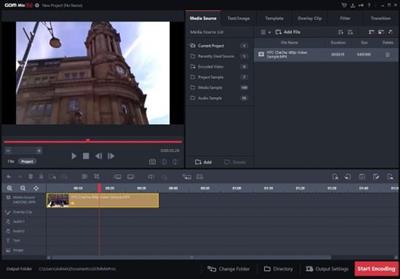
GOM Mix Pro - Create online classes. Video Editor for All. Various overlay clips such as opening/closing, image transition and frame effects improve the video quality. Provides video editing sources through continuous updates.

Simply Editing a Whole Video in 10 Min
- Quickly make your own video and upload on YouTube!
- Effectively shortens time taken for Video Editing → Encoding → Social Media Posting.

Raising Degree of Video Editing Completion With a Single Click
- Various overlay clips such as opening/closing, image transition and frame effects improve the video quality.
- Provides video editing sources through continuous updates.

Photoshop for Videos with 100 Different Filters
- More dynamic video editing with color filters and correction.
- Edit brightness and colors of a video as you wish.

Video Editor with Various Sources
- Quick and easy video editor with a huge range of built-in sources such as songs, fonts, and images.
- Enables to edit videos with desired sources.

Easy Video Editing & Source Control
- Easy to trim, merge, rotate videos and add subtitles!
- Easy to manage various media sources as well.
Release Notes
[Addition of new features]
- Added GOM Mix Market font function

[Customer feedback and correction of errors]
- Improved GOM downloader status display

System Requirements:
- Microsoft Windows 10/8.1/8/7 (32/64bit)
- DirectX 9.0c or higher
- Memory 4GB RAM or more (required 1GB free memory)
- HDD 1GB or more
- CPU Intel Core i3(Haswell), AMD Athlon 64 X2 or higher
- VGA HD Graphics 4600 or higher
- Resolution 1280 x 1024 or higher (Product minimum window size: 1260 x 880)

Supported Languages:
한국어, English, 日本語, čeština, Deutsch, Русский, Türkçe, Español, Português, Tiếng Việt

Download link:​
Код:
[center][b]rapidgator_net[/b]:
https://rapidgator.net/file/765ee84dd0d8b47a3bd5002954630a2e/7321v.GOM.Mix.Pro.2.0.4.7.1.Multilingual.rar.html

[b]uploadgig_com[/b]:
https://uploadgig.com/file/download/bc508616a96bb1F1/7321v.GOM.Mix.Pro.2.0.4.7.1.Multilingual.rar

[b]nitroflare_com[/b]:
https://nitroflare.com/view/E1FFF452ABE8923/7321v.GOM.Mix.Pro.2.0.4.7.1.Multilingual.rar[/center]

Links are Interchangeable - No Password - Single Extraction​
 
Ham Radio Deluxe 6.7.0.357

f83b280adfe9b7d94b6580b8bf9a36ef.jpeg

File size: 119 MB​
The Ham Radio Deluxe is an amateur radio software suite that includes five ham radio apps. They are the best asset you can add to your ham shack. It includes most everything an amateur radio operator needs to automate their ham radio station, regardless of your operating privileges. These applications are all built to work together. You can spend more time enjoying Amateur Radio.

The Ham Radio Deluxe Software Suite includes these five modules:
HRD Logbook is a feature rich ham radio logging software with powerful features for QSO logging, awards tracking, DX cluster, QSL card printing, integrated to rig control, and more.

If you're an extreme DXer, a DXCC fan, or enjoy casual DXing, Logbook is a real keeper; now with automated logging of JT65, JT9, FT8, FT4 using WSJT-X, FTDX, JTAlert, and/or QSO Relay. Solar weather tracking and greyline maps are included.

Upload your QSOs to Logbook of the World (LOTW), eQSL.cc, HRDLog.net, Clublog, and QRZ Log.

Automatic callsign lookup from QRZ callsign database (XML or CD), Hamcall (or CD), Callook.info, HamQTH, and QRZCQ.com. Wikipedia integration provides atlas information about DX countries. SWL support.
HRD Rig Control is a ham radio control software program for ham radios that has the appearance of being connected to a software defined radio (SDR); HF, VHF, UHF, radio control for all major radio manufacturers; integrated to QSO logging.
DM-780 is a digital modes software program that includes RTTY, PSK31, Morse code send/receive, and many more; integrated to QSO logging. Modes include CW, RTTY, PSK, QPSK, Contestia, DominoEX, Hell, MFSK, MT63, Olivia, Thor, and Throb. Control an unlimited number of transceivers, transmitters, or receivers simultaneously. DM-780 uses the same automatic callsign lookup that HRD Logbook uses.
HRD Rotor Control is a software program that supports most popular rotator controllers; turn automatically within Logbook; world map display
HRD Satellite Tracking is a software program that makes your 2-way satellite communications much easier and includes integrated rig control.

Download link:​
Код:
[center][b]rapidgator_net[/b]:
https://rapidgator.net/file/91d3aa67dac789e7ff0206bbb15bb1c6/jxuo6.Ham.Radio.Deluxe.6.7.0.357.rar.html

[b]uploadgig_com[/b]:
https://uploadgig.com/file/download/447C57d354178051/jxuo6.Ham.Radio.Deluxe.6.7.0.357.rar

[b]nitroflare_com[/b]:
https://nitroflare.com/view/79FE279FADAC1D3/jxuo6.Ham.Radio.Deluxe.6.7.0.357.rar[/center]

Links are Interchangeable - No Password - Single Extraction​
 
InPixio Photo Cutter 10.5.7633.20671 Multilingual

0e9cc6f4d44f6efcd1d0e3f64634780a.jpeg

Languages: Multilingual | File Size: 273.64 MB​
inPixio Photo Cutter lets you produce creative and realistic photomontages in just a few clicks. Thanks to these powerful digital scissors, no more time is wasted cutting out your images down to the nearest pixel since Photo Cutter does it all for you. The time saved can be devoted to coming up with original photomontages that are bound to impress your friends and family.

Create photomontages in a few clicks
- Cut out your photos easily
- Crop your photos to your liking
- Add a wallpaper from among the themes on offer or import your own images
- 100 stickers and text templates
- Import several images into your photomontages

Cutting out in a few clicks
With inPixio Photo Cutter, your digital scissors, cut out any detail, individual, object or even landscape in your photos. Select the outline of the person using the slider or the background to erase, and the Photo Cutter algorithm then runs automatically! Conversely, you can use the "keep" slider for important features to make sure your cut-out is perfect. Even hair, drops of water and the finest details are removed from the background down to the nearest pixel.

Choose a background
Then put the cut objects on the available backgrounds to make photomontages or collages in an instant! Just select your background pattern from the new original images, or download your own images for unique photomontages. New backgrounds are available in version 9 and plain backgrounds of each colour have been added.

Even easier use and infinite creations
You can now import multiple photos in a single edit for spectacular and unexpected results. Also find over 100 stickers and text templates to add style to your photos and photomontages. Original content for every special occasion (birthdays, greetings, invitations, etc.).

Mini video Tooltips
To get the most out of Photo Studio 10's features, mini videos have been added to each of the software program's modules in the form of tooltips, making it easier and more effective to use.
The old and new features of the program are explained in a fun and dynamic way. Simply hover over one of the features to reveal a demonstration of what you can do with it.

NEW! Help Tool
A detailed and regularly updated database is now accessible in 1 click from the interface. This resource anticipates potential user questions and provides complete answers, once again to offer improved assistance.

NEW! Video tutorials available for each Photo Studio module
To help you get the best out of the features of Photo Studio, tutorials have been added to a new section for user support, providing a simpler and more effective way to get started.
Release Notes
- Release notes were unavailable when this listing was updated.

System Requirements:
- Windows 7, Windows 8, Windows 10
- 1 GHz Intel® Pentium® processor or equivalent
- 1 GB RAM CD/DVD ROM drive
- 100 MB hard disk space, mouse and keyboard

Download link:​
Код:
[center][b]rapidgator_net[/b]:
https://rapidgator.net/file/c2762be31e13a7edba939db5dc7a5953/kgosi.InPixio.Photo.Cutter.10.5.7633.20671.Multilingual.rar.html

[b]uploadgig_com[/b]:
https://uploadgig.com/file/download/b754D005bAf270aE/kgosi.InPixio.Photo.Cutter.10.5.7633.20671.Multilingual.rar

[b]nitroflare_com[/b]:
https://nitroflare.com/view/0B212219E12588A/kgosi.InPixio.Photo.Cutter.10.5.7633.20671.Multilingual.rar[/center]

Links are Interchangeable - No Password - Single Extraction​
 
KM-3D Cloth Deform v1.0 for 3ds Max

6451e0127315408779e570eba2dab123.jpeg

Requirement: 3ds Max 2015 - 2022 | File size: 1.5 MB​
Cloth Deform is a modifier which creates cloth-like wrinkles on top of any mesh deforming modifier, which squashes/stretches its edges (e.g. Skin). It is history-independent, so it gets a single mesh as an input and transform it into a wrinkled-state based on its rest pose. It doesn't do any simulation, so to see the result at frame 100 you don't have pre-sim the (0-99) range, like in any other cloth simulators.

What's New :
Updates: official site does not provide any info about changes in this version.

Download link:​
Код:
[center][b]rapidgator_net[/b]:
https://rapidgator.net/file/39e9b5f484ec97d03a79566c32e37c08/wq10a.KM3D.Cloth.Deform.v1.0.for.3ds.Max.zip.html

[b]uploadgig_com[/b]:
https://uploadgig.com/file/download/62080ab5633818C3/wq10a.KM3D.Cloth.Deform.v1.0.for.3ds.Max.zip

[b]nitroflare_com[/b]:
https://nitroflare.com/view/058E8CF05ADFF0C/wq10a.KM3D.Cloth.Deform.v1.0.for.3ds.Max.zip[/center]

Links are Interchangeable - No Password - Single Extraction​
 
KM-3D DeltaMushToSkin v1.0 for 3ds Max

2486d647e97c7292e1052d35161e1cec.jpeg

Requirement: 3ds Max 2013 - 2022 (x64) | File size: 1.6 MB​
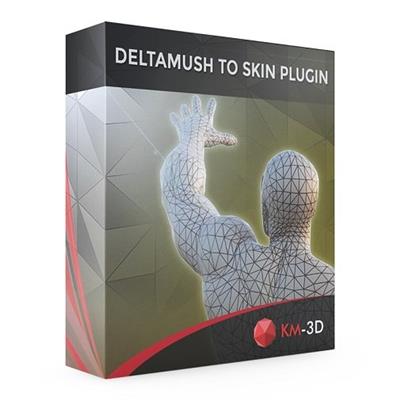
DeltaMush to Skin is a c++ 3ds Max modifier which smooths deformations while preserving details with "converting" to Skin feature. The plugin solves Skin weights matched as close as possible to the DeltaMush result. It enables the user to export such rigg to the game engine like Unity, Unreal etc. The whole process is incredibly fast thanks to multithreaded optimization.

What's New :
Updates: official site does not provide any info about changes in this version.

Download link:​
Код:
[center][b]rapidgator_net[/b]:
https://rapidgator.net/file/2e19334a39f5b2fdc5078051cca86ebf/91398.KM3D.DeltaMushToSkin.v1.0.for.3ds.Max.zip.html

[b]uploadgig_com[/b]:
https://uploadgig.com/file/download/19b69833b611fecb/91398.KM3D.DeltaMushToSkin.v1.0.for.3ds.Max.zip

[b]nitroflare_com[/b]:
https://nitroflare.com/view/43C2D6864D8BB74/91398.KM3D.DeltaMushToSkin.v1.0.for.3ds.Max.zip[/center]

Links are Interchangeable - No Password - Single Extraction​
 
Назад
Сверху