• Здравствуйте. Сайт заработал в архивном режиме форум www.old.nado.in

All mitsumi'1s Applications !! (updated daily)

  • Автор темы Автор темы mitsumi1
  • Дата начала Дата начала
CAMWorks ShopFloor 2025 SP2 (x64)

th_C6j6zmaRThN2kgom9OSFjFadkaVul3Ke.avif


CAMWorks ShopFloor 2025 SP2 (x64)
File size: 1.38 GB​

CAMWorks ShopFloor is the latest Industry 4.0/Smart Manufacturing tool specially designed for the CNC machinist on the shop oor and promotes digital manufacturing by providing 3D models with MBD & PMI data and CNC programming information to the shop oor in a single, compact digital format.

CAMWorks ShopFloor provides state-of-the-art digital tools for machinists to leverage digital machining data in part models, reducing errors and improving communication between CNC programmers and shop floor machinists.
This allows companies to move beyond traditional methods and meet Smart Manufacturing and Industry 4.0 initiatives, as well as improve quality, increase productivity and reduce the number of needed CAD/CAM software licenses. With CAMWorks ShopFloor, 3D digital models capture extensive data from the part design files and provide tools that machinists can utilize to produce parts with fewer miscommunications between the design and manufacturing departments.
Empower your shop floor with the Smart Manufacturing tools they need to avoid errors and increase production at a fraction of the cost of a CAD/CAM system. A full suite of tools are provided to view and precisely measure 3D parts and assemblies. Digital setup sheets and tool lists can be sent along with the 3D part models and CNC programs, and the machinist can virtually simulate the CNC program using cutting-edge 3D simulation. The ability step-through every move in a CNC program is provided to reduce setup time and eliminate the need to dry-run programs on the machine.
Whats New
Updates: official site does not provide any info about changes in this version
Homepage:
Код:
https://camworks.com/camworks-shopfloor/

Download link

rapidgator.net:
Код:
https://rapidgator.net/file/0e0e13ecb20e0007bd85ff675d26a158/wtfvj.CAMWorks.ShopFloor.2025.SP2.x64.rar.html

nitroflare.com:
Код:
https://nitroflare.com/view/CE38E74A93C6607/wtfvj.CAMWorks.ShopFloor.2025.SP2.x64.rar
 
CloneZilla Live 3.2.1-28 (x64) stable

CloneZilla Live 3.2.1-28 (x64) stable

2ca568c554c1d96d0ec365cf2c64d0ea.jpeg


File Size : 451 Mb​

Create partition and disk images for backup purposes and restore them whenever necessary, all thanks to this powerful open-source application. There's nothing worse than losing all the data stored on the computer because of a hard disk failure or a serious system crash. Fortunately, there are advanced backup and recovery systems out there that can help you prevent such situations from happening. Clonezilla is one of them.

Backup disks and partitions for later restoring
Designed as an alternative to expensive disk cloning apps, Clonezilla is capable of creating backups for the entire hard drive or individual partitions. When disaster strikes, you can use Clonezilla's disk or partition image to put everything back to its place and retrieve your lost files.
There are two downloading options Clonezilla offers: ISO and ZIP packages, each for different booting media: the first for CDs/DVDs or PXE servers, the second for USB flash / hard drives. Deployment is not difficult but a boot disk creating application (such as Tuxboot, LinuxLive USB Creator or Rufus). Alternatively, experienced users can perform this operation manually.
Create bootable disks and start creating backups
Booting from the Clonezilla media opens a menu where you can choose the running mode for Clonezilla Live and run memory tests. The console data configuration options are displayed as you proceed, allowing you to select the keymap policy.
There are two options you can choose from after running Clonezilla, namely to clone or restore a disk or a partition using a previously created image, or clone (backup) a disk or a partition. Obviously, when running Clonezilla for the first time, you must take the time to create an image, which can be stored in various locations, namely a local or external drive, a SSH / Samba / NFS / WebDAV / AWS S3 server, an OpenStack Swift server, or the local memory (existing '/home/partimag/'). The latter option is not recommended, as it can overwrite data and render your computer unusable unless you know exactly what you are doing. More experienced users will be happy to find out that there are some advanced parameters they can tamper with.
Once the image is created, you can either enter the command line prompt, start Clonezilla over, as well as power off or reboot your computer to access the host operating system.
The safety net you need for your computer
Clonezilla enables you to clone disks and partitions, storing resulting images on a backup storage device of your choice.
While there is no Windows interface to work with and intuitive wizards where clicking 'Next' is enough, Clonezilla does offer a good option for creating disk and partition backups and keeping data files intact in case you need to restore them.
FEATURES
• Many File systems are supported: (1) ext2, ext3, ext4, reiserfs, reiser4, xfs, jfs, btrfs, f2fs and nilfs2 of GNU/Linux, (2) FAT12, FAT16, FAT32, NTFS of MS Windows, (3) HFS+ of Mac OS, (4) UFS of FreeBSD, NetBSD, and OpenBSD, (5) minix of Minix, and (6) VMFS3 and VMFS5 of VMWare ESX. Therefore you can clone GNU/Linux, MS windows, Intel-based Mac OS, FreeBSD, NetBSD, OpenBSD, Minix, VMWare ESX and Chrome OS/Chromium OS, no matter it's 32-bit (x86) or 64-bit (x86-64) OS. For these file systems, only used blocks in partition are saved and restored. For unsupported file system, sector-to-sector copy is done by dd in Clonezilla.
• LVM2 (LVM version 1 is not) under GNU/Linux is supported.
• Boot loader, including grub (version 1 and version 2) and syslinux, could be reinstalled.
• Both MBR and GPT partition formats of hard drive are supported. Clonezilla live also can be booted on a BIOS or uEFI machine.
• Unattended mode is supported. Almost all steps can be done via commands and options. You can also use a lot of boot parameters to customize your own imaging and cloning.
• One image restoring to multiple local devices is supported.
• Image could be encrypted. This is done with ecryptfs, a POSIX-compliant enterprise cryptographic stacked filesystem.
• Multicast is supported in Clonezilla SE, which is suitable for massively clone. You can also remotely use it to save or restore a bunch of computers if PXE and Wake-on-LAN are supported in your clients.
• The image file can be on local disk, ssh server, samba server, NFS server or WebDAV server.
• AES-256 encryption could be used to secures data access, storage and transfer.
• Based on Partclone (default), Partimage (optional), ntfsclone (optional), or dd to image or clone a partition. However, Clonezilla, containing some other programs, can save and restore not only partitions, but also a whole disk.
Код:
https://sourceforge.net/p/clonezilla/news/
Homepage:
Код:
https://www.clonezilla.org

Download link

rapidgator.net:
Код:
https://rapidgator.net/file/bdb002c4c8ce9cb58f8f4c710e014030/gldzr.CloneZilla.Live.3.2.128.x64.stable.zip.html

nitroflare.com:
Код:
https://nitroflare.com/view/FA81387156E52F9/gldzr.CloneZilla.Live.3.2.128.x64.stable.zip
 
Coolutils Total Excel Converter 7.1.0.92 Multilingual

Coolutils Total Excel Converter 7.1.0.92 Multilingual

68ed1c519d1c0c9343b1f634e6d1a53a.jpeg


File size: 72.31 MB​

Total Excel Converter is the perfect choice to convert any type of table. Supported input formats include Excel and Excel 2007, XLSM, XLT, XLTM as well as OpenOffice formats ODS, XML, SQL, WK2, WKS, WAB, DBF, TEX, and DIF. The list of target formats is even more extensive: convert your tabled files into DOC, DOCX, PDF, HTML, Access, TXT, ODT, ODS, XML, SQL, CSV, Lotus, DBF, TEX, DIFF, SYLK, and LaTeX. Instead of spending hours trying to gather various converters for each file type, download the one tool that can handle them all!


Features
With Total Excel Converter, you can convert each sheet into a new file.
Convert Excel to PDF and set user permissions. This will protect your PDF files from being modified or copied.
Total Excel Converter can easily convert OpenOffice ODS files to Microsoft XLS documents; making it so that spread sheets produced by different programs are compatible with your viewer. More unique options..
Source formats: XLS, XLSX, CSV, TSV, XLSM, XLSB, XLT, XLTM, XLTX, XLK, XLW, OTS, PXL, QPW, WB2, WB1, WQ2, WQ1, SDC, VOR, DBF, SLK, UOS, UOF, WK1, WK2, WK3, WK4, WKS, WAB, DIF, ET, Clarion, DBISAM, Advantage.
Output formats: DOC, PDF, HTML, MHT, XHTML, CSV, TXT, TIFF, JPEG, SVG, RTF, XML, XLS, XLSX, ODS, ODT, Lotus, DIFF, SYLK, LATEX, SQL, DBF, Access.
Converts XLS with charts
Can sign PDF files
Supports Excel 2019 files
Offerss Fit-to-page option
Has built-in renamer
User-friendly GUI
Command line support
ActiveX and Server version
What's new
• official site does not provide any info about changes in this version
Homepage:
Код:
https://www.coolutils.com

Download link

rapidgator.net:
Код:
https://rapidgator.net/file/94c2e58ac8781651a2fa7d9004e53f7d/wqmzt.Coolutils.Total.Excel.Converter.7.1.0.92.Multilingual.rar.html

nitroflare.com:
Код:
https://nitroflare.com/view/AEAE8BD99C17DBB/wqmzt.Coolutils.Total.Excel.Converter.7.1.0.92.Multilingual.rar
 
CPFD Barracuda Virtual Reactor 25.0.0

CPFD Barracuda Virtual Reactor 25.0.0

th_MZxWR3KozHCSVCq4chbWsZrhsevk4RfR.avif


File size: 610 MB​

The latest CPFD breakthrough, Barracuda Virtual Reactor® or Barracuda VR® continues to be the only software of its kind, built exclusively for one single application: Gas-Particle fluidized reactors. The Barracuda VR software package includes all our models and features, and its unique capabilities have been well validated with both large-scale experimental data and with commercial operating reactors across broad industries.


What is Barracuda VR ?
A physics-based engineering software package capable of predicting all fluid, particulate-solid, thermal and chemically reacting behavior inside a fluidized reactor in order to maximize its productivity and reliability.
What is Barracuda VR's value to Industry
To addresse complex, multi-million dollar issues
Oil refinery shutdown: $1MM per day
Reactor emissions control: $20-100 MM per unit
Elimination of a pilot plant: $150-250MM
How is Barracuda VR used?
Reactor operations troubleshooting
Reactor reliability and 'yield' improvements
Reactor scale-up
Reactor new design or feedstock change-out
Reactor emissions reductions
What is Barracuda VR's Technology Scope?
Industrial-scale units, e.g., 10's of meters in length-scale
3-D physical model, with transient to a steady 'time-averaged' solution
Fluid flow phenomena, fully coupled to,
Particulate-solids phenomena for all 'dilute-to-dense' regimes
Chemically reacting gaseous and particulate-solid materials
Post-processing to quickly and clearly develop solutions
Validated against large-scale experiments and industrial units
Код:
https://cpfd-software.com/cpfd-releases-barracuda-virtual-reactor-25-0/
Homepage:
Код:
https://cpfd-software.com/

Download link

rapidgator.net:
Код:
https://rapidgator.net/file/f4f525743cca9ce8ef646c0814a28fc7/naknj.CPFD.Barracuda.Virtual.Reactor.25.0.0.rar.html

nitroflare.com:
Код:
https://nitroflare.com/view/C57FC139121FF5B/naknj.CPFD.Barracuda.Virtual.Reactor.25.0.0.rar
 
DBF Converter 7.48

DBF Converter 7.48

d9a2490b0ef11ea4a2e35e62bcbdc07c.jpeg


File size: 3.7 MB​

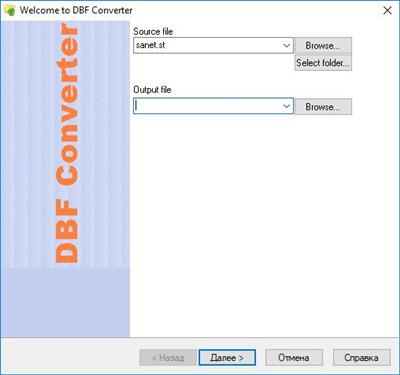
DBF Converter is a universal solution to all your DBF format conversion needs. Whenever you need to extract data from a DBF file to CSV, XLS, XLSX, SQL or plain text, the software delivers a straightforward way to do this with minimum efforts.


3-Steps conversion
Working with DBF Converter is easy. You specify a DBF file or a folder with DBF files you want to convert, select fields and filter out records you need. Then it's just a matter of one click for DBF Converter to turn source files into the format of your choice.
Powerful data filtering
Data filtering in DBF Converter is visual. This means the program takes a sample of records in the DBF file and allows you to apply custom filter rules and masks and instantly see the sample changes according to your choice.
Batch conversion for multiple DBF files
When you have dozens of those DBFs, converting them could be tricky. But thanks to DBF Converter there's no difference whether you need to process one file or a hundred. The program accepts a folder containing your source DBF files and converts them all one by one. And thanks to the low-level access to data the conversion remains fast and accurate.
Код:
https://www.dbf2002.com/dbf-converter/news.html
Homepage:
Код:
https://www.dbf2002.com

Download link

rapidgator.net:
Код:
https://rapidgator.net/file/c72cd287a0f9ec8cc0be5d3187845afa/dmbkc.DBF.Converter.7.48.rar.html

nitroflare.com:
Код:
https://nitroflare.com/view/87F3C043833AF97/dmbkc.DBF.Converter.7.48.rar
 
Dextronet FastPaste 3.3 Professional

Dextronet FastPaste 3.3 Professional

th_KV4GU8iFwbW0sbFQ8qppfsqeV48jqK4G.avif


File size: 6.5 MB​

The FastPaste clipboard utility has a lot of features, to save you a lot of time. It has an arsenal of weapons to help you win the war on stupid typing! FastPaste is very easy to use, and has simple and elegant design. But it still gives you the flexibility and customization options that you need, so you can configure it to meet your pesronal needs.

Some of the most notable features include
Paste commonly used text phrases, rich text, images or execute keyboard scripts
Paste Plain text, Rich text, Images and Scripts. . You can paste just about anything, from a single word to multi-line rich formatted text.

Keyboard scripts to fill forms or send keyboard sequences or combinations
Scripts allow you to fill forms, send hotkeys and key sequences, and do all sorts of other useful keyboard operations. Be creative and liberal when using scripts. It's your time you are saving here - the most precious commodity in the whole universe! Scripts are in Professional edition only.

Secure clipboard data
Encrypt your projects to protect password and other personal or sensitive data. The encryption uses very secure 256-bit AES algorithm.

Sidebar docking for commonly used text phrases and clipboard clips
Docking (sidebar) support. Dock FastPaste as a sidebar, and have instant access to your commonly used clips.

Portable clipboard utility
Portable.. Runs from USB thumb-drive. You can deploy FastPaste to a USB drive and then run it from any computer.

Rich text clips
Rich-text clips with full-featured formatting, including styles (bold, italic, underline, strike through), colors, bullets, fonts, and more.

Paste commonly used text phrases with 4 different methods
4 different pasting methods for maximum flexibility
Paste using a global hotkey associated to each clip (keyboard)
Paste using a global paste menu for all clips (keyboard)
Paste using "Copy" button from the main program interface (mouse)
Paste using the FastPaste notification area icon right-click menu (mouse)
All global hotkeys and shortcuts are fully customizable.
Smart hotkey handling. FastPaste will detect conflicted hotkeys and inform you. It will also register only hotkeys for the clips that are actually used.
You can also just copy the clips to clipboard, the autopaste can be disabled.

300 clips accessible with keyboard, unlimited number of projects
Unlimited number of projects, 30 clips per projects.
Up to 300 clips readily accessible with keyboard or buttons with Quick Projects feature.

Fast clipboard access with FastPaste fast clipboard projects
10 FastProjects for quick access. You can have up to 10 projects associated with global hotkeys and also easily openable from the main toolbar. This way, you can access over 300 clips entirely using your keyboard.

Reorder commonly used clipboard clips
Reorder clips using drag & drop. It couldn't be simpler. Just start the drag on the number upon the clip.

Display clips in 1 column, 2 columns, or 3 columns
Display clips in 1, 2 or 3 columns, so the FastPaste window will fit perfectly into your work space.

Overview of clips and hotkeys can be exported to HTML or printed
Overview of clips and hotkeys can be exported to HTML or printed. This is very useful, e.g. if you've just setup a bunch of hotkeys and want to remember them, then simply print the overview and stick it on the wall beside your computer for a reference. You will memorize the hotkeys in no time. Or better yet, you don't have to remember anything with this handy overview!

Always on top Fast-Paste mode
Always on top mode supported.

Easy Installation - No Admin Privileges Required
Easy fast installation that doesn't require admin privileges. You can install FastPaste even if your Windows user account doesn't have administrator privileges. This makes it perfect for installing it at your day job - you don't need to ask anyone for a permission. Just install it under your user account even without the admin rights.
Or, install it at home, deploy it to USB thumb-drive using File - Deploy to USB, and run it from there.

Whats New
Updates: official site does not provide any info about changes in this version.

rapidgator.net:
Код:
https://rapidgator.net/file/f729ab719d71e45ab36aabe3d1bd9dc6/gwavy.Dextronet.FastPaste.3.3.Professional.rar.html

nitroflare.com:
Код:
https://nitroflare.com/view/83C5360D2DD1319/gwavy.Dextronet.FastPaste.3.3.Professional.rar
 
Dropzone 4 Pro 4.80.52 macOS

Dropzone 4 Pro 4.80.52 macOS

e6e31d480a7db545f8b85092be08bb97.jpeg


File size: 61 MB​

Dropzone makes it faster and easier to copy and move files, open applications and share files with many different services. Dropzone is a unique and amazing app that's like nothing you've ever used before. We've paid fanatical attention to every detail and built an app that looks and feels like an integral part of macOS.


Dropzone ships with a powerful scripting API and with a little programming knowledge you can modify any of your actions or even create entirely new ones. This gives Dropzone unlimited extendability and utility. We're always thinking up new actions so Dropzone will become even more useful over time.
Dropzone also includes Drop Bar - Drop Bar makes it easy to stash files you know you'll need later. Just drop files on the Drop Bar icon in the grid and they will stick there until you're ready to use them.
Features
• Open applications, move and copy files faster than ever before.
• Shorten URLs quickly using Tinyurl shortener. Just select a URL to shorten and press Ctrl+Option+Cmd+S and the shortened URL is automatically copied to the clipboard.
• AirDrop integration lets you drop files or folders from any app and share them with your other Macs over the network.
• Imgur integration lets you share images fast and get a link for pasting.
• Upload files to Amazon S3 (Dropzone Pro feature).
• Upload files to your FTP server (Dropzone Pro feature).
• Upload files to your Google Drive (Dropzone Pro feature).
• Download and install add-on actions that let you upload to services like Google Drive, YouTube and many others (Dropzone Pro feature).
• Powerful multi-tasking engine allows you to run multiple tasks at once and track the progress of each one through the in-grid task status area.
• See how tasks are progressing at a glance in the animated menu item.
• Launch Dropzone actions with the newly added keyboard shortcuts feature (Dropzone Pro feature).
• Add applications, folders or actions to your grid easily by dragging and dropping them on the Add to Grid area.
• Develop your own actions using the updated and massively improved Ruby or Python API (Dropzone Pro feature).
Release Notes
Updates: official site does not provide any info about changes in this version

Supported Operation Systems
macOS 10.15 or later
Homepage:
Код:
https://aptonic.com

Download link

rapidgator.net:
Код:
https://rapidgator.net/file/cc0d4ef207626099ae4b1a78e1b093b8/bvsfp.Dropzone.4.Pro.4.80.52.macOS.dmg.html

nitroflare.com:
Код:
https://nitroflare.com/view/5EC5E8395C1362A/bvsfp.Dropzone.4.Pro.4.80.52.macOS.dmg
 
DxO PhotoLab 7 ELITE Edition 7.14.0 macOS

DxO PhotoLab 7 ELITE Edition 7.14.0 macOS

1bf781f8968962295f413d5a7216a410.jpeg


Language: Multilingual | File size: 773 MB​

DxO PhotoLab provides a complete set of smart assisted corrections that you can manually fine-tune at any time. Take control on every aspect of your photos: effectively remove noise, get rid of light constraints, recover color details, apply sophisticated optical corrections, and enhance details.


Reducing digital noise in RAW images is an ongoing challenge for most photo-editing software. But with DxO DeepPRIME we are breaking new ground. The first artificial intelligence-based (AI) technology of its kind, DeepPRIME enables you to demosaic and denoise images simultaneously. Try it out - the results speak for themselves.
Demosaicing and denoising are usually two separate processes. But with DxO DeepPRIME we've combined them to achieve even better results.
The outcome is spectacular. DxO DeepPRIME removes noise and renders photographic information without reducing color detail. Transitions are smoother and more natural, and you gain nearly two ISO sensitivity values compared to our earlier version, DxO PRIME, the benchmark software for all comparable programs currently available.
If you are an expert photographer, DxO DeepPRIME will open up a world of new possibilities by enabling you to shoot at very high sensitivities. As an amateur photographer, DeepPRIME will allow you to compensate for the drawbacks of small sensors in compact and bridge cameras that produce digital noise even at low ISO sensitivities. And if you're struggling with low quality, or older-generation cameras that are no longer suitable because of the scale of digital noise, DxO DeepPRIME will give your images a new lease of life.
Release Notes

Updates: official site does not provide any info about changes in this version

Supported Operation Systems
macOS 12.6 or later

rapidgator.net:
Код:
https://rapidgator.net/file/709e35e078be812e17ad07c83e7b66c6/tklwf.DxO.PhotoLab.7.ELITE.Edition.7.14.0.macOS.dmg.html

nitroflare.com:
Код:
https://nitroflare.com/view/10F7996334FBEBC/tklwf.DxO.PhotoLab.7.ELITE.Edition.7.14.0.macOS.dmg
 
DxO PhotoLab 8 ELITE Edition 8.6.0 macOS

DxO PhotoLab 8 ELITE Edition 8.6.0 macOS

61fff5c41fd32941f030a71c424331bb.jpeg


Language: Multilingual | File size: 904 MB​

DxO PhotoLab provides a complete set of smart assisted corrections that you can manually fine-tune at any time. Take control on every aspect of your photos: effectively remove noise, get rid of light constraints, recover color details, apply sophisticated optical corrections, and enhance details.

Reducing digital noise in RAW images is an ongoing challenge for most photo-editing software. But with DxO DeepPRIME we are breaking new ground. The first artificial intelligence-based (AI) technology of its kind, DeepPRIME enables you to demosaic and denoise images simultaneously. Try it out - the results speak for themselves.

What's new DxO PhotoLab 8
Enjoy a host of upgrades including new tools and an improved workflow.
Image correction & enhancement
DxO's pioneering Optics Modules are renowned for giving photographers the best possible performance from their gear, and are applied automatically depending on metadata. Lens softness adjustments are tailored according to the idiosyncrasies of individual lenses. They don't simply sharpen uniformly across the entire image like in other software.
Groundbreaking denoising technologies
Noise reduction powered by machine learning. DeepPRIME, DeepPRIME XD, and DeepPRIME XD2s eliminate noise, recover detail, and improve color reproduction. Two legacy technologies - PRIME and High Quality - are included when speed is crucial. Choose the automatic settings or dial them in manually. Use the new large live preview magnifier to see the impact of denoising - plus all of your other edits.
Color rendering and fidelity
Extra-wide gamut working color space (DxO Wide Gamut) ensures accurate rendering throughout the workflow. Soft Proofing mode ensures accurate colors when preparing files for print or display. Simulate ink and paper via ICC profiles. Create calibrated color profiles using industry-standard color charts to ensure precision.
Control exposure, contrast, color & tonality
Use ColorWheel to manipulate colors and customize color channels. Adjust Exposure compensation, edit the Tone Curve (enhanced in v8), tweak Contrast and Microcontrast. Plus White Balance with color picker, Color Accentuation to set saturation/vibrancy, Black-and-white palette with channel mixer, and Selective Tone for greater control over tonal ranges.
Color rendering
As well as DxO's camera-calibrated profiles and classic film renderings, import and apply DCP profiles, or apply color rendering from your camera. Start your editing process with DxO Styles to open up new creative possibilities.
Smart, automated tools
DxO PhotoLab contains two innovative tools to speed up your editing: DxO Smart Lighting quickly balances brightness levels between shadows and highlights. DxO Clearview Plus reduces atmospheric haze and enhances local contrast.
LUTs
Import and apply LUTs to open up endless creative color options. Choose from 32 pre-installed LUTs and set intensity.
Presets and toning
Create and share presets. Duplicate, rename, import/export presets, and organize into folders. Edit existing presets and create partial presets. Use the Style / Toning palette to apply Simple Toning (e.g., Sepia) and access Split Toning by installing DxO FilmPack.
ReTouch tool
More than just a cloning/healing tool, rotate, scale, and mirror the source area for absolute control. Edit the shape of the area to be retouched using a brush/eraser. Switch between Clone/Repair modes. Remove unwanted elements with automatic source selection (or set manually).
Crop, horizon & perspective tools
Adjust the horizon and crop images using a common or custom ratio - all automatically or manually. Adjust perspective distortion with dedicated tools: force parallels, rectangle, or 8-point guides.
Local Adjustment tools
U Point™ technology features Control Points and Control Lines for intelligent masks without the need for complex layers. Use Brush, Gradient, Eraser, and Auto Mask tools. Create complex adjustments using Hue Masks (new in v8). Toggle visibility and set opacity of masks, and duplicate/invert mask content. Set Control Point/Control Line sensitivity according to Luminance or Chrominance.
Available corrections
The corrections available as local adjustments include

- Exposure, Contrast, Microcontrast
- Highlights, Midtones, Shadows, Blacks
- Hue, Saturation, Luminance (via ColorWheel)
- Vibrancy, Saturation, Hue, Sharpness, Blur
- White Balance and Tint (RAW only)
Advanced History & Quick Compare
Advanced History palette provides a full editing history including specific values and changes. Grouped corrections can be expanded when applying presets in order to track individual changes. Quick Compare Mode puts your edit alongside the original image with a vertical or horizontal split. You can compare your current image with output versions and virtual copies, or choose a reference image (new in v8).
Virtual Copies
Create Virtual Copies for multiple variations of an image without copying the RAW file. Compare quickly with the original image, and selectively copy/paste settings between images.
Customizable workspaces
Highly customizable workspace: reposition/hide panels, collapse/expand palettes, and use a search field to quickly find tools. Add your most-used tools to a favorites palette, or create custom palettes. Filter displayed corrections by category. Display only the tools actively making changes to an image. Use multiple monitors and palettes. Place the grid view navigator on a second display.
Histogram
Display RGB, individual colors, and luminosity channels. Indicate where highlights and/or shadows have been clipped. Display the RGB value of an individual pixel.
Powerful functionality, catalog-free
Don't import images; simply browse your disk and edit your images on the fly. Select/search/filter photos with ease. Apply star ratings, color tags, pick/reject images, and choose from a range of criteria when searching, including color tags. For faster searching, simply direct PhotoLab to index specific folders.
Metadata management
Add and manage keywords, create keyword hierarchies, drag/drop keywords to organize them in a tree view list. Import and manage Exif and IPTC metadata, and selectively copy/paste metadata from one image to multiple others. Synchronize metadata changes with third-party applications.
Projects & other organizational tools

Create Projects to gather selections of images, independent of their folder. Create groups of Projects and drag/drop to organize virtual collections. Batch rename files, adjust capture time, drag files to folders to copy/move them, and sort/select files according to flexible options.
Customizable export settings
Choose the size/location of files, set up custom export presets, create multiple parallel exports, and apply original or custom ICC profile, sRGB, or Adobe RGB profiles. Right-click to export to a specific application. Send images directly to other applications. With Nik Collection installed, you have direct access to all plugins.
Watermarks
Create your own watermarks. Use both text and images together, adjust the size, opacity, blend modes, and save as presets.
Release Notes
Updates: official site does not provide any info about changes in this version

Supported Operation Systems
macOS 13.6 or later

rapidgator.net:
Код:
https://rapidgator.net/file/ba9f82ef4a3ecd77dfd1c42e45b766d9/naycy.DxO.PhotoLab.8.ELITE.Edition.8.6.0.macOS.dmg.html

nitroflare.com:
Код:
https://nitroflare.com/view/5D16CCC15B885B9/naycy.DxO.PhotoLab.8.ELITE.Edition.8.6.0.macOS.dmg
 
Duplicate File Detective 7.3.88 (x64) Enterprise

Duplicate File Detective 7.3.88 (x64) Enterprise

OAax48NqO4lRCQu3AMqY2QnwxOnP8aWj.avif


File size: 25 MB​

Duplicate File Detective uses state-of-the-art file content analysis technology to show you exactly where your duplicate files are (even when the file names are different). You can search multiple folders, drives, removable storage devices, even network shares - all in a single pass. Then move, zip, or remove duplicate files safely with assistance from our innovative SmartMark duplicate file selection system.


Key Software Benefits
• Reclaim wasted local and network storage resources - archive or remove duplicate files
• Speed up backup processes by reducing storage allocation redundancy
• Gain visibility into what types of duplicates are consuming space and who owns them
• Eliminate time wasted performing virus scans on duplicate files
• Scan and de-dupe file systems of virtually any size with our extreme scalability engine
• Process (move, delete, or zip) duplicates safely with our built-in file management system
• Find duplicates by any combination of attributes, including content-only matching
• De-dupe and clean up your music (MP3, iTunes, etc.) file collection
• Optimized for Windows 11, 10, 8, 7 (SP1) and Windows Server 2022, 2019, 2016, 2012 R2 (64 bit)
• Native 64-bit support for unmatched performance and scalability.
Код:
https://www.duplicatedetective.com/Content/static/ReleaseNotes.htm
Homepage:
Код:
https://www.duplicatedetective.com/

Download link

rapidgator.net:
Код:
https://rapidgator.net/file/993c1977e73a48d2a4db6a00ae42476f/ktrbf.Duplicate.File.Detective.7.3.88.x64.Enterprise.rar.html

nitroflare.com:
Код:
https://nitroflare.com/view/7B8F3133B372F72/ktrbf.Duplicate.File.Detective.7.3.88.x64.Enterprise.rar
 
DxO FilmPack 7.14.0.2 (x64) Multilingual

th_qKPrbtggpaEfLQDp6pNay4H8sD9okK2K.avif


DxO FilmPack 7.14.0.2 (x64) Multilingual
File size: 636 MB​

DxO FilmPack 7 is the software that takes your digital images back in time to the golden era of film photography. A tribute to the darkroom, you can explore history and get inspired by beautiful renderings, authentically recreated with scientific precision.

Refined and upgraded, the new DxO FilmPack 7 delivers
- 40 black and white and 49 color films, faithfull recreated
- Digital simulations and presets, cinematic styles, frames, textures, and light leaks
- Time Machine guides you through all of photographic history
- Set the intensity of a film stock, and modify grain
- Control exposure, highlights, midtones, shadows, and more
- Control color, create split tones, and apply luminosity masks
Rediscover the magic of film in the age of digital.
Код:
https://www.dxo.com/dxo-filmpack/new-features/
Homepage:
Код:
https://www.dxo.com/

Download link

rapidgator.net:
Код:
https://rapidgator.net/file/c693c90548bdd174626cbdab451764b9/wtrfh.DxO.FilmPack.7.14.0.2.x64.Multilingual.rar.html

nitroflare.com:
Код:
https://nitroflare.com/view/EA76EAAA5FF5F0D/wtrfh.DxO.FilmPack.7.14.0.2.x64.Multilingual.rar
 
DxO PureRAW 5.1.0.6 (x64) Multilingual

th_fl4Z9fvxeQNupduZgN0n4SGOwE4TU4um.avif


DxO PureRAW 5.1.0.6 (x64) Multilingual
File size: 1.77 GB​

Exclusive Lens Sharpness Optimization, based on 
DxO Modules. Industry-leading noise reduction, powered by DeepPRIME. Unique demosaicing, for unmatched detail extraction. Superior distortion adjustments, giving maximum field of view. Chromatic aberration corrections, tailored to your lens. Vignetting rectification, based on precise measurements. Sharper, cleaner, more detail, incredible levels of detail, rich, beautiful colors, deliciously smooth bokeh.

Whats New in v5
Supreme levels of control: Local Adjustments
Purify with precision for the most demanding images and get the perfect results.
Create masks to adjust DeepPRIME noise reduction and lens sharpness optimization, and view changes instantly.
Step into the future with new DeepPRIME 3
DxO's legendary denoising and demosaicing engine just got an upgrade.
Free yourself from the limitations of 
your camera's ISO when photographing.
Custom presets for a faster workflow
Create custom presets to quickly accommodate different cameras, specific lenses, and different subject matter - streamlining your workflow whenever you need an extra level of control.
An exquisite new interface
Enjoy a refreshed user experience for a beautifully refined workflow.
Discover DeepPRIME XD3 X-Trans Beta*
Get exclusive access to the next generation of noise reduction and detail extraction for Fujifilm X-Trans sensors.
Achieve the true image quality of your Fujifilm camera.
Homepage:
Код:
https://www.dxo.com/

Download link

rapidgator.net:
Код:
https://rapidgator.net/file/5b244f86d5d31c599582b3b65b12f2c4/ytnew.DxO.PureRAW.5.1.0.6.x64.Multilingual.rar.html

nitroflare.com:
Код:
https://nitroflare.com/view/4633683A3B01492/ytnew.DxO.PureRAW.5.1.0.6.x64.Multilingual.rar
 
DxO ViewPoint 5.4.0.506 (x64) Multilingual

th_oznCGMbULarOmHmiOTKeriufbcEzPpCi.avif


DxO ViewPoint 5.4.0.506 (x64) Multilingual
File size: 551 MB​

Ultimate control over geometry, shape, and perspective. Warp any part of your image for perfect proportions. The only way to fix wide-angle stretching. All the perspective tools you will ever need.


Correct distortion with precision, and get maximum field of view.
Create dioramas without using a tilt-shift lens.
Warp any part of your image
Reposition small but vital details without having to go back and reshoot, and create balance in just a few clicks.
The ReShape Fusion tool is a completely new way to manipulate photos. Move, scale, and rotate any part of an image with ease.
Enhanced in version 5
Sometimes stretching a subject that's too close to the edge of the frame when using a wide-angle lens is unavoidable.
The exclusive Volume Deformation tool resolves this problem instantly.
And it does it in just a few clicks.
Fine-tune perspectives
Access a complete suite of tools that will perfect your perspective.
With the new functionality introduced through ReShape Fusion, make perspective and horizon changes to specific parts of your image. It's a whole new level of control.
Correct distortions, get the maximum field of view
Lenses don't always see the world as we do. DxO ViewPoint takes care of it and then goes one step further.
Correct distortion in a single click - barrel, pincushion, and more - and even get more field of view from your sensor thanks to superior science.
Create a diorama effect without a tilt-shift lens
Turn any scene into a tiny world without the need for expensive equipment.
Apply an ultra-shallow depth of field with smooth bokeh to focus attention exactly where you want it.
Код:
https://www.dxo.com/dxo-viewpoint/whats-new/
Homepage:
Код:
https://www.dxo.com/

Download link

rapidgator.net:
Код:
https://rapidgator.net/file/e31416aa2967f0abda092d1a8ad8b4ea/whiao.DxO.ViewPoint.5.4.0.506.x64.Multilingual.rar.html

nitroflare.com:
Код:
https://nitroflare.com/view/F02EBAFC90958F1/whiao.DxO.ViewPoint.5.4.0.506.x64.Multilingual.rar
 
EasyUEFI Enterprise 5.9 (x64) Multilingual

EasyUEFI Enterprise 5.9 (x64) Multilingual

af5af283f2f9d6d904037ea2e37dfba1.jpeg


File size: 12.8 MB​

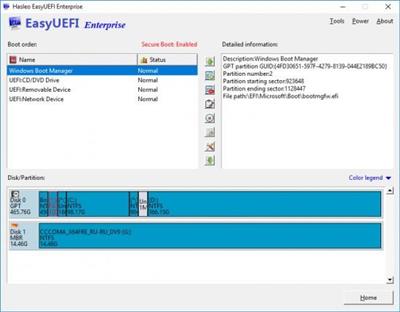
EasyUEFI owns comprehensive EFI/UEFI boot option management functions, such as create, delete, edit, clean up, backup and restore EFI/UEFI boot options, specifies an one-time boot entry for the next restart, or change EFI/UEFI boot order, all these operations done under Windows without entering BIOS setup.


Create, Delete and Modify EFI/UEFI Boot Option
Backup & Restore EFI/UEFI Boot Option
Disable & Enable EFI/UEFI Boot Option
Boot Into UEFI firmware settings (UEFI BIOS) From Inside Windows
Specifies an One-time Boot Option
Change EFI/UEFI Boot Sequence
Command line support
EFI system partition management
EasyUEFI also releases a feature which allows you to manage the EFI System Partitions, with this feature you can easily backup, restore, rebuild the EFI System Partition (ESP), or move EFI System Partition from one drive to another.
Backup EFI System Partition
Restore EFI System Partition
Recreate EFI System Partition
Move EFI System Partition to Another Drive
Manage EFI system Partitions
Create Windows PE emergency disk
With EasyUEFI you can also build a bootable Windows PE image file. After building the image file, you can use it to create a bootable USB flash drives or use 3rd-party burner software to burn it to CD/DVD. With this Windows PE emergency disk you can easily fix EFI boot issues or repair efi system partition, such as missing or corrupt EFI boot option, missing or corrupt EFI System Partition.
Код:
https://www.easyuefi.com/change-logs.html
Homepage:
Код:
https://www.easyuefi.com/

Download link

rapidgator.net:
Код:
https://rapidgator.net/file/a0026654cac14e49fc08d39a48867f9e/cynnt.EasyUEFI.Enterprise.5.9.x64.Multilingual.rar.html

nitroflare.com:
Код:
https://nitroflare.com/view/3E57D1F57BDACBB/cynnt.EasyUEFI.Enterprise.5.9.x64.Multilingual.rar
 
EasyUEFI Enterprise 5.9 (x64) WinPE

EasyUEFI Enterprise 5.9 (x64) WinPE

f4744e6b53ee53838044501d19757972.jpeg


File size: 732.8 MB​

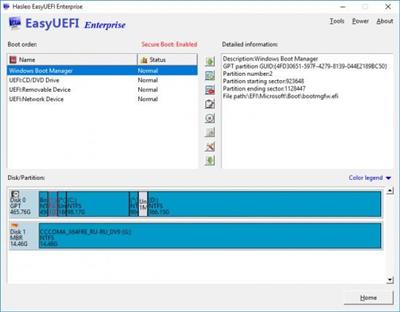
EasyUEFI owns comprehensive EFI/UEFI boot option management functions, such as create, delete, edit, clean up, backup and restore EFI/UEFI boot options, specifies an one-time boot entry for the next restart, or change EFI/UEFI boot order, all these operations done under Windows without entering BIOS setup.


Create, Delete and Modify EFI/UEFI Boot Option
Backup & Restore EFI/UEFI Boot Option
Disable & Enable EFI/UEFI Boot Option
Boot Into UEFI firmware settings (UEFI BIOS) From Inside Windows
Specifies an One-time Boot Option
Change EFI/UEFI Boot Sequence
Command line support
EFI system partition management
EasyUEFI also releases a feature which allows you to manage the EFI System Partitions, with this feature you can easily backup, restore, rebuild the EFI System Partition (ESP), or move EFI System Partition from one drive to another.
Backup EFI System Partition
Restore EFI System Partition
Recreate EFI System Partition
Move EFI System Partition to Another Drive
Manage EFI system Partitions
Create Windows PE emergency disk
With EasyUEFI you can also build a bootable Windows PE image file. After building the image file, you can use it to create a bootable USB flash drives or use 3rd-party burner software to burn it to CD/DVD. With this Windows PE emergency disk you can easily fix EFI boot issues or repair efi system partition, such as missing or corrupt EFI boot option, missing or corrupt EFI System Partition.
Код:
https://www.easyuefi.com/change-logs.html
Homepage:
Код:
https://www.easyuefi.com/

Download link

rapidgator.net:
Код:
https://rapidgator.net/file/f8b3480f9bca19695eb65f4bd64e6310/wwegq.EasyUEFI.Enterprise.5.9.x64.WinPE.rar.html

nitroflare.com:
Код:
https://nitroflare.com/view/F1DA846DC599E5D/wwegq.EasyUEFI.Enterprise.5.9.x64.WinPE.rar
 
Agisoft Metashape Professional 2.2.1 Build 20539 (x64) Multilingual

Agisoft Metashape Professional 2.2.1 Build 20539 (x64) Multilingual

d118a4abd0d819ef19ad19a544b2ff42.jpeg


File size: 193.7 MB​

Agisoft Metashape (formerly PhotoScan) is a stand-alone software product that performs photogrammetric processing of digital images and generates 3D spatial data to be used in GIS applications, cultural heritage documentation, and visual effects production as well as for indirect measurements of objects of various scales.


Wisely implemented digital photogrammetry technique enforced with computer vision methods results in smart automated processing system that, on the one hand, can be managed by a new-comer in the field of photogrammetry, yet, on the other hand, has a lot to offer to a specialist who can adjust the workflow to numerous specific tasks and different types of data. Throughout various case studies Metashape proves to produce quality and accurate results.
Features
Photogrammetric triangulation
Processing of various types of imagery: aerial (nadir, oblique) & close-range.
Auto calibration: frame (incl. fisheye), spherical & cylindrical cameras.
Multi camera projects support.
Dense point cloud: editing and classification
Elaborate model editing for accurate results.
Points classification to customize geometry reconstruction.
.LAS export to benefit from classical point data processing workflow.
Digital elevation model: DSM/DTM export
Digital Surface and/or Digital Terrain Model - depending on the project.
Georeferncing based on EXIF meta data/flight log: GPS/GCPs data.
EPSG registry coordinate systems support: WGS84, UTM, etc.
Georeferenced orthomosaic export
Georeferenced orthomosaic: most-GIS-compatible GeoTIFF format; .KML file to be located on Google Earth.
Export in blocks for huge projects.
Color correction for homogeneous texture.
Measurements: distances, areas, volumes
Inbuilt tools to measure distances, areas and volumes.
To perform more sophisticated metric analysis Metashape products can be smoothly transferred to external tools thanks to a variety of export formats.
Код:
https://www.agisoft.com/pdf/metashape_changelog.pdf
Homepage:
Код:
https://www.agisoft.com/

Download link

rapidgator.net:
Код:
https://rapidgator.net/file/1cf716446402c3cdff18c1ba05ce7237/qhlgd.Agisoft.Metashape.Professional.2.2.1.Build.20539.x64.Multilingual.rar.html

nitroflare.com:
Код:
https://nitroflare.com/view/44DC3661208105F/qhlgd.Agisoft.Metashape.Professional.2.2.1.Build.20539.x64.Multilingual.rar
 
Futuremark SystemInfo 5.84.1372

Futuremark SystemInfo 5.84.1372

72dfff281cf12cdc94ec34b1f9bfaa09.jpeg


File Size : 3.4 Mb​

SystemInfo is a component used in many of our benchmarks to identify the hardware in your system. It does not collect any personally identifiable information. SystemInfo updates do not affect benchmark scores but you may need the latest version in order to obtain a valid score.


The most recent versions of our currently supported benchmarks will prompt you to install new SystemInfo updates. Alternatively, you can update SystemInfo yourself from this page.
Monitor your system and find hardware IDs
Futuremark SystemInfo can scan your computer and collect information regarding a series of services, processes and hardware performance.
The tool can easily export the result of the scan to an XML file in which you can view the current values for the system version, user, files, storage, memory and motherboard. You can also view several statistics and information on WMI, Setup APIs, power supplies, DirectX, CPU cores, plus single or multi-threaded activities.
This diagnostic tool can only offer you the system information, it does not flag errors, trigger alarms, nor does it repair or clean any irregularity. It does, however, offer you a comprehensive overview on the current state of your system.
System information and activity logs
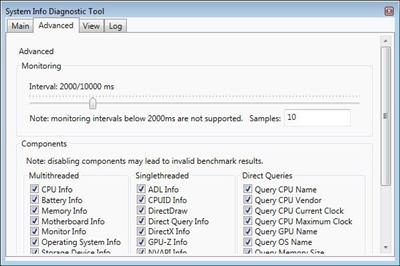
Once installed, Futuremark SystemInfo creates several components that you can use with various benchmarks. The System Diagnostic tool allows you to collect system data, monitoring information of direct queries.
The GUI utility is simple to operate and features several tabs. The Log displays the task being performed and their status, but the actual results of the search are displayed, separately, automatically exported to an XML file, that you can inspect.
Advanced searching tools
The Advanced tab in Futuremark SystemInfo allows you to filter the categories that you wish to investigate. Thus, you can select any of the parameters in single and multi-threaded activities, which are ADL info, DirectX, CPUID, NVAPI info, respectively CPU, battery, motherboard, monitor, OS or storage data.
Moreover, you can run direct queries on the CPU name, vendor, integrated clock, GPU name, if available, as well as details on each of the CPU cores. You can run standard diagnosis searches or find bottlenecks.
Код:
https://benchmarks.ul.com/systeminfo?redirected=true#
Homepage:
Код:
https://www.futuremark.com/

Download link

rapidgator.net:
Код:
https://rapidgator.net/file/879bfbadeb6fa52c0a2f359353c85f42/zibdn.Futuremark.SystemInfo.5.84.1372.rar.html

nitroflare.com:
Код:
https://nitroflare.com/view/B63223602BCB4CC/zibdn.Futuremark.SystemInfo.5.84.1372.rar
 
iBarcoder 3.16.6 macOS

iBarcoder 3.16.6 macOS

5593408e7126a38571f8b63b329d1d62.jpeg


Language: Multilingual | File size: 17 MB​

The Cristallight iBarcoder is professional mac barcode generator for creating any number of individual, or sequential barcodes, printing them as colorful barcode labels in your own style, of any size, or shape, or exporting them as graphic image files in common vector and raster image formats.


The iBarcoder makes it really easy to design and print barcode labels, stickers, tags on your mac in just a few steps. Use our mac barcode software to produce barcodes of more then 40 1-D and 2-D (Datamatrix and QR Code, etc.) barcode symbologies.
Export barcodes either as high-resolution (up to 4800 dpi) image files, or vector graphics
• PDF (vector)
• EPS (vector)
• BMP
• TIFF
• JPEG
• PNG
• PNTG
• Photoshop and more.
Release Notes
Release notes were unavailable when this listing was updated

Supported Operation Systems
macOS 10.10 or later
Homepage:
Код:
https://cristallight.com/

Download link

rapidgator.net:
Код:
https://rapidgator.net/file/1a67836e97ee404f3ef9799aaee0cb00/gnbom.iBarcoder.3.16.6.macOS.dmg.html

nitroflare.com:
Код:
https://nitroflare.com/view/53992F829B6238E/gnbom.iBarcoder.3.16.6.macOS.dmg
 
Noir - Dark Mode for Safari 2025.1.3 macOS

Noir - Dark Mode for Safari 2025.1.3 macOS

7be3c951a65e0065d860bf9d20d6c2ad.jpeg


File size: 12 MB​

Browse better at night. Noir is a Safari extension that automatically adds a dark mode to every website you visit. It makes browsing the web at night so much better. With Noir, you won't be blinded by bright websites ever again.


And the results look great too. Noir generates a custom dark style for each website you visit, based on the colors that are used on a page. You won't even notice this happening in the background - that's how fast it is - but you'll certainly appreciate the end result: a beautiful dark mode tailored for each website, where contrast is preserved and highlights still pop. And with over 20 built-in themes and the ability to create your own, you can customize the results exactly the way you want.
Noir works with any website you visit in Safari, automatically. By default, Noir is linked to your device's Dark Mode, so websites will only go dark when you want them to. But you can easily customize this to your liking, even per website. Only want to use Noir on just a few specific websites? Sure thing! Disable Noir on some websites? No problem!
Код:
https://geo.itunes.apple.com/app/id1592917505
Supported Operation Systems
macOS 12.0 or later
Homepage:
Код:
https://geo.itunes.apple.com/app/id1592917505

Download link

rapidgator.net:
Код:
https://rapidgator.net/file/ab11e49a22b4a3423f16a77d443aa9fb/sutlx.Noir..Dark.Mode.for.Safari.2025.1.3.macOS.dmg.html

nitroflare.com:
Код:
https://nitroflare.com/view/A020E79B60E29D9/sutlx.Noir..Dark.Mode.for.Safari.2025.1.3.macOS.dmg
 
Internet Download Manager 6.42 Build 36 Multilingual + Retail

Internet Download Manager 6.42 Build 36 Multilingual + Retail

a3321e85870ab5ff9bbfe6a99b0757d7.jpeg


File size: 23.5 MB​

Internet Download Manager has a smart download logic accelerator that features intelligent dynamic file segmentation and safe multipart downloading technology to accelerate your downloads. Unlike other download accelerators and managers that segment files before downloading starts, Internet Download Manager segments downloaded files dynamically during download process.

Features
- All popular browsers and applications are supported!
Internet Download Manager has been tested with the following browsers: Internet Explorer, MSN Explorer, AOL, Netscape Communicator, Netscape 6, Netscape 7, Mozilla, Mozilla Firefox, Mozilla Firebird, Opera, NetCaptor, UltraBrowser, Slim Browser, Avant Browser, MyIE2, Optimal Desktop, Ace Explorer, Advanced Browser, 27 Tools-in-1 Wichio Browser, WindowSurfer, 550 Access Browser, FineBrowser Freeware, Kopassa Browser, Fast Browser Pro, Enigma Browser, GoSuRF, K-Meleon, Smart Explorer, The Off By One Web Browser, Smartalec Voyager, CrystalPort AppCapture, The Family Browser, XANA Web Browser, Bluto, AutoSurf, 32bit Web Browser, BrowseMan, WrestlingBrowser, Eminem Browser, UltraBrowser, Cygsoft LDAP Browser, and Net M@nager. Internet Download Manager supports all versions of popular browsers, and can be integrated into any 3rd party Internet applications.
- Easy downloading with one click.
When you click on a download link in a browser, IDM will take over the download and accelerate it. IDM supports HTTP, FTP, HTTPS and MMS protocols.
- Download Speed Acceleration.
Internet Download Manager can accelerate downloads by up to 5 times due to its intelligent dynamic file segmentation technology. Unlike other download managers and accelerators Internet Download Manager segments downloaded files dynamically during download process and reuses available connections without additional connect and login stages to achieve best acceleration performance.
- Download Resume.
Internet Download Manager will resume unfinished download from the place where they left off.
- YouTube grabber.
Internet Download Manager can grab FLV videos from popular sites like YouTube, MySpaceTV, and Google Video.
- Simple installation wizard.
Quick and easy installation program will make necessary settings for you, and check your connection at the end to ensure trouble free installation of Internet Download Manager
- Drag and Drop.
You may simply drag and drop links to IDM, and drag and drop downloaded files out of Internet Download Manager.
- Automatic Antivirus checking.
Antivirus checking makes your downloads free from viruses and trojans.
- Advanced Browser Integration.
When enabled, the feature can be used to catch any download from any application. None of download managers have this feature.
- Built-in Scheduler.
Internet Download Manager can connect to the Internet at a set time, download the files you want, disconnect, or shut down your computer when it's done.
- IDM includes web site spider and grabber.
IDM downloads all required files that are specified with filters from web sites, for example all pictures from a web site, or subsets of web sites, or complete web sites for offline browsing. It's possible to schedule multiple grabber projects to run them once at a specified time, stop them at a specified time, or run periodically to synchronize changes.
- IDM supports many types of proxy servers.
For example, IDM works with Microsoft ISA, and FTP proxy servers.
- IDM supports main authentication protocols
Basic, Negotiate, NTLM, and Keberos. Thus IDM can access many Internet and proxy servers using login name and password.
- Download All feature.
IDM can add all downloads linked to the current page. It's easy to download multiple files with this feature.
- Customizable Interface.
You may choose the order, and what buttons and columns appear on the main IDM window.
- Download Categories.
Internet Download Manager can be used to organize downloads automatically using defined download categories.
- Quick Update Feature.
Quick update may check for new versions of IDM and update IDM once per week.
- Download limits.
Progressive downloading with quotas feature. The feature is useful for connections that use some kind of fair access policy (or FAP) like Direcway, Direct PC, Hughes, etc.
- IDM is multilingual.
IDM is translated to Albanian, Arabic, Azerbaijan, Bosnian, Bulgarian, Chinese, Croatian, Czech, Danish, Dutch, Farsi, French, German, Greek, Hebrew, Hungarian, Italian, Japanese, Korean, Lithuanian, Macedonian, Norwegian, Polish, Portuguese, Romanian, Russian, Serbian, Slovak, Slovenian, Spanish, Thai, Turkish, and Uzbek languages.
Код:
https://www.internetdownloadmanager.com/news.html
Homepage:
Код:
https://www.internetdownloadmanager.com/

Download link

rapidgator.net:
Код:
https://rapidgator.net/file/9c52b106d1f80565bc1eefed80feb58b/hqaon.Internet.Download.Manager.6.42.Build.36.Multilingual..Retail.rar.html

nitroflare.com:
Код:
https://nitroflare.com/view/D0482A6567E5947/hqaon.Internet.Download.Manager.6.42.Build.36.Multilingual..Retail.rar
 
Назад
Сверху