• Здравствуйте. Сайт заработал в архивном режиме форум www.old.nado.in

All mitsumi'1s Applications !! (updated daily)

  • Автор темы Автор темы mitsumi1
  • Дата начала Дата начала
DefenderUI 2.10

72bbea86592f7cfc9b8daf08a7d8d628.webp


DefenderUI 2.10 | Size: 2.49 MB
Language: English


DefenderUI significantly improves usability & unlocks many hidden security features.Compatible with Windows 10 / 11.

Different security profiles to choose from
With DefenderUI, you can control Microsoft Defender much easier. For instance, it allows you to enable or disable real-time and cloud-delivered protection, or turn off and on the Windows Firewall.
There are four different security profiles that you can use. The recommended profile activates various security features in Microsoft Defender that are not available by default, providing enhanced protection. If you need more control, then you can opt for the "Interactive" profiles, which prompts the user for confirmation.
The "Aggressive" profile unlocks most of the hidden security features in Defender, and it is recommended for when the security is critical. Last but not least, the "Default" profile restores Microsoft Defender to its factory settings.

On-demand scans and extra protection modules
With DefenderUI, you can perform on-demand scans. It supports quick, full and custom scans as well. Moreover, it allows you to run an offline scan, which requires a system restart.
Accessing the Defender quarantine, viewing the action history for Windows Defender, opening the security log files is possible via DefenderUI. Windows Security, Windows Update and the Control Panel can be opened with a single click.
Aside from monitoring the PC in real-time, DefenderUI also provides behavioral and PUA protection, which can be disabled both, if needed. Moreover, there is a module dedicated to ransomware protection, allowing controlled folder access.
A GUI for Microsoft Defender
DefenderUI helps you gain full control over the security features of Microsoft Defender. It is easy to use, it features different security profiles and it features one-click access to both basic and advanced security settings. With its help, Microsoft Defender is no longer an antivirus that runs in the background, but a full-featured security tool with various settings and options.

System Requirements: Windows 11, Windows 10, 8 , 7


DOWNLOAD LINKS:


Код:
https://rapidgator.net/file/4b6362311af1617c8a3b353022d2ecc4/DefenderUI_2.10.rar.html

Код:
https://nitroflare.com/view/11809D0ADA09E20/DefenderUI_2.10.rar
 
Desktop Calendar 3.29.287.9038 Multilingual

7194e2225fb0fe33b9a06caee14497a7.webp


Desktop Calendar 3.29.287.9038 Multilingual | Size: 7.07 MB
Language: English


DesktopCal is a very useful piece of software that helps change your normal desktop into a calendar, so that time management can be done with more ease.The interface of the application is pretty straightforward, thus allowing any type of person to easily work with it. Moreover, the interface is highly customizable, enabling users to change the background colors, level of transparency, font of all the text, and gaps between the cells.

The utility can also control the entire desktop and what it looks like. For example, you can leave the wallpaper existent, delete it altogether or loop certain pictures of your choosing. The latter option enables you to add entire folders with hundreds of files and program them to change every 5, 10, 20, 30 minutes or even more. The position of the images can be modified, from "Fill" to "Stretch," "Center," "Fit" or "Tile".

All of the features aforementioned make this software tool highly efficient and should suit any person's taste.

The interface supports multiple languages such as English, French, Vietnamese, Chinese and Spanish.

In order to make annotations to a certain date in the calendar, all you have to do is double click on the corresponding panel and write. You should also know that each and every cell can be colored in a different way, so as to help you color-code specific events according to importance.

All in all, DesktopCal is a very useful piece of software, if you like being organized. You are able to input important occasions and meetings to the calendar with just two clicks, use a color-coded system, while also being able to manipulate the desktop.

Key features
- Record anything by double clicking on the windows desktop.
- Offers a variety of common festivals, anniversaries and other information.
- Move your data from one deveice to another with powerful tools.
- Print any page of calendar with wallpaper as you work.
- Set background color for any day you want. So, the days are colorful.
- Powerful and easy-to-use settings allows you to easily customize your own calendar.

System Requirements: Windows XP, Vista, Windows 7, 8, 10, 11


DOWNLOAD LINKS:


Код:
https://rapidgator.net/file/d96cd61fd354a7524c5b560c694b5a33/Desktop_Calendar_3.29.287.9038_Multilingual.rar.html

Код:
https://nitroflare.com/view/FE76A4F8838C3C5/Desktop_Calendar_3.29.287.9038_Multilingual.rar
 
Disk Pulse 18.2.34

58dcc01d911eec6a8f12ac0c47b8ae2e.webp

Disk Pulse 18.2.34
File Size: 74.7 MB


DiskPulse is a real-time disk change monitoring solution allowing one to monitor one or more disks or directories, save reports and disk change monitoring statistics, export detected changes to a centralized SQL database, execute custom commands and send E-Mail notifications when unauthorized changes are detected in critical system files.
DiskPulse Main GUI Application
The DiskPulse GUI application provides the user with the ability to start/stop disk change monitoring operations, review detected file system changes and export reports.
Disk Change Monitoring Filters
The bottom part of the DiskPulse GUI application includes the 'Categories' pane, which is capable of categorizing detected file system changes by the file type, size, extension, user name, etc. and allows one to filter changes by one or more change categories.
Disk Change Monitoring Statistics
The pie charts dialog is capable of showing numbers of changed files and the amount of changed disk space per extension, change type, file size and file type. In addition, the user is provided with the ability to copy the chart image to the clipboard allowing one to easily integrate DiskPulse charts into presentations and documents.

Disk Change Monitoring Directories
The profile dialog's 'Monitor' tab allows one to specify one or more disks or directories that should be monitored. All the specified directories will be monitored recursively including all subdirectories.
Disk Change Monitoring Events
The profile dialog's 'Events' tab allows one to select one or more file system event types that should be monitored.
Disk Change Monitoring Rules
The profile dialog's 'Rules' tab provides the user with the ability to limit a disk change monitoring operation to one or more specific file types.
Disk Change Monitoring Actions and E-Mail Notifications
The profile dialog's 'Advanced' tab allows one to automatically save reports, submit changes to a database, send E-Mail notifications and/or execute custom commands when a disk change monitoring operation will detect a specified number of changes.
Search File System Changes
The search dialog allows one to search disk changes by the file name, location, modification date, category, file size, file owner, etc. in all disk change monitoring reports stored in an SQL database.
DiskPulse Disk Change Monitor Server
DiskPulse Server is a server-based product version, which runs in the background as a service and allows one to perform multiple, parallel disk change monitoring operations, send E-Mail notifications, save reports, export detected changes to a centralized SQL database, send error messages to the system event log and/or execute custom user commands when a user-specified number of changes detected.
DiskPulse Enterprise
DiskPulse Enterprise can be used as a centralized reports database server capable of receiving disk change monitoring reports from multiple production servers. DiskPulse Enterprise allows one to define a centralized set of report analysis rules, which are automatically applied to disk change monitoring reports received from production servers, detect critical file system changes and send E-Mail notifications.

Код:
https://www.diskpulse.com

System Requirements
Windows XP
Windows Vista
Windows 7
Windows 8
Windows 10
Windows 11
Server 2003
Server 2008
Server 2008 R2
Server 2012
Server 2012 R2
Server 2016
Server 2019
Server 2022
Server 2025

Код:
https://rapidgator.net/file/db2629263f4ce3ad237e5b36cc92e1c4/Disk.Pulse.18.rar.html

Код:
https://nitroflare.com/view/A4E393D1C55E7A0/Disk.Pulse.18.rar
 
Disk Sorter 18.2.34

c9db121d939f2b9b5c6a6d3054810488.webp


Disk Sorter 18.2.34 DiskSorter is a powerful file classification solution allowing one to classify files in disks, directories, network shares and NAS storage devices, save file classification reports, export file classification results to an SQL database, perform advanced history trend analysis operations and multiple types of file management operations on categories of files.

DiskSorter Main GUI Application
DiskSorter provides a number of built-in file classification plugins capable of recognizing more than 3,000 types of files and allowing one to classify files by the file type, extension, user name, creation, last modification and last access dates, etc. Users are provided with the ability to generate various types of pie charts, categorize and filter file classification results and save file classification reports into a number of standard formats including HTML, PDF, Excel, text, CSV, XML and the DiskSorter native report format.

File Size: 26 MB


DiskSorter File Classification Pie Charts
IT and storage administrators are provided with the ability to submit file classification reports from multiple servers and NAS storage devices to a centralized SQL database and analyze disk space usage history trends for one or more file categories per server and/or per user across the entire enterprise.

Classifying Files in Network Servers and NAS Storage Devices
DiskSorter allows one to scan the network, discover network servers and NAS storage devices, automatically detect all accessible network shares and classify files in hundreds of network servers and NAS storage devices. In addition, the user is provided with the ability to export the list of detected servers and NAS storage devices (including lists of network shares for each server) into HTML, PDF, text and Excel CSV reports.

Classifying Files in Network Servers
In order to classify files in one or more servers or NAS storage devices, press the 'Network' button located on the main toolbar and wait while DiskSorter will scan the network and show a list of detected network servers and NAS storage devices. On the network servers and NAS storage devices dialog, select the required servers and press the 'Classify' button.

Classifying Files in Network Shares
DiskSorter will show all network shares hosted on the selected servers and NAS storage devices allowing one to classify files and save various types of file classification charts and reports. In addition, DiskSorter provides a large number of advanced file classification options allowing one to tune and customize file classification operations for user specific needs and hardware configurations.

DiskSorter Command Line Utility
In addition to the desktop GUI application, DiskSorter Ultimate and DiskSorter Server provide a command line utility allowing one to perform file classification operations, save various types of file classification reports, export file classification results to an SQL database and control one or more DiskSorter Servers locally or via the network.

DiskSorter Command Line Utility
DiskSorter Server
Enterprise customers are provided with DiskSorter Server, which runs in the background as a service and allows one to perform multiple, parallel file classification operations, schedule periodic file classification operations and provides advanced file classification capabilities optimized for servers and NAS storage devices.

DiskSorter Server Client GUI Application
DiskSorter Server may be controlled using a full-scale client GUI application, which provides all features available in the desktop product version and additional capabilities allowing one to schedule periodic file classification operations and perform multiple-parallel file classification operations on a number of servers and/or NAS storage devices.

DiskSorter Server Web-Based Interface
In addition to the client GUI application, DiskSorter Enterprise provides a web-based management interface allowing one to control one or more servers using a regular web browser locally or via the network.

Batch File Classification Operations
DiskSorter Server and DiskSorter Enterprise provide the ability to scan the network, detect all network servers and NAS storage devices, execute one or more pre-configured file classification commands on hundreds of network servers and NAS storage devices and generate an individual file classification report for each network server, NAS storage device or network share.

Batch File Classification Operations
In the simplest case, just press the 'Network' button located on the main toolbar, search all network servers and NAS storage devices on the network, select one or more servers, press the right mouse button and select the 'Batch File Classification' menu item. DiskSorter will show a list of pre-configured file classification commands allowing one to select one or more commands to be executed on all selected network servers and NAS storage devices.

Batch File Classification Mode
Depending on the selected configuration, DiskSorter will save in the built-in reports database an individual file classification report for each network server, NAS storage device or network share. Once the batch file classification operation is completed, the user will be provided with the ability to open saved file classification reports, review file classification results, generate various types of pie charts and export reports to a number of standard formats including HTML, PDF, Excel, text, CSV and XML.

Whats New

System Requirements
Windows XP
Windows Vista
Windows 7
Windows 8
Windows 10
Windows 11
Server 2003
Server 2008
Server 2008 R2
Server 2012
Server 2012 R2
Server 2016
Server 2019
Server 2022
Server 2025


HOMEPAGE


Код:
https://www.disksorter.com/


DOWNLOAD

Код:
https://rapidgator.net/file/89bbe8b435596686d0aa218983b93bf3/Disk.Sorter.18..rar.html

Код:
https://nitroflare.com/view/994CEBBE3DC9A2A/Disk.Sorter.18..rar
 
Helium Music Manager 18.1.773 Premium Multilingual

592de089a431a985006df98e28884715.webp

Helium Music Manager 18.1.773 Premium Multilingual Fast Links | 43.8 Mb
Helium Music Manager is a music manager that can rip, tag, play, browse, search, rename, burn and synchronize your music with a portable player. You can take control of your music collection. Stop spending time looking for files on your computer or hunting through CDs, vinyl records and tapes - instead, simply enjoy and explore your music! Helium Music Manager can replace your ripper, player, tag editor and other audio related software.


Helium Music Manager is a music tagger, renamer, cataloguer, browser, playlist manager and report creator. It can catalogue, edit and play the most common music formats (MP3, Ogg, WMA, iTunes M4A, FLAC, APE and MPC) as well as standard Audio CDs. Catalogue your entire music music collection with just a few clicks, regardless which media the music is stored on. Use the new built in Music Information Browser to navigate through your music collection in an intuitive manner by means of a Web style user interface.
Helium makes it easy to find your favorite music by searching for criteria such as Artist, Title, Genre, Rating etc. Avoid manual typing by downloading artist and title information from various sources on the Internet (CDDB, Amazon.com, AllMusic, Discogs to mention a few). Helium supports downloading of album pictures, artist pictures, track information, artist relations, biographies, discographies and lyrics.
- Supports your iPod or Zen. Synchronize and play music from your iPod, Creative Zen, mobile phone or other portable device. Helium Music Manager supports a wide variety of players.
- Explore your music your way. Browse and play your music depending on the situation. Be the DJ - take your entire collection on your laptop to your friends party. Impress your family - bring Helium Music Manager to your Full-HD television and redefine music entertainment!
- Download covers for your albums. Easily find your albums by browsing their album art. Helium Music Manager has built-in facilities to quickly find and download album art.
Helium Music Manager Features:
- Import
Supports mp3, mp4, flac, ogg, wma and more as well as audio CDs, vinyl and tapes.
For user with large collections we offer support for Microsoft SQL Server and MySQL for improved performance.
- Tag
Add or correct missing or incorrect meta-data using the many tools available for tagging your files.
Remove, switch, add or copy tag contents between files and fields using batch operations.
- Manage
Download album pictures, analyze quality and repair broken mp3 files.
Automatically rename files and create custom folder structures, convert files to different formats.
- Explore
Many different ways of browsing your music. Album and artist pictures as well as detailed listings.
Easily filter your content, search for your favourites and create playlists.
- Play
Play music, scrobble to Last.fm, stream through Shoutcast. Show your friends what you are playing on Windows Live Messenger.
Display visual effects and enjoy automatic playback with built-in features.
- On-the-go
Synchronize to your iPod, Creative Zen or other portable music device, cell phone or netbook.
Burn Audio or Data CDs, export playlists and create reports for printing.
Operating System:Windows 8, Windows 10 and Windows 11
Home Page-
Код:
https://www.imploded.com/

Rapidgator
Код:
https://rapidgator.net/file/e6f71a6119efb617afc2fd1b07294d67/79seg.HeliumMusicManager18.1.773.zip.html

Код:
https://nitroflare.com/view/D0184EA92E9B3D5/79seg.HeliumMusicManager18.1.773.zip
 
HyperSnap 10.0.3 (x64)

59b8277b609de4af9b76ff7175619ce6.webp


HyperSnap 10.0.3 (x64) | Size: 16.87 MB
Language: English


HyperSnap 10 captures screenshots and records video from any screen area, including ordinary desktop windows, scrolling content, delayed menus, multi-monitor desktops, and on-screen text that needs OCR.

OCR included
Capture editable text from screenshots and screen regions.

Built for edge cases
Useful when Print Screen misses scrolling windows, menus, or unusual UI states.

Capture what Print Screen misses
Grab scrolling windows, delayed menus, irregular regions, multi-monitor desktops, and interface elements that are awkward to capture with built-in Windows tools.

Extract text with OCR
Capture editable text from screen regions or image files when normal copy-and-paste does not work.

Edit immediately
Add arrows, notes, highlights, image stamps, frames, shadows, and cleanup adjustments without switching to a second graphics program.

Build repeatable workflows
Use hotkeys, automatic saving, clipboard integration, and export steps to speed up documentation and support tasks.

Best fit for
Technical writers and support teams
Capture long dialogs, setup windows, floating menus, and full application states.
Create screenshots for manuals, help systems, tutorials, knowledge-base articles, and release notes.
Use annotation tools to explain exactly what changed or where a user should click.

QA, developers, trainers, and marketers
Document bugs and UI regressions with precise screenshots.
Capture screen states for demos, internal reviews, and acceptance testing.
Create polished visual assets for presentations, training handouts, and web copy.

Explore specific HyperSnap jobs
Scrolling screenshot tool
Capture long setup dialogs, web pages, and panes that do not fit on one screen.

Capture dropdown menus
Freeze delayed menus and transient UI states that disappear before a normal screenshot can catch them.

Screen OCR
Extract editable text from screenshots, dialogs, images, and locked interfaces.

Multi-monitor screenshots
Capture complex desktop setups for support, QA, demonstrations, and documentation.

Technical writer workflows
Build cleaner screenshots for manuals, tutorials, release notes, and support articles.

System requirements: Windows 10 and higher (64-bit)

HOMEPAGE:
Код:
https://hyperionics.com/


DOWNLOAD LINKS:


Код:
https://rapidgator.net/file/6643a181573e5f6e3be520e17516c56b/HyperSnap_10.0.3_x64.rar.html

Код:
https://nitroflare.com/view/5CB5575AA0A698B/HyperSnap_10.0.3_x64.rar
 
InstallerClean 1.9.0

6059725d9551e47d14538c59c221515b.png


InstallerClean 1.9.0 | Size: 91.03 MB
Language: English
​


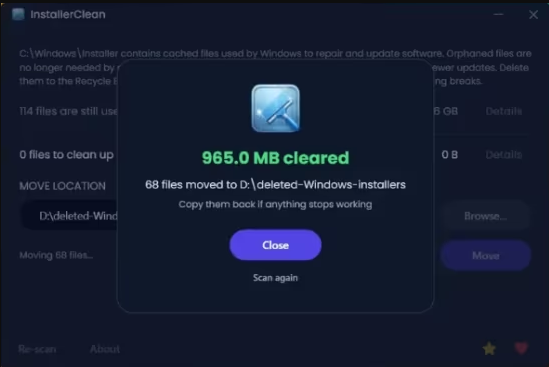
InstallerClean is a small tool made to clean up hidden leftover files that Windows keeps after installing or updating programs.

A simple, focused interface
The UI is very simple, showing a list of installer files with details like their size and whether they can be removed. At the end, it clearly displays how much space can be freed and gives a straightforward prompt after the cleanup is done.

It is designed to be a no-fuss tool: the scan runs automatically on startup, but both Delete and Move require confirmation before anything is changed. You see the count and total size before proceeding, so you have full control.

It double-checks before deleting anything
At this point, you may be wondering if the app is safe and the short answer is yes. After it scans the Windows installer files folder, it checks with the OS to determine what is safe to remove based on the Windows record of installed programs. In fact, the app asks Windows directly through its built-in installer system, not guessing or scanning blindly.

The developer explains that the app is designed to look for two types of junk, which are the orphaned files and the superseded patches. The latter are basically older update files that got replaced by newer ones, so Windows has already moved on but keeps the old files sitting there.

InstallerClean can be used occasionally or when you're re-installing many programs, as those junk files don't gather as often as you think. A completion screen shows exactly what was found and removed so you can review the result.

System Requirements: Windows 11, Windows 10, 8 , 7


DOWNLOAD LINKS:​


Код:
https://rapidgator.net/file/d92b32d539e765900d84450af6a398ef/InstallerClean_1.9.0.rar.html

Код:
https://nitroflare.com/view/112B428409E8011/InstallerClean_1.9.0.rar
 
KS DB Merge Tools for MySQL 1.27.1

d9faa0938501b045d3864f8525fcdfe6.avif


KS DB Merge Tools for MySQL 1.27.1 KS DB Merge Tools for MySQL is an easy to use diff & merge tool for MySQL and MariaDB databases.

Compare both schema and data
Quick filters to show all/new/changed
Merge changes in both directions
Lightweight GUI for Windows, command line for Windows and Linux
Free version with basic features, available for commercial use. No credit card, no signup, no ads, no hidden telemetry.

File size: 11.7 MB


Supported DBMS
MySQL 5.5 .. 9.1
MariaDB 10.2 .. 11.6 Whats New

System Requirements: Windows 7 and later


HOMEPAGE


Код:
https://ksdbmerge.tools/mysql-diff-merge-overview.html


DOWNLOAD

Код:
https://rapidgator.net/file/e3f7a30df4f6cdd1b856e05c1e6db796/Konstantin.Semenenkov.KS.DB.Merge.Tools.for.MySQL.v1.27.1.Incl.Keymaker-CORE..rar.html

Код:
https://nitroflare.com/view/4479F40E1033A46/Konstantin.Semenenkov.KS.DB.Merge.Tools.for.MySQL.v1.27.1.Incl.Keymaker-CORE..rar
 
KS DB Merge Tools for Oracle 1.17.0

6badae96df727e435859cbe8a8c1528c.webp


KS DB Merge Tools for Oracle 1.17.0 If Oracle is your database management tool of choice, then an application such as KS DB Merge Tools for Oracle is surely of great help. This software utility is designed for database comparison and synchronization, allowing you to compare data and schemas inside two Oracle databases and merge any changes that might occur.

To make it easier for you to spot differences, KS DB Merge Tools for Oracle displays data on two panels, each allowing a direct connection to an Oracle database. A few details are required to help you get started: the server's name and the port number, as well as the connection credentials. The connection can be tested to see if everything works as it should.

There are other connection options besides entering the credentials manually: KS DB Merge Tools for Oracle can use connection strings for each database.

File size: 13.9 MB


KS DB Merge Tools for Oracle compares the database schemas and the programming objects. In other words, you can use it to compare tables, columns and constraints, as well as views, procedures and functions in the Oracle databases. Moreover, it can spot differences between the two database schemas and sequences.

Filters can be easily applied to reveal changes since the application was used, whether we are talking about recent changes, new ones or both. Data can be compared per table or per view. KS DB Merge Tools for Oracle is able to spot differences across multiple tables and views. It is possible to merge changes in both directions

It is always easier to compare two databases when you have their contents displayed in front of you, side by side. KS DB Merge Tools for Oracle allows you to closely compare two Oracle databases and merge differences both ways without a lot of hassle. This allows you to keep your Oracle databases up-to-date.

Whats New
Updates: official site does not provide any info about changes in this version

System Requirements
Microsoft Windows 7/8.1/10/11. Windows Server editions with GUI should be supported but were not tested. Windows "S Mode" is not supported.
Microsoft .NET Framework 4.7.2 or higher (most likely already installed on your computer with Windows Update).


HOMEPAGE


Код:
https://ksdbmerge.tools/oracle-diff-merge-overview.html


DOWNLOAD

Код:
https://rapidgator.net/file/3ea0ce1c3d0442a55843034d3ccf956c/Konstantin.Semenenkov.KS.DB.Merge.Tools.for.Oracle.v1.17.0.Incl.Keymaker-CORE.rar.html

Код:
https://nitroflare.com/view/3C585550247BC94/Konstantin.Semenenkov.KS.DB.Merge.Tools.for.Oracle.v1.17.0.Incl.Keymaker-CORE.rar
 
KS DB Merge Tools for PostgreSQL 1.19.0

8b40d9ffd45f0b7e1f3d4b5b0eaa0f61.webp


KS DB Merge Tools for PostgreSQL 1.19.0 Keeping two or more databases in sync might seem like a challenge but a dedicated application such as KS DB Merge Tools for PostgreSQL can be of great help in this case. As its name suggests, it is specifically designed for PostgreSQL databases, allowing you to synchronize and compare both schemas and data.

Side-by-side comparison of two PostgreSQL databases
Smartly enough, the layout of the main GUI is designed to facilitate side-by-side comparison between two databases. You can easily set up new database connections for each of the two panels and KS DB Merge Tools for PostgreSQL connects to PostgreSQL and starts populating the tables with objects, while also displaying totals, new and changed items in the database schema.

File size: 12.2 MB


A data changes summary can be shown for tables and views, and table schemas can be handled as well. KS DB Merge Tools for PostgreSQL displays all the data differences, showing both new and changed items. Moreover, records in tables can be compared and changes can be merged without a lot of hassle.

Compare schemas and data in PostgreSQL databases
In essence, KS DB Merge Tools for PostgreSQL can compare schema and data in two different PostgreSQL databases. It can compare both schemas and programming objects, such as tables, views, procedures, functions and sequences.

Data can be compared to find differences across multiple tables and views. Moreover, you get to apply filters to reveal all the new and changed items and merge the modifications in both directions.

Synchronize PostgreSQL databases without effort
Monitoring and syncing changes in two PostgreSQL databases becomes a matter of a few clicks with a tool such as KS DB Merge Tools for PostgreSQL. Not only that it allows you to view modifications, but it also makes it easier to merge and compare records for a given table. Being able to explore both databases side by side is a plus, turning database syncing into a routine operation.

Whats New

System Requirements
Microsoft Windows 7/8.1/10/11. Windows Server editions with GUI should be supported but were not tested. Windows "S Mode" is not supported.
Microsoft .NET Framework 4.7.2 or higher (most likely already installed on your computer with Windows Update).


HOMEPAGE


Код:
https://ksdbmerge.tools/


DOWNLOAD

Код:
https://rapidgator.net/file/c3c13704e1eb155787cac7968cc1289e/Konstantin.Semenenkov.KS.DB.Merge.Tools.for.PostgreSQL.v1.19.0.Incl.Keymaker-CORE..rar.html

Код:
https://nitroflare.com/view/E6436EA7B014F2C/Konstantin.Semenenkov.KS.DB.Merge.Tools.for.PostgreSQL.v1.19.0.Incl.Keymaker-CORE..rar
 
KS DB Merge Tools for SQLite 1.25.3

87393f67fa0e9594a87b7e1605610c78.webp


KS DB Merge Tools for SQLite 1.25.3 KS DB Merge Tools for SQLite is a software utility that provides a convenient way for you to compare databases and monitor them for changes. Not only that it allows you to explore the content of an SQLite database, but it also helps you identify differences and apply filters to reveal modifications to tables, indexes, triggers and views.

Compare and merge SQLite databases
You can open any two databases in KS DB Merge Tools for SQLite and explore their content side-by-side. The application reveals table definitions, indexes, triggers, views and pragmas for each in a separate panel. Moreover, new application instances can be opened to load new databases.

KS DB Merge Tools for SQLite can compare both database schema and containing data for multiple tables and views. It allows you to check all the modifications that occurred in all the database fields, but you can also configure it to only reveal new elements or new and changed items inside tables and views. In other words, applying filters to see changes or new elements is possible. Changes between databases can be merged to keep them in sync.

File size: 12 MB


Differences between tables are highlighted in KS DB Merge Tools for SQLite. You can compare columns and tables and specify the desired column order. Table definition changes can be synchronized in KS DB Merge Tools for SQLite.

Run SQL queries and export data to Excel
Running SQL queries is a feature of KS DB Merge Tools for SQLite. It is worth mentioning that KS DB Merge Tools for SQLite can avoid key and data column mapping, but it also features options to allow basic or customized key column mapping.

Not only that KS DB Merge Tools for SQLite allows database comparison and viewing, but it also allows you to export data to Microsoft Excel. To put it another way, it can generate Excel reports for object lists, data diff and query result diff.

Compare, sync and merge SQLite databases
KS DB Merge Tools for SQLite comes in handy to those whose database solution of choice is SQLite. It provides a simple, yet handy database comparison, monitoring and merging tool that covers most of the needs when it comes to syncing and merging database changes.

Whats New

System Requirements
Microsoft Windows 7/8.1/10/11. Windows Server editions with GUI should be supported but were not tested. Windows "S Mode" is not supported.
Microsoft .NET Framework 4.7.2 or higher (most likely already installed on your computer with Windows Update).


HOMEPAGE


Код:
https://ksdbmerge.tools/


DOWNLOAD

Код:
https://rapidgator.net/file/d4d1f7bea0bc19a9d1d3229ddf7ed758/Konstantin.Semenenkov.KS.DB.Merge.Tools.for.SQLite.v1.25.3.Incl.Keymaker-CORE.rar.html

Код:
https://nitroflare.com/view/39574B7E07FD6DD/Konstantin.Semenenkov.KS.DB.Merge.Tools.for.SQLite.v1.25.3.Incl.Keymaker-CORE.rar
 
MediaHuman YouTube Downloader 3.9.21 (1206) Multilingual (x64)

cca802926ab5a58203cecc4c46adc273.webp

MediaHuman YouTube Downloader 3.9.21 (1206) Multilingual (x64) | 89.2 Mb
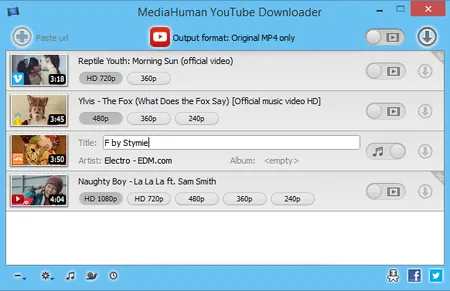
MediaHuman YouTube Downloader is a handy application for those who found a favorite music video or trailer of a new movie and wants to keep it on your computer for viewing offline. Or you need to download a video lesson/tutorial. Our video downloader is an ideal solution for such kind of tasks.


Simultaneous downloads
- Supports Ultra High resolutions up to 4K
- Download whole playlists and channels
- YouTube, Vimeo, Dailymotion, Soundcloud
- Extract audio track and save it as MP3
- iTunes support
- VEVO support
System Requirements:
Windows 11, Windows 10, Windows 8, Windows 7, Windows Vista, Windows 2003, Windows XP for PC systems (64-bit)
About 70 Mb of free hard drive space
Home Page-
Код:
https://www.mediahuman.com/

Rapidgator
Код:
https://rapidgator.net/file/838389e4aa009de9c713c6bbd64135cf/l8n67.MediaHuman.YouTube.Downloader.3.9.21.1206.Multilingual.x64.rar.html

Код:
https://nitroflare.com/view/E12D43AF2700761/l8n67.MediaHuman.YouTube.Downloader.3.9.21.1206.Multilingual.x64.rar
 
NirLauncher Package 1.30.24

73ae62dcde80f4bd96a63e8b361cbbc6.webp


NirLauncher Package 1.30.24 | Size: 39.77 MB
Language: English


NirLauncher is a package of more than 180 portable freeware utilities for Windows, all of them developed for NirSoft Web site during the last few years.

NirLauncher Features
NirLauncher can be used from USB flash drive without need of any installation.
NirLauncher and all the utilities in the package are completely freeware, without any Spyware/Adware/Malware. This package doesn't contain any 3-party software, toolbars, Web browser plugins, or other unwanted surprises. It will not install any software on your system and it will not change your Web browser homepage or other settings on your system.
NirLauncher package includes variety of tools that you may need for your daily computer use, including utilities to recover lost passwords, to monitor your network, to view and extract cookies, cache, and other information stored by your Web browser, to search files in your system, and more...

For every utility in the package, you can easily run it, view the help file, or jump to the Web page of the utility.
When using it from USB flash drive, the configuration of every utility is saved into .cfg file on the flash drive.
On x64 systems, NirLauncher automatically run the x64 version of the utility, when there is a separated x64 version.
NirLauncher also allows to add more software packages in additional to the main NirSoft package.
NirLauncher allows you generate plugin files for BartPE (Launcher -> Generate BartPE Plugin Files), so you can easily use the utilities of NirSoft from a bootable live windows CD.

System Requirements
NirLauncher works on any version of Windows, starting from Windows 2000 and up to Windows 8. NirLauncher also works on x64 systems. Some the NirSoft utilities have a separated version for x64, and NirLauncher automatically run them when you're in x64 system.

The password for extracting the files is nirsoft9876$

System Requirements: Windows 11, Windows 10, 8 , 7


DOWNLOAD LINKS:


Код:
https://rapidgator.net/file/993f0c8e9ee0c323747ecc94e41351d3/NirLauncher_Package_1.30.24.zip.html

Код:
https://nitroflare.com/view/5C55869AA0108C0/NirLauncher_Package_1.30.24.zip
 
Nik Collection 9.0.0 Multilingual macOS

2b622df397c60fad2aa2b13c8ea9a370.webp

Nik Collection 9.0.0 Multilingual macOS | 3.5 GB
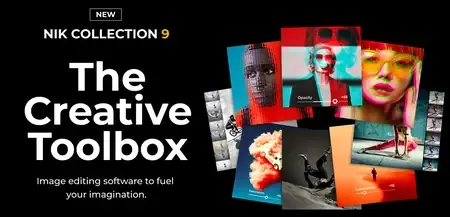
Nik Collection by DxO is a powerful suite of professional photo-editing plugins designed for photographers, creators, and digital artists. It combines advanced color grading, black-and-white conversion, selective adjustments, noise reduction, sharpening, HDR processing, and creative effects into one seamless workflow. Compatible with Adobe Photoshop, Lightroom Classic, Affinity Photo, and DxO PhotoLab, Nik Collection helps users achieve stunning results faster while maintaining full creative control.


Key Features:
- Advanced Creative Effects - Access hundreds of professional filters and presets for cinematic looks, film simulations, artistic styles, and color enhancement.
- AI-Powered Masking & Selections - Create precise local adjustments quickly using intelligent masking tools and depth-based selections.
- Industry-Leading Black & White Editing - Transform photos with the renowned Silver Efex plugin, trusted by photographers worldwide for exceptional monochrome conversions.
- Powerful Color Grading Tools - Fine-tune shadows, midtones, highlights, hue, saturation, and luminance with intuitive controls for professional color workflows.
- Selective Adjustments with U Point Technology - Edit specific areas of an image without complicated masks or layers.
- Noise Reduction & Sharpening - Improve image clarity and detail with dedicated tools for noise removal and output sharpening.
- Seamless Workflow Integration - Works as both a standalone application and a plugin for major photo-editing platforms
System Requirements:
* Apple M1
* 8 GB RAM
* 16 GB available disk space
* 1280 x 768 display
* macOS 15.7 (Sequoia)
Home Page -
Код:
https://nikcollection.dxo.com

Rapidgator
Код:
https://rapidgator.net/file/4f215d5a68fcdb8a66e70a55004af468/9x8ab.Nik.Collection.9.0.0.macOS.rar.html

Код:
https://nitroflare.com/view/4314F7E288949FC/9x8ab.Nik.Collection.9.0.0.macOS.rar
 
NuEdge Development Sonic Charge Synplant v2.0.2 (Win/macOS)

8a97ca65113f32ece83647376c744c82.webp

NuEdge Development Sonic Charge Synplant v2.0.2 (Win/macOS) | 61.1/47.3 MB
Synplant is a software synthesizer with a genetic approach to sound creation. Instead of creating patches the conventional way by turning dials and knobs, Synplant lets you explore a world of organic sounds by planting seeds that grow into synth patches. The purpose of this product is to move focus away from the sometimes intricate and difficult process of sound synthesis and instead let you develop sounds by simply using your ears.


You will find that creating synth patches with Synplant will be as easy as listening and deciding what you like and then having the sounds evolve in the directions you desire. Although Synplant is exceedingly easy to use, whatever you do, do not let its relative simplicity fool you. Beneath its straightforward and playful interface you will find a versatile synthesizer of the utmost quality with lots of character. Also, once you are ready to get your hands dirty and dig deeper into the anatomy of Synplant you will have the option to crack open your sound seeds and modify their underlying genetic code.
Genopatch Technology
Genopatch crafts synth patches from audio recordings, using AI to find optimal synth settings based on your source sample. As the strands in the user interface sprout and grow, they generate patches that increasingly match the chosen audio.
Sometimes, you will get a perfect match; other times, something new and unexpected. This balance of precision and unpredictability makes Genopatch a unique tool for sound exploration.
Genopatch runs entirely on your local computer, requiring no internet connection.
Digging into the Genome
Whether you begin from a random seed, an existing patch, or a creation from Genopatch, Synplant offers many different ways to sculpt your sound. When you are ready to delve further into the core of your patch, you can crack open your sound seeds and modify their underlying genetic code.
The new intuitive DNA Editor in Synplant 2 offers a structured layout with graphical representations for settings like envelopes, oscillator types, and filters.
Performance Features
Synplant makes it easy to create organic, multi-faceted synth patches by letting you play variations of a sound using different MIDI notes and velocities. It also offers a layer mode for creating rich, multi-dimensional sounds. There are polyphonic and monophonic play modes with portamento, tempo sync and more, further contributing to deep and versatile synth patches that are a joy to play.
Making your own sounds in Synplant is easy as a breeze, but it also comes bundled with hundreds of well-designed patches, and more are available to download when you purchase.
Home Page -
Код:
https://soniccharge.com/synplant

Rapidgator
Код:
https://rapidgator.net/file/189906296135e19157d1e9bb30599198/u2ovb.SonicCharge.Synplant.v2.0.2.rar.html
https://rapidgator.net/file/d3bf0d0223b1be8d7279d36770815c76/u2ovb.Synplant202mac.rar.html

Код:
https://nitroflare.com/view/53A43D4905D32DF/u2ovb.SonicCharge.Synplant.v2.0.2.rar
https://nitroflare.com/view/2A3919A1C9D17B7/u2ovb.Synplant202mac.rar
 
O&O SafeErase Professional 21.3.26141 (x64)

74a53e4fa90846cede06b05aa3191850.webp

O&O SafeErase Professional 21.3.26141 (x64) | 45.3 Mb
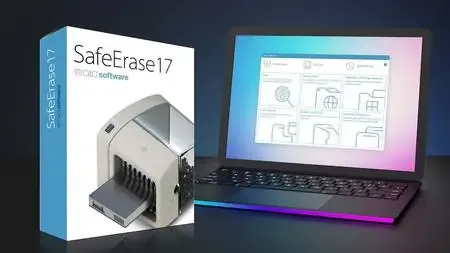
Your personal photos and confidential documents can easily fall into the wrong hands when you sell, give away or dispose of your old PC or hard drives. Identity theft is now a widespread security threat. This is because clicking on "Delete" does not mean your files are permanently deleted. Even formatting the hard disk is not enough to permanently delete data. O&O SafeErase permanently deletes your confidential files using recognized methods so that a recovery is never possible, not even when using the best file recovery software.


There is a good chance your personal photos or business data will easily fall into the wrong hands whenever you want to sell, give away or dispose of your old computer. This is because clicking on "Delete" doesn't automatically mean your data is irrevocably destroyed. Even formatting the hard disk is not enough to completely destroy your data. O&O SafeErase allows you to permanently delete your data using recognized methods so that a recovery is never possible, not even when using specialized software.
New and enhanced functions
Thanks to extensive optimization of the entire program, O&O SafeErase now starts considerably faster than any previous version. Information about drives is accessed as soon as the system starts and this accelerates booting significantly. In addition to many minor enhancements, O&O SafeErase includes an analytical tool that scans your computer for temporary and unsafely deleted files. With just a few clicks, you can clean your computer so that unauthorized parties never have a chance to spy out old files for possible misuse. SSDs can also be detected, and deletions made on them will be done sparing resources.
Internet security
When surfing the Internet, your browser usually stores Internet files unnoticed on your hard drive. These files can provide information about websites you've visited or the passwords you've entered. It makes no difference whether it involves cookies, data entered on forms, or browsing history - O&O SafeErase lists all the information saved for each browser you use, and you can then delete them individually or together. Once deleted, nobody will be able to detect your Internet traces and your online accounts are protected from data thieves or hackers. Version 17 supports Microsoft Edge, the successor to Internet Explorer, as well as Internet Explorer, Google Chrome and Firefox.
Safe erase your entire computer
Deleting the entire computer allows you to permanently delete all confidential files before you dispose of, sell, or give your computer away. All files, settings, applications and the operating system itself are deleted so that a file recovery is impossible. You can be sure that nobody will ever restore your confidential information and misuse it, protecting yourself against identity theft. With O&O SafeErase you can even delete your entire computer without a start medium (e.g. a Boot CD).
Six deletion methods for maximum security
O&O SafeErase allows you to choose from among six different deletion methods. The methods of deletion differ in the number of runs and the type of overwriting process. These methods ensure maximum security, whatever your requirements. In addition to standardized deletion methods of the U.S. Department of Defense (DoD) and the German Federal Office for Information Security (BSI) you can also select a complex mathematical method (the Gutmann method), which complies with the highest security levels. In this scientifically approved method of data deletion, corresponding areas of the hard disk are overwritten 35 times using precisely defined rules along with fixed and random values. In this way, O&O SafeErase exceeds even the requirements of the DoD and the BSI. Quick deletion can also be made by just overwriting data with zeros.
SolidErase
As of version 12.3, O&O SafeErase includes the feature SolidErase, which was developed especially for the deletion of SSDs. SolidErase uses resources sparingly and thoroughly so that the data is not recoverable and the SSD is exposed to the least possible strain.
Product features:
"Instant Erase": Selecting files over the context menu prompts a mini-dialog from where deletion can immediately take place
Permanent deletion of files, folders, Memory cards and USB sticks
Delete an entire computer, no boot medium necessary
Delete internet traces and temporary program files
Six methods to permanently delete confidential data
Detailed reports as proof of deletion
Analysis tool to search for unsafe deleted files
Adapted deletion method for SSDs (Solid State Disks) with SolidErase
Enhanced report and activity management
.Net Framework 4.7.1
Operating System:Windows 11, 10, 8.1, 8, 64-bit versions
Home Page -
Код:
https://www.oo-software.com/

Rapidgator
Код:
https://rapidgator.net/file/bc62e307bdd542ca064d302abd200a91/0exwc.OO.SafeErase.Professional.21.3.26141.rar.html

Код:
https://nitroflare.com/view/DA2F86FB8DE22BB/0exwc.OO.SafeErase.Professional.21.3.26141.rar
 
O&O SafeErase Professional 21.3.26141 Multilingual

745ee468e17728374f78127fd256b06b.avif


O&O SafeErase Professional 21.3.26141 Multilingual The complete solution for your data protection! Deleting files, directories, drives or the entire PC - no problem with O&O SafeErase! Your internet traces can also be deleted quickly and securely at the touch of a button. At some point, every user of a Windows PC comes to the point where a hard drive or SSD needs to be deleted or certain documents need to be securely destroyed. If the computer is sold or given away, personal photos or business data can easily fall into the wrong hands. Because deleting it under Windows does not mean that the data is permanently removed. O&O SafeErase allows you to securely delete and overwrite your data using recognized deletion procedures so that restoration is no longer possible.

Windows x64 | File size: 67.42 MB


Avoid the risks
Data misuse can have serious consequences, from identity theft to financial loss. Simply "deleting" files is not enough as they can often be recovered.
O&O SafeErase ensures that deleted data is irretrievably removed using advanced deletion algorithms that meet the strictest security standards.

Unique Fortress Mode
With the Fortress Mode from O&O SafeErase 21, you can now destroy your sensitive data even more efficiently and securely. To do this, your PC is placed in a locked mode in which no other application can access your data. This not only makes the deletion process faster, but also safer, as background processes cannot influence the deletion process or even write new sensitive data during the process.

Surf the Internet without a trace
As you surf the Internet, your browser usually silently stores data about your history and actions. This data can provide information about websites visited and even access data. O&O SafeErase supports current browsers and allows you to safely delete their data and therefore your traces.

Delete the entire PC
Wiping the entire computer allows you to securely delete all of your data before selling, giving away, or disposing of the computer. All data, settings, applications and even the operating system are securely deleted so that recovery is not possible. O&O SafeErase does not require any additional hardware and is ready to use straight away.

Six deletion methods for maximum security
O&O SafeErase offers you the choice between six different deletion methods. These differ in their speed and thoroughness. In addition to standardized deletion procedures from the U.S. Departments of Defense (DoD) and the Federal Office for Information Security (BSI), you can also choose a complex mathematical method (Gutmann method) that meets the highest security requirements. This means that O&O SafeErase even exceeds the current requirements of the BSI and DoD.

Product details
- Secure deletion of data, memory cards and data carriers (hard drives and SSDs)
- Protect your privacy by securely deleting internet traces
- Fortress mode for secure and isolated deletion of sensitive data
- Erase entire PC with TotalErase - without additional hardware
- Security check for automatic detection of insecurely deleted data
- Six extinguishing methods according to international industry standards
- Advanced erasure method for SSDs (Solid State Disks) with SolidErase
- Creation of reports as proof of deletion
- Seamless integration into Windows Explorer (InstantErase)
- Support for Microsoft Edge, Google Chrome and Mozilla Firefox as well as Internet Explorer

What's new

System Requirements: Windows 11, 10, 64-bit versions


HOMEPAGE


Код:
https://www.oo-software.com/en/


DOWNLOAD

Код:
https://rapidgator.net/file/f3ad315bb94d930a328bffe2893335b7/OO.SafeErase.Professional.21.3.26141.rar.html

Код:
https://nitroflare.com/view/D219DDA0B606ECF/OO.SafeErase.Professional.21.3.26141.rar
 
Operant Peak Spectroscopy 4.00.556

93074e8f0151d14acb175e6c79d2ea40.webp


Operant Peak Spectroscopy 4.00.556 Power Tools for Optical Spectroscopy since 2006. Mid IR, Near IR, FTIR, Raman, fluorescence, LIBS, XRF, UV-VIS, Raman and EELS.

Peak can read your Data
Peak can read data from over 70 spectral file types.

Spectral File Conversions
Batch-convert files from closed proprietary formats.

21 CFR Part 11
Peak is 21 CFR Part 11 Compliant

See who's using Peak
Peak is used world-wide in industry, education, government and military

Library Search
Peak has complete and powerful spectral library search

File size: 99.5 MB


Turn Data Into Information
Smoothing, Baseline Correction, Line Out, Normalization, Subtraction and more.

Whats New
Updates: official site does not provide any info about changes in this version

System Requirements: Windows XP and later


HOMEPAGE


Код:
https://www.peakspectroscopy.com/


DOWNLOAD

Код:
https://rapidgator.net/file/2f875901f78fb06d7ef3d5d338dadf9d/Spectroscopy4..rar.html

Код:
https://nitroflare.com/view/687E50CC7AE72C8/Spectroscopy4..rar
 
Pazu All-In-One Music Converter 3.1.2 Multilingual

879881360b4966af26f18d7b4d03c000.webp


Pazu All-In-One Music Converter 3.1.2 Multilingual Fast Links | 247 MB


Pazu All-In-One Music Converter 3.1.2 is a powerful and versatile music conversion tool designed to download and convert music from multiple streaming platforms into popular audio formats. It supports services such as Apple Music, Spotify, Amazon Music, YouTube Music, TIDAL, Deezer, and Pandora, allowing users to save tracks locally in high-quality audio formats.

This all-in-one solution is ideal for users who want to enjoy offline playback of their favorite music without restrictions, while maintaining original sound quality.

Overview

Pazu All-In-One Music Converter for Windows provides an easy and efficient way to download and convert streaming music into widely supported formats such as MP3, M4A, AAC, FLAC, WAV, and AIFF. The software is designed with simplicity in mind, making it accessible for both beginners and advanced users.

With its multi-platform support and high-speed conversion engine, it ensures a smooth and reliable music downloading experience.


Key Features of Pazu All-In-One Music Converter

  • Download music from Apple Music, Spotify, Amazon Music, YouTube Music, TIDAL, Deezer, and Pandora.
  • Convert songs to MP3, M4A, AAC, FLAC, WAV, and AIFF formats.
  • Preserve original audio quality during conversion.
  • Batch download and convert multiple tracks simultaneously.
  • Retain ID3 tags including artist, album, and title information.
  • High-speed conversion engine for efficient processing.
  • User-friendly interface suitable for all experience levels.
  • Offline playback support for downloaded music.

Supported Music Platforms

  • Apple Music
  • Spotify
  • Amazon Music
  • YouTube Music
  • TIDAL
  • Deezer
  • Pandora

Supported Output Formats

  • MP3
  • M4A
  • AAC
  • FLAC
  • WAV
  • AIFF

Benefits of Using Pazu All-In-One Music Converter

  • Enjoy offline listening from multiple streaming services.
  • Maintain original audio quality.
  • Save music in universal formats compatible with all devices.
  • Manage large playlists efficiently with batch processing.
  • Keep full metadata for organized music libraries.

System Requirements

  • Windows 10 or Windows 11 (64-bit recommended)
  • Stable internet connection for streaming access
  • Minimum 4 GB RAM recommended
  • Sufficient disk space for downloaded audio files

Official Website

Код:
https://www.pazusoft.com/

Conclusion

Pazu All-In-One Music Converter 3.1.2 is an all-in-one solution for downloading and converting streaming music into high-quality audio files. With support for multiple platforms and formats, it offers flexibility, speed, and convenience for building an offline music library.


Rapidgator
Код:
https://rapidgator.net/file/0bae54463e247c4853a51cf8d6cb47a6/u1vqj.Pazu_All-In-One_Music_Converter_3.1.2.rar.html

Код:
https://nitroflare.com/view/9336D49BF9EC0DB/u1vqj.Pazu_All-In-One_Music_Converter_3.1.2.rar
 
Sandboxie 5.72.8 (x64) / plus v1.17.8 Multilingual

f9d9ba7146f29dbcceeb850074d4572c.webp


Sandboxie 5.72.8 (x64) / plus v1.17.8 Multilingual | Size: 26.44 MB
Language: English


When you browse the Web, changes occur to your computer system. Some of these might be harmful, like the unsolicited installation of malware. When you use Sandboxie to protect your browsing session, it catches all these changes just as the browser is about to apply them into your computer system. Sandboxie does record these changes on behalf of the browser, but it records them in a special isolated folder, called the sandbox.

Thus, with Sandboxie, you can browse the Web securely while still keeping all your browser's functionality for active and dynamic content, such as jаvascript and ActiveX. All undesired side effects can be easily undone.

Stay safe on the Internet with Sandboxie
- Run programs in a sandbox to prevent rogue software, unwanted programs, spyware, viruses, worms, and other malware from making permanent changes to your machine
- Protect yourself or your company from a wide variety of attacks - ranging from botnets to banking Trojans and ransomware to run of the mill viruses
- Configure your own sandboxes to meet your specific needs
- Trial the Sandboxie Free version, buy the Sandboxie Pro version or upgrade to an enterprise grade product with Invincea FreeSpace™ to take advantage of invisible protection, central management, behavioral based malware detection & reporting, malware forensics capture, threat intelligence feeds

Trusted for more than 10 years by hundreds of thousands of individuals and more than 1,100 organizations around the globe.
- Secure Web Browsing: Run your web browser in Sandboxie - preventing any malicious software downloaded by the browser from harming your machine
- Enhanced Privacy: Keep browsing history, cookies and cached temporary files in the sandbox - not on your machine
- Safe Social Networking: Click on Twitter links and Facebook updates without the fear of social networking worms infecting your machine
- Secure e-mail: Viruses and other malicious software that might be hiding in your e-mail attachments can't break out of the sandbox and infect your machine
- Keep your system running smoothly: Prevent wear-and-tear in Windows by installing software in the isolated container

HOMEPAGE:
Код:
https://www.sandboxie.com


DOWNLOAD LINKS:


Код:
https://rapidgator.net/file/8bd6b90c2b3df708436339d274dcce8b/Sandboxie_5.72.8_x64_plus_v1.17.8_Multilingual.rar.html

Код:
https://nitroflare.com/view/2CC0662188E1CCE/Sandboxie_5.72.8_x64_plus_v1.17.8_Multilingual.rar
 
Назад
Сверху