• Здравствуйте. Сайт заработал в архивном режиме форум www.old.nado.in

Anthony's Software !!!

DiskInternals Linux Reader 4.6.1.0

68538961-2de3-4bdc-84fb-b88ceec75d16.png

File Size : 39 Mb

DiskInternals Linux Reader is a simple yet powerful application that provides users with the possibility to explore Ext2 and Ext3 Linux partitions directly from their Windows computers.​

A Windows Explorer-like interface

The program comes with a GUI (Graphical User Interface) that resembles a lot with that of the Windows Explorer. Thus, users can browse their Linux partitions from a familiar interface, which makes it easier for them to find the files they are interested in.

When launching the program, users can view all of the hard disks and partitions on the system, regardless of whether they have been created under Windows or Linux.

Open partitions and create partition images

With the help of this application, users can open any of the partitions on their system and can view and extract the files saved there. Moreover, the tool allows them to write data to these partitions without affecting their integrity.

The application includes support for creating images of any of the partitions discovered on the installed hard disks. Moreover, it can be used to mount an existing image and to access its contents.

Hex preview and logging

The tool has been packed with Hex preview capabilities, accessible with a simple right-click on the target partition. It can also be used to launch the properties window of the selected item.

All of the operations performed with the help of this program are logged, which means that users can review information on them at a later date. Thus, they can stay informed on what changes were made to the partition and on the successful processes.

A fast utility

All in all, DiskInternals Linux Reader is an easy-to-use, snappy program for accessing Linux partitions under Windows. It allows users to extract files from these partitions, to write content to them, and to create images of any partition on the system.

Updates: official site does not provide any info about changes in this version


DOWNLOAD
rapidgator
Код:
https://rapidgator.net/file/2d248dbaca67f8fb1366eb034f613b39/Linux_Reader_(1).sanet.st.exe
 
DiskInternals Linux Recovery 6.7.1.0

e349945b-3b0a-4736-9d01-a4644e1b3315.png

File Size : 33.7 Mb

DiskInternals Linux Recovery is a handy no-cost utility that runs under any version of Windows and designed to recover the erased or damaged information that is kept on Ext2/Ext3 partitions.​

Linux Recovery might come in handy on a number of occasions when due to the unforeseen contingencies there was a loss of important data stored on Ext2/Ext3 disks.

Linux Recovery can recover both the files you just accidentally deleted and the files which have been erased long ago. It's also capable of restoring corrupted files and can read and recover the information located on an inaccessible drive. The files you restore can be saved on any (including network) disk, which is visible to the host operating system.

The utility also allows you to repair a corrupt or damaged partition table and attempt to restore a disk after a serious crash, so you'll have a chance to repair a serious malfunction right away.

In case you noticed that you lost a piece of valuable information only after you formatted a partition, DiskInternals Linux Recovery can unformat the disk and it'll be up and running again.

Linux Recovery can create a virtual partition and mount an image so it can be processed just like any another regular disk.

Linux Recovery is easy-to-use as its interface resembles the Explorer menu. The recovery process is simple and convenient and comes through a built in wizard so you don't have to be an advanced user to handle with the utility just follow the provided options.

Linux Recovery serves well to save your deleted or damaged valuable data and comes with a number of useful features. It is both handy and absolutely free. The program will benefit anyone who wants to recover some data from Ext2/Ext3 partitions.

Updates: official site does not provide any info about changes in this version


DOWNLOAD
rapidgator
Код:
https://rapidgator.net/file/6cc6b2ca011ed0e5ecb173e50429db20/Linux_Recovery.sanet.st.exe
 
DiskInternals Partition Recovery 8.0.1.0

cfc89188-9724-4d8a-b344-71929d84534d.png

File size: 63.6 MB

DiskInternals Partition Recovery is an advanced software tool, which is intended for all users, who need to recover some data or lost partitions.​

You deleted a file or your boot record, master boot record or partitions are damaged? You are at a loss for solutions here? This program will be a magic wand to make the whole situation go your way.

Native RAID and Dynamic Disk Support

Virtual Disk Images (VMware, VirtualBox, Microsoft VirtualPC, Parallels)

Forensic Disk Images (EnCase, ProDiscover)

Boot CD

FTP Export

Recovered files can be burned to CD or DVD!

Preview recoverable files before purchasing the product

Recover partitions and deleted files remotely over the network

Easy Recovery Wizard

Supported file systems: NTFS, NTFS 4, NTFS 5

Supported file systems: FAT12, FAT16, FAT32, VFAT

Recovered files can be saved on any (including network) disks visible to the host operating system

Creates recovery snapshot files for logical drives. Such files can be processed like regular disks

Creates Virtual partitions. Such partitions can be processed like regular disks


DOWNLOAD
rapidgator
Код:
https://rapidgator.net/file/36b6d1d50e4d0e2a924d29f131151644/Sanet.st.DiskInternals_Partition_Recovery_8.0.1.0.rar.html
 
DiskInternals Uneraser 8.7.1.0 Multilingual

8e8b3755-5e92-4eb0-ba65-80e2a6dcc37e.png

File size: 62.6 MB

Recovering deleted files on an SSD or hard drive can range from simply pulling them back from the Recycle Bin to running recovery software.​

For the most part, you're going to be looking at a relatively simple process with modern-day recovery packs. It's possible to recover deleted files from a failed SSD or hard drive. The process has been simplified with file recovery software. Since powerful recovery software allows for recovering deleted files from both SSDs and hard drives under the same package, data recovery has been made easier.

Standard Windows Explorer interface, Drag and Drop support.

Supported file systems: FAT12, FAT16, FAT32, NTFS (NT 4), NTFS5 (2000, XP).

Supported hidden file systems: Hidden FAT12, Hidden FAT16, Hidden FAT32, Hidden NTFS

Access to any hard disk partitions under any OS. (It is possible to recover files on NTFS under Win9x).

Recovers compressed files (NTFS, NTFS5).

Recovers encrypted files (NTFS5).

Ignores file access rights (NTFS)

Recognizes localized names.

Long filenames support (FAT12,FAT16,FAT32)

Saves folders with subfolders

Several ways to save a deleted file (FAT12,FAT16,FAT32)

Correctly recovers files deleted in Windows NT, 2000, XP (FAT32)

Original algorithm for recovering deleted folders in Windows NT, 2000, XP (FAT32)

Recovered files can be saved on any (including network) disks visible to the host operating system.

Creates image files for entire hard drives, logical drives, or their part. Such image files can be processed like regular disks.


DOWNLOAD
rapidgator
Код:
https://rapidgator.net/file/69fecd54ad0863fcfeeeda5256d8fafb/Sanet.st.DiskInternals_Uneraser_8.7.1.0_Multilingual.rar.html
 
DiskInternals Video Recovery 7.7.1.0

280d8e1e-9df2-4aca-b489-398fcc146f02.png

File size: 59.4 MB

DiskInternals Video Recovery is not just a video recovery tool, but also the ultimate solution to all your data recovery problems.​

Lost pictures, corrupted videos, music, documents and deleted files - DiskInternals software can recover it all.

Can preview and recover AVI, WMV, MPEG, MPG, asf, mp1, m1v, mp2, m2v, m2a, vob, dat, mv, mov and other movies.

Can preview and recover RAW images:

CRW - Canon Digital Camera Raw Image Format.

CR2 - Canon Digital Camera Raw Image Format version 2.0.

NEF - Nikon Digital SLR Camera Raw Image File.

PEF - Pentax Raw Image Format

RAF - Fuji CCD-RAW Graphic File.

X3F - Sigma Camera RAW Picture File.

BAY - Kodak/Roper Bayer Picture Sequence.

ORF - Descent 3 Outrage Room Format.

MRW - Minolta Diamage Raw Image File.

RAW - Image Alchemy HSI Temporary Raw Bitmap

SRF - Sony DSC-F828 Raw Image File.

ARW - Sony Raw Image File.

Other RAW images

Works under Microsoft Windows 95, 98, ME, NT, 2000, XP, 2003 Server, Vista.

Supported file systems: FAT12, FAT16, FAT32, NTFS (NT 4), NTFS5 (2000, XP), UDF, ISO9660, EXT2/3, HPFS.

Recovered files can be saved on any (including network) disks visible to the host operating system.

Recovered files can be burned to CD or DVD!

Creates recovery snapshot files for logical drives. Such files can be processed like regular disks.

Recover Videos deleted by accident

Recover Videos from the erased or formatted media

Preview recoverable Videos before purchasing the program

Restore Video deleted from digital cameras.

Undelete Video deleted from the Recycle Bin.

Recover Movies deleted from digital cameras.

Hard Drive

Digital camera

Floppy disk

Zip Disk

Jaz Disk

Smart Media Card

Sony Memory Stick

Compact Flash card

MicroDrive

Secure Digital Cards

xD Picture Card

Flash Card

PC Card

Muldia Card

Any USB disk

and many others


DOWNLOAD
rapidgator
Код:
https://rapidgator.net/file/043f7364212059ce19a72f92c6a148cf/Sanet.st.DiskInternals_Video_Recovery_7.7.1.0_Multilingual.rar.html
 
DiskInternals Word Recovery 5.6.1.0

e5da9659-0938-4a42-b5f1-37ad417bde66.png

File size: 58.5 MB

DiskInternals Word Recovery provides the best data recovery, offering unprecedented efficiency and dealing specifically with Microsoft Word documents.​

It scans the file system and learns about the files that were deleted, just as the free undelete tools. Then, it scans the hard drive directly to locate Microsoft Word documents that are not shown in the file system. It uses a list of file signatures such as .DOCX, .DOC and .RTF to detect the bning and end of Microsoft Word documents. This method works even if your hard drive is half dead!

Installed Microsoft Office isn't necessary.

Installed StartOffice or OpenOffice isn't necessary.

Can recover documets created with Microsoft Word 95, 97, 2000, XP, 2003, 2007

Can recover documets created with StartOffice, OpenOffice 1.x and OpenOffice 2.x

Can Preview and recover

DOCX - Microsoft Word 2007 Document

DOCM - Microsoft Word 2007 Document

DOC - Microsoft Word Document

RTF - Rich Text files

DOT - Microsoft Word Document

SDW - StarOffice Word

ODT - OpenOffice 2 Text

Easy Recovery Wizard.

Display Summary Information

"On the fly" filters

Power Search support

Works under Microsoft Windows 95, 98, ME, NT, 2000, XP, 2003 Server, Vista.

Supported file systems: FAT12, FAT16, FAT32, NTFS (NT 4), NTFS5 (2000, XP), ISO9660, UDF, Linux Ext2, Ext3, Raiser.

Recovered files can be saved on any (including network) disks visible to the host operating system.

Recovered files can be burned to CD or DVD!

Restore files deleted from any device.

Preview recoverable documents before purchasing the program

Recover documents deleted by accident

Recover unsaved documents

Recover documents from the erased or formatted media

Undelete files deleted from the Recycle Bin.

From various storage media including:

Hard Drive

CD

DVD

iPods

Mp3 Players

Digital camera

Floppy disk

Zip Disk

Jaz Disk

Smart Media Card

Sony Memory Stick

Compact Flash card

MicroDrive

Secure Digital Cards

xD Picture Card

Flash Card

PC Card

Muldia Card

Any USB disk

and many others


DOWNLOAD
rapidgator
Код:
https://rapidgator.net/file/b14be2674d84f5c3f5c484da4aa99d24/Sanet.st.DiskInternals_Word_Recovery_5.6.1.0.rar.html
 
ES-Computing EditPlus 5.3 Build 3229

b106e616-6d39-45d4-83f1-fb570479d902.png

File size: 7.6 MB

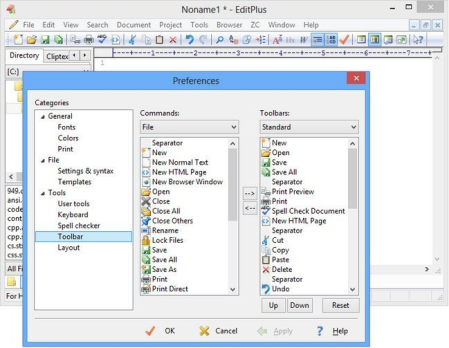
EditPlus is a text editor, HTML editor and programmers editor for Windows.​

While it can serve as a good Notepad replacement, it also offers many powerful features for Web page authors and programmers. EditPlus supports powerful and customizable syntax highlighting for HTML, CSS, PHP, ASP, Perl, C/C++, Java, javascript and VBScript by default. Also, you can create your own syntax file to support other programming languages. So, it supports user-defined tools, help files and keystroke recording files. The output of tool execution can be captured in the Output Window, so that you can double-click the error line to automatically load the file and locate the cursor to that line.

* Multiple document interface

* Overlappable windows

* Tabbed document interface

* Window splitting

* Spell checking

* Regex-based find & replace

* Encoding conversion

* Newline conversion

* Syntax highlighting

* Multiple undo/redo

* Rectangular block selection

* Bracket matching

* Auto indentation

* Auto completion

* Code folding (Text folding)

* Compiler integration

* Shell integration

* Macro (Keystroke recording)

* Multi-line regex support

* Integrated web browser

* Dynamically customizable key bindings

* FTP

* sftp (SSH)

* ASCII

* UTF-8

* UTF-16 (Unicode, little/big endian)

* Any encoding supported by the OS

* DOS (CR/LF)

* Unix (LF)

* Mac (CR)


DOWNLOAD
rapidgator
Код:
https://rapidgator.net/file/a696c6138729132cb39e7a6c48f54ec0/EditPlus.5.3.Build.3229.sanet.st.rar
 
Microsoft Visual C++ 2015-2019 Redistributable 14.27.29009.1

ed2af2c0-e915-4a9c-9247-1884c7c1b50d.png

File Size : 28.1 Mb

Microsoft Visual C++ Redistributable Package contains the run- components of Visual C++ Libraries needed for running applications on a PC without Visual C++ installed.​

Most people will have this installed at some point being that it is pretty common in many applications and games explaining why it eventually shows up in most people's programs or apps. In other words, if you don't have a program that needs it, then there is no reason to this.

Microsoft Visual C++ Redistributable Package comes as a self-installing executable. the 32-Bit or 64-Bit version, double click and follow the prompts.


DOWNLOAD
rapidgator
Код:
https://rapidgator.net/file/114c42dac2016056df3c54a96d97cdf7/_Microsoft_Visual.sanet.st.rar
 
PDF Shaper Professional / Premium 10.2 Multilingual

9fbabddd-eb39-476e-8c9e-a48c6dcc954d.png

File Size: 25.1 MB

PDF Shaper - a program to convert PDF-files to different formats.​

Unlike similar programs, this product has a very simple and intuitive interface, not overloaded with unnecessary features and options - just choose the file to convert and save path. Functionality of the program also provides batch conversion, which will be useful when working with multi-page PDF documents.
PDF Shaper is a powerful and free PDF software, which offers a collection of PDF tools and utilities to modify and optimize your PDF documents and its content. With PDF Shaper you can easily split and merge any PDF documents, extract text and graphics from PDF files, encrypt / decrypt document with password and change users permissions, convert images to PDF or PDF to images, convert Word DOC / DOCX to PDF documents.

PDF Shaper makes it easy to tailor the content of PDF files. Users can split PDF files into smaller PDFs, extract or delete individual pages, and encrypt and decrypt files. It's just as simple to merge multiple PDF files into a larger file. The software rotates, crops, and normalizes pages, individually or in batch mode. It's simple to convert a PDF file's text to the popular Microsoft Word RTF format, or to convert DOC files to PDF files. Similarly, the software converts PDF pages to standalone images, and vice versa.

PDF Shaper's clean, intuitive interface allows users to become productive in just a few minutes. PDF Shaper is optimized for high-DPI monitors and low CPU resource usage, even during the CPU-intensive conversion operations. The software runs under Windows XP, Vista, 7, 8, 8.1, 10 (32 and 64 bits).

With its emphasis on security and privacy, PDF Shaper lets users update or remove PDF metadata fields such as author, title, and dates. PDF files can be encrypted with owner and user passwords. In addition, the software can protect content, set user access permissions, sign PDF files, and decrypt previously encrypted files.


DOWNLOAD
rapidgator
Код:
https://rapidgator.net/file/619088d6ed42044ede0ca00badf4fc47/PDF.Shaper.10.2.sanet.st.rar
 
Peregrine Labs Bokeh 1.4.7 (x64) for Nuke

5a4ccf3d-87c0-44db-9b6e-a9bce49f1a6c.png

File size: 2.0/2.0 MB

Bokeh is a highly optimized plug-in for simulating out-of-focus effects and the industry's first and only to fully support deep data.​

deep data support for both colour and depth

traditional Z-depth support

varying lens shapes including a user-supplied image

simulated lens aperture blades

lens blooming

spherical and chromic aberration simulation

f-stop and focal length settings for real world lens simulation

Nuke 3D camera input

matte inputs to control defocus, blooming and chromic aberration

visualization of focus regions and lens shapes for finer feedback

highly optimized to make use of multiple cores and SIMD processors

Updates: official site does not provide any info about changes in this version.


DOWNLOAD
rapidgator
Код:
https://rapidgator.net/file/38a41c827f30f925e52451fc055f8d73/Peregrine.Labs.Bokeh.v1.4.7.for.Nuke.11.3.X64-AMPED.sanet.st.rar
https://rapidgator.net/file/d08a12905f6d317ea40009346b7cdca8/Peregrine.Labs.Bokeh.v1.4.7.for.Nuke.12.1.X64-AMPED.sanet.st.rar
 
Prepros 7.3.1

7b0fc08d-7e86-4c95-b3a0-fcbb7f67b6cc.png

File size: 159 MB

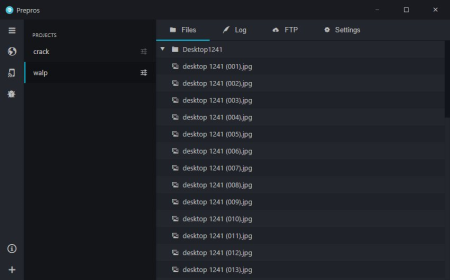
Compile Sass, Less, Stylus, Jade, CoffeeScript on Mac, Windows & Linux with Live Browser Reload.​

Prepros can compile almost all preprocessing languages like Sass, Less, Stylus, Cssnext, Jade/Pug, Markdown, Slim, Coffeescript etc.
Find Out Errors At a Glance

Forget black screen full of millions of unreadable errors.

Live Reload

Prepros reloads your browser automatically every you save a file in code editor.

Minify & Optimize

Prepros can minify and optimize CSS, javascript & images with just one click.

JS Concatenation

Concatenate and combine javascript files to reduce http requests.

File Minification

Minify & Uglify files with ease to reduce bandwidth and load .

Image Optimization

Losslessly optimize image to reduce bandwidth and load .

Network Preview

Prepros has built in server that can help preview your site in multiple devices like phones and tablets.

Browser Sync

Prepros synchronizes browsers across multiple devices for easier testing

Scroll Sync

Cross browser synchronized scroll in real . No complicated setup.

Click Sync

Synchronize clicks and other mouse events in real .

Form Sync

Synchronize user input such as forms and other keyboard events in real .

Remote Inspect

Prepros has Chrome DevTools like inspector to remotely inspect & debug devices.

Build & Deploy

Prepros can export files ready for deployment or It can just upload all the files via FTP or SFTP for you.


DOWNLOAD
rapidgator
Код:
https://rapidgator.net/file/4d91fdf9f167a7146de8b628fe37af49/Prepros7.3.1.sanet.st.rar
 
ScreenHunter Pro 7.0.1091

27cab2a2-a331-4134-a1e3-2899d89d8042.png

File size: 136.7 MB

ScreenHunter 7 is an award-winning solution to all-in-one image capture, print, edit and video recording.​

It's the total capture solution to save you and boost productivity. Also with auto-scroll web pages, auto-capture, webcam and video screen capture. It captures what you see as an image even whilst recording. It has an easy-to-use interface. All the features are visible in 4 easy-to-use tabs, so everyone from bners to professionals can use ScreenHunter 7. The process is simple, the options are easy to manage, and the results are flawless. Powerful and intelligent, ScreenHunter has proven to be an incomparable helper of your business.
The software supports full screen capture up to 6K for multiple monitors and records 4K videos for a single monitor. Supports frame rate up to 100 fps.

Using DirectX lets ScreenHunter 7 produce professional quality videos. It is a perfect tool for recording movies and courses online.

Moreover, ScreenHunter 7 captures and records windows covered by another window or even minimized windows. Optimal for automatic or scheduled captures and recording.

Furthermore, you can show your webcam anywhere at any given , so you can integrate it into your recording the way you want.

ScreenHunter Pro 7 is the most advanced version with all the necessary tools included for your screen capture needs. It's the total capture solution to save you and boost productivity. With this tool, you can capture screen to image or PDF files, immediately see the benefits of numerous -saving features and deliver the highest quality screenshots. As well, it offers easy-to-use user interface and maximum flexibility for a more interactive capture experience.

Rectangular area

Adjustable rectangle

Object / Window

Auto-scroll

Multi-object

Text

Active Window

Fixed area (user defined)

Specific window (lock-in window)

Full screen

DOS program

DirectX / Screen saver

Movie / video

Freehand

Round area (Ellipse)

Round Rectangular area

Polygon

Web capture

Scanning images

Mouse pointer

Multiple monitors

Transparent window

AutoText (date/ stamps, note)

Watermark

Border

Delayed capture

d auto-capture

Scheduled auto-capture

Recurring capture

Image editing, adding text & annotation

Advanced image processing

High-quality zooming, resizing & cropping

Viewing 100 images & conversion

Drag & drop images from desktop

Automatic naming and saving to files

Clipboard

Auto-email

Auto-scale

Saving in the smallest file size

Optimized JPEG, GIF and PNG

High quality and transparent GIF

Saving to TIFF

Screen Color Picker

System tray

Zoombox

Flexible hotkey

Multiple hotkey

Direct printing

Wysiwyg printing

Developer support


DOWNLOAD
rapidgator
Код:
http://rapidgator.net/file/43095fe0e1684bad73499edd38ec3293
 
Sejda PDF Desktop Pro 7.0.5 Multilingual

9b318b42-0915-45f9-9af0-c5fac4d862aa.png

Languages: Multilingual | File Size: 218.31 MB | 204.79 MB

Sejda PDF Desktop - Pleasant and productive PDF software that you'll love to use.​

Full-featured to help you with your PDF tasks. Sejda PDF Desktop is free to use within daily limits. Upgrade for premium features and unlimited use.

Visually combine and reorder pages, merge multiple PDF files. Alternate and mix odd and even page files.

Split documents by pages. Extract separate documents. Split by size, bookmarks or text occurrences. Divide two page layout scans.

Convert PDF files to Word, Excel and to image. Convert images to PDF file.

Reduce the size of PDF files. Optimize images and resources.

Add, edit or move text in your PDF. Change the font type, size and style. Insert, reorder, move or delete pages.

Add copy and edit protection to a PDF. Include a password to protect your PDF from unapproved access.

Add image or text watermark to PDF documents.

Convert PDF text and images to grayscale.

Trim PDF mas, adjust visible page area, change PDF page size.

- Windows 10 32/64 bit

- Windows 8 32/64 bit

- Windows 7 32/64 bit


DOWNLOAD
rapidgator
Код:
https://rapidgator.net/file/22106deb412c539ee1abebbbaa9fd5a8/SaNet.st.PDF.Desktop.7.0.5.rar.html
https://rapidgator.net/file/a56d154eca076e2d74d5cdb0efb02601/SaNet.st.PDF.Desktop.7.0.5.x64.rar.html
 
WhatsApp for Windows 2.2025.7 Multilingual

6e3b0fed-25f0-41cc-8a47-974de1903630.png

File Size : 299 Mb

WhatsApp is currently one of the most popular messengers on the mobile platform.​

The mobile applications for different operating systems allow group chats, sharing locations and sending photos and videos among others. With the introduction of WhatsApp for Windows, you can now enjoy using your favorite messenger from your desktop. The free desktop app is compatible with Windows 8 and later operating systems.
Nowadays, keeping in touch with your friends and family can be attained in a wide variety of ways, given the ever growing interest in communication solutions.

WhatsApp is a lightweight application that can help you connect with your contacts in a quick, efficient manner by providing you with a vast selection of relevant functions.

Please note that in order to benefit from this program's full capabilities you need a WhatsApp account. More so, both your computer and mobile device need to be connected to the Internet.

Smooth design

This application comes with a minimalistic, stylish user interface that encompasses a broad spectrum of straightforward functions. Therefore, numerous users can operate its controls without significant efforts, regardless of their PC skills or previous experience with similar apps.

When you first launch the program, you need to scan a QR code with your phone, in order for your devices to synchronize and grant you access to your account. Furthermore, you can choose to be kept signed in or automatically logged off after a certain idle period.

Send text messages, recordings or pictures

WhatsApp can help you stay in touch with your contacts by providing you with multiple ways of doing so. You can choose between sending text messages, audio or video recordings, images and also various other documents. It is possible to snap pictures with your webcam and send them instantly or select files from your computer.

More so, the chat window offers you an outstanding amount of emoticons that you can include in your messages by clicking the dedicated button and choosing your preferred one from the lists.

Group chat support

You can create group chats by choosing the New Group option from the context menu, selecting a group icon by taking or uploading a photo and setting a group subject. After you adjust the necessary settings, you can add participants by selecting them and clicking the tick symbol.

In case you no longer want to display a certain conversation in the main window, you can quickly remove it by either deleting it entirely or archiving it. Doing so is possible by either right-clicking the desired item and choosing the corresponding options or by using the functions under the dedicated Chat menu.

Reliable instant messaging application with several handy features

All things considered, WhatsApp is a lightweight, yet efficient application that can help you keep in touch with your mobile contacts by providing you with numerous handy features. It comes with a stylish design that encompasses various intuitive functions, thus proving itself to be highly accessible even for novices.

Updates: official site does not provide any info about changes in this version


DOWNLOAD
rapidgator
Код:
https://rapidgator.net/file/5418b1785dd4551ddfcc1ca36c6b3beb/WhatsApp.sanet.st.rar
 
Windows Firewall Control 6.2.0 Multilingual

1f50e2c5-ce34-4059-99d3-b05b5b5a8d02.png

File Size: 2.7 MB

Windows Firewall Control is a powerful software which extends the functionality of Windows Firewall and provides new extra features which makes Windows Firewall even better.​

It runs in the system tray and allows the user to control the native firewall easily without having to waste by navigating to the specific part of the firewall. This is the best tool to manage the native firewall from Windows 10, 8.1, 8, 7, Vista, Server 2008, Server 2012.
Windows Firewall Control offers four filtering modes which can be switched with just a mouse click: High Filtering - All outbound and inbound connections are blocked. This profile blocks all attempts to connect to and from your computer.

Medium Filtering - Outbound connections that do not match a rule are blocked. Only the programs that you allow can initiate outbound connections.

Low Filtering - Outbound connections that do not match a rule are allowed. The user can block the programs he doesn't want to allow initiating outbound connections.

No Filtering - Windows Firewall is turned off. Avoid using this setting unless you have another firewall running on your computer.

Windows Firewall Control doesn't do any packet filtering and does not block or allow any connection. This is done by Windows Firewall itself based on the existing firewall rules.

v Intuitive user interface which is easy accessible through a system tray icon.

v Full support with standard user accounts. Elevated privileges are required only at installation.

v Disable the ability of other programs to add Windows Firewall rules.

v Integrated support of creating, modifying and deleting Window Firewall rules.

v Multiple and easier ways of creating new rules in Windows Firewall.

v Lock feature which can disable the access to the settings of the program and Windows Firewall.

v Shell integration into the right click context menu of the executable files.

v Automatically display invalid rules for programs that do not exist any more.

v Merge multiple similar rules or duplicate existing ones.

v View recently allowed and blocked connections and create new rules from the Security log.

v Import and export of partial sets of rules.

v Protection to unauthorized uninstallation.

v Possibility to restore previous settings at uninstallation.

v Global hot keys are supported and various shortcut keys are available.

v And many, many more. Just try it out.

v Notifications System which provides notifications for outbound blocked connections. Four modes available:

High - Display notifications for all outgoing connections that were blocked, including System and svchost.exe.

Medium - Display notifications only for regular programs, without notifications for System and svchost.exe.

Low - Automatically allow digitally signed programs. Notifications are displayed only for unsigned programs.

Disabled - Notifications are disabled.

v Create temporary rules which are automatically deleted when they expire or on program restart.

v Microsoft .NET Framework version 4.5 or newer version

v Compatible with all x86 and x64 versions of Windows 10, 8.1, 8, 7, Vista, Server 2008, Server 2012.

v Windows Firewall service is required to be enabled for Windows Firewall Control to run.

v DNS Client service is required to be enabled for the notifications to work properly.

v Windows Firewall is incompatible with software proxies, web filtering modules, NDIS drivers.

v Notifications System is incompatible with old versions of BoxCryptor and TrueCrypt.

v Due to multiple system configurations and software installed there may be incompatibility problems. Please report them and help us to improve Windows Firewall Control. Thank you for your support !

Currently, our program is available in 27 languages. If you would like to see the program displayed in your language you can one of the the translation files that are available. After you select your language from the combo box below, a new will start for a file with extension *.lng. When the completes, you have to copy this file in the installation folder, where the file wfc.exe is located. When you restart wfc.exe the new strings will be read from the translation file. The translation file is a plain text file and can easily be edited with any text editor. If you have and you translate the file to a language which does not appear here, please send it to us too and we will update this page. Thank you.


DOWNLOAD
rapidgator
Код:
https://rapidgator.net/file/9f579d2daf37f57f39f633293eca6bb5/wfc6setup.sanet.st.exe
 
Youlean Loudness Meter Pro 2.4

ac284f51-15d7-41fd-a243-b2e1324d7a91.png

File Size: 7.35 MB

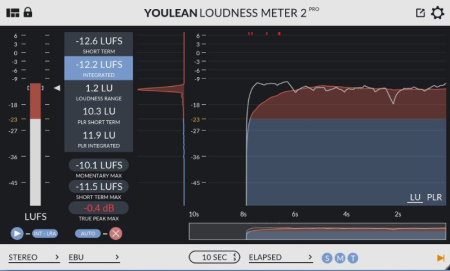
The best free loudness meter.​

Youlean Loudness Meter helps you find the true perceived loudness of your audio and prepares it for TV or streaming services release. Join the thousands of recording studios that already use it.
DAW plugin

Works in almost any DAW.

Available in VST2, VST3, AU and AAX plugin formats, Windows and macOS operating systems.

Measure loudness

Helps you comply with strict loudness requirements for the Film and TV industry.

Helps you get the correct loudness levels for upload to Spotify, YouTube, Apple Music and Tidal.

Measure dynamic

Prevent your mix sounding crushed and unprofessional.

Get the most out of your mix, make any track sound great on all streaming platforms!

Film and TV presets

Find out what regulation your country is using and use ITU-R BS.1770-4, EBU R128, ATSC A/85, OP-59, ARIB TR-B32 or AGCOM 219/09/CSP preset to comply with the standard.

Streaming presets

Make sure to sound great on Spotify, YouTube, Apple Music, Tidal or when streaming by using AES loudness preset.

Fixed macOS Mojave or Catalina can't analyze audio from inputs

Fixed crash with Vegas Pro when rendering

Fixed crash with SADiE 6

Fixed crash with OBS Studio

Fixed drop down menus not scrolling in some cases

Fixed reset button doesn't clear all values in some hosts

Fixed switching from A to B state doesn't switch properly

Fixed long non-ASCII filenames breaking GUI with file analysis

Fixed standalone app not starting the audio ee after the first install on macOS

Fixed standalone app crashes if digital inputs are selected

Fixed plugin always starts in default size

Fixed window resizing in Ozone 9

Fixed dynamic range graph color do not update on preset change

Fixed channel selection menu not showing correctly with histogram disabled

Fixed short term alerts not set and reloaded properly in free version

Fixed edited preset indication not working for streaming services

Fixed tooltips showing wrong info if menus are open

Fixed window resizing with OBS Studio

Fixed crash when doing drag and drop on AudioSuite in Pro Tools

Fixed drag and drop not switching to 5.1 channels automatically

Added option to save and load projects with the standalone application

Added option to export only loudness or dynamics graphs

Added option to set points density for graph export

Added option to the export-import graph memory file

Added dialog gating option based on Dolby Dialog Intelligence

Added option to see a voice detection inside the histogram based on Dolby Dialog Intelligence

Added option to ignore system audio volume on Windows standalone app

Added option to always keep the standalone app on top of other windows

Added option to resize the window by its sides

Added option to auto update export name based on the file name from drag and drop

Added option to select integrated relative gate type

Added option to select adaptive dialog gate method of calculation

Added adaptive gate threshold setting

Added configurable averaging window for the momentary loudness calculation

Added integrated relative gate indication in the histogram

Added option for showing an alternative look of the metering bars

Added Netflix preset

Added Deezer preset

Updated YouTube preset

Removed click to pause histogram tracking option

Improved CPU usage when the UI is minimized

Improved measurements naming in the graph export

Changed indication for edited preset to a simple star symbol

Output settings are removed on the standalone app because they are not needed

The standalone app now remembers its position

Integrated alerts are now set with presets automatically

Successful export message box now shows the full path of the exported file

Advanced optimizations are now on by default

Improved project saving speed with large graphs

Improved loading speed

Changed LK indication to more correct LU indication

The standalone app preferences will be reverted to default values

Windows installer now remembers previous install paths

Improved GUI performance on 5K iMacs and macOS running non-default display color profiles

Other small UI, UX improvements


DOWNLOAD
rapidgator
Код:
https://rapidgator.net/file/13172533bdfad10911502703eaa47fff/Youlean.Loudness.Meter.Pro.v2.4.0.CE.sanet.st.rar
 
Zentimo xStorage Manager 2.3.2.1280 Multilingual

611f9cc8-fe5c-45a0-8ea3-bfb49cff2f4a.png

File Size: 4.14 MB

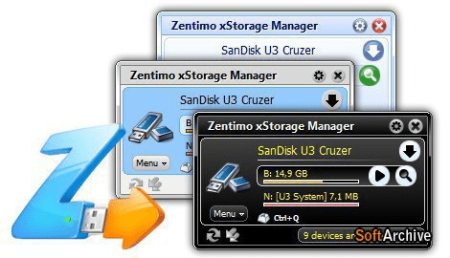
Zentimo xStorage Manager - is the manager of USB devices, it saves and enhances the user experience when working with flash drives, portable drives, card readers and other gadgets.​

The program provides a convenient safe removal, free from flaws built into Windows, shows what programs are hampered remove the device, removes the disk empty slots card reader is able to return back to the disabled and the device contains a wealth of other features for a comfortable and pleasant to work with hot-plug devices (USB , SATA, FireWire).
- Safely remove in one click.

- Rename the device.

- Change device image.

- Hide unnecessary device from the menu.

- Scan for hardware changes.

- Stop all devices simultaneously.

- Keyboard shortcuts for stopping a device or a menu.

- Ability to remove unnecessary devices from the stop menu.

- Device names + renaming.

- Possibility to stop the drive SATA.

- Allows you to return the device back.

- Just a small menu where you can add programs files folders from your portable drive for quick launch.

- The program has the ability to test your portable gadgets on the read / write speed.


DOWNLOAD
rapidgator
Код:
https://rapidgator.net/file/7b6f759cbc19d3cbfdf168e73eb129a5/Zentimo.xStorage.Manager.2.sanet.st.rar
 
Zortam Mp3 Media Studio Pro 27.10 Multilingual

a10e0718-d428-47fa-bcaa-7494944e6195.png

File Size: 21.4 MB

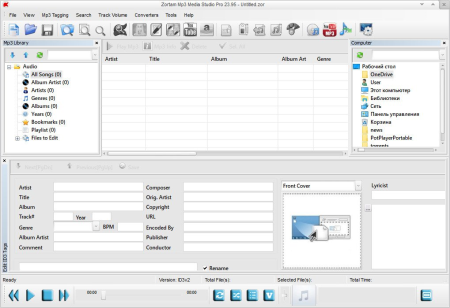
Zortam Mp3 Media Studio is all-in-one Mp3 application that contains Mp3 ID3 Tag Organizer for searching and cataloguing Mp3 files into Mp3 library, editing ID3v1 and ID3v2.​

4 tags (ID3 Tag Editor-Mp3 Tag Editor), CD Ripper with album cover art/lyric support that uses CDDB (Internet Compact Disc Database) and automatically writes ID3v1 and ID3v2.4 tags.
CD Ripper s album cover arts and lyrics from the interenet as you rip your CD (CD Ripper with lyric/cover art support), Mp3 Normalizer with custom volume level allows normalization of your Mp3's (Batch Mp3 Normalizer), search for song lyric from the internet (Batch Lyric Finder), search for album cover (album) arts (pictures) from the internet (Batch Cover Finder), batch lyrics and cover art finder from the internet (Batch Lyric-Cover Finder). Create lyric book in html format (cover pictures are included) from ID3v2 tags (Lyric Book), convert Wav to Mp3 files and Mp3 to Wav files (Wav/Mp3 Converter), manage M3u playlists (Playlist Manager), rename files using ID3 tags (Mp3 Renamer), search for duplicate Mp3 files, (Search Duplicate Mp3's). Play Mp3's using your favorite Mp3 player, add karaoke (Kar) and midi (Mid) files directly to ID3 tag (Karaoke Manager), and keep them together in Mp3 file and play either Mp3 or Kar file from the single Mp3 file.

Auto tag your Mp3 music collection using the Zortam Music Internet Database (ZMLIMD)

Mp3 Tagger and MP3 Manager

Zortam Mp3 Player with cover arts and lyrics support

Organize Mp3 music and edit tags in your audio library with a powerful interface

ID3 Tag Editor (Mp3 Tagger) with separate views for ID3v1 and ID3v2.4 Tags

song lyric and cover arts (Album covers) from the Zortam Music Interent Database using batch processing - iPod and iTunes ready

Normalize your Mp3's with Volume Normalizer and set custom volume in dB

Rip your CD with CD Ripper and tag your songs in one single step with cover arts(artworks) and lyrics

Batch Wav to Mp3 converter and vice versa

Burn Audio or Mp3 CD

Print HTML Lyrics book width cover arts

Powerful drag & drop playlist manager

Write ID3 Tags from filename

Delete ID3 Tags, delete cover arts, delete lyrics (ID3 Tag Remover)

Search for duplicate Mp3's

Batch file rename using information from ID3 tags(Mp3 Renamer)

Write ID3 tags using information from filename

Add karaoke and midi files directly to ID3 tags

All options are supporting batch processing

Use mp3 tag lookup using Zortam Music Internet Database for auto tagging

Plus much more ...


DOWNLOAD
rapidgator
Код:
https://rapidgator.net/file/19fd8b5f18219926d013c213b638cec5/Zortam.Mp3.Media.Studio.Pro.27.sanet.st.rar
 
f.lux 4.118

0158541f-20de-44f0-8e09-95cc2d169127.png

File Size : 0.7 Mb

f.​

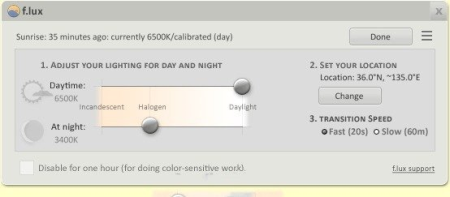
lux is a simple and easy to use application developed in order to provide you with the means of automatically adapting your desktop brightness and colors to the night / day lighting conditions.
This utility functions best when it knows your location details, as such it is recommended that you enter your geographical position, so lux can calculate the precise of day and render the appropriate light tones. This is also advisable because the program has a hard guessing your location.

After setting your position on the map, lux will detee your local , placing your computer on a 24-hour transition schedule. You have the option of customizing the lighting for your screen for day and night , rag from 'Candle', to 'Halogen' and 'Daylight'.

In addition, lux enables you to preview an entire day's lighting changes in just a few seconds, so you can be certain your are happy with the settings, or go back and try again.

The application also offers a 'Movie Mode', that will attempt to keep the colors and shadow details, but still present images in warmer color tones, balancing powerful contrasts.

Moreover, you can turn off lux for an hour, if you need to work on something that is more color-sensitive and you want your computer to display images in their original tones, without any adjustments.

If you were ever blinded by an overly-bright computer when working at night or early in the morning, than you will immediately find use in lux. By adjusting your PC lights and colors to the of day or night, you will spare your eyes from the effort of coping with high contrast levels between your room's lighting and your screen.

lux is a great tool that can help you feel more comfortable with your PC brightness and soften the shock your eyes face when switching from your computer to your ambient lights.


DOWNLOAD
rapidgator
Код:
https://rapidgator.net/file/33216ad1dcb140a455ee405dcf7653b7/flux-setup.sanet.st.rar
 
Autoruns 13.98

307703cf-40d1-4c1a-accc-8f4b97413288.png

File size: 3.0 MB

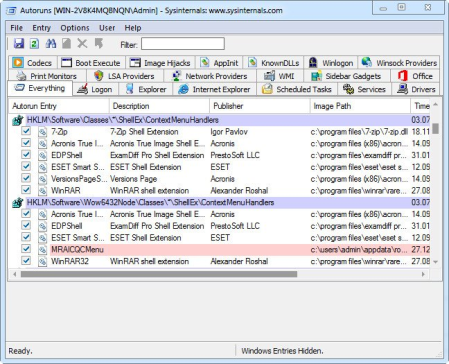
This utility, which has the most comprehensive knowledge of auto-starting locations of any startup monitor, shows you what programs are configured to run during system bootup or login, and when you start various built-in Windows applications like Internet Explorer, Explorer and media players.​

These programs and drivers include ones in your startup folder, Run, RunOnce, and other Registry keys. Autoruns reports Explorer shell extensions, toolbars, browser helper objects, Winlogon notifications, auto-start services, and much more. Autoruns goes way beyond other autostart utilities.
Autoruns' Hide Signed Microsoft Entries option helps you to zoom in on third-party auto-starting images that have been added to your system and it has support for looking at the auto-starting images configured for other accounts configured on a system. Also included in the package is a command-line equivalent that can output in CSV format, Autorunsc.

You'll probably be surprised at how many executables are launched automatically!

Simply run Autoruns and it shows you the currently configured auto-start applications as well as the full list of Registry and file system locations available for auto-start configuration. Autostart locations displayed by Autoruns include logon entries, Explorer add-ons, Internet Explorer add-ons including Browser Helper Objects (BHOs), Appinit DLLs, image hijacks, boot execute images, Winlogon notification DLLs, Windows Services and Winsock Layered Service Providers, media codecs, and more. Switch tabs to view autostarts from different categories.

To view the properties of an executable configured to run automatically, select it and use the Properties menu item or toolbar button. If Process Explorer is running and there is an active process executing the selected executable then the Process Explorer menu item in the Entry menu will open the process properties dialog box for the process executing the selected image.

Navigate to the Registry or file system location displayed or the configuration of an auto-start item by selecting the item and using the Jump to Entry menu item or toolbar button, and navigate to the location of an autostart image.

To disable an auto-start entry uncheck its check box. To delete an auto-start configuration entry use the Delete menu item or toolbar button.

The Options menu includes several display filtering options, such as only showing non-Windows entries, as well as access to a scan options dialog from where you can enable signature verification and Virus Total hash and file submission.

Select entries in the User menu to view auto-starting images for different user accounts.

More information on display options and additional information is available in the on-line help.


DOWNLOAD
uploadgig
Код:
https://uploadgig.com/file/download/610151e399decfb6/nk6aQk5o_Autoruns_.rar

rapidgator
Код:
https://rapidgator.net/file/43d06b839702b221acbac39915593674/nk6aQk5o_Autoruns_.rar

nitroflare
Код:
http://nitroflare.com/view/104AC8998673AC3/nk6aQk5o_Autoruns_.rar
 
Назад
Сверху