• Здравствуйте. Скоро заработает в архивном режиме форум www.old.nado.in

Anthony's Software !!!

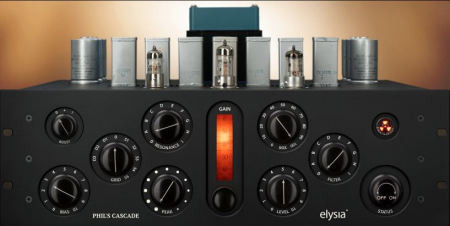
Elysia Phils Cascade v1.2.0 WiN

3e643af1-5d49-46a3-b01c-c371b415fd90.png

WiN | 19.07 MB

Phil's Cascade is based on highly esoteric vintage components combined in a truly unique circuitry.​

It is anything but your typical audio processor. Phil's Cascade is an amazing toolbox which will open the world for creating the most interesting sound flavors.
The beauty of this approach is that it did not have to follow any rules at all. Phil's Cascade uses very interesting NOS (New Old Stock) components which are everything but standard in audio applications, and the novel circuitry is a creative celebration of its own. All in all, this gives you the perfect basis for creating truly wonderful, new and unheard sounds.

Now you can spice up virtual and natural instruments at ease, transmuting standard sounds with all kinds of gritty, organic and aged flavours. There are no right or wrong settings: Saturation, harmonics, distortion, colouration, filtering, interaction, anything goes, and expenting is as much encouraged as it is rewarding.

Like every elysia plugin released so far, Phil's Cascade has been modelled on real analogue hardware. However, this one has been exclusively planned, designed and built to become a plugin! Painstaking analysis and modelling of circuit and component behaviors finally made this monster become available for your DAW.

There can be only one. What a pity, but you can rest assured that the hardware will never go into serial production. Most of the parts are so rare that they would last for just a handful of units, with environmental restrictions forbidding to use them in new products anyway, and the price point for this beast would be pretty demanding as well, to say the least.

All components used for Phil's Cascade were made when we were kids (or not even born yet) by legendary brands like Philips, Sprague, Erdmet, Wima and PSW the very best of New Old Stock.


DOWNLOAD
uploadgig
Код:
https://uploadgig.com/file/download/2Bf0DDc0fd099dd9/dzYmVSzD_Elysia.Phil.rar

rapidgator
Код:
https://rapidgator.net/file/4ae30f083857896bf42b9d215a7e7cc1/dzYmVSzD_Elysia.Phil.rar

nitroflare
Код:
http://nitroflare.com/view/A9B3B79BD1654F1/dzYmVSzD_Elysia.Phil.rar
 
Louder Than Liftoff Chop Shop EQ v1.0.1 WiN

70c11401-a342-49ff-9fa5-622128399d9c.png

WiN | 19.07 MB

The Chop Shop plugin sports a super intuitive interface that allows users of all skill levels to quickly address tonal issues in their audio and enhance the original character of sounds in a musical and transparent way.​

It is a faithful digital recreation of the famous 500 series analog EQ from Louder Than Liftoff.

This plugin not only perfectly reproduces the pristine sound of the original but also offers extra features that extend the functionality of this already versatile tone shaping tool.

Whether you are cleaning up multiple recordings from a hectic session or looking for a way to make your synths stand out in the mix, Chop Shop has got your back.

With the ability to quickly enhance the clarity or low end punch of any sound Chop Shop's simple feature set belies it's underlying power.

Chop Shop is the perfect tool to use across entire sessions. CPU efficiency coupled with musical transparency make Chop Shop ideal for eliminating masking and enhancing intelligibility.


DOWNLOAD
uploadgig
Код:
https://uploadgig.com/file/download/e63Ae816d2ea5122/v75t01Nz_Louder.Than.rar

rapidgator
Код:
https://rapidgator.net/file/32fa360083461448347674d76218dcdb/v75t01Nz_Louder.Than.rar

nitroflare
Код:
http://nitroflare.com/view/967526A4D3F03F9/v75t01Nz_Louder.Than.rar
 
MSMG ToolKit 10.3

0c31ae9c-3ea4-4e78-8f64-ee01d2b89d62.png

File Size : 59 Mb

The MSMG ToolKit is basically a Tool to Service, Customize, Add or Remove Features and Components, Enable or Disable Features to Microsoft Windows Operating Systems.​

Copy Source DVD Files from DVD Drive

Extract Source DVD Files from ISO Image

Extract Source DVD Files from OEM / IMG Image

Convert Windows Store ESD Image to WIM Image

Convert Windows Media Creation Tool (MCT) Image to WIM Image

Convert Windows ESD Image to WIM Image

Convert Windows WIM Image to ESD Image

Convert Source WIM Editions

Integrate Windows Updates

Integrate Windows Setup Media Updates

Integrate Windows Language Packs

Integrate Windows Device Drivers

Integrate Microsoft .NET Framework 3.5

Integrate Microsoft .NET Framework 4.6.2

Integrate Microsoft .NET Framework 4.7.1

Integrate Microsoft Data Deduplication

Integrate Microsoft Edge Browser App

Integrate Windows Accessibility Braille

Integrate Microsoft Win32 Calculator

Integrate Open Secure Shell (SSH)

Integrate Windows Management Framework 5.1

Integrate Windows Media Feature Pack

Integrate Windows Muldia Restricted Codecs

Integrate Windows Subsystem for Linux (WSL)

Integrate Windows System Restore

Integrate Windows To Go Workspace

Integrate Remote Server Administration Toolkit (RSAT)

Integrate Microsoft Default Metro Apps

Integrate Microsoft DaRT Tools to Boot & Recovery Images

Integrate Windows Thin PC Add-on Packages

Integrate Microsoft DirectX 9.0c

Integrate Microsoft Games

Integrate Windows Sidebar

Integrate Windows 8.1 Media Center Generic Activation Tokens

Integrate Windows 8.1 Pre-Activation Data & Tokens

Integrate Teal Server Patch

Integrate Custom Themes UxTheme Patch

Integrate Custom Windows Recovery Environment (WinRE)

Integrate Custom Default User Account Pictures

Integrate Custom System Files

Integrate Windows PhotoViewer Metro Mods

Integrate Windows MediaPlayer Metro Mods

Integrate Windows Win32Calc Metro Mods

Remove Default Metro Apps

Remove Default Metro Apps Using Apps List

Remove Default Metro Apps Association

Remove Windows Components

Remove Windows Components Using Package List

Import Default Metro Apps Association from XML File

Export Default Metro Apps Association to a XML File

Import Tweaks

Make a DVD ISO Image

Burn a ISO Image to DVD

Copy Source to Bootable USB Flash Drive

Sync Source Boot and Install Images to Bootable USB Flash Drive

Burn an ISO Image to Bootable USB Flash Drive

Format a USB Flash Drive

WIM Manager to Display, Delete, Rename, Export, Split, Merge, Capture, Apply, Cleanup, CheckHealth, ScanHealth WIM Image Indexes

Load/Unload WIM Image Registry for Modification

Windows 7 with SP1 (All Editions)

Windows Embedded Standard 7 with SP1

Windows Thin PC

Windows Server 2008 R2 (All Editions)

Windows 8.1 (All Editions)

Windows Embedded 8.1 Industry (All Editions)

Windows Server 2012 R2 (All Editions)

Windows 10 Threshold 1, 2, & Redstone 1, 2, 3 (All Editions)

Windows Server 2016 R2 (All Editions)

Windows 7 with SP1 / Windows 8.1 / Windows 10 / Server 2008 R2 / Server 2012 R2 / Server 2016 R2 Installation Disc DVD/ISO.

Windows 7 with SP1 / Windows 8.1 / Windows 10 Host Operating System for Servicing Windows 7 / Windows 8.1 Source Images.

Windows 8.1/ Windows 10 Host Operating System for Servicing Windows 7 / 8.1 / 10 Source Images.

The ToolKitHelper.exe requires Microsoft .NET Framework 4.7.1.

+ Updated ToolKit's Bin folder with Windows 10 20H1 Insider Preview WADK (v10.0.20190.1000) Tools.

+ Updated the Microsoft .NET Framework 4.8 Pack (Windows 7/Server 2008 R2) for MSMG ToolKit with .NET 4.8 Rollup Update KB4569754 (4.8.4210.6) (Thanks to MDL Member : abbodi1406).

+ Updated the Microsoft Visual C++ Run Pack for MSMG ToolKit with VC++ 2019 v14.28.29115.0 Run (Thanks to MDL Member : abbodi1406).

+ Fixed a Bug in the Feature "Integrate Windows PowerShell 7.0", where the Toolkit imported a wrong registry file for Windows 8.1/10 Source OS.

+ Updated the Feature "Remove Windows Component" to support removing Windows Firewall System Component for Windows 10 Client v1809/v1903/v1909/v2004/v2009 Source OS.

+ Updated the Feature "Remove Windows Component" to support Windows 10 Client v1903/v1909 (v10.0.18362.1049/v10.0.18363.1049) Source OS.

+ Updated the Feature "Remove Windows Component" to support Windows 10 Client v2004/v2009 (v10.0.19041.450/v10.0.19042.450) Source OS.

+ Fixed Typo Errors (Thanks to MDL Member : 正义羊).


DOWNLOAD
uploadgig
Код:
https://uploadgig.com/file/download/a51a38c7E531e5a8/crINzMNR_ToolKit_v10.rar

rapidgator
Код:
https://rapidgator.net/file/4a9f072248a5a72ac6a18bdcd2c4543c/crINzMNR_ToolKit_v10.rar

nitroflare
Код:
http://nitroflare.com/view/9454A14A5C0FD1D/crINzMNR_ToolKit_v10.rar
 
NEOLD V76U73 v1.0.0 WiN

fd6bb80f-b8cf-4843-bbe8-48da17af15e4.png

WiN | 19.07 MB

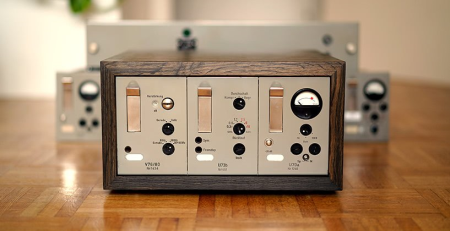
Have you ever dreamt about owning your very own sixties tube mixing console?​

Just try multiple instances of the V76U73 on your instruments and busses to feel that instantly compelling old school vibe building up track by track.
The Telefunken V76 is a legendary piece of audio history. These iconic tube preamps were designed with nearly unlimited funding from the German government, and have enhanced countless music productions from the 1950s till today.

With a rich, enchanting low end, and some of the smoothest highs you'll ever hear, it's no wonder that the original V76 preamps have all been snatched up for top dollar by high-end studios and collectors the world over.

Simply running signal through these devices without moving a single knob can bring new life and dimension to just about any signal. But the V76 isn't the only powerhouse of a tonal shaper from this family of modules. The U73 compressor/limiter builds on this tone, adding exceptionally smooth-sounding "variable mu" dynamic control that earned this tool the nickname of the "The German Fairchild."

The V76U73 is a painstakingly accurate emulation of the real analog circuits of both of these devices, with all their gorgeous components, brig the wonderful tube sound of this classic vintage preamp and compressor to a single easy-to-use plugin.

While the plugin honors the straightforward simplicity of the original modules, it also provides some features and optimizations that are only possible in plugin form.

With the V76U73, you will be able to enchant your vocals, guitars, bass, drums, and synths with the unique tone and dynamic control of these rare and highly sought-after studio icons.

Designed by Dominik Klaßen, Roger Schult and Reimund Dratwa - the masteds behind the groundbreaking Phil's Cascade plugin from elysia - this is the first entry in the new pro audio plugin brand NEOLD, a line devoted to seamlessly brig the best untapped resources of the analog world into the digital domain.


DOWNLOAD
uploadgig
Код:
https://uploadgig.com/file/download/2Dda7418e602752f/7VKe0P1s_NEOLD.V76U7.rar

rapidgator
Код:
https://rapidgator.net/file/b438e90174ad8babd01f2b40909740da/7VKe0P1s_NEOLD.V76U7.rar

nitroflare
Код:
http://nitroflare.com/view/2B11043CDCDE93E/7VKe0P1s_NEOLD.V76U7.rar
 
Ashampoo Video Optimizer Pro 2.0 (x64) Multilingual

68180867-f9a8-400a-8a6c-949b28a20af5.png

File Size: 96 MB

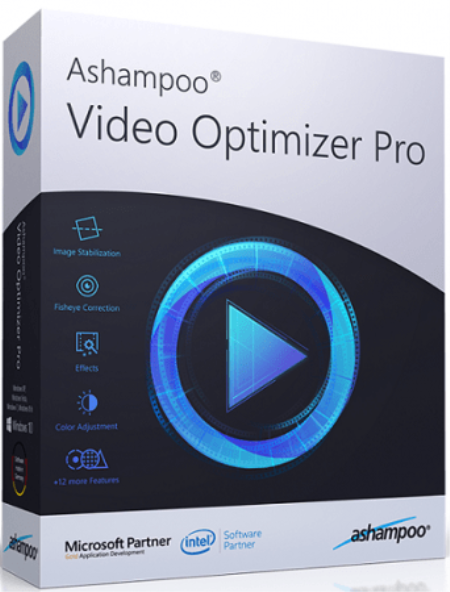
Ashampoo Video Optimizer Pro is the effective solution to enhance the quality of your videos.​

Stabilize shaky footage super easily, optimize contrasts and colors or sharpen your clips. Remove digital noise and flicker with incredible ease. Create slow motion or lapse effects and fix lens distortions at the click of a button. Use the built-in editor to rotate, crop or merge your videos.

Perfect for cellphone videos, action cams, digital cameras and drones

High-performance image stabilization

No more lens distortions: Automatic fisheye removal

Superior sharpness and colors for a totally new visual experience

Nifty slow motion and lapse effects for breath-taking results

Perfect exposure and contrast settings even for unlucky shots

Stunning effects like tilt-shift for a more personal touch

Noise reduction and deflickering for clear and crisp videos

Rotate and edit videos with incredible ease through built-in editor

Save with batch-processing

Enhance your video quality and auto-adjust colors and contrasts. After just a few clicks, your clips will look more vibrant, realistic and captivating. The white balance feature can make your videos feel warmer or colder while individual brightness, saturation, shadow and light settings add a personal touch to your recordings. Breathe new life even into mediocre cellphone clips!

Stabilize and fix shaky videos with ease

Clips taken with cellphones or action cams (GoPro) tend to be shaky. Ashampoo Video Optimizer Pro offers superior video stabilization for your shaky footage! Even handheld shots taken in motion will become smoother and more realistic. Enhance your clips and say goodbye to shaky videos!

Fix sharpness, noise and flicker issues

Clips taken in dark environments always suffer from some degree of digital noise and poor lighting can even lead to flicker. In these conditions, contours quickly become blurry. Ashampoo Video Optimizer Pro automatically detects and fixes these issues for crisp and steady images. Originally too dark and out of focus videos are not longer a total loss.

Super easy video rotation and cropping

Not only can Ashampoo Video Optimizer Pro enhance the quality of your videos but it also supports 90 / 180 / 270 and custom degree rotation plus cropping. Export your video highlights and merge multiple photos and videos into a single clip!

Apply stunning slow motion and lapse effects

You can apply a speed effect to make certain video portions stand out. Slow motion helps draw attention to individual details and helps bring out the magic in your clips while lapse can speed up slow-paced passages. Both effects are super easy to use in Ashampoo Video Optimizer Pro and render your clips more dynamic and vibrant.

Natural looking distortion-free images

Many camera models yield less than realistic results. Especially action cameras tend to use wide-angle lenses that produce images that can quickly tire users. Ashampoo Video Optimizer Pro fixes lens distortions for realistic natural looking images. The program features a number of presets for various camera models with support for custom profiles.

Add texts and effects

Comments and effects can really help make your videos stand out. Ashampoo Video Optimizer Pro makes it incredibly easy to add texts or stunning effects like tilt shift that selectively blurs image portions to create a miniature effect. Unleash your creativity!

Also for pros and perfectionists

Ashampoo Video Optimizer Pro also adds metadata like author, copyright, title and comments to your clips. The program supports all common codecs and resolutions (including HD, 2K, 2.7K, 4K). Save and effort with built-in batch processing and enhance, edit or add metadata to your videos in just one click!


DOWNLOAD
uploadgig
Код:
https://uploadgig.com/file/download/f74712945b33c57d/g3qMIqJp__AshampooVi.rar

rapidgator
Код:
https://rapidgator.net/file/5a4aa26e0ecca8ee12abbc07bc23212f/g3qMIqJp__AshampooVi.rar

nitroflare
Код:
http://nitroflare.com/view/5D25FF269913590/g3qMIqJp__AshampooVi.rar
 
Awave Audio 11.2

bf3a7e6e-d244-447a-9c67-8234d433c176.png

File Size: 6.15 MB

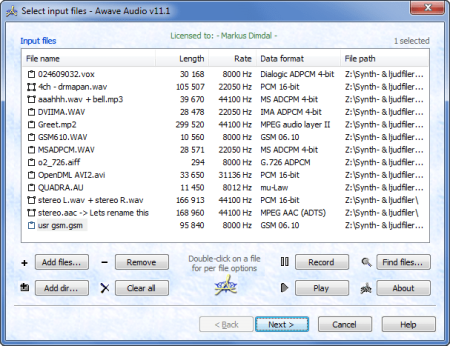
Supports a wide range of audio file formats (reads from ~90 and writes to ~60 formats).​

A simple 3-step interface for quick and easy conversions - handle a thousand files as easily as one!

File size is limited only by disk space and the design limits of the file formats.

Converts anything from low-rate speech up to 24/96 multi-channel audio and beyond.

Several optional dithering techniques are available that improves the perceived sound quality when decreasing the sample bit-depth.

Extremely high quality sample rate conversion (resampling) with up to 144dB S/N-ratio.

Optional audio processing using VST or DX plug-ins as well as several built in functions.

Normalization support including Replay Gain, ITU BS 1770 and EBU R 128 algorithms for psycho-acoustically adjusted volume.

'Direct Stream Copy' support for several types of raw audio data - providing both a speed advantage, and allowing addition of meta data (including volume normalization) withouth having to recompress already compressed audio.

Handles many types of text meta-data (a.k.a. text tags, APE-tags, ID3v2 et c.) - with full Unicode support.

And much, much more!

Bonus features: You can also use record new audio clips, or rip tracks from Audio CD's.


DOWNLOAD
uploadgig
Код:
https://uploadgig.com/file/download/27214e81eD6b2fD8/lxokhmuO_FMJSoftware.rar

rapidgator
Код:
https://rapidgator.net/file/4e8b30c84463d46b330ec310dc394cb9/lxokhmuO_FMJSoftware.rar

nitroflare
Код:
http://nitroflare.com/view/4E91FD4EFD47DF2/lxokhmuO_FMJSoftware.rar
 
Dashcam Viewer 3.5.2 Multilingual (x64)

2ca81192-1d34-4faa-bbd5-ad11be9afa98.png

Languages: Multilingual | File size: 129 MB

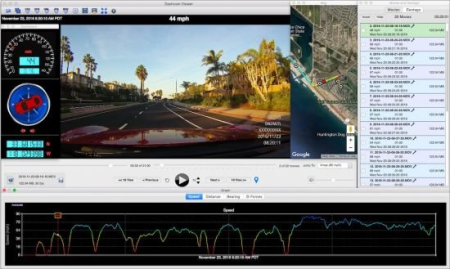
Dashcam Viewer is a software application for viewing movies, GPS data, and shock-sensor data recorded by your dashcam or action cam.​

Dashcam Viewer supports over 70 camera models. See below for the complete list of supported cameras and features.
What Dashcam Viewer can do for you:

Play your dashcam videos on the main screen while watching your vehicle's speed, distance, position, bearing, and shock-sensor data update on graphs, data displays, and maps.

"Geotag" points of interest along your route. Export these to a file. Or import them back in.

Export your GPS tracks to common file formats such as comma-separated value (CSV), Google Earth KML, and GPS-exchange (GPX) for further data analysis.

Export portions of videos to new clips

Combine multiple videos into a single video

And much more!

The Main Window controls movie selection, playback, and data export. The individual buttons and sliders are described below:

Select movie folder

Select individual movie files

Export all GPS track data to CSV file

Export all GPS track data to GPX file

Export all GPS track data to Google Earth KML file

Export view to PNG image

Export portion of movie to separate movie file

Switch dual-channel display modes

Merge multiple movies into a single large movie

Arrange ancillary windows to the right of the main window

Re-center movie(s) in viewer frame

Modify preferences

Current speed

Current date/

Picture-in-picture view (Mac only)

Current movie scrubber

Movie file selector

Jump To fastest point in movie or Jump To a specific movie

Reveal movie in Finder

Current movie filename, file size, framerate

Save or delete settings on a per-movie basis

Jump back one or ten movies

Instant Replay

Pause/Play:

Increase/decrease playback rate

Jump forward one or ten movies

Create Geotag

Volume and mute controls


DOWNLOAD
uploadgig
Код:
https://uploadgig.com/file/download/ad645a852eC77a9e/B8N5cyK9_.Dashcam_Vi.rar

rapidgator
Код:
https://rapidgator.net/file/cd24731583c91aebfab097a78050c592/B8N5cyK9_.Dashcam_Vi.rar

nitroflare
Код:
http://nitroflare.com/view/76A888E91DC7D0F/B8N5cyK9_.Dashcam_Vi.rar
 
Enscape 3D 2.8.0.2.26218 (x64)

3730791b-175d-4a2f-8380-e05b5231edd9.png

x64 | File Size: 170 MB

With our real- rendering technology your project will impress from every angle, even at different days.​

There is no need to carefully adjust your perspective before rendering, just start Enscape and fly to the spots you like. It's fully dynamic and: A lot of fun!Enscape will make your life easier and delight your clients after seeing their project!
ONE CLICK TO VIRTUAL REALITY:

Give your customers the VR experience as if your architecture is already built: With Oculus Rift / HTC VIVE and Enscape, a virtual walkthrough of your building is only one click away.

Stop explaining your drawings - start amazing people with your ideas and offer them a virtual reality experience of their architectural project.

SHARE YOUR WALKTHROUGH:

Enscape usually runs alongside Revit, SketchUp, Rhino and ArchiCAD mirroring all changes in your construction through real- rendering. Additionally, you can export the Enscape walkthrough into a Windows executable or a WebGL based website that we host for you.

PANORAMA & CARDBOARD:

Share immersive 360° panoramas with colleagues and clients within seconds! Enscape allows you to generate panoramas in both stereo or mono. They can be saved to a file or uploaded into the cloud, where they are accessible via a link. No special app is needed, even for cardboard!

System Requirements:

OS:Windows 7 64 Bit or higher.

GPU:NVIDIA GTX 1060/Quadro P4000 or AMD equivalent with 4GB VRAM

RAM:4GB RAM

-Revit (2018, 2019, 2020, 2021)

-SketchUp (2018, 2019, 2020)

-Rhino (6.0)

-ArchiCAD (21, 22, 23)

-Vectorworks (2020 Service Pack 3)


DOWNLOAD
uploadgig
Код:
https://uploadgig.com/file/download/805ebe1c803617fb/Tmfmvrxo__Enscape2.8.rar

rapidgator
Код:
https://rapidgator.net/file/248b8c2619ccfe78972c859ab8021fb2/Tmfmvrxo__Enscape2.8.rar

nitroflare
Код:
http://nitroflare.com/view/F111A7B8239240B/Tmfmvrxo__Enscape2.8.rar
 
Homedale 1.89 Multilingual

f470030b-2bbf-4a5e-a486-d95642d5bc18.png

File Size : 1 Mb

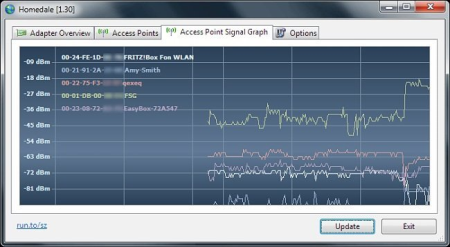
Homedale is a simple wireless network monitor that allows you to view the status and signal strength of nearby access points.​

In addition to displaying technical information like infrastructure mode, channel and supported bitrates, the program also includes a signal graph that allows you to monitor the signal strength of multiple access points in real-.
With Homedale you can search for Wi-Fi / WLAN Access Points and monitor their signal strength.

Details

See an overview of all available access points with their signal strength, encryption [WEP/WPA/WPA2], speed and channel.

Signal Strength

You can also monitor the signal strength of selected access points in a graph over the . With a right mouse click, you can start logging to a text file and create a screenshot.

Connect

Make a right mouse click to connect and disconnect from a WLAN access point. The blue icon shows the currently connected access point.

New: Press space key to deselect current AP, Specification column added, Frequency usage chart channel list updated, Log files are now UTF8 History


DOWNLOAD
uploadgig
Код:
https://uploadgig.com/file/download/6c434aa2DD807e91/Xn36hbIH_Homedale_.rar

rapidgator
Код:
https://rapidgator.net/file/d94429716d89896ea9d48781acee3a6d/Xn36hbIH_Homedale_.rar

nitroflare
Код:
http://nitroflare.com/view/4295E4F1F9103AA/Xn36hbIH_Homedale_.rar
 
Lindell Audio 80 Series v1.0.3 WiN

9452b02d-b640-4bb8-842c-63d1589eb55b.png

WiN | 119.21 MB

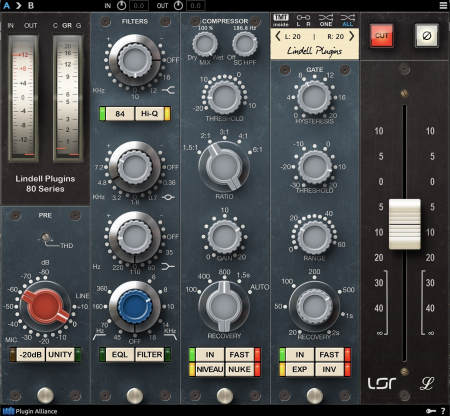
One of the most beloved consoles emulated to the core - Neve 80 Series Console and 80 Series Mix Buss emulations.​

Lindell Plugins is proud to bring you their exacting emulation of the original 1073/1084/ 2254 and 1272 line amplifier module into your DAW. One of the classic hand-wired mixing consoles made by Neve Electronics, the 8028 is a truly magical desk on which countless sal records have been cut in the last 30 years; think Queen, David Bowie, Nirvana, Red Hot Chilli Peppers and Slipknot - the sound of this analog legend is nothing short of extraordinary. In the Lindell 80 Series, you will find aggression and power to make your records sound as analog as possible.

Dating back to 1969 when it was first brought to the market, the 80 series analog mixing desks attained somewhat of a cult-like status due to their uniqueness and rarity. Known for their breathtaking depth, pristine high end and rich definition, the individual modules that comprise these desks have stood the test of . It's no wonder that institutions like Sound City Studios, Oscilloscope Labs, Electric Lady Studios and Sphere Studios have relied on the sound and features offered by this desk.

Lindell 80 Series Channel brings the sound of this desk into the digital domain. Track, mix and master your records with this particular Neve flavor and achieve the thick tone only made possible by the individual components found in the original channel strip.

To complete their new console offering, Lindell Audio has licensed the patent-pending Tolerance Modeling Technology (TMT) from Brainworx in order to provide an authentic analog experience in the digital realm. Mix your songs with 32 different channels in order to replicate the various component tolerances found in the original hardware. As part of the PA family, Lindell are also offering a work-flow and feature set with this new TMT console, which will feel very much familiar to all users of the current bx_console line.

Legal Disclaimer: The Lindell 80 Series was developed by Lindell Audio using its own modeling techniques, and one of the products studied was the Neve 1073, 1084/2254 and Neve 1272 (Buss). Neve is a registered trademark of AMS/Neve Inc., which is unaffiliated with Lindell Audio. AMS/Neve have not licensed any intellectual property for use in the Lindell 80 Series, nor have they endorsed or supported the Lindell 80 Series in any manner.


DOWNLOAD
uploadgig
Код:
https://uploadgig.com/file/download/cb162c12a5d667EA/KdEYpTuo_Lindell.Aud.rar

rapidgator
Код:
https://rapidgator.net/file/c95603a1bbd79b5fcf2c5ce8e0421efe/KdEYpTuo_Lindell.Aud.rar

nitroflare
Код:
http://nitroflare.com/view/C6392A86E08807F/KdEYpTuo_Lindell.Aud.rar
 
NextLimit Maxwell 5 v5.1.0 for Cinema 4D R14-S22

e611177f-70a6-42f6-ad0d-463b98564036.png

x64 | File Size: 1.38 GB

Maxwell | Cinema 4D offers seamless integration, allowing you to work comfortably within the Cinema 4D interface.​

This product has been specifically designed for rendering in Cinema 4D with a simple yet comprehensive Maxwell toolbar.

Maxwell is all about quality. Period. This has been our sacred mantra for most than 15 years of development. Our secret sauce is a physically-correct unbiased spectral ee, which produces not only beautiful images but also lighting-accurate simulations. In fact, Maxwell is considered the ground-truth in rendering and CGI production. We strive to inspire others, and you inspire us.

If you have ever heard that Maxwell is slow.well, it was. Our commitment to developing the most accurate render ee on the market wasn't negotiable. The story has changed in Maxwell 5. A fully rewritten multi-GPU core now delivers final results in minutes and accurate previews in seconds, keeping physical accuracy intact. With multiple GPUs working in parallel you'll get an unprecedented Maxwell experience. With Maxwell 5, is now in your hands.

The new Cloud Render service allows you to access the most powerful machines available in the cloud (up to 96 cores) speeding up the render process and thus improving your productivity. Cloud render jobs can be easily dispatched from Maxwell Studio and the plugins, freeing the local computer from high CPU loads. Cloud Render helps you optimize your and resources more efficiently.

Maxwell 5 is seamlessly integrated in most of the major 3D/CAD software solutions such as Rhino, SketchUp, Autodesk Maya, Autodesk 3ds Max, Revit, ArchiCAD, Cinema 4D and formZ. As an alternative, the standalone Maxwell Studio offers an independent production/rendering environment to create, edit and render Maxwell scenes. Render nodes and network tools for advanced deployments are included. Maxwell is available for Windows, MacOS and Linux.
Cinema 4D R14-R21-S22


DOWNLOAD
uploadgig
Код:
https://uploadgig.com/file/download/83bc24Bd98F22e87/7wEunJNH__maxwell_ci.part1.rar
https://uploadgig.com/file/download/8C9f08d9eebe3d57/7wEunJNH__maxwell_ci.part2.rar

rapidgator
Код:
https://rapidgator.net/file/1d23abbbc652a2cc703e6ca934e1bb3d/7wEunJNH__maxwell_ci.part1.rar
https://rapidgator.net/file/c7dc31f37da198b6d7d62419844c9c3f/7wEunJNH__maxwell_ci.part2.rar

nitroflare
Код:
http://nitroflare.com/view/8B3523F0D1CD79B/7wEunJNH__maxwell_ci.part1.rar
http://nitroflare.com/view/F12EF030E880267/7wEunJNH__maxwell_ci.part2.rar
 
PDFill PDF Tools Free 15.0 Build 2

95e31546-8046-498f-9681-e2da065d588c.png

File Size : 20.3 Mb

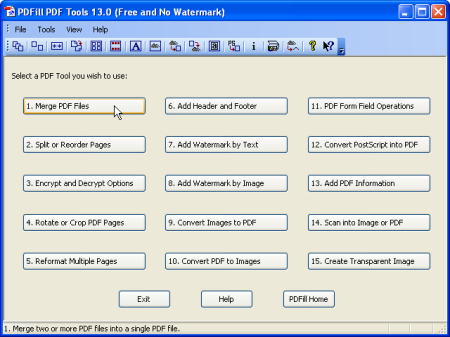
PDFill PDF Tools are FREE PDF functions to merge, split, reorder, delete, encrypt, decrypt, rotate, crop and reformat PDF pages, to add information, header, footer and watermark, to convert images to PDF, PDF to images or PostScript to PDF, to delete, flatten and list form fields, to scan to pdf, to create transparent image, and more.​

The following table explains each free function. Please click each item to see the details.
1.Merge Merge or Combine two or more PDF files into a single PDF file.

2.Split, Reorder or Delete Split, Extract, Reorder or Delete PDF pages from a PDF file into a new file.

3.Encrypt and Decrypt with Security Options Encrypt or Decrypt PDF documents (Master Password or User Password may be required). Protect PDF files with passwords and prevent PDF files from being printed, copied, changed, filled, extracted, signed, assembled or merged. Supports Adobe Standard 40-bit Encryption and Adobe Advanced 128-bit Encryption

4.Rotate and Crop Rotate a PDF page by 0, 90, 180 and 270 degree. Crop a page to modify its layout of Print or View by specifying its mas.

5.Reformat Put multiple pages into one page to save paper and inks when printing hard copies. Add note lines for handout.

6.Header and Footer Add Headers and Footers to present information, such as date, , page numbers, or the title of the document, in the top or bottom mas of a document.

7.Watermark by Stylized Text Add Stylized Text Stamp.

8.Watermark by Image Add Stamp using image file (bmp, jpg, gif, png, tiff, and wmf).

9.Convert Images to PDF Convert images (bmp, jpg, gif, png, tiff, and wmf) into a PDF file with layout options.

10.Convert PDF into images Save PDF pages into images (png, jpg, bmp and tiff) with DPI options.

11.PDF Form Fields: Delete, Flatten, List Delete, Flatten or List the PDF Form Fields inside a PDF file.

12.Convert PostScript(PS) File into PDF Covert PS files into PDF files so Adobe Reader can read them.

13.Add Information Add information (title, author, subject, keywords, created, creator, producer, version) to PDF documents.

14.Free Scanner Scan your paper form or photo as an image file (PNG, JPG, BMP, TIF, GIF) or a PDF file.

15.Create Transparent Image Create a transparent image with options to adjust transparency options.

Updates: official site does not provide any info about changes in this version


DOWNLOAD
uploadgig
Код:
https://uploadgig.com/file/download/a7a2E7ec043aa910/l1jJpIHh_PDFill_FREE.rar

rapidgator
Код:
https://rapidgator.net/file/7b4650fa344bf24b825c7c59650f3882/l1jJpIHh_PDFill_FREE.rar

nitroflare
Код:
http://nitroflare.com/view/C7D2ADBB498B646/l1jJpIHh_PDFill_FREE.rar
 
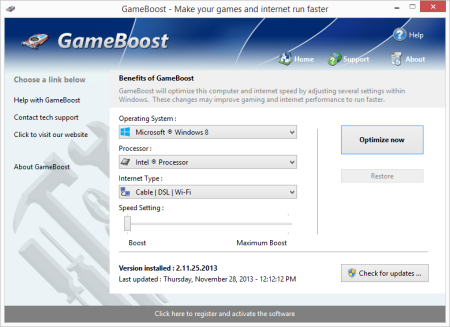
PGWare GameBoost 3.8.24.2020 Multilingual

20ddc28d-a67f-460b-aec8-be2b0c6e9f02.png

File Size: 5.16 MB

GameBoost sets the standard for PC gaming and internet optimization software.​

A combination of our two products GameGain and Throttle; GameBoost instantly increases the performance of your computer and squeezes out every last bit of performance your computer and internet connection is capable of. With many of the latest PC games requiring high hardware requirements to have a suitable gaming experience, it is important to optimize your computer's performance.
Windows is a general operating system which is used for many tasks; it is not optimized for gaming. With GameBoost and a few clicks of your mouse, you will notice an increase in frames per second, smooth game play and less latency and lag during multiplayer gaming.

GameBoost makes several Windows registry and system changes to increase the performance of your current gaming hardware; this allows you to play the most recent games without having to spend hundreds of dollars to upgrade your hardware. These changes made to your computer improve memory usage, how foreground applications are prioritized with the CPU, hard drive access read and write speeds, how fast graphics can display on your screen, the overall speed of your internet connection and latency. GameBoost does not make changes, no patches and no modifications to games themselves, thus no anti-cheat detection software considers our software cheating software and you will not be banned from those gaming networks.

Faster Gaming Graphics

Increase the frames per second you are getting when playing the most current and exciting games without having to purchase a new graphics card, memory, or CPU.

CPU Prioritization

GameBoost instructs the CPU to prioritize full screen applications so they are given the most power and access to more CPU cores; this allows games to work faster.

No Patches to Games

Games run faster and are not directly patched or modified, thus you are not banned from networks that have cheat detection software that detect modifications to games.

Faster Internet Speed

Instantly increases the speed of your Cable, DSL, U-Verse, Fios and dial-up internet connection and improves latency issues that cause lag during multiplayer gaming.

GameBoost also improves the speed of your internet connection; these system changes work with all internet connections such as Cable, DSL, U-Verse, Fios and dial-up. If you notice during multiplayer gaming that you are getting long pings and lag, GameBoost can help improve the speed of your connection. GameBoost makes several Windows registry changes to improve how networking packets are transmitted and received, we increase the buffer sizes which allows data to be transmitted and processed faster on your computer, allowing games, web browsing and ing files to work much faster.

Optimizing your Windows environment to work faster with games is a no brainer if you are a hardcore PC video game enthusiast. Just like tuning a car to get higher performance, GameBoost tunes your PC's hardware to work faster which improves gaming and internet performance. Get every last bit of horsepower out of your computer to play your games smoother and faster while also increasing the speed of your internet with a few clicks of the mouse. a trial version of GameBoost today and unleash the full power of your computer hardware for faster gaming and internet.

Compatible with Microsoft Windows 10, 8, 7, Vista, XP & Windows Server 2012, 2008, 2003. 32-BIT/64-BIT ready.

Optimizes your computer hardware to allow games to run faster and increase the speed of your internet connection for faster s and speed.

Increases the speed of all internet connection types such as Cable, DSL, U-Verse, Fios and dial-up.

Increase the frames per second that is displayed allowing games to play much smoother and increase your enjoyment of these games.

Advanced software based over-clocking feature which enhances memory speed, CPU prioritization of full screen applications and internet speed for games.

Changes are made to the Windows system directly not patches to game files; this prevents anti-cheat systems from accusing you of game modification.

New and improved modern user interface, easy and intuitive to use and compliant with Windows user interface guidelines.

Software updates can be ed and installed directly from inside the application without having to visit our web site.


DOWNLOAD
uploadgig
Код:
https://uploadgig.com/file/download/a8404b8e41658530/ryhhYEtG_GameBoost.3_.rar

rapidgator
Код:
https://rapidgator.net/file/3934a637293f3bdcaac50e7489d81471/ryhhYEtG_GameBoost.3_.rar

nitroflare
Код:
http://nitroflare.com/view/CC2BC50B77DFFE3/ryhhYEtG_GameBoost.3_.rar
 
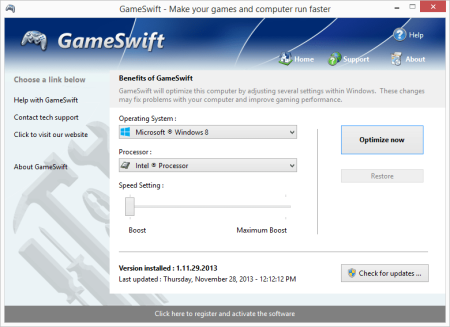
PGWare GameSwift 2.8.24.2020 Multilingual

2fbc7334-5e19-4dc7-8c04-d5b581be3115.png

File Size: 5.16 MB

GameSwift sets the standard for PC and game optimization software.​

A combination of our two products PCMedik and GameGain; GameSwift instantly makes your computer faster and fixes common problems associated with frustrating slowdowns and errors and squeezes out every last bit of performance your computer and games are capable of. Do you remember when you first turned your brand new computer on and how fast it worked? With GameSwift and a click of the mouse you can bring back this speed to your computer instantly.
GameSwift quickly scans your computer for common problems and fixes them, it then makes several permanent changes to Windows so your computer feels like it is brand new once again. Don't deal with a slow computer and make tasks take longer to complete, install GameSwift and make your computer run faster.

Over as you install new and updated software, you get the impression your computer is slower due to these applications being more demanding of faster hardware. GameSwift makes your computer faster by making several changes to Windows settings; for instance it turns off several animations that degrade performance, instructs the CPU how to prioritize background tasks, how files are loaded and written to the hard drive and changes to the way memory is used when programs use the memory swap file.

Heals Problems

Many small problems on your computer lead to a combined loss of performance over , PCSwift will scan your computer for these problems and instantly repair them.

CPU Prioritization

GameSwift instructs the CPU to prioritize full screen applications so they are given the most power and access to more CPU cores; this allows games to work faster.

Constant Updates

We constantly update PCSwift with new system performance tweaks; this allows your computer to keep up with the latest software that demand faster hardware.

Faster Gaming Graphics

Increase the frames per second you are getting when playing the most current and exciting games without having to purchase a new graphics card, memory, or CPU.

GameSwift makes several Windows registry and system changes to increase the performance of your current gaming hardware; this allows you to play the most recent games without having to spend hundreds of dollars to upgrade your hardware. These changes made to your computer improve memory usage, how foreground applications are prioritized with the CPU, hard drive access read and write speeds, how fast graphics can display on your screen. GameSwift does not make changes, no patches and no modifications to games themselves, thus no anti-cheat detection software considers our software cheating software and you will not be banned from those gaming networks.

Optimizing your Windows environment to work faster with games is a no brainer if you are a hardcore PC video game enthusiast. Just like tuning a car to get higher performance, GameSwift tunes your PC's hardware to work faster which improves gaming and your computer performance. Get every last bit of horsepower out of your computer to play your games smoother and faster while also fixing problems with your computer with a few clicks of the mouse. a trial version of GameSwift today and unleash the full power of your computer hardware for faster gaming.

Compatible with Microsoft Windows 10, 8, 7, Vista, XP & Windows Server 2012, 2008, 2003. 32-BIT/64-BIT ready.

Optimizes your computer hardware to allow the latest games to run faster with the highest graphic settings possible.

Increase the frames per second that is displayed allowing games to play much smoother and increase your enjoyment of these games.

Decreases the amount of for Windows to load, and makes loading and running your favorite programs much faster.

GameSwift repairs common problems found on most computers and instantly fixes them to improve computer stability and performance.

Changes are made to the Windows system permanently, allowing you to perform a single one tune-up to increase performance forever.

New and improved modern user interface, easy and intuitive to use and compliant with Windows user interface guidelines.

Software updates can be ed and installed directly from inside the application without having to visit our web site.


DOWNLOAD
uploadgig
Код:
https://uploadgig.com/file/download/859617891180760f/0WXqWAFy_GameSwift.2_.rar

rapidgator
Код:
https://rapidgator.net/file/859ab2964e0e898701d1c12bcc43a9d9/0WXqWAFy_GameSwift.2_.rar

nitroflare
Код:
http://nitroflare.com/view/2DB423F00A9A968/0WXqWAFy_GameSwift.2_.rar
 
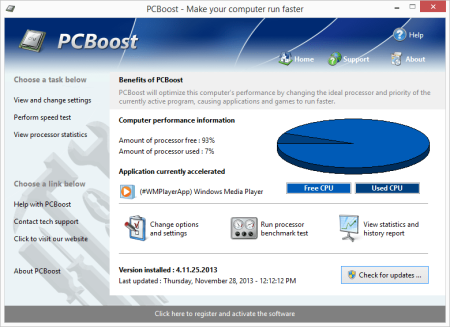
PGWare PCBoost 5.8.24.2020 Multilingual

8b055bdf-92a9-4918-89d1-d34c85416358.png

File Size: 6.10 MB

PCBoost allows you to run programs such as games, video production, photo editing software and any software that requires excessive processing power to run much faster than the software was originally designed for.​

With little to no effort you can instantly force programs & games to run faster on your computer without having to purchase new hardware. Most programs are designed to use a minimal amount of CPU (processor) power which often leads to the CPU being idle and not used to its fullest potential, with PCBoost your computer is able to take advantage of this by allocating more CPU power to the currently active application.
PCBoost constantly monitors which application is running as the foreground and active program; it then tells the CPU to give this application priority over all other applications. This direct instruction to the CPU forces the application to get more attention and quickly finish any tasks that are required as soon as possible. If you switch to another program or game PCBoost instantly notices this change and instructs the CPU to set the old application to a normal priority and the newly active and foreground application to a higher priority. This approach allows the current and active program to always use the most CPU power as possible.

Performance Increase

Instantly makes the foreground application run faster by instructing the computer processor to give the application a higher priority than all other applications running in the background.

Artificial Intelligence

Constantly switches the foreground application to use the least used processor core on multi-core computers; ensuring applications always have the most CPU power available to them.

Unlock Your Hardware

Unlock the power of your computer hardware, no longer do you have idle processor power being wasted when you need critical applications to finish as soon as possible.

No More Waiting

Don't wait for programs that take forever to complete, applications now run much faster and tasks complete quicker when you take control of the CPU with PCBoost installed.

PCBoost also takes advantage of multi-core processors found in most computers today. Generally the more CPU cores you have the faster your computer will operate, however most applications are not written to take advantage of multi-core processors. When a multi-core processor is detected PCBoost instantly instructs the foreground application to run on a CPU core that is being used the least. For instance if your computer has two CPU cores and core one is at 75% and core two is at 25%, then PCBoost will make sure the application will run on core two. This feature allows applications to always have the most processing power available and instantly makes your computer run faster.

Any application that requires excessive processing power can instantly become faster when PCBoost is installed. It's as easy as ing the current version of our software, clicking the install button and letting everything work on its own. PCBoost's simple to use interface allows you to set it and forget it, and let PCBoost automatically make your applications work faster. For the power computer users we do offer many settings, such as how fast applications should be accelerated, which applications should be blocked from being accelerated, if PCBoost should start up with Windows and many numerous other settings that are available for you to control. You can decide if you want to fine tune PCBoost or let it work on its own - our software works with the novice all the way up to expert computer users. a trial version of PCBoost and take control of your computer.

Compatible with Microsoft Windows 10, 8, 7, Vista, XP & Windows Server 2012, 2008, 2003. 32-BIT/64-BIT ready.

Optimizes games and applications by increasing the processor priority thread of the currently active application, allowing these programs to run faster.

Runs in the background, which allows the software to run quietly and accelerate applications without user interaction.

New ideal processor setting automatically sets applications to use processor cores that are not being fully utilized.

Processor benchmark test feature has been added in to get an estimate of how fast and stable your computer processor is.

Built-in and fully editable block list of applications which are not compatible, to prevent problems with the software such as slowdowns or computer crashes.

New and improved modern user interface, easy and intuitive to use and compliant with Windows user interface guidelines.

Software updates can be ed and installed directly from inside the application without having to visit our web site.


DOWNLOAD
uploadgig
Код:
https://uploadgig.com/file/download/1c677A0Ba4e6280e/XU8G9Qve_PCBoost.5__.rar

rapidgator
Код:
https://rapidgator.net/file/8f2fe0df4b46cbf20f917810ae9f110a/XU8G9Qve_PCBoost.5__.rar

nitroflare
Код:
http://nitroflare.com/view/6BB594BDC291E74/XU8G9Qve_PCBoost.5__.rar
 
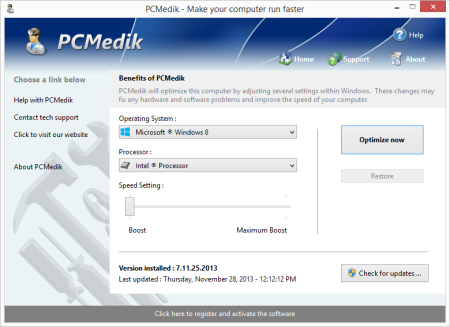
PGWare PCMedik 8.8.24.2020 Multilingual

6eacc88a-7773-4dfd-9e11-134e0cbdf10c.png

File Size: 5 MB

PCMedik instantly makes your computer faster and fixes common problems associated with frustrating slowdowns and errors.​

Do you remember when you first turned your brand new computer on and how fast it worked? With PCMedik and a click of the mouse you can bring back this speed to your computer instantly. PCMedik quickly scans your computer for common problems and fixes them, it then makes several permanent changes to Windows so your computer feels like it is brand new once again. Don't deal with a slow computer and make tasks take longer to complete, install PCMedik and make your computer run faster.
Over as you install new and updated software, you get the impression your computer is slower due to these applications being more demanding of faster hardware. PCMedik makes your computer faster by making several changes to Windows settings; for instance it turns off several animations that degrade performance, instructs the CPU how to prioritize background tasks, how files are loaded and written to the hard drive, changes to the way memory is used when programs use the memory swap file and dozens of other performance settings. With these system changes made to Windows and the fixes to common problems, your computer will run faster and operate like it is brand new.

Constant Updates

We constantly update PCMedik with new system performance tweaks; this allows your computer to keep up with the latest software that demand faster hardware.

Heals Problems

Many small problems on your computer lead to a combined loss of performance over , PCMedik will scan your computer for these problems and instantly repair them.

Simple to Use

PCMedik is easy to use, simply click a single button and the software instantly performs changes to your computer safely. PCMedik is simple, efficient and effective.

Instant Speed Increase

PCMedik will instantly increase the speed of your computer's hardware by making permanent system wide Windows changes to how your computer operates.

PCMedik is one of the easiest to use PC optimization utilities available on the market. We designed PCMedik to be very easy to use, allowing a novice computer user to simply install our software, click a single button and reboot the machine for an instant speed increase. While our software may appear very simple, it is extremely powerful on the inside and instantly fixes many of the common computer problems and makes permanent changes to your system intelligently. PCMedik has a built in system analyzer and diagnostic ee which quickly locates problems and fixes them, and we constantly update our software to provide you with new improvements.

Your computer works similar to a car, if over you do not perform maintenance and tune-up's they both b to exhibit problems and don't have the same performance they did when they were brand new. PCMedik performs a quick tune-up, fixes problems and optimizes the performance of your computer with a single click of the mouse. Don't waste money buying a new computer because your computer is slowing down or having problems, a trial version of PCMedik today and make your computer run faster.

Compatible with Microsoft Windows 10, 8, 7, Vista, XP & Windows Server 2012, 2008, 2003. 32-BIT/64-BIT ready.

Instantly increases the speed of your computer with a very easy to use interface, simply click one button and reboot the computer.

Decreases the amount of for Windows to load, and makes loading and running your favorite programs much faster.

PCMedik repairs common problems found on most computers and instantly fixes them to improve computer stability and performance.

Makes your computer faster by optimizing how the computer memory operates, how applications are prioritized with the CPU and how the disk drive performs.

Changes are made to the Windows system permanently, allowing you to perform a single one tune-up to increase performance forever.

New and improved modern user interface, easy and intuitive to use and compliant with Windows user interface guidelines.

Software updates can be ed and installed directly from inside the application without having to visit our web site.


DOWNLOAD
uploadgig
Код:
https://uploadgig.com/file/download/5b2c92EE6fb0635e/BGSG3cxG_PCMedik.8_.rar

rapidgator
Код:
https://rapidgator.net/file/3cee273b23cf01d69f211e9ec8cbcad1/BGSG3cxG_PCMedik.8_.rar

nitroflare
Код:
http://nitroflare.com/view/4BA838D14DAC01E/BGSG3cxG_PCMedik.8_.rar
 
PGWare SuperRam 7.8.24.2020 Multilingual

de758c4d-6885-48c3-80ad-7823eddbde00.png

File Size: 8 MB

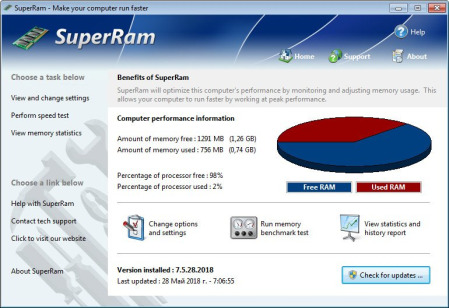
SuperRam makes your computer run faster by taking control and managing the memory on your computer efficiently.​

If you notice your computer is running slow, this typically is due to the memory (RAM) running out of usable space. When memory space gets lower, Windows then starts opening programs into the Windows page file; this page file is the computer hard drive which is much slower than RAM. SuperRam switches this behavior and puts old programs into the Windows page file and any newly opened programs are put into actual RAM. This change in how Windows operates allows programs and games to run faster.
SuperRam constantly runs in the background on your computer and detees when the memory on your computer is getting to a low threshold; once it reaches this threshold it immediately frees memory back to the computer and makes programs run faster since they have access to physical memory. SuperRam's settings allow you to freely adjust and change this low memory threshold and give you the ability to detee how much memory to free back to Windows. SuperRam gives you full control over how memory works on your computer and allows you to fine tune how your computer operates.

Faster Applications

Applications and games instantly load and run faster than before since they have access to more RAM on your computer. This instantly makes your computer run smoother and faster.

Take Control

You are now in control of your computer and decide how the system works. SuperRam gives you instant access to control how the computer operates and then works in the background for you.

Always Running

SuperRam constantly runs in the background even if no user is logged in, works great for server systems and desktop machines whether they are in full use or idle.

Infinite Memory

SuperRam constantly frees wasted memory back to the computer giving the impression you have an unlimited supply of RAM available to your applications at all s.

SuperRam intelligently manages memory unlike many other memory management programs available on the internet. SuperRam monitors how much of your computer processor is being utilized; ensuring that it does not free memory when the computer is processing large amounts of data and cause slowdowns. SuperRam can also detect when a program is running full screen, such as a game or a DVD and prevent memory from being freed to also prevent the screen from lagging and causing video problems to occur. If you are using a laptop SuperRam can also be told not to run when the laptop is on battery power and only work when plugged in. These settings allow you to fully control SuperRam and dictate how your computer works.

If you notice your computer is running slower, trying our software SuperRam is as easy as ing the current version, clicking the install button and letting everything work on its own. SuperRam's simple to use interface allows you to set it and forget it, and let SuperRam automatically manage your computer's memory. However if you would rather take control directly, SuperRam offers many settings to let you decide how much memory to free, and when memory should be freed depending on CPU utilization, full screen applications running and many other factors. a trial version of SuperRam and make your computer faster.

Compatible with Microsoft Windows 10, 8, 7, Vista, XP & Windows Server 2012, 2008, 2003. 32-BIT/64-BIT ready.

Allows games and applications to run faster by giving them access to more physical memory installed on the computer.

Runs in the background, which allows the software to run quietly freeing memory back to the computer without user interaction.

SuperRam can even run when no user is logged in allowing server systems to free memory leaks or give server software access to more RAM.

Memory benchmark test feature has been added in to get an estimate of how fast and stable your computer memory is.

Full customizable settings allow users the ability to fully control how memory behaves empowering the user to control their computer.

New and improved modern user interface, easy and intuitive to use and compliant with Windows user interface guidelines.

Software updates can be ed and installed directly from inside the application without having to visit our web site.


DOWNLOAD
uploadgig
Код:
https://uploadgig.com/file/download/D65e9c7c2c101309/2T1EQ8u6_SuperRam.7_.rar

rapidgator
Код:
https://rapidgator.net/file/911085289da25368c86c2f3a0938c4de/2T1EQ8u6_SuperRam.7_.rar

nitroflare
Код:
http://nitroflare.com/view/65F0C80DEB1F08D/2T1EQ8u6_SuperRam.7_.rar
 
PGWare Throttle 8.8.24.2020 Multilingual

b5be8a72-af4b-44bf-9345-3622597febab.png

File Size: 5 MB

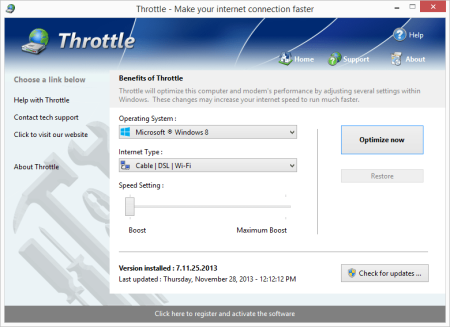
Throttle instantly upgrades your computer and modem to files faster, browse the web faster and play games without lag.​

If you are tired of browsing the web and pages taking forever to load or you want to large files faster, Throttle can instantly increase the speed of your internet. Throttle is one of the best internet acceleration software products available and works with Cable, DSL, U-Verse, Fios, dial-up, satellite and mobile phone (2G/3G/4G) internet connection types. You can easily upgrade you internet connection without having to pay extra monthly fees to your ISP using Throttle.
Throttle is very safe to use and makes several Windows registry and system changes to increase the performance of your modem and internet speed; this allows you to browse the web faster, files faster and play games without lag. These permanent changes made to your computer and modem improves how large data packets are sent between your computer and servers, it lowers the latency between your computer and servers, and how Internet Explorer simultaneously s images and files. With Throttle your internet will become much faster and the changes it makes to your computer are completely safe and permanent.

Faster s

Instantly makes s from the internet faster. Don't wait while ing large files, Throttle makes large s take much less to finish.

Safe and Permanent

Changes made to your computer and modem with Throttle are completely safe and are permanent, run once and your internet is permanently faster.

Easy to Use

Simply and install Throttle on your computer and click a single button. Browsing the web, ing and online gaming are instantly faster.

Faster Internet Speed

Instantly increases the speed of your Cable, DSL, U-Verse, Fios and dial-up internet connection and improves the speed of your internet connection dramatically.

Throttle instantly increases the speed of your internet and immediately saves you money. Throttle allows you to take advantage of a faster internet without having to pay extra monthly fees to your ISP for a more expensive internet package; try our Throttle software and instantly increase the speed you can files, browse the web and play online games. Throttle makes several Windows registry changes to improve how networking packets are transmitted and received, we increase the buffer sizes which allows data to be transmitted and processed faster on your computer, allowing games, web browsing and ing files to work much faster.

Increasing the speed of your internet connection, browse the web faster and files faster as well as saving monthly fees are as easy as installing Throttle. Simply and install Throttle from our web site, click a single button and reboot your computer; upon reboot you will quickly see how fast your internet connection has transformed, browsing the web is now much more enjoyable and playing games online will become an incredibly fun lag-free experience.

Compatible with Microsoft Windows 10, 8, 7, Vista, XP & Windows Server 2012, 2008, 2003. 32-BIT/64-BIT ready.

Instantly increases the speed of your internet making s faster, surfing the web faster and playing online games without lag.

Increases the speed of all internet connection types such as Cable, DSL, U-Verse, Fios and dial-up satellite and mobile phone (2G/3G/4G).

Saves you money by maximizing your current internet connection without having to upgrade to a higher package with your ISP.

Easy to use software that allows you to make permanent changes to your computer and modem with a single click.

Playing online multiplayer games is now a lag-free experience due to many of the settings Throttle makes to the computer.

New and improved modern user interface, easy and intuitive to use and compliant with Windows user interface guidelines.

Software updates can be ed and installed directly from inside the application without having to visit our web site.


DOWNLOAD
uploadgig
Код:
https://uploadgig.com/file/download/2b14241540f7429a/4XL9JkPR_Throttle.8_.rar

rapidgator
Код:
https://rapidgator.net/file/5adb7852f207103127cbeb5a731da00a/4XL9JkPR_Throttle.8_.rar

nitroflare
Код:
http://nitroflare.com/view/01D63EFF2D15D93/4XL9JkPR_Throttle.8_.rar
 
Parted Magic 2020.08.23

ba1cf23f-2251-4591-b729-a0968c2d9afd.png

Languages: English | File Size: 762 MB

Powerful Tools for Home or Office!​

- Parted Magic is a complete hard disk management solution. PartedMagic has the tools to get the job done. With the Partition Editor you can re-size, copy, and move partitions. You can grow or shrink your C: drive. Create space for new operating systems. Attempt data rescue from lost partitions.
PartedMagic has the tools to get the job done. With the Partition Editor you can re-size, copy, and move partitions. You can grow or shrink your C: drive. Create space for new operating systems. Attempt data rescue from lost partitions.
PartedMagic allows you to easily reset or change Windows passwords. Recover lost files. Rescue files from devices with disk read errors.
Clone a computer's entire disk or a single partition. The cloned data could be saved as an image-file or as a duplicated copy of the data. The data could then be saved to a locally attached storage device, an SSH server, a Samba Server, or a Network File System share. The clone file can then be used to restore the original when needed.
PartedMagic comes with easy to use solutions for conventional overwrite. Internal Secure Erase. Wiping of only Free Space.
All the benchmarking tools you would ever need! Bonnie++, IOzone, Hard Info, System Stability Tester, mp, and stress.

PartedMagic is a stand alone Linux operating system. Runs from a CD or USB drive. Nothing installed.

Disk partitioning divides a hard disk into multiple storage units referred to as partitions. A physical disk with multiple partitions is useful for running more than one operating system. Each Partition may use a different file system.

When Parted Magic Secure Erase is issued against a SSD drive, all of its cells will be marked as empty.

A benchmark program tests the relative performance of computer by running a number of standard tests and trials against it.

- PartedMagic requires at least a 686 processor with 1GB of RAM.

- 512MB in Live mode.

- Compatible with Secure Boot Windows machines.

- Runs well on Intel Macs.


DOWNLOAD
uploadgig
Код:
https://uploadgig.com/file/download/084a141a996d7eE4/EeL0IBvw_pmagic_2020.rar

rapidgator
Код:
https://rapidgator.net/file/f2daf8cd70a1e549358ca1ca946f6c90/EeL0IBvw_pmagic_2020.rar

nitroflare
Код:
http://nitroflare.com/view/5EF26C352CF4B80/EeL0IBvw_pmagic_2020.rar
 
Text Editor Pro 9.6.1 Multilingual

c30cf785-dcbd-474f-b028-4ceeb2a785b2.png

File Size : 12 Mb

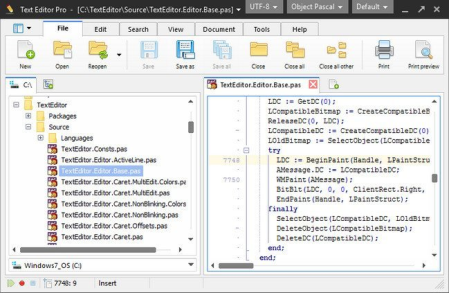
Text Editor Pro is a comprehensive and easy to use text editing tool that offers syntax highlighting for over 50 scripts.​

What is guaranteed to surprise you and catch your attention is that the application supports over 50 programming languages such as C++, COBOL, DOT Graph Drawing, DSP, DWScript, Fortran, Foxpro, Java, Perl, Python, Ruby SQL and many more. This feature alone makes Text Editor Pro an invaluable tool that can appeal to almost any programmer.
Right off the bat you notice how good the graphic design of the application looks. If focuses on simplicity and ease of access. All the tools you use frequently are displayed in the toolbar at the top of the main window but can also be accessed from the right-click context menu.

You can easily select any of the languages from a drop-down menu, create a new document and start writing. The application can handle multiple opened documents and displays them in separate tabs. Since aspect is important in the layout of the text, you get to increase and decrease indent and sort the text lines.

Working with hundreds of lines of text you're bound to need to locate certain words and commands. To help you out in this matter, the application provides you with a practical and powerful search function. It allows you to toggle case sensitive, whole words only and regular expression search modes. Another means of locating content is to mark it and then return to it when you need to. For this, you get the option of adding multiple bookmarks throughout the document.

When you work on a project and save multiple drafts of it you can can very easily get confused trying to figure out what is different between them. To make it easier for you, the application allows two files to be opened and compared line by line.

With the above to consider and more to discover, Text Editor Pro is by all means a handy and reliable text editing tool that provides you with the means to edit code in a large variety of programming languages.


DOWNLOAD
uploadgig
Код:
https://uploadgig.com/file/download/f158DEf1Afb6cbeb/KFznyeGR__Text_Edito.rar

rapidgator
Код:
https://rapidgator.net/file/452175d0227cb979bdb3b5c60f63f302/KFznyeGR__Text_Edito.rar

nitroflare
Код:
http://nitroflare.com/view/ECDF20D57856371/KFznyeGR__Text_Edito.rar
 
Назад
Сверху