
• Здравствуйте. Сайт заработал в архивном режиме форум www.old.nado.in

Dl4ever Software

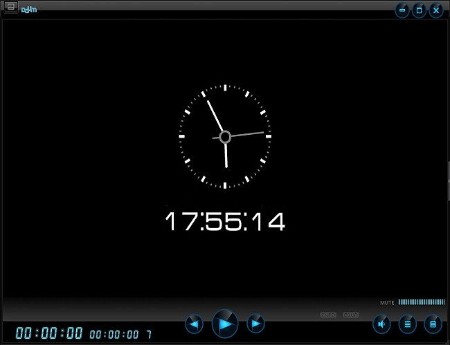
Daum PotPlayer 260114 (1.7.22777) Repack

a0e55ee353d4aff3ecde5c4d9a5b1514.jpg


Daum PotPlayer 260114 (1.7.22777) | File size: 94 MB
​


PotPlayer is a comprehensive freeware video and audio player, that also supports TV channels, subtitles and skins. Done by the same Korean author as The KMPlayer. It works w/ madVR/HR/EVR and Reclock of course it's a much improved/faster version of KMPlayer, including ffdshow and some other stuff to connect to a Korean-only video/chat network.

Plenty of features and rich customization. It gives its users great control over its functions, allowing modification of the video speed, adjusting the audio volume, decrease or increase contrast and brightness. Also, several skins are available so that users can match the appearance of their video player to the theme of their OS. Player contains internal codecs and there is no need to install codecs manually.
Diversity is a word that can be attached next to anything, from living beings, objects to virtual items. When referring to media files, these are found in an astonishing large variety of quality settings and formats. Luckily, specialized applications such as PotPlayer give you the possibility to enjoy your favorite songs and videos without worrying about compatibility issues.

Visually appealing and easy to use
The setup process guides you through a series of steps, which take very little of your time. Additional codecs are installed only if these are missing from your computer and not without your consent. However, codecs and encoders can also be configured through the application's preferences panel.
Running it unveils a pretty interface, with elements reduced to a minimum, yet managing to include all necessary playback options, volume slider and a decent, resizable preview section. A playlist can be toggled on, as well as a control panel, with the possibility to stick them to the main window and move around the desktop as a group.

Supporting a large variety of formats
Adding a media file is no rocket science, and barely requires you to drag desired items either over the playlist or the preview section. Lists can be easily saved and loaded when needed, as well as importing already existing ones.
You need not worry whether or not the application is capable of opening a certain file, as it supports nearly all available formats. Ranging from AVI, WMV, MP4, 3GP, FLV, MKV in the video category, to MP3, WAV, FLAC, AAC, APE for music, and even commonly used playlists, tha application is sure to satisfy any requirement. The actual list of supported formats is considerably larger than the few mentioned examples.

Enhance audio and video experience
The application puts several tools at your disposal in order to fully enjoy clips or songs. A control panel lets you carefully adjust several frequency sliders or put presets to good use, to get the most out of the audio. Moreover, your custom configurations can be saved for later use.
Furthermore, you can adjust a few color related sliders to correct any errors in a video or make it suitable to your liking. Subtitles can also be inserted and placed at a custom position, while an integrated function lets you take snapshots of desired frames.In conclusion
Taking everything into consideration, we can say that PotPlayer is worth at least a try. The interface is extremely minimalistic, letting even the most inexperienced accommodate in a jiffy. However, it's packed with rich features under the hood, coming in handy even to pro users. It might just convince you to keep it around for a long time.

Whats New
Код:
https://t1.daumcdn.net/potplayer/PotPlayer/v4/Update2/UpdateEng.html

HomePage:
Код:
https://www.daum.net

-:DOWNLOAD FROM LINKS:-​
Download From RapidGator
У Вас недостаточно прав для просмотра ссылок. Войдите или зарегистрируйтесь.


Download From DDownload
У Вас недостаточно прав для просмотра ссылок. Войдите или зарегистрируйтесь.
 
FreeFileSync 14.8 Donation Edition


9e2134a59240b119407bd816caf70931.jpg


FreeFileSync 14.8 Donation Edition | File size: 29.5 MB
​


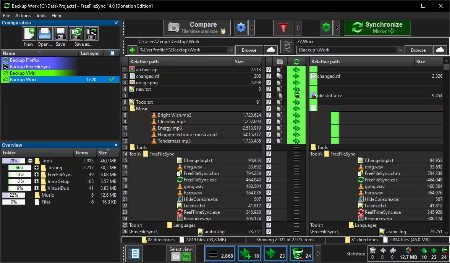
FreeFileSync is a folder comparison and synchronization software that creates and manages backup copies of all your important files. Instead of copying every file every time, FreeFileSync determines the differences between a source and a target folder and transfers only the minimum amount of data needed.

Whats New
Automatically detect proxy settings for Google Drive (Windows)
Fixed file filter considering parent folder as match candidate
Fixed bitmap button being trimmed (Linux)
Fixed window flash when starting silent batch job (Windows, macOS)
Try to set modification time on open file handle (Linux, macOS)
Mitigate invalid main window size and position on startup
Improved spin control arrow key handling (macOs)
Run (S)FTP and HTTP session cleanup threads on demand
Fixed mouse highlight when showing file grid context menu
Avoid percentage format precision flicker when copying large file

HomePage:
Код:
https://freefilesync.org/

-:DOWNLOAD FROM LINKS:-​
Download From RapidGator
У Вас недостаточно прав для просмотра ссылок. Войдите или зарегистрируйтесь.


Download From DDownload
У Вас недостаточно прав для просмотра ссылок. Войдите или зарегистрируйтесь.
 
GoodSync 12.9.25.5 (x64) Multilingual English


cc54a3914e1bbc8dade108cd505eed75.jpg


GoodSync 12.9.25.5 (x64) Multilingual | File size: 76 MB
​


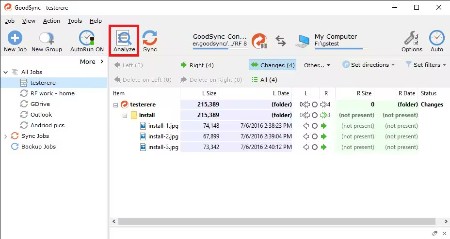
File Synchronization and Backup Software. Easily back up and sync your files with GoodSync. Our simple and secure file backup and synchronization software will ensure that your files are never lost.

File Backup
An easy, fast, and secure way to automatically back up all of your data to multiple destinations and to restore it when needed.

File Synchronization
Real-time and automated data replication for one-way or two-way synchronization across multiple destinations and platforms.

Features for Every Backup and Synchronization Task
Real Time Data Transfer
Automated, scheduled, and real-time backup and synchronization with no user interaction required.

Block Level Data Transfer
Propagates only the data blocks changed since the last analysis, significantly reducing backup time, network consumption, and storage requirements.

Unattended Service
Runs as a background service, performing automated, scheduled, and real-time backups with no user interaction required.

END TO END ENCRYPTION
Improves security by applying AES-256 bit encryption to your mission critical data in transit and at rest.

Version History Control
Saves single or multiple versions of your data change history, ensuring maximum protection and minimal data recovery time.

Copy Locked Files
Guaranteed backup and synchronization of files that are simultaneously open on users' devices.

File and Folder Move/Rename Detection
GoodSync detects file/folder renames and executes them as Move commands.

SECURITY ATTRIBUTE PROPAGATION
Capable of monitoring and propagating file security attributes across the Internet maintaining same access permission levels at different locations.

RealDisk Online Storage
GoodSync provides its own RealDisk online storage, which is really fast, especially on large number of small files.

Whats New
Код:
https://www.goodsync.com/news-windows

HomePage:
Код:
https://www.goodsync.com/

-:DOWNLOAD FROM LINKS:-​
Download From RapidGator
У Вас недостаточно прав для просмотра ссылок. Войдите или зарегистрируйтесь.


Download From DDownload
У Вас недостаточно прав для просмотра ссылок. Войдите или зарегистрируйтесь.
 
Handicap Manager 8.0.2 for Excel


4e28a7954917af2d7d7c9adee05de460.png


Handicap Manager 8.0.2 for Excel | File Size: 2.2 MB
​


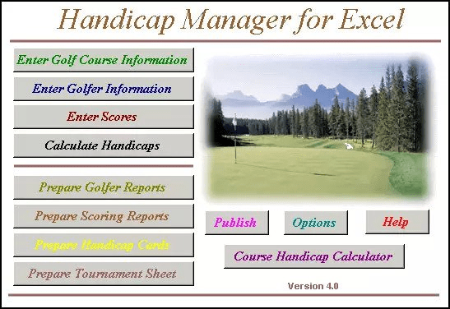
Handicap Manager for Excel - this is a customizable application written in Visual Basic as an application for Microsoft Excel. Fully compatible with Excel and above and meets all the requirements of the USGA handicap system for calculating the indices USGA handicapping. Can be used to calculate the average score, statistics, leagues handicaps and custom handicaps based on user settings. User-friendly interface and easy "point and click" make it easy to work with the program even perfect for beginners. It does not matter Whether you USGA Handicap Indexes for all members of the club or just tracking your own glasses, Handicap Manager for Excel provides a simple solution. Includes a separate calculator calculate the course handicap for Palm OS.

Features
Flexible licensing lets you pay only for the capacity you require.
Accommodates up to most recent 1000 rounds per golfer, and up to 2,500 different courses.
Handicap management for clubs and stat tracking for individuals.
Compute 9 and/or 18 hole handicaps.
English and French versions of member level windows
Handicap Manager is used by over 350 golf courses around the world to maintain handicaps for thousands of golfers.
Enter scores hole by hole or total score.
Automatically applies and displays the appropriate stroke limitation if scores are entered hole by hole.
For scores entered hole by hole, comprehensive and meaningful statistics available including driving accuracy, fairway stats, greens in regulation, putting stats, scoring stats, etc.
Updated handicap information automatically displayed after score entry.
For a small additional fee, upload your data to our eHandicap Network (www.eHandicap.net)
query handicap data via the Internet
view score cards via the Internet
enter scores via the Internet (can be enabled or disabled)
an offsite backup of your data for added security
Management features can be disabled to secure system for entry of scores by members
Members can maintain their own password.
Golfer selection by Member Name or Member ID.
Print handicap cards, member lists, ringer round reports, blank score cards, score posting sheets, telephone lists, address labels, and more.
Preview reports online before printing.
Group golfers into up to 10 flights or logical groups.
Excellent statistics and graphics. The amount of statistical information available depends on the amount of information each golfer chooses to enter!
Tournament scoring using net scores, gross scores or Stableford scoring.
Integrates with our Tournament Manager for more comprehensive tournament management.
Most reports can be saved in HTML (Internet) format for easy emailing or inclusion on your web site
Backup and recovery facility to ensure your data is protected.
Includes an optional "Mouseless" interface for members who are not comfortable with computers
Includes complimentary support and the right to download and apply all 2020 updates.

Whats New
official site does not provide any info about changes in this version.

HomePage:
Код:
https://www.northernsystems.com/

-:DOWNLOAD FROM LINKS:-​
Download From RapidGator
У Вас недостаточно прав для просмотра ссылок. Войдите или зарегистрируйтесь.


Download From DDownload
У Вас недостаточно прав для просмотра ссылок. Войдите или зарегистрируйтесь.
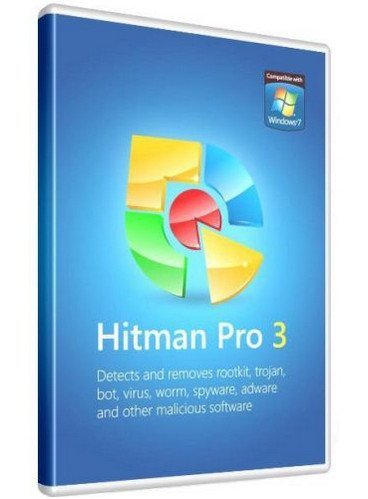
 
HitmanPro 3.8.50 Build 346 Repack


08cda7f13feee877227689df220e618c.jpg


HitmanPro 3.8.50 Build 346 | Windows x86/x64 | File size: 26.28 MB
​


Hitman Pro is the fastest solution to see if your computer is infected with viruses. This software is also portable and can run from a USB Flash Drive, CD/DVD, local or network attached hard drive. Hitman Pro 3 is a fast all-in-one tool to locate, identify and remove viruses, spyware, trojans, rootkits and other malware. Hitman Pro 3 will quickly show if your PC is infected with malicious software.

Research shows that many computers are infected, even if they have an up-to-date security suite installed, and that a combination of different anti malware programs would be required to prevent infection. Hitman Pro 3 uses innovative cloud computing techniques to detect and remove potential malware threats with minimal impact on system performance.

Features of Hitman Pro 3x.
- Recognizes and removes viruses, trojans, rootkits, spyware and other malware.
- Revolutionary innovation in scanning technique to distinguish between malicious and safe software without signatures.
- Short scan time - searches the system within a few minutes.
- No extra system load.
- Impossible to make false positives on important systems files thanks to "profiling" and whitelisting.
- Multi-vendor identification of malware in our real-time "Scan Cloud".
- Automatically restores common system alterations made by malicious software.
- Creates a check point in System Restore before removing malicious software.
- Removes resistant threats using native NT boot-time deleter.
- Removes references to malicious software (like shortcuts and registry entries).
- Free malware scan

What's new
Код:
https://www.hitmanpro.com/en-us/whatsnew.aspx

HomePage:
Код:
https://www.hitmanpro.com/

-:DOWNLOAD FROM LINKS:-​
Download From RapidGator
У Вас недостаточно прав для просмотра ссылок. Войдите или зарегистрируйтесь.


Download From DDownload
У Вас недостаточно прав для просмотра ссылок. Войдите или зарегистрируйтесь.
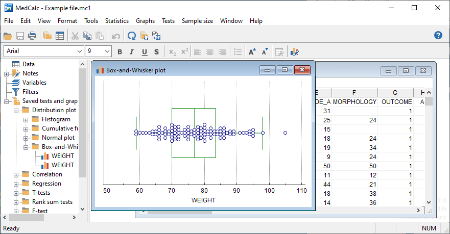
 
MedCalc 23.4.9 Multilingual


1868dc31b443c6b1b0f55fe36b48d23b.png


MedCalc 23.4.9 Multilingual | File size: 67.8 MB
​


Statistical software for biomedical research with a rich set of functions, graph types and an advanced module for performing ROC graph analysis. MedCalc is designed to meet the requirements of biomedical researchers with respect to the statistical analysis of large datasets. It provides the necessary tools and features for performing Receiver Operating Characteristic curve analysis, data plotting, Bablok and Deming regression and more.

With an integrated spreadsheet with over 100,000 rows, MedCalc is capable of reading and displaying detailed data imported from Excel, SPSS, Dbase, Lotus or extracted from SYLK, DIF or text files. The information can be easily sorted, filtered or edited.

The built-in data browser offers a comfortable means of easily managing data, variables, notes, texts and graphs, while the array of supported graphs and diagrams (scatter plots, method comparison graphs, graphs for subgroups or for up to 24 continuous variables, survival curves, serial measurement, standardized mean plots and many more) make it perfect for analyzing trends and comparing information.

One of the most important features of MedCalc is related to its ROC curve analysis capabilities. It can generate the ROC curve graph with 95% confidence bounds, calculate specificity, sensitivity, predictive values for all the thresholds, likelihood ratios, generate conclusive plots and determine the size of an area under the ROC graph. Up to 6 ROC curves can be compared, calculating the differences between the areas, the standard errors, P-values and more.

MedCalc is capable of handling missing data, creating subgroups, calculating percentile ranks and power transformation. It features outlier detection, correlation and regression tools, Bland & Altman plotting, while also enabling you to run Anova, variance ratio, mean, propertion, Chi-Square, Fisher and T-tests.

A summary of the statistical report can be easily generated and data can be placed and viewed side-by-side thanks to the multiple comparison graphs function.
MedCalc requires at least basic statistics knowledge in order to get the most out of its potential. Its extensive array of features make it a must-have tool for running method comparison studies and analyzing biomedical data.

Whats New
Код:
https://www.medcalc.org/history.php

HomePage:
Код:
https://www.medcalc.org/

-:DOWNLOAD FROM LINKS:-​
Download From RapidGator
У Вас недостаточно прав для просмотра ссылок. Войдите или зарегистрируйтесь.


Download From DDownload
У Вас недостаточно прав для просмотра ссылок. Войдите или зарегистрируйтесь.
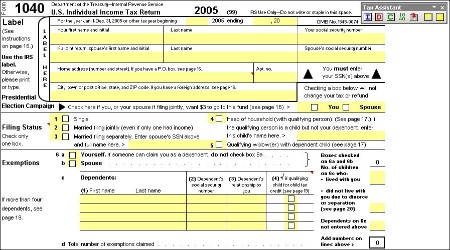
 
Tax Assistant for Excel Professional 7.11


3c17aa54bb6f72ecc24eddbe79d1ecf5.jpg


Tax Assistant for Excel Professional 7.11 | File Size: 5.7 MB
​


ax Assistant for Excel for the 2010 tax year is ready to help you prepare your taxes. In addition to updating the various tax forms, we've made the program more intuitive and user friendly and improved the error checking on Capital Gains entries to insure your return is correct. We've also added Form 8829 for reporting a tax deduction for the business use of your home. Don't waste time answering 1000 questions and entering unnecessary information with other tax programs. Tax Assistant for Excel allows you to enter only the data you need in a fast efficient manner. Even if you use another program to file your taxes electronically, Tax Assistant for Excel provides an inexpensive way for you to keep a permanent record of your federal tax return in the ubiquitous Excel file format. You can also use it to compare your taxes under different scenarios.

New Release of Project Manager for Excel
We just posted a new maintenance release of Project Manager for Excel. It provides a much requested enhancement to the task priorities feature and greatly improves compatibility with charting features in Excel 2007/2010 as well as the 64 bit versions of Windows. Whether you're tracking projects at work or at home or simply want a good to do list, Project Manager for Excel will fit the bill.

Personal Finance Made Easy
Checkbook for Excel - Personal Finance and Checking Account Software
Microsoft Money has abandoned you and Quicken just wants more of your money. It's time to save your money and try out Checkbook for Excel.
Checkbook for Excel is our most popular application and Version 5 has added a host of important new features to make it both more powerful and easier to use for managing your personal and business bank accounts, credit card accounts and financial ledgers. While other personal finance software makers are adding advertising to their releases, we're still providing helpful new features to make managing your personal finances and bank accounts easier than ever. A new maintenance release is now available that adds a couple features, including a new date selection tool to make entering dates easier than ever.
Microsoft has dropped its support and development for Microsoft Money, which leaves Quicken with a virtual monopoly in the personal finance software arena. Now's a good time to try Checkbook for Excel and simplify your personal finances. You can easily export your Microsoft Money accounts in QIF format and import them into Checkbook for Excel. Don't sign up for the Quicken monopoly. Try Checkbook for Excel today!
Checkbook for Excel is ideal for tracking and managing your Paypal transactions. Just download your Paypal history in the Quicken .qif file format and it will import perfectly into Checkbook for Excel. You can easily prepare reports of your various income, expenses and transaction fees.
The enhanced Palm Checkbook Companion application is also available that lets you enter transactions on your Palm OS device and then automatically synchronize them with Checkbook for Excel.
If you have never tried Checkbook for Excel, this is your chance to get rid of the convoluted interface and gratuitous advertising that plagues the more popular financial programs. You can download the fully functional version of Checkbook for Excel and try it for free for 30 days. We're confident it will simplify your financial life.

VistaPrint Checks - Recommended
If you need checks to use with Checkbook for Excel or if you still use old fashioned checks, order your VistaPrint checks and save money!
Tax Assistant for Excel
Tax Assistant for Excel - Tax Preparation Without All the Questions
We have our new release of Tax Assistant for Excel for the 2010 tax year now available to download. We've kept the same form based approach but have made the program easier to navigate. You can use the IRS approved forms in Tax Assistant for Excel to file your Federal Income Tax Return, use it to easily estimate your taxes or use it to keep a permanent electronic record of your tax return in the universal Excel file format. Don't delay. Download Tax Assistant for Excel today and use it to get an early start on filing your Federal income tax return. While the other tax software companies are still finalizing their forms and programs, Tax Assistant for Excel has been completely updated with the latest forms and changes for the 2010 tax year.
Rest assured that your Federal Income Tax preparation will be easier than ever with the Tax Assistant for Excel for the 2010 tax year. We provide the latest IRS updates and have added a few new features along the way. As always, we're committed to taking the pain out of filing your federal income tax return. The latest version of Tax Assistant for Excel will help you do it quickly and easily. It provides IRS approved tax forms in an easy to use Excel spreadsheet format. The program encompasses all the IRS changes for the current tax year and includes the most commonly used forms.
In addition to our typical Tax Assistant for Excel release that runs in all versions of Excel back to Excel 97, we've also released a version for Excel 2007/2010 that takes advantage of the new Ribbon interface and more efficient file format. It provides a Ribbon tab specifically for Tax Assistant that makes entering data and navigating the forms easier than ever. If you are using Excel 2007 or Excel 2010 be sure to download this new version as the Excel 2007/2010 file format is faster, smaller and more secure. We've also added tools to all versions that make un-protecting and protecting the various worksheets easier than ever.
Tax Assistant for Excel also provides automation for capital gains reporting on Schedule D and Schedule D-1. It includes accommodations for Wash Sales, Section 1202 Exclusions and automatic Schedule D and Schedule D-1 completion with error checking. If you are an active trader, be sure to download the Expanded Schedule D-1 version that will accommodate over 10,000 short-term and long-term entries (each). You can copy and paste your spreadsheet data directly into the Capital Gains data entry sheet and the program will automatically check for errors and prepare all your Schedule D-1 attachments.
We've also provided the Social Security Benefits Worksheet to automate the calculation of any taxable portion of your Social Security income and included multiple Schedules C and C-EZ for reporting business income from sole proprietorships. Tax Assistant for Excel for the 2009 tax year and previous years are still available to download.

Project Manager for Excel
We worked a long time incorporating your suggestions and our own ideas to create a vastly enhanced version of our Task Manager for Excel application. We've enhanced it so much that we had to change the name to Project Manager for Excel. It goes beyond simple task management by providing full blown project management features like Gantt Charts, complete scheduling features and task assignments. Whether you are managing projects for your business, projects around the house, or just tracking your to-do list, you'll find that Project Manager for Excel is easy to use and does exactly what you need.
We've just completed a significant maintenance upgrade that provides a number of new features to meet your project management needs. We've added the ability to include the task owner on Gantt charts, the ability to sort all projects and associated tasks at once, the ability to set reminders by default and an option for omitting completed tasks on Gantt charts. We've also added the ability to export the Projects sheet to a separate file. We have this new version available with all these new features and several others as a free upgrade to registered users. Just go to our Project Manager for Excel page to download the new version.

Whats New
official site does not provide any info about changes in this version.

HomePage:
Код:
https://www.djicomputer.com

-:DOWNLOAD FROM LINKS:-​
Download From RapidGator
У Вас недостаточно прав для просмотра ссылок. Войдите или зарегистрируйтесь.


Download From DDownload
У Вас недостаточно прав для просмотра ссылок. Войдите или зарегистрируйтесь.
 
VanDyke SecureCRT and SecureFX 9.7.1.3815 (x64)


dedb5df8174ad265343baa23f23adc06.jpg


VanDyke SecureCRT and SecureFX 9.7.1.3815 (x64) | File size: 50.6 MB
​


SecureFX is a high-security file transfer client with great flexibility in configuration and transfer protocols. SecureFX includes a command-line utility (SFXCL) for scripting batch jobs to perform secure unattended file transfers using the Secure Shell protocol (SSH). SecureFX also supports "relentless" file transfers that automatically reconnect and resume when transfer connections are broken.

SecureCRT is an extremely customizable terminal emulator with support for Secure Shell (SSH) as well as Telnet, Telnet/TLS, and serial protocols. SecureCRT is ideal for securely connecting to remote systems running Windows, UNIX, and VMS. SecureCRT supports secure file transfers via Xmodem, Zmodem, Ymodem, Kermit, and SFTP.
Key Benefits SecureFX
Maintain file systems and documents securely. Transfer files across networks and the internet with a choice of SFTP over SSH2, FTP over TLS, SCP, or FTP for access to legacy systems.
Get started quickly. Connect to sessions from the main application window using the Connect bar, then organize those sessions with the easy-to-learn tabbed interface.
Leverage the high-productivity UI. Drag and drop files to start transfers (Windows only), even between SecureFX and applications like WinZip. Quickly find the files you want to work with using the filter view, bookmarks, and the address bar.
Synchronize files. Upload, download, and mirror files. Use filtering to include or exclude files or file types. Store configurations for multiple sites.
Recover more easily when transfers fail. SecureFX works to complete interrupted transfers, automatically resuming multi-file transfers.
Save steps with integrated SecureFX and SecureCRT®. Set up connections with shared sessions and server host keys. Common sessions and settings reduce repeated steps.
Make transfers unattended. The SFXCL command-line client (Windows only) allows you to automate tasks with powerful options like site synchronization. You can also use the built-in task scheduler (Windows only) to schedule transfer and synchronize operations once or at recurring intervals.
Comply with Federal standards. Use security protocols that help meet HIPAA, SOX, and other guidelines, including FIPS 140-2.

Key Benefits SecureCRT
Securely access business applications on UNIX, Linux, or VMS from machines running Windows, Linux, and Mac - employ the rich emulation support for VT100/102/220, TN3270, ANSI, SCO ANSI, Wyse 50/60, Xterm, and Linux console.
Configure, manage, and organize all your sessions with full control over scrollback, key mappings, colors, fonts, and more - whether you have one or thousands of sessions.
Access your full array of network devices from one client with SSH (SSH2, SSH1), Telnet, Telnet/TLS, serial, and other protocols.
Leverage the high-productivity GUI with time-saving capabilities including multi-session launch, tabbed sessions, tab groups, tiled sessions, cloned sessions, a button bar for repeated commands, and mapped keys.
Depend on the open standard Secure Shell (SSH) protocol for encrypted logon and session data, flexible authentication options, and optional FIPS 140-2 -approved ciphers.
Automate repetitive tasks in SecureCRT by running scripts using VBScript, JScript, PerlScript, or Python. The script recorder builds your keystrokes into a VBScript or Python script.
Transfer files between network devices with SFTP, Xmodem, Ymodem, Zmodem, or Kermit. A built-in TFTP server provides additional file transfer flexibility.
Save steps with the close integration of SecureCRT and the SecureFX® file transfer client, which share sessions and settings that let you run SFTP, FTP, SCP, and FTP/TLS file transfer sessions without reentering passwords.

Whats New
Код:
https://www.vandyke.com/products/securecrt/history.txt

HomePage:
Код:
https://www.vandyke.com

-:DOWNLOAD FROM LINKS:-​
Download From RapidGator
У Вас недостаточно прав для просмотра ссылок. Войдите или зарегистрируйтесь.


Download From DDownload
У Вас недостаточно прав для просмотра ссылок. Войдите или зарегистрируйтесь.

 
X1 Search Enterprise 10.3 Revision 9


a90842db7df6bbde239aed09ede44f32.jpg


X1 Search Enterprise 10.3 Revision 9 | File Size: 197 MB
​


X1 Search is a comprehensive software utility that lets you perform thorough searches within files and emails by applying filters to narrow down results. It is packed in a user-friendly interface and contains many helpful options, such as saved search filters.

Once started, the tool runs on a initial scan on the computer to populate its library with files. You can view the results with the name, type, date of modification, size, and full patch for each file, as well as filter them by taking into account any of these criteria. The list of results can be exported to Excel, tab, comma or other format which your preferred columns.

You can also view the contents of folders or archives within the main application window by just clicking their entries. Likewise, you can check out pictures and text files, along with technical file information for executables.

X1 Search is capable of filtering saved searches to display only files and attachments, documents, or pictures, for example. It gives you the possibility to copy or move any selected files to other locations, remove them from the computer, add them to SharePoint, or print them.

You can manage data sources and assign new locations to scan, together with the type of information to look for (e.g. file names and sizes), filter files by type and maximum size for content indexing, as well as add network paths, external drives, or accounts from AOL, GMAP, IMAP email, Outlook, Yahoo, SharePoint or X1 Rapid. Plus, indexing jobs can be scheduled to run recurrently in order to keep data updated.

The software program can be set to run at every Windows startup until further notice, begin the indexing service immediately, hide the splash screen at app startup, shut down the indexing service on exit, or minimize to the system tray on close. You can set a key combination for showing the X1 Search search window in the foreground.

X1 Search takes a while to finish an indexing job, depending on the computer's hardware abilities and data source size. However, it uses a significant amount of CPU and RAM during this time, and runs multiple processes. Other than that, the tool sports some powerful features for performing customized file searches in various locations, so you can definitely give it a shot.

What's New
official site does not provide any info about changes in this version.

HomePage:
Код:
https://www.x1.com/products/x1-search/

-:DOWNLOAD FROM LINKS:-​
Download From RapidGator
У Вас недостаточно прав для просмотра ссылок. Войдите или зарегистрируйтесь.


Download From DDownload
У Вас недостаточно прав для просмотра ссылок. Войдите или зарегистрируйтесь.

 
AITextTune 1.7.5


7840ba67698f923828b16a95847f92c5.jpg


AITextTune 1.7.5 | Languages: Multilingual File Size: 167.55 MB
​


Improve your text with AI in just one click! Correct any errors, improve clarity and flow. change the style! Generate summaries and translate texts in 25+ different languages! Revolutionize your writing in an instant! Revolutionize your writing in an instant!

PERFECT WRITING
Improve the clarity and flow of your texts! Generate summaries and translations!

CUSTOMIZE THE STYLE
Adapt the text to different writing styles, from formal to creative!

POWERFUL AI
Process your text in real-time with just one click!

WORKS EVERYWHERE
Use it on any software or tool!

SIMPLE!
1. Select the text
2. Click "CTRL+C+INS"
3. Choose a style / Summarize / Translate

FEATURES
- Correct any errors, improve clarity and flow
- Choose a style and leverage AI to enhance it instantly, in real-time!
- Generate summaries and translations in 25+ different languages!
- Use it on any tool or software you're writing on!
- Enhance text using the Google Gemini AI...

System Requirements
Windows 10 version 19041.0 or higher (32-bit and 64-bit)

* All features require an active Gemini API key and may not be available in some markets due to Google's restrictions. For a complete list of countries where the Gemini API is available, please refer to Google's official documentation:

HomePage:
Код:
https://www.aitexttune.com

-:DOWNLOAD FROM LINKS:-​
Download From RapidGator
У Вас недостаточно прав для просмотра ссылок. Войдите или зарегистрируйтесь.


Download From DDownload
У Вас недостаточно прав для просмотра ссылок. Войдите или зарегистрируйтесь.

 
App Builder 2026.6 (Window 64)


bce8fdcc88fa9e9750976d123062c751.png


App Builder 2026.6 (x64) | File size: 250.7 MB
​


Complete suite to create HTML5 and hybrid mobile applications.

Visual designer
App Builder provide us with dozens of visual and non visual controls we can simply drop it in the application's designer. Timers, HTTP Clients, Text Inputs, Push Buttons and many more controls ready to use.

Based in actions
You no need to know Javascript to create applications. App Builder scripting is based in visual assisted actions that we can use to do whatever we wanted. Hundreds of actions are available out of the box.

Fully extensible
App Builder's applications can be extended in many ways. We can use Javascript in addition to the action's based script. We can develop and use third party App Builder's Javascript plugins and also Apache Cordova plugins.

Whats New
* This release enhances how the app dialogs are internally managed. Not only fixing a bug in some specific scenario, which causes that a possible dialog is shown below an already showing dialog, so it's not really shown, but also performs other enhancements. Basically now we can show any number of dialogs, put it always above the previous ones, and never get any orphaned "backdrop" after hiding the dialogs, one by one or all of them at once.

* Update the VueJS JavaScript library Router to the latest 5.0.3 version (debug and production) for the apps template. This version of the VueJS JavaScript library Router includes a lot of changes, fixes and enhancements.

HomePage:
Код:
https://www.davidesperalta.com/

-:DOWNLOAD FROM LINKS:-​
Download From RapidGator
У Вас недостаточно прав для просмотра ссылок. Войдите или зарегистрируйтесь.


Download From DDownload
У Вас недостаточно прав для просмотра ссылок. Войдите или зарегистрируйтесь.
 
ConceptDraw DIAGRAM 17.1.1.316


93a86d65a3ce0d8dc97bf2f2641736f0.jpg


ConceptDraw DIAGRAM 17.1.1.316 | Languages: English File Size: 96.99 MB
​


The newest edition of ConceptDraw DIAGRAM (previously known as ConceptDraw PRO) ensures that it still to be the world-leading professional and easy-to-use business diagramming software. ConceptDraw DIAGRAM 17 provides a complete range of business graphic documentation solutions with thousands of stencils and hundreds of templates for rapid diagramming. ConceptDraw Solutions offer business-specific add-ons to support an expansive variety of workflow requirements. ConceptDraw DIAGRAM 17 is a versatile diagramming tool, which provides for the sharing of drawings and assists in team collaboration through presentations and many export options.

Model Your Own Solutions
My ConceptDraw panel provides instant access to the ConceptDraw DIAGRAM documents, templates, libraries, and presentations. Model your own custom solution: Simply pick some pre-designed content supplied by ConceptDraw Solutions, and save it along with your custom ConceptDraw files in the My ConceptDraw folder on your computer.

Drawing Tools
ConceptDraw DIAGRAM 17 provides a set of powerful and comprehensive drawing tools. Effortlessly design any kind of custom stencils to visualize your specific business diagrams. Arrange and format diagrams of any complexity using side panels. Format, order, align and position tools allow one to create professional looking flowcharts, process flow diagrams, engineering drawings, infographics, dashboards and more diagrams that are clear and easy to understand.

MS Visio Compatibility
ConceptDraw DIAGRAM 17 is an excellent alternative to MS Visio on macOS and Windows. Many people involved in visual communication need software tools that will import and export to the Visio file format. Powerful business graphics and diagramming tools are the norm and not the exception for today's businesses. For these important visual communication tools do their job it is often important that they be compatible with a file format that can be easily shared with others. For years the de facto standard file format for business has been Microsoft Visio™. As a result, when looking for a Visio alternative, people need the ability to open and save MS Visio files. ConceptDraw DIAGRAM 17 is such a viable alternative for individuals and organizations that are looking for a professional business software. ConceptDraw DIAGRAM 17 has import and export roundtrip of the native Visio file formats.

Live Objects Technology
Important business metrics can be viewed and tracked with live object technology. Live objects can dynamically show changes based on external data source files to give you an accurate overview of any process. ConceptDraw Solutions provide a set of solutions with library stencils of data driven charts and indicators. Using live objects, you can communicate the state of any process or the metrics of any workflow. Making custom KPI dashboards will provide real-time information with the help of interactive and easy-to-understand charts and indicators. The ability to rapidly and visually communicate these items makes live objects a powerful tool for helping your organization function more efficiently.

Powerful and Simple Flowchart Maker
ConceptDraw DIAGRAM 17 is dedicated to providing professionals with the optimum tools required to create diagrams in a clear and efficient manner, maximizing possible output to keep up with the designer's speed of thought. Accelerate designing of Business Process Diagrams, Process Flowcharts and UML diagrams using powerful RapidDraw capabilities. Organizational Charts, Concept Maps and Data Flow Diagrams visualization are highly benefiting of drawing speed from the use of advanced Chain and Tree connection modes. Create Sales Process Flowcharts, EPC, or BPMN diagram for the moment using the auto-routing capabilities of Smart Connectors. This intuitive tool takes a lot of the workload from specialists, allowing them to focus on the more creative aspects of their tasks.

Building Plans Creator
ConceptDraw DIAGRAM 17 is well suited as building plan software. There are a number of add-in solutions that contain vector stencils and templates to assist in any project. ConceptDraw DIAGRAM 17 is a professional tool imagines your blueprints, architectural, and floor plans; for home, business center, restaurant, shop, or office layout. The building plan solution family includes hundreds of stencil libraries that are tailored to industry standards. Solutions are available for: office layouts; piping and instrumentation diagram (P&ID); heating, ventilations, and air conditioning (HVAC); and emergency exit plans.

What is New in ConceptDraw DIAGRAM 17
ConceptDraw DIAGRAM 17 contains a number of improvements worth your attention. In addition to successfully adapting ConceptDraw DIAGRAM 17 for macOS to Apple Silicon and compatibility with the latest macOS Sonoma, it comes with a set of enhancements for both Windows and macOS versions. Most of them are developed in the wake of DIAGRAM users' requests. Our users want a fast, intuitive, and flexible tool for creating charts that meet professional standards. The new ConceptDraw DIAGRAM 17 will make your diagramming experience easier and more accurate.

Find below a list of improvements that enable you to be more productive with DIAGRAM 17 both on macOS and Windows platforms. When creating your next drawings, give them a try and see how much time and effort you can save.

Rapid Draw
Сreate diagrams faster than ever with expanded Rapid Draw functionality. You can personalize RapidDraw for creating flowcharts using your custom objects.

Grouped Objects in a Diagram
Editing objects in a group individually is easy. You can use a special command to change one object in a group without affecting the others. A simple and intuitive navigation system for objects and groups using only shortcuts without using a mouse - means quick editing of complex objects such as tables and matrices.

System Requirements
- Microsoft Windows® 8.1, 10, 11 (64-bit)
- CPU: Intel or AMD; 1.8 GHz or higher
- RAM: minimum 4 GB
- HDD: minimum 1.5 GB disk space

HomePage:
Код:
https://www.conceptdraw.com

-:DOWNLOAD FROM LINKS:-​
Download From RapidGator
У Вас недостаточно прав для просмотра ссылок. Войдите или зарегистрируйтесь.


Download From DDownload
У Вас недостаточно прав для просмотра ссылок. Войдите или зарегистрируйтесь.
 
ConceptDraw MINDMAP 15.1.1.296


2b913c66c32f0a8dcbb19df612fcf1cf.jpg


ConceptDraw MINDMAP 15.1.1.296 | Languages: English File Size: 132.42 MB
​


ConceptDraw MINDMAP 15, a leading mind mapping software tool includes a comprehensive set of solutions for designing and building timesaving mind maps. Create mind maps that intuitively illustrate your thought process. Organize ideas and data with a comprehensive productivity tool that is flexible and easy-to-use. Generate a great assortment of document styles and formats. Make live presentations from mind maps and then export them to MS PowerPoint or Web pages. Perfect for brainstorming, project planning, meeting management, note-taking, and much more. Apply your creativity for planning, organizing and communicating. We suppose ConceptDraw MINDMAP 15 to become an assistant to help you with this.

Mind Mapping for Project Management
ConceptDraw MINDMAP 15 is a perfect tool when it comes to project planning. You can create mind maps that contain branches with project parameters: Duration, dates, percent completed, executors, etc. Any topic in your mind map can be transformed into a project task. Any mind map can be transformed into a project map. Turn the mind map into an organizer for your projects - the Map Minder panel tracks real-time project progress data in your project mind maps and displays the number of unstarted tasks.

Intelligent Topics
A mind map can be turned into an electronic file cabinet by adding attachments in any file format. Keeping all information for a project or process one click away makes embedded files a productivity booster.

Hyperlinks and Text Notes
Extend any mind map topic by using Hypernote. It is the blend of a text note with multiple hyperlinks. Mind maps with Hypernotes can easily support an impressive amount of knowledge in a single map. Everything is at your fingertips.

Splendid Appearance
More than 20 built-in styled themes, plus the ability to design custom themes makes ConceptDraw MINDMAP 15 an impressive visual tool. Quickly make a mind map template for organization meeting schedules and reporting. Create mind maps that stand out from the crowd. With ConceptDraw MINDMAP 15 it easy to incorporate graphic images into your maps, making maps even more impactful. Images add a blend of creativity and functionality and provide your mind map with a distinctive look. Images can be either attached to a topic or added inside of the topic, or as floating images that can be moved freely. You can use pre-designed images from graphic libraries delivered with ConceptDraw Solutions or your own image from a file. You can also import images from ConceptDraw DIAGRAM custom libraries.

Mind Map Presentation
ConceptDraw MINDMAP 15 provides a set of tools to quickly create a slideshow. Using MINDMAP editing tools there is no faster way to build a presentation. Intuitive features allow for the selection of mind map areas that are to be included in each slide. Then drag-and-drop views to sequence slides. When slide sequencing is completed it is then easy to quickly transition to presentation preview mode. The resulting slide presentation can be exported to MS PowerPoint to share with the team or the world.

Data Exchange
ConceptDraw MINDMAP 15 breaks boundaries in mind mapping data exchange for project managers and mind mappers. It offers the ability to exchange data with Microsoft Project, Microsoft Office, ConceptDraw PROJECT 14, MindManager, XMind, and FreeMind. MINDMAP 15 also provides the ability of export to ConceptDraw DIAGRAM 17 files format.

ConceptDraw OFFICE Integration
ConceptDraw MINDMAP 15 can identify and structures ideas; as well as generate final documents and presentations. Open a mind map in ConceptDraw PROJECT 14 to assign tasks and report completeness of multiple projects. Use export to ConceptDraw DIAGRAM 17 to build project diagrams, organizational charts, SWOT matrices,, and more from your mind map's structured data. The ConceptDraw OFFICE 10 products provide a set of tools that support any professional activity. Choose the proper tools for your business to get the best results. Your data easily integrates with the other ConceptDraw OFFICE 10 applications because of our innovative INGYRE technology.

What is New in ConceptDraw MINDMAP 15
The new ConceptDraw MINDMAP 15 includes a set of improvements tailored to the needs of our users. We are grateful to active MINDMAP users for the ideas that we use to improve MINDMAP. ConceptDraw MINDMAP 15 for macOS has been successfully adapted to Apple Silicon and is compatible with the latest macOS 14 Sonoma. The new release makes mind map creation clearer and more accurate on both macOS and Windows platforms. Find below a list of improvements that enable you to be more productive with MINDMAP 15 both on macOS and Windows platforms. When designing your next mind maps, give them a try and see how much time and effort you can save.

Outline View
View and edit your mind map as a diagram with an updated interface and new editing capabilities.

Mind Map Sharing
More social networks for one-click publishing of your mind maps.

Mind Map Boundaries
Boundary's interface has been updated with a new control panel and new shapes to help you visually summarize your thoughts. If you want to summarize some of the ideas presented in your mind map, new boundary shapes are the best way to do that. The new side panel will help with boundaries formatting.

System Requirements
- Microsoft Windows® 8.1, 10, 11 (64-bit)
- CPU: Intel or AMD; 1.8 GHz or higher
- RAM: minimum 4 GB
- HDD: minimum 1.5 GB disk space

HomePage:
Код:
https://www.conceptdraw.com

-:DOWNLOAD FROM LINKS:-​
Download From RapidGator
У Вас недостаточно прав для просмотра ссылок. Войдите или зарегистрируйтесь.


Download From DDownload
У Вас недостаточно прав для просмотра ссылок. Войдите или зарегистрируйтесь.
 
Fast Video Cutter Joiner 7.0.2 Multilingual + Portable


2900c2bc7b09a2834dadeee4ed9db682.jpg


Fast Video Cutter Joiner 7.0.2 Multilingual + Portable | File size: 26.8 MB
​


Editing video data can be done in numerous ways, and thanks to the latest advancements in software and online services, cutting, trimming, joining or editing video content has become easier than ever. Fast Video Cutter Joiner aims at offering users a simple, clutter-free desktop solution for either cutting individual video files, or, joining multiple together, therefore making resorting to more complex software or online services not required.

Right from the start, we find out quite quickly that the app is centered on simplicity, and users have an easy choice to make, by selecting to either cut or, join videos. The design, as well as the layout of the interface, isn't elaborate, but we didn't feel that this aspect impeded the app's functionality in any way.

Adding files and initializing the processing is quite straightforward, meaning that even novices won't have any issues.

When it comes to selecting the cutting or joining types, users have a bit more flexibility, in the sense that the application offers two modes, a simple, and a more advanced one. The latter will enable one to select parameters that pertain to the characteristics of the output videos, such as format, as well as audio characteristics.

Last but not least, it is fair to mention that Fast Video Cutter Joiner does come equipped with minor playback capabilities, in the form of a rudimentary player, which allows users to preview the loaded video content.

Simple in design, and even simpler in handling, Fast Video Cutter Joiner can provide average performance for the user who seeks a way of quickly cutting or joining video clips.

Whats New
Updates: official site does not provide any info about changes in this version.

HomePage:
Код:
https://www.videocutterjoiner.com/

-:DOWNLOAD FROM LINKS:-​
Download From RapidGator
У Вас недостаточно прав для просмотра ссылок. Войдите или зарегистрируйтесь.


У Вас недостаточно прав для просмотра ссылок. Войдите или зарегистрируйтесь.


Download From DDownload
У Вас недостаточно прав для просмотра ссылок. Войдите или зарегистрируйтесь.


У Вас недостаточно прав для просмотра ссылок. Войдите или зарегистрируйтесь.
 
Hexagon Cabinet Vision 2025.4 (Window 64)


a773797332bd9dcbe983caae64ed486f.jpg


Hexagon Cabinet Vision 2025.4 (x64) | x64 | File Size: 12.7 GB
​


Description
Cabinet Vision makes it simple for furniture, woodworking, or casegood manufacturers of all sizes to play to their strengths, by using a single, fully modular software package to go from design to manufacture. With Cabinet Vision you buy only the features you need. This allows you to evolve and grow your software usage in line with your business, making Cabinet Vision highly scalable and cost-effective. Enhanced usability makes it even easier to visualise and efficiently perform a full range of tasks, while responding to changing design requirements, whether making high-end bespoke pieces or basic elements. Fast, practical and precise, Cabinet Vision excels at rapidly and seamlessly converting designs into all the information you need on the factory floor to manage manufacturing process. And an intuitively simple parametric function means you can capitalise on previous bespoke designs by resizing elements without reprogramming. The result is a faithful reproduction of designs and the reduction of both time-consuming processes and human error.

The ultimate custom showroom design tool
-CABINET VISION Design supports sales and profitability by creating professional, accurate designs, renderings and pricing estimates. Its interface is easy to use for both simple and complex projects, enabling designers to give customers a true representation of the look and cost of the finished product. CABINET VISION Design comes in three possible configurations, cabinets, closets, or both and lets you draw on a smart catalogue of products and objects so you can consistently design to manufacturers' standards.

Key Features
-Order entry, floor plan, elevations,
-3D and assembly views
-Straight, angled, curved, cathedral, vaulted and peninsula walls
-Import and export orders (CSV, ORD, ORDx)
-Job costing
-Full rendering (photorealistic, cartoon, hand drawn and hatch)
-Basic 2D CAD
-Choose between cabinets or closets, or both

CABINET VISION Design
CABINET VISION Design supports sales and profitability by creating professional designs, renderings and pricing estimates.

Cabinet Vision Core Cabinets software interface
-Core Cabinets is a core element of CABINET VISION and contains the tools to define the engineering of cabinetry.[/b]

Core Closets
Core Closets is a core element of CABINET VISION and contains the tools needed for manufacturing closets.

Minimum Specifications
-OS:64-bit Intel Pentium 4 processor (2 GHz or faster), Intel Xeon, Intel Core, AMD Athlon 64, AMD Opteron, AMD Phenom or later, in single, dual or quad core versions
-Memory:4 GB of RAM
-Disk Space:10 GB free disk space for the Edgecam installation
-GPU:Graphics cards - Driver requires OpenGL 3.3
To make the most of background processing and multi-threading, we recommend a 64-bit operating system and 2GB RAM for each processor as a minimum.

HomePage:
Код:
N/A

-:DOWNLOAD FROM LINKS:-​
Download From RapidGator
У Вас недостаточно прав для просмотра ссылок. Войдите или зарегистрируйтесь.

У Вас недостаточно прав для просмотра ссылок. Войдите или зарегистрируйтесь.

У Вас недостаточно прав для просмотра ссылок. Войдите или зарегистрируйтесь.

У Вас недостаточно прав для просмотра ссылок. Войдите или зарегистрируйтесь.

У Вас недостаточно прав для просмотра ссылок. Войдите или зарегистрируйтесь.


Download From DDownload
У Вас недостаточно прав для просмотра ссылок. Войдите или зарегистрируйтесь.
У Вас недостаточно прав для просмотра ссылок. Войдите или зарегистрируйтесь.

У Вас недостаточно прав для просмотра ссылок. Войдите или зарегистрируйтесь.

У Вас недостаточно прав для просмотра ссылок. Войдите или зарегистрируйтесь.

У Вас недостаточно прав для просмотра ссылок. Войдите или зарегистрируйтесь.
 
Revo Uninstaller Free 2.6.8


84dfa749bef5a476363c11e1704896e9.jpg


Revo Uninstaller Free 2.6.8 Multilingual | File size: 11 MB
​


Revo Uninstaller helps you to uninstall software and remove unwanted programs easily.

Uninstaller
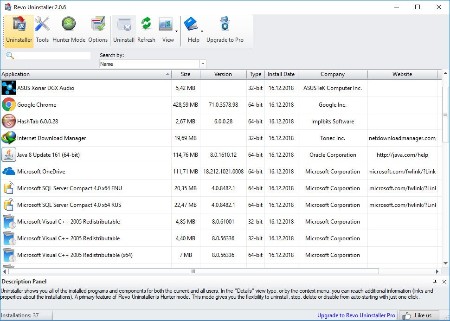
The Uninstaller module is Revo Uninstaller's primary feature for situations when a program won't uninstall normally or when you have some doubts that a program has not been uninstalled completely.
Also when a program is uninstalled, often times there are multiple files, folders, and/or Registry entries left on your system, which can cause various issues if not removed. This happens more frequently than you might think.
Revo Uninstaller acts as both a replacement and a supplement to the built-in functionality in Windows by first running the built-in uninstaller for the program, and then scanning for leftover data afterwards, making it your best choice when it comes to completely remove stubborn programs, temporary files, and other unnecessary program data that is left behind after the standard uninstall process.

Hunter Mode
Hunter Mode is an innovative feature that allows you to select in a more flexible way the program to uninstall or manage. When you activate Hunter Mode, Revo Uninstaller's main window will disappear, and a new targeting icon will appear instead. Simply drag and drop that icon over the opened window, System Tray icon, or Desktop icon of the program you wish to control, and Revo Uninstaller will display any available options in a convenient menu. This can be very useful because many programs loading on start-up and/or remain in the system tray without your consent, or you do not even know which program that is.
The Hunter Mode can come in handy when you want to uninstall an unknown program (or at the very least disable its automatic start-up in Windows), which you cannot find listed anywhere, but you can see its window or icon.

8 Additional Cleaning Tools included
Autorun Manager - control Windows startup
Junk Files Cleaner - remove unnecessary files
Windows Tools - useful Windows tools in one place
Browsers Cleaner - clear Internet browser history
MS Office Cleaner - clear Microsoft Office history
Windows Cleaner - remove junk files from your Windows
Evidence Remover - erase permanently confidential data
Unrecoverable Delete - erase permanently files and folders

Whats New
Код:
https://www.revouninstaller.com/revo_uninstaller_full_version_history.html

HomePage:
Код:
https://www.revouninstaller.com

-:DOWNLOAD FROM LINKS:-​
Download From RapidGator
У Вас недостаточно прав для просмотра ссылок. Войдите или зарегистрируйтесь.


Download From DDownload
У Вас недостаточно прав для просмотра ссылок. Войдите или зарегистрируйтесь.
 
Sante DICOM Editor 10.3.2


a0d97f352b19bb0d7c3760f6fcf8275a.jpg


Sante DICOM Editor 10.3.2 | File size: 171.1 MB
​


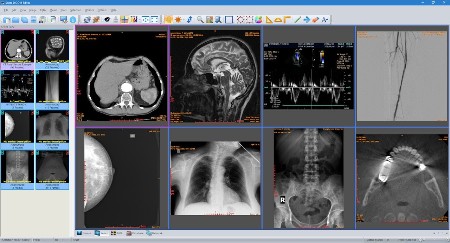
Sante DICOM Editor is a professional DICOM editor, viewer, anonymizer, converter, dicomizer, PACS client, mini PACS server, patient CD/DVD burner (with viewer) and much more.

The unique viewer
Sante DICOM Editor is not a "yet another DICOM viewer" constructed with freely available libraries such as dcmtk, itk and vtk, like hundreds of other DICOM viewers which differ from each other only in the appearance, menus, panels and dialog boxes. It is a unique program with unique capabilities, designed and developed in-house by us, from the ground up, with the most advanced programming tools and it is the result of research and development on DICOM imaging of the last two decades.

The powerful editor
Sante DICOM Editor is the industry-leading post processing application for DICOM file editing, conversion and handling, it is used by almost all the large corporations and medical equipment manufacturers, and it is the DICOM editor of choice of the greatest universities and hospitals of the world. Among others, it lets the user to edit and modify DICOM files, to add and remove attributes, and even edit and modify sequence attributes.

Features and benefits
Powerful DICOM workstation, viewer and editor
Perpetual license that never expires.
Free updates and free technical support for product's lifetime
PACS client that supports all the DICOM network services (C-FIND SCU/SCP, C-MOVE SCU/SCP, C-STORE SCU/SCP, C-GET SCU/SCP, C-ECHO SCU/SCP)
It can be used as a mini PACS server as well
(the number of stored patients/studies depends on disk size only)
Command line switches for integration with PACS servers (learn more.)
Support of all charsets (latin, chinese, japanese, korean, cyrillic, arabic, greek, turkish, etc.)
Compatible with all modalities (CT, MR, NM, US, XA, MG, CR etc.), all manufacturers and all DICOM 3.0 and NEMA 2 file types.
Editing and modification of DICOM files (even of sequence attributes)
Simultaneous editing of all DICOM files of a series/study
DICOMDIR editor
Dual monitor support (new in version 6, learn more.)
Structured Report support (new in version 6.3)
Presentation State file editor
Structured Report file editor
Printing to DICOM printers and Windows printers
DICOM to DICOM conversion, DICOM file modification (transfer syntax, image width and height, color depth, frame insertion, removal, sorting, etc.)
Built-in Anonymizer, burned-in annotations removal (Patient data de-identification, suitable as well for avoiding issues with the GDPR regulation 2016/679 of EU)
Built-in Dicomizer: DICOM file creation from video files (avi, wmv) and plain image formats (jpeg, jpeg2000, tiff, bmp, and png)
Ultrasound region calibration module support (calibrated Ultrasound measurements)
Merging of DICOM files
Creation of DICOM CD/DVD disks with viewer
Support of Epson and Primera CD/DVD Disk Publishers (robots)
Contrast Agent Probe

Whats New
Код:
https://www.santesoft.com/win/sante-dicom-editor/whats_new.html

HomePage:
Код:
https://www.santesoft.com/

-:DOWNLOAD FROM LINKS:-​
Download From RapidGator
У Вас недостаточно прав для просмотра ссылок. Войдите или зарегистрируйтесь.


Download From DDownload
У Вас недостаточно прав для просмотра ссылок. Войдите или зарегистрируйтесь.
 
TweakNow Snap2PDF 1.3


b8472eda7848054b2f602cf301c33c32.jpg


TweakNow Snap2PDF 1.3 | File size: 24.2 MB
​


Transform your documents with ease. Snap2PDF combines image-to-PDF conversion, high-quality PDF-to-image extraction, and fast, precise PDF splitting-all in one smart, lightweight app.

Snap2PDF is your smart companion for managing documents on the go. Convert images into sleek PDFs, extract pages into high-quality images, or split large PDFs with surgical precision-all in one fast, intuitive app.

Why Snap2PDF?
- Convert images to clean, shareable PDFs
- Extract any PDF page as an image-perfect for sharing or editing
- Split large PDFs with full control and simplicity
- Lightweight, fast, and beautifully designed for mobile

Whether you're a student, professional, or just organizing your digital life-Snap2PDF makes document tasks effortless.

Whats New
Код:
https://www.tweaknow.com/Snap2PDF.php

HomePage:
Код:
https://www.tweaknow.com/

-:DOWNLOAD FROM LINKS:-​
Download From RapidGator
У Вас недостаточно прав для просмотра ссылок. Войдите или зарегистрируйтесь.


Download From DDownload
У Вас недостаточно прав для просмотра ссылок. Войдите или зарегистрируйтесь.

 
Xara Photo & Graphic Designer+ 25.1.0.72372 (x64)


0f5763e85d6f0863a9069d256b2fe2e0.jpg


Xara Photo & Graphic Designer+ 25.1.0.72372 (x64) Multilingual | Windows x64 | File size: 302.09 MB
​


Xara Photo & Graphic Designer - Realize your ideas easily. Make your photos pop Image editing, graphic design and illustration. Enjoy detailed photo editing, creative drawing and professional design from photo collages and print documents to digital artwork - realize each and every one of your creative ideas with Xara Photo & Graphic Designer! Create impressive designs in no time.

Vector-based graphic design
Create vector shapes and texts that you can combine to create designs for invitations, flyers and logos. This makes it possible to export in any size without loss of quality.

Extensive photo editing
Easily adjust brightness, contrast, color and saturation or perform detailed photo retouching - Xara Photo & Graphic Designer includes everything you need to optimize your images.

SmartShapes
For designs as one of a kind as the project itself. Create custom flyers, social media posts and invitations - with arrows, tables, photo text boxes, lines, trapezoids and wheels that can be freely modified.

Find the right template for any occasion.
Templates for invitations, greeting cards, photo collages and social media posts can be customized in a matter of clicks.

Photo grids for collages
Select the template you want and then drag and drop your pictures to the desired position. All grids are freely adjustable.

Social media posts
Share your ideas - choose from over 240 templates for Facebook and Instagram posts and personalize them in just a few clicks.

Invitations & greeting cards
Create stunning invitations and greeting cards to send to family, friends and clients.

Impressive new features


HiDPI support
Discover the new, razor-sharp HiDPI program interface with your 4K monitor. Thanks to the high-resolution textures and optimal contrast, you can customize your designs with pixel-exact accuracy without straining your eyes.

Smart Duplication
Individual objects and entire groups of objects can now easily be precisely duplicated per drag & drop. Adjust size and spacing with just one click and save yourself the tedious copy and paste process.

What's new
Код:
https://www.magix.com/int/photo-graphic/xara-photo-graphic-designer/new-features/#c1577678

System Requirements
- You need a 64-bit version for the following operating systems
- Windows 10, 11
- Processor: Dual core processor with 2.0 GHz
- Graphics card: Onboard, minimum resolution 1280 x 600
- Hard drive space: 300 MB for program installation
Program languages: English, Deutsch

HomePage:
Код:
https://www.xara.com/

-:DOWNLOAD FROM LINKS:-​
Download From RapidGator
У Вас недостаточно прав для просмотра ссылок. Войдите или зарегистрируйтесь.


Download From DDownload
У Вас недостаточно прав для просмотра ссылок. Войдите или зарегистрируйтесь.

 
Lumion Pro 2025.2.2 (x64)


ea11ead0b605433cadb50aa9a2e82487-18322056283358052917-medium.webp


Lumion Pro 2025.2.2 | 45.4 Gb
Languages Supported: English, 中文, 中文 (TW), Čeština, Dansk, Nederlands, Français,
Deutsch, Ελληνικά, עברית, Italiano, 日本語, 한국어, Norsk, Polski, Português (BR),
Русский, Español (ES), Türkçe, Slovenčina
​


Lumion has released Lumion Pro 2025.2.2 is the advanced version of Lumion, designed to offer additional features, tools, and functionality. It is aimed at professionals who require more complex, detailed, and sophisticated visualizations for their projects. Lumion Pro includes all the features of Lumion, but it also comes with extended tools for creating more intricate environments, handling larger projects, and working on professional-level animations and renderings.

Lumion Pro 2025 brings you smarter tools, faster workflows, and even more ways to visualize your ideas with precision and ease. With AI-powered upscaling, real-time scene management, and enhanced ray-traced realism, every feature is built to keep your creativity flowing-helping you move naturally through every stage of your design.

Lumion 2025.2.2 Update - Date: December 5, 2025
This is a security update and includes several fixes and improvements across object placement, Materials, and user login.

Fixes:
- Sign in: Fixed a problem that could cause Lumion to be unable to authenticate on certain network environments.
- Sign in: You can now manually copy the Lumion login URL in cases where the browser fails to open automatically.
- Sign in: It is now possible to login on multiple PCs using the same Lumion Account as long as the registered floating (Studio) License Key has enough available Seats. This change is an interim step toward a more flexible and scalable licensing experience for multi Seat floating License Key users.
- Material Editor: Fixed inconsistent display of Material names caused by UI caching issues in the Material Library.
- Fully Ray-Traced Water: Water colors are now rendered correctly when Fully Ray-Traced Water is enabled.
- Line and Cluster Placement: No longer ignore Imported Models (Objects are no longer placed only on the Landscape).
- Line and Cluster Placement: An Object is no longer unintentionally placed when clicking Confirm and return to Build mode after deleting Objects during Mass Placement.
- Cluster Placement: No longer forces Objectsonto the top surface of Imported Models. Placement now respects geometry correctly.
- Space objects evenly: Objects now correctly respect Imported Model geometry instead of passing through it when using Place on Landscape + Space Evenly.
- Align Height: Fixed an issue where Object height was incorrectly influenced by Landscape changes when an Imported Model was present.

Lumion Pro stands out as a game-changer for architects and designers seeking to bring their creative visions to life with unparalleled realism and speed in the fast-evolving world of architectural visualization. Packed with innovative features, Lumion Pro transforms complex 3D models into stunning, photorealistic renders, animations, and walkthroughs, empowering professionals to impress clients and streamline their workflow.

Lumion 2025 is HERE! What's New?

Lumion out their newest version with a lot of interesting new features, including a low cost, lightweight renderer for SketchUp!
Act-3D B.V., doing business as Lumion, provides software solutions. The Company develops and markets 3D rendering software made especially for architects and designers with interiors and lighting shadow impact. Lumion serves customers worldwide.

Owner: Act-3D B.V.
Product Name: Lumion
Version: Pro 2025.2.2
Supported Architectures: x64
Website Home Page :
Код:
 https://lumion.com/
Languages Supported: multilanguage
System Requirements: Windows *
Size: 45.4 Gb

-:DOWNLOAD FROM LINKS:-​
Download From RapidGator
У Вас недостаточно прав для просмотра ссылок. Войдите или зарегистрируйтесь.

У Вас недостаточно прав для просмотра ссылок. Войдите или зарегистрируйтесь.

У Вас недостаточно прав для просмотра ссылок. Войдите или зарегистрируйтесь.

У Вас недостаточно прав для просмотра ссылок. Войдите или зарегистрируйтесь.

У Вас недостаточно прав для просмотра ссылок. Войдите или зарегистрируйтесь.

У Вас недостаточно прав для просмотра ссылок. Войдите или зарегистрируйтесь.

У Вас недостаточно прав для просмотра ссылок. Войдите или зарегистрируйтесь.

У Вас недостаточно прав для просмотра ссылок. Войдите или зарегистрируйтесь.

У Вас недостаточно прав для просмотра ссылок. Войдите или зарегистрируйтесь.

У Вас недостаточно прав для просмотра ссылок. Войдите или зарегистрируйтесь.

У Вас недостаточно прав для просмотра ссылок. Войдите или зарегистрируйтесь.

У Вас недостаточно прав для просмотра ссылок. Войдите или зарегистрируйтесь.

У Вас недостаточно прав для просмотра ссылок. Войдите или зарегистрируйтесь.

У Вас недостаточно прав для просмотра ссылок. Войдите или зарегистрируйтесь.

У Вас недостаточно прав для просмотра ссылок. Войдите или зарегистрируйтесь.

У Вас недостаточно прав для просмотра ссылок. Войдите или зарегистрируйтесь.

У Вас недостаточно прав для просмотра ссылок. Войдите или зарегистрируйтесь.

У Вас недостаточно прав для просмотра ссылок. Войдите или зарегистрируйтесь.

У Вас недостаточно прав для просмотра ссылок. Войдите или зарегистрируйтесь.

У Вас недостаточно прав для просмотра ссылок. Войдите или зарегистрируйтесь.

У Вас недостаточно прав для просмотра ссылок. Войдите или зарегистрируйтесь.

У Вас недостаточно прав для просмотра ссылок. Войдите или зарегистрируйтесь.

У Вас недостаточно прав для просмотра ссылок. Войдите или зарегистрируйтесь.


Download From DDownload
У Вас недостаточно прав для просмотра ссылок. Войдите или зарегистрируйтесь.

У Вас недостаточно прав для просмотра ссылок. Войдите или зарегистрируйтесь.

У Вас недостаточно прав для просмотра ссылок. Войдите или зарегистрируйтесь.

У Вас недостаточно прав для просмотра ссылок. Войдите или зарегистрируйтесь.

У Вас недостаточно прав для просмотра ссылок. Войдите или зарегистрируйтесь.

У Вас недостаточно прав для просмотра ссылок. Войдите или зарегистрируйтесь.

У Вас недостаточно прав для просмотра ссылок. Войдите или зарегистрируйтесь.

У Вас недостаточно прав для просмотра ссылок. Войдите или зарегистрируйтесь.

У Вас недостаточно прав для просмотра ссылок. Войдите или зарегистрируйтесь.

У Вас недостаточно прав для просмотра ссылок. Войдите или зарегистрируйтесь.

У Вас недостаточно прав для просмотра ссылок. Войдите или зарегистрируйтесь.

У Вас недостаточно прав для просмотра ссылок. Войдите или зарегистрируйтесь.

У Вас недостаточно прав для просмотра ссылок. Войдите или зарегистрируйтесь.

У Вас недостаточно прав для просмотра ссылок. Войдите или зарегистрируйтесь.

У Вас недостаточно прав для просмотра ссылок. Войдите или зарегистрируйтесь.

У Вас недостаточно прав для просмотра ссылок. Войдите или зарегистрируйтесь.

У Вас недостаточно прав для просмотра ссылок. Войдите или зарегистрируйтесь.

У Вас недостаточно прав для просмотра ссылок. Войдите или зарегистрируйтесь.

У Вас недостаточно прав для просмотра ссылок. Войдите или зарегистрируйтесь.

У Вас недостаточно прав для просмотра ссылок. Войдите или зарегистрируйтесь.

У Вас недостаточно прав для просмотра ссылок. Войдите или зарегистрируйтесь.

У Вас недостаточно прав для просмотра ссылок. Войдите или зарегистрируйтесь.

У Вас недостаточно прав для просмотра ссылок. Войдите или зарегистрируйтесь.
 
Назад
Сверху