• Старая версия форума работает в архивном режиме www.old.nado.in

All mitsumi'1s Applications !! (updated daily)

  • Автор темы Автор темы mitsumi1
  • Дата начала Дата начала
Ashampoo ZIP Pro 3.05.07 Multilingual

8a87dfd3e7b39aeca66411680a75376a.jpg


Ashampoo ZIP Pro 3.05.07 Multilingual | 83.9 Mb​
Ashampoo ZIP Pro 3 is no mere ZIP application but a complete, feature-packed suite to compress, extract, send and encrypt your files! ZIP Pro 3 handles a total of 60 archive types. Creating and encrypting archives takes just seconds, thanks to full multi-core support and 256-bit encryption keeps your archives safe. The built-in file explorer supports a classic split-pane view as well as cloud and FTP support-on top of all major ZIP functions, naturally!

Ashampoo ZIP Pro 3
Enjoy 100% compatibility with ZIP, ZIPX, RAR, CAB, ISO and over 60 other popular formats! Benefit from live previews and 256-bit encrypted self-extracting archives. Upload your data via FTP and to the cloud or take the traditional route and burn them to disc!

Ashampoo ZIP Pro 3 Portable
World-class software to go: Compress, encrypt or extract your files on the go with ZIP Pro 3 Portable! Simply run the full program from flash drive, external hard disk or via DAV, no installation required.

Ashampoo ZIP Pro Office add-ins
Access the power of ZIP Pro 3 directly in your favorite Office applications. Conserve disk space, protect your documents against unauthorized access and save time with clever automatic features!

Ashampoo encryption suite
Secure your files with FIPS 140-2 256-bit AES encryption for maximum protection. Encrypt your office documents and PDFs to preserve data integrity before and after you've sent them. The software even supports the popular OpenPGP standard so you'll always have the most up-to-date technology!

Ashampoo ZIP Script
The total backup solution: Back up your files and folders instantly and with maximum space savings. Store your files in the cloud, on FTP servers, in your home network or in multiple locations at once-and automatically, thanks to full Windows Scheduler support!

Ashampoo file explorer
Windows Explorer is great but not ideal for working with file archives. Try our Windows Explorer alternative! You'll love the split-pane view, ZIP features and built-in support for over 60 formats. Whether you need to move, send or burn files, our file explorer has got you covered!

Ashampoo cloud browser
The comfortable way to access your clouds: Ashampoo ZIP Pro 3 supports always up-to-date cloud files without the need for additional software! Access Azure, Dropbox, GoogleDrive, OneDrive and many others. Compress your files and upload them comfortably to the cloud service of your choice.

Ashampoo virtual drive
Mount your ISO disc images as virtual drives and access your data instantly and without the need for extraction or additional software! Working with disc images couldn't be any easier. What other archive software is this versatile?

Compress files at record-breaking speeds
Ashampoo ZIP Pro 3 sets new standards in compression gains! The program automatically picks the best codec for any given file type and achieves up to 70% better compression than the competition, even outclassing market leaders when it comes to PDF, DOCX and PNG files.

Operating System: Windows 7, 8/8.1, 10

Home Page -
У Вас недостаточно прав для просмотра ссылок. Войдите или зарегистрируйтесь.


Download link:​
Код:
[center][b]rapidgator_net[/b]:
https://rapidgator.net/file/ed8052fee97592ac6e2c201dc7cd67eb/uyibb.Ashampoo.ZIP.Pro.3.05.07.Multilingual.rar.html

[b]nitroflare_com[/b]:
https://nitroflare.com/view/E757BABDF9B0C7D/uyibb.Ashampoo.ZIP.Pro.3.05.07.Multilingual.rar

[b]alfafile_net[/b]:
http://alfafile.net/file/8Q5z9/uyibb.Ashampoo.ZIP.Pro.3.05.07.Multilingual.rar[/center]

Links are Interchangeable - No Password - Single Extraction​
 
Athentech Perfectly Clear Complete v3.10.0.1865 (x64)

6e2b404300a35ea3c2ca84c58179bb1c.jpg


Athentech Perfectly Clear Complete v3.10.0.1865 (x64) | 73.45 MB​
Built for precision. Made for beauty. Above all, you want better photos. But what if you could have better photos faster? Perfectly Clear has mastered the science of intelligent image correction - creating superior quality photos in record time, so you can get back to doing what you really love...in no time.

What's New in Perfectly Clear 3:

You have better ways to spend your day than laboring over manual edits
You became a photographer to go out and capture the beauty of the world, not sit inside at an editing desk. We invented our automatic image corrections to take away the tedium and give you back your freedom. So let Perfectly Clear handle the editing chores while you devote your day to doing what you do best-creating incredible images.

- Up to 20 auto corrections with one click
- Batch process 1000s of images in minutes
- Stay within your workflow
- Unlock the details in every image
- Tap into professionally created presets
- Save countless hours of manual editing
- Fine tune details with precise controls

We've got image correction down to a science
Creating our award-winning technology took more than a decade of R&D, multiple patented processes, and over a dozen unique algorithms. We cracked the code on correcting every pixel independently. That's how we make a 12-megapixel photo look like it was taken with 12 million separate apertures. The proof is in your pictures.

Investing, innovating and improving every year
At Athentech, we're committed to solving problems faced by photographers. Every year, we continue to innovate with R&D work by our team of physicists, engineers, and photographers. Every day, we invest in making your photos look their best.

Lighting.
- Perfect Exposure. More effective than traditional brightness, Perfect Exposure lets you maintain Real Color Photography™ without clipping or washing out. Our technology overcomes the distortions caused by a single aperture by replicating the way your eye gathers light and correcting your exposure pixel by pixel.
- Depth. Brings out the contrast in a photo without messing up the other colors. Perfectly Clear uses a patented algorithm that manages the dynamic range in a unique way, revealing the detail needed to produce this kind of depth.
- Light Diffusion. Perfectly Clear lets you create a softer look with warmer tones and captures the perfect portrait even in broad daylight.
- Skin & Depth bias. For realistic lighting on skin.

Color.
- Photoshop is powerful, but for Full Color Spectrum, Light Diffusion, automatic red-eye removal, you have to turn to Perfectly Clear.
- Vibrancy. Perfectly Clear mimics how the eye adjusts saturation, providing a color-vibrant photo. Sometimes digital cameras can cause photos to look washed out/faded because they have a linear response to light. But our solution overcomes this problem by looking at each channel independently.
- Fidelity. We reproduce the full visual spectrum of colors seen by the eyes, enabling you to capture purples properly every time.
- Tint. In the days of film, you had to carry around different films and filters for different times of day-all to get the lighting source correct. To remove nasty tints-from tungsten, fluorescent, incandescent, IR-Perfectly Clear searches for an abnormal tint, then reveals the great photo underneath.

Clarity.
- Sharpening. Traditional sharpening methods also sharpen weak signal and introduce halos. Perfectly Clear only searches for strong signal and creates sharp, clear photos with zero artifacts.
- Noise removal. Perfectly Clear automatically reduces noise 2-3 stops with one click (unlike Ps or Lr which requires multiple slider bar adjustments). ISO 1600 is effectively reduced to ISO 200-400 without blurring or losing details.

Eyes.
- Red-eye. We sourced this technology from our wonderful partner FotoNation, which is embedded in hundreds of millions devices. It detects and corrects imperfections as quickly as 5 images per second with no manual intervention.
- Unlike Photoshop, Perfectly Clear not only removes red eye automatically, it also includes Eye Enhance, Eye Enlarge, Dark Circle removal, and the ability to automatically add 5 different Catchlights.

Skin.
Perfectly Clear lets you smooth and tone skin, adjust blush, and remove infrared, shine and blemishes. Our robust, automatic correction uses advanced facial detection techniques to identify age, gender and key facial features including texture and skin tone. As a result, we're able to determine the precise amount of corrections to apply automatically. All of our Beautify corrections are much faster than doing this manually in Ps or Lr which will takes minutes per image instead of seconds.

Face.
Perfectly Clear lets you whiten teeth for the perfect smile and saves a painful trip to the dentist. Plus, it can sharpen the look of your lips and tone your face shape for a more slender and youthful appearance.

System Requirements:
- Windows 7, 8, or 10 (64-bit OS and Host application)
- Photoshop CS5, CS6 or Creative Cloud
- Photoshop Elements 13,14,15
- Corel PaintShop Pro X6, X7, X8, X9
- 4 GB RAM or more

Home Page -
У Вас недостаточно прав для просмотра ссылок. Войдите или зарегистрируйтесь.


Download link:​
Код:
[center][b]rapidgator_net[/b]:
https://rapidgator.net/file/e95e41a4929184e50572e4d5c29d97f3/7e8qn.Athentech.Perfectly.Clear.Complete.v3.10.0.1865.x64.rar.html

[b]nitroflare_com[/b]:
https://nitroflare.com/view/175B9C5C79ED170/7e8qn.Athentech.Perfectly.Clear.Complete.v3.10.0.1865.x64.rar

[b]alfafile_net[/b]:
http://alfafile.net/file/8Q53u/7e8qn.Athentech.Perfectly.Clear.Complete.v3.10.0.1865.x64.rar[/center]

Links are Interchangeable - No Password - Single Extraction​
 
AudioFinder 6.0.2 macOS

862417082be6c68377b1f8715f8f63da.jpg


AudioFinder 6.0.2 | macOS | 89 mb​
AudioFinder is an audio asset management system and music production hub. It gathers all the most useful tools in one quick and intuitive application, enabling you to be more creative by handling all the time consuming tasks that slow down your music production.

AudioFinder can build a catalog of every sound on your system, save it, and search it instantly to find the sounds you need when you need them. Use it to create custom sets for sound categories and specific projects, with fast file browsing to audition, analyze, process, convert, and move or copy the samples in your library.

AudioFinder can visualize sounds instantly with the waveform overview and preview them at any pitch via MIDI or the built in keyboard, all in real-time. Sounds can even be previewed through your favorite AudioUnits. Speaking of plug-ins, AudioFinder features an advanced plug-in manager and a slew of other studio necessities that will make your workflow flow. Necessities like the metaeditor with built-in beat detection and tools for fast trimming, fading, slicing, and dicing your sounds. You can even convert your audio sample CDs into individual files with just a few clicks of the mouse

Compatibility: OS X 10.9 or later 64-bit
Homepage:
У Вас недостаточно прав для просмотра ссылок. Войдите или зарегистрируйтесь.


Download link:​
Код:
[center][b]rapidgator_net[/b]:
https://rapidgator.net/file/b22f71adbf34bcfdfaaf3462d27b1053/jl6qr.AudioFinder.6.0.2.rar.html

[b]nitroflare_com[/b]:
https://nitroflare.com/view/73AD7576B8B543E/jl6qr.AudioFinder.6.0.2.rar

[b]alfafile_net[/b]:
http://alfafile.net/file/8Q5og/jl6qr.AudioFinder.6.0.2.rar[/center]

Links are Interchangeable - No Password - Single Extraction​
 
AVS4YOU Software AIO Installation Package 5.0.2.164

dc72402ed4f8b4fbf5854f7478c4f582.jpg


AVS4YOU Software AIO Installation Package 5.0.2.164 | 280.4 Mb​
AVS Video Converter, AVS Audio Editor, AVS Video Editor, AVS Audio Converter and other reliable tools for multimedia processing.

AVS4YOU Software AIO Installation Package contains
- AVS Audio Converter
- AVS Audio Editor
- AVS Audio Recorder
- AVS Cover Editor
- AVS Disc Creator
- AVS Document Converter
- AVS DVD Copy
- AVS Image Converter
- AVS Media Player
- AVS Photo Editor
- AVS Registry Cleaner
- AVS Ringtone Maker
- AVS Screen Capture
- AVS Video Recorder
- AVS Video Converter
- AVS Video Editor
- AVS Video ReMaker

Operating System: Windows 10, 8.1, 8, 7, XP, 2003, Vista

Home Page -
У Вас недостаточно прав для просмотра ссылок. Войдите или зарегистрируйтесь.


Download link:​
Код:
[center][b]rapidgator_net[/b]:
https://rapidgator.net/file/402f67d73dd0d86709947d4fb7857f85/n6bvp.AVS4YOU.Software.AIO.Installation.Package.5.0.2.164.rar.html

[b]nitroflare_com[/b]:
https://nitroflare.com/view/40953A021A583C8/n6bvp.AVS4YOU.Software.AIO.Installation.Package.5.0.2.164.rar

[b]alfafile_net[/b]:
http://alfafile.net/file/8Q5iT/n6bvp.AVS4YOU.Software.AIO.Installation.Package.5.0.2.164.rar[/center]

Links are Interchangeable - No Password - Single Extraction​
 
Coolutils Total Mail Converter Pro 6.1.0.149 Multilingual

8c9a3421fed0f6290d73a4396284852c.jpg


Coolutils Total Mail Converter Pro 6.1.0.149 Multilingual | 240 Mb​
Total Mail Converter Pro converts MSG and EML to PDF, DOC, TXT, HTML, HTMLX, TIFF, RTF documents and images (TIFF, JPEG). While other email converters only extract and save attached files in their original formats, the Pro version is unique - it converts attachments as well. For example, if you have an email with a doc attachment, Total Mail Converter Pro can convert both the message and the attachment to PDF as part of a single operation.

Attachments saved in DOC, TXT, RTF, PDF, HTML, XLS, and OpenOffice formats can be converted to DOC, RTF, TXT, HTML, HTMLX, JPEG, TIFF, or PDF.

Attachments can be inserted as clickable links into converted emails.
With multi-page formats, you can combine several emails into one PDF, DOC or TIFF file.
Rename output files using macros (name, date, sender, subject, etc.). Attachments can be given descriptive names as well.
Find out how lawyers save hours with Total Mail Converter Pro.
Control document appearance by fine-tuning your output files' display options; change the fonts, colors, styles and more. Alternately, you can choose to include any external CSS scheme.

Features :

Emails to PDF, DOC, TXT, HTML, HTMLX, TIFF, RTF, TIFF, JPEG.
Input files: MSG, MIM, EML, EMLX.
Offers 5 ways to process attachments
Batch conversion mode - copes with thousands of emails for eDiscovery or any Freedom Of Information requests
Can sign target PDF files or set user permissions
Can combine several emails into one multi-page PDF or TIFF file
Add sender, subject or date to the file name
Adds pagination, dates, any text
Stamps bates
Perfect mail to PDF solution for lawyers
Simple interface
Command line support
ActiveX and Server version

Operating System: Windows 2000/2003/Vista/7/8/10

Home Page -
У Вас недостаточно прав для просмотра ссылок. Войдите или зарегистрируйтесь.


Language: Multilingual

Download link:​
Код:
[center][b]rapidgator_net[/b]:
https://rapidgator.net/file/b265c3fab8154fc077bbd13e9c1e2020/ufugz.Coolutils.Total.Mail.Converter.Pro.6.1.0.149.Multilingual.rar.html

[b]nitroflare_com[/b]:
https://nitroflare.com/view/B8D49EB5A5D53DF/ufugz.Coolutils.Total.Mail.Converter.Pro.6.1.0.149.Multilingual.rar

[b]alfafile_net[/b]:
http://alfafile.net/file/8Q5zb/ufugz.Coolutils.Total.Mail.Converter.Pro.6.1.0.149.Multilingual.rar[/center]

Links are Interchangeable - No Password - Single Extraction​
 
Futuremark 3DMark 2.14.7040 (x64) Multilingual

4f7677aa136f863e12b38a5a09cd91a7.jpg


Futuremark 3DMark 2.14.7040 Advanced / Professional (x64) Multilingual | 6.5 GB​
The new 3DMark includes everything you need to benchmark your hardware. With three all new tests you can bench everything from smartphones and tablets, to notebooks and home PCs, to the latest high-end, multi-GPU gaming desktops. And it's not just for Windows. With 3DMark you can compare your scores with Android and iOS devices too. It's the most powerful and flexible 3DMark we've ever created.

Fire Strike
Fire Strike is a showcase DirectX 11 benchmark designed for today's high-performance gaming PCs. It is our most ambitious and technical benchmark ever, featuring real-time graphics rendered with detail and complexity far beyond what is found in other benchmarks and games today.

Fire Strike is only available in the Windows editions.

Fire Strike Extreme
3DMark Fire Strike Extreme is an enhanced version of Fire Strike designed for high-end multi-GPU systems (SLI / Crossfire) and future hardware generations.

In addition to raising the rendering resolution, additional visual quality improvements increase the rendering load to ensure accurate performance measurements for truly extreme hardware setups.

Features
- Cutting edge DirectX 11 graphics engine.
- Graphics test 1: geometry and illumination.
- Graphics test 2: particles and GPU simulations.
- Physics test: physics simulation on the CPU.
- Combined test: stresses both CPU and GPU.
- Stunning demo with an original soundtrack.

Operating System: Microsoft Windows 7, 8/8.1, 10 (64-bit only)

Home Page -
У Вас недостаточно прав для просмотра ссылок. Войдите или зарегистрируйтесь.


Download link:​
Код:
[center][b]rapidgator_net[/b]:
https://rapidgator.net/file/7940f7320713ac152648f28b2fbb760b/3nltl.Futuremark.3DMark.2.14.7040.x64.Multilingual.part1.rar.html
https://rapidgator.net/file/a79115a6e72000cf99431097306f1855/3nltl.Futuremark.3DMark.2.14.7040.x64.Multilingual.part2.rar.html
https://rapidgator.net/file/3f267a5976b0e7c83c8854f81d59ef90/3nltl.Futuremark.3DMark.2.14.7040.x64.Multilingual.part3.rar.html
https://rapidgator.net/file/a6e6f14ddb9bdb95d59c5f2fb6ad1c32/3nltl.Futuremark.3DMark.2.14.7040.x64.Multilingual.part4.rar.html

[b]nitroflare_com[/b]:
https://nitroflare.com/view/50F6E190FB2D23D/3nltl.Futuremark.3DMark.2.14.7040.x64.Multilingual.part1.rar
https://nitroflare.com/view/AA9DB097B269BBA/3nltl.Futuremark.3DMark.2.14.7040.x64.Multilingual.part2.rar
https://nitroflare.com/view/3CFDFA7C4266BE2/3nltl.Futuremark.3DMark.2.14.7040.x64.Multilingual.part3.rar
https://nitroflare.com/view/5EC2457F6599487/3nltl.Futuremark.3DMark.2.14.7040.x64.Multilingual.part4.rar

[b]alfafile_net[/b]:
http://alfafile.net/file/8Q53J/3nltl.Futuremark.3DMark.2.14.7040.x64.Multilingual.part1.rar
http://alfafile.net/file/8Q53p/3nltl.Futuremark.3DMark.2.14.7040.x64.Multilingual.part2.rar
http://alfafile.net/file/8Q53m/3nltl.Futuremark.3DMark.2.14.7040.x64.Multilingual.part3.rar
http://alfafile.net/file/8Q53k/3nltl.Futuremark.3DMark.2.14.7040.x64.Multilingual.part4.rar[/center]

Links are Interchangeable - No Password - Single Extraction​
 
IDimager Photo Supreme 5.6.0.3195 Multilingual

f3d6dd843c55cb81f921d60a639d78e1.jpg


IDimager Photo Supreme 5.6.0.3195 Multilingual | 111 Mb​
Do you own a digital camera or do you have a large collection of images to manage? Then in no time finding that one image you're looking for becomes a chore. But Photo Supreme can change all that. Photo Supreme's integrated cataloging and management features will help you quickly find and work with your desired image.

Highlights

Advanced search capabilities
When looking for that one image, Photo Supreme will help you with deep text searches, tag searches, duplicate detection, similarity detection, dynamic search combinations and advanced filtering.

Limit access to those who need it
The Server Edition allows you to control who can access your Catalog. You control who can add or delete. You control who sees what in their screen.

Multi tab browsing
Photo Supreme brings tabbed browsing to your image archive. Take advantage of having multiple sets open at the same time.

Import & ingest images
Import your images in your Catalog the way you want. You can define naming conventions, apply metadata on import, version rules, and of course copy files.

Keyword tagging
Tagging your images has never been easier. GEO tagging, parent cascading, face tagging, and automatic metadata enrichment are just a few of many features.

Get organized
Organize your images in Portfolios and Collections.

Multi version control
Logically hold your pictures together so you can find them again more easily.

Features
Advanced search capabilities
Multi tab browsing
Import & ingest images
Side-by-side comparison (up to 6 images)
Keyword tagging
Advanced GEO tagging
Image organization in portfolios
Duplicate detection
Share images with Flickr, Smugmug, Zenfolio, Google+ (former Picasaweb), FTP, EMail
Dual monitor support
Creative Commons support
Lossless image editing
Supports Darwin Core metadata
Dynamic collections
Face detection
Area tagging
Extensible metadata with custom field definitions
Take your previews with you while travelling
Color managed
Fully scriptable
English, German, French, Italian, and Dutch locale
Full HD, 2K, 4K, 5K, Retina screen resolutions supported

Operating System: Windows Vista or higher

Home Page -
У Вас недостаточно прав для просмотра ссылок. Войдите или зарегистрируйтесь.


Download link:​
Код:
[center][b]rapidgator_net[/b]:
https://rapidgator.net/file/5d72488ba77a48f0cb55c962e304901c/e1wkn.IDimager.Photo.Supreme.5.6.0.3195.Multilingual.rar.html

[b]nitroflare_com[/b]:
https://nitroflare.com/view/AA647469B0F88C5/e1wkn.IDimager.Photo.Supreme.5.6.0.3195.Multilingual.rar

[b]alfafile_net[/b]:
http://alfafile.net/file/8Q5S6/e1wkn.IDimager.Photo.Supreme.5.6.0.3195.Multilingual.rar[/center]

Links are Interchangeable - No Password - Single Extraction​
 
IObit Uninstaller Pro 10.1.0.21 Multilingual + Portable

6f59cb2b3a68718ddbcda64c56e3185e.jpg


IObit Uninstaller Pro 10.1.0.21 Multilingual + Portable | 26/40Mb​
Integrated with up to date uninstall technology, IObit Uninstaller helps you remove unneeded programs easily even when Windows "Add or Remove Programs" fails. Besides removing unwanted applications, it also scans and removes leftovers easily. The most attractive part is that it makes a restore image before every uninstallation. With the new added Toolbars Uninstallation Module, IObit Uninstaller helps you remove unwanted toolbars thoroughly.

Cleaner & More Stable PC
As time going on, your PC will easily become slow after piling up too many leftovers in registry after general uninstallation. But now users can remove the programs and all leftovers quickly by just 1 click in IObit Uninstaller 5; and get a cleaner, faster and more stable PC. Additionally, IObit Uninstaller 5 can also remove programs and pre-installed apps in Windows 10.

Faster & Safer Browsing
Some malicious plug-ins, toolbar and unwanted injected programs will be installed into browsers without any notice, which will frustrate you by slowing down your surfing speed and annoying ads pop-ups. The improved Toolbar & Plug-in removal will monitor and remove all these useless programs and give you fast and clean online surfing experience. And the newly enhanced Chrome plug-ins removal can remove the plug-ins not installed via Chrome store.

Powerful & Safe Uninstallation
Many stubborn programs cannot be uninstalled or uninstalled completely in an easy way. IObit Uninstaller 5 can powerfully remove them and delete all the leftovers, including the registry and file directory of some stubborn antivirus programs. IObit Uninstaller 5 will continue the unfinished uninstall process caused by system reboot; and it also can create a system restore point before every uninstallation in case of unexpected happens.

More Powerful Tools
Sometimes users will forget to remove the leftovers after uninstallation, and the new tools in IObit Uninstaller 5 can help them continuing powerful scan for the programs in the uninstall history, as well as cleaning other useless update/install package and invalid shortcuts etc. Download IObit Uninstaller 5, and you can even easily find the basic Windows Tools in it.

Operating System: Windows 7, 8/8.1, 10

Home Page -
У Вас недостаточно прав для просмотра ссылок. Войдите или зарегистрируйтесь.


Download link:​
Код:
[center][b]rapidgator_net[/b]:
https://rapidgator.net/file/637ed60825f9a7de6fe45bc8c0a1bb4a/asmqm.IObitUninstallerPro10.Portable.rar.html
https://rapidgator.net/file/a8d772aed2360bf4738b98440f6a20a0/asmqm.IObitUninstallerPro10.rar.html

[b]nitroflare_com[/b]:
https://nitroflare.com/view/FFEBDCDFAB342C9/asmqm.IObitUninstallerPro10.Portable.rar
https://nitroflare.com/view/7B8172E410B92E2/asmqm.IObitUninstallerPro10.rar

[b]alfafile_net[/b]:
http://alfafile.net/file/8Q5ga/asmqm.IObitUninstallerPro10.Portable.rar
http://alfafile.net/file/8Q5gW/asmqm.IObitUninstallerPro10.rar[/center]

Links are Interchangeable - No Password - Single Extraction​
 
Kobo Converter 3.20.1012.394 Portable

a31ebbeb97a601bc52c4cd6197cc9a8f.jpg


Kobo Converter 3.20.1012.394 Portable | 70.2 Mb​
Kobo Converter is tools to convert Kobo Desktop ebook file to PDF, Kindle, Word, Text and Html format file, user download ebook in Kobo Desktop App, convert DRM kepub file to other format with 1-Click. it is award-winning and a "must-have" tool for all eBook reader. 100% safe with no adware, spyware, or viruses.

Features:
Remove Kobo kepub DRM Protection.
Convert Kobo kepub file to PDF/Text/RTF/HTML format.
Easy to use, 1-click converter.

Operating System: Windows 7, 8/8.1, 10

Home Page -
У Вас недостаточно прав для просмотра ссылок. Войдите или зарегистрируйтесь.


Download link:​
Код:
[center][b]rapidgator_net[/b]:
https://rapidgator.net/file/e21fa55eb8931e4fbed0c37f38f154cf/35z2c.Kobo.Converter.3.20.1012.394.Portable.rar.html

[b]nitroflare_com[/b]:
https://nitroflare.com/view/2D4D4BDC9E27133/35z2c.Kobo.Converter.3.20.1012.394.Portable.rar

[b]alfafile_net[/b]:
http://alfafile.net/file/8Q53M/35z2c.Kobo.Converter.3.20.1012.394.Portable.rar[/center]

Links are Interchangeable - No Password - Single Extraction​
 
Macrium Reflect 7.3.5283 (x64)

99f206a1c1ce4e7571a24d4f7abb0d57.jpg


Macrium Reflect Workstation / Server / Server Plus 7.3.5283 (x64) | 370 Mb​
Macrium Reflect - backup and recovery for individual PCs and servers. Reflect Workstation - Designed for endpoint backup of business-critical PCs and workstations. Peace of mind for organisations when backing up Windows PCs.

Solution highlights:
- New Backup Engine: Incremental and differential images up to 60 times faster
- Instant virtual booting of backup images: instantly create, start and manage Microsoft Hyper-V virtual machines
- Ultra-fast Live imaging of windows systems, physical and virtual
- Restore images to dissimilar hardware using Macrium ReDeploy
- Greatly simplified administration including pre-defined Backup Plans for popular backup strategies
- Fully featured file and folder level backup and recovery
- Updated support for all the latest Windows Operating Systems and disk formats

Macrium Reflect 7 Features:
- Backup your entire PC to a single compressed image file.
- Backup files and folders to a single compressed archive file.
- Recover partitions and entire disk images with just a few clicks of your mouse
- Dynamic disk support
- MBR and GPT disk support
- Restore images to dissimilar hardware using Macrium ReDeploy

Operating System: Windows XP, Vista, 7/8/10 (64-bit only)

Home Page -
У Вас недостаточно прав для просмотра ссылок. Войдите или зарегистрируйтесь.


Download link:​
Код:
[center][b]rapidgator_net[/b]:
https://rapidgator.net/file/ab24f18f714e7516e15ea88453c666d1/tkwil.Macrium.Reflect.7.3.5283.x64.rar.html

[b]nitroflare_com[/b]:
https://nitroflare.com/view/28EBF87F19FB79B/tkwil.Macrium.Reflect.7.3.5283.x64.rar

[b]alfafile_net[/b]:
http://alfafile.net/file/8Q5Hc/tkwil.Macrium.Reflect.7.3.5283.x64.rar[/center]

Links are Interchangeable - No Password - Single Extraction​
 
Macrium Reflect 7.3.5283 Server Plus WinPE (x64)

a45705807b3c0aa0aef511beb02859b6.jpg


Macrium Reflect 7.3.5283 Server Plus WinPE (x64) | 445.6 Mb​
Macrium Reflect - backup and recovery for individual PCs and servers. Reflect Workstation - Designed for endpoint backup of business-critical PCs and workstations. Peace of mind for organisations when backing up Windows PCs.

Solution highlights:
- New Backup Engine: Incremental and differential images up to 60 times faster
- Instant virtual booting of backup images: instantly create, start and manage Microsoft Hyper-V virtual machines
- Ultra-fast Live imaging of windows systems, physical and virtual
- Restore images to dissimilar hardware using Macrium ReDeploy
- Greatly simplified administration including pre-defined Backup Plans for popular backup strategies
- Fully featured file and folder level backup and recovery
- Updated support for all the latest Windows Operating Systems and disk formats

Macrium Reflect 7 Features:
- Backup your entire PC to a single compressed image file.
- Backup files and folders to a single compressed archive file.
- Recover partitions and entire disk images with just a few clicks of your mouse
- Dynamic disk support
- MBR and GPT disk support
- Restore images to dissimilar hardware using Macrium ReDeploy

Operating System: Windows XP, Vista, 7/8/10 (64-bit only)

Home Page -
У Вас недостаточно прав для просмотра ссылок. Войдите или зарегистрируйтесь.


Download link:​
Код:
[center][b]rapidgator_net[/b]:
https://rapidgator.net/file/e9fad91724426812ff1edb5ab5dbebb9/5guz8.Macrium.Reflect.7.3.5283.Server.Plus.WinPE.x64.iso.html

[b]nitroflare_com[/b]:
https://nitroflare.com/view/8A777B1ACE84B19/5guz8.Macrium.Reflect.7.3.5283.Server.Plus.WinPE.x64.iso

[b]alfafile_net[/b]:
http://alfafile.net/file/8Q53w/5guz8.Macrium.Reflect.7.3.5283.Server.Plus.WinPE.x64.iso[/center]

Links are Interchangeable - No Password - Single Extraction​
 
MediaHuman YouTube Downloader 3.9.9.47 (1510) Multilingual Portable

7df2293368abe2a06a8b3e8d15a1e623.jpg


MediaHuman YouTube Downloader 3.9.9.47 (1510) Multilingual Portable | 119.3 Mb​
MediaHuman YouTube Downloader is a handy application for those who found a favorite music video or trailer of a new movie and wants to keep it on your computer for viewing offline. Or you need to download a video lesson/tutorial. Our video downloader is an ideal solution for such kind of tasks.

Simultaneous downloads
- Supports Ultra High resolutions up to 4K
- Download whole playlists and channels
- YouTube, Vimeo, Dailymotion, Soundcloud
- Extract audio track and save it as MP3
- iTunes support
- VEVO support

Operating System: Windows 7, 8/8.1, 10

Home Page -
У Вас недостаточно прав для просмотра ссылок. Войдите или зарегистрируйтесь.


Download link:​
Код:
[center][b]rapidgator_net[/b]:
https://rapidgator.net/file/fb3358e26e2f2add1291ca5378ff3b41/g3jp0.MediaHuman.YouTube.Downloader.3.9.9.47.1510.Multilingual.Portable.rar.html

[b]nitroflare_com[/b]:
https://nitroflare.com/view/8BEF2E40BFC2409/g3jp0.MediaHuman.YouTube.Downloader.3.9.9.47.1510.Multilingual.Portable.rar

[b]alfafile_net[/b]:
http://alfafile.net/file/8Q5hM/g3jp0.MediaHuman.YouTube.Downloader.3.9.9.47.1510.Multilingual.Portable.rar[/center]

Links are Interchangeable - No Password - Single Extraction​
 
Nero BackItUp 2021 v23.0.1.15

df5f05238a55d8c1889403010b4ca14f.jpg


Nero BackItUp 2021 v23.0.1.15 Multilingual | 171.5 MB​
Nero BackItUp 2021 - One click away from peace of mind. Nero BackItUp: Quickly and easily back up your valuable data to external hard drives, to optical media - and now even to your cloud.

New in Nero BackItUp:
It's the secure PC backup you need, for the irreplaceable files you love. Get started now with Nero BackItUp to protect your files and memories on your PC or laptop. Have your filed automatically backed up on up to 3 locations, such as USB hard disks. All you need to do is click one button to set up your backup.

Fully automate your backups
Relax safe in the knowledge that your files are safe: You can back up your files daily, weekly, monthly - or whenever you want! Just set a time and date. You can even choose to set up a continuous file backup, and Nero BackItUp will constantly secure new data or files whenever you update them.

Multiple Targets
Back your files up locally to another hard disk or external USB drive, burn them, or store them on network attached storage (NAS) - the choice is yours! Either way, our product will help you double-protect your files reliably. You can now also carry out your backups with OneDrive and Google Drive cloud storage. Data can of course also be restored online in this way, meaning backup and restoring with Nero BackItUp can be done using any location you want.

Version management
Unlike other services that only save the latest version of your files, Nero BackItUp even saves earlier versions of files that you want to protect. If you make any changes to a file, all older versions of that file will be kept locally. So even if you delete or damage a file, it's always restorable!

Encryption & Compression
You can rest assured knowing that your files are safely stored thanks to hardware-accelerated AES 256-bit encryption. And with our clever compression algorithm, you can even save a bit of disk space when storing your files to a USB disk.

System Requirements:
- Windows® 10 (32/64-Bit), Windows® 8.1 (32/64 bit), Windows® 8 (32/64 bit), Windows® 7 SP1 Home Premium, Professional or Ultimate (32/64 bit),
- 2 GHz AMD or Intel® processor
- 1 GB RAM
- 1 GB hard drive space for a typical installation of all components CD, DVD, or Blu-ray Disc recordable or rewritable drive for burning
- Third party components such as Microsoft .NET® 4.5.2, or Microsoft® DirectX® are shipped with the product or downloaded if not included in the package
- Internet Explorer 11 and higher

Home Page-
У Вас недостаточно прав для просмотра ссылок. Войдите или зарегистрируйтесь.


Download link:​
Код:
[center][b]rapidgator_net[/b]:
https://rapidgator.net/file/a71e65b55ef3a1d7ca1fd32f6e8f0515/lafmi.Nero.BackItUp.2021.v23.0.1.15.rar.html

[b]nitroflare_com[/b]:
https://nitroflare.com/view/F45EA6846C1DF23/lafmi.Nero.BackItUp.2021.v23.0.1.15.rar

[b]alfafile_net[/b]:
http://alfafile.net/file/8Q5Nz/lafmi.Nero.BackItUp.2021.v23.0.1.15.rar[/center]

Links are Interchangeable - No Password - Single Extraction​
 
OfficeSuite Premium 4.80.3498034981 Multilingual Portable

0adf6f005762c5ad7d18d311ec072a87.jpg


OfficeSuite Premium4.80.34980/34981 (x86/x64) Multilingual Portable | 287 Mb​
An office suite that includes a word processor, a PDF editor and reader, a spreadsheet editor, and a presentation creator, all of them with modern and clean interfaces. When talking about Office suites, many of you might only point to Microsoft's widely-known product. However, there are other alternatives that you can try out, especially if you are a home user. Very popular on mobile platforms, OfficeSuite has also shifted towards Windows, delivering a suite of office-related tools with a clean look and simple options.

Modern-looking yet familiar suite of office tools
With a name that speaks out simplicity and ease of use, OfficeSuite tries to concentrate the most important features of applications that are usually included in such a suite. As such, it brings to the table a word processor, a spreadsheet editor, a presentation maker, and a PDF reader and editor.

OfficeSuite cannot work without you logging in to your account, which makes it possible for anyone to sync their profiles (and licenses, if that is the case) on all the devices.

All the applications feature the ribbon-based toolbox you are used to, and a clean and modern-looking GUI. All the settings are one-click away, and there are plenty of exporting and saving options.

Text and spreadsheet editors, a presentation maker, and a PDF reader
The word processor features basic text editing and formatting capabilities, with standard page setup options. You can insert images, tables, hyperlinks, and bookmarks into your documents, and export the result as a PDF, print it, or save it to the cloud.

Moving on to the presentation maker, it features simple tools to help you build compelling content, with graphics and transition effects. The spreadsheet editor also depicts a familiar environment, with support for all kinds of charts, a plethora of formulas and functions to help you process statistical data.

Last but not least, the PDF reader can use a two-sided viewer to display the text, enabling you to attach notes, take snapshots, and freely draw on the desktop. And while the application is a reader, without editing functionality, input PDF documents can be exported to Word, Excel, or ePub format.

Simplistic alternative to Microsoft Office
With standard functionality in all the applications, OfficeSuite delivers a good alternative to Microsoft Office, from whom it also borrows the GUI layout. It supports all the Office formats, so you don't have to worry about compatibility issues.

Nevertheless, you should know that it doesn't sport the same rich feature set you can find in Microsoft Office. Instead, it sticks to the basic set of options that should be enough for any home user.

System Requirements:
OS: Windows 7 or later
.NET Framework 4.8

Home Page -
У Вас недостаточно прав для просмотра ссылок. Войдите или зарегистрируйтесь.


Download link:​
Код:
[center][b]rapidgator_net[/b]:
https://rapidgator.net/file/31dd77072ac3eb1d6d9ba80609ec6ff5/jejsn.OfficeSuite.Premium.4.80.3498034981.Multilingual.Portable.rar.html

[b]nitroflare_com[/b]:
https://nitroflare.com/view/532DFA2038CCC71/jejsn.OfficeSuite.Premium.4.80.3498034981.Multilingual.Portable.rar

[b]alfafile_net[/b]:
http://alfafile.net/file/8Q5oF/jejsn.OfficeSuite.Premium.4.80.3498034981.Multilingual.Portable.rar[/center]

Links are Interchangeable - No Password - Single Extraction​
 
PDF Annotator 8.0.0.815 (x64) Multilingual Portable

09ff6454846cf109309855d84f0ea7b0.jpg


PDF Annotator 8.0.0.815 (x64) Multilingual Portable | 59.5 Mb​
PDF Annotator lets the user open any PDF file and add annotations, using the mouse or a Tablet PC pen, directly on the PDF file's pages. The annotated documents can then be saved directly back to PDF format. In this way, anyone can read or print the annotated PDF documents. Annotated documents can also be easily attached to emails.

Previously, annotating, commenting or proofreading a document received for review in PDF file format was possible only by using multiple software products in a row-or only by printing the document and adding comments manually. With PDF Annotator, annotations can also be added in a natural way-using a pen-but everything remains in digital format. PDF Annotator allows commenting of PDF files in a single step.

Annotation Manager in the Sidebar
* Get a quick overview of all annotations in a document.
* Navigate to any annotations quickly.
* Perform operations on any selection of annotations.

Filter Annotations
* Only display a filtered subset of your annotations in the new Annotations sidebar.
* Filter by type, color, or page number.

Print Annotations Overviews
* Print a detailed list with small previews of every single annotation in a document.
* Print an overview only outlining the pages containing annotations.

Operating System: Windows 7, 8.1, 10 (64-bit only)

Home Page -
У Вас недостаточно прав для просмотра ссылок. Войдите или зарегистрируйтесь.


Download link:​
Код:
[center][b]rapidgator_net[/b]:
https://rapidgator.net/file/6d411f0a2430d33a04d359ced6ba1175/tbgsj.PDF.Annotator.8.0.0.815.x64.Multilingual.Portable.rar.html

[b]nitroflare_com[/b]:
https://nitroflare.com/view/814E2F289717149/tbgsj.PDF.Annotator.8.0.0.815.x64.Multilingual.Portable.rar

[b]alfafile_net[/b]:
http://alfafile.net/file/8Q5Ho/tbgsj.PDF.Annotator.8.0.0.815.x64.Multilingual.Portable.rar[/center]

Links are Interchangeable - No Password - Single Extraction​
 
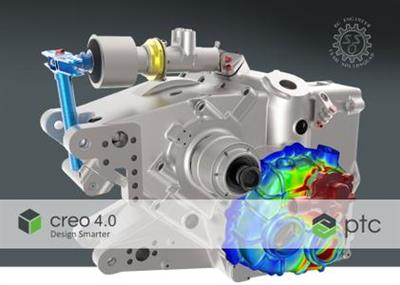
PTC Creo 4.0 M140 with HelpCenter

01474a8d8a9e4ae969138ab7d4ef1c08.jpg


PTC Creo 4.0 M140 with HelpCenter | 5.2 Gb
Languages *: English, Français, Deutsch, Italiano, Русский,
Simplified, Traditional, Español, Brazilian Português
​
PTC is pleased to announce the availability new version of Creo 4.0 M140 computer-aided design (CAD) software, is enables smarter design and greater productivity with a vast array of core modeling enhancements and new functionality that allow designers to create the products of the future.

PTC Creo 4.0 was launched 15 November 2016., the top highlights in PTC Creo Parametric 4.0 are from improvements in Mini toolbar, new 3D Sweep, new Flexible Modeling in Sheetmetal.

When you're familiar with function sets in certain CAD packages, it can come as a surprise to learn what other ones do - or don't do. Creo 4.0, for instance, adds some basic functions other CAD packages have had for years, even decades. For example, box selection is new, where dragging the cursor diagonally left-to-right selects enclosed objects, and right-to-left selects crossing and enclosed objects. AutoCAD and its clones have had this for ages. Other examples of not-so-new functions new to Creo include a mini toolbar that appears when objects are selected, customization of shortcut keys and full-screen editing mode.

With each Creo release, direct editing becomes stronger. In release 4.0, a new clipping mode lets us see the part we are editing within the assembly. To help draw parts, we can now snap to other parts for reference. Opposite faces of parts can be dragged at the same time, and we can make negative offsets. In the View Manager, the Appearances tab lets us changes the colors of parts

Also with this release, PTC have added many new capabilities including design for additive manufacturing, model-based definition and much more.

What s New in Creo 4.0

PTC has the most robust Internet of Things technology in the world. In 1986 we revolutionized digital 3D design, and in 1998 were first to market with Internet-based PLM. Now our leading IoT and AR platform and field-proven solutions bring together the physical and digital worlds to reinvent the way you create, operate, and service products. With PTC, global manufacturers and an ecosystem of partners and developers can capitalize on the promise of the IoT today and drive the future of innovation.

Product: PTC Creo
Version: 4.0 M140 with Help Center
Supported Architectures: x64
Website Home Page :
У Вас недостаточно прав для просмотра ссылок. Войдите или зарегистрируйтесь.

Language: multilanguage *
System Requirements: PC **
Size: 5.2 Gb

Depending on the Creo application, the user interface and documentation are translated to varying degrees into French, German, Italian, Japanese, Korean, Russian, Simplified Chinese, Spanish, and Traditional Chinese. In Creo 4.0 M020 and later, the user interface is also translated into Brazilian Portuguese. The translation of documentation into Brazilian Portuguese is available in Creo 5.0.0.0 and later. A detailed list of translated materials is available in the

bea664a7c454f2eb5457c29c7f3647d1.jpg


Download link:​
Код:
[center][b]rapidgator_net[/b]:
https://rapidgator.net/file/6b2f52169898fd3c658a7a44f0274729/k4kjf.LocalizationInformation.pdf.html
https://rapidgator.net/file/97b88641d6887023e215307823952884/k4kjf.PTC.Creo.4.0.M140.HelpCenter.part1.rar.html
https://rapidgator.net/file/4b9f0706e6fae9087bb9f7a03c98ccad/k4kjf.PTC.Creo.4.0.M140.HelpCenter.part2.rar.html
https://rapidgator.net/file/66365e79199d9d6ea55e8185c806ce49/k4kjf.PTC.Creo.4.0.M140.HelpCenter.part3.rar.html
https://rapidgator.net/file/d8c600e9732d7f6be75456a6d068ba58/k4kjf.PTC.Creo.4.0.M140.HelpCenter.part4.rar.html
https://rapidgator.net/file/ff464a474428b259ab79e7e4e880cf84/k4kjf.PTC.Creo.4.0.M140.HelpCenter.part5.rar.html
https://rapidgator.net/file/e1dcb09246847ee12a9bed5521ac069f/k4kjf.PTC.Creo.4.0.M140.Win64.part01.rar.html
https://rapidgator.net/file/94b4c9addb706919c41a19f9c1d6d6cb/k4kjf.PTC.Creo.4.0.M140.Win64.part02.rar.html
https://rapidgator.net/file/95448d07cd6dd61ce6d51512df1c9417/k4kjf.PTC.Creo.4.0.M140.Win64.part03.rar.html
https://rapidgator.net/file/34ea7caa40182c4dc5714a08276f6dfa/k4kjf.PTC.Creo.4.0.M140.Win64.part04.rar.html
https://rapidgator.net/file/9b4b339c0a2029f8f7f178479b35975a/k4kjf.PTC.Creo.4.0.M140.Win64.part05.rar.html
https://rapidgator.net/file/9fd9dd6cae366e78a0d0dffc89d04c46/k4kjf.PTC.Creo.4.0.M140.Win64.part06.rar.html
https://rapidgator.net/file/bf554dd48334c2c1c946cd7ee500bdd8/k4kjf.PTC.Creo.4.0.M140.Win64.part07.rar.html
https://rapidgator.net/file/934e1bbe3a1b4902ce3406ad50b42bd9/k4kjf.PTC.Creo.4.0.M140.Win64.part08.rar.html
https://rapidgator.net/file/7ad1a3a9ca4bd6ef38d59a5e6158d6f1/k4kjf.PTC.Creo.4.0.M140.Win64.part09.rar.html
https://rapidgator.net/file/de335ede136a1ec6e8d84aad9c608a34/k4kjf.PTC.Creo.4.0.M140.Win64.part10.rar.html
https://rapidgator.net/file/d8ceb2fc28b8c30a165c21b0f4636617/k4kjf.PTC.Creo.4.0.M140.Win64.part11.rar.html

[b]nitroflare_com[/b]:
https://nitroflare.com/view/900B89CA548AE35/k4kjf.LocalizationInformation.pdf
https://nitroflare.com/view/E12D36BBFAA8010/k4kjf.PTC.Creo.4.0.M140.HelpCenter.part1.rar
https://nitroflare.com/view/AC0A8D43A6BA090/k4kjf.PTC.Creo.4.0.M140.HelpCenter.part2.rar
https://nitroflare.com/view/C3DBB8D31915A04/k4kjf.PTC.Creo.4.0.M140.HelpCenter.part3.rar
https://nitroflare.com/view/D2E6C63B8DF5A21/k4kjf.PTC.Creo.4.0.M140.HelpCenter.part4.rar
https://nitroflare.com/view/8807A61CAF9EA5C/k4kjf.PTC.Creo.4.0.M140.HelpCenter.part5.rar
https://nitroflare.com/view/4DACA66DA915AA1/k4kjf.PTC.Creo.4.0.M140.Win64.part01.rar
https://nitroflare.com/view/198335BAC1366E5/k4kjf.PTC.Creo.4.0.M140.Win64.part02.rar
https://nitroflare.com/view/6E340B3DE877B49/k4kjf.PTC.Creo.4.0.M140.Win64.part03.rar
https://nitroflare.com/view/61652AB493EC15E/k4kjf.PTC.Creo.4.0.M140.Win64.part04.rar
https://nitroflare.com/view/908BA143352D1B8/k4kjf.PTC.Creo.4.0.M140.Win64.part05.rar
https://nitroflare.com/view/14D68617485407A/k4kjf.PTC.Creo.4.0.M140.Win64.part06.rar
https://nitroflare.com/view/13A372AD501AE01/k4kjf.PTC.Creo.4.0.M140.Win64.part07.rar
https://nitroflare.com/view/AC1537DEAE38A27/k4kjf.PTC.Creo.4.0.M140.Win64.part08.rar
https://nitroflare.com/view/BEC60DC5CB2C188/k4kjf.PTC.Creo.4.0.M140.Win64.part09.rar
https://nitroflare.com/view/CA4767E83852409/k4kjf.PTC.Creo.4.0.M140.Win64.part10.rar
https://nitroflare.com/view/40D7CEB743B77DD/k4kjf.PTC.Creo.4.0.M140.Win64.part11.rar

[b]alfafile_net[/b]:
http://alfafile.net/file/8Q5oc/k4kjf.LocalizationInformation.pdf
http://alfafile.net/file/8Q5oi/k4kjf.PTC.Creo.4.0.M140.HelpCenter.part1.rar
http://alfafile.net/file/8Q5oR/k4kjf.PTC.Creo.4.0.M140.HelpCenter.part2.rar
http://alfafile.net/file/8Q5oH/k4kjf.PTC.Creo.4.0.M140.HelpCenter.part3.rar
http://alfafile.net/file/8Q5oG/k4kjf.PTC.Creo.4.0.M140.HelpCenter.part4.rar
http://alfafile.net/file/8Q5ou/k4kjf.PTC.Creo.4.0.M140.HelpCenter.part5.rar
http://alfafile.net/file/8Q5oA/k4kjf.PTC.Creo.4.0.M140.Win64.part01.rar
http://alfafile.net/file/8Q5o8/k4kjf.PTC.Creo.4.0.M140.Win64.part02.rar
http://alfafile.net/file/8Q5oZ/k4kjf.PTC.Creo.4.0.M140.Win64.part03.rar
http://alfafile.net/file/8Q5NT/k4kjf.PTC.Creo.4.0.M140.Win64.part04.rar
http://alfafile.net/file/8Q5Nf/k4kjf.PTC.Creo.4.0.M140.Win64.part05.rar
http://alfafile.net/file/8Q5NK/k4kjf.PTC.Creo.4.0.M140.Win64.part06.rar
http://alfafile.net/file/8Q5N6/k4kjf.PTC.Creo.4.0.M140.Win64.part07.rar
http://alfafile.net/file/8Q5Ns/k4kjf.PTC.Creo.4.0.M140.Win64.part08.rar
http://alfafile.net/file/8Q5NP/k4kjf.PTC.Creo.4.0.M140.Win64.part09.rar
http://alfafile.net/file/8Q5Np/k4kjf.PTC.Creo.4.0.M140.Win64.part10.rar
http://alfafile.net/file/8Q5N7/k4kjf.PTC.Creo.4.0.M140.Win64.part11.rar[/center]

Links are Interchangeable - No Password - Single Extraction​
 
Revo Uninstaller Pro 4.3.8 Multilingual + Portable

9785060b8dda94ef3d12dfe36bda6ed8.jpg


Revo Uninstaller Pro 4.3.8 Multilingual + Portable | 16.7/21 Mb​
Revo Uninstaller Pro is innovative uninstaller program which helps you to uninstall unnecessary software and remove easily unwanted programs installed on your personal computer. Revo Uninstaller gives you the convenience to optimize your device, as well as to get rid of all the program files you do not need and slow down your computer processes. You might be surprised to learn that the "Add/Remove Programs" option in the Windows Control Panel does not always completely remove all software data from your system. Traces like registry items or program files and folders may still remain. Now with Revo Uninstaller you can be sure that you can clean your system from all these remnants and provide more comfort and optimization to your device.

Also, most programs come with their own uninstallers, but in most cases, these don't do complete and thorough job, leaving behind temporary files, leftovers, unused registry entries, and other unnecessary program files. These remnants take up space and slow down your Windows PC, and can cause conflicts if you want to install a newer version of the same software in the future. That's where Revo Uninstaller Pro comes in.

The secure and powerful uninstall of a program, sometimes becomes a difficult process. Windows inbuilt Add/Remove Program tool isn't always the perfect solution. As we mentioned earlier it is slower and usually doesn't remove all the traces of the application in your PC (like registry entries, files, folders of the program).

Revo Uninstaller is a great replacement for Add/Remove programs in Windows and offers lots of functions to remove guaranteed any program, faster and completely from your computer. It can effectively remove unnecessary files, folders and registry keys and values related to the program.

Revo Uninstaller also includes a number of cleanup tools such as Junk Files Cleaner, Browsers Cleaner, MS Office Cleaner, Windows Cleaner and Autorun Manager which can be used to take control of the programs that start automatically with Windows.

WHY USE REVO UNINSTALLER PRO?
Complete powerful software uninstall
Quick Uninstall of one or few programs in a row
The best Windows application to uninstall stubborn programs easily
Remove junk files and unnecessary program files
Compatible with all 32-bit and 64-bit versions of Windows
Portable version for all your personal Windows devices
Customizable and flexible easy to use user interface
Free professional technical support

Operating System:
Revo Uninstaller Pro is fully compatible with 32-bit and 64-bit versions of Windows XP, Windows Vista, Windows 7, Windows 8, Windows 8.1, Windows 10 and Windows Server

Home Page -
У Вас недостаточно прав для просмотра ссылок. Войдите или зарегистрируйтесь.


Download link:​
Код:
[center][b]rapidgator_net[/b]:
https://rapidgator.net/file/df40fa5e7796ab7e08d0e4b5e9d1cd6a/hnq4t.Revo.Uninstaller.Pro.4.3.8.Portable.rar.html
https://rapidgator.net/file/2f896229a0c12fd54766598b98c095c5/hnq4t.RevoUninstallerPro4.rar.html

[b]nitroflare_com[/b]:
https://nitroflare.com/view/C3E17DC7426CFD9/hnq4t.Revo.Uninstaller.Pro.4.3.8.Portable.rar
https://nitroflare.com/view/677C1CD72F0622B/hnq4t.RevoUninstallerPro4.rar

[b]alfafile_net[/b]:
http://alfafile.net/file/8Q5hB/hnq4t.Revo.Uninstaller.Pro.4.3.8.Portable.rar
http://alfafile.net/file/8Q5hX/hnq4t.RevoUninstallerPro4.rar[/center]

Links are Interchangeable - No Password - Single Extraction​
 
Serato DJ Pro 2.4.1 Build 1808 (x64) Multilingual

01a36357a30a4244048fec1c4461a303.jpg


Serato DJ Pro 2.4.1 Build 1808 (x64) Multilingual | 620.8 Mb​
Professional DJ software - From the unknown to the greatest, Serato DJ Pro is the most popular DJ software globally. When you're talking about Hip-Hop, Dance, and everything in between, you're looking at the standard.

Rock solid reliability
Serato DJ Pro is renowned for its reliability and trusted by DJs to deliver incredible performances. That's why it powers the world's top artists on some of the biggest stages.

The best hardware
Serato DJ Pro officially supports over 90 pieces of hardware by industry leaders. Every piece is tightly integrated to ensure the best experience possible.

Limitless performance
Whatever your style, you can DJ with freedom. Your creative potential will be unlocked through innovative features and an intuitive interface.

New in Serato DJ Pro 2.0:
A range of new features and improvements as Serato DJ became Serato DJ Pro.

- Practice Mode
- New UI with Performance Pad view
- Optimised for high resolution screens
- Bigger Libraries and rock-solid reliability
- Improved help and support

System Requirements:
- Windows 10 (64-bit)
- Windows 8.1 (64-bit)
- Windows 7 (64-bit)

Home Page -
У Вас недостаточно прав для просмотра ссылок. Войдите или зарегистрируйтесь.


Download link:​
Код:
[center][b]rapidgator_net[/b]:
https://rapidgator.net/file/6d75bb362a8e1a51573ae1bc1a3922d6/zcaea.Serato.DJ.Pro.2.4.1.Build.1808.x64.Multilingual.rar.html

[b]nitroflare_com[/b]:
https://nitroflare.com/view/3D68439EFFE0BE5/zcaea.Serato.DJ.Pro.2.4.1.Build.1808.x64.Multilingual.rar

[b]alfafile_net[/b]:
http://alfafile.net/file/8Q5A9/zcaea.Serato.DJ.Pro.2.4.1.Build.1808.x64.Multilingual.rar[/center]

Links are Interchangeable - No Password - Single Extraction​
 
Serif Affinity Designer 1.9.0.791 (x64) Beta Multilingual

c0b5e8f7dc4b7b958d394b40607746c3.jpg


Serif Affinity Designer 1.9.0.791 (x64) Beta Multilingual | 531 Mb​
Affinity Designer is the fastest, smoothest, most precise vector graphic design software available. Whether you're working on branding, concept art, print projects, icons, UI, UX, or web mock ups, Affinity Designer will revolutionise how you work, on Windows.

Design tools redefined
All the tools you need in a professional vector design app, from an incredible precise pen tool to a super smooth gradient tool. All carefully considered and meticulously developed, they just work-in precisely the way you want them to.

Built for your workflow
With core principles of performance, stability and lack of bloat, Affinity Designer has been meticulously crafted for a professional workflow.

Cross platform performance
With a professional pedigree forged on Mac, and matched step for step on Windows, common file format delivers stunning results on either platform.

Unsurpassed speed and accuracy
Pan at 60fps and zoom to an eye-popping 10,000,000%, you'll see all adjustments, effects, transformations and brushes in real time.

Work in any color space
RGB, CMYK, LAB, Grayscale. End-to-end CMYK workflow with ICC color management, and 16-bit per channel editing.

Unsurpassed file compatibility
The best PSD import engine available and full support for SVG, EPS, PDF, PDF/X and FH files means injecting Affinity Designer into your workflow is painless.

Pixel perfect control
With real-time pixel preview in standard or retina resolution available with a single click, you can always see what you're going to get. Can't achieve the perfect result purely in vector? Just edit the pixels - Affinity Designer has a full suite of raster tools too.

Non-destructive effects and adjustments
With a huge library of adjustment layers, effects and blend modes-combined with full support for masks and clipping layers-Affinity Designer offers the most advanced layer controls available in any vector based app.

Flexible workspaces... and workflows
With a focused, fully customisable workspace, including docked and floating UI modes, Affinity Designer lets you work how you want. Add regular and custom 2D and isometric grids for flexible layouts, work on multiple designs at once, and use macOS features like Split Screen and Full Screen. Plus, with savable history, unlimited undo and non-destructive filters and adjustments you can always go back and change your mind.

Natural brushwork
Use Force Touch, stylus pressure, tilt and other controls for natural-looking artwork. Edit vector brush strokes as cleanly and easily as regular curves, and add raster brushwork-on its own or with vector art-to add depth and high quality organic textures. Rotate the canvas, blend colors, edit brush parameters, create your own brushes and nozzles, and import .abr brushes for complete control over your work.

Throw some shapes
Affinity Designer delivers a comprehensive set of shape primitives with easy controls for adjusting geometry with corner settings and smart snapping indicators. A full set of Boolean geometry operations, non-destructive compound shapes, and full node editing means you can create beautiful complex geometry in no time.

Just your type
Add artistic text for headlines, text frames of any shape, or text that follows any vector path. Apply sophisticated styling and ligatures, previewing all your available fonts and style sets in on-screen panels. All the controls you need are built in, including leading, kerning, baseline shift, tab stops - and now in version 1.5 you can create text styles across your document.

New professional print controls
Affinity Designer features full professional print output. Pantone support, end-to-end CMYK and ICC color management are just part of it. You can also open, edit and output PDF/X files, set overprint controls, use spot colors, and add bleed area, trim and crop marks.

Powerful export
In export mode you get a complete workspace dedicated to image export. Select areas, layers or objects to export, controlling each item's output settings independently. For efficient web and UI design, you can automatically create new files whenever your design changes, in whatever resolution, file format and folder structure you wish.

Common Affinity file format
Affinity's shared file format makes mixed discipline design as smooth and simple as it should be. Open any native Affinity file in any Affinity app on any platform and just keep working - with shared history, unlimited undo and seamless switching. And for export, Affinity Designer takes all major file types in its stride.

Incredibly powerful artboards
In Affinity Designer you can create an unlimited number of different design variants, sizes and screens - laying them out in one document to see them all at once. When you come to export you get full control over what artboards to output and with what settings, dramatically simplifying your workflow for responsive and app design.

Operating systems (64 bit):
- Windows 10
- Windows 8.x
- Windows 7 (Service Pack 1; Aero enabled)

Home Page -
У Вас недостаточно прав для просмотра ссылок. Войдите или зарегистрируйтесь.


Download link:​
Код:
[center][b]rapidgator_net[/b]:
https://rapidgator.net/file/6b6785515fc37e3e2e4ac55be2eb05f3/c1wi5.Serif.Affinity.Designer.1.9.0.791.x64.Beta.Multilingual.rar.html

[b]nitroflare_com[/b]:
https://nitroflare.com/view/C3F9CD937EDFF5B/c1wi5.Serif.Affinity.Designer.1.9.0.791.x64.Beta.Multilingual.rar

[b]alfafile_net[/b]:
http://alfafile.net/file/8Q5gh/c1wi5.Serif.Affinity.Designer.1.9.0.791.x64.Beta.Multilingual.rar[/center]

Links are Interchangeable - No Password - Single Extraction​
 
Serif Affinity Photo 1.9.0.791 (x64) Beta Multilingual

4f0f1d64d626884011969bc7cc35b84d.jpg


Serif Affinity Photo 1.9.0.791 (x64) Beta Multilingual | 540.8 Mb​
Five years in the making, Affinity Photo redefines the boundaries for professional photo editing software. With a meticulous focus on workflow it offers sophisticated tools for enhancing, editing and retouching your images in an incredibly intuitive interface, with all the power and performance you need.

Engineered for professionals
Built on rock solid foundations with principles of performance, stability and lack of bloat, Affinity Photo is a professional photography tool to the very core.

Comprehensive RAW editing
Develop camera RAW files in a dedicated built-in workspace with all the processing adjustments and corrections you need.

Unsurpassed file compatibility
We've got the best PSD support out there, plus all the standards you'd expect including PNG, JPG, TIFF, EPS, PDF, and SVG.

Work in any color space
RGB, CMYK, LAB, Grayscale. End-to-end CMYK workflow with ICC color management, and 32-bit per channel editing.

Dedicated RAW editing workspace
Compatible with all major camera file formats, the Develop persona offers a dedicated processing workspace offering incredibly accurate editing in an unbounded linear color space.

Complete digital darkroom
Affinity Photo includes all the tools you need from a professional photography application. Every tool has been painstakingly engineered for speed, power and accuracy - and they work in precisely the way you want them to.

Fast, customizable effects
Affinity Photo comes with a huge range of high-end filters including lighting, blurs, distortions, tilt-shift, shadows, glows and many more. Full control is given over every aspect of a filter's properties with incredibly precise controls - all the while seeing a real-time live preview of the result. Best of all, filters can be applied as live layers, enabling you to edit, erase away, or mask effects after they have been applied.

Advanced adjustment layers
Correct and enhance images with Levels, Curves, Black and White, White Balance, HSL, Shadows and Highlights and over a dozen other adjustments that are previewed instantly and can be edited any time. Adjust, readjust, and drag and drop onto any layer, group, mask, or in any place in a stack to control how they're applied.

Live blend modes
Remove trial and error from your workflow - see changes to blend modes live as you edit without having to click apply each time. Affinity Photo's 30 layer blends preview smoothly in real time while you scroll through them.

Sophisticated selection refinement
Accurate selections are critical, whether cutting out objects, creating masks or selectively applying adjustments. Our selection refinement algorithm is one of the most advanced available, making selections - even down to individual strands of hair - easier than ever before.

Precise photo stitching
Affinity Photo's stitching algorithm is one of the most advanced available. On top of accurate automatic alignment and perspective corrections, you get full control over each image and boundary in the composite to fine tune to perfection.

Extensive retouching tools
Whether you want to make quick corrections, or spend an hour on a detailed retouch, Affinity Photo has all the tools you need. That naturally includes dodge, burn, clone, patch, blemish, and red eye tools. But you'll also find an incredibly accurate inpainting brush, frequency separation capability, and a full set of liquify features built-in.

System Requirements:

Hardware
Windows-based PC with mouse or equivalent input device
DirectX 10-compatible Graphics Cards and above
2GB RAM minimum (4GB RAM recommended)
670MB of available space; more during installation
1280x768 display size or better

Operating systems (64 bit):
Windows 10 (1607 Anniversary update or higher)
Windows 8.1
Windows 7 (Service Pack 1; Aero enabled)

Home Page -
У Вас недостаточно прав для просмотра ссылок. Войдите или зарегистрируйтесь.


Download link:​
Код:
[center][b]rapidgator_net[/b]:
https://rapidgator.net/file/f8293c7e0548bce5b83ea7a74580d69b/g7qqc.Serif.Affinity.Photo.1.9.0.791.x64.Beta.Multilingual.rar.html

[b]nitroflare_com[/b]:
https://nitroflare.com/view/8A8E0313461CC75/g7qqc.Serif.Affinity.Photo.1.9.0.791.x64.Beta.Multilingual.rar

[b]alfafile_net[/b]:
http://alfafile.net/file/8Q5hK/g7qqc.Serif.Affinity.Photo.1.9.0.791.x64.Beta.Multilingual.rar[/center]

Links are Interchangeable - No Password - Single Extraction​
 
Назад
Сверху